

How to Check Availability for a Meeting via Email - Templates, Tools, and Tips
"When are you free?" Three words that guarantee four more emails before anyone picks a time. If you've ever tried to email someone to check availability for a meeting, you know the pain. Knowledge workers receive 117 emails daily, and nearly a third of meetings now span multiple time zones - a 35% increase since 2021. The scheduling back-and-forth isn't just annoying. It's a measurable productivity drain.
Here's how to handle it with better templates, smarter tools, and a few habits that prevent the chaos before it starts.
Why "When Are You Free?" Fails
That open-ended question forces the other person to check their calendar, draft a reply with options, and wait for you to confirm. Multiply that by every meeting on your calendar and you've got a full-time job just coordinating schedules. We've watched teams burn entire afternoons on scheduling threads that a single poll would've solved in minutes.
The fix is simple: propose specific times, use the right channel for the situation, and stop treating scheduling like a negotiation.
Email vs. Link vs. Poll
Not every meeting needs the same booking method. 46% of appointments are already booked online, and 68% of people prefer businesses that offer it. But the right approach depends on who you're meeting.
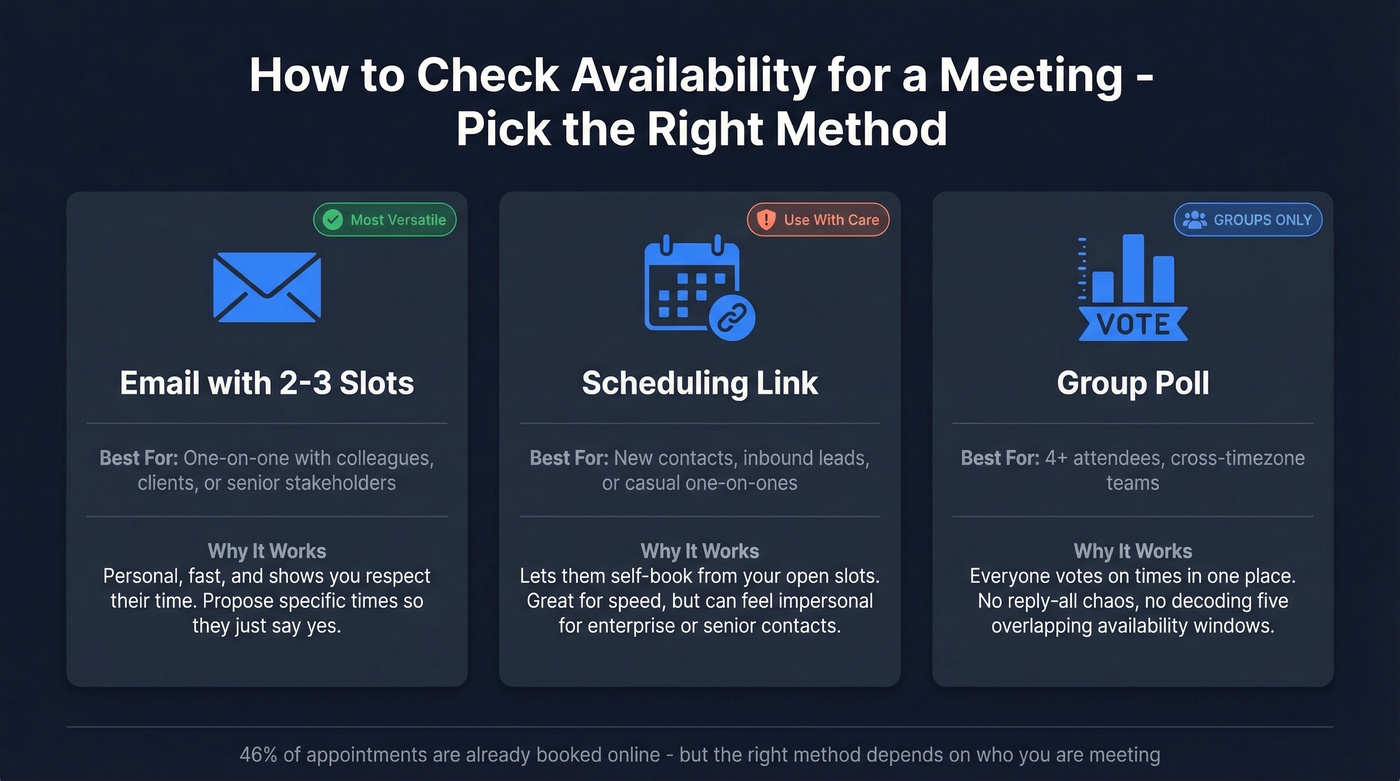
One-on-one with someone you know: Send an email with 2-3 proposed slots. It's personal, fast, and doesn't feel transactional.
One-on-one with a new contact or prospect: A scheduling link works if the relationship allows it. But some clients and senior stakeholders find Calendly links impersonal - if you're in consulting or enterprise sales, propose times in the email body instead. Offering 2-3 concrete options is clearer than asking "when are you free?" and makes it far easier to get a fast yes.
Group meeting with 4+ people: Use a poll tool like Doodle or Cal.com. Long reply-all threads with multiple people proposing times get messy fast, and nobody wants to decode five overlapping availability windows in a chain of forwards.
Meeting Availability Email Templates
These are ready to customize. Swap in your details, hit send, and skip the fourth round of "does Tuesday work?"
Internal or Colleague Request
Subject: Quick sync on [project] - checking your availability
Hi [Name],
I'd like to set up a 30-minute meeting to discuss [topic]. Would any of these work?
- Tuesday, June 10 at 2:00 PM
- Wednesday, June 11 at 10:00 AM
- Thursday, June 12 at 3:30 PM
If none of these fit, let me know what does and I'll make it work.
One thing worth flagging: if you're scheduling for an exec, always check with their assistant before placing anything on the calendar. Booking without confirming availability creates a cascade of rescheduling that frustrates everyone involved.
Client or External Stakeholder
Subject: Meeting request - [topic/company name]
Dear [Name],
I'd appreciate the opportunity to discuss [topic] at your convenience. I've listed a few options below, including time zones for reference:
- Monday, June 16 at 3:00 PM EST / 12:00 PM PST
- Wednesday, June 18 at 10:00 AM EST / 7:00 AM PST
- Friday, June 20 at 1:00 PM EST / 10:00 AM PST
Please let me know if any of these work, or suggest a time that suits you better. I'm happy to adjust.
This template works well for external contacts because it balances professionalism with flexibility - the recipient can accept a slot or counter-propose without friction.
Cold Outreach Meeting Request
Subject: Quick question about [their pain point or initiative]
Hi [Name],
[One sentence of context - why you're reaching out and what's in it for them.] Would you be open to a 15-minute call this week or next?
- Tuesday, June 10 at 11:00 AM EST
- Thursday, June 12 at 2:00 PM EST
If neither works, I'm flexible - just let me know.
Follow-Up When No Reply
Here's the thing: most people don't ignore your email on purpose. They saw it, got distracted, and forgot. A good follow-up is shorter and lower-pressure than the original.
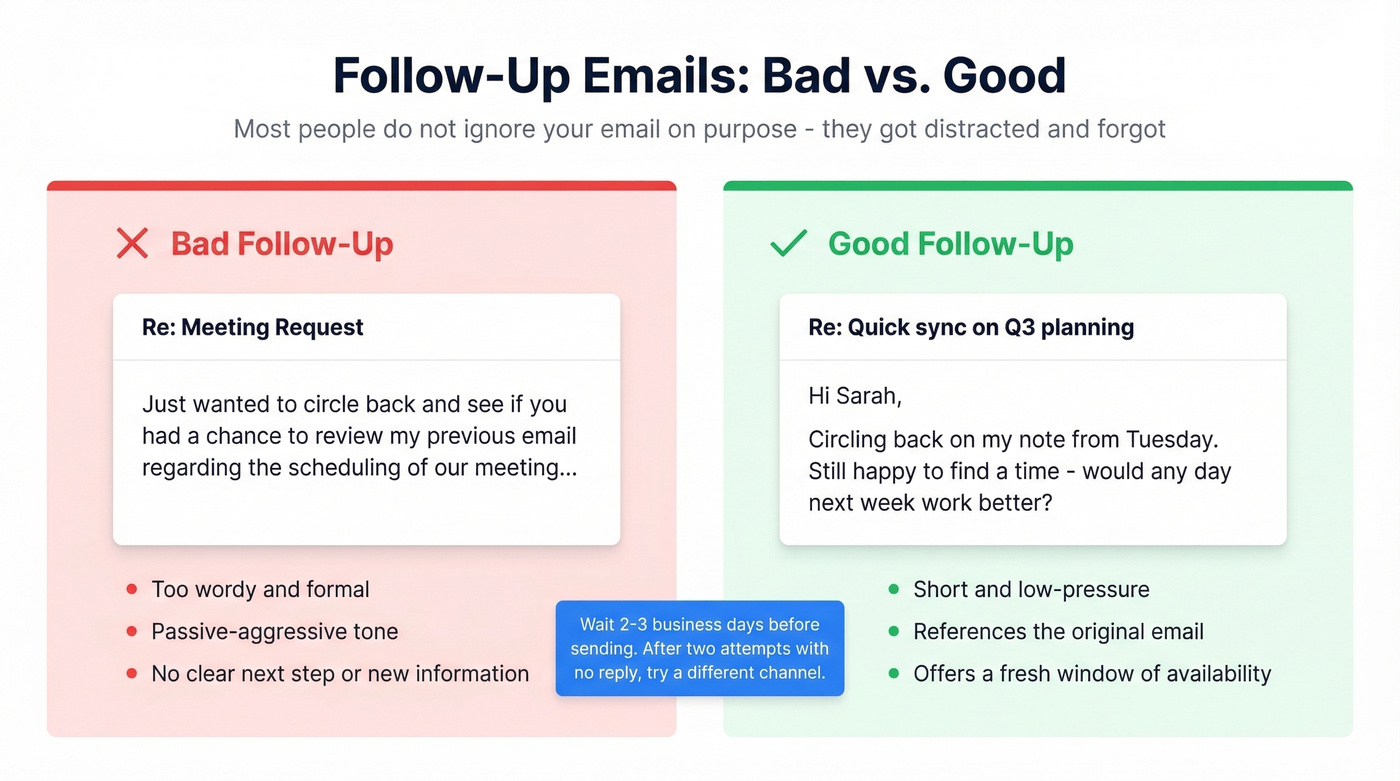
Bad follow-up: "Just wanted to circle back and see if you had a chance to review my previous email regarding the scheduling of our meeting..."
Good follow-up:
Subject: Re: [original subject line]
Hi [Name],
Circling back on my note from [day]. Still happy to find a time - would any day next week work better?
Wait two to three business days before sending this. If there's still no reply after a second attempt, try a different channel entirely.
Group or Cross-Timezone Meeting
For groups of four or more, skip the email thread and lead with a poll. It saves a ton of time, and nobody has to decode time zone math in a reply-all chain.
Subject: Scheduling [meeting name] - please vote on times
Hi all,
I've set up a quick poll to find the best time for our [meeting topic]. All times are shown in your local time zone:
[Insert Doodle/Cal.com poll link]
Please submit your availability by [date]. For reference, we're targeting the 9:00 AM-12:00 PM EST / 2:00 PM-5:00 PM GMT window.

Before you can check someone's availability, you need their real email address. Prospeo gives you 98% verified emails from 300M+ professional profiles - so your meeting request actually lands in the right inbox, not a dead end.
Send your meeting request to a verified email. Every time.
Share Availability Without Back-and-Forth
If you're tired of proposing times manually, both Google and Outlook have built-in features that kill the problem at the source.
Google Calendar Appointment Schedule
Google Calendar's appointment schedule is a free mini-Calendly built into your existing calendar. It's available on personal accounts and on Google Workspace accounts (as long as your admin has it enabled) and creates a booking page where anyone with an email can grab a slot.
Set buffer time between meetings, cap bookings per day, and choose which calendars get checked for conflicts. One limitation: you can't set Zoom as the default video conferencing - it defaults to Google Meet. Once configured, share the link in your email signature or embed it on your website.
If you're sending these links in outreach, it also helps to tighten your email wording so the recipient knows exactly what to do next.
Outlook Scheduling Poll
Outlook's Scheduling Poll lets you propose multiple times and have attendees vote. It's particularly useful for internal teams already in the Microsoft ecosystem.
Gmail users can use the "Propose times you're free" feature inside the compose window, which pulls available slots from your calendar and lets the recipient pick one directly.
Scheduling Tools at a Glance
If built-in calendar features aren't enough, here's how the dedicated tools compare:
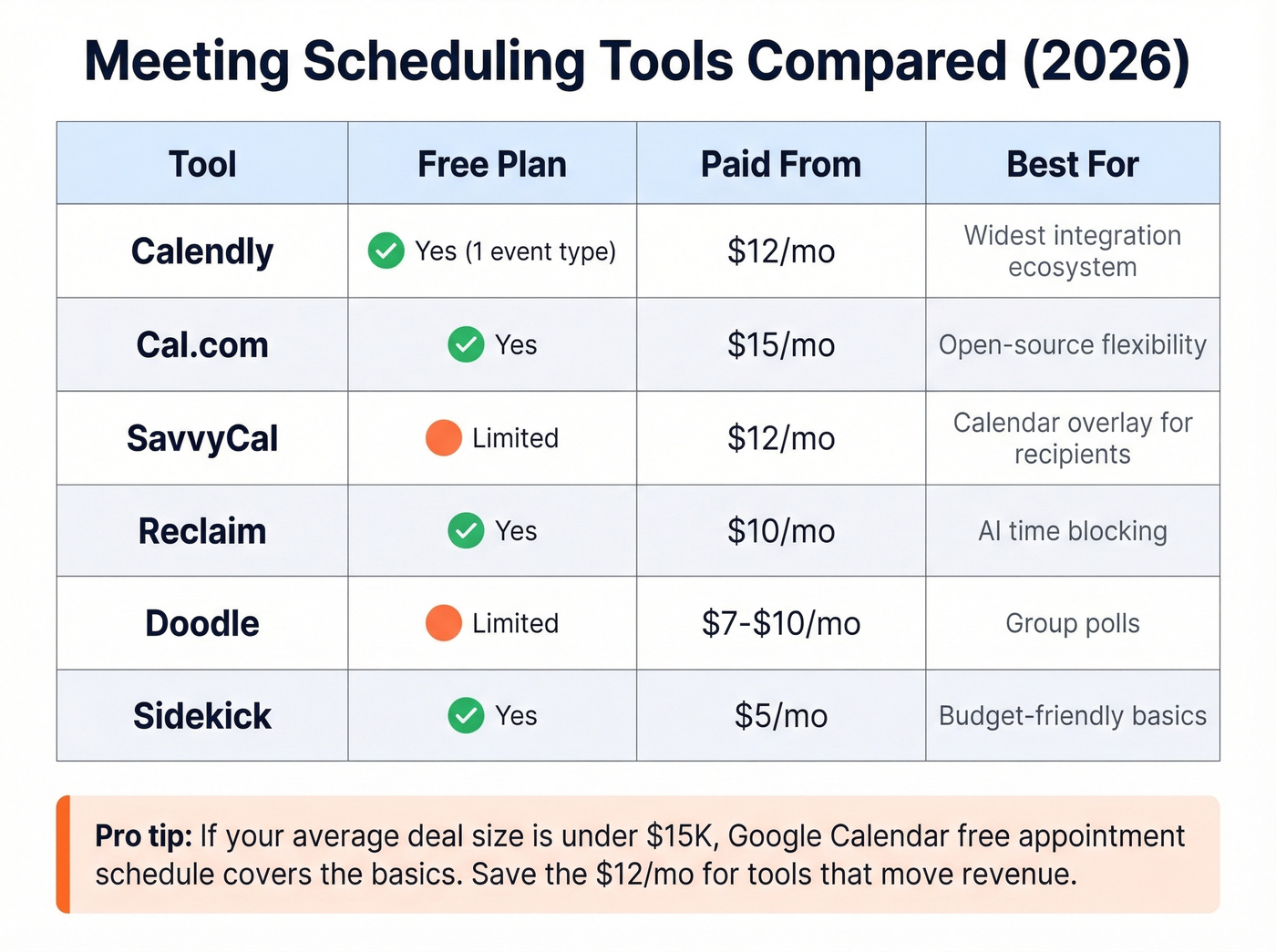
| Tool | Free Plan? | Paid From | Best For |
|---|---|---|---|
| Calendly | Yes (1 event type) | $12/mo | Widest integration ecosystem |
| Cal.com | Yes | $15/mo | Open-source flexibility |
| SavvyCal | Limited | $12/mo | Calendar overlay for recipients |
| Reclaim | Yes | $10/mo | AI time blocking |
| Doodle | Limited | ~$7-$10/mo | Group polls |
| Sidekick | Yes | $5/mo | Budget-friendly basics |
Pricing from Zapier's roundup and Forbes Advisor, both updated within the last six months.
Let's be honest: if your average deal size is under $15K, you don't need a paid scheduling tool. Google Calendar's free appointment schedule covers the basics for simple booking. Save the $12/month for tools that actually move revenue.
If you're booking meetings from outbound, pairing scheduling with a lightweight SDR tools stack can reduce the manual follow-up load.
Three Mistakes That Cause Scheduling Chaos
Booking without checking availability. This is the number-one complaint we see from executive assistants. Placing a meeting on someone's calendar without confirming first creates a domino effect of rescheduling that wastes everyone's time. Don't do it.
If you're doing this in a sales context, a simple sales process optimization pass usually fixes it fast.
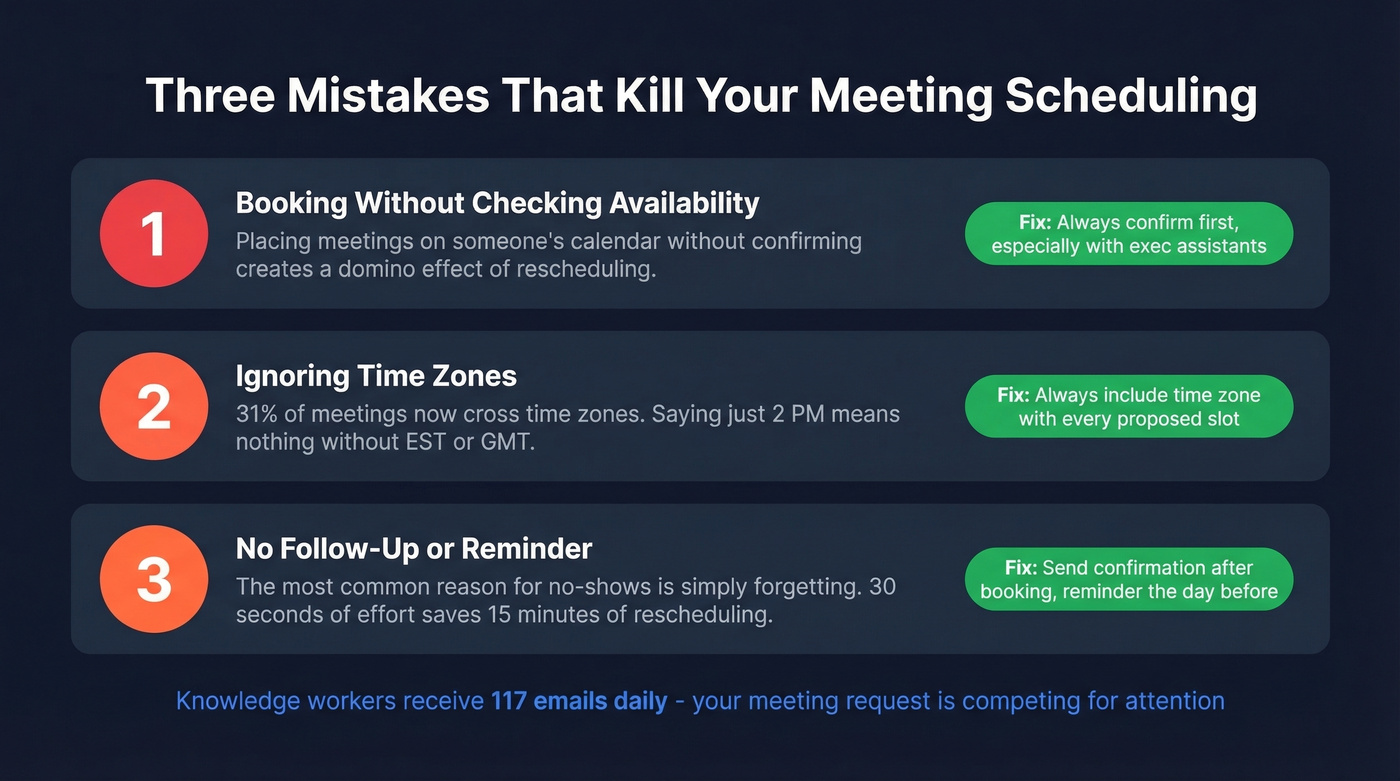
Ignoring time zones. Nearly a third of meetings now cross time zones. Always include the time zone in your proposed slots - or use a tool with automatic detection. "2 PM" means nothing without "EST."
No follow-up or reminder. The most common reason for no-shows is simply forgetting. Send a brief confirmation after booking and a reminder the day before. It takes 30 seconds and saves the 15 minutes you'd spend rescheduling. If you need better nudges, borrow a few patterns from these sales follow-up templates.
Cold outreach meeting requests only work when they reach real people. Teams using Prospeo book 35% more meetings than Apollo users because every contact is verified through a 5-step process - no bounces, no wasted follow-ups.
Book more meetings by starting with data that actually connects.
FAQ
How many time slots should I propose?
Two to three options strike the right balance between flexibility and decision fatigue. Always include the meeting duration and time zone with each option - "30 minutes, 2 PM EST" is far more actionable than just "Tuesday afternoon."
How long should I wait before following up?
Two to three business days. Send one shorter follow-up after that. If two attempts get no response, switch channels - a phone call or a message on a professional network often breaks through where email didn't.
What if I'm cold-emailing someone I've never met?
Lead with context and value, not a calendar link. Explain why the meeting is worth their time in one sentence, then propose specific slots. Verify the email address before sending - a single bounce can hurt your sender reputation, and Prospeo's free tier covers 75 verifications per month to keep your domain clean.
How should I ask a senior executive for meeting availability?
Keep it concise and respectful of their time. Propose two or three specific windows, mention the meeting's purpose in one line, and always cc their assistant if they have one. Avoid open-ended questions like "when works for you?" - executives rarely have time to check their own calendars and reply with options.