

How to Run an Email Domain Health Check (and Actually Fix What's Broken)
Your SDR team's reply rates dropped 40% over two weeks. Nobody changed the messaging, the ICP, or the sequences. The problem isn't your copy - it's your domain. Somewhere between a purchased list, a missing DKIM selector, and a spam complaint spike, your sending reputation quietly collapsed.
21% of legitimate emails never reach inboxes due to poor domain reputation. Think of your domain health like a credit score: months to build, seconds to damage, and the factors that drive it stay invisible until something breaks. A proper email deliverability domain health check catches these problems before they crater your pipeline.
What Is Email Domain Health?
Email domain health is the aggregate measure of how mailbox providers like Gmail, Outlook, and Yahoo perceive your sending domain. It determines whether your messages land in the primary inbox, get filtered to spam, or get rejected outright.
There's a distinction most people miss: delivery means the recipient's server accepted your email. Deliverability means it actually reached the inbox. You can have 99% delivery and still land in spam for half your recipients.
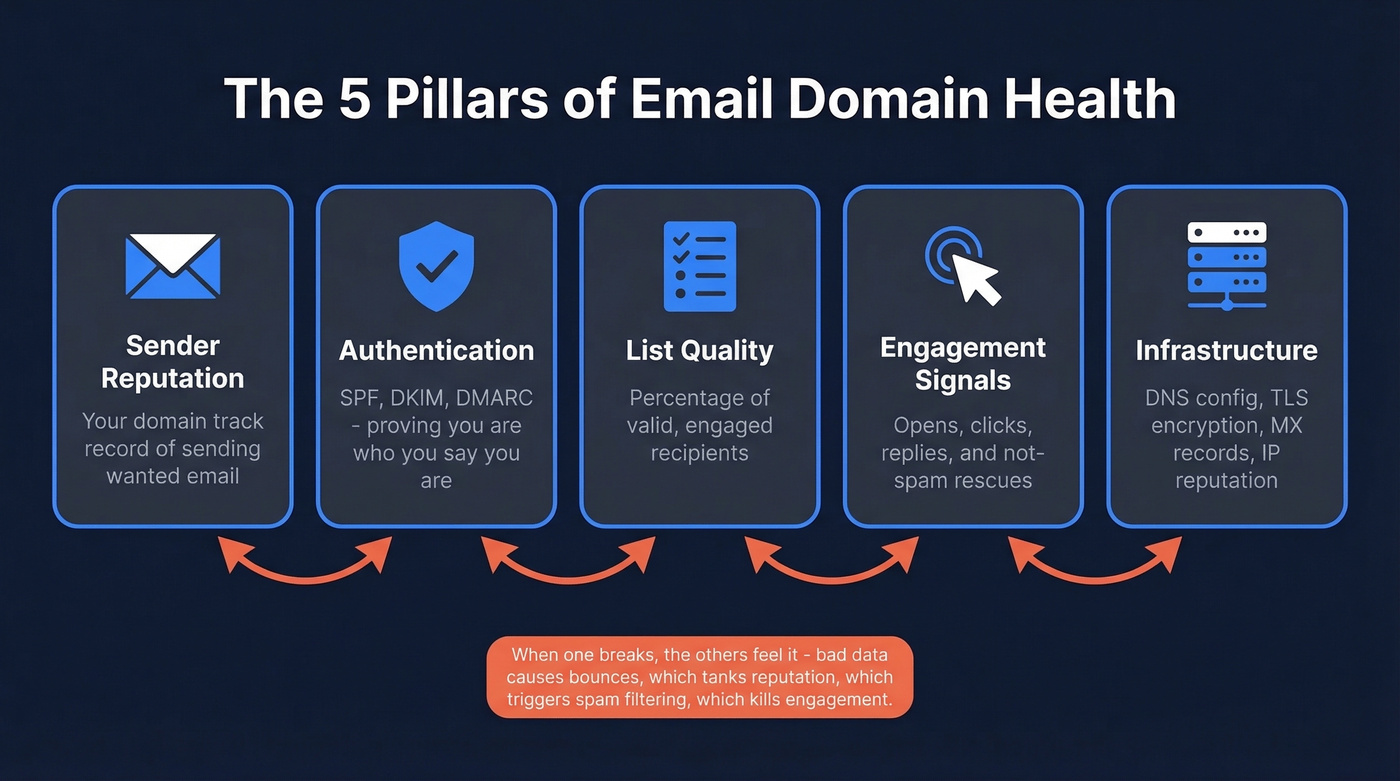
Domain health rests on five pillars. Sender reputation is your domain's track record of sending wanted email. Authentication - SPF, DKIM, and DMARC - proves you are who you say you are. List quality reflects the percentage of valid, engaged recipients you're sending to. Engagement signals include opens, clicks, replies, and "not spam" rescues. And infrastructure covers DNS configuration, TLS encryption, MX records, and IP reputation. When any one breaks down, the others feel it - a bad list causes bounces, which tanks reputation, which triggers spam filtering, which kills engagement. It spirals fast.
What You Need (Quick Version)
Cold emailers on r/coldemail often ask for a "one-stop tool" to tell them if a domain is burned. No single tool does it all, but this three-tool stack comes closest:
- MxToolbox - run a quick authentication scan and blacklist check.
- Google Postmaster Tools - ongoing Gmail reputation monitoring. Free. Non-negotiable if you send 100+ emails per day to Gmail addresses.
- An email verification tool - verify prospect lists before sending. Bad data causes the bounces that tank your domain.
That's your minimum viable stack.
Your Domain Health Scorecard
Before fixing anything, you need to know what "healthy" looks like. Here's the scorecard we use across every domain audit:
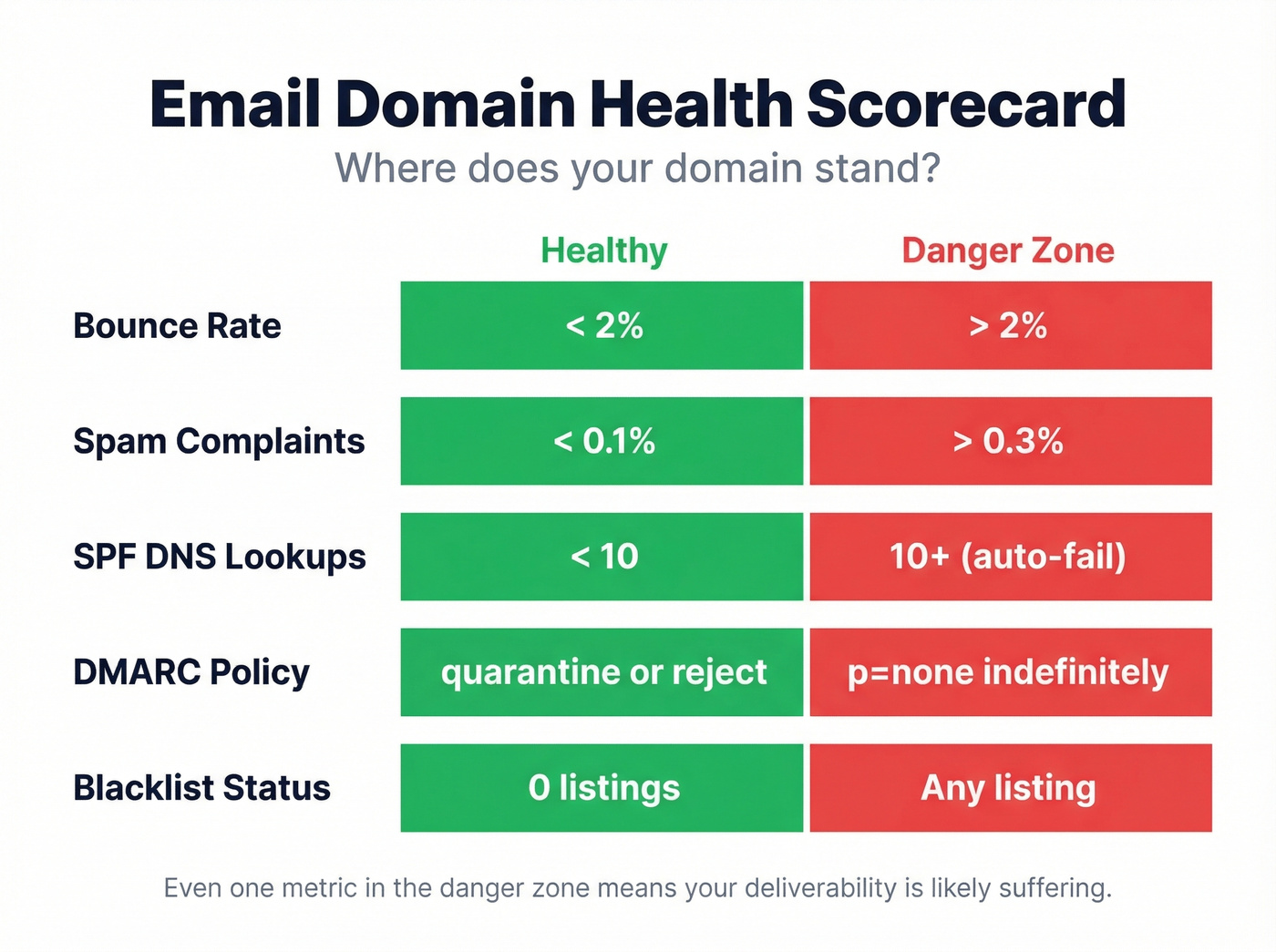
| Metric | Healthy | Danger Zone |
|---|---|---|
| Bounce rate | < 2% | > 2% |
| Spam complaints | < 0.1% | > 0.3% |
| SPF DNS lookups | < 10 | 10+ (auto-fail) |
| DMARC policy | quarantine / reject | p=none indefinitely |
| Blacklist status | 0 listings | Any listing |
If you're in the danger zone on even one of these, you've got work to do. Two or more, and your deliverability is almost certainly suffering - even if your open rates don't look terrible yet. Spam filters are getting smarter about quietly deprioritizing mail without hard-rejecting it.
What a Thorough Check Should Test
Most free tools check SPF, DKIM, and DMARC - then call it a day. That's half the picture.
A thorough check covers SPF record validity (syntax, DNS lookup count, no conflicting records), DKIM signature correctness (selector, key length - 2048-bit preferred), DMARC policy enforcement with rua/ruf reporting configured, MX records pointing to active mail servers, blacklist scans across your domain and your MX/SMTP server IPs, domain age (newer domains get more scrutiny), open relay checks, TLS/DANE encryption in transit, and delivery chain analysis tracing the full path from send to delivery.
Tools like EasyDMARC's domain scanner and InboxDoctor.ai go deeper than the basics. Don't assume a green checkmark on SPF means your domain is healthy.
How to Run Your Check Step by Step
Quick Authentication Scan
Start with MxToolbox. Enter your domain and run the "Email Health" report. In about a minute, you'll see SPF, DKIM, and DMARC status plus any DNS misconfigurations. Pay special attention to SPF lookup count - if you're at 9 or 10, you're one new SaaS integration away from a hard fail.

Blacklist Check
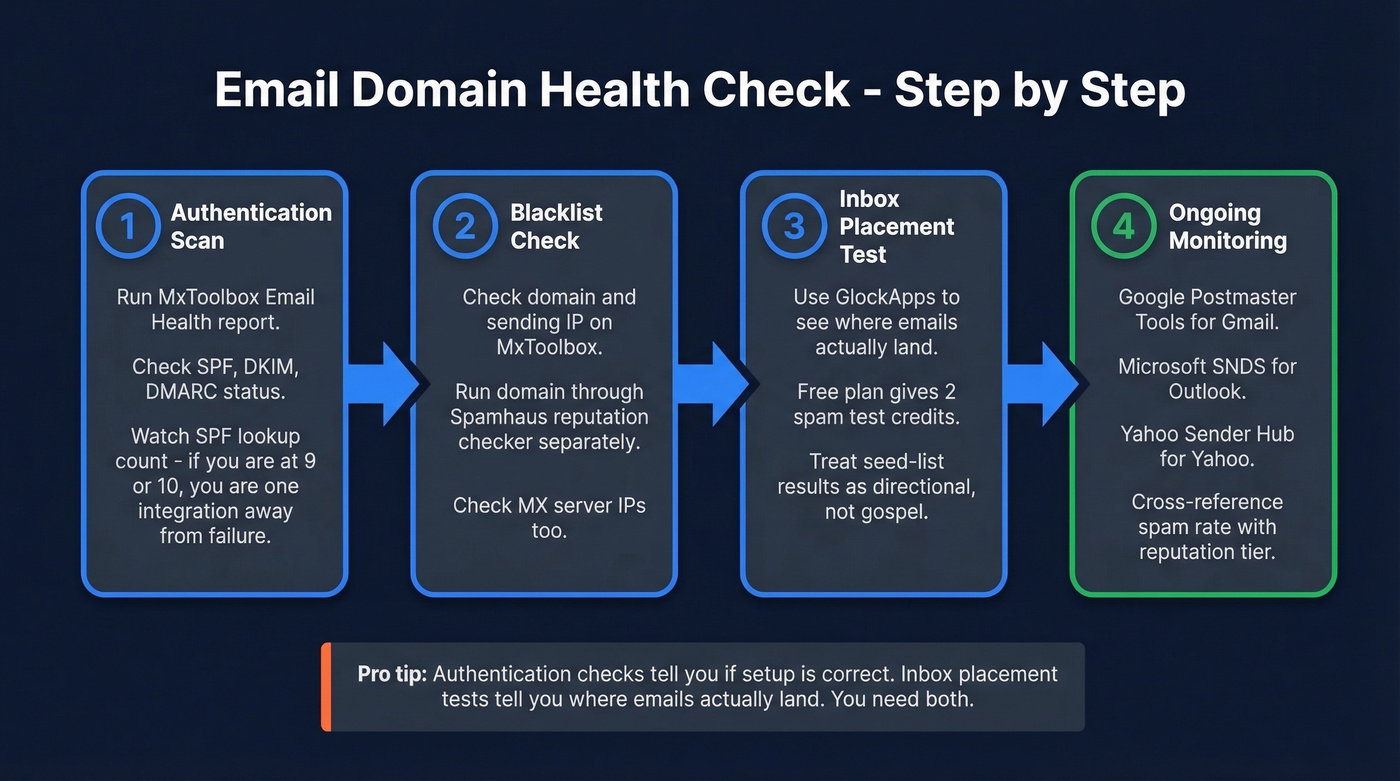
Still in MxToolbox, run the blacklist check against your domain and sending IP. Check your MX server IPs separately too. Then run your domain through Spamhaus's reputation checker directly. A Spamhaus listing often leads to filtering, throttling, or blocks across major mailbox providers.
Inbox Placement Test
Authentication checks tell you if your setup is correct. Inbox placement tests tell you where emails actually land. GlockApps is the go-to here - the free plan gives you 2 spam test credits and up to 10,000 DMARC checks per month, enough for a diagnostic. The Essential plan at $59/mo unlocks 360 credits for ongoing monitoring.
One caveat: seed-list tests use synthetic inboxes that don't behave like real users. Treat results as directional, not gospel.
Rules That Changed Everything (2024-2026)
Gmail and Yahoo rewrote the rules for bulk senders back in early 2024, and enforcement has only tightened through 2026. If you're sending outbound at any scale, these aren't optional.
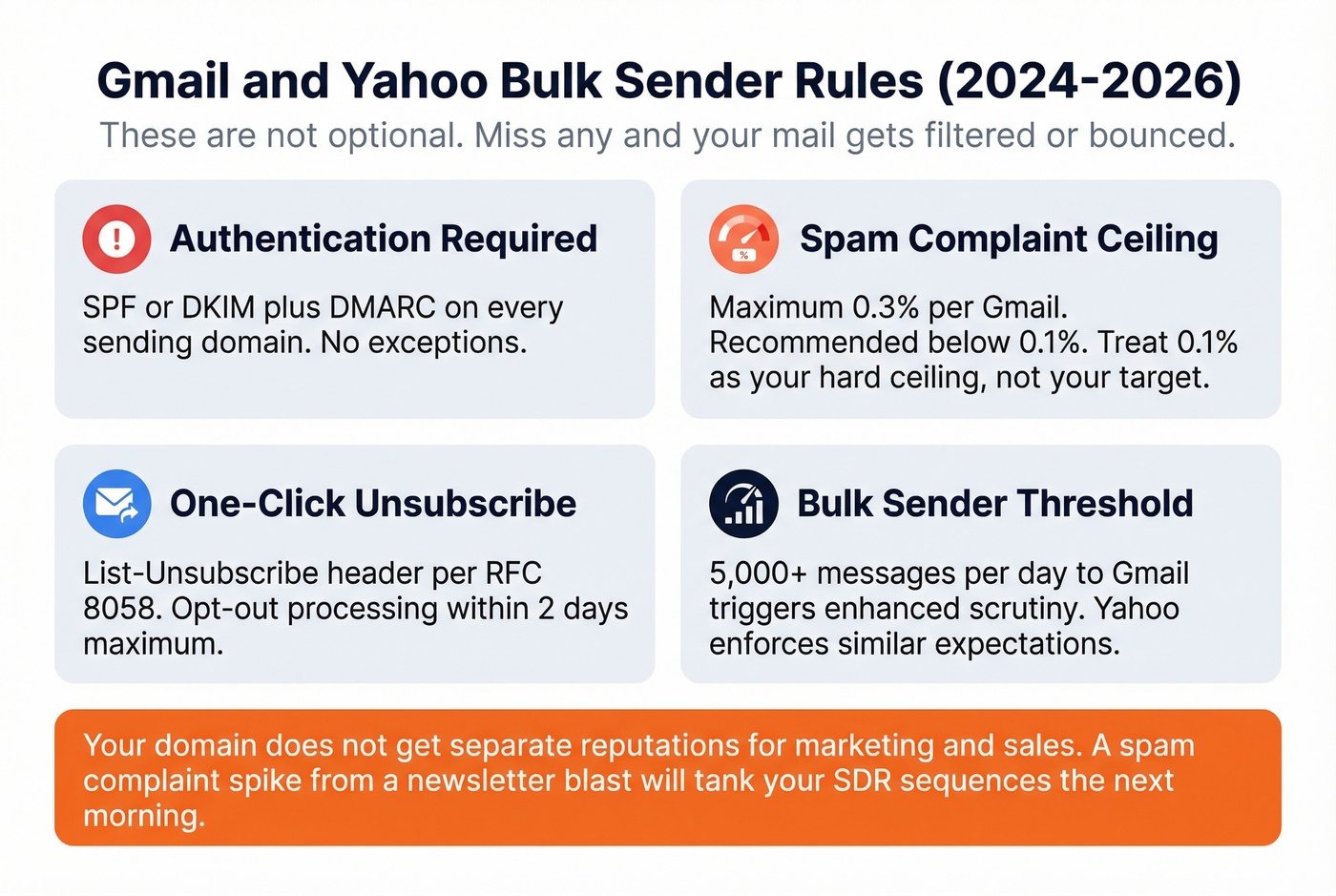
The bulk sender threshold kicks in at 5,000+ messages per day to Gmail, triggering enhanced scrutiny. Yahoo enforces similar expectations. Authentication - SPF or DKIM plus DMARC - is required, not recommended. Miss any of these and your mail gets filtered or bounced. The spam complaint ceiling sits at 0.3% maximum, but Gmail recommends staying below 0.1%. We'd go further: treat 0.1% as your hard ceiling, not your target. One-click unsubscribe must be implemented via List-Unsubscribe header per RFC 8058, and opt-out processing has a 2-day maximum window.
Here's the thing: these rules target marketing email, but the reputation effects bleed into cold outbound. Your domain doesn't get separate reputations for marketing and sales. A spam complaint spike from a newsletter blast will tank your SDR sequences the next morning.
Let's be honest - if your deal sizes are modest and you're sending fewer than 200 cold emails a day, you probably don't need a dedicated deliverability platform. The free monitoring stack below covers 90% of what matters. Spend your budget on data quality instead. That's where domains actually die.

Most domain health problems start with bad prospect data. Bounces above 2% tank your reputation - and every unverified email is a gamble. Prospeo's 5-step verification delivers 98% email accuracy, keeping bounce rates under the danger zone.
Stop diagnosing domain damage you could have prevented with clean data.
Monitoring Domain Health Ongoing
A one-time check isn't enough. Domain health shifts daily based on sending patterns, recipient behavior, and infrastructure changes.
Google Postmaster Tools
This is the single most important monitoring tool for anyone sending to Gmail. It's free, and it shows you exactly how Google sees your domain. Add your domain, verify ownership via DNS TXT record, and data starts populating within 24-48 hours assuming you're sending at least ~100 emails per day to Gmail addresses.
The reputation dashboard uses a four-tier scale: High, Medium, Low, and Bad. High means your mail rarely gets filtered. Bad means almost everything gets rejected or spammed. We've seen domains go from High to Low in under a week after a single bad list send - and it took three weeks of disciplined sending to climb back.
Important caveat: Postmaster Tools tracks personal Gmail accounts, not Google Workspace. If your prospects are mostly on corporate Workspace domains, this data won't reflect their experience.
The "Low Spam Rate" Trap
This trips up experienced senders constantly. A low spam rate in Postmaster Tools doesn't automatically mean good inboxing. If Gmail is already filtering most of your mail to spam, fewer messages reach the inbox - which means fewer opportunities for recipients to click "mark as spam." Your spam rate looks low, but only because Gmail already decided you're not worth delivering.
Always cross-reference spam rate with the reputation tier.
Microsoft SNDS and Yahoo Sender Hub
Microsoft's Smart Network Data Services provides sender and complaint signals and filtering indicators for Outlook/Hotmail. Yahoo Sender Hub covers Yahoo Mail. Both are free. Between Postmaster Tools, SNDS, and Sender Hub, you've got the three major mailbox providers covered.
Fixing Common Domain Health Issues
When something breaks, here's the playbook.
SPF exceeds 10 DNS lookups. This is the most common authentication failure we see. Every SaaS tool you authorize - Mailchimp, HubSpot, Outreach - adds include statements to your SPF record. Hit 10 lookups and the entire SPF evaluation fails with a PermError. Flatten your SPF record by replacing nested includes with direct IP ranges, or consolidate sending services. AutoSPF can automate this.
DKIM signature fails validation. Usually a missing or incorrect selector. Check your email headers for the s= value, then query selector._domainkey.yourdomain.com in DNS. If nothing comes back, your DKIM record isn't published. If it returns but doesn't match, regenerate and republish the key.
DMARC stuck on p=none or alignment failures. Starting with p=none is correct for monitoring. Leaving it there forever is not. Set up rua and ruf reporting addresses, monitor for 2-4 weeks, then progress to p=quarantine and eventually p=reject. If SPF and DKIM pass individually but DMARC still fails, your domains aren't aligning with the From address - configure a custom return-path domain for SPF alignment and a custom DKIM signing domain for DKIM alignment. For third-party senders, relaxed alignment is a pragmatic middle ground. (If you want the deeper technical breakdown, see DMARC alignment.)
Multiple conflicting SPF records. DNS allows only one SPF TXT record per domain. Two records - common after migrations - means both fail. Audit your TXT records, consolidate into one, and wait 24-48 hours for propagation.
What to Do If You're Blacklisted
Don't panic, but don't ignore it. We've seen teams get delisted from Spamhaus in under 24 hours when they submit a clean root-cause analysis.
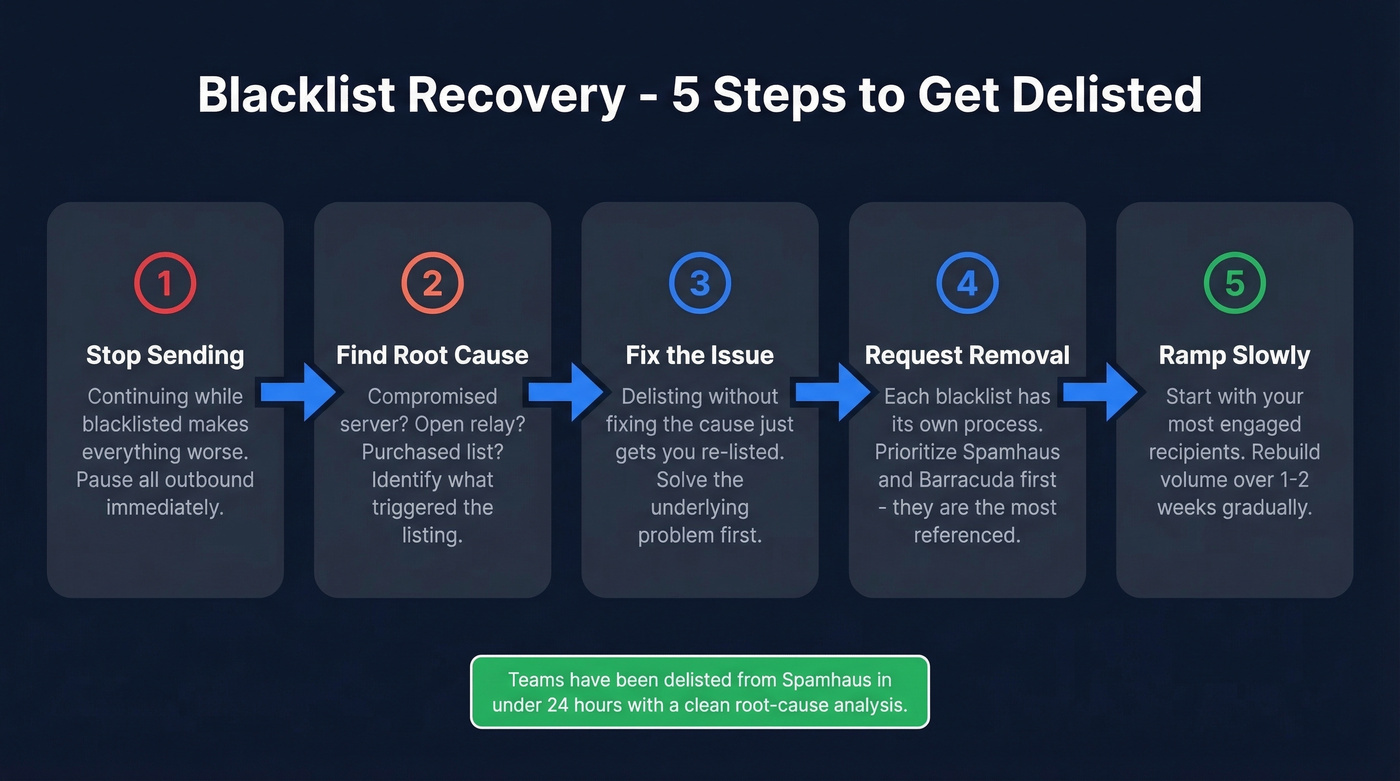
- Stop sending - continuing while blacklisted makes everything worse.
- Identify the root cause - compromised server? Open relay? Purchased list?
- Fix the underlying issue - delisting without fixing the cause just gets you re-listed.
- Request removal - each blacklist has its own process.
- Ramp volume slowly - start with your most engaged recipients over 1-2 weeks.
Prioritize Spamhaus and Barracuda first - they're the most heavily referenced by major mailbox providers. If you need a step-by-step, use this Spamhaus blacklist removal guide.
| Blacklist | Typical Timeline | Process |
|---|---|---|
| SpamCop | 24-48 hours | Auto-delist |
| Spamhaus | 24-48 hours | Manual request |
| Barracuda | 12-24 hours | Manual request |
After delisting, keep bounce rate under 2% and complaints under 0.1%. If either spikes again, you'll end up right back on the list.
The Hidden Domain Killer: Bad Data
You can nail every authentication record, monitor Postmaster Tools religiously, and still destroy your domain with one bad send. The #1 preventable cause of reputation damage is sending to bad email addresses.
Invalid emails bounce. Bounces above 2% are a deliverability red flag that drags down reputation fast. Stale lists contain spam traps - addresses that exist solely to catch senders who don't verify their data. Hit a few and you can trigger immediate filtering or blacklisting.
This is where data quality becomes a domain health issue. Prospeo's 5-step verification catches invalid addresses, spam traps, and honeypots before they reach your sending infrastructure - 98% email accuracy on a 7-day refresh cycle. Stack Optimize built to $1M ARR running client campaigns through verified data, maintaining 94%+ deliverability with under 3% bounce across all clients. (For bounce benchmarks and what to do when you’re over 2%, see email bounce rate.)
Verify before you send, or pay for it in domain reputation later.
You just read it: spend your budget on data quality, not deliverability platforms. Prospeo refreshes 300M+ profiles every 7 days - not the 6-week industry average - so you're never sending to stale addresses that spike bounces and spam traps.
Clean data at $0.01 per email costs less than rebuilding a burned domain.
Best Tools for Checking Domain Health
Start with Postmaster Tools + MxToolbox + a verification tool. Add from there based on what breaks. If you want a broader list, see our roundup of email reputation tools.
| Tool | Category | What It Checks | Price |
|---|---|---|---|
| MxToolbox | Quick check | SPF/DKIM/DMARC, blacklists | Free; from $129/mo |
| EasyDMARC | Quick check | Domain auth scan | Free scanner |
| Valimail | Quick check | SPF/DKIM/DMARC, impersonation | Free checker |
| DNSChecker | Quick check | DNS records, propagation | Free |
| Google Postmaster | Monitoring | Gmail reputation, spam rate | Free |
| Microsoft SNDS | Monitoring | Outlook sender/complaint signals | Free |
| Yahoo Sender Hub | Monitoring | Yahoo sender/deliverability signals | Free |
| PowerDMARC | Monitoring | DMARC reporting, alerts | From $12/mo |
| GlockApps | Inbox placement | Spam vs inbox testing | Free tier; $59/mo |
The free tier of most monitoring tools covers what 90% of teams need. Where you should spend money: inbox placement testing with GlockApps and email verification before every send. Those are the two areas where free tools leave gaps that cost you in reputation.
Advanced: MTA-STS and TLS-RPT
Most domains don't need this. If you're a 20-person sales team, skip this section entirely. For regulated enterprises running email at scale, read on.
MTA-STS tells receiving servers to enforce TLS encryption when delivering mail to your domain. You publish a policy file at https://mta-sts.yourdomain.com/.well-known/mta-sts.txt specifying version, mode (start with testing), your MX hosts, and a max_age value. Per UK government security guidance, avoid wildcard MX records and know that MTA-STS fails open - if the policy file is unavailable, senders proceed without enforcement.
TLS-RPT (RFC 8460) is a DNS TXT record telling senders where to deliver TLS failure reports. It's the monitoring layer for MTA-STS - without it, you won't know when TLS negotiation fails.
FAQ
How often should I run a domain health check?
Run a full authentication and blacklist scan monthly at minimum. If you send 100+ emails per day to Gmail addresses, set up Google Postmaster Tools for daily passive monitoring - it's free. Increase to weekly scans during high-volume campaigns or after infrastructure changes like adding a new sending service.
Can I recover a burned domain?
Sometimes, but it takes 2-4 weeks of disciplined remediation. Follow the delisting steps, fix root causes, and ramp volume slowly starting with your most engaged recipients. If Postmaster Tools shows "Bad" reputation for multiple weeks despite fixes, a fresh domain with proper warmup is often faster than rehabilitation.
What's the difference between domain and IP reputation?
Domain reputation follows your sending domain across any IP you send from. IP reputation is tied to the specific mail server. On shared hosting, you inherit the IP's reputation from other senders. For most outbound teams today, domain reputation carries more weight - mailbox providers increasingly evaluate the domain over the IP.
Does email verification actually protect domain health?
Yes - it's the single highest-ROI prevention step. Bounces above 2% trigger reputation damage, and stale lists contain spam traps that can get you blacklisted overnight. Verifying every list before sending keeps bounce rates well under the 2% threshold and eliminates the trap addresses that cause the most damage.
What free tools give the best domain health overview?
MxToolbox for authentication and blacklist scanning, Google Postmaster Tools for Gmail reputation monitoring, and Valimail's domain checker for a quick SPF/DKIM/DMARC summary. Together these three free tools cover authentication, reputation, and blacklist status - the core components of any email domain health check.