

Email Text Extractor: Pull & Verify Emails in 2026
A marketing team we know exported three years of newsletter replies, ran them through a free email text extractor, and fired off a re-engagement campaign to the 2,000 addresses it pulled. Twenty-five percent bounced on the first send. Their domain reputation tanked within 48 hours, and it took six weeks to claw back deliverability.
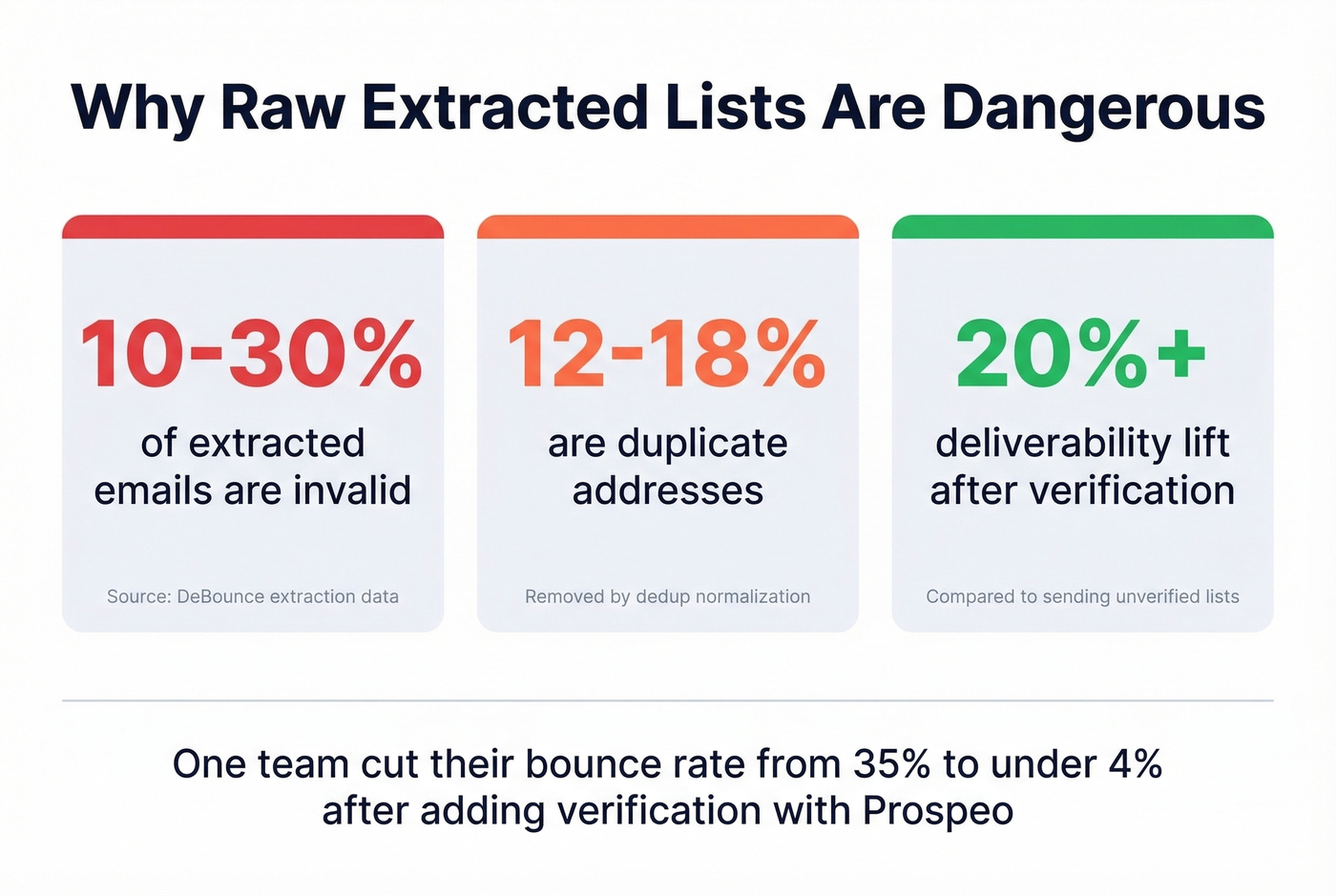
That's the gap between extracting emails and having emails you can actually use. Roughly 10-30% of raw extracted emails are invalid, and another 12-18% are duplicates.
What You Need (Quick Version)
Just need to paste text and grab emails? DeBounce's free extractor is the cleanest option - it dedupes automatically and offers verification as an upsell.
Need to extract from web pages or files at scale? ConvertCSV gives you formatting control, or write a quick Python script with requests, BeautifulSoup, and re.
What Is an Email Text Extractor?
An email text extractor scans a block of text - a document, a webpage, a CSV dump, raw HTML - and pulls out anything that looks like an email address. Under the hood, almost every tool runs some variation of regex. Here's the most common pattern:
[grep -Eo](https://www.gnu.org/s/grep/manual/html_node/index.html) '[a-zA-Z0-9._%+-]+@[a-zA-Z0-9.-]+\.[a-zA-Z]{2,}'
The first chunk matches the local part, everything before the @. The @ is literal. The next chunk matches the domain name, and \.[a-zA-Z]{2,} requires a dot followed by a TLD at least two characters long.
This pattern isn't RFC-5322 compliant - it'll miss internationalized domain names - but it catches most standard-format addresses. For most practical purposes, that's good enough. The real problem isn't what regex misses. It's what you do with the emails it finds.
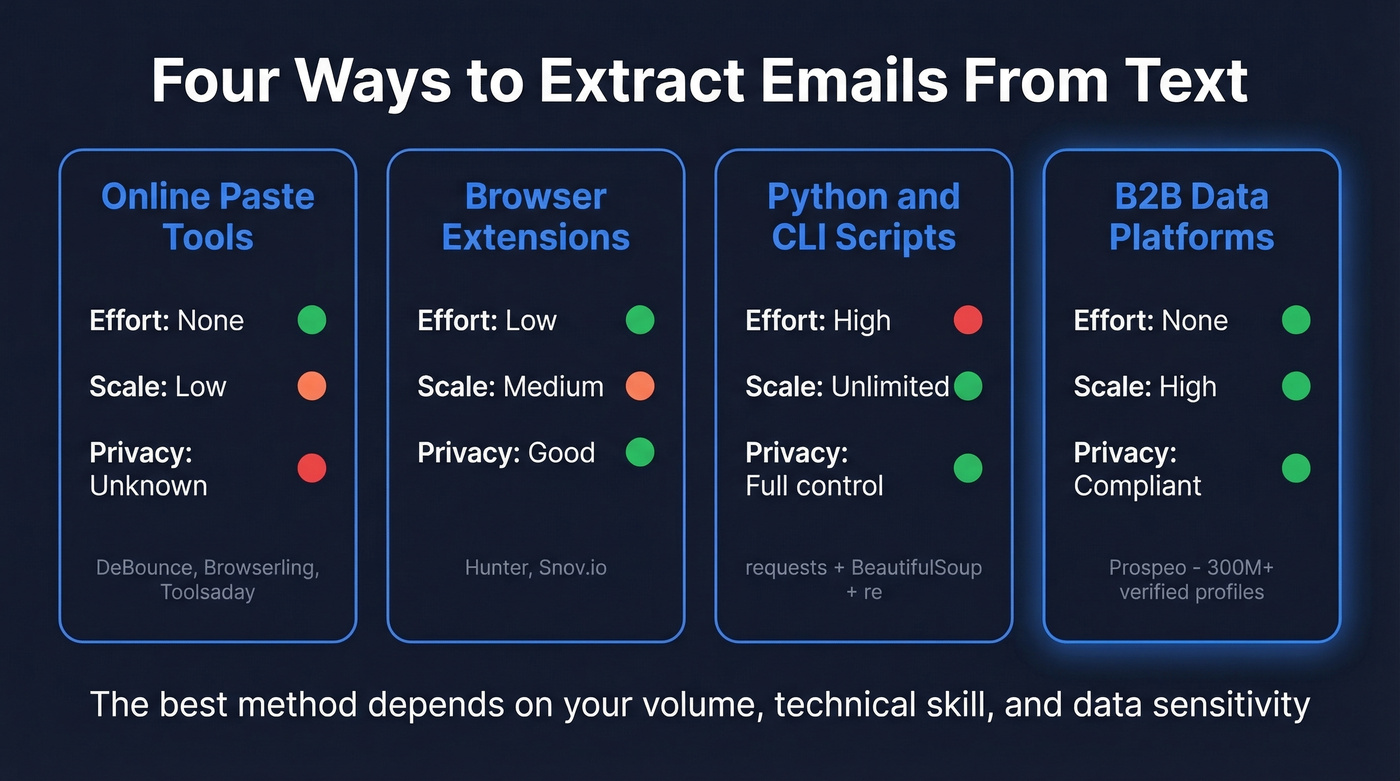
Four Ways to Extract Emails From Text
Online Paste-and-Extract Tools
The simplest approach. Copy your text, paste it into a web form, click a button, get a list of emails. Any online extractor - DeBounce, Browserling, Toolsaday - works this way. No setup, no code, no account required for most of them. The tradeoff is obvious: you're pasting potentially sensitive data into a web form with no visibility into whether it's processed client-side or server-side.
Browser Extensions
Hunter, rated 4.7 stars across 12.5K Chrome Web Store reviews, scans the current page and combines page scanning with its own database. Snov.io (4.9 stars, 6K reviews) works similarly. They're great for one-off prospecting: visit a company's team page, click the extension, grab the emails. Hunter's free plan gives you 50 searches and 50 verifications per month, with paid plans starting at $49/mo. Snov.io starts at roughly $39/mo.
Python & CLI Scripts
For anything at scale, a script beats a web tool every time. The standard Python stack is requests for fetching pages, BeautifulSoup for parsing HTML, and re for regex extraction. A solid script uses three strategies: pull from mailto: links first, then scan tag text and attributes, then run regex across raw HTML as a fallback. For JavaScript-heavy sites, add Selenium or Scrapy. This approach gives you full control over deduplication, output format, and rate limiting - and you never have to wonder where your data went.
B2B Data Platforms
Here's the thing: if you're extracting emails because you need to contact prospects, there's a shorter path. B2B data platforms let you search a verified database directly instead of scraping messy text and hoping the addresses are valid. Prospeo covers 300M+ professional profiles with 98% email accuracy, refreshed every 7 days. Search by job title, company, or industry and export verified contacts ready for outreach.

Best Free Email Address Extractor Tools
| Tool | Input | Dedup | Export | Verification |
|---|---|---|---|---|
| DeBounce | Text, files/source code | Yes | TXT | Upsell ($0.00045/check) |
| ConvertCSV | Text, file, web pages | Yes | CSV | No |
| Lemlist | Text, URL | Yes | Copy/DL | Separate |
| Browserling | Text | No | Copy | No |
| Toolsaday | Text (1M char limit) | Yes | TXT | No |
| Email-Checker | Text (100K char limit) | Yes | TXT | No |
| Divhunt | Text | No | - | No |
DeBounce
Use this if you want the cleanest output from a free paste-and-extract tool. DeBounce automatically deduplicates results and exports to TXT. The real value is the verification upsell - at $0.00045 per check, verifying 10,000 emails costs about $4.50. Their data shows 10-30% of extracted emails are invalid, and they report a 20%+ deliverability lift after cleaning, a figure that tracks with industry norms.
Skip this if you need a full prospecting workflow. DeBounce is built for extraction and cleanup, not for finding new contacts.
ConvertCSV
Best for developers and data engineers who need precise control over output. In our testing, ConvertCSV's encoding options saved us from garbled output on international lists more than once. It handles text, file uploads, and web pages, and lets you control column structure, delimiters, line endings, and character encoding. If your extracted emails feed into a data pipeline, this is the tool that won't make you clean up its mess.
Lemlist
Lemlist earns points for honesty. Their own documentation explicitly warns that "unverified extracted emails lead to bounces and damage sender reputation" - a refreshingly direct admission from a company selling an extractor. The tool handles both pasted text and URLs, which is a step up from text-only tools. It's a gateway to Lemlist's outreach platform, which starts at $39/mo. Good extraction tool, better as a funnel into their ecosystem.
Hunter
Hunter is more than an extractor - it's a prospecting tool with a built-in verification layer. The free plan gives you 50 email searches and 50 verifications per month. Paid plans start at $49/mo for 500 searches. Where Hunter shines is domain search: enter a company domain and it returns known email addresses with confidence scores. We've found it most useful for targeted account-based prospecting rather than bulk extraction.
Quick Mentions
Browserling is the simplest extractor you'll find - paste text, get emails, done. No dedup, no formatting options. Fine for a one-off job. Toolsaday stands out for its generous 1M character limit, enough for large document dumps. Email-Checker.net caps at 100K characters but includes deduplication. Divhunt offers a basic extractor useful if you want to integrate extraction into a workflow, irrelevant if you just want to paste and go.

Extracting emails from text gives you patterns, not verified contacts. Prospeo gives you 300M+ profiles with 98% email accuracy - refreshed every 7 days, not scraped from stale documents. At $0.01 per email, it costs less than cleaning a bad list.
Skip the regex. Start with emails that actually work.
When Free Extractors Fall Short
Free tools hit three walls that matter for anyone doing real outreach.
Your sources use obfuscation. A significant share of B2B contact pages render emails as name[at]domain[dot]com or hide them behind JavaScript. Reddit users testing Hunter and Snov.io on r/sales and r/Emailmarketing report missing 40-70% of contacts on obfuscated pages. Simple regex can't handle what it can't see.
No verification means a bounce list. Extraction tools find patterns. They don't check whether those patterns resolve to real, active inboxes. You're one campaign away from a domain reputation hit that takes weeks to undo.
Privacy is a black hole. Most free extractors don't clearly disclose data retention policies or whether processing happens client-side or server-side. You're pasting business contacts into a web form and hoping for the best.
Paid alternatives like Kaspr ($49-$99/mo), GetProspect ($49-$99/mo), and Snov.io ($39/mo) bundle more of the workflow but at a significantly higher cost per contact. If your average deal size is modest, you probably don't need enterprise-grade data tools - but you absolutely need verified emails.

Free extractors can't verify what they find - and 10-30% of extracted emails are invalid. Prospeo's 5-step verification catches catch-all domains, spam traps, and honeypots before they wreck your sender reputation. One team cut their bounce rate from 35% to under 4%.
Extract and pray, or search a verified database. Your domain reputation decides.
Regex vs. AI Extraction
Regex and LLMs solve different problems, and confusing the two creates real risk.
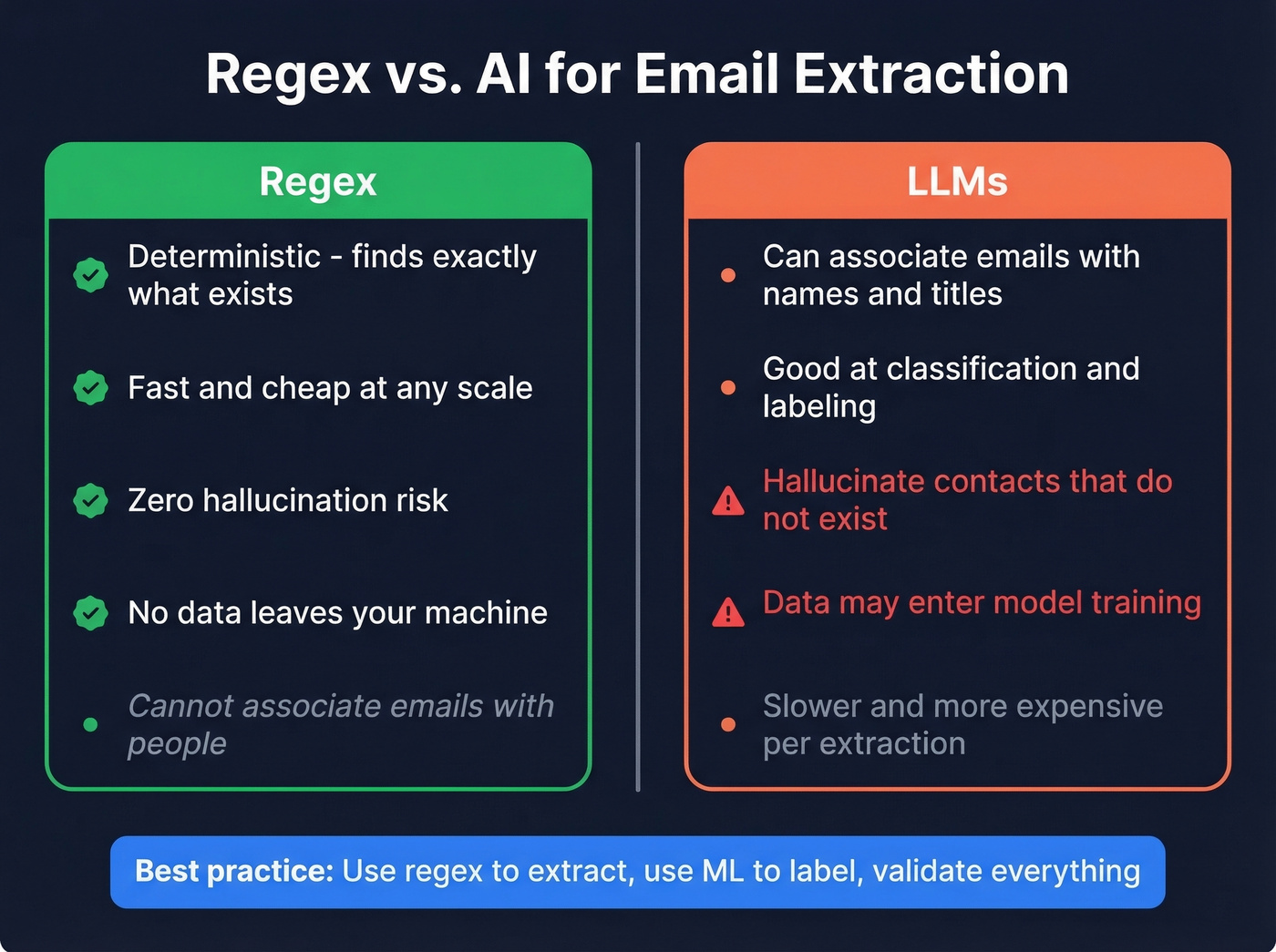
Regex is deterministic. It finds a pattern or it doesn't. It won't invent an email address that doesn't exist in the source text. For raw extraction, regex is faster, cheaper, and more reliable than any LLM.
LLMs hallucinate contacts. One team processing 50 million PDFs found that multiple models invented emails and phone numbers that didn't exist in the source text. As the user put it, models "make up emails or phones" even with explicit instructions not to. At scale, this isn't a quirk - it's a data quality disaster.
Where LLMs actually help is entity association: figuring out who an email belongs to, matching it to a name, title, and company. That's a classification task, not an extraction task. Use regex to extract, use ML to label, and validate everything.
There's also a privacy concern that keeps surfacing on Reddit: sending sensitive business data to LLM APIs means that data could end up in model training. If you're processing client emails or internal communications, that's a compliance conversation you don't want to have after the fact.
Extraction-to-Outreach Workflow
Here's the workflow we've used on lists of 5,000+ contacts. The dedup step alone typically cuts 15% of records.
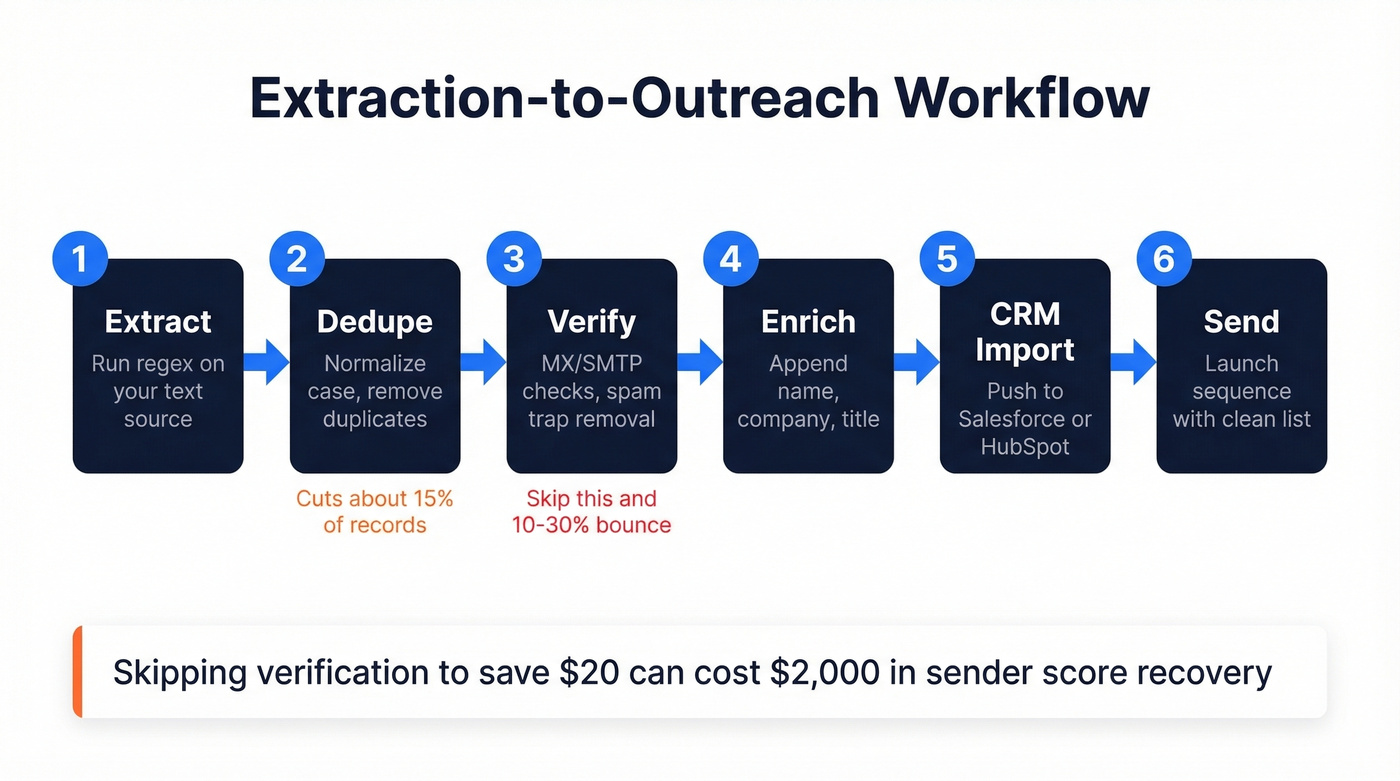
- Extract. Run your text through a regex-based extractor or script. Get the raw list.
- Dedupe. Normalize case - john@acme.com and John@Acme.com are the same address - then run exact-match removal.
- Verify. Run MX/SMTP checks, catch-all handling, and spam-trap removal before any outreach.
- Enrich. Append name, company, title, and firmographic data. Without context, an email address is just a string.
- CRM import. Push enriched contacts into Salesforce, HubSpot, or your CRM of choice with dedup rules active.
- Send. Launch your sequence with confidence that the list is clean.
Skip any step and you're gambling with your domain reputation. We've seen teams skip verification to save $20 and spend $2,000 recovering their sender score.
Mistakes That Ruin Your List
Your bounce rate will crater your sender score if you skip verification - 10-30% of extracted emails are invalid, and ESPs notice fast.
Keeping role addresses like info@, support@, and sales@ is another common mistake. They don't convert and often trigger spam filters. Strip them before you send.
Ignoring disposable domains wastes your time. Mailinator, Guerrilla Mail, and hundreds of throwaway services will never reach a real person.
Sending duplicates is a fast way to get marked as spam. Raw lists carry 12-18% duplicates, and sending the same person two identical emails looks exactly like what it is.
Treating extracted data as evergreen will burn you eventually. People change jobs, companies rebrand, domains expire. Re-verify quarterly at minimum.
Ignoring compliance is the most expensive mistake on this list. Extraction is legal. What you do with the emails afterward is where fines start - up to $53,088 per email under CAN-SPAM.
Legal Compliance: CAN-SPAM & GDPR
Extracting emails from text is legal. Sending unsolicited marketing to those emails without following the rules is where you get fined.
In the US, CAN-SPAM operates on an opt-out model. You can email someone cold, but you must include a physical mailing address, a clear unsubscribe mechanism, and honor opt-outs within 10 business days. Penalties run up to $53,088 per email.
In the EU, GDPR and related ePrivacy rules generally require consent for most marketing emails. No pre-checked boxes, and you must honor the right to erasure. Fines scale up to EUR 20M or 4% of global annual turnover, whichever is higher.
Let's be clear: the extraction step is the easy part. The compliance step is what keeps you out of trouble. Build your unsubscribe links, physical address blocks, and consent records for EU contacts before you hit send.
FAQ
Is it legal to extract email addresses from text?
Yes - extraction itself is legal in virtually all jurisdictions. The legal risk begins when you use those emails for unsolicited marketing. CAN-SPAM requires opt-out mechanisms and a physical address; GDPR requires consent for most marketing emails.
Can extractors handle obfuscated emails?
Most free tools miss obfuscated formats like name[at]domain[dot]com or JavaScript-rendered addresses. Standard extractors miss 40-70% of contacts on obfuscated pages. You'll need a headless-browser scraper or manual review.
Do I need to verify emails after extracting them?
Absolutely. 10-30% of raw extracted emails are invalid. Sending to unverified lists damages your sender reputation and deliverability - one bad campaign can take weeks to recover from.
What's the fastest way to extract emails from text online?
Paste your content into DeBounce or Browserling and you'll have a deduplicated list in seconds. For verified emails without the extraction step, Prospeo lets you search 300M+ profiles and export contacts at 98% accuracy - 75 free emails/month.
Regex or AI - which is better for extraction?
Regex is faster, cheaper, and deterministic - it won't hallucinate addresses. LLMs have been documented inventing contacts that don't exist in source text. Use regex to extract, ML to classify, and always verify the output.