

How to Run an Email Verification Test (And Know If It Actually Works)
Your bounce rate just hit 12%. Your ESP is sending warnings that read like eviction notices. You run your list through the first free checker you find - it says "98% valid." Two campaigns later, you're still bouncing.
The tool wasn't broken. You just didn't know how to run a proper email verification test to see whether it was working.
To test verification properly, build a ~500-email sample with known valid, invalid, and catch-all addresses, run it through two or three tools, and compare results against ground truth. Here's the methodology and what the numbers actually look like.
How Email Verification Works
No email is ever sent. The tool fakes the first half of a conversation with the mail server and listens to what comes back.
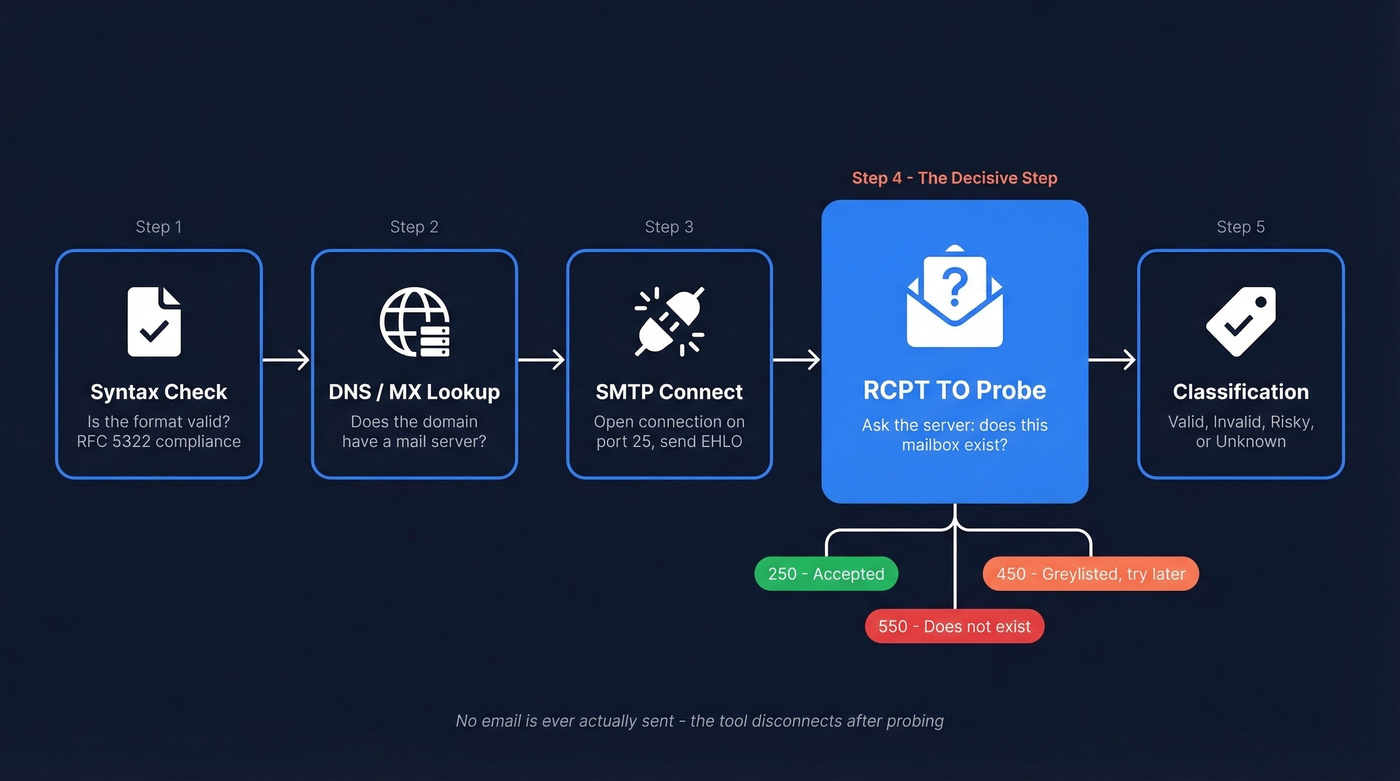
- Syntax parsing - Is
john@@company..comeven a valid format? RFC 5322 compliance catches the obvious junk. - DNS / MX lookup - Does the domain have mail exchange records? No MX record means no mail server, and the address is dead.
- SMTP connect on port 25 - The tool opens a connection and says hello (
EHLO). RCPT TOprobe - This is the decisive step. The tool says "I want to send to john@company.com" and waits. A250means the server accepted the recipient. A550means it doesn't exist. A450means the server is greylisting - basically saying "come back later, I don't trust you yet."- Result classification - The tool labels the address valid, invalid, risky, or unknown, then disconnects with
QUITwithout delivering anything.
In practice, things get messy. Catch-all domains return 250 for every address - real or fake. Greylisting forces retries with exponential backoff. Some providers deliberately return misleading responses to block enumeration. The best tools use multi-pass strategies, retrying from different IPs at different times and treating patterns across attempts as the real source of truth.
Why "99% Accuracy" Is Misleading
Every verification tool's marketing page claims 98% or 99% accuracy. Those numbers are meaningless without context.
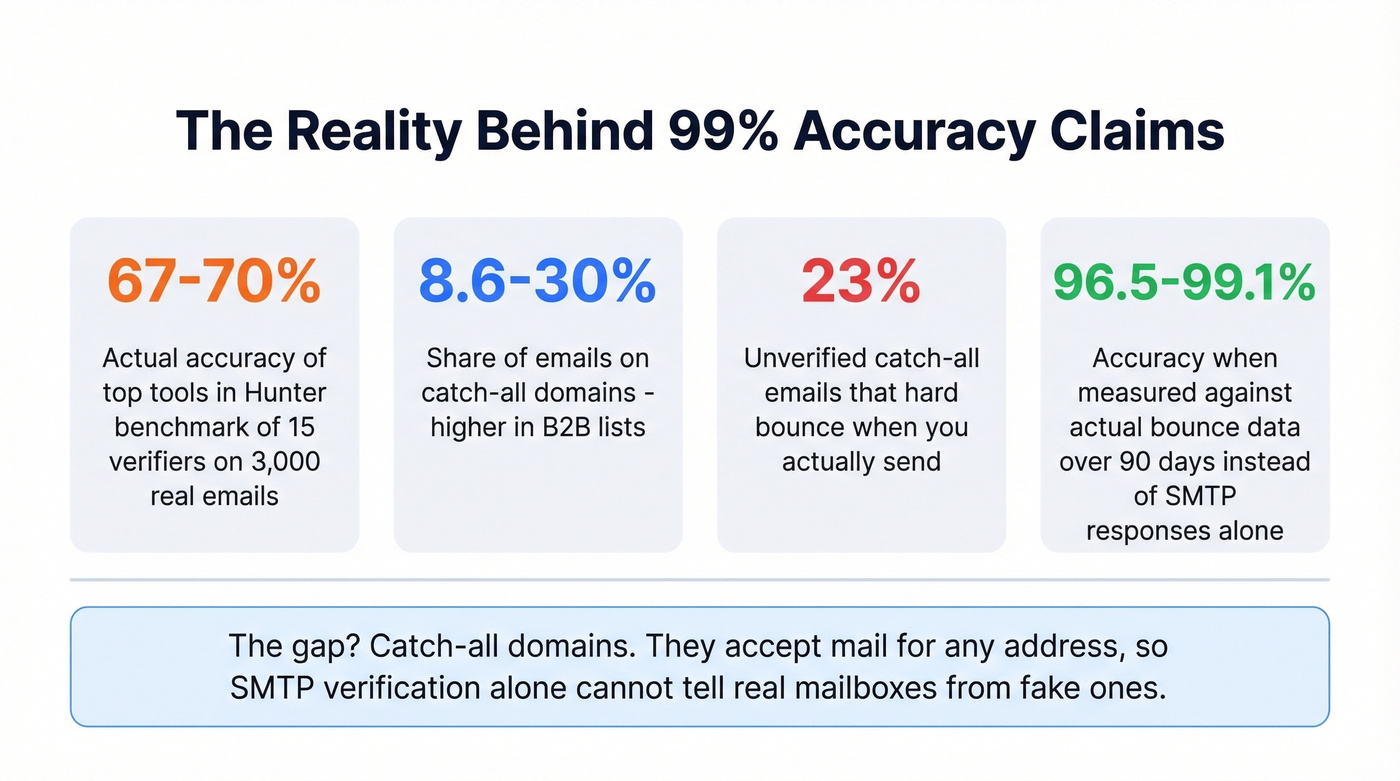
Hunter benchmarked 15 email verifiers using ~3,000 real business emails. The top three tools scored between 67% and 70% - and Hunter, the benchmark's creator, acknowledged their own dataset may have given them an edge. A separate 90-day test across 47,000 emails showed similar clustering, with top tools ranging from 96.5% to 99.1% when measured against actual bounce data rather than SMTP responses alone.
The gap comes down to catch-all domains. Between 8.6% and 15.25% of emails in a typical list sit on catch-all domains - in B2B, that number can hit 30%. These domains accept mail for any address, so SMTP verification can't distinguish real mailboxes from fake ones. About 23% of unverified catch-all emails will hard bounce when you actually send.
Here's the thing: most teams waste hours agonizing over which verifier to pick. Tool selection matters far less than whether you verify at all and how you handle the gray-area results.
How to Test if an Email Address Is Valid
Run two or three tools against the same sample. That's it.
Build a test list of ~500 emails across three categories: addresses you know are valid (colleagues, active customers), addresses you know are invalid (typos, defunct domains you control), and addresses on catch-all domains. A list of all-valid emails won't stress-test anything.
Run the same list through 2-3 tools without changing settings between runs. Hunter's benchmark standardized everything through Clay with default settings - that's the right instinct.
Compare results against ground truth. For known addresses, accuracy is binary: did the tool get it right? For catch-all addresses, compare how each tool classifies them and, if possible, send a small batch to see what actually bounces.
Check the "unknown" bucket. A tool marking 30% of your list as "unknown" isn't necessarily worse - it's more honest than one that guesses "valid" on ambiguous addresses. We've seen teams pick the tool with fewer unknowns, only to discover it was just more reckless with its classifications.

Prospeo doesn't just verify emails - it finds and verifies them in one step. 143M+ emails already verified at 98% accuracy, refreshed every 7 days so you're never testing stale data.
Skip the multi-tool benchmark. Get emails that are accurate from the start.
Reading Your Results
Every verifier returns results in roughly four buckets. What you do with each matters more than which tool you picked.
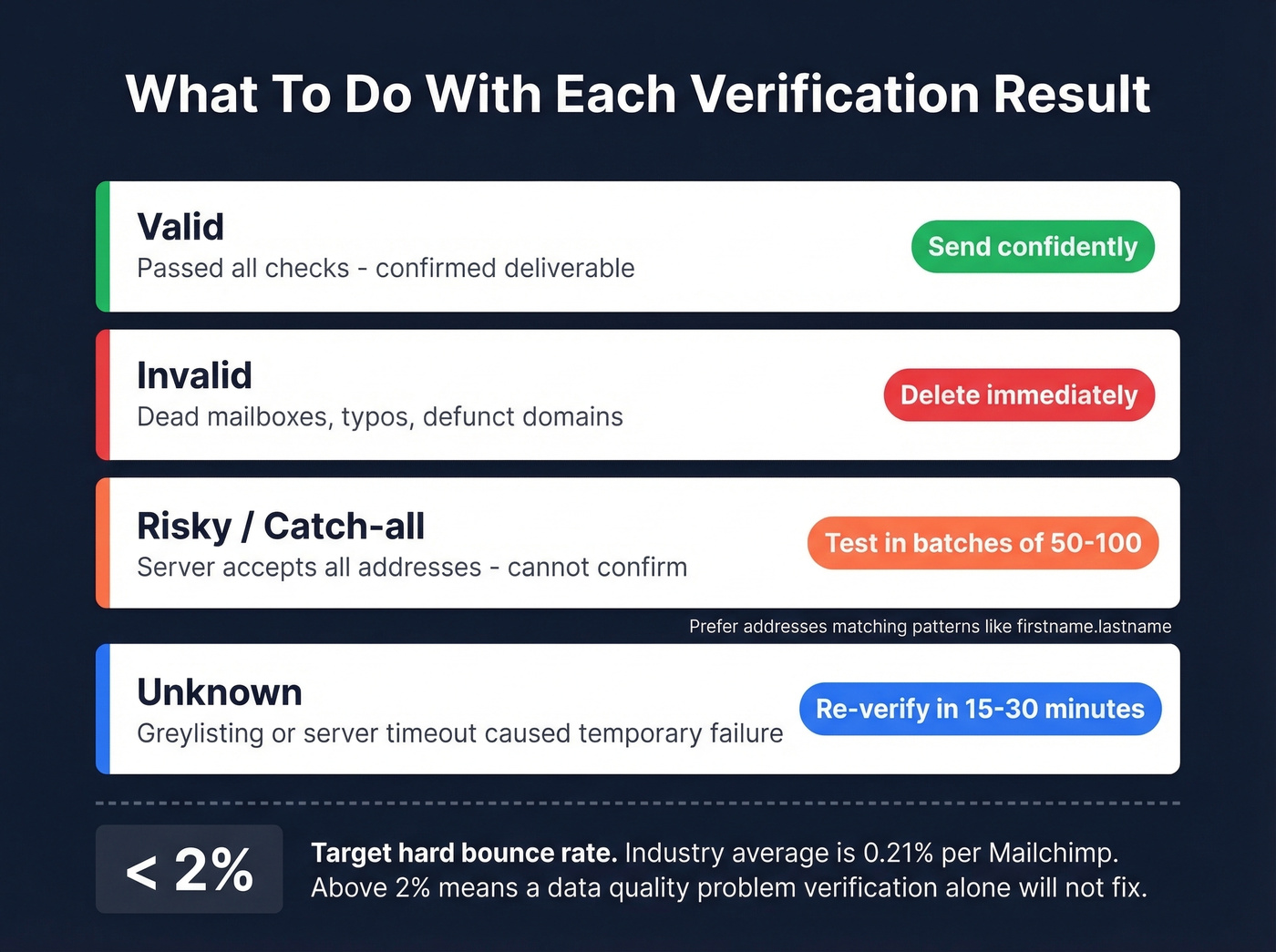
- Valid - Send confidently. These passed the verifier's checks.
- Invalid - Delete immediately. Confirmed dead mailboxes, typos, defunct domains. Sending to them is pure email bounce rate damage.
- Risky / Catch-all - Segment and send in small test batches of 50-100. Watch bounce rates. Prefer addresses matching corporate naming patterns like firstname.lastname.
- Unknown - Re-verify in 15-30 minutes or later the same day. Greylisting or server timeouts likely caused the temporary failure.
Your target: keep hard bounce rate under 2%. For context, Mailchimp's benchmarks show an average hard bounce of 0.21% across industries. If you're consistently above 2%, you've got a data quality problem that verification alone won't fix.
Tool Comparison: Accuracy, Speed, Pricing
Accuracy numbers below come from a Warmup Inbox test of 15 verifiers on the same 10,000-contact list, except where noted.
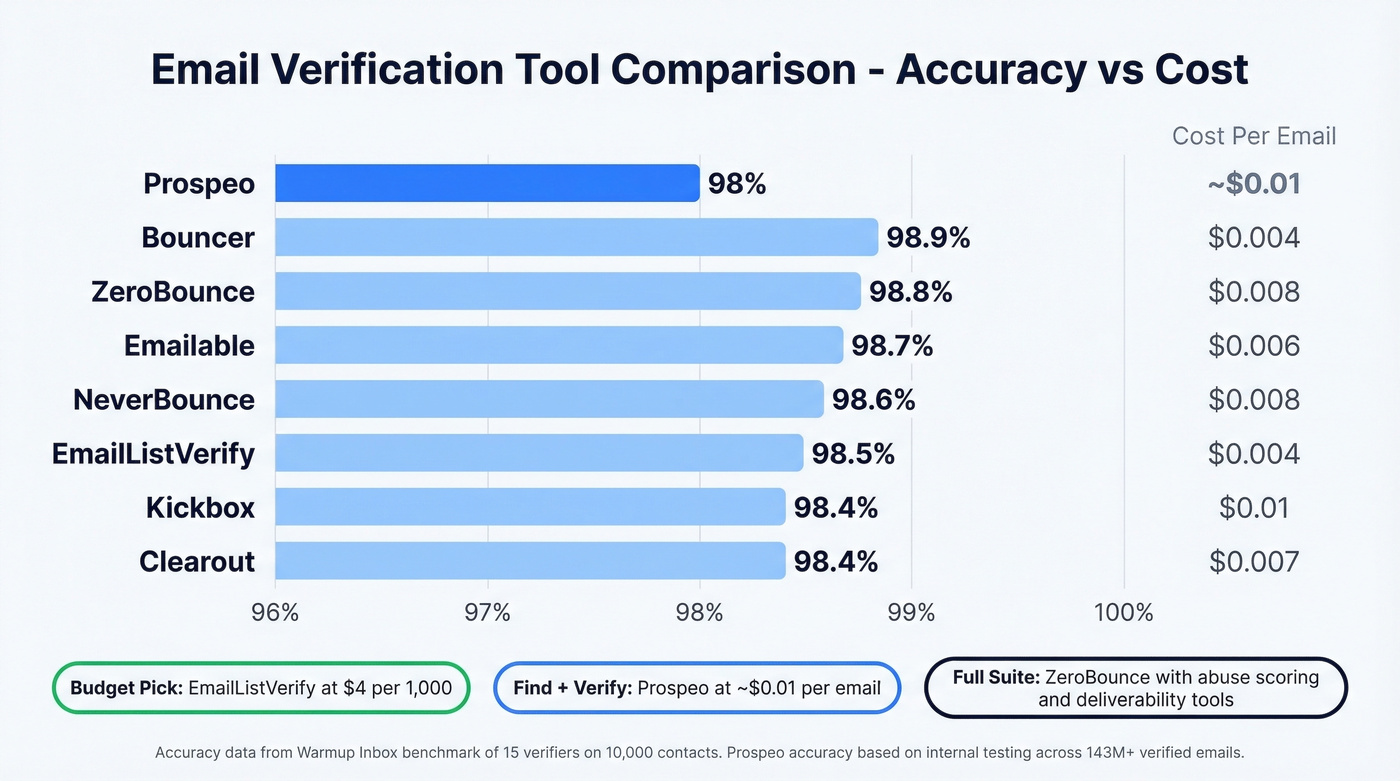
| Tool | Accuracy | Best For | Free Credits | Entry Price |
|---|---|---|---|---|
| Prospeo | 98%* | Find + verify | 75/mo | ~$0.01/email |
| Bouncer | 98.9% | Highest accuracy | 100 | $20/5,000 |
| ZeroBounce | 98.8% | Deliverability suite | 100 | $16/2,000 |
| NeverBounce | 98.6% | Speed | 10 | $8/1,000 |
| Emailable | 98.7% | Mid-range value | 250 | $30/5,000 |
| EmailListVerify | 98.5% | Budget pick | 100 | $4/1,000 |
| Kickbox | 98.4% | API reliability | 100 | $10/1,000 |
| Clearout | 98.4% | Scale pricing | 100 | $21/3,000 |
\Prospeo accuracy based on internal testing across 143M+ verified emails, not the Warmup Inbox benchmark.*
For free single-check tools, Mailmeteor runs 15+ checks with no sign-up and offers 50 bulk verifications per month free via Google Sheets. Email Hippo provides 100 daily checks. Hunter gives you 50 free credits per month with solid accuracy.
For pure verification on an existing list, Bouncer, ZeroBounce, and NeverBounce all deliver strong results. EmailListVerify at $4/1,000 holds up against tools charging four times more - it's the budget pick that doesn't sacrifice much. ZeroBounce commands a premium but pairs verification with abuse scoring and deliverability tools that some teams genuinely need.
When and How Often to Verify
Before every major campaign - non-negotiable.
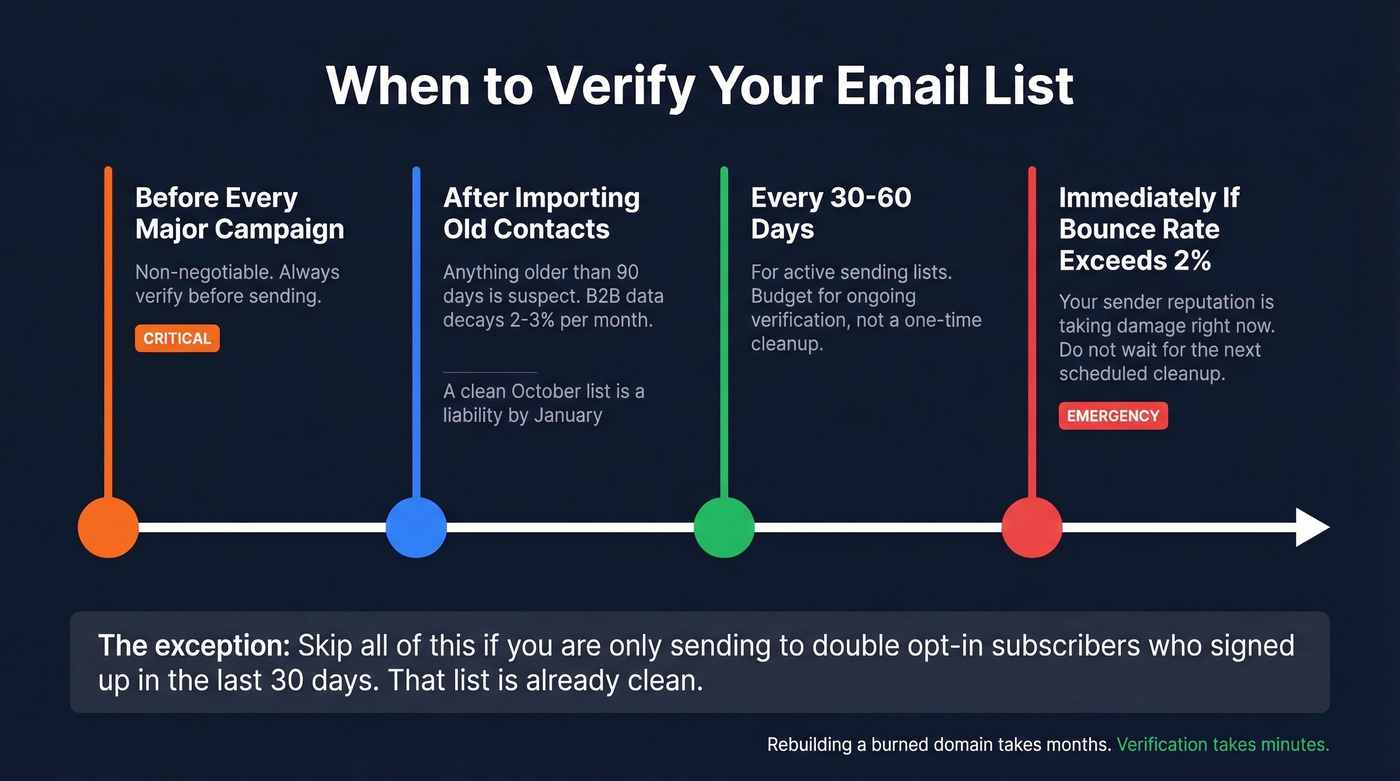
After importing old contacts - anything older than 90 days is suspect. B2B email data decays at roughly 2-3% per month due to job changes and company closures, so a list that was clean in October can be a liability by January.
Every 30-60 days for active sending lists. In our experience, the teams with the worst deliverability problems aren't the ones who picked the wrong verifier - they're the ones who verified once and never again. Budget for ongoing verification, not a one-time cleanup.
Immediately if bounce rate exceeds 2% on any send. Don't wait for the next scheduled cleanup. Your sender reputation is taking damage right now.
Let's be honest: running a quick email verification test after every major list import is the simplest habit that protects your sender reputation long-term. It takes minutes. Rebuilding a burned domain takes months.
Skip all of this if you're only sending to double opt-in subscribers who signed up in the last 30 days. That list is already clean. Everyone else needs a process.
Running verification tests because your current provider's data keeps bouncing? Prospeo's 5-step verification with catch-all handling, spam-trap removal, and honeypot filtering keeps bounce rates under 4% - at roughly $0.01 per email.
Stop paying to clean bad data. Start with data that's already clean.
FAQ
What's the difference between email verification and validation?
Validation checks format and syntax - is the address RFC-compliant? Verification goes further by pinging the mail server via SMTP to confirm the mailbox can actually receive mail. Most modern tools do both automatically, but verification is the step that prevents bounces.
How accurate are free email checkers?
Free tools like Mailmeteor and Email Hippo use the same SMTP process as paid tools, so per-email accuracy is comparable. The real limits are volume (50-100 checks per day) and missing features like catch-all detection and bulk processing. For spot-checks, they're fine. For list hygiene at scale, paid tools are more practical.
Can I verify emails without sending them?
Yes. Every tool in this article uses SMTP verification, which asks the recipient's mail server "does this mailbox exist?" without delivering any message. The better tools add catch-all detection, spam-trap filtering, and honeypot removal on top, which reduces ambiguous "unknown" results and keeps your sender reputation clean.
How often should I re-verify my email list?
Re-verify every 30-60 days for active sending lists and before every major campaign. Lists older than 90 days should be treated as unverified regardless of their original source quality. If you're seeing bounce rates creep above 2%, don't wait for the next scheduled cleanup - verify now.