


7 EmailAnalytics Alternatives That Actually Track What Matters in 2026
EmailAnalytics does one thing well - team email visibility. But at $19/inbox/month with thin support, a lot of managers hit a ceiling fast. The G2 reviews tell the story: 4.5/5 from just 8 reviews, with pricing and poor customer support as recurring complaints. Run the math on a 20-person team and you're looking at $380/month for dashboards that don't even enforce SLAs.
Here's the thing: most "alternatives" lists for this category mash together four completely different tool types - email marketing platforms, internal comms tools, and even unrelated analytics software all lumped in together. We filtered for tools that actually replace what EmailAnalytics does, and we tested or evaluated each one against real team use cases.
What Type of Tool Do You Actually Need?
Before picking a replacement, figure out which category you're shopping in:
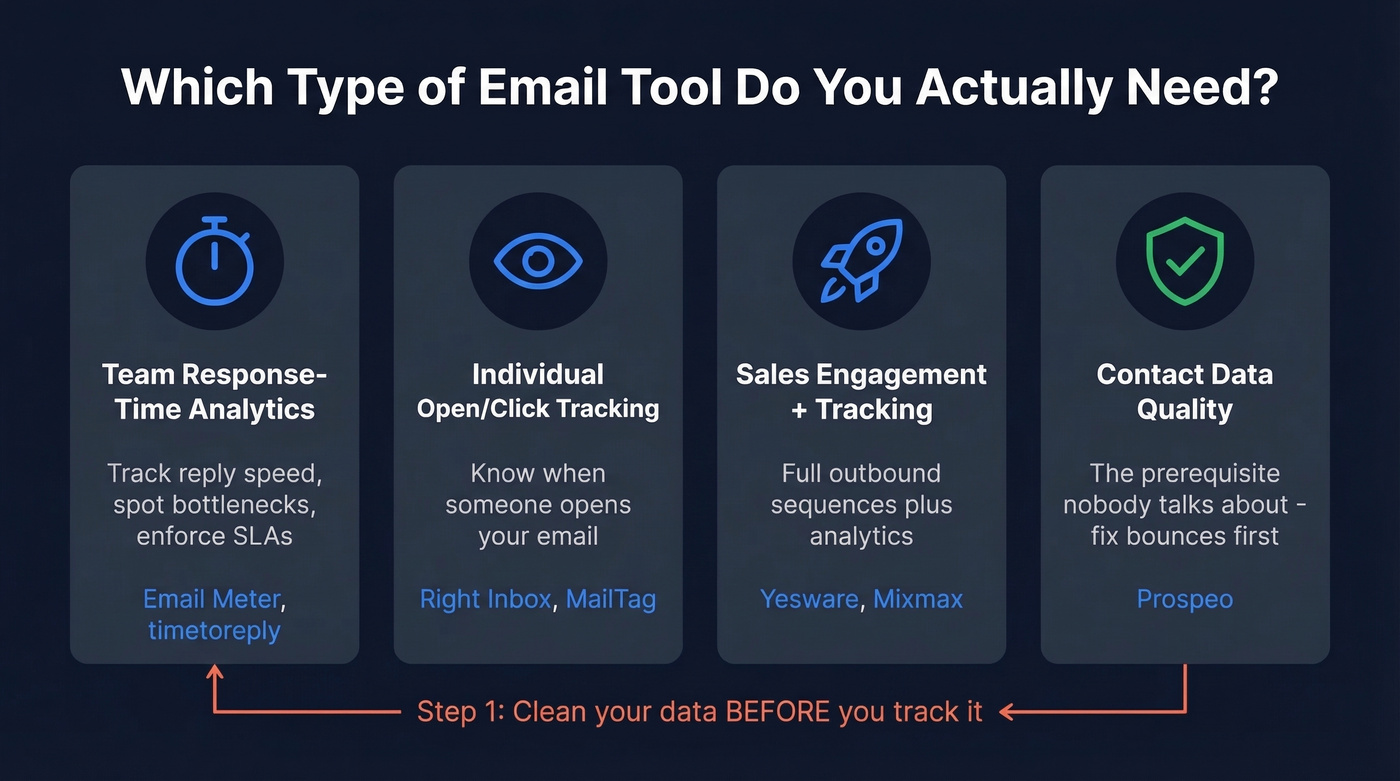
- Team inbox response-time analytics - track how fast your team replies, spot bottlenecks, enforce SLAs. This is what EmailAnalytics does. Direct replacements: Email Meter, timetoreply.
- Individual email open/click tracking - know when someone opens your email. Lightweight, cheap. Right Inbox, MailTag.
- Sales engagement with tracking - full outbound sequences plus analytics. Yesware, Mixmax.
- Contact data quality - the prerequisite nobody talks about. If 15-30% of your outbound bounces, your response-time dashboards are measuring noise, not performance. (If this is your bottleneck, start with email deliverability basics.)
We've seen threads in r/BusinessIntelligence and r/Entrepreneur from managers asking for exactly this - lightweight email analytics without BI complexity. That demand is real.
Our Top Picks at a Glance
| Need | Pick | Why |
|---|---|---|
| Budget team analytics | Email Meter | Free tier, $15/user/mo (annual) for teams |
| Enterprise response-time SLAs | timetoreply | Deepest SLA features (15-mailbox minimum) |
| Clean data first | Prospeo | 98% accuracy fixes your data before you track it |

Teams switch analytics tools to track response times - then realize 15-30% of their emails are bouncing. Prospeo's 5-step verification drops bounce rates below 4%, so every metric your dashboard reports reflects real conversations, not dead addresses.
Fix the data first. Analytics will finally mean something.
Best EmailAnalytics Alternatives Reviewed
Email Meter - Best Budget Team Analytics
The closest direct replacement for EmailAnalytics, and it's cheaper on annual billing ($15 vs $19). Email Meter's free tier covers general stats, reports, filters, and CSV export for both Google and Microsoft mailboxes. That alone handles what most small teams need.
Pros:
- Free tier does 80% of what EmailAnalytics charges $19/inbox for
- Supports both Gmail and Outlook natively
- ISO 27001 and SAML-based SSO on the Custom Dashboard tier for compliance-conscious teams
Cons:
- Plus plan caps at 15 mailboxes
- No SLA enforcement or BI sync on lower tiers
The Plus plan runs $15/user/month annual (or $19 month-to-month) and adds team features for up to 15 mailboxes. It only accesses email headers - never the body or attachments. Beyond 15 mailboxes, you're looking at their Custom Dashboard tier or jumping to timetoreply.
In our experience, Email Meter's free tier is where most teams under 10 people should start. You can always upgrade later, and the data you collect on the free plan carries over.
timetoreply - Best for Response-Time SLAs
timetoreply requires a 15-mailbox minimum on both Essentials and Pro plans. That means the Essentials floor is $435/month on annual billing (15 x $29). If you're a 5-person team, you're paying for 10 empty seats.
That said, if you clear the 15-mailbox threshold, this is the most feature-rich response-time tool available. SOC 2 Type II, ISO 27001, HIPAA, GDPR - timetoreply checks every compliance box. It syncs with BI tools, offers real-time analytics included in Essentials, and the Pro plan includes a dedicated customer success manager. Like Email Meter, it analyzes email header data rather than the body or attachments.
Pricing starts at $29/mailbox/month annual ($38 monthly) for Essentials, $34/mailbox/month annual ($44 monthly) for Pro. Worth every dollar if response-time SLAs are contractual obligations, not just nice-to-haves.
Skip this if: you have fewer than 15 mailboxes. Full stop.
Prospeo - Fix Your Data Before You Track It
Email analytics is step two. Step one is making sure you're emailing real people.
Too many teams obsessing over response-time dashboards are sending to addresses that bounce. That's not a productivity problem - it's a data quality problem. We've seen teams cut their bounce rate from 35% to under 4% just by verifying their lists before sending, and suddenly their analytics dashboards started telling a completely different (and accurate) story.
Use Prospeo if: your outbound bounce rate is above 5%, you're building prospect lists before tracking replies, or you want analytics tools downstream to measure real conversations instead of noise. With 300M+ professional profiles, 98% email accuracy, and a 7-day data refresh cycle, Prospeo catches invalid addresses before they tank your deliverability. The 5-step verification process includes catch-all handling, spam-trap removal, and honeypot filtering - so the emails hitting your tracked inboxes are reaching real humans. (If you’re comparing verifiers, see Bouncer alternatives too.)
Skip this if: you only need internal team email monitoring and your contact data is already clean.
Pricing starts free - 75 email verifications plus 100 Chrome extension credits per month. Paid plans run about $0.01/email with no contracts.

Yesware - Sales Tracking With a Catch
Use Yesware if: you need email tracking baked into a sales engagement workflow with templates, campaigns, and Salesforce sync. The free tier works for basic open tracking, but it's limited to emails sent in the last 24 hours. Pro at $15/seat/month annual adds unlimited tracking.
Skip this if: you need team response-time analytics - Yesware doesn't do that. And watch the fine print: Pro limits you to 20 campaign recipients per month. Twenty. That's not a typo. Salesforce integration doesn't unlock until Enterprise at $65/seat/month annual.
Mixmax - Overkill for Analytics Alone
Don't buy a Ferrari to check your speedometer. Mixmax Suite runs $89/user/month annual or $105 monthly. It's a full sales execution platform - sequences, meeting scheduling, workflow automation. Yes, it includes email tracking and reporting. But if analytics is your primary need, you're paying 5x what Email Meter charges for features you'll never touch. (If you’re still considering it, compare options in our Mixmax alternatives guide.)
Use Mixmax if: you're replacing your entire outbound stack, not just your analytics tool.
Right Inbox - Cheap Gmail Extension
A lightweight Gmail add-on for individual tracking - opens, clicks, reminders, scheduling. Runs roughly $8-$15/user/month billed annually. No manager dashboard, no response-time reporting, no SLA monitoring. Fine for a solo rep who wants read receipts on the cheap.
MailTag - Basic Open Tracking
Similar story to Right Inbox but even simpler. $9.99/user/month on annual billing, 14-day free trial. Individual email open tracking for Gmail. No team features, no response-time analytics. If all you need is "did they open it?" - this works.
Pricing Comparison
| Tool | Starting Price | Billing | Free Tier | Platform |
|---|---|---|---|---|
| Email Meter | $15/user/mo | Per user | Yes | Gmail + Outlook |
| timetoreply | $29/mailbox/mo | Per mailbox | No | Gmail + Outlook |
| Prospeo | ~$0.01/email | Per email | Yes | Web + Chrome extension |
| Yesware | $15/seat/mo | Per seat | Yes | Gmail (Google Workspace) |
| Mixmax | $89/user/mo | Per user | Yes | Gmail (Google Workspace) |
| Right Inbox | ~$8/user/mo | Per user | Yes | Gmail |
| MailTag | $9.99/user/mo | Per user | Yes | Gmail |
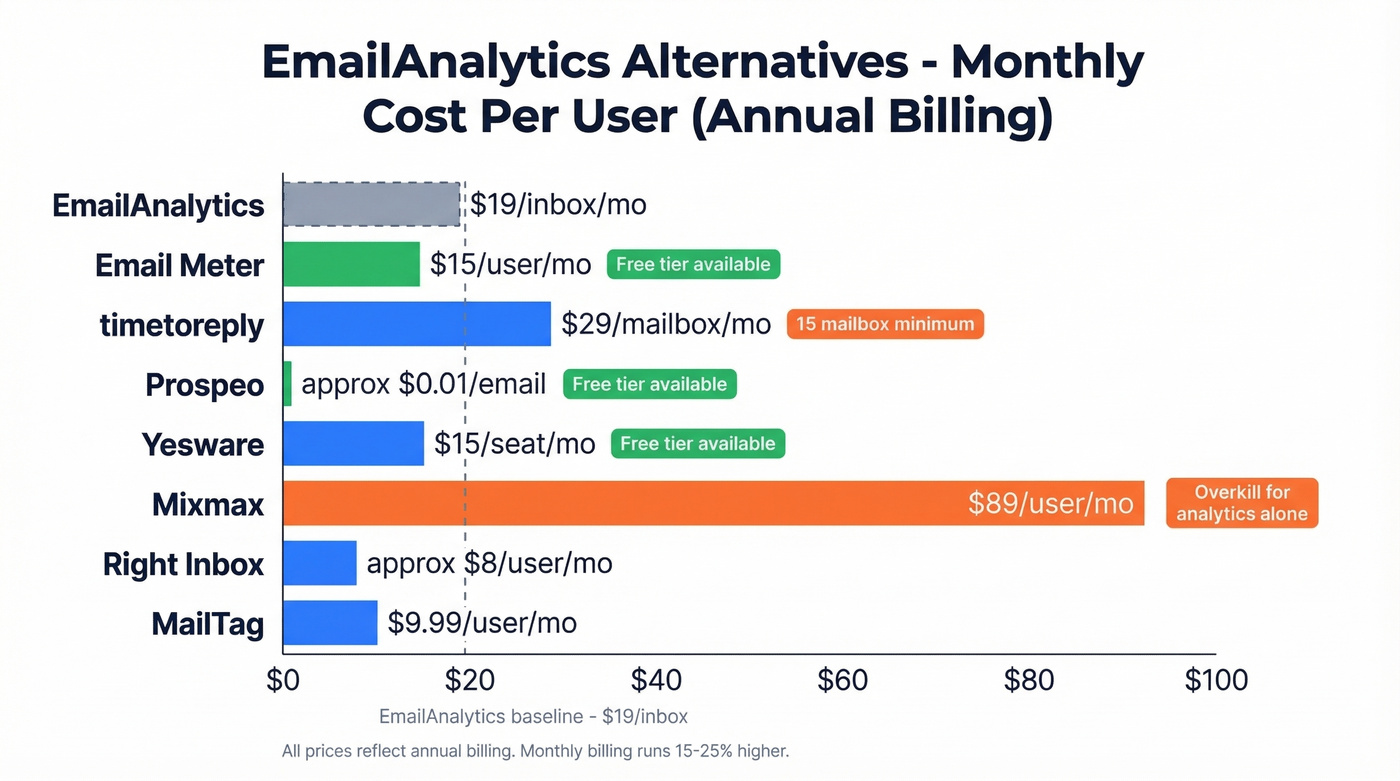
All paid prices reflect annual billing. Monthly billing runs 15-25% higher depending on the vendor.
You're comparing tools at $15-$29/inbox/month to track replies. But if your contact list is full of invalid emails, you're paying to measure noise. Prospeo verifies emails at $0.01 each with 98% accuracy and a 7-day refresh cycle - 75 free verifications to start, no contract.
Clean your list before you spend another dollar on dashboards.
How to Choose the Right Tool
Let's be honest: most teams shopping for EmailAnalytics alternatives don't actually need better analytics. They need cleaner data and a free dashboard. Email Meter's free tier plus verified contact data solves 80% of the problem at 0% of the cost. (If you’re diagnosing bounces, start with email bounce rate benchmarks and fixes.)
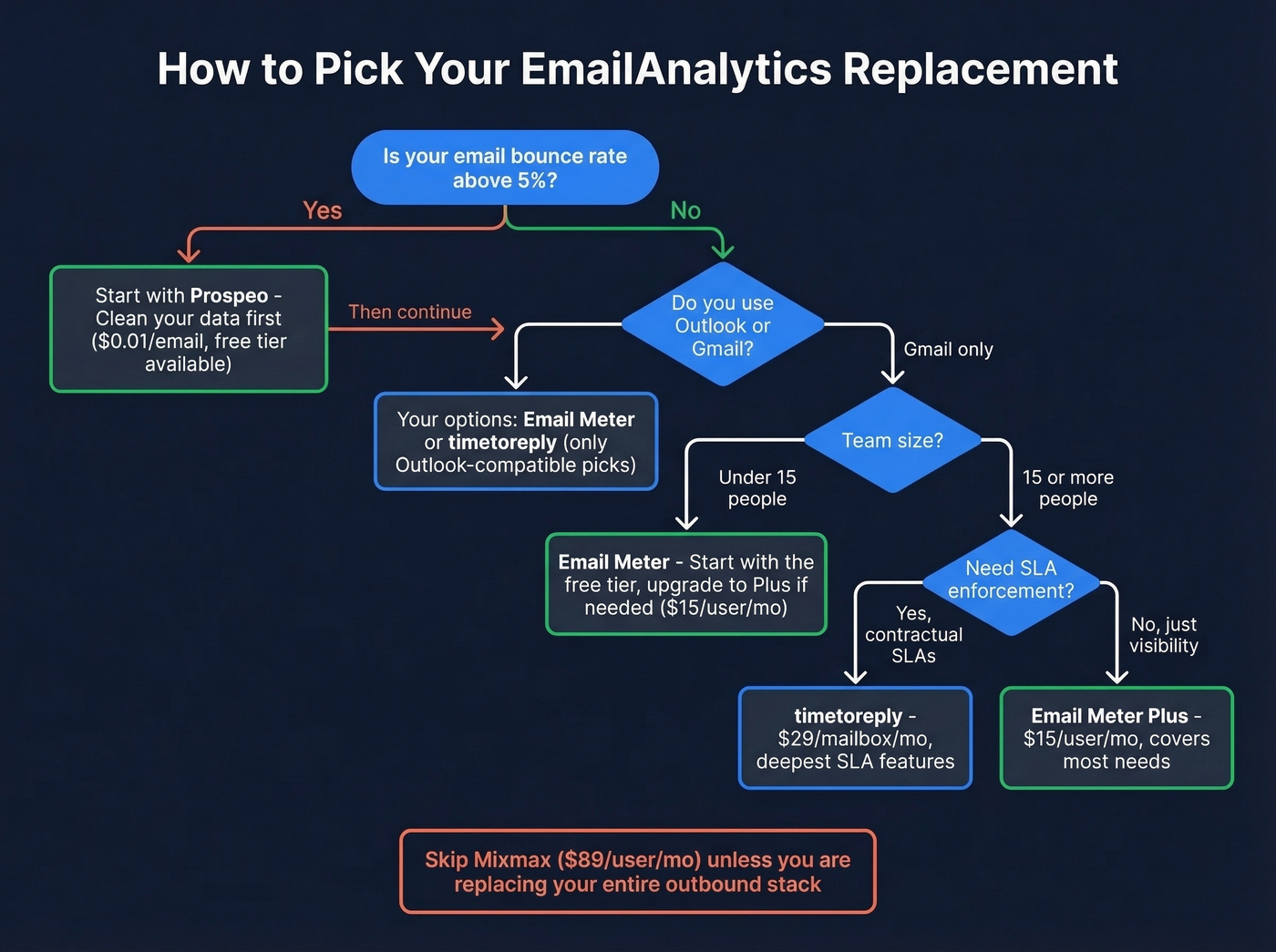
Three things narrow the field fast.
Platform support. If your team runs Outlook, Email Meter and timetoreply are the only clean fits on this list. Everything else is Gmail-only.
Team size. timetoreply's 15-mailbox minimum is a hard gate. Fewer than 15 people? Email Meter's Plus plan or the free tier is the practical choice. We've talked to teams who signed up for timetoreply, realized they were paying for phantom seats, and switched within a month.
Budget reality. Mixmax at $89+/user is absurd if analytics is all you need. Match the tool to the actual problem, not the shiniest feature list. (If you’re building outbound systems, see our SDR tools roundup.)
FAQ
Is EmailAnalytics worth the price?
At $19/inbox/month, EmailAnalytics is reasonable for mid-size teams needing response-time visibility. But a 20-person team pays $380/month. Email Meter's free tier handles most of the same metrics, making it hard to justify unless you specifically need EmailAnalytics' reporting format.
Can I track Outlook emails with these tools?
timetoreply and Email Meter support both Gmail and Outlook natively - they're the only two on this list with full Microsoft 365 compatibility. Right Inbox, MailTag, and Yesware are Gmail-only, so Outlook teams should start with those two.
What's the biggest mistake teams make with email analytics?
Measuring response times on dirty data. If 15-30% of your outbound emails bounce, your dashboards are tracking noise, not performance. Verify your contact list first, then layer analytics on top. The numbers will actually mean something.
Which free EmailAnalytics alternative is best?
Email Meter offers the strongest free tier - general stats, reports, filters, and CSV export for Gmail and Outlook. For teams that also need data verification, Prospeo's free plan includes 75 email verifications monthly. Combined, they cover analytics and data quality at zero cost.