

How to Find Any Email Address by Company Name or Domain
You've got the perfect prospect. Right company, right title, right timing. And you can't find their email address. It's the most basic problem in outbound sales, and it still trips up experienced teams every day.
This guide teaches methods first, tools second. Six approaches from free Google tricks to paid platforms with real accuracy data, so you can stop guessing and start sending. You don't need ten email finder tools. You need one good one and a verification step.
Check the Company Website First
This sounds obvious, but give it 30 seconds before you fire up any tool. After analyzing roughly 905,000 company websites, Hunter found that 18.7% mention at least one email address. That's low. But when it works, you get a confirmed address with zero cost and zero tool dependency.
Where to look:
- About / Team page - individual bios sometimes include direct emails
- Contact page - often a generic inbox, but it reveals the domain pattern
- Blog author bios - writers frequently list their email
- Footer - small companies love putting info@ or hello@ down there
- Job postings - occasionally include a hiring manager's direct address
Even if you only find a generic address like info@company.com, you've confirmed the domain format. That's useful for the next method.
Guess the Email Pattern + Verify
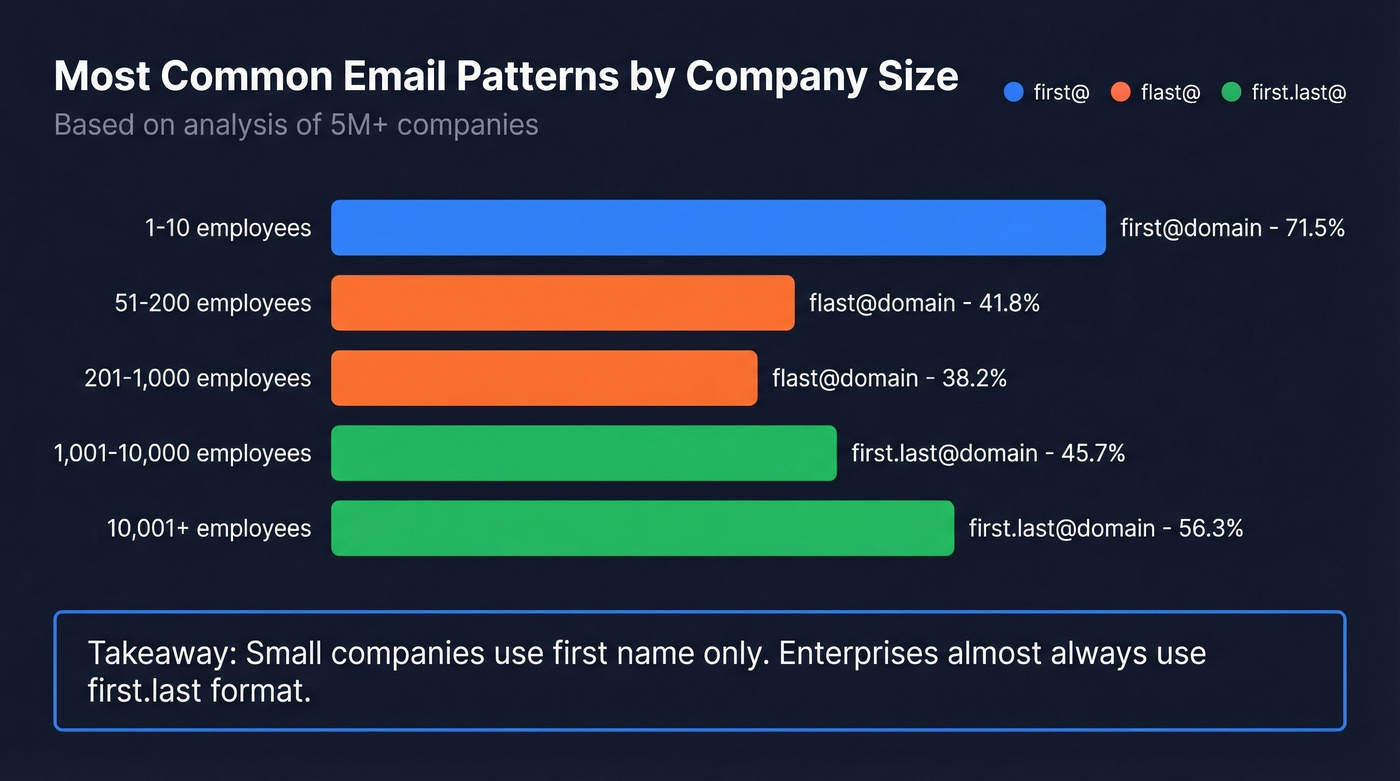
If you know someone's name and their company domain, you can guess their email with surprisingly high accuracy - provided you know which pattern to try first. Naming conventions depend heavily on company size, and a dataset of over 5 million companies breaks it down clearly:
| Company Size | Most Common Pattern | % of Companies |
|---|---|---|
| 1-10 employees | first@domain | 71.5% |
| 51-200 | flast@domain | 41.8% |
| 201-1,000 | flast@domain | 38.2% |
| 1,001-10,000 | first.last@domain | 45.7% |
| 10,001+ | first.last@domain | 56.3% |
Hunter's analysis of 12M+ email addresses confirms the trend: 49.9% of companies use first@domain overall. But that average masks a real shift. Small companies skew heavily toward first-name-only, while enterprises almost always use first.last.
Free permutator tools like Mailmeteor's Email Permutator will generate every possible combination for you. But guessing without verification is useless - an unverified guess has maybe a 50/50 chance of being right, and sending to a wrong address damages your sender reputation. Always run your guess through a verification tool before hitting send.
Use Google Search Operators
Google dorking is the free method that actually works for small volumes. Use advanced search operators to surface email addresses published somewhere on the web.
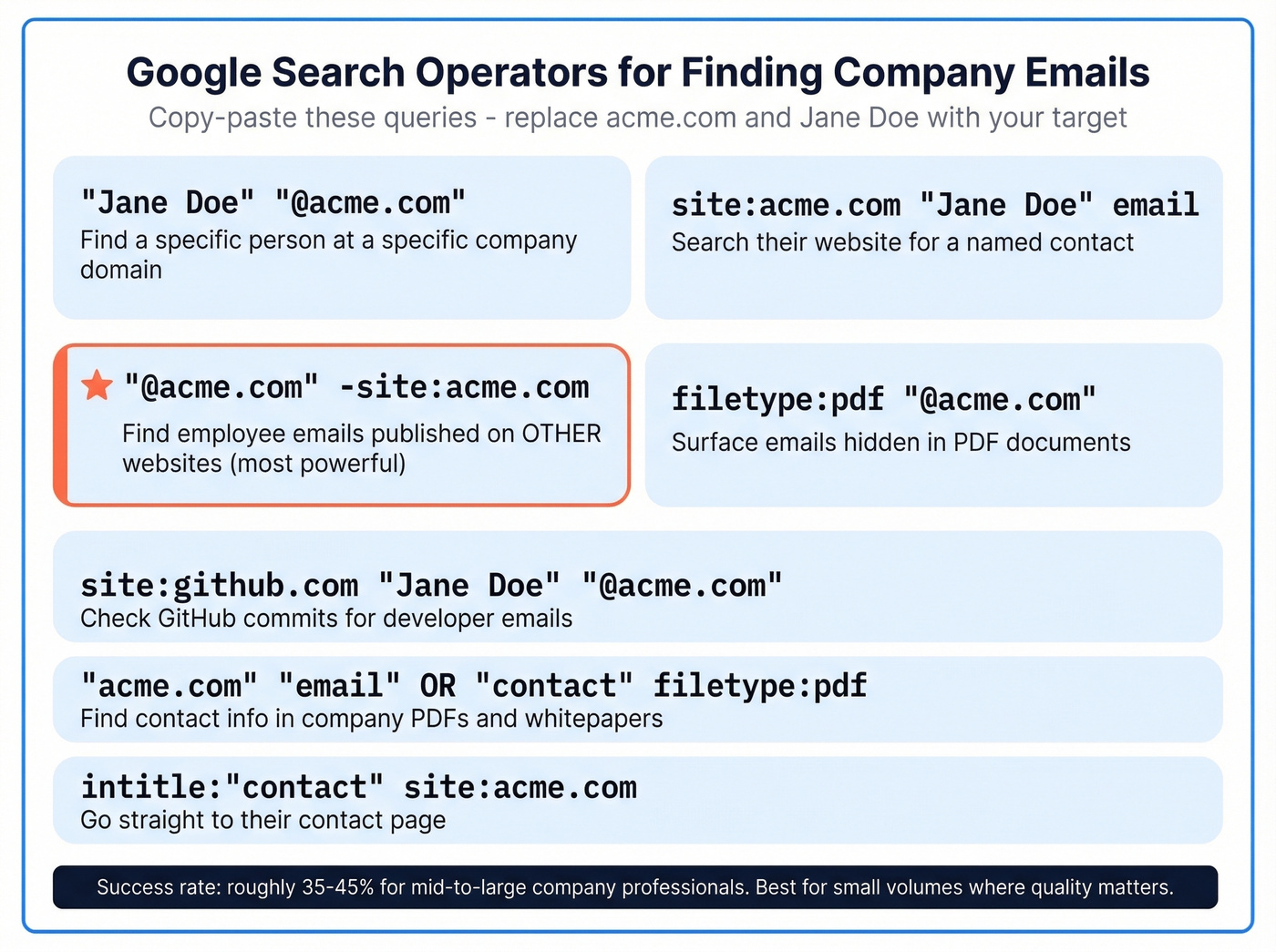
Here's a cheat sheet you can copy-paste:
"Jane Doe" "@acme.com"
site:acme.com "Jane Doe" email
"@acme.com" -site:acme.com
filetype:pdf "@acme.com"
site:github.com "Jane Doe" "@acme.com"
"acme.com" "email" OR "contact" filetype:pdf
intitle:"contact" site:acme.com
The most powerful query is the third one: "@acme.com" -site:acme.com. This finds employee emails published on other websites - conference speaker lists, GitHub commits, academic papers, press releases. It also reveals the company's email pattern, which you can then apply to your target contact.
We've run these queries across dozens of prospecting campaigns, and the success rate lands around 35-45% for professionals at mid-to-large companies. Not bad for free. But this method has a hard ceiling: it works for small-to-medium volumes where quality matters more than speed. If you need to find emails for hundreds of contacts, you'll spend 3-10 minutes per lookup. At that point, a tool pays for itself in the first hour.

Google tricks and pattern guessing work - until you need more than 10 emails a day. Prospeo's domain search returns verified contacts from 300M+ profiles at 98% accuracy, refreshed every 7 days. No guessing, no bounces, no wasted time.
Find every email at any company for $0.01 each - 75 free lookups to start.
Find Email Addresses by Company With a Dedicated Tool
This is where most teams land, and for good reason. A tool that takes a domain and returns verified emails in seconds is worth every penny once you're doing any kind of volume.
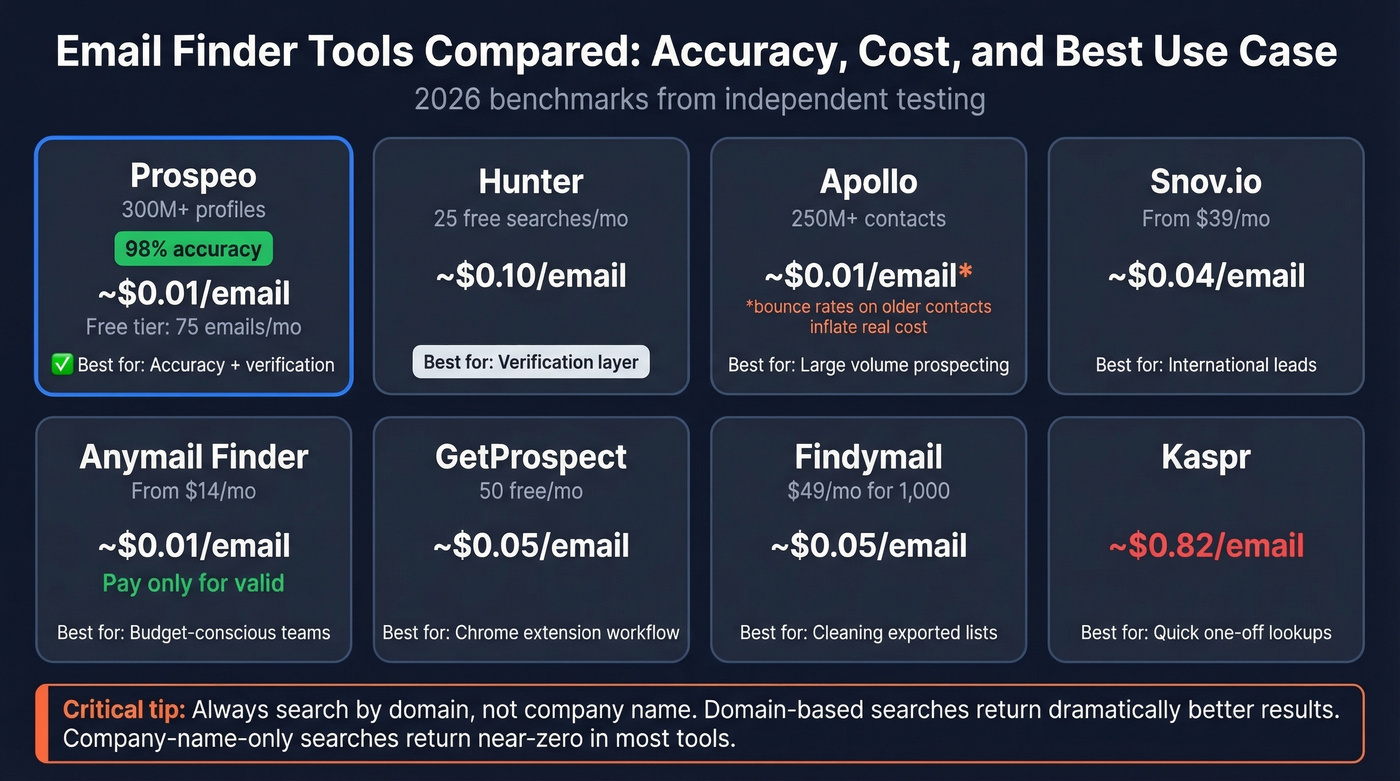
Let's be honest about accuracy, though. Most tools claim 95%+ hit rates with zero methodology behind the number. Independent benchmarks tell a different story. In one test of 5,000 lookups, Tomba led at 80.3% accuracy and Anymail Finder hit 77.5%. In that same benchmark, Snov.io came in at 20.1%. The real range across tools is roughly 17-80%, depending on the tool and input type.
Here's the single most important thing we can tell you about email finders: domain-based searches perform dramatically better than company-name-only searches. In that same benchmark, tools searching by company name alone returned near-zero results. Always search by domain, not company name. This one habit will double your hit rate overnight.
| Tool | Free Tier | Paid From | ~Cost/Email | Best For |
|---|---|---|---|---|
| Prospeo | 75 emails/mo | ~$0.01/email | ~$0.01 | Accuracy + verification |
| Hunter | 25 searches/mo | $49/mo | ~$0.10 | Verification layer |
| Apollo | Limited | $59/mo (unlimited email credits) | ~$0.01* | Large-volume prospecting |
| Snov.io | Trial | $39/mo (1,000) | ~$0.04 | International leads |
| Anymail Finder | 100 free credits | $14+/mo | ~$0.01 | Pay-only-for-valid |
| GetProspect | 50 emails/mo | $49/mo (1,000 valid emails) | ~$0.05 | Chrome extension |
| Findymail | None | $49/mo (1,000) | ~$0.05 | Exported lead lists |
| Kaspr | 5 emails/mo | $49/mo (60) | ~$0.82 | Quick profile lookups |
*Apollo's "unlimited" makes per-email cost near zero on paper, but bounce rates on older contacts inflate the real cost.
Prospeo
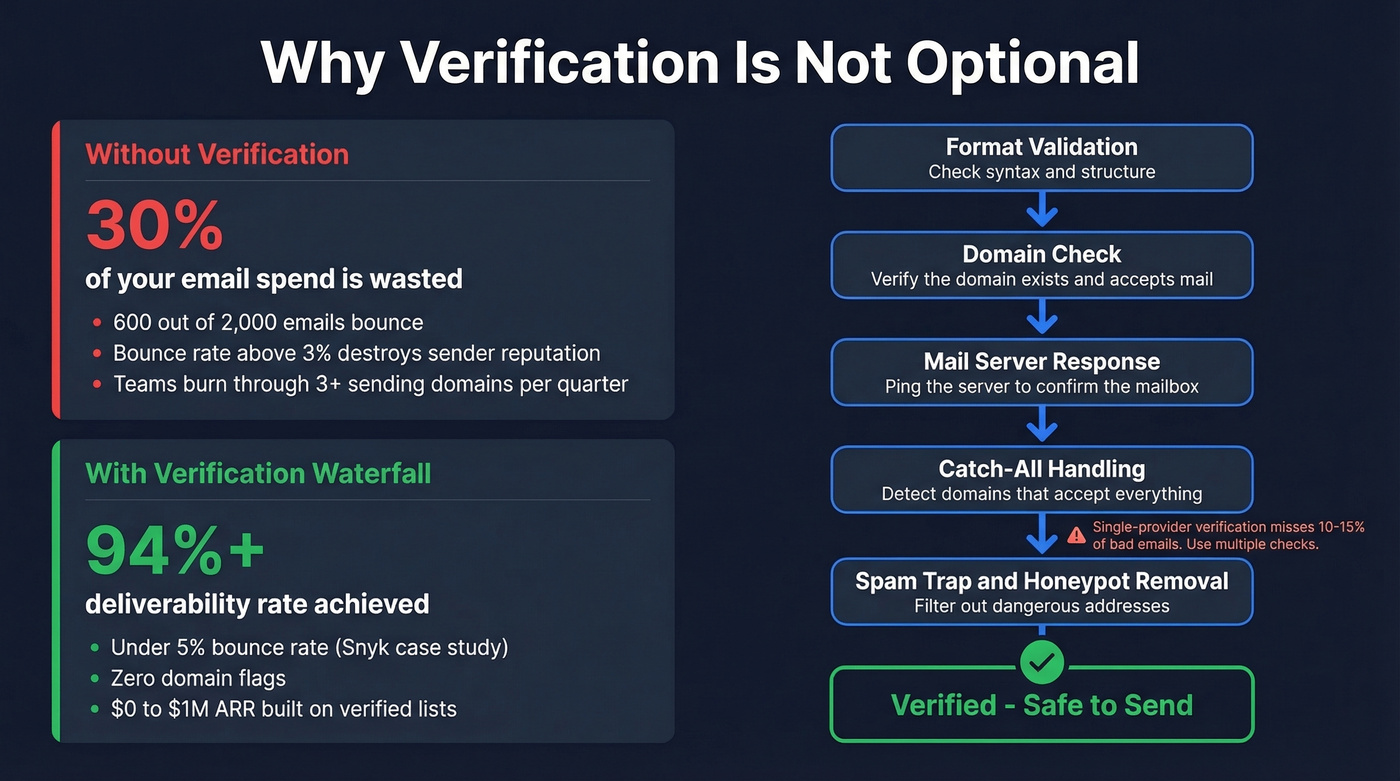
Prospeo runs a 300M+ profile database with 98% email accuracy. That number holds up because every email goes through a 5-step process: format validation, domain check, mail server response, catch-all handling, and spam-trap/honeypot removal. The database refreshes every 7 days, which matters more than most people realize - a 300M database refreshed weekly beats a 700M database refreshed monthly.
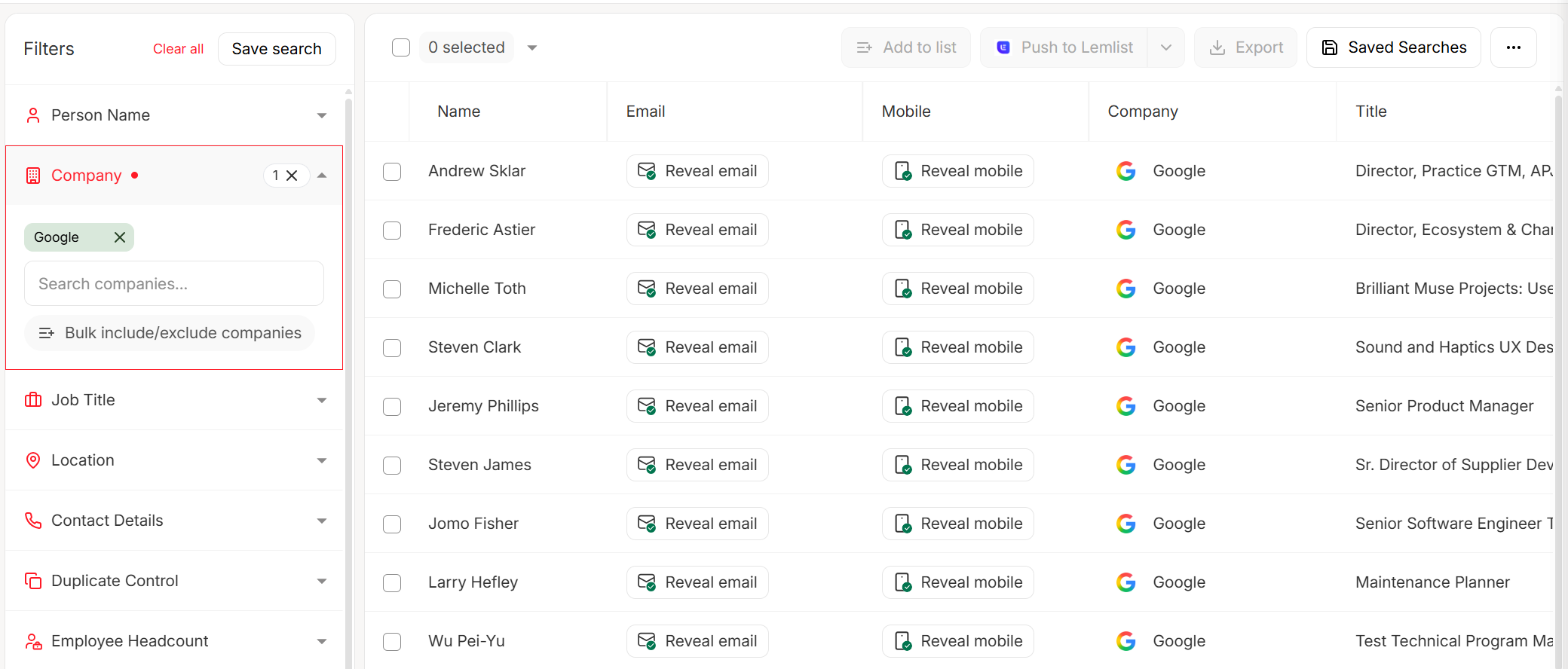
The proof is in the bounce rates. Snyk's team of 50 AEs went from 35-40% bounce rates to under 5% after switching. That's not a marginal improvement - that's the difference between a functioning outbound program and one that's actively destroying your domain reputation.
The free tier gives you 75 verified emails per month plus 100 Chrome extension credits. Paid plans run about $0.01 per email with no annual contract.
Hunter
Hunter is the tool everyone's heard of, and for good reason - the verification engine is solid. The domain search returns known emails for a company along with the detected pattern, making it straightforward to locate a specific contact once you know the format.

The limitation is database size. Reddit threads on r/sales consistently echo what we've found in our own testing: Hunter works better as a verification layer than a primary discovery source. If you already have a guessed email and need to confirm it, Hunter's great. For discovering emails at scale, the database is smaller than competitors. Paid plans start at $49/mo.
Apollo
Apollo takes a different approach entirely. Its database covers 250M+ contacts with unlimited email credits on the $59/mo plan - hard to beat on sheer volume. But data quality on older contacts is inconsistent, and the r/agency crowd on Reddit flags this repeatedly: "lots of bounces on older contacts" is the common refrain.
Use Apollo for large-volume prospecting where you can absorb some bounce rate, but verify before sending anything to a cold list. If your average deal size is under $15K, Apollo's volume-first approach probably makes more sense than paying for premium data. Above that threshold, every bounced email to a decision-maker is a missed opportunity worth investing in accuracy.
Other Tools Worth Knowing
Snov.io starts at $39/mo for 1,000 credits and is solid for international leads. It bundles email automation into the platform, which is good value if you need both finding and sequencing in one tool.
Anymail Finder offers a pay-only-for-valid model with plans from $14/month. If you hate paying for unverified results, this is your tool.
GetProspect gives you 50 free emails/mo and has a clean Chrome extension workflow for prospecting directly from professional profiles. Paid plans start at $49/mo.
Findymail at $49/mo for 1,000 credits specializes in cleaning and enriching exported prospect lists. Niche but useful if that's your workflow.
Kaspr is expensive at ~$0.82 per email. Skip it unless you need a quick, one-off lookup and don't want to set up another tool.
Snyk's 50 AEs dropped bounce rates from 35-40% to under 5% by switching to Prospeo. Every email passes 5-step verification - format, domain, server, catch-all, and spam-trap checks - so you never send to a dead address again.
Stop destroying your sender reputation with unverified emails.
Why Verification Isn't Optional
Run the numbers. Say you're sending 2,000 cold emails per month using an unverified list with 70% deliverability. That's 600 emails that never land. Your monthly stack cost - domains, inboxes, sequencer, data tool - runs $139-144/month, and roughly 30% of that spend is wasted on emails that bounce or hit spam.
But the real damage isn't the wasted spend. It's sender reputation.
If your bounce rate climbs above 3%, stop everything and fix your list. Every bounce signals to email providers that you're not a legitimate sender. Once your domain reputation tanks, even your verified emails start landing in spam. We've seen teams burn through three sending domains in a quarter because they skipped verification on a 10,000-contact import. Domains are harder to replace than tools.
The smart move is a verification waterfall. Single-provider verification misses 10-15% of bad emails that a second or third check catches. Stack Optimize built from $0 to $1M ARR running client campaigns with 94%+ deliverability and zero domain flags - all by running every address through multi-step verification before it entered a sequence.
If you're building a repeatable outbound motion, pair verification with a deliverability-first setup (SPF/DKIM/DMARC, sending limits, and monitoring) to keep bounces low long-term - see our Email Deliverability Guide and How to Improve Sender Reputation.
Is Finding Company Emails Legal?
Short answer: yes, but the rules depend on where your prospect sits.
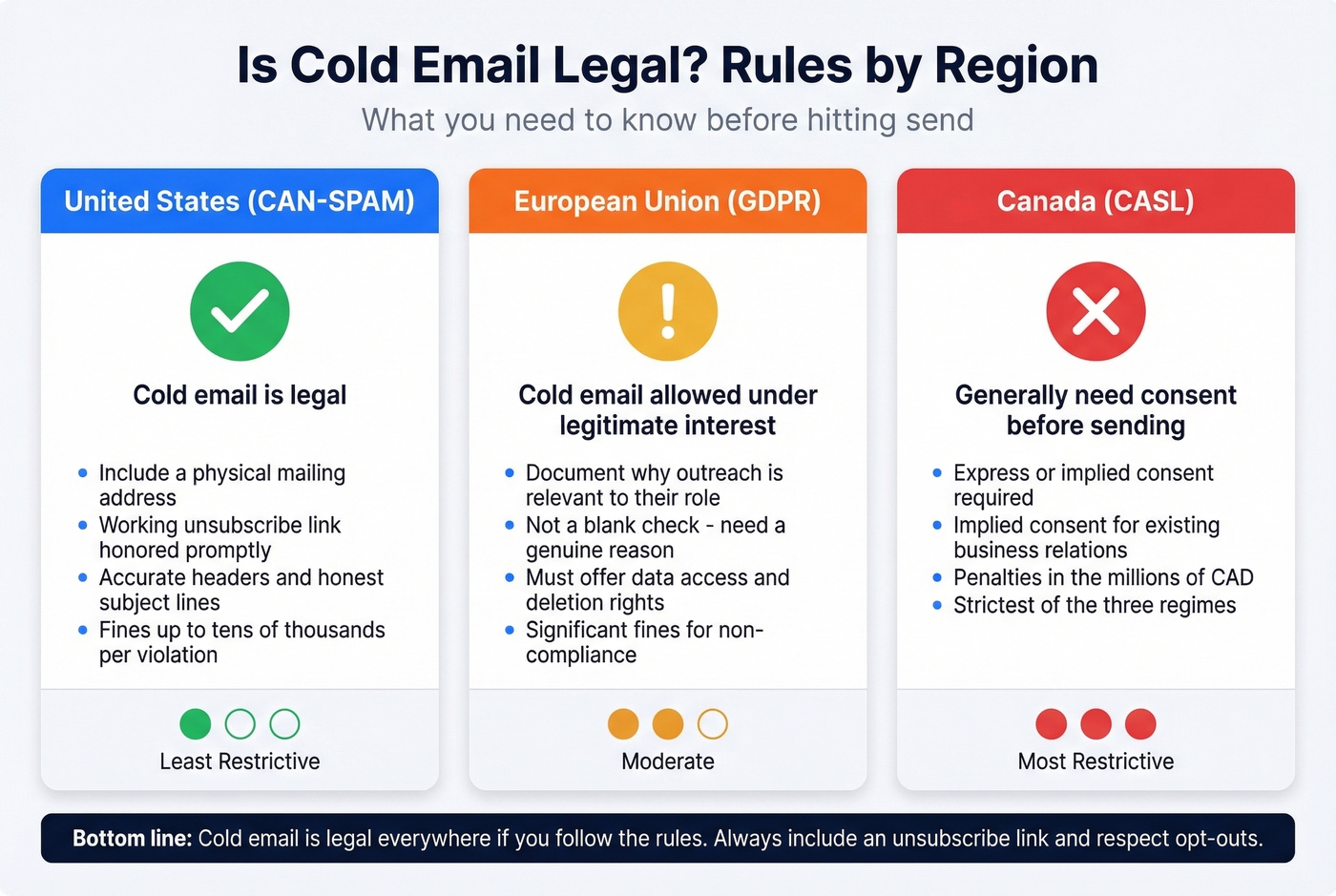
United States (CAN-SPAM): Cold email is legal. You must include a physical mailing address, a working unsubscribe link honored promptly, accurate headers, and honest subject lines. Fines can reach tens of thousands of dollars per violating email.
European Union (GDPR): You can cold email under legitimate interest, but you need to document why your outreach is relevant to the recipient's professional role. This isn't a blank check - you need a genuine reason, not just "they're a VP at a SaaS company."
Canada (CASL): The strictest of the three. You generally need express or implied consent before sending. Penalties run into millions of CAD. Implied consent exists for existing business relationships, but the bar is higher than CAN-SPAM.
Regardless of jurisdiction, stick to these basics: say who you are and why you're reaching out, make opting out easy and honor it immediately, personalize your messages, use reputable data sources, and clean your lists regularly. Generic blasts are both ineffective and legally riskier.
Ask Directly
When every other method fails - or when the prospect is high-value enough to warrant a personal touch - just ask. Send a message through the company's contact form. Reach out via social DMs or mutual connections. Ask for a referral from someone in your network who knows them.
This doesn't scale, obviously. But for a $200K deal, spending five minutes to get a warm introduction beats sending a cold email to a guessed address. Sometimes the low-tech approach is the right one.
FAQ
What's the most common corporate email format?
For small companies under 10 employees, first@domain is used 71.5% of the time. For enterprises with 10,000+ employees, first.last@domain dominates at 56.3%. Knowing headcount helps you guess correctly on the first try - check the company's profile page for employee count before guessing.
How do I find a CEO's email address?
Start with the company domain, not the company name - domain-based searches return dramatically more results. Enter the domain into an email finder tool, filter by title or seniority, and verify the result before sending.
Why do my prospecting emails keep bouncing?
Most likely cause: stale data. Email databases degrade fast as people change jobs and companies switch providers. Use a tool with frequent data refreshes (weekly, not monthly) and always verify before sending. If your bounce rate exceeds 3%, pause campaigns and clean your list immediately.
Is it legal to cold email someone whose address I found online?
In the US under CAN-SPAM, yes - include a physical address and working unsubscribe link. In the EU under GDPR, you need documented legitimate interest tied to the recipient's professional role. In Canada under CASL, you generally need express or implied consent. Know where your prospects are before sending.