

Follow Up Email for Meeting Confirmation: Templates, Timing & Tips
46% of professionals sit through three or more meetings every day. With a calendar that packed, forgetting a Tuesday demo or a Thursday strategy call isn't rude - it's inevitable. A well-timed follow up email for meeting confirmation is the difference between a productive meeting and a calendar ghost.
What You Need (Quick Version)
- Pre-meeting confirmation? Use the schedule-finalization template below. Send it at noon the day before and add a 48-72h touch for meetings booked far out.
- Post-meeting follow-up? Send a recap with action items within 24 hours.
- Neither getting replies? Check your subject line (under 50 characters, personalized) and verify the email address is valid before you hit send.
Confirmations, Reminders & Follow-Ups: Know the Difference
Mixing these up is how you end up sending a recap before the meeting happens.
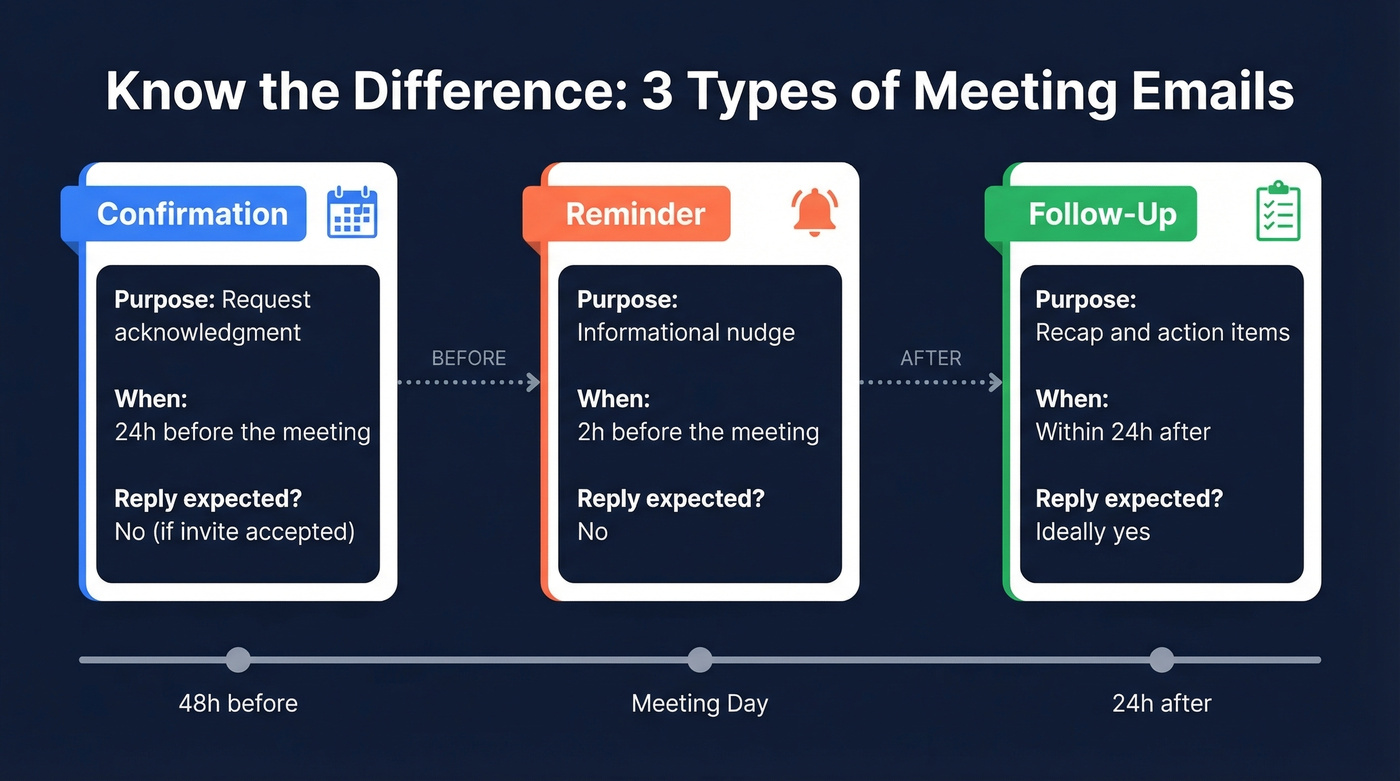
| Type | Purpose | When to Send | Expects Reply? |
|---|---|---|---|
| Confirmation | Request acknowledgment | 24h before | No (if invite accepted) |
| Reminder | Informational nudge | 2h before | No |
| Follow-up | Recap + action items | Within 24h after | Ideally yes |
Pre-Meeting Confirmation Templates
Formal Confirmation (Client or Executive)
Send this around noon the day before - late enough to feel timely, early enough for the recipient to flag conflicts.
Subject: Confirming our meeting - [Date] at [Time] [TZ]
Hi [Name],
Confirming our meeting tomorrow, [Date] at [Time] [Time Zone]. Here's the agenda: [one-line summary].
Location/Link: [insert]
Let me know if anything's changed on your end. Looking forward to it.
Best, [Your name]
Soft-Ask Confirmation (Sales Demo)
Here's the thing - asking "Are we still on?" gives permission to cancel. A statement works better than a question. We've sent hundreds of these, and the "finalizing my schedule" framing consistently outperforms any version that asks for permission. That's especially true in sales, where the prospect is already weighing whether the call is worth their time.
Subject: Tomorrow at 2pm - quick agenda
Hi [Name],
Finalizing my schedule for tomorrow and wanted to confirm our 2pm ET call. I'll walk through [specific demo topic] and leave time for questions.
Here's the link: [insert]
See you there, [Your name]
Low-pressure and effective - sales reps on r/sales swear by this framing.
Rescheduling Ask
Instead of a long apology, keep rescheduling emails to three elements: the conflict, two alternative times, and flexibility. Something like: "A conflict came up for [original time]. Could we shift to [Option A] or [Option B]? Happy to work around your schedule if neither works." That's it. No backstory needed.
All three templates assume one thing: the email actually reaches the recipient. If your confirmation bounces, the meeting was dead before it started. Prospeo's real-time email verification catches bad addresses before you send, so your message lands where it should.

Post-Meeting Follow-Up Templates
Recap With Action Items
Send this within 24 hours. Structure it as: thank, key decisions, action items with owners and deadlines, next meeting date. Keep it under 150 words.
Subject: Recap: [Meeting topic] - next steps
Hi [Name],
Thanks for the time today. Here's what we landed on:
- [Decision 1]
- [Decision 2]
Action items:
- [Task] - [Owner] by [Date]
- [Task] - [Owner] by [Date]
Next check-in: [Date/Time]. I'll send a calendar invite.
Best, [Your name]
Thank-You (Networking)
Subject: Great connecting - [specific reference]
Hi [Name],
Really enjoyed our conversation about [specific topic]. Your point about [detail] stuck with me.
Would love to continue the conversation - coffee next month?
Best, [Your name]
No-Response Nudge
Never write "just checking in." Treat the follow-up as part two of the pitch - add something the recipient can actually use.
Before: "Hi [Name], just checking in on our conversation. Any updates?"
After: "Hi [Name], wanted to share [case study/article] that ties into what we discussed on [day]. Thought it'd be useful as you evaluate [topic]. Happy to jump on a quick call if questions come up."
The second version gives a reason to reply. The first one doesn't.

A perfect confirmation email is worthless if it lands in a dead inbox. Prospeo's real-time email verification catches invalid addresses before you send, with 98% accuracy across 143M+ verified emails. Stop losing meetings to bounced confirmations.
Verify every email before your next meeting confirmation goes out.
When to Send Each Email
For pre-meeting emails, follow this cadence:
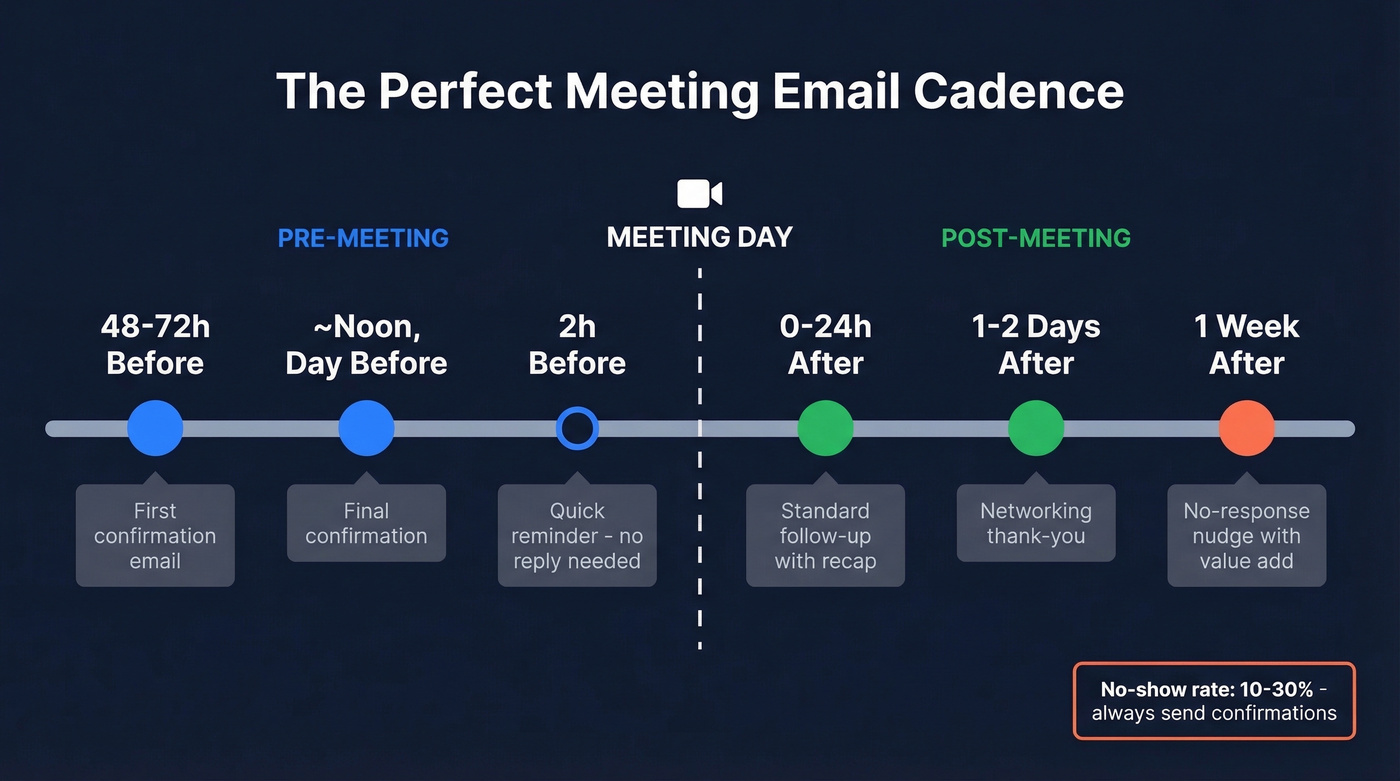
| Timeframe | Action |
|---|---|
| 48-72h before | First confirmation email |
| Noon, day before | Final confirmation |
| 2h before | Quick reminder (no reply needed) |
A common question: do you still need a confirmation after a calendar invite's been accepted? Yes. Calendar acceptances are often reflexive - a confirmation the day before re-engages the prospect and cuts no-shows significantly.
Post-meeting timing depends on context:
| Scenario | Send within |
|---|---|
| Standard follow-up | 24 hours |
| Networking | 1-2 days |
| No response | 1 week |
Subject Lines That Get Opened
Personalized subject lines deliver 26-50% higher open rates. Keep them at 33 characters or fewer for full mobile visibility. If you want more options, pull from these email subject lines and adapt them to the meeting context.
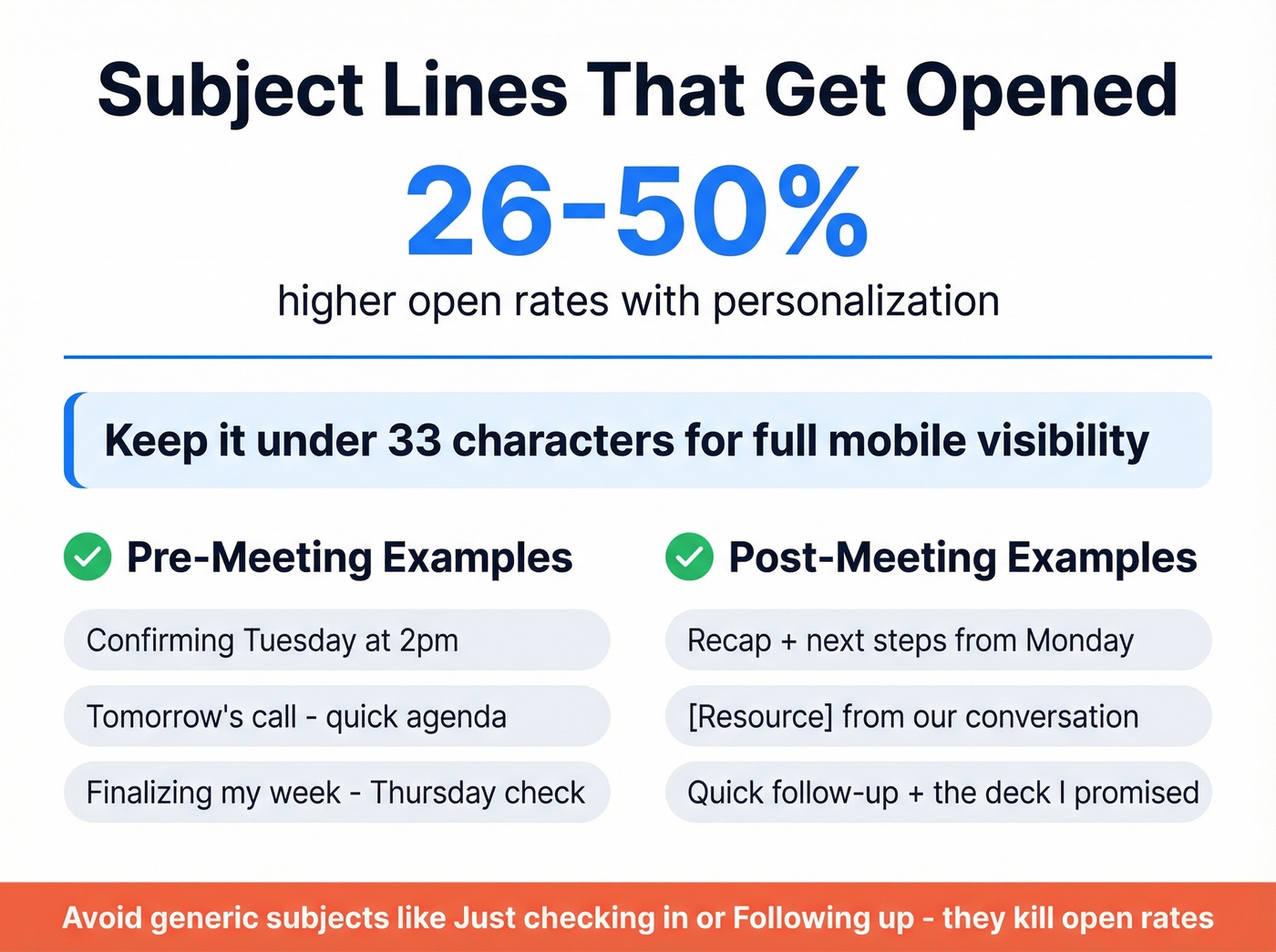
Pre-meeting: Confirming [Day] at [Time] · Tomorrow's call - quick agenda · Finalizing my week - [Day] check
Post-meeting: Recap + next steps from [Day] · [Resource] from our conversation · Quick follow-up + the deck I promised
Tone Tips
| Do | Don't |
|---|---|
| "Finalizing my schedule for tomorrow" | "Just checking in!" |
| Share a resource or insight | Send an empty "any updates?" |
| State the meeting time as fact | Ask "are we still on?" |
The fear of sounding desperate is real - but an empty "just checking in" is what actually sounds desperate. A follow-up with a resource attached sounds helpful. In our experience, the noon-day-before send consistently outperforms morning confirmations because it catches people during their afternoon planning window, right when they're mentally mapping tomorrow.
Let's be honest: if your average deal size is under $5k, skip the multi-touch reminder sequence entirely. One confirmation the day before and one follow-up after is plenty. Over-engineering the cadence signals you value the meeting more than they do - and that's a weak negotiating position.
When They Don't Reply
Business meeting no-show rates run 10-30%. Don't panic. Have a two-step plan.
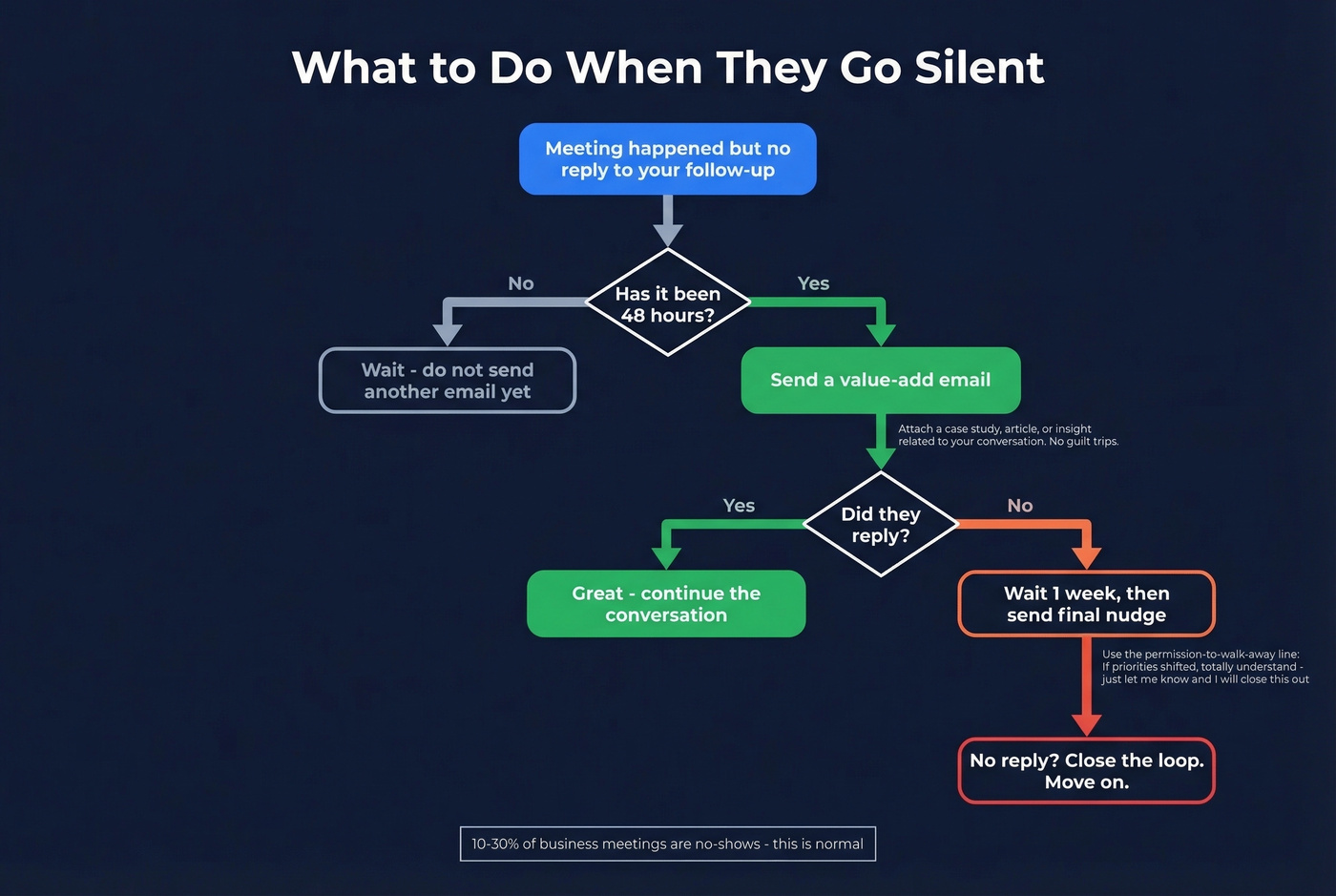
48 hours after silence, send a value-add email. Attach a case study or a short insight related to your conversation. No guilt trips. If you need copy you can swipe, use these sales follow-up templates.
One week later, send a final nudge with an easy out: "If priorities have shifted, totally understand - just let me know and I'll close this out." Giving permission to say no paradoxically increases reply rates. We've seen this work across dozens of outbound campaigns - the "permission to walk away" line almost always gets a response, even if it's a polite no.
No-shows often start with bad contact data - wrong email, outdated address, catch-all domain that silently swallows your follow-up. Prospeo's 5-step verification and 7-day data refresh ensure your meeting confirmations and recaps reach real people, every time.
Kill no-shows at the source: bad data. Fix it for $0.01 per email.
FAQ
Should I reply to a meeting confirmation email?
If the calendar invite's already accepted, no reply is necessary. A quick "See you then" is polite but not expected - the consensus on r/socialskills is to save the keystrokes for actual meeting prep.
How many follow-up emails is too many?
Two follow-ups after no response is the limit. Send a final "closing the loop" message with an easy out after that. Three total touchpoints, spaced 48 hours to one week apart, covers most scenarios without crossing into pushy territory.
What's the best time to send a meeting confirmation?
Noon the day before consistently outperforms morning sends because it catches recipients during their afternoon planning window. For meetings booked two or more weeks out, add a reminder 48-72 hours before as well.
How do I confirm a meeting without sounding pushy?
Frame it as a statement, not a question. "Looking forward to our call tomorrow at 2pm - here's the agenda" works better than "Are we still on?" And if you're not sure the address is valid, run it through an email verification tool first so your confirmation doesn't bounce into the void.