

Free Domain Reputation Check: 8 Best Tools (2026)
One in six legitimate emails never reaches the inbox. That's the reality behind the 83.5% global inbox placement rate from the latest Validity benchmark - and domain reputation is the single biggest reason emails vanish.
Running a free domain reputation check sounds simple enough. But "domain reputation" means completely different things depending on who you ask. Security teams use it to flag phishing domains. Email marketers use it to diagnose deliverability problems. Both need free tools, and both get confused when those tools spit out conflicting results.
Let's sort it out.
The Three-Tool Shortcut
Check three tools and you'll cover 80% of what matters. Google Postmaster Tools shows your Gmail reputation directly, assuming you have enough volume. MxToolbox checks your domain against major blacklists. Talos Intelligence gives you a security reputation grade - Good, Neutral, or Poor. No single free checker gives you the full picture because each inbox provider scores you independently, but these three together get you close.
What Domain Reputation Actually Means
Domain reputation is a score that inbox providers and security filters assign to your sending domain based on historical behavior. But there's a critical distinction most guides skip: domain reputation and IP reputation aren't the same thing.
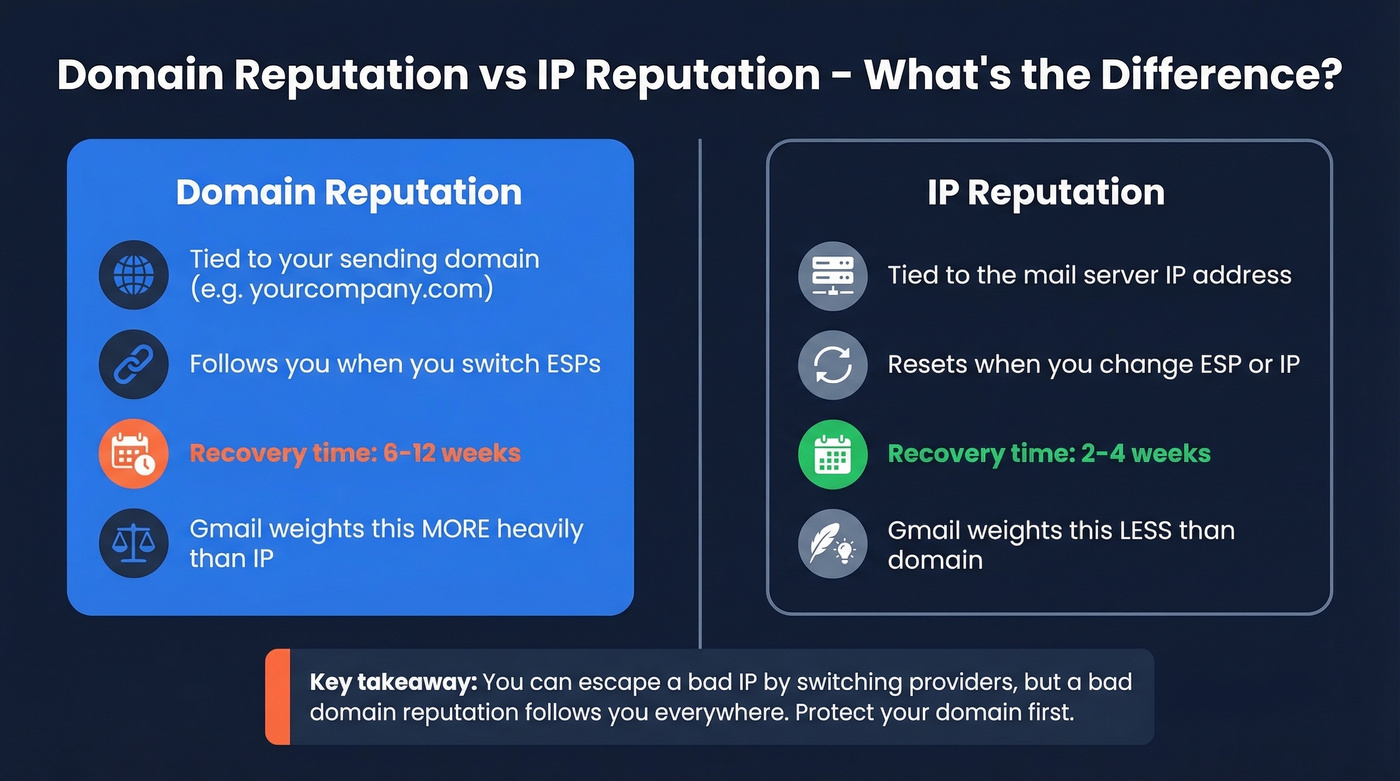
IP reputation is tied to the mail server sending your messages. Switch ESPs, and you get a new IP with a clean slate. Domain reputation follows you everywhere - it's portable and persistent. Gmail weights domain reputation more heavily than IP because domains are a more stable identifier than IPs, which change constantly.
The recovery timelines tell the story. A damaged IP reputation typically recovers in 2-4 weeks of clean sending. A damaged domain reputation? Expect 6-12 weeks. And here's what trips people up: each mailbox provider maintains its own score. Your Gmail reputation can be "High" while your Outlook reputation is tanked. There's no universal number.
One more thing most guides miss entirely: reputation isn't just about your "From" domain. Inbox providers evaluate multiple domain identifiers in every email - your Return-Path domain, DKIM signing domain, and even link domains in the message body. If your tracking links point to a domain with a bad reputation, that drags down deliverability even if your sending domain is clean.

A damaged domain reputation takes 6-12 weeks to recover. The fastest fix? Stop sending to bad emails. Prospeo's 5-step verification and 98% email accuracy keep bounce rates under 4% - the same result Snyk saw across 50 AEs and Stack Optimize maintained across every client domain.
Fix your reputation at the source - start with data that doesn't bounce.
8 Best Free Domain Reputation Check Tools
| Tool | What It Checks | Best For | Free Limits | Registration? |
|---|---|---|---|---|
| Google Postmaster | Gmail deliverability + compliance | Gmail senders | No fixed cap; needs mail volume | Yes (domain verify) |
| MxToolbox | Blacklists + domain/email health | Quick blacklist scan | 1 monitor (top 30 blacklists); 1 health check/day | No |
| Talos Intelligence | Security reputation grade | Corporate filter reputation | Unlimited lookups | No |
| Spamhaus | Domain reputation + blocklists | Spam blocklist check | Unlimited lookups | No |
| EasyDMARC | IP/domain blacklists | Fast multi-list scan | Unlimited | No |
| VirusTotal | Malware/phishing signals | Security investigation | 4 lookups/min | No |
| Sender Score | Aggregated 0-100 | Overall reputation | Free (lead-gated) | Yes |
| Microsoft SNDS | IP reputation + complaint data | Microsoft ecosystem | Unlimited | Yes |
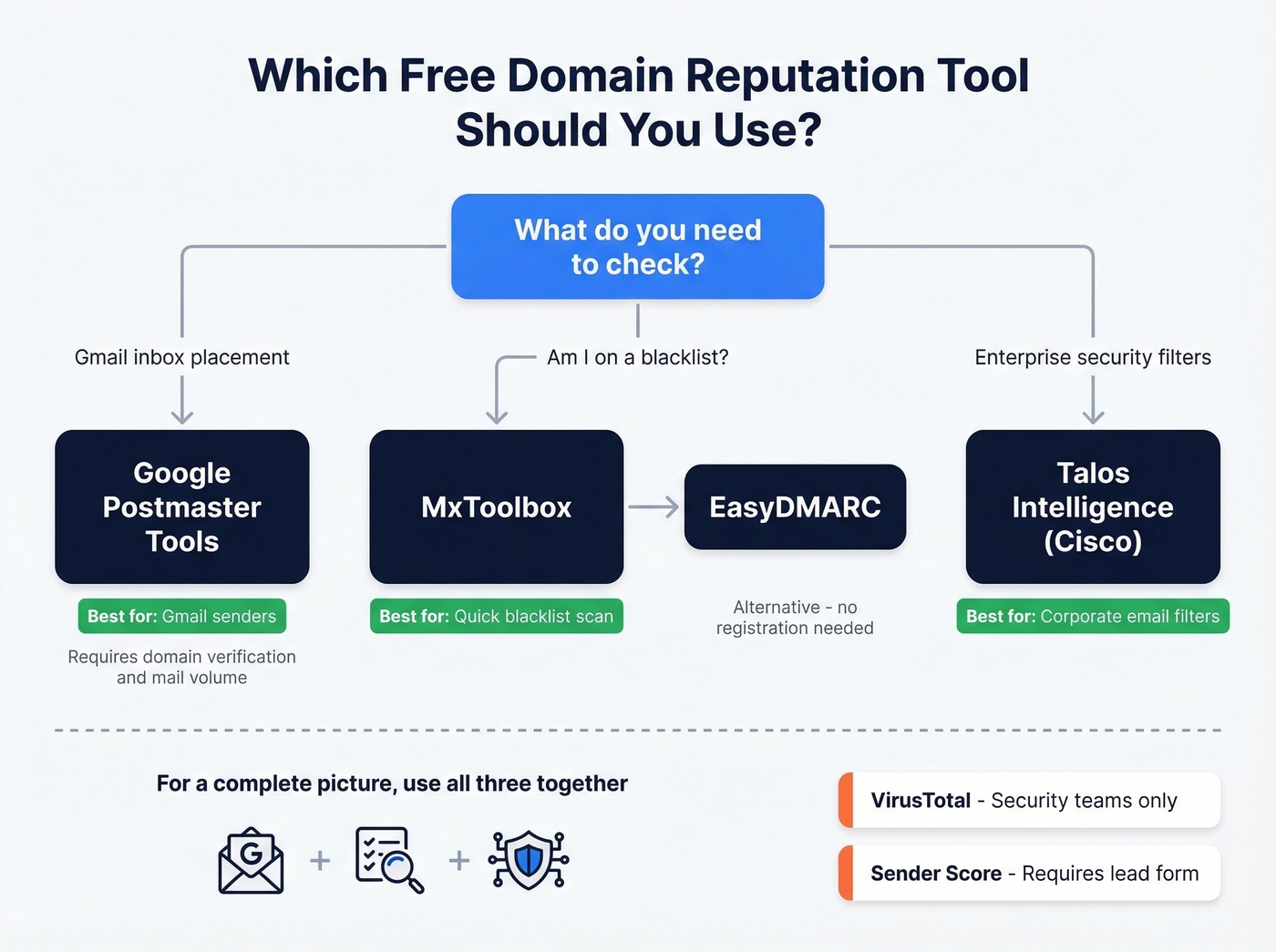
Sender Score requires filling out a lead form before you see results - worth it for the 0-100 aggregate score, but you're trading your contact info.
Google Postmaster Tools
This is the most important tool if you send to Gmail - which, for most B2B teams, is a huge chunk of the list. You'll need to verify domain ownership and send enough volume for Google to surface data.
Google deprecated Postmaster Tools v1 on September 30, 2025, replacing the familiar domain and IP reputation charts with a Compliance Status dashboard. The new system runs pass/fail checks aligned with Gmail's sender guidelines: SPF, DKIM, DMARC, TLS, one-click unsubscribe, and spam complaint rate under 0.3%.
Classic Google move - replace something simple with something "better" that requires relearning everything. The old reputation bars were imperfect, but they were intuitive. The new Compliance Status is more actionable because it tells you exactly what's broken, but if you're used to checking a "High/Medium/Low" grade, that's gone. You're now looking at a checklist.
MxToolbox
The fastest way to check if you're on a blacklist. No registration, results in seconds. The free plan includes one monitor covering the top 30 blacklists, and paid plans scale from there depending on how many monitors and how broad you want coverage to be.

For a one-time gut check, the free tier is plenty. If you do land on a blacklist, most operators have a delisting request form directly on their site - start there.
Talos Intelligence (Cisco)
Here's the thing about Talos: "Neutral" doesn't mean you're fine. It usually means Cisco doesn't have enough data on your domain to form an opinion, which is common for low-volume senders. The grades - Good, Neutral, or Poor - matter most for corporate email filters like Cisco Secure Email and IronPort. If you're selling to enterprises behind those filters, this is the reputation that gates your emails.
VirusTotal
Reddit users in r/cybersecurity call VirusTotal's free tier rate limit - 4 lookups per minute - "a nightmare" for automated workflows. Fair. But for manual spot checks, nothing beats it: dozens of security engines in a single query, making it one of the broadest free scans for malware and phishing reputation. Security teams also commonly use URLScan.io and AbuseIPDB for deeper domain investigation.
Skip These If...
You're a marketer who just wants to know why Gmail is junking your emails? Skip VirusTotal and Spamhaus - they're security-focused tools that won't tell you much about inbox placement. Start with Google Postmaster and MxToolbox, then add Talos if you sell to enterprises.
Why Your Tools Disagree
You'll run your domain through three tools and get three different answers. This isn't a bug.
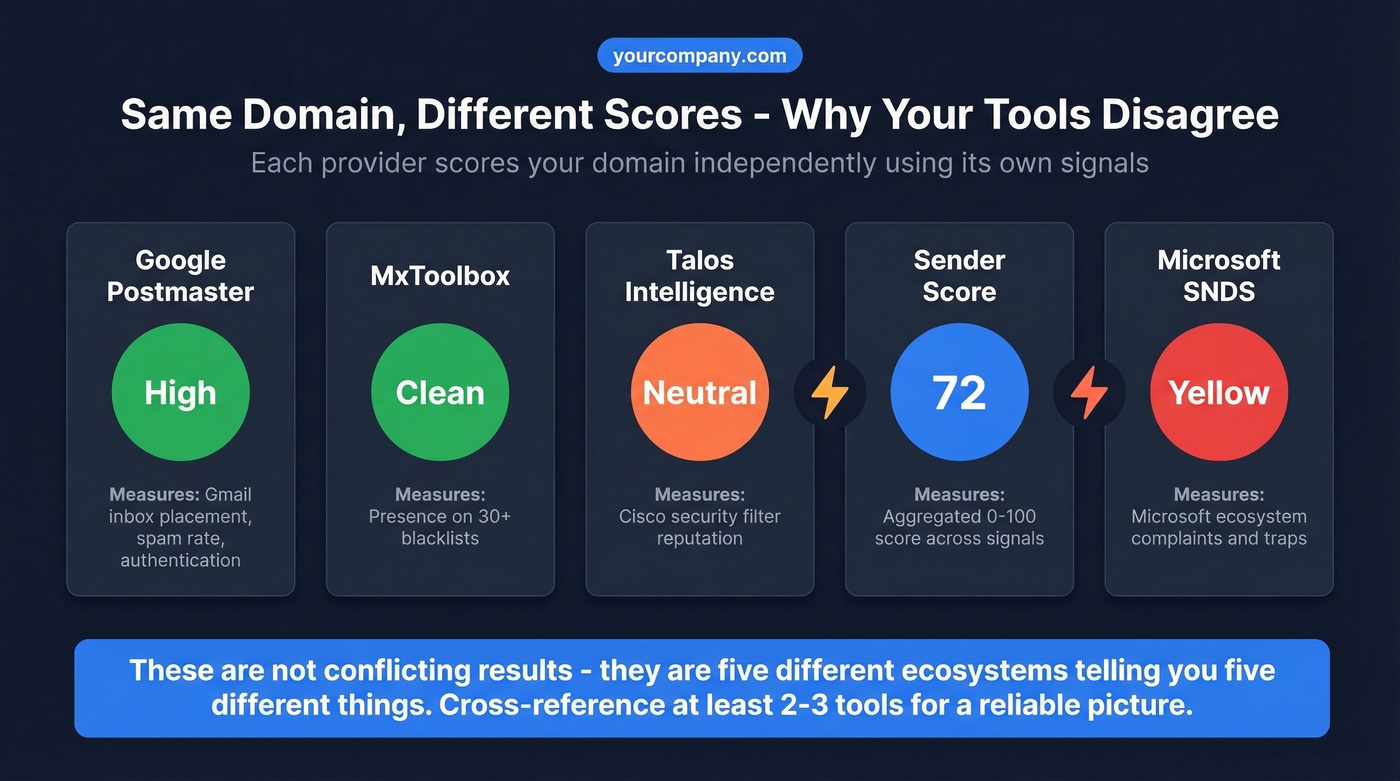
Each inbox provider and security filter calculates reputation independently using its own signals and thresholds. Google Postmaster only reflects Gmail. Microsoft SNDS reflects Microsoft's ecosystem. Spamhaus maintains blocklists that many systems use as an input signal. Yahoo Postmaster covers Yahoo recipients, and Barracuda and McAfee maintain separate corporate filter databases that don't always line up with mailbox-provider views.
We've found that the tools that disagree most often are Talos and Google Postmaster - they're measuring completely different things for completely different audiences. The standard workflow on r/cybersecurity is to use a multi-tool approach rather than trusting any single score. That's the right call. If Talos says "Neutral" and Google Postmaster says "High," you don't have conflicting data. You have two providers telling you two different things about two different ecosystems.
How to Fix a Bad Domain Reputation
Most domain reputation problems aren't sending problems - they're data problems. Fix the data and the reputation follows. We've seen this pattern over and over with outbound teams who come to us after burning a domain on bad contact lists.
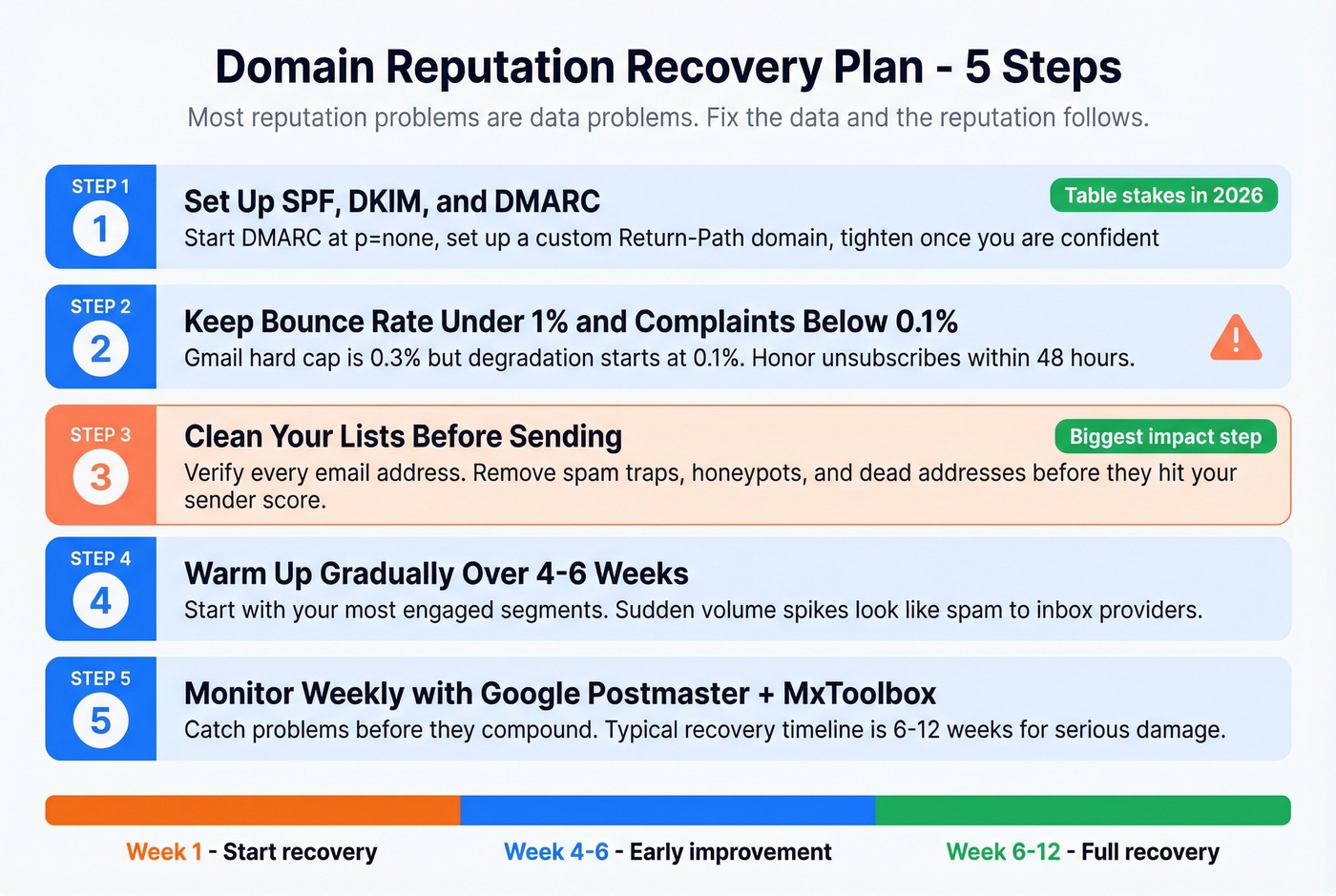
1. Implement SPF, DKIM, and DMARC. Table stakes in 2026. Gmail, Yahoo, and Microsoft all require them for bulk senders. Start DMARC at p=none, set up a custom Return-Path domain, and tighten once you're confident in your authentication.
2. Keep bounce rate under 1% and spam complaints below 0.1%. Gmail's hard cap is 0.3%, but anything above 0.1% starts degrading reputation. Honor unsubscribes within 48 hours.
3. Clean your lists before sending. Bad contact data is the most common root cause of reputation damage. Spam traps, honeypots, and dead addresses all torch your domain - and they're invisible until the damage is done. One of our customers, Stack Optimize, went from zero to $1M ARR while maintaining 94%+ deliverability and under 3% bounce rates across all their clients by verifying every address before it entered a sequence. That's not a coincidence.

Prospeo's 5-step verification catches invalid addresses, spam traps, and honeypots before they hit your sender score - with 98% email accuracy and a free tier of 75 verifications per month.
4. Warm up gradually and send consistently. Sudden volume spikes look like spam. If you're recovering, ramp slowly over 4-6 weeks with your most engaged segments first. (If you need a framework, start with safe email velocity limits.)
5. Monitor weekly. Run Google Postmaster + MxToolbox checks every week. We've seen domains recover in as little as 4-6 weeks when teams nail list hygiene and authentication simultaneously, but the typical timeline is 6-12 weeks for serious damage. For a deeper stack, compare more email reputation tools and add a dedicated email spam checker to catch content issues early.
Every blacklist hit traces back to the same root cause: bad contact data. Prospeo refreshes 300M+ profiles every 7 days and removes spam traps, honeypots, and catch-all dead ends before you ever hit send. At $0.01 per email, clean data costs less than one delisting headache.
Stop checking blacklists. Start sending to emails that actually exist.
FAQ
How often should I check domain reputation?
Weekly if you're actively sending outbound or marketing email. Check immediately after any campaign with unusual bounce rates or complaint spikes. Consistent monitoring catches problems before they compound into weeks-long recovery cycles.
What's a good domain reputation score?
There's no universal number - each provider uses its own scale. Google Postmaster uses Low/Medium/High (aim for High). Sender Score uses 0-100 (aim for 80+). Talos grades Good/Neutral/Poor. Cross-reference at least two tools for a reliable picture.
Can I check domain reputation free without signing up?
Yes. Talos Intelligence, EasyDMARC, and MxToolbox all allow instant lookups with no registration. Sender Score requires a lead form, and Google Postmaster requires domain verification through your Google account.
How does bad contact data hurt domain reputation?
Sending to invalid addresses, spam traps, and honeypots spikes your bounce rate and triggers blocklist flags - the two fastest ways to tank sender reputation. Verifying emails before you send keeps bounce rates under 1% and protects your domain long-term.