

GoDaddy Email Deliverability: Fix It in 2026
You send a proposal to a prospect. It never arrives. You call GoDaddy support, and they tell you to "ask the recipient to whitelist your domain." That's not a fix - that's a shrug. GoDaddy says it's Microsoft's problem. Microsoft says it's GoDaddy's problem. Meanwhile, your emails are tanking and deals are dying in your outbox.
Here's the thing: most of these problems are fixable in under an hour. The diagnosis is the hard part, because GoDaddy runs two completely different email products under one brand, and the authentication setup for each is different. Grab the wrong SPF record from the wrong help article and you'll silently break delivery for every message you send.
Start with three steps:
- Confirm which GoDaddy email product you're on - Workspace Email and Microsoft 365 from GoDaddy use completely different authentication records.
- Check your SPF/DKIM/DMARC with MXToolbox using the correct records for your specific product.
- Read your bounce-back message - the NDR tells you the exact cause. Don't skip it.
Which GoDaddy Email Product Are You On?
This is the #1 reason GoDaddy emails fail. Users don't know which product they're running, so they configure the wrong authentication records. GoDaddy's documentation is fragmented across dozens of help articles, and it's easy to grab the wrong SPF record from the wrong page.
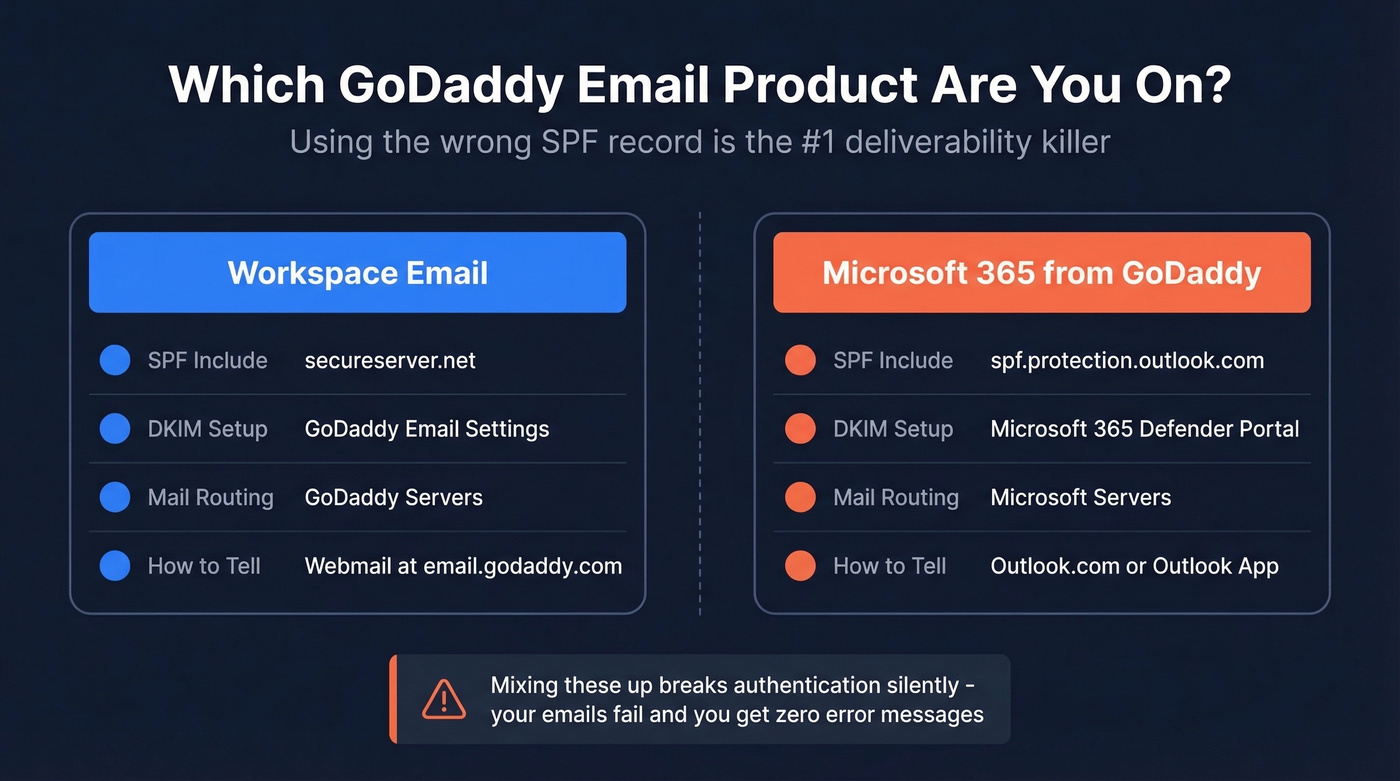
| Workspace Email | Microsoft 365 from GoDaddy | |
|---|---|---|
| SPF include | secureserver.net |
spf.protection.outlook.com |
| DKIM setup | GoDaddy email settings | Microsoft 365 Defender portal |
| Mail routing | GoDaddy servers | Microsoft servers |
| Common tell | Webmail at email.godaddy.com | Outlook.com or Outlook app |
Using secureserver.net in your SPF when you're actually on Microsoft 365? Your emails will fail authentication silently. We've seen this exact misconfiguration more times than we can count - it's the single most common GoDaddy deliverability issue we help people debug.
Fix Your Email Authentication Records
Since February 2024, Google and Yahoo require DMARC for bulk senders (5,000+ emails/day). In 2026, non-compliant messages are increasingly rejected at the SMTP level, which shows up as hard bounces instead of quiet spam-folder placement.
Even if you're only sending a handful of emails a day, proper authentication is still table stakes.
| Record | Workspace Email | Microsoft 365 from GoDaddy |
|---|---|---|
| SPF | v=spf1 include:secureserver.net -all |
v=spf1 include:spf.protection.outlook.com -all |
| DKIM | Enable in GoDaddy email settings | Enable in Microsoft 365 Defender |
| DMARC | v=DMARC1; p=none; rua=mailto:you@yourdomain.com |
Same |
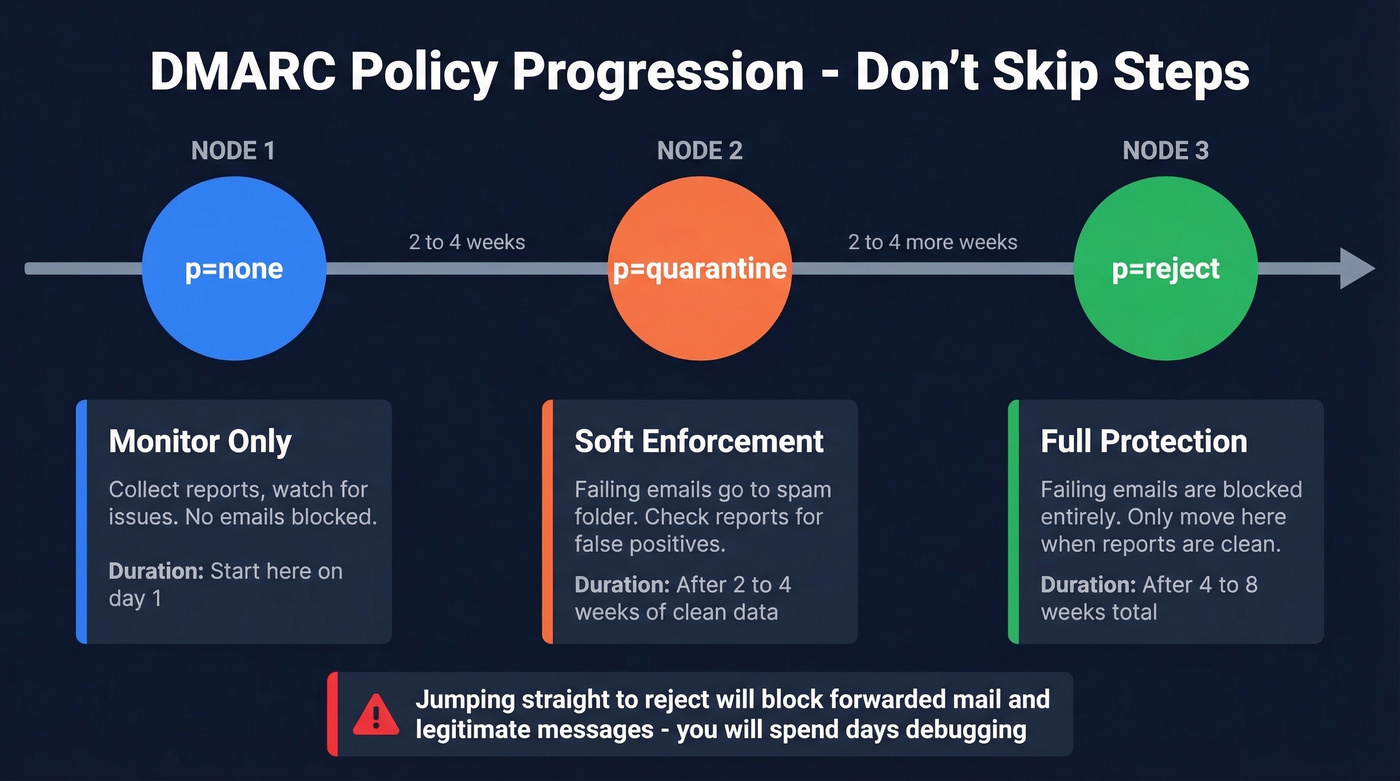
Start DMARC at p=none so you can monitor without breaking anything. After 2-4 weeks of clean reports, move to p=quarantine, then p=reject. Don't jump straight to reject - you'll block legitimate forwarded mail and spend a week figuring out why your accountant stopped getting invoices.
SPF, DKIM, and DMARC are necessary but not sufficient. If your hosting is compromised, your IP is blocklisted, or your bounce rate is above 2%, perfect authentication won't save you.
Provider-Specific Blocks
Gmail and Yahoo Rejections
If Yahoo, AOL, AT&T, or Gmail suddenly start rejecting your emails after days of working fine, it's almost certainly a reputation drop or blocklist hit - not a configuration change you made. Keep your bounce rate under 1% and spam complaints under 0.1%. Check Google Postmaster Tools for your domain reputation.
Microsoft / Outlook Blocks
We've walked dozens of GoDaddy users through this exact workflow:
- Confirm SPF/DKIM/DMARC are correct for your product (see table above).
- Find the blocked sending IP from your bounce-back headers.
- Go to sender.office.com and submit a delist request with that IP and your email address.
- Wait 24-48 hours and retest.
One user on Microsoft's Q&A forum confirmed delivery started working after following these steps. The delist form is the key - without it, you're just waiting and hoping.

You just fixed SPF, DKIM, and DMARC. Don't waste it by emailing addresses that bounce. Prospeo's 5-step verification catches catch-all domains, spam traps, and honeypots before they tank your sender reputation - at 98% accuracy and $0.01 per email.
Clean your list before your next send. 75 free verifications included.
Hidden Causes Most Guides Miss
Most guides stop at SPF/DKIM/DMARC. Here are three causes they skip entirely.
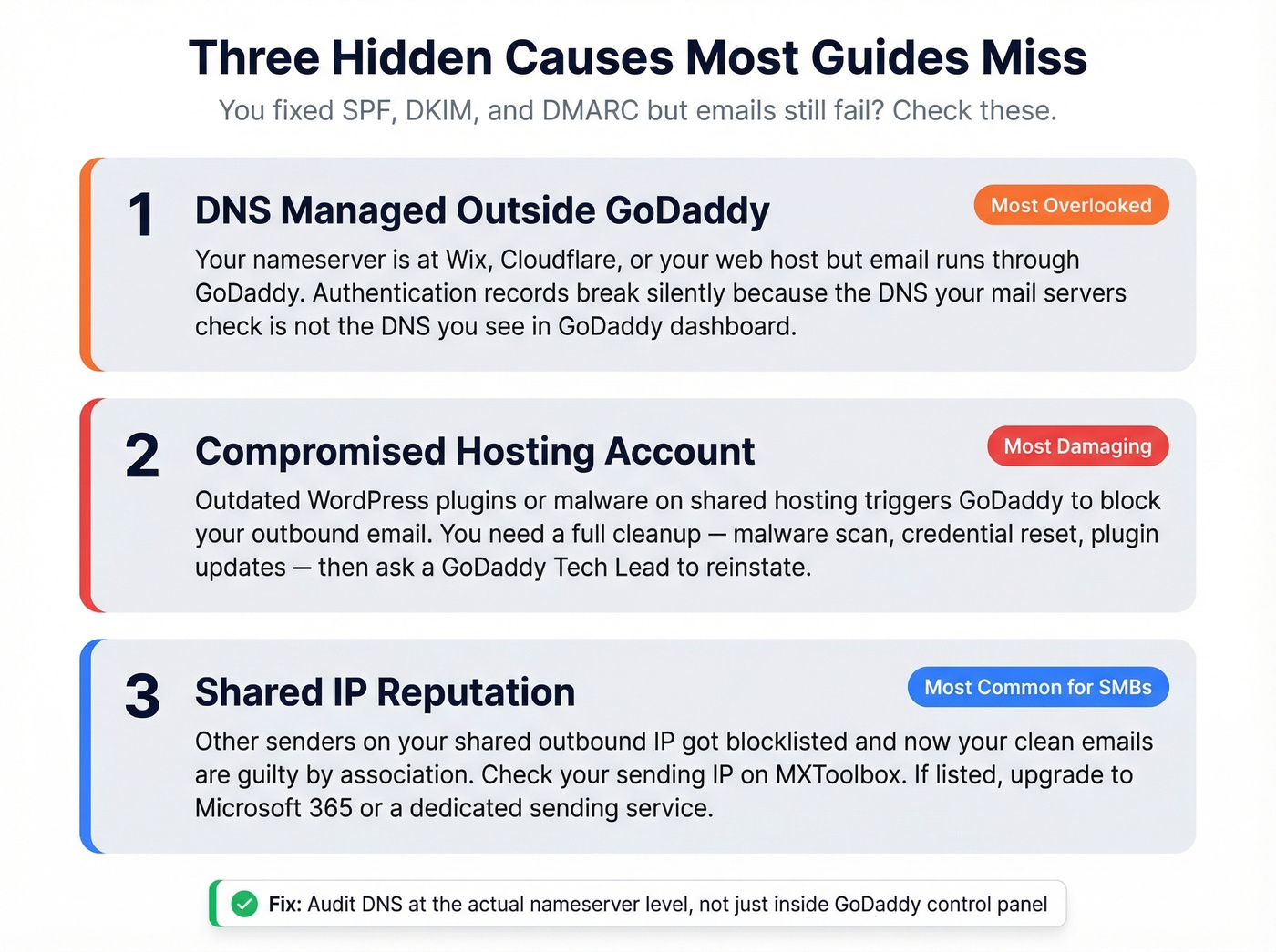
DNS Managed Outside GoDaddy
One business on r/webhosting spent weeks bouncing between GoDaddy and Microsoft support over Gmail/Yahoo rejections. The fix? They moved DNS management off Wix and back to GoDaddy. Everything worked "flawlessly" after that.
When your DNS is managed by a third party - Wix, Cloudflare, your web host - but email runs through GoDaddy, authentication records often break in ways that aren't obvious from inside one dashboard. Audit your DNS records at the actual nameserver level, not just in GoDaddy's control panel. The two don't always match, and the nameserver is what receiving mail servers actually check.
Compromised Hosting
GoDaddy will block your outbound email if your hosting account has been compromised and is sending spam. This is more common than people think, especially on shared WordPress hosting with outdated plugins. The fix is a full cleanup: run a malware scan, reset all credentials, update plugins and themes, remove malicious files, add CAPTCHA to forms, then contact GoDaddy support and ask a Tech Lead to reinstate email.
Shared IP Reputation
Many SMB email services use shared sending infrastructure, which means your mail can be affected by other senders on the same outbound IP range. Check your sending IP against blocklists using MXToolbox. If the IP is listed and you can't get it delisted, upgrade to Microsoft 365 from GoDaddy or use a dedicated sending service.
Clean Your Contact List
You just spent an hour fixing authentication. Don't undo it by sending to unverified addresses.
A bounce rate above 2% is a red flag that triggers filtering and blocks. Spam traps and catch-all domains are the hidden killers - they look like real addresses but exist solely to flag careless senders. One bad batch can undo weeks of reputation building.
Let's be honest: if your deliverability problems keep coming back despite clean authentication, bad contact data is almost always the real culprit - not GoDaddy's infrastructure. We've seen teams fix every DNS record perfectly and still land in spam because 8% of their list was dead addresses. Prospeo's email verification catches these before they tank your sender reputation, handling catch-all domains, spam traps, and honeypots at 98% accuracy. The free tier gives you 75 verifications per month - enough to clean a small list before your next send.
Diagnostic Toolbox
| Tool | What It Checks | Cost |
|---|---|---|
| MXToolbox | SPF/DKIM/DMARC, blocklists | Free; Delivery Center from $129/mo |
| mail-tester | Spam score for a test email | Free |
| Google Postmaster Tools | Domain reputation, spam rate | Free |
| Microsoft SNDS | IP reputation with Outlook | Free |
| Sender Score | Sending IP reputation | Free |
| GlockApps | Inbox placement across providers | From ~$85/mo |
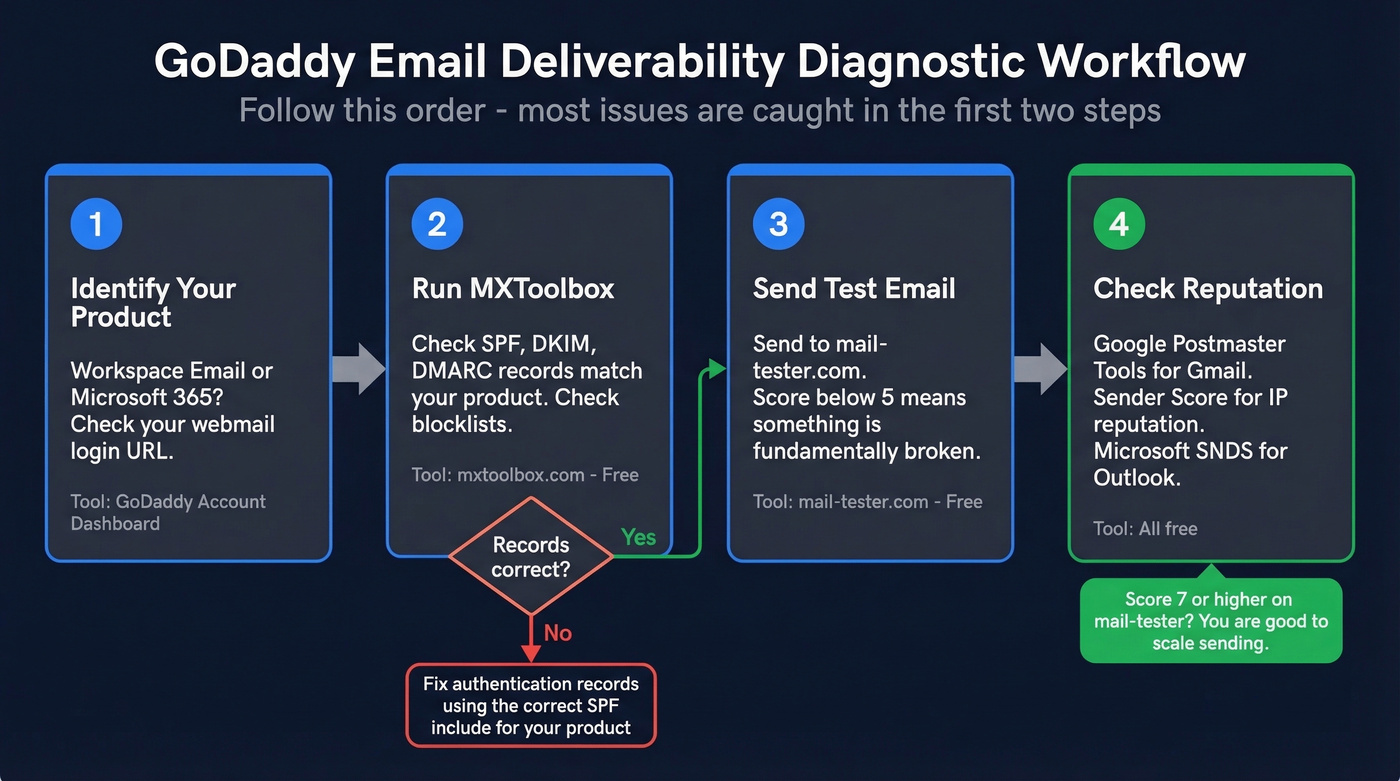
Run MXToolbox first - it catches common authentication and DNS issues in one check. Then send a test through mail-tester. Aim for 7/10+ before you scale sending. If you're below 5, something is fundamentally broken and you should go back to the authentication tables above.
FAQ
How long does it take to fix GoDaddy email deliverability?
Most authentication fixes take under an hour. If your domain reputation is damaged, expect 2-4 weeks of warm-up for a new domain, or 8-12 weeks to recover fully. Start with 5-10 emails per day and increase gradually.
Why did my GoDaddy emails suddenly start bouncing?
The February 2024 Google/Yahoo authentication enforcement raised the bar for all senders. If your SPF, DKIM, and DMARC weren't configured - or were set for the wrong GoDaddy product - emails can start failing overnight. This is the single most common cause of "it was working fine until it wasn't."
Can bad contact data hurt my sender reputation?
Absolutely. Sending to invalid addresses, spam traps, or catch-all domains inflates your bounce rate and destroys sender reputation fast. Verify your list before every campaign - even a small percentage of bad addresses compounds quickly when mailbox providers are watching your bounce rate in real time.
Should I switch from GoDaddy Workspace to Microsoft 365?
If you're on Workspace Email and consistently hitting shared-IP blocklists, upgrading to Microsoft 365 from GoDaddy gives you better sending infrastructure and more granular authentication controls. For teams sending 50+ outbound emails daily, the upgrade typically pays for itself in recovered deliverability. Skip this if you're only sending a few emails a day to known contacts - Workspace is fine for that.
Perfect DNS records won't save you if 8% of your list is dead addresses. Prospeo verifies emails against catch-all domains, spam traps, and honeypots with 98% accuracy - refreshed every 7 days, not 6 weeks. Keep your bounce rate under 1% without the guesswork.
Stop fixing deliverability issues caused by bad data. Fix the data.