

How Long Do SPF Records Take to Propagate?
You changed your SPF record four hours ago and it's still not showing up. The answer plastered across every DNS article - "24-48 hours" - is usually wrong.
The Short Answer: Usually 1-2 Hours
Most SPF changes appear within 1-2 hours. Low-TTL records can update in minutes. Technically, DNS doesn't "propagate" at all - old cached records simply expire. But the practical question remains the same.
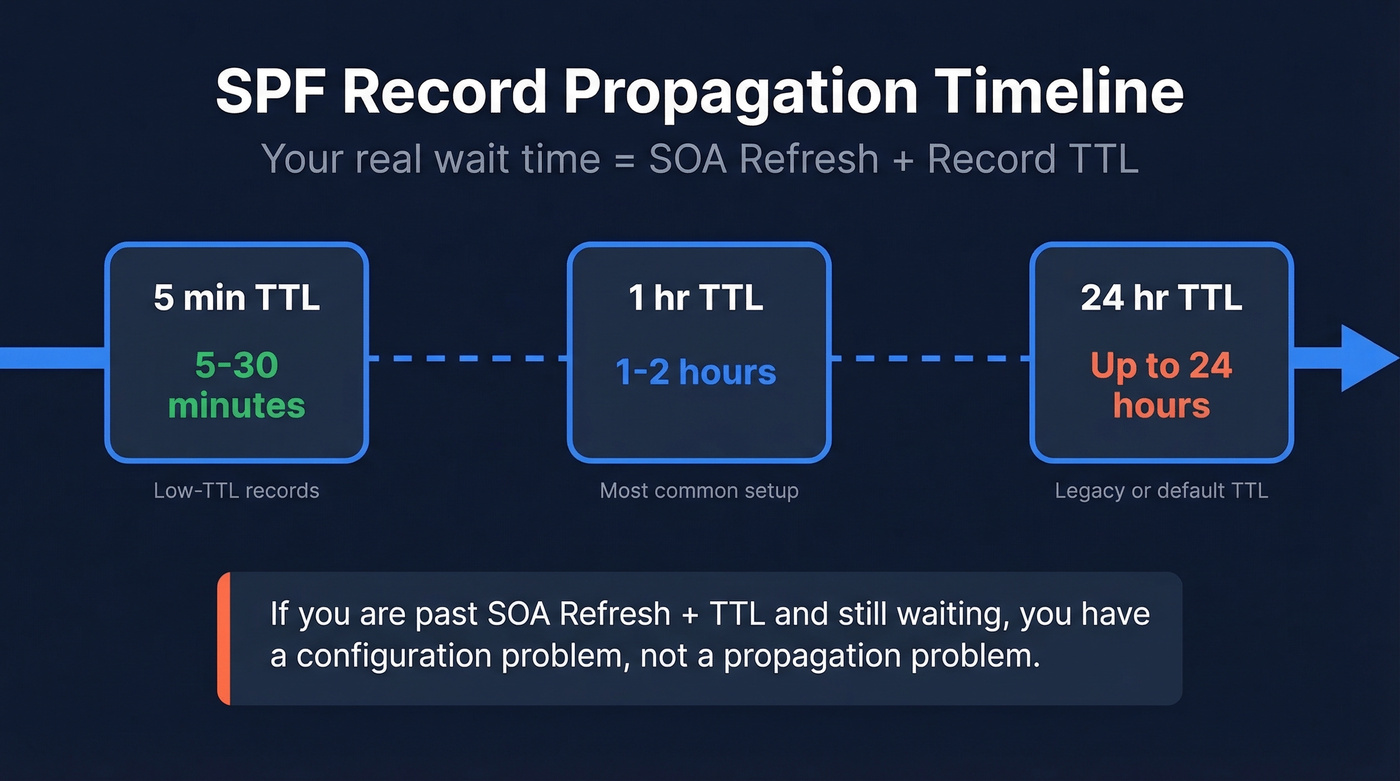
Your real wait time is bounded by the SOA Refresh interval + the record's TTL. If you're past that window, you don't have a propagation problem. You have a configuration problem.
| Record TTL | Typical Wait |
|---|---|
| 300s (5 min) | 5-30 minutes |
| 3600s (1 hr) | 1-2 hours |
| 86400s (24 hr) | Up to 24 hours |
Per Valimail's DNS propagation breakdown, authoritative changes sync via zone transfers at the SOA Refresh interval, often 30 minutes to a couple of hours. DNS Notify can cut that to seconds. After that, caching resolvers hold the old answer until TTL expires. That's the whole story - SPF propagation timing is almost entirely a function of these two values.
Why New SPF Records Take Longer
Creating a brand-new SPF record behaves differently than modifying an existing one. Here's the thing: if a resolver previously queried your TXT records and got nothing back, it cached that "does not exist" response.
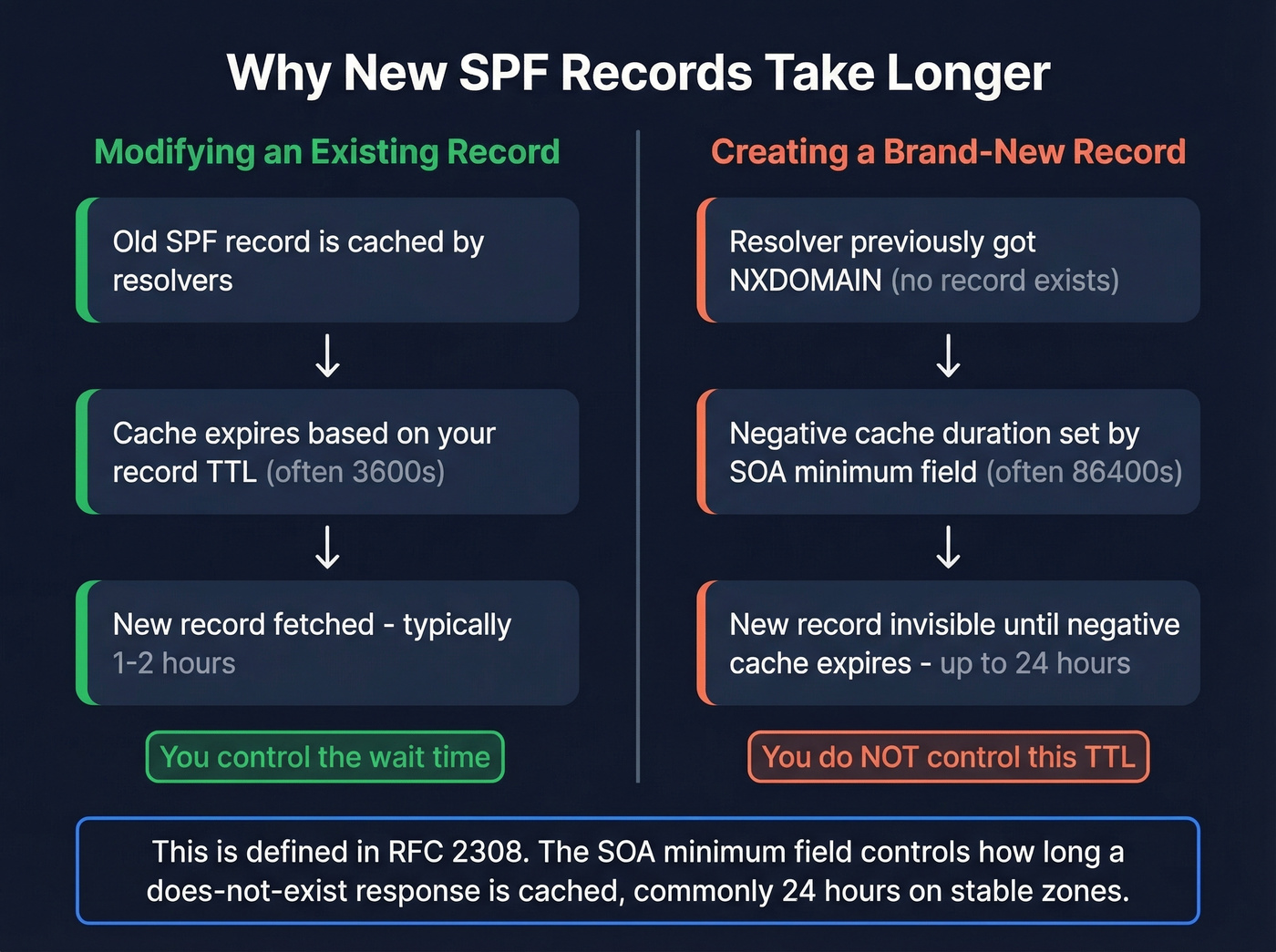
This is negative caching, defined in RFC 2308. The duration isn't controlled by your record's TTL - it's controlled by the SOA minimum field (repurposed as the negative TTL), which is commonly set to 86400 seconds on stable zones. This is the one scenario where "24 hours" is actually accurate, and it catches people off guard constantly.
How to Check Propagation
Query multiple resolvers. Don't rely on one tool.
dig TXT example.com @8.8.8.8
dig TXT example.com @1.1.1.1
If Google's resolver shows the new record but Cloudflare's doesn't, you're watching normal cache expiration. If neither shows it, the problem is upstream. WhatsMyDNS queries many resolvers worldwide, and MXToolbox validates your SPF syntax - a record that exists but fails parsing is worse than no record at all.
The same approach applies when checking DKIM DNS propagation. Query the specific selector record (e.g., dig TXT selector._domainkey.example.com) against multiple resolvers to confirm it's updated everywhere.

SPF propagation protects your sending infrastructure, but one bad list can undo all that work. Prospeo's 5-step verification catches spam traps, honeypots, and catch-all domains before they torch your domain reputation. 98% email accuracy at ~$0.01/email.
Don't let dirty data wreck the deliverability your SPF record just fixed.
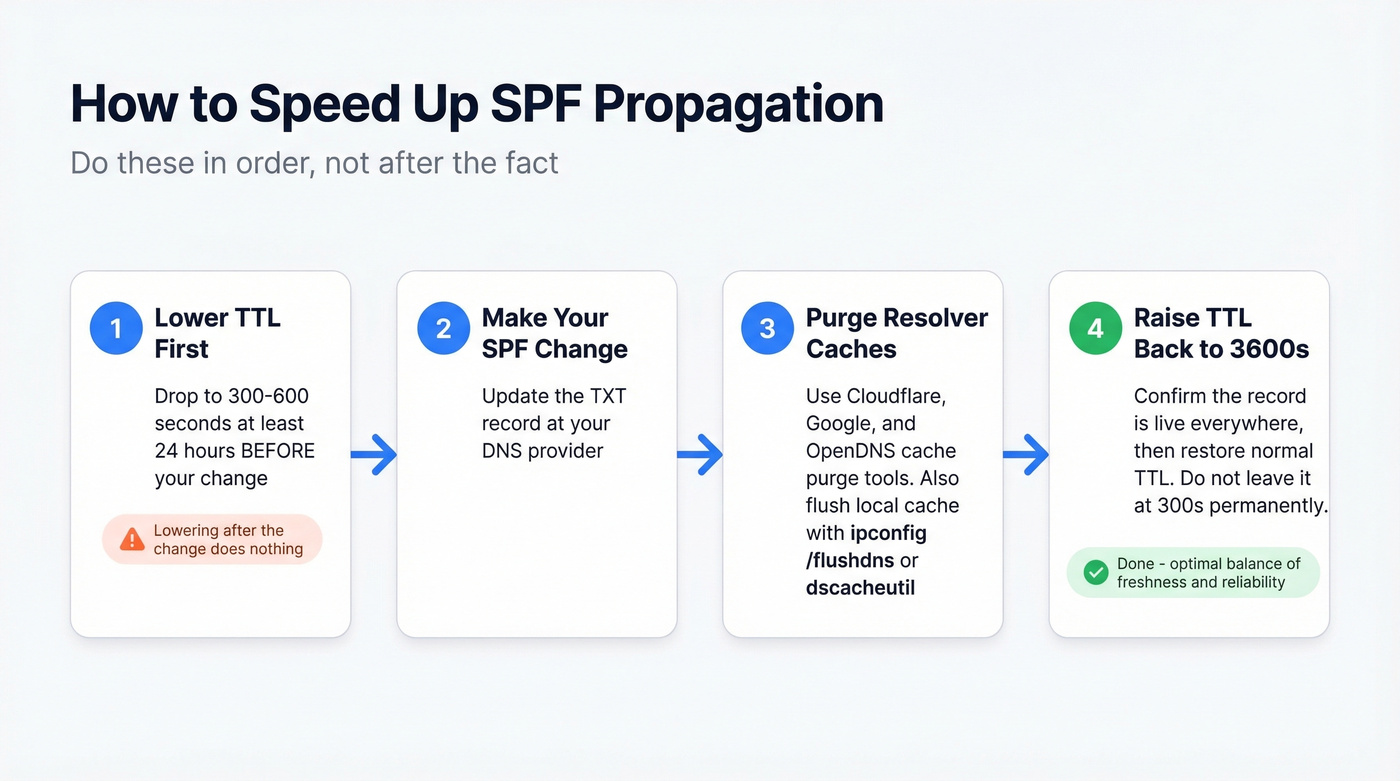
How to Speed Up SPF Propagation
- Lower your TTL before making changes. Drop it to 300-600 seconds at least 24 hours in advance. Lowering it after the change does nothing - resolvers already cached the old record at the old TTL.
- Purge public resolver caches. Cloudflare, Google, and OpenDNS all offer cache purge tools. This only helps recipients using those specific resolvers - it won't flush every ISP's cache.
- Flush your local cache. Windows:
ipconfig /flushdns. macOS:sudo dscacheutil -flushcache. - Raise TTL back to 3600s once confirmed. Don't leave it at 300s permanently.
It's Probably Not Propagation
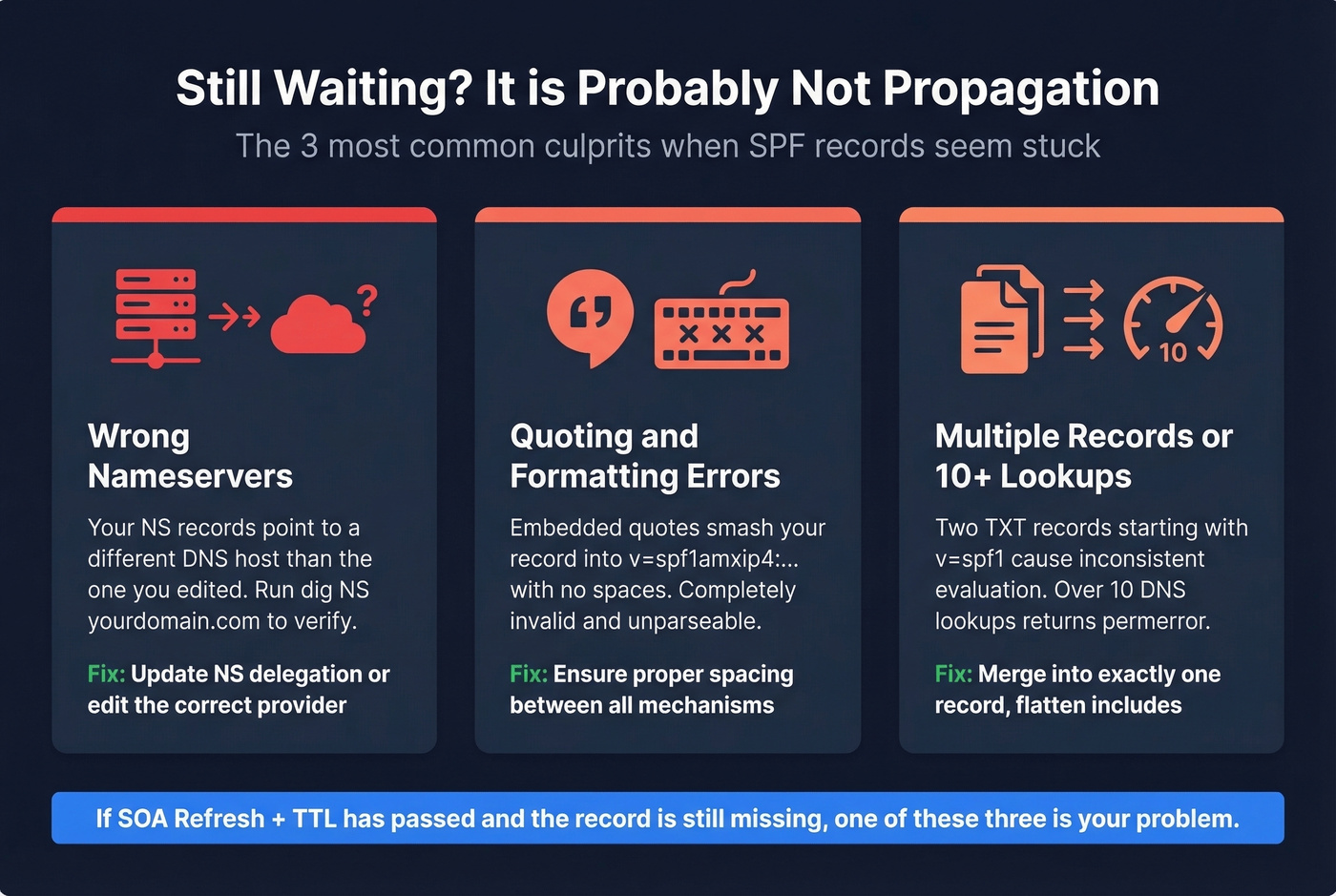
If your SPF record still hasn't appeared after (SOA Refresh + TTL), stop blaming DNS. We see the same three culprits over and over.
Check NS Delegation First
Run dig NS yourdomain.com right now. A thread on r/sysadmin documents an org that waited 72+ hours before realizing their nameservers pointed to a different host than the one they were editing. The fix took minutes. We've seen this exact mistake on our own team - it's embarrassingly common.
Quoting and Formatting Errors
Your record might exist but be unparseable. A common failure mode involves embedded quotes that smash the record into v=spf1amxip4:... - no spaces, completely invalid. Confirm your value reads v=spf1 a mx ip4:... -all with proper spacing between mechanisms. If you want a quick sanity check, compare against a few SPF record examples.
Multiple Records or Too Many Lookups
Two TXT records both starting with v=spf1 can cause inconsistent SPF evaluation and delivery failures. You need exactly one. Also check your lookup count - SPF records exceeding 10 DNS lookups per RFC 7208 return permerror, which looks identical to a missing record from the sender's perspective.
SPF Can Still Fail After Propagation
Even when DNS is perfect, some receiving servers lag behind. Microsoft 365 is the worst offender. Practitioner reports on r/Office365 describe SPF failures persisting even when the record passes validation everywhere else. Microsoft's official line? Updates happen "usually in less than 24 hours." Cold comfort when your emails are bouncing right now.
There's also a counterintuitive risk with very low TTLs. An analysis of 2.1 billion emails over 90 days found a strong positive effect from increasing TTLs, with DKIM/SPF failures dropping to almost negligible levels for many non-Microsoft receivers. A steady-state TTL of 3600s strikes the right balance between freshness and reliability. Let's be honest - most DNS headaches we've debugged came down to TTL mismanagement, not actual propagation delays.
Protecting Sender Reputation Beyond DNS
SPF protects your sending infrastructure. But sending to invalid addresses damages that same reputation from the data side - bounces, spam traps, and honeypots erode deliverability regardless of how clean your DNS is. Prospeo's email finder runs real-time verification with 98% accuracy, so bad addresses never enter your sending workflow in the first place. Its 5-step verification process includes catch-all handling, spam-trap removal, and honeypot filtering - the exact threats that tank your domain reputation even after SPF propagation completes.
If you're actively working on deliverability, it also helps to monitor your list hygiene and email bounce rate alongside DNS changes, and keep an eye on email reputation tools when troubleshooting sudden inboxing drops.
You just spent hours debugging DNS records to protect your sender reputation. Now protect it from the data side - bounces and spam traps do more damage than a missing SPF record. Prospeo verifies emails in real time with 98% accuracy so bad addresses never hit your outbox.
Clean DNS deserves clean data. Verify your list before you hit send.
FAQ
Do SPF changes take 24-48 hours?
Rarely. That figure assumes 86400-second TTLs or negative caching on brand-new records. Most changes appear within 1-2 hours, and low-TTL records update in minutes. If you're past (TTL + SOA Refresh), check NS delegation and record formatting - it's almost certainly a configuration error, not slow propagation.
Does lowering my TTL speed up propagation?
Only if you lower it before the change. Resolvers cache the old record at its existing TTL. Drop to 300s at least 24 hours in advance, make the change, verify, then raise back to 3600s. Lowering TTL after the fact has zero effect on already-cached responses.
Why doesn't my new SPF record show up at all?
Your nameservers likely point to a different DNS provider than the one you edited - verify with dig NS yourdomain.com. If you're adding a record for the first time, negative caching (RFC 2308) can hold a "does not exist" response for up to 24 hours based on the SOA minimum field.
Does DKIM propagation follow the same timeline?
Yes. DKIM records are TXT records stored under a selector subdomain, so they follow the same TTL and caching rules. The key difference: DKIM selectors are often newly created subdomains, which means negative caching can delay initial visibility for up to 24 hours - the same pattern you see with brand-new SPF records.