

How to Check if an Email Address Is Valid or Not
You just uploaded 2,000 leads into your sequencer and watched the bounce rate spike to 8%. Half your sends never reached a human. Your domain reputation took a hit before the campaign even got momentum.
Here's the short answer: paste the address into a verification tool like Prospeo, Hunter, or ZeroBounce and read the result. Takes seconds. For bulk lists, skip to the tools section below. But if you want to understand why emails bounce and what "valid" actually means, the five-layer process below is worth two minutes of your time.
One thing to get straight first: "valid" and "verified" aren't the same. Validation checks format - does the address look right? Verification is a point-in-time check of whether a mailbox can accept mail right now. You need both.
The 5-Step Email Validation Process
Every serious verification tool runs a version of this pipeline. Understanding it helps you spot which tools are cutting corners.
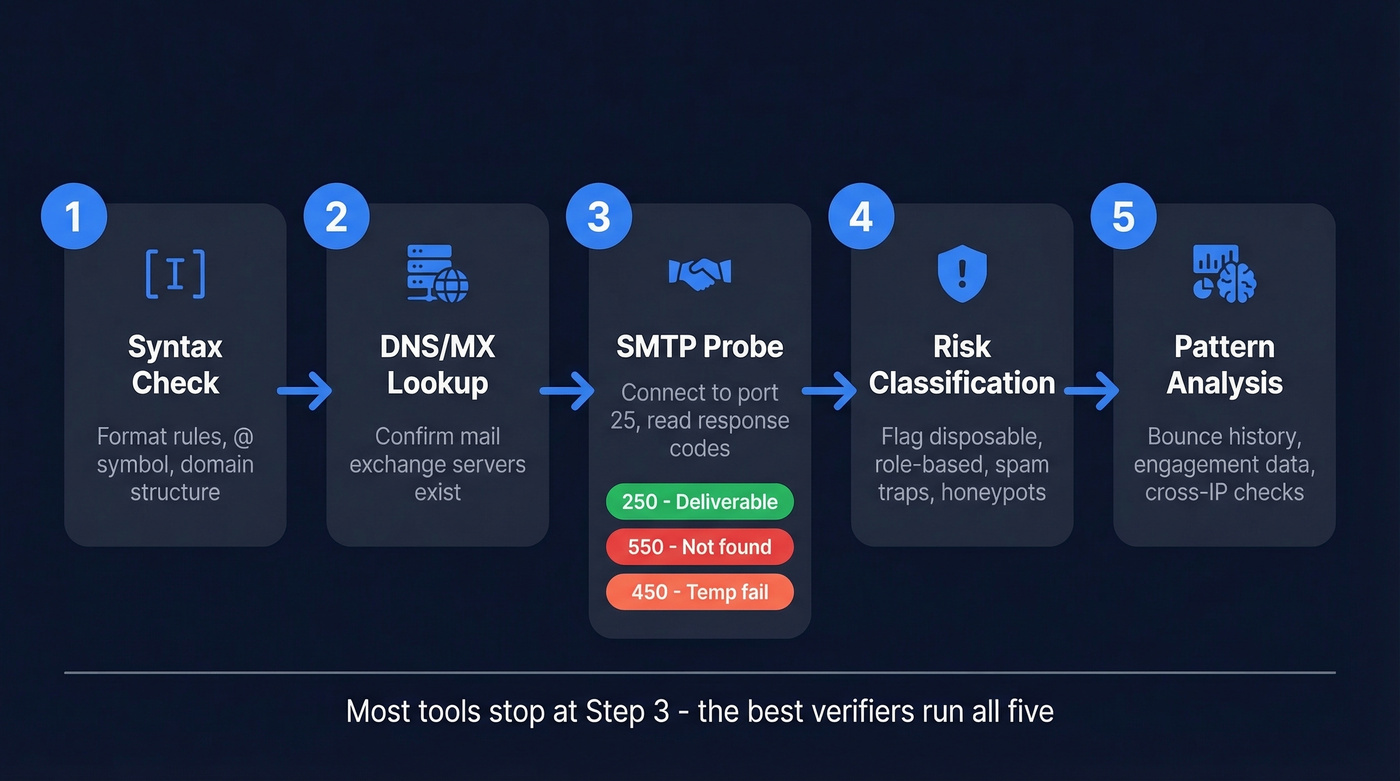
1. Syntax check. The tool confirms the address follows formatting rules - an @ symbol, a domain, no illegal characters. Necessary but nowhere near sufficient. RFC 5322 allows genuinely weird valid addresses, which is one reason regex-only validation fails in practice.
2. DNS/MX lookup. The tool queries the domain's DNS records to confirm mail exchange servers exist. No MX record usually means the domain isn't set up to receive email, though some domains accept mail via A/AAAA fallback.
3. SMTP probe. This is where the real work happens. The tool connects to the mail server on port 25, initiates an SMTP handshake, and reads the response code. A 250 means the server accepted the recipient at SMTP time - often treated as "deliverable" - but catch-all domains can still return 250 for completely fake addresses. A 550 typically means the mailbox doesn't exist. A 450 is a temporary failure, often greylisting, which requires exponential backoff and retry 15-30 minutes later. Worth noting: Stack Overflow threads warn that SMTP callback verification at scale without proper rate limiting can get your IP listed on RBLs, a risk most tool marketing pages conveniently skip.
4. Risk classification. Good verifiers flag disposable addresses like Mailinator, role-based addresses like info@ and support@, known spam traps, and honeypots. These are technically valid mailboxes that'll wreck your sender reputation.
5. Historical pattern analysis. The best verifiers also check bounce history, engagement data, and cross-referencing across verification attempts from different IPs and time windows. Some mail servers intentionally return misleading responses to block enumeration - strong verifiers detect these patterns over time.

The Catch-All Problem
Let's be honest: this is where most verification tools fall short.
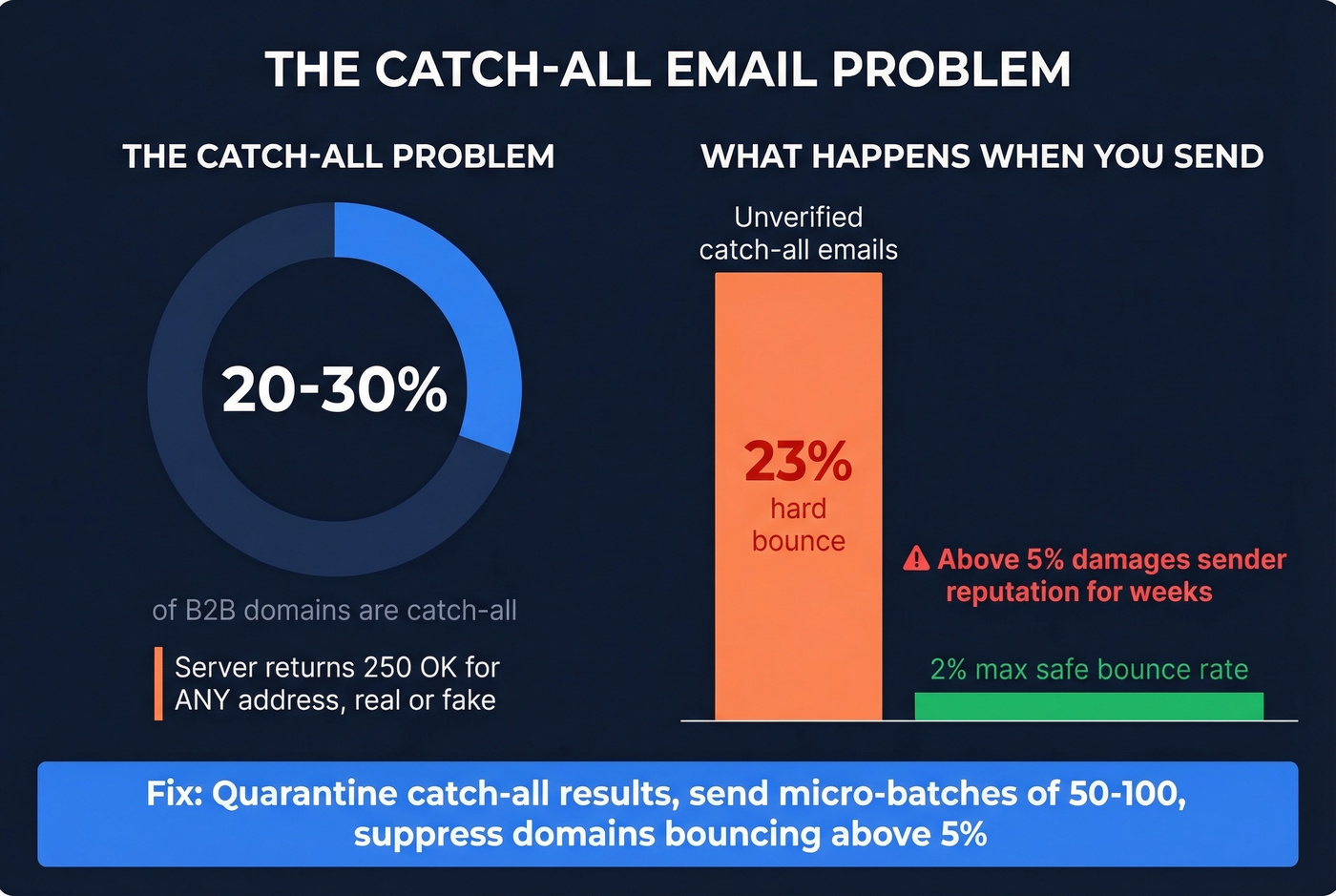
Roughly 20-30% of B2B domains use catch-all configurations, meaning the server returns 250 OK for any address - real or fake. Your verifier says "valid," but there's no actual mailbox behind it. We've tracked this closely across our own outbound campaigns: about 23% of unverified catch-all emails hard bounce when you actually send. That alone can push you past the 2% bounce-rate ceiling most teams try to stay under.
The practical move is to quarantine catch-all results into a separate segment. Send micro-batches of 50-100 first. Monitor bounces. If the domain bounces above 5%, suppress it entirely. Most verification tools return "unknown" for catch-all and call it a day. That's a product failure, not a technology limitation.

Prospeo's 5-step verification - syntax, DNS, SMTP, risk scoring, and catch-all handling - runs before you ever see an email. 98% accuracy across 143M+ verified addresses, refreshed every 7 days. No second tool needed.
Skip the verify-after-finding workflow. Start with clean data at $0.01 per email.
Why Email Validity Matters
Email lists decay roughly 25% per year - about 2% going invalid every month. Addresses that worked last quarter bounce today because someone changed jobs, a company rebranded, or a domain expired. Checking validity before every campaign isn't optional. It's the baseline for protecting deliverability.
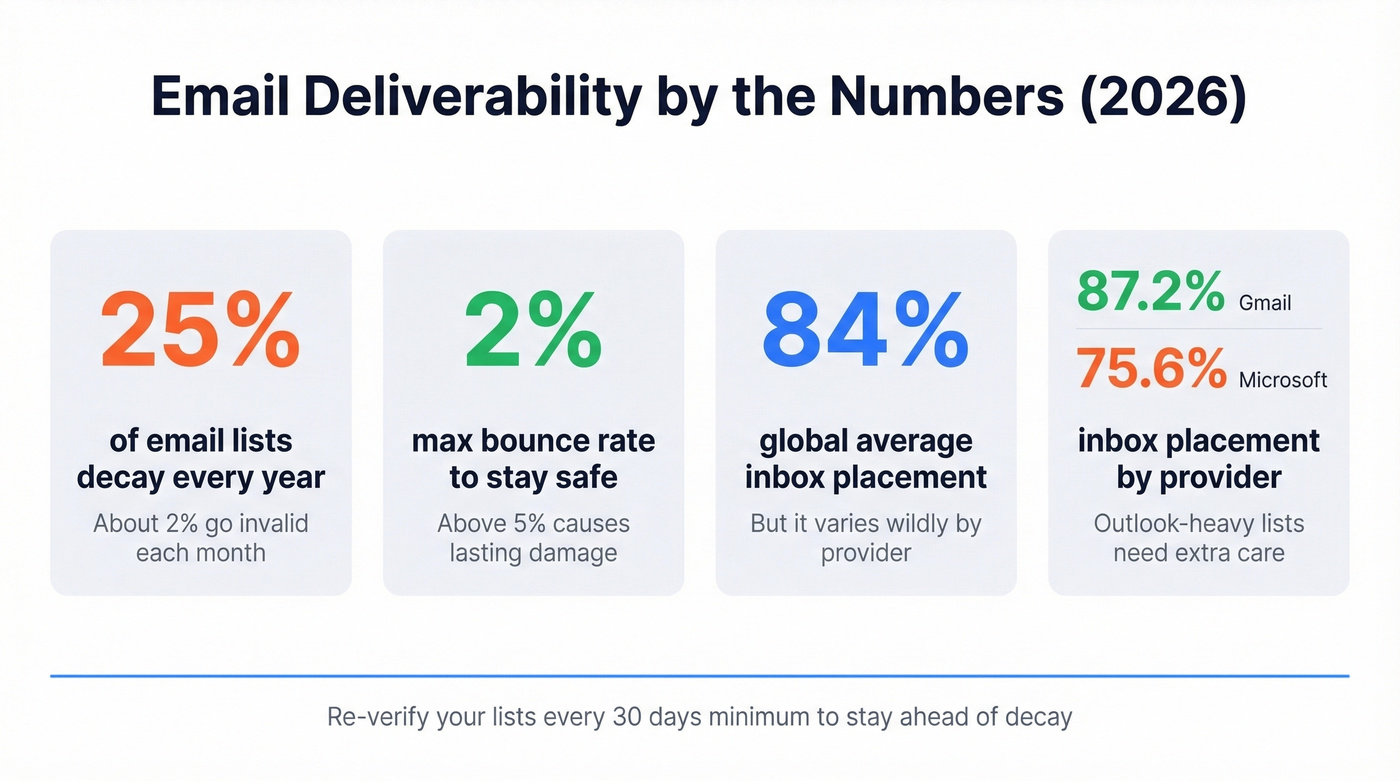
The numbers that matter: keep your bounce rate below 2%. Bounce rates above 5% damage sender reputation in ways that take weeks to recover from. Global inbox placement sits around 84%, but the ISP-level breakdown tells a sharper story - Gmail inboxes 87.2% of mail while Microsoft sits at 75.6%. If your list skews toward Outlook domains, verification matters even more.
And this isn't just for outbound lists. API-based verification on signup forms catches bad addresses before they ever hit your database. The cheapest verification is the one you never have to do twice. Google and Yahoo's bulk sender requirements make all of this worse: SPF/DKIM/DMARC alignment is mandatory, and spam complaint rates above 0.3% trigger throttling fast.
Three Mistakes That Ruin Results
Regex-only validation. RFC 5322 is complex enough that no regex pattern covers all valid addresses without also introducing ReDoS vulnerabilities. Regex catches obvious garbage. It misses everything else.
Verify-and-forget. You verified your list in January. It's April. Roughly 6% of those addresses are now invalid. We re-verify our outbound lists every 30 days minimum - anything less and you're sending into a decaying list wondering why deliverability keeps dropping. If months have passed since your last check, the answer is simple: re-run verification.
Treating accept-all as valid. A catch-all server saying "sure, send it" doesn't mean anyone's reading it. Segment these addresses, test in small batches, and suppress anything that bounces.
Here's the thing: if you're constantly running lists through verifiers because half your emails bounce, the issue isn't your verifier - it's your data source. Start with verified data and you skip the cleanup step entirely.
Best Tools to Verify Email Addresses
Not all verifiers are built the same. We've tested these across real outbound campaigns, and the differences in catch-all handling and accuracy are significant.
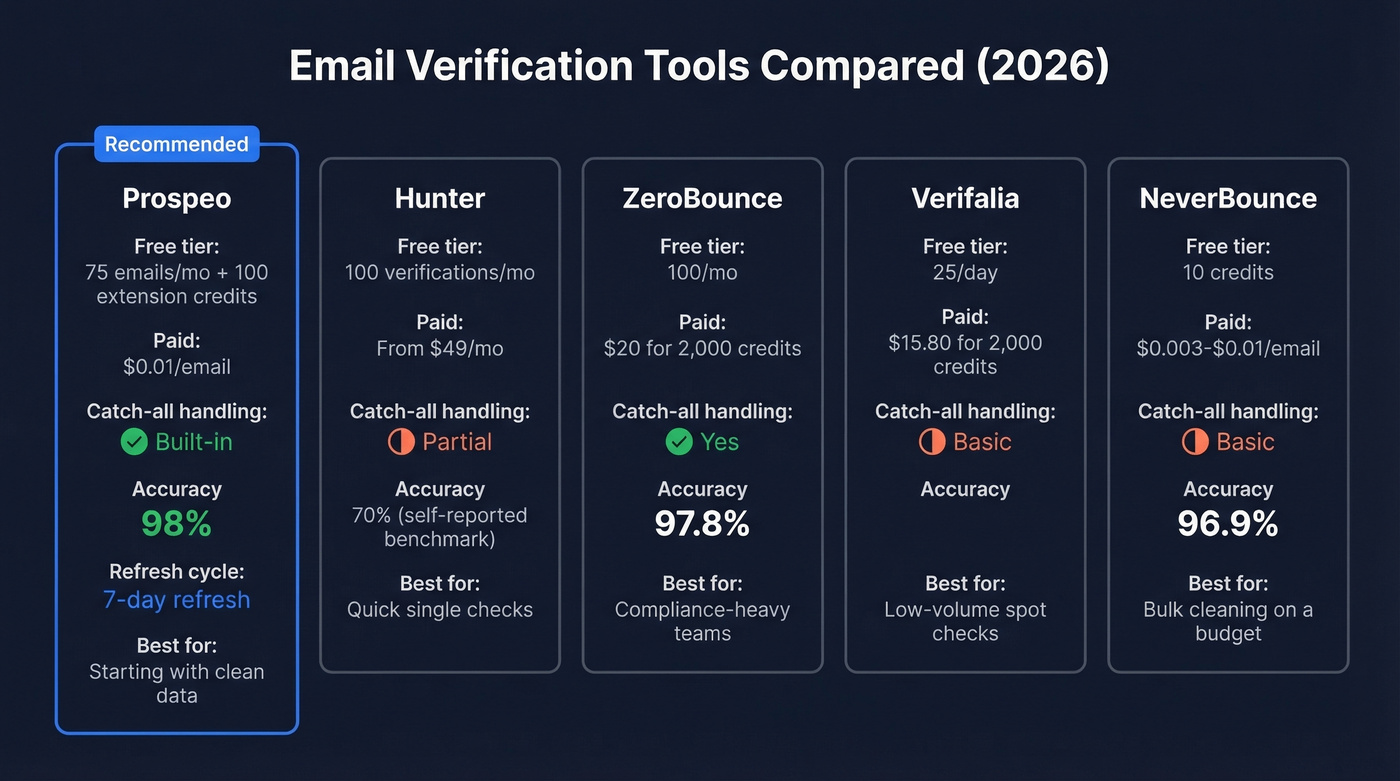
| Tool | Free Tier | Paid Pricing | Catch-All Handling | Best For |
|---|---|---|---|---|
| Prospeo | 75 emails/mo + 100 extension credits | ~$0.01/email | Yes (built-in) | Starting with clean data |
| Hunter | 100 verifications/mo | From ~$49/mo | Partial | Quick single checks |
| ZeroBounce | 100/mo | $20 for 2,000 credits | Yes | Compliance-heavy teams |
| Verifalia | ~25/day | $15.80 for 2,000 credits | Basic | Low-volume spot checks |
| NeverBounce | 10 free credits | ~$0.003-$0.01/email | Basic | Bulk cleaning on a budget |
Prospeo
Prospeo's Email Finder returns only verified emails from the start - every address goes through 5-step verification including catch-all handling, spam-trap removal, and honeypot filtering before it reaches you. That means 98% email accuracy across 143M+ verified addresses, with the database refreshing every 7 days. You skip the "find emails, then verify them in another tool" workflow entirely. Free tier gives you 75 emails per month plus 100 Chrome extension credits, which is enough to test the accuracy yourself before committing.
Hunter
Hunter's free tier - 100 verifications per month - handles one-off checks well. Their 3,000-email benchmark across 15 tools showed 70% overall accuracy, top of their own test. Hunter can verify some accept-all addresses with major providers, but catch-all results still often come back as Accept-All/Unknown on protected domains. For bulk verification, you'll outgrow it quickly.
ZeroBounce
ZeroBounce is positioned around SOC 2 Type 2, ISO 27001, and HIPAA compliance. A 10,000-email benchmark from LeadMagic scored its accuracy around 97.8%. The PAYG pricing - $20 for 2,000 credits - keeps costs predictable. Overkill for a five-person startup, but if your legal team has opinions about data handling, this is the safe choice.
Verifalia and NeverBounce
Verifalia works for low-volume spot checks at ~25 free verifications per day. LeadMagic's same benchmark scored NeverBounce around 96.9%. Neither matches the depth of a full verification pipeline, but both handle the basics competently. Skip these if you're running campaigns above a few hundred emails per month - you'll want something with better catch-all detection.
Your list decays 2% every month. Prospeo's 7-day data refresh cycle means the emails you pull today were verified this week - not six weeks ago like most providers. Catch-all handling, spam-trap removal, and honeypot filtering are built in.
Stop cleaning bad data. Start with emails that actually reach real inboxes.
FAQ
How do you check an email address for validity?
Use a dedicated verification tool - paste the address, and it runs syntax, DNS, SMTP, and risk checks in seconds. For developers, you can query MX records and initiate an SMTP handshake programmatically, though building reliable verification from scratch is far more complex than most teams expect.
Can you verify an email without sending one?
Yes. SMTP verification checks whether a mailbox accepts mail by initiating a handshake with the server without delivering a message. The tool connects, asks "would you accept mail for this address?", reads the response code, and disconnects. No live send required.
How often should you re-verify your email list?
Every 30 days minimum. Lists decay roughly 2% per month, so addresses valid last quarter can bounce today due to job changes or domain expirations. Monthly re-verification is the standard for teams running active outbound campaigns.
What does "catch-all" mean in verification results?
The domain accepts mail for any address, so the server can't confirm whether a specific mailbox exists. The best approach is to quarantine these results, send micro-batches, and monitor bounces rather than treating them as valid or discarding them entirely.
What's the best free tool to check email validity?
Prospeo gives you 75 verified emails per month plus 100 Chrome extension credits. Hunter offers 100 verifications, and ZeroBounce provides 100 free credits. For occasional spot checks, these free tiers handle validation without spending anything.