

How to Choose a CRM That Your Team Will Actually Use
A RevOps lead we know ran a CRM evaluation last year that dragged on for five months. Twelve vendors, forty-seven demos, a 200-row spreadsheet. The team picked Salesforce. Six months later, half the reps were still logging deals in Google Sheets.
Knowing how to choose a CRM matters more than which CRM you choose - and that team learned it the expensive way.
55% of CRM implementations fail to hit their planned objectives. Only 25% hit objectives, timeline, and budget. Those aren't software problems. They're decision-making problems. Let's fix that.
The Short Version
Most CRM failures are people problems, not software problems. Pick a CRM that matches your actual workflow - pipeline, helpdesk, email-native, or account management - trial it with real data for two weeks, and budget for the six-month total cost of ownership, not the sticker price. Evaluate 2-3 tools instead of 15 and you'll decide faster and choose better.
Quick picks by workflow type:
- Sales pipeline: HubSpot (free tier) or Pipedrive ($14.90/user/mo)
- Email-native: Streak (free for individuals, paid plans available)
- Support/helpdesk: Zendesk or HelpScout
- Growing teams needing everything: Zoho CRM ($14/user/mo)
Why CRM Projects Fail
The instinct is to blame the software. The data tells a different story.
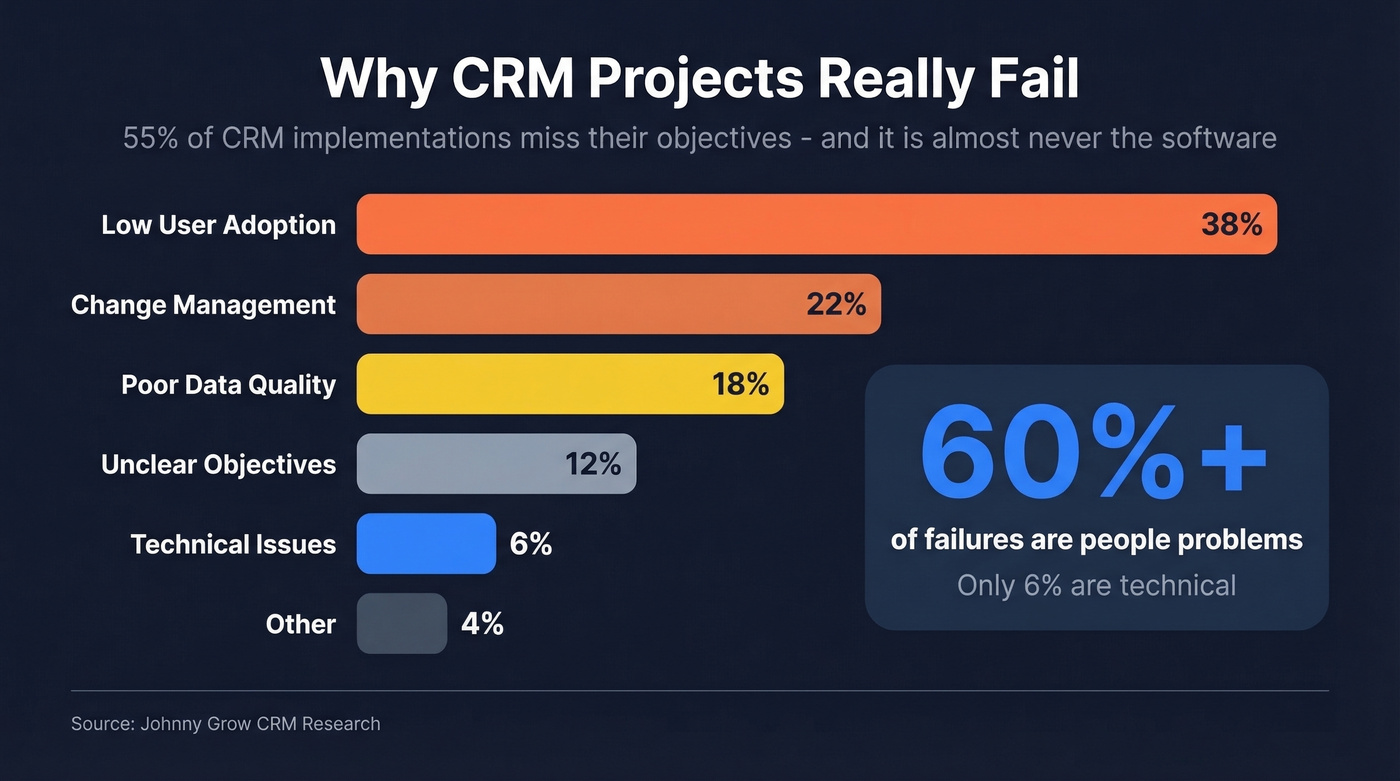
| Failure Factor | % of Failures |
|---|---|
| Low user adoption | 38% |
| Change management | 22% |
| Poor data quality | 18% |
| Unclear objectives | 12% |
| Technical issues | 6% |
| Other | 4% |
Over 60% of CRM failures come down to people. Only 6% are technical. The tool you pick matters far less than how you roll it out, who's involved in the decision, and whether the data going in is any good.
Seven out of ten CRM projects exceed their planned timeline by 30% or more. One in five blow past it by 100%+. And 44% of buyers reject pitches from unprepared reps, which means every month your CRM rollout slips is a month your team is losing deals they should be closing. The pattern is consistent: teams over-invest in feature evaluation and under-invest in adoption planning.

18% of CRM failures come from poor data quality. Prospeo's CRM enrichment fills your pipeline with 98% accurate emails and 125M+ verified mobiles - 50+ data points per contact, refreshed every 7 days. Your CRM works when the data inside it works.
Stop feeding your new CRM garbage data from day one.
CRM Selection Step-by-Step
Match the Tool to Your Workflow
CRM is an overloaded term. A pipeline CRM and a helpdesk CRM solve completely different problems, and evaluating them side by side is like comparing a pickup truck to a sedan because they both have four wheels.
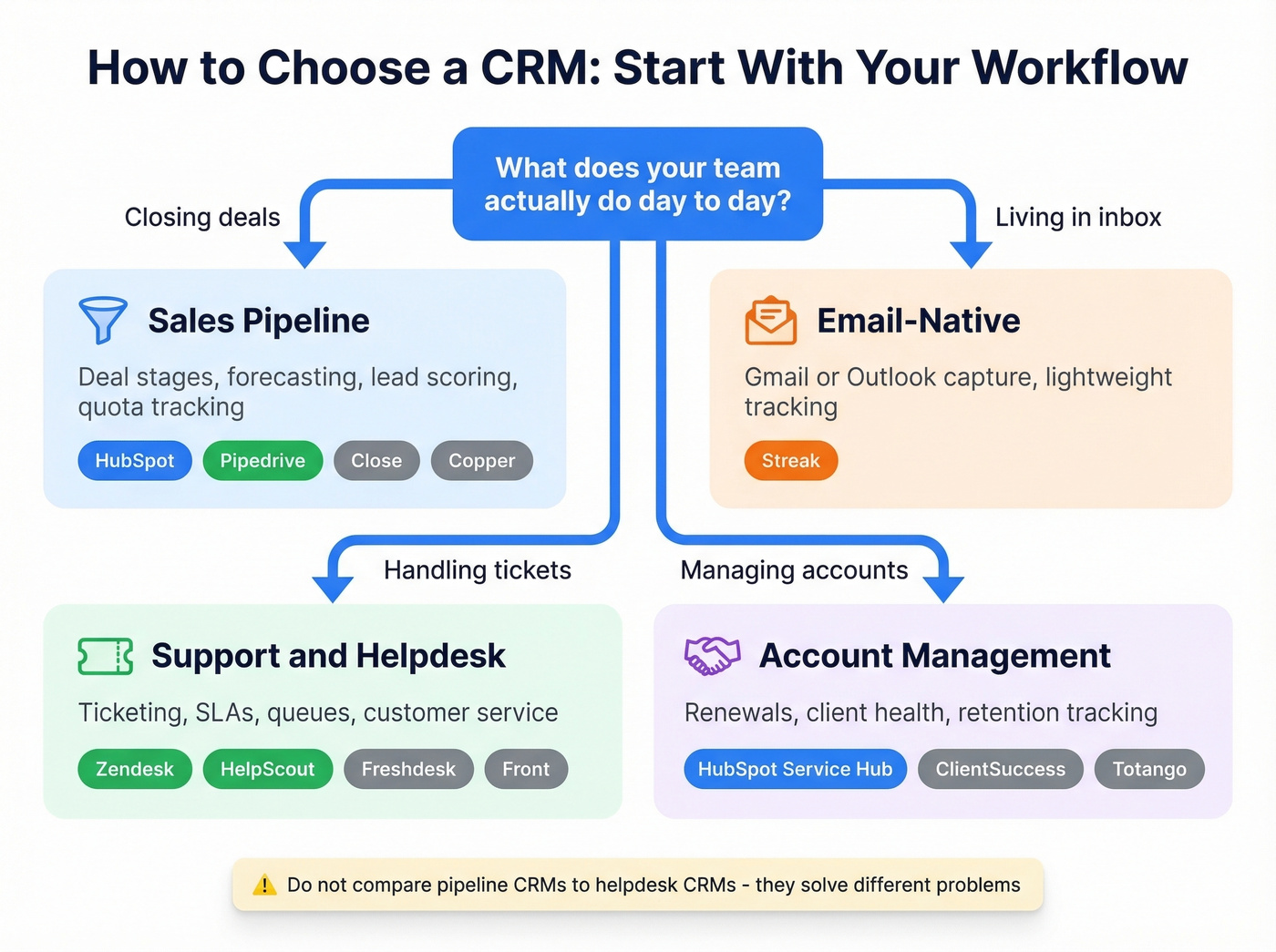
| Workflow | What You Need | Best-Fit Tools |
|---|---|---|
| Sales pipeline | Deal stages, forecasting, lead scoring | HubSpot, Pipedrive, Close, Copper |
| Email-native | Gmail/Outlook capture | Streak |
| Support/helpdesk | Ticketing, SLAs, queues | Zendesk, HelpScout, Freshdesk, Front |
| Account mgmt | Renewals, client health, retention | HubSpot Service Hub, ClientSuccess, Totango |
Start here. If your team runs a real sales funnel with stages, forecasting, and quota tracking, you need a pipeline CRM. If your support team handles tickets and SLAs, you need a helpdesk CRM. Trying to force one tool into the other's job is how you end up with a system nobody uses.
The consensus on r/smallbusiness mirrors this: choose by use case, not by "best CRM" listicle rankings. A five-person team living in Gmail doesn't need Salesforce - they need Streak or something equally lightweight. Figuring out which system fits starts with understanding how your team actually sells, not which vendor has the flashiest demo.
Here's the thing: if your average deal size is under $15K and your team is under 20 reps, start with something lightweight. HubSpot's free tier or Pipedrive will cover 90% of what you actually do. The other 10% usually isn't worth a six-figure implementation.
Define Must-Haves vs. Nice-to-Haves
Don't build a 200-line requirements doc. That's how evaluations stall for months. Sort your needs into three buckets and frame them as outcomes, not checkboxes. One team we worked with cut their onboarding time from 14 days to 5 by prioritizing workflow automation over feature count - that's the kind of outcome-based thinking that separates good evaluations from spreadsheet exercises.
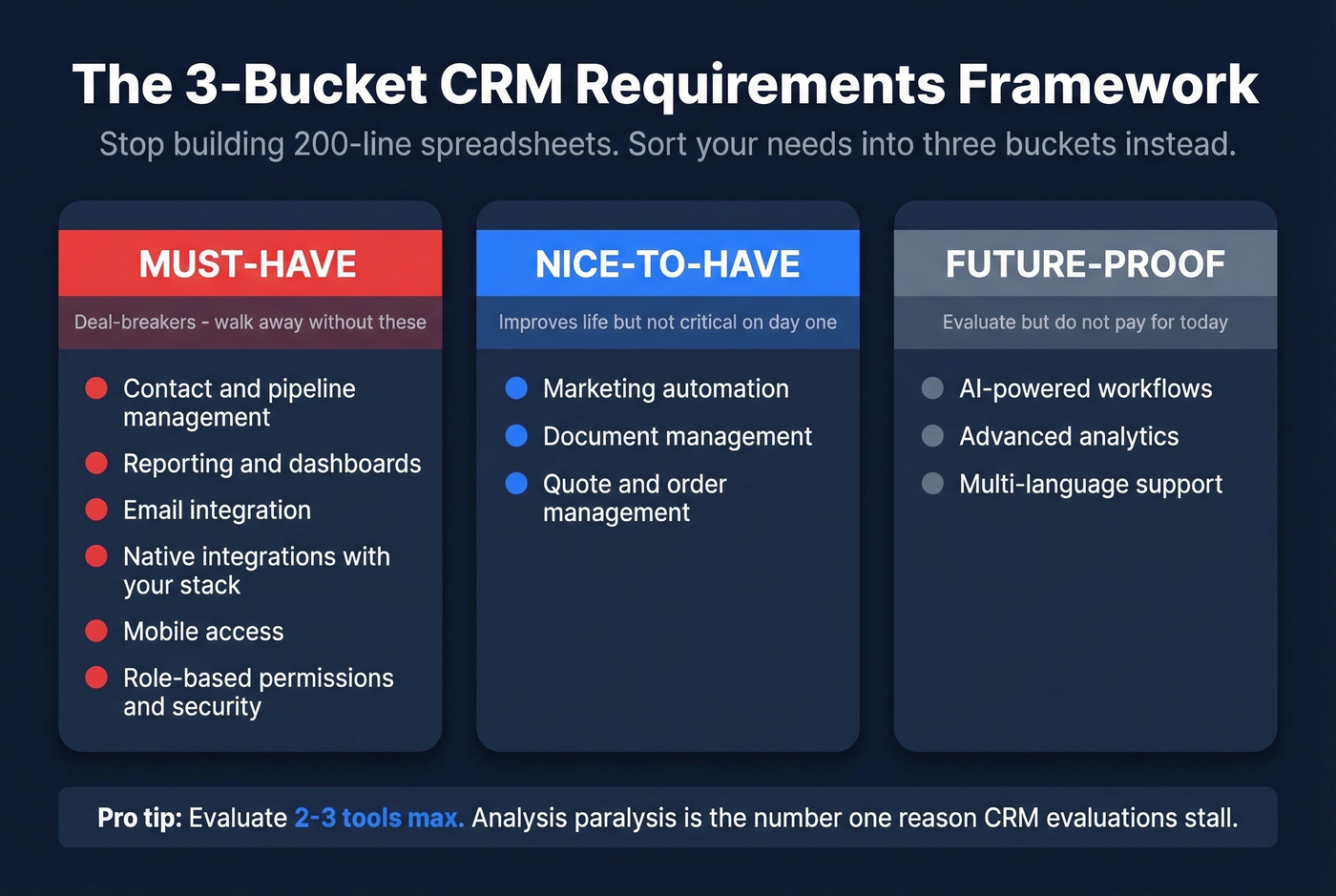
Must-Have (deal-breakers):
- Contact and pipeline management
- Reporting and dashboards
- Email integration
- Native integrations with your existing stack
- Mobile access
- Role-based permissions and security
Nice-to-Have (improves life but not critical):
- Marketing automation
- Document management
- Quote/order management
Future-Proof (evaluate but don't pay for today):
- AI-powered workflows
- Advanced analytics
- Multi-language support
Evaluate 2-3 tools max. Analysis paralysis is the #1 reason CRM evaluations stall. Three strong contenders that match your workflow will give you a better decision than a dozen that sort of fit.
Set a Realistic Budget
Low entry pricing is the oldest trap in CRM sales. A $15/seat/mo plan sounds great until you realize the features you actually need - workflow automation, custom reporting, API access - live on the $100/mo tier.

| CRM | Starting Price | Best For | Free Tier |
|---|---|---|---|
| HubSpot Sales Hub | $15/seat/mo | Marketing-heavy teams | Yes |
| Pipedrive | $14.90/user/mo | Pure sales pipeline | No |
| Zoho CRM | $14/user/mo | Growing teams | Yes |
| Salesforce | $25/user/mo | Enterprise w/ admin | 30-day trial |
| Freshsales | ~$15-$50/user/mo | Budget SMBs | Yes |
| monday CRM | ~$12-$30/seat/mo | Project-oriented | Limited |
| Zendesk Sell | $55/user/mo | Sales + support integration | No |
| Creatio | From $15/user/mo | No-code customization | Trial only |
Typical ranges by company size: SMBs pay $10-$30/user/mo. Mid-market runs $40-$100. Enterprise lands at $150+ per user, often with bundled seats and platform fees. Gartner reports an average of roughly $87/user/month across all segments.
Real talk: sticker price is maybe a third of the story. Implementation costs for SMBs typically run $5k-$25k. Mid-market: $25k-$150k. Enterprise: $150k+. In our experience, the six-month cost - licensing, implementation, training, and the inevitable customization requests - runs 2-3x what the pricing page suggests. Budget for that number, not the one the sales rep quotes you.
A popular Reddit thread on CRM selection mistakes nails this: ask every vendor "when and how would my pricing change?" before you sign anything.
Evaluate AI Features Carefully
Every CRM vendor is pitching AI in 2026. The shift from copilot-style AI that suggests and summarizes to agentic AI that autonomously executes multi-step workflows is real, but most teams don't need it yet.
Before you pay extra for AI features, ask three questions:
- Can it act autonomously, or just suggest? Salesforce Agentforce can execute multi-step workflows. HubSpot Breeze mostly assists. Know the difference.
- What data does it need to work? AI is only as good as your CRM data. If your records are stale, AI will confidently automate garbage.
- Is AI included or an add-on? HubSpot's Breeze Intelligence runs on credits - that's a separate cost. Salesforce Agentforce runs $125/user/mo.
46% of SMBs already use AI for customer insights, up 10% year over year. The trend is real. Just don't let a slick AI demo override your actual workflow requirements.
Run Structured Demos and Trials
- Shortlist 2-3 vendors that match your workflow type and budget range.
- Build a scoring rubric before the first demo - weight criteria by importance, with adoption ease ranked above feature count.
- Run a 2-4 week trial with real data and real workflows. Not a sandbox with fake contacts.
- Involve end users from day one. The reps who'll live in this tool daily should test it, not just the VP who'll check dashboards quarterly.
- Test vendor support during the trial. Response time and quality now predict what you'll get after signing.
- Ask vendors two questions: "What does success look like in six months, and what will it take to get there?" and "When and how would my pricing change?"
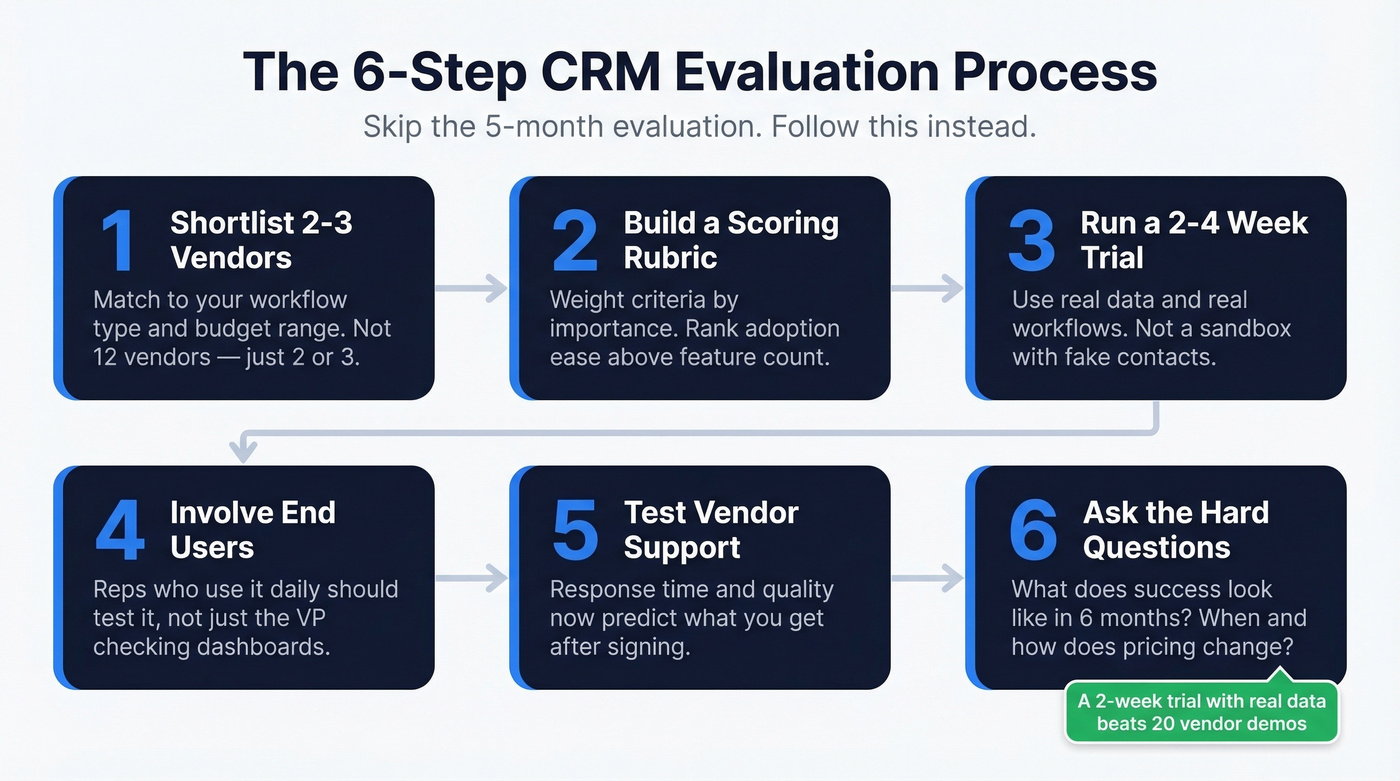
We've seen teams spend months on demos and skip the trial entirely. That's backwards. A two-week trial with your actual pipeline data will tell you more than twenty vendor presentations ever will.
Plan for Adoption First
Stop obsessing over features and start obsessing over adoption. The best CRM is the one your team will actually use - and that's a function of training, change management, and simplicity, not feature count. 70% of salespeople say their CRM is very important to closing deals. If your reps don't feel that way about yours, you've picked the wrong tool or rolled it out wrong.
Treat data migration as its own workstream. Duplicates, incomplete records, and orphaned contacts will follow you into the new system if you don't clean them first. A tool like Prospeo can enrich records automatically with 98% email accuracy and a 7-day refresh cycle, integrating natively with Salesforce and HubSpot. At roughly $0.01 per email with a free tier of 75 verifications per month, it's cheap insurance against the data quality problem that kills 18% of CRM projects.
Build a training plan that goes beyond "here's a 45-minute webinar." Role-specific training for reps, managers, and admins makes the difference between a CRM people tolerate and one they rely on.
Assign a CRM champion on the team - someone who owns adoption metrics, not just the technical setup.
Timeline benchmarks: lightweight CRMs like Pipedrive or Streak take days to two weeks. Mid-market tools like HubSpot Pro or Zoho Enterprise run 2-8 weeks. Enterprise Salesforce deployments: 3-9 months.

You just spent months choosing the right CRM. Don't let stale contacts and bounced emails kill adoption. Prospeo integrates natively with HubSpot and Salesforce, enriching records at a 92% match rate for about $0.01 per email. No contracts, no sales calls.
Give your reps a reason to actually log into the CRM.
CRM Selection Mistakes That Cost You Twice
Defaulting to the biggest brand. A five-person team doesn't need Salesforce. A solo founder doesn't need HubSpot Enterprise at $4,300/mo. Match the tool to your stage, not your ambition.
Ignoring the six-month cost. That $15/seat/mo plan will cost you $100/seat/mo once you need automation, custom reports, and API access. Ask what it costs when you actually use it.
Skipping end-user input. If the reps who'll log deals every day weren't part of the evaluation, you've already lost the adoption battle. This is the single most common mistake we see, and it's the hardest to recover from because by the time you realize it, the contract is signed and the team is already resentful.
Reusing old requirements docs. An 18-month-old requirements list doesn't account for AI capabilities, new integrations, or the customer lifecycle workflows your team has built since then. Start fresh.
Running too many vendors. Twelve demos create confusion, not clarity. Two to three contenders with a firm decision deadline will get you to a better answer faster.
Ignoring integration compatibility. Your CRM doesn't exist in a vacuum. If it can't connect to your email platform, marketing tools, billing system, and data enrichment stack, you'll spend months building workarounds that should have been native.
Ask every vendor: "What does it cost in six months?" and "What does success look like, and what will it take to get there?" The answers - or the dodges - tell you everything.
Recovering From a Failed Rollout
If your first CRM rollout stalled, you're not alone - 40% of SMBs switch CRMs to improve efficiency, and 31% switch due to feature limitations.
Run a retrospective first. Why did the last one fail - budget, sponsorship, wrong workflow fit? Address the root cause before you start shopping again, and re-interview stakeholders rather than reusing old requirements. Your needs have changed.
Limit to 2-3 vendors, set a 2-4 week decision deadline, and make sure your data is clean before migrating. Stale contacts carrying over from the old system will poison the new one just as fast. The second time around should be faster - you already know what didn't work.
FAQ
What's the best free CRM to start with?
HubSpot Free offers the most generous feature set at $0 - contact management, deal tracking, email integration, and basic reporting for unlimited users. Zoho CRM has a free edition for up to three users. For individuals living in Gmail, Streak's free plan is the strongest option.
How long does CRM implementation take?
Lightweight CRMs like Pipedrive or Streak take days to two weeks. Mid-market tools like HubSpot Professional or Zoho Enterprise run 2-8 weeks. Enterprise Salesforce deployments typically take 3-9 months. Budget extra time for data migration and training - they're always slower than you expect.
What's the average CRM cost per user?
SMBs typically pay $10-$30/user/month. Mid-market companies run $40-$100. Enterprise contracts land at $150+ per user. Across all segments, the average sits around $87/user/month. Implementation costs are separate and often larger than the first year of licensing.
How do I keep CRM data accurate after launch?
Use a data enrichment tool with native CRM integration that refreshes records automatically. Without active enrichment, expect roughly 30% of your contact data to decay annually - and stale data is what turns a useful CRM into an expensive address book nobody trusts.
Which CRM do I need if my team is just getting started?
If you're tracking deals in spreadsheets, losing follow-ups, or can't forecast revenue with confidence, you need a CRM. Start with the workflow matching framework above and trial one tool for two weeks before committing. For most early-stage teams, HubSpot Free or Pipedrive covers everything you need without overspending.