

How to Search for Email Addresses on Google (2026)
You've got the name, the title, even the headshot from the company's About page - but no email address. It's the most common dead end in B2B prospecting, and it's maddening. Knowing how to search for email addresses on Google is one of the most underrated skills in outbound sales, yet basic queries solve it less than 10% of the time. With the right search operators, you can push that success rate dramatically higher. Here's exactly how.
The Three-Step Workflow
- Use the Google operator templates below to search for the email directly.
- If Google doesn't surface it in 2-3 queries, guess the email format and verify it.
- If manual search takes more than 5 minutes, stop Googling. A dedicated email finder will get you there faster and more reliably.
Most emails can be found with operators plus format guessing, and most can be verified in seconds if you follow this sequence.
Why Basic Google Searches Fail
Google doesn't have a dedicated search operator for email addresses. You can search for exact email strings in quotes, but you can't run a query that means "find anything that looks like an email address."
A query like john smith email acme corp returns profiles, press mentions, and company pages. Rarely an actual email. Three things work against you:
Sites expose role-based emails, not personal ones. Contact pages list info@, sales@, or support@ addresses. The personal email you need is almost never on the homepage. Meanwhile, most professionals actively avoid publishing their email because of spam - so the address you're looking for might exist in an old indexed PDF, or nowhere at all.
Repeated, similar queries can trigger verification checks. If you run a lot of near-identical operator searches quickly, Google may gate you behind extra verification. Vary your queries and pace yourself.
That's why operators matter. They let you search inside pages and documents rather than relying on Google's default ranking - and they're the foundation of any reliable method to find email addresses using Google.
Google Operators That Actually Work
Bookmark this section. We've tested every one of these.
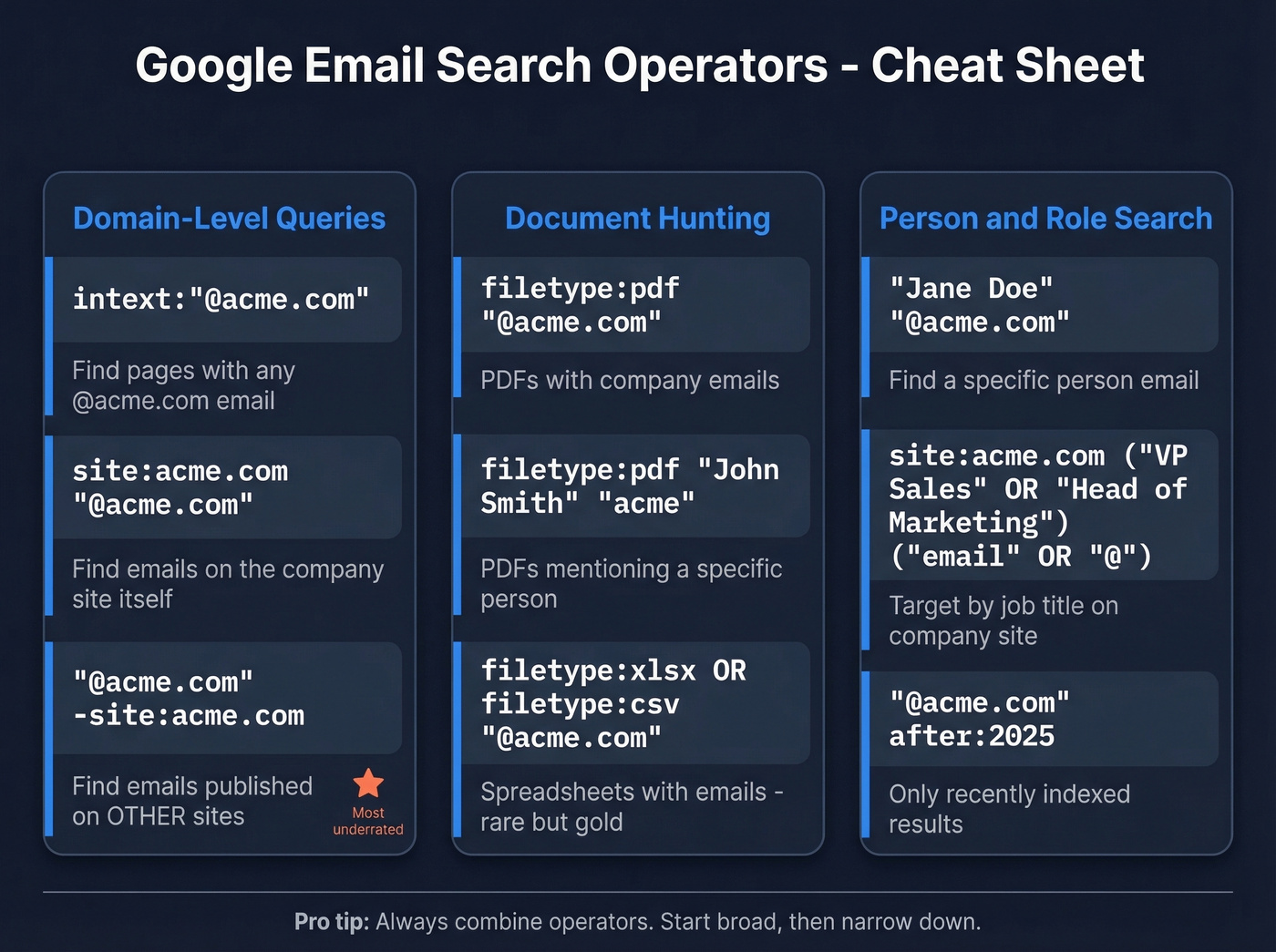
Domain-Level Queries
| Operator Template | What It Does |
|---|---|
intext:"@acme.com" |
Finds pages containing any @acme.com email |
site:acme.com "@acme.com" |
Finds Acme pages that actually display email addresses |
"@acme.com" -site:acme.com |
Finds Acme emails published on other sites |
That last operator is underrated. It often surfaces emails that the company's own site hides - conference speaker lists, press releases, and industry directories are common sources.
Document Hunting
PDFs, spreadsheets, and slide decks are goldmines. Authors frequently include their email in document footers, headers, or author bios.
| Operator Template | What It Does |
|---|---|
filetype:pdf "@acme.com" |
Finds PDFs containing Acme email addresses |
filetype:pdf "John Smith" "acme" |
Finds PDFs mentioning a specific person at Acme |
filetype:xlsx OR filetype:csv "@acme.com" |
Finds spreadsheets with Acme emails - rare but high-value |
Add "PDF" to any executive search. Whitepapers, annual reports, and conference proceedings often include author contact details that never appear on the company website.
Person-Specific and Role-Based Templates
When you know the person's name or the role you're targeting:
- Person-specific:
"Jane Doe" "@acme.com" - Role-based:
site:acme.com ("VP Sales" OR "Head of Marketing") ("email" OR "contact" OR "@") - Cross-site person search:
"Jane Doe" site:acme.com "@acme.com"
Date Filtering for Fresh Results
Stale results are the enemy. A conference PDF might have an email that's been deactivated for years.
Use before: and after: to narrow by date:
intext:"@acme.com" after:2025- only results indexed recentlyfiletype:pdf "@acme.com" after:2023-06-01- PDFs from the last ~3 years
Operators That Don't Work Anymore
Don't waste time with these - they're deprecated or unreliable as of 2026:
| Operator | Status |
|---|---|
link: |
Fully deprecated |
info: |
Deprecated |
inanchor: / allinanchor: |
Unreliable, inconsistent results |
daterange: |
Replaced by before: / after: |
If you're copying operator lists from older blog posts, strip these out. They'll either return nothing or give you misleading results.

Google operators are clever, but they still fail 90% of the time. Prospeo searches 300M+ verified profiles and returns the exact email you need - with 98% accuracy and built-in verification. No guessing formats, no bounced emails, no wasted hours.
Find any B2B email in one second instead of ten Google searches.
OSINT-Style Email Discovery
When standard operators come up empty, OSINT techniques fill the gap. These are patterns used by investigators and security researchers, adapted for sales prospecting.
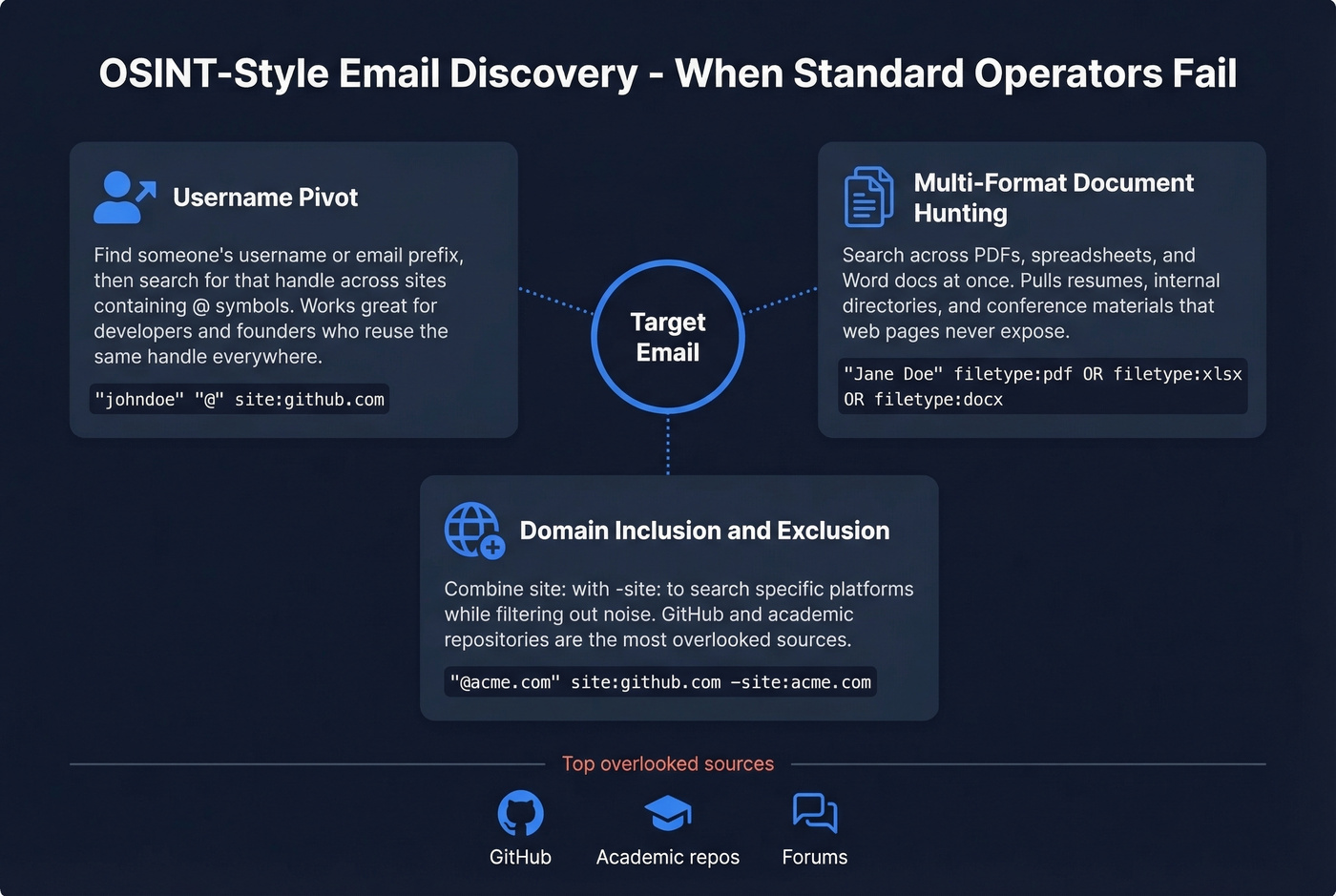
Username pivot. If you know someone's email prefix, searching for that username across pages that also contain @ can surface places where it appears alongside an email address. We've found this works especially well for developers and technical founders who use the same handle everywhere.
Multi-format document hunting. Cast a wider net across file types:
"Jane Doe" filetype:pdf OR filetype:xlsx OR filetype:docx
This pulls resumes, internal directories, and conference materials that standard web pages never expose.
Domain inclusion/exclusion. Combine site: with -site: to search specific corners of the web while excluding noise:
"@acme.com" site:github.com -site:acme.com
Developer profiles, open-source contributions, and forum posts often contain work emails that corporate websites deliberately hide. The consensus on r/OSINT is that GitHub and academic repositories are two of the most overlooked sources for professional email addresses.
Complete Workflow: Google Search to Verified Email
Here's the full process, start to finish. Manual search typically takes a few minutes per lead, while tools return results in under a second.
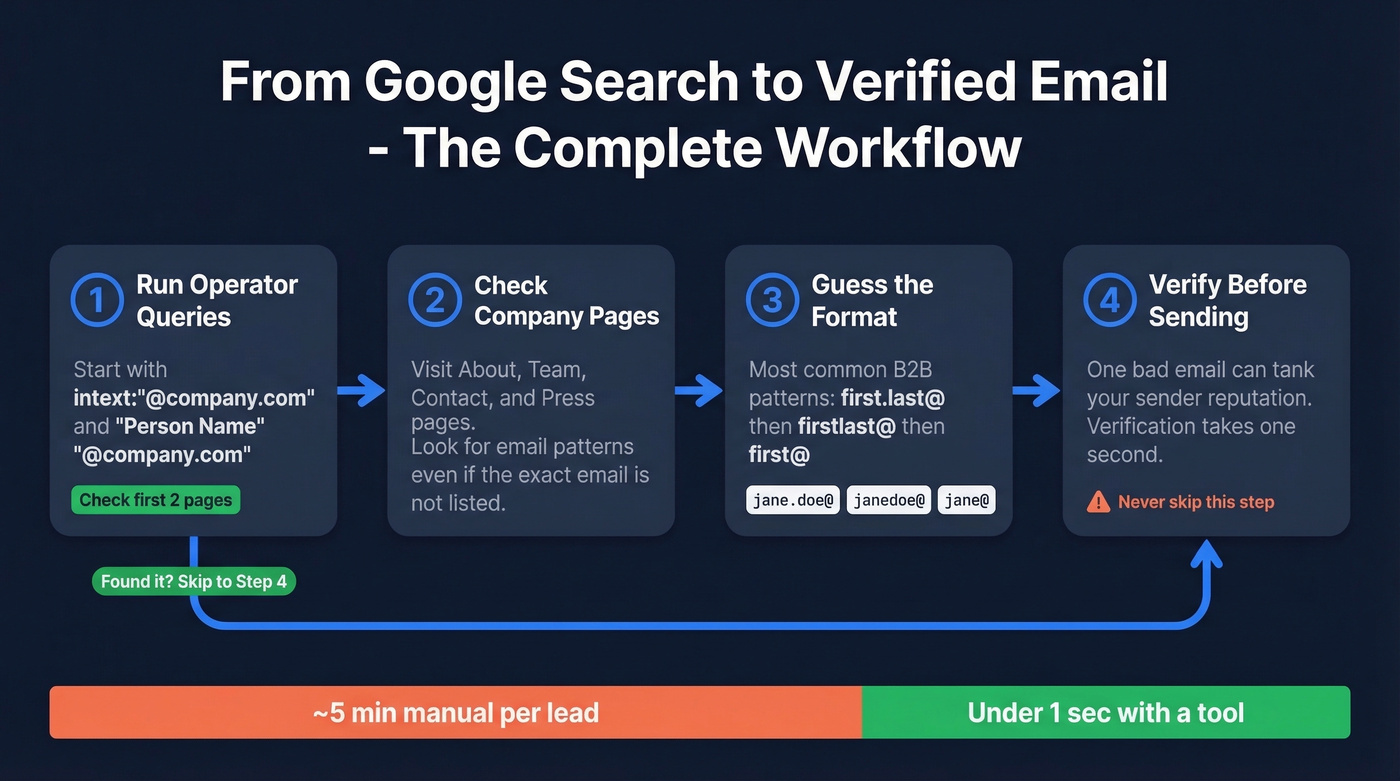
Step 1: Run operator queries. Start with intext:"@company.com" and "Person Name" "@company.com". Check the first two pages of results. If you find the email, jump to Step 4.
Step 2: Check company pages directly. Visit the company's About, Team, Contact, and Press pages. Look for email patterns even if the specific person's email isn't listed - if you see sarah.jones@acme.com on the team page, you've got the format.
Step 3: Guess the email format. The most common B2B patterns are first.last@, firstlast@, and first@. Try the most likely variant. In practice, pattern guessing combined with verification is how most practitioners actually find emails - the Google search just gives you the format to guess from.
Step 4: Verify before you send. This is where most people skip a step and pay for it with bounces. One bad email can tank your sender reputation, and verification takes one second with any decent tool.

This operator-plus-format-guessing workflow can land a verified email around 80% of the time when the address exists and is reachable. The key is never skipping verification.
When Google Isn't Enough
Here's the thing: once you're prospecting at any real volume, stop Googling entirely. The time math doesn't work. Five minutes per lead times 200 leads is nearly 17 hours of manual searching - and you'll still miss a third of them. A tool gets you to a verified address in seconds, and you avoid the bounce-rate damage that comes from sending to unverified guesses.
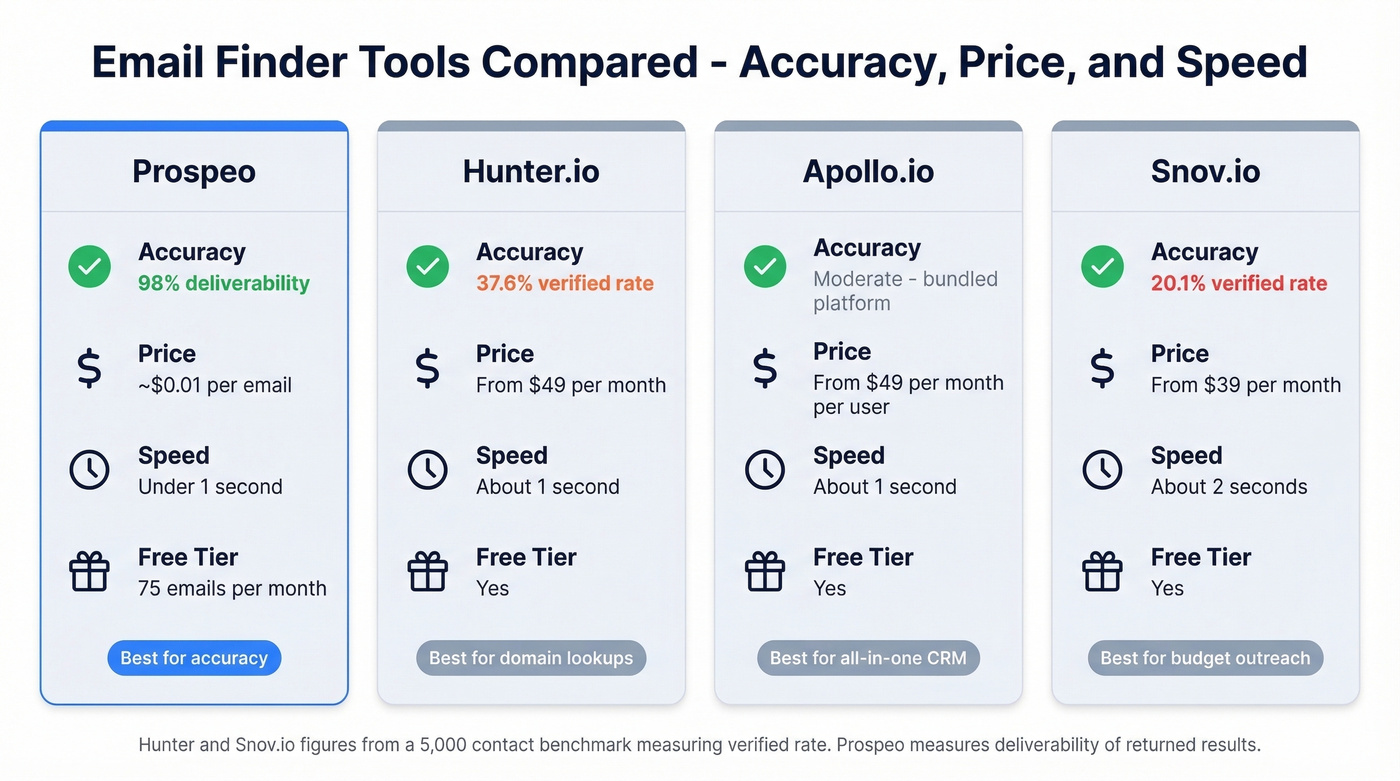
The major options break down like this:
| Tool | Coverage / Accuracy | Price | Speed | Free Tier |
|---|---|---|---|---|
| Prospeo | 98% deliverability | ~$0.01/email | <1 sec | 75 emails/mo |
| Hunter.io | 37.6% verified rate | From $49/mo | ~1 sec | Yes |
| Apollo.io | All-in-one sales platform | From $49/mo/user | ~1 sec | Yes |
| Snov.io | 20.1% verified rate | From $39/mo | ~2 sec | Yes |
Prospeo's 98% measures deliverability of returned results. Hunter and Snov.io figures from a 5,000-contact benchmark measuring verified rate.
Prospeo
Prospeo is the accuracy-first option for when Google dorking hits a wall. The database covers 143M+ verified emails drawn from 300M+ professional profiles, running on a 7-day refresh cycle while most competitors refresh every 4-6 weeks. The proprietary email-finding infrastructure doesn't rely on third-party providers, which is why the 98% deliverability rate holds up in production.
The verification pipeline runs five steps: syntax check, domain validation, catch-all handling, spam-trap removal, and honeypot filtering. You only pay for valid addresses. The free tier gives you 75 emails per month - enough to test the workflow before committing. Meritt switched to Prospeo and saw their bounce rate drop from 35% to under 4% while tripling their pipeline, which tells you what good data quality does for outbound at scale.

Hunter.io
Hunter is the tool Reddit threads mention most for domain-based email finding. Type in a domain, get a list of associated emails with confidence scores. Simple, fast, and a free tier lets you test without commitment. In the 5,000-contact benchmark, Hunter returned a 37.6% verified rate - fine for quick domain lookups, but most searches won't return a verified result. Use it for spot checks, not bulk list building.

Apollo.io
Apollo bundles email finding with a full sales platform: CRM, sequencing, intent data. If you want one tool for everything and can tolerate some bounce rate in exchange for workflow consolidation, it's a strong starting point. Free tier available, paid from $49/mo per user. Skip this if email accuracy is your top priority - dedicated verification tools are built for that job.
Snov.io
Credit-based email finder with drip campaigns bundled in, starting at $39/mo for 1,000 credits. The 20.1% verified rate in benchmark testing makes it the weakest on pure email finding. It earns its place only if you need a lightweight outreach tool with finding built in and don't want to pay for a separate sequencer.
You just read that verification is the step most people skip. Prospeo's 5-step verification catches bad addresses, spam traps, and catch-all domains before they wreck your sender reputation. Every email costs about $0.01 - verified and ready to send.
Stop guessing email formats and start sending with confidence.
Legal Rules Before You Email
Finding an email is legal. What you do with it has real consequences.
| Law | Jurisdiction | Max Penalty |
|---|---|---|
| CAN-SPAM | US | $51,744 per email |
| GDPR | EU/EEA | EUR 20M or 4% of revenue |
| CASL | Canada | $10M per violation |
| WA State (2025 ruling) | Washington, US | $500 per email |
That Washington State ruling is new - a 2025 Supreme Court decision created $500-per-email penalties for misleading subject lines, and at least eight lawsuits have already been filed under it.
The compliance checklist that keeps you safe:
- Accurate headers. Your "From" name and email must be real.
- Non-deceptive subject lines. No fake "Re:" or "Fwd:" on cold emails.
- Physical address included. A real mailing address in every email.
- Clear unsubscribe mechanism. One click, no login required.
- Honor opt-outs within 10 business days. Faster is better - most tools handle this instantly.
The biggest CAN-SPAM failure mode in cold outreach? Adding "Re:" to a first-touch email to imply a prior conversation. It's technically illegal and now carries real enforcement risk under the FTC's updated guidelines.
FAQ
Can Google search operators actually find email addresses?
Yes - operators like intext:"@domain.com" and filetype:pdf surface publicly indexed emails that basic searches miss. Expect to find the address roughly 30-50% of the time with operators alone. Combining operators with format guessing and verification pushes success rates closer to 80%.
Is it legal to email someone whose address you found on Google?
Finding a publicly indexed email is legal. Sending commercial email requires CAN-SPAM compliance (US) or GDPR compliance (EU) - including a physical address, clear unsubscribe, and honest subject lines. Penalties reach $51,744 per non-compliant email under CAN-SPAM.
What's the fastest way to find email addresses online?
A dedicated email finder returns verified results in under a second - compared to 3-5 minutes per lead with manual Google searching. For volume prospecting, the time savings alone justify the cost. We've found that the real ROI isn't just speed; it's avoiding the sender reputation damage from unverified guesses.
How do I find my own forgotten email address?
Go to the Google Account recovery page and enter your recovery phone number or backup email. Google will show a partially masked version of the associated address. For non-Google accounts, check your browser's saved passwords - most browsers store the email alongside the password for each site.