

How to Tell If an Email Exists - Without Sending a Message
You just imported 500 leads into your outreach tool. You hit send. Two hours later, 47 bounced. Your domain reputation took a hit, and now your legitimate emails are landing in spam.
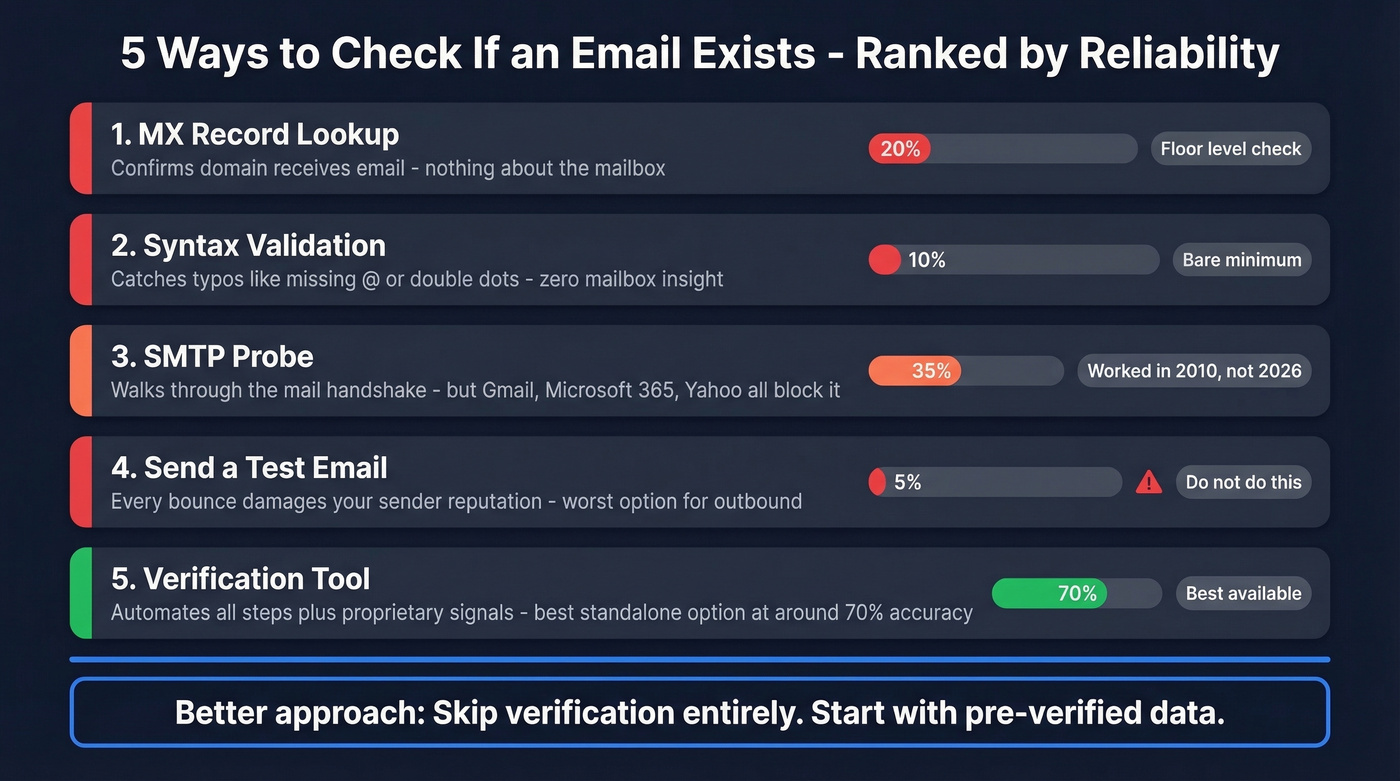
Here's how to prevent that: five approaches to tell if an email exists, ranked by reliability, plus one that reframes the problem entirely. Most guides on this topic are thinly disguised landing pages for verification tools. We're going to explain the actual mechanics - including the parts that make those tools look bad.
What You Need (Quick Version)
One-off check? Use a free email verifier like Email Hippo or Mailmeteor. Paste the address, get a result in seconds.
Cleaning an existing list? Use a bulk verifier like Bouncer ($7/1,000) or NeverBounce ($8/1,000). They'll flag invalids, catch-alls, and spam traps.
Building a list from scratch? Skip the verification step entirely. Start with pre-verified data instead of cleaning dirty data.
Why Verification Is Harder Than You Think
The internet makes email verification sound simple: just ping the server and ask. The major providers have spent years making sure you can't.
Gmail returns a 250 OK response for virtually any address, whether the mailbox is real or not. A Reddit user on r/AskProgramming put it bluntly: Gmail "always returns OK 250 no matter what." Microsoft 365 and Yahoo behave the same way - they accept the connection, then silently discard if the address doesn't exist. If you've tried to check whether an email exists using a free checker and gotten "unknown" with zero explanation, that's why. This anti-enumeration behavior exists specifically to prevent the kind of probing that verification depends on.
Then there are catch-all domains, which accept mail for every address at the domain, real or fabricated. And greylisting, where a server temporarily rejects your probe with a 450 code, expecting you to retry later - but most verification scripts interpret this as a failure and move on. The result is that manual checks return "unknown" more often than a definitive answer.
Five Ways to Check If an Email Is Real
1. Check the Domain's MX Records
Before you verify a specific mailbox, confirm the domain actually receives email. This is the simplest check and the most reliable - it just doesn't tell you much.
On Windows, open Command Prompt and run:
- Type
nslookupand press Enter - Type
set q=mxand press Enter - Type the domain (e.g.,
acme.com) and press Enter
You'll see MX preference values and mail exchanger hostnames.
On macOS/Linux, it's one command: dig mx acme.com
If MX Records exist, the domain can receive mail. If they don't, every email address at that domain is dead on arrival. Useful, but it's the floor of verification - not the ceiling.
2. Validate Email Syntax
This catches the obvious mistakes: missing @ symbols, double dots, spaces, trailing periods, invalid characters. A regex or basic parser handles syntax validation instantly.
The limitation is equally obvious. john.smith@acme.com passes every syntax check in existence. That tells you nothing about whether John Smith actually has a mailbox there.
3. Probe via SMTP
This is the approach most guides describe. You walk through the SMTP handshake - the same protocol mail servers use to deliver messages - and stop just before actually sending anything.
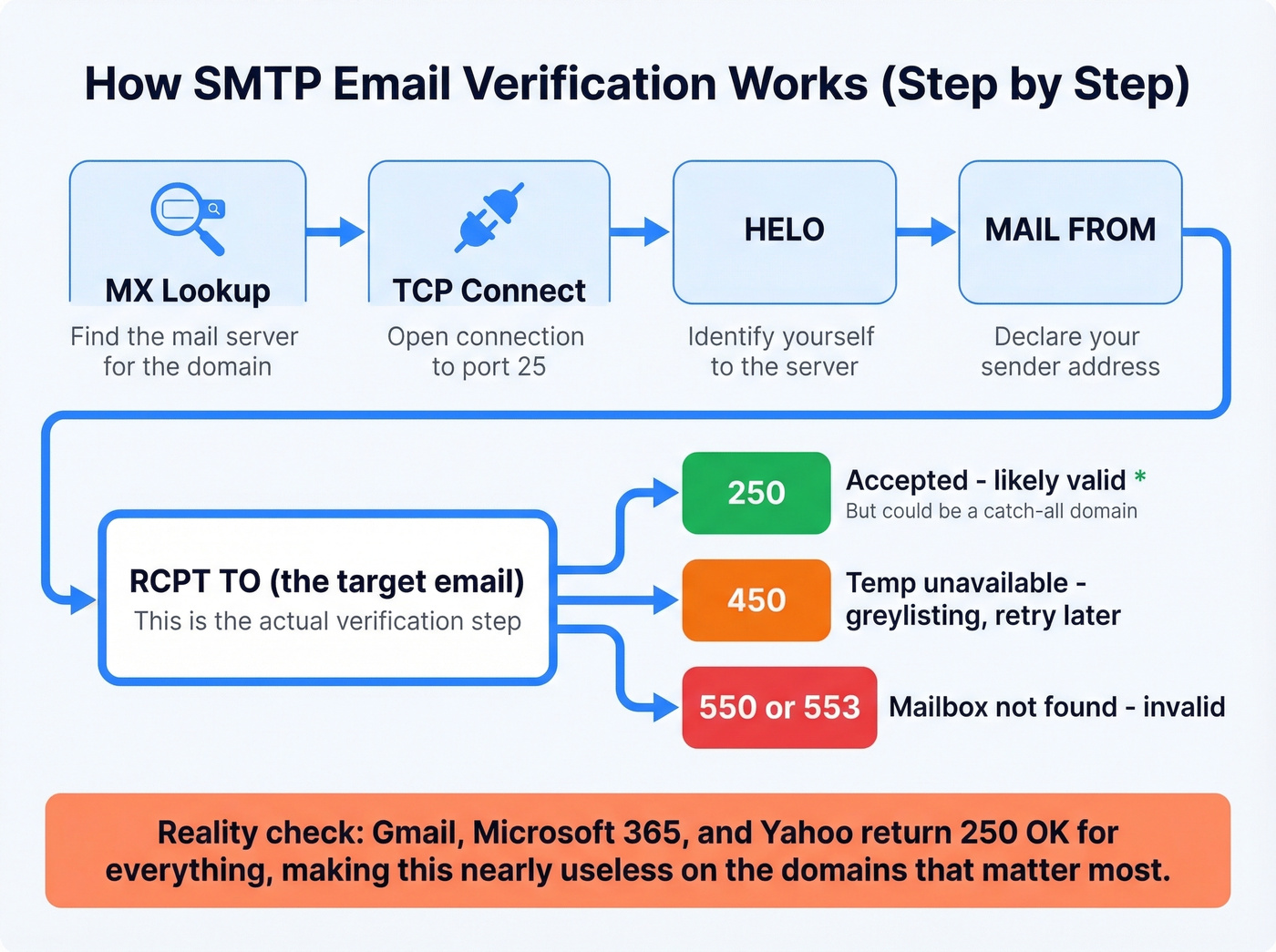
The sequence: look up the domain's MX record, open a TCP connection to port 25, send HELO to identify yourself, send MAIL FROM:<you@yourdomain.com>, then send RCPT TO:<target@theirdomain.com>. That last command is the verification step. The SMTP spec also includes a VRFY command designed for exactly this purpose, but virtually no modern server supports it - it was disabled years ago to prevent address harvesting.
| Code | Meaning | Action |
|---|---|---|
| 250 | Accepted | Likely valid (or catch-all) |
| 450 | Temp unavailable | Greylisting - retry in 15-30 min |
| 550 | Mailbox not found | Invalid |
| 553 | Mailbox name invalid | Invalid |
Detecting catch-all domains: Send a RCPT TO for a random nonsense address like xz7q9random@theirdomain.com. If the server returns 250, it accepts everything - the domain is catch-all, and no individual address can be verified this way. Users on r/coldemail regularly warn that catch-all results are essentially meaningless for verification.
Here's the honest assessment: manual SMTP verification is a relic. It worked in 2010. In 2026, Gmail, Microsoft 365, and Yahoo have made it nearly useless for the domains that matter most. Rate limiting, anti-enumeration responses, and silent discarding mean you'll get 250 OK for addresses that don't exist and timeouts for addresses that do.
4. Send a Test Email (Don't)
The most intuitive approach - just send something and see if it bounces - is also the worst. Every hard bounce damages your sender reputation. Send enough test emails to enough bad addresses, and your domain ends up on blocklists.
Some StackOverflow practitioners suggest a middle ground: send a confirmation email with an opt-in link, which validates the address without risking your reputation on cold sends. This works for sign-up flows but is useless for outbound prospecting.
If your deal sizes are under five figures, you almost certainly can't afford the domain reputation damage from testing addresses manually. The math doesn't work. One blocklisting costs you more in lost deliverability than a year of verification tools.
5. Use an Email Verification Tool
Modern verification tools automate the entire sequence above - syntax check, domain validation, MX lookup, SMTP probe, catch-all detection, spam-trap filtering - and add proprietary signals on top. Some, like Verifalia, use over 30 steps in their process. The best tools maintain relationships with major email providers and use behavioral data that a manual SMTP probe can't access.
Speed is reasonable. Real-time single checks return in 1-2.5 seconds. Bulk verification handles 100,000 emails in under an hour.
But accuracy has a ceiling. A Hunter benchmark testing 15 tools across 3,000 real business emails found the top scorer hit 70% overall accuracy. That's the best tool in the test, on a curated dataset. Accuracy drops further on enterprise domains with stricter server configurations.
Let's be honest about what this means: the real answer isn't better verification - it's better data. Verifying a bad list is like spell-checking a document written in the wrong language. We've seen teams cut bounce rates from 35% to under 4% just by switching from verify-after-scraping workflows to pre-verified databases.

The article above shows why SMTP probes and manual checks fail on Gmail, Microsoft 365, and Yahoo. Prospeo bypasses all of that. Every email in our 143M+ database passes a 5-step verification process - including catch-all handling, spam-trap removal, and honeypot filtering - before it ever reaches your list. The result: 98% email accuracy and bounce rates under 4%.
Stop verifying bad data. Start with emails that already work.
Verification Tools Compared
Most standalone verifiers charge around $7-10 per 1,000 checks. Here's how the major options stack up:
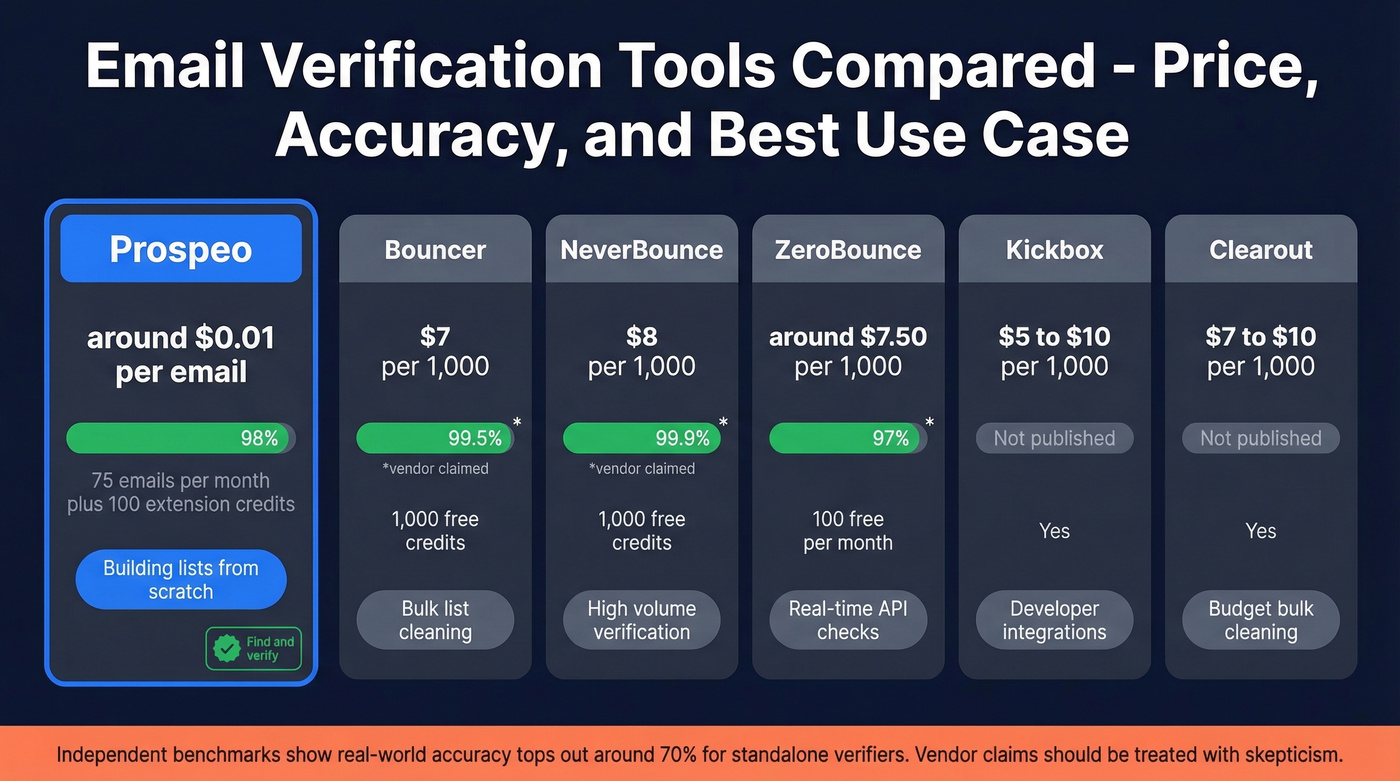
| Tool | Price / 1,000 | Accuracy | Free Tier | Best For |
|---|---|---|---|---|
| Prospeo | ~$0.01/email | 98% | 75 emails/mo (+100 extension credits) | Building lists from scratch |
| Bouncer | $7 | 99.5% claimed | 1,000 free credits | Bulk list cleaning |
| NeverBounce | $8 | 99.9% claimed | 1,000 free credits | High-volume verification |
| ZeroBounce | ~$7.50 | 96-98% claimed | 100 free/mo | Real-time API checks |
| Kickbox | $5-10 | Not published | Yes | Developer integrations |
| Clearout | $7-10 | Not published | Yes | Budget-friendly bulk cleaning |
The accuracy claims above are vendor-reported - take them with skepticism given that independent benchmarks showed real-world accuracy topping out around 70% for standalone verifiers. Prospeo's differentiator is that it's a find-and-verify platform: you pull contacts from a 143M+ verified email database processed through a 5-step verification pipeline before you ever see them, at roughly a tenth the cost per email. Its proprietary email-finding infrastructure doesn't rely on third-party providers, which is why it maintains 98% accuracy even on catch-all domains where other tools return "unknown."
Why Verified Emails Still Bounce
Even after verification, expect some bounces. The 2% bounce rate threshold is your canary - anything above that signals a data quality problem.
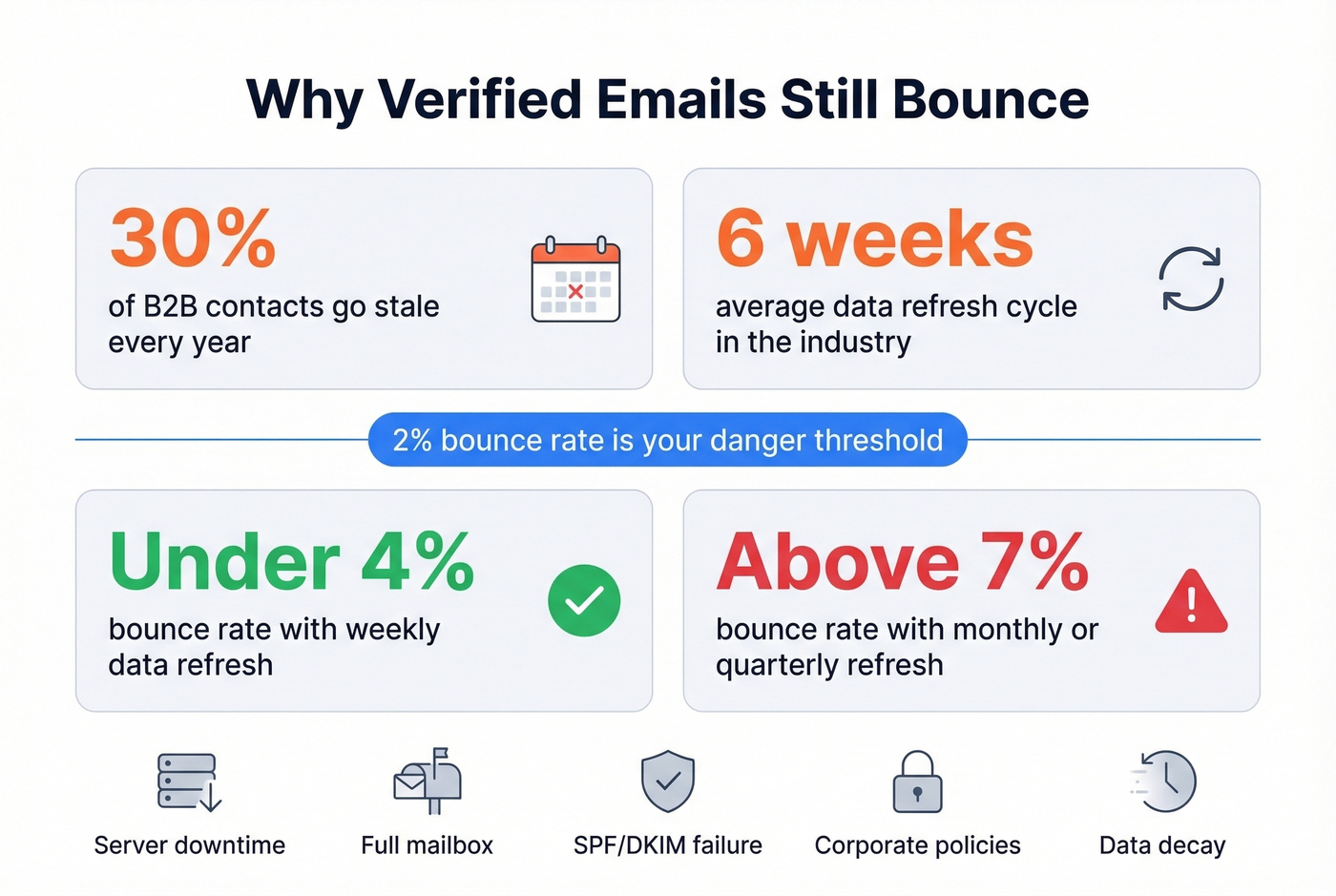
Common causes: server downtime between verification and send, full mailboxes, SPF/DKIM/DMARC failures on the recipient side, strict corporate policies that reject unknown senders, and plain old data decay. People change jobs, companies restructure, mailboxes get deactivated. Roughly 30% of B2B contacts go stale annually.
The gap between verification and send is the killer. Industry-average data refresh cycles run about 6 weeks - plenty of time for an address to go stale. In our experience, teams that use databases with weekly refresh cycles consistently keep bounce rates under 4%, while teams relying on monthly or quarterly refreshes see rates creep above 7%.
Legal Considerations
Verification itself is legal. What you do with verified addresses is where compliance matters.
Under GDPR, sending unsolicited email to EU contacts requires a lawful basis - typically legitimate interest, which demands a three-part balancing test. Treat double opt-in as required for EU subscribers. It's your strongest evidence of consent. Enforcement is real: cumulative fines have passed EUR 5.88B across 2,245+ actions and climbing.
CAN-SPAM is more permissive - opt-out based, meaning you don't need prior consent for commercial email in the US. But you must include a working unsubscribe mechanism, a valid physical address, accurate sender information, and non-deceptive subject lines. Violations carry fines of up to $51,744 per email. Per email. That math gets ugly fast.
Which Method Should You Use?
Three scenarios, three answers.
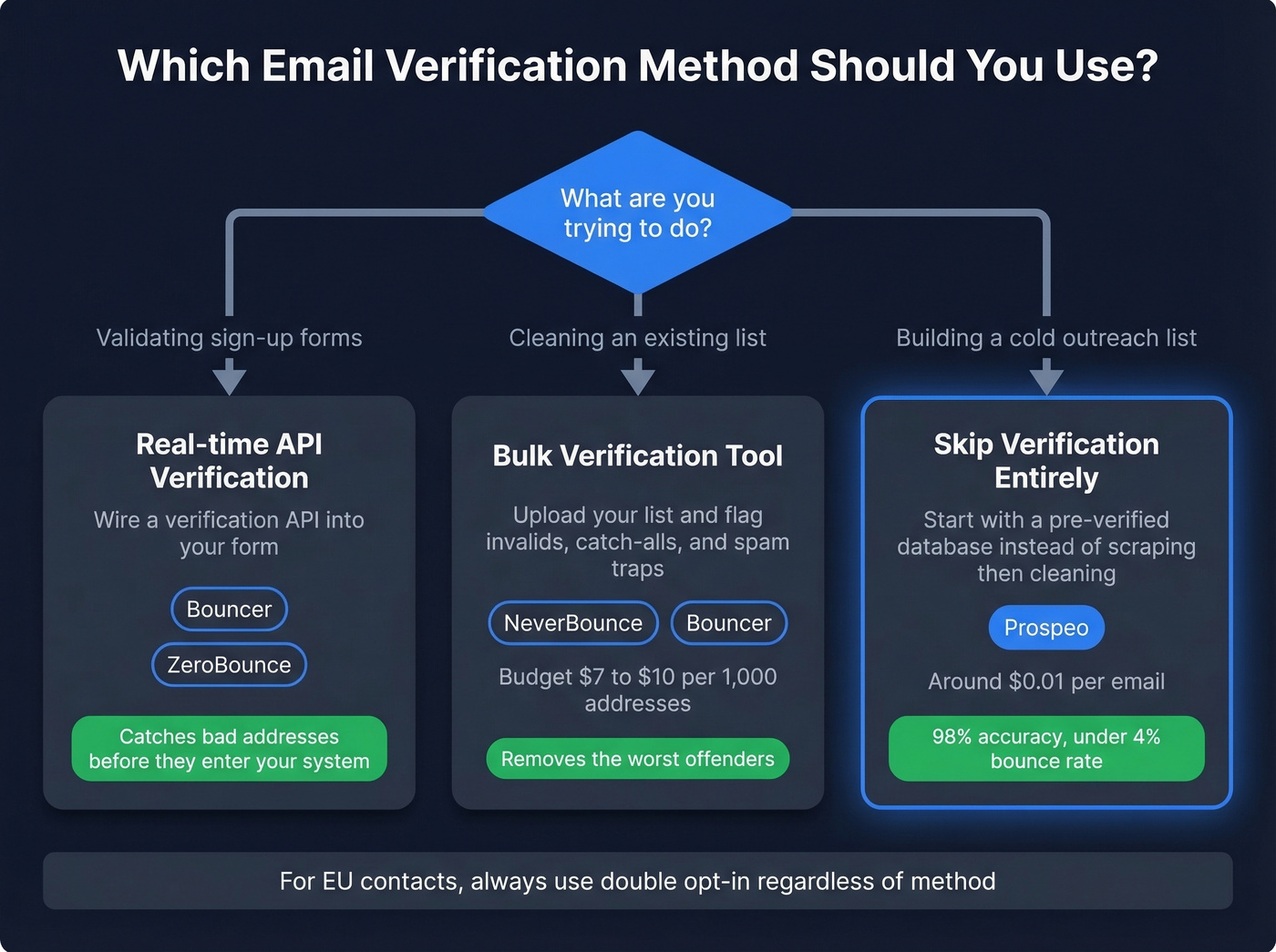
You're validating sign-up forms. Wire a real-time API verification into your form. Bouncer and ZeroBounce both offer real-time API checks that catch bad addresses before they enter your system.
You have an existing list to clean. Run it through a bulk verifier. NeverBounce or Bouncer will flag invalids, catch-alls, and spam traps. Budget $7-10 per 1,000 addresses.
You're building a cold outreach list. Skip the verify-after-scraping workflow. Start with a verified database instead of sourcing addresses and then paying to verify them. Use double opt-in for any EU contacts. Knowing how to tell if an email exists matters - but starting with clean data means you rarely need to ask the question. If you're also scaling outbound, pair this with an email deliverability checklist and a clear email bounce rate target.
You just read that the best verification tool scored 70% accuracy on a curated benchmark. Prospeo's proprietary email-finding infrastructure delivers 98% accuracy at $0.01 per email - with a 7-day data refresh cycle so addresses don't go stale. Teams using Prospeo cut bounce rates from 35% to under 4% and book 26% more meetings than ZoomInfo users.
Better than verifying: 143M+ emails that never needed cleaning.
FAQ
How can you check if an email is real without sending a message?
Combine an MX record lookup, syntax validation, and an SMTP probe - or use a verification tool that automates all three in seconds. Manual SMTP probes fail on Gmail and Microsoft 365 due to anti-enumeration protections, so for the highest accuracy on those providers, you'll need a tool with proprietary infrastructure beyond basic SMTP.
Can you verify a Gmail address?
Not reliably through SMTP. Gmail returns 250 OK for virtually any address, whether the mailbox is real or not. Most free email checkers return "unknown" for Gmail. Tools with proprietary verification beyond basic SMTP improve accuracy on these providers, but no method is 100% for Gmail.
What does "catch-all" mean in verification?
A catch-all domain accepts mail for any address, real or fake. The server returns 250 OK for everything, so SMTP-based verification can't distinguish valid from invalid mailboxes. Test with a random nonexistent address - if it's accepted, individual addresses can't be confirmed through SMTP alone. Roughly 30-40% of B2B domains use catch-all configurations.
How often should you re-verify an email list?
Every 30-90 days, depending on list size and send frequency. Email addresses decay as people change jobs - roughly 30% of B2B contacts go stale annually. If your bounce rate exceeds 2%, re-verify immediately. Databases with 7-day refresh cycles reduce this problem significantly compared to the 6-week industry average.