

How to Write an Introduction Email to a Client for Services (2026 Guide)
50 emails sent. Two replies - both asking to be removed from your list. If you've ever sent generic templates stuffed with "[Your Company Name]" and "[Your Service Here]," you know how fast cold intros go sideways. A strong introduction email to a client for services doesn't need to be clever. It needs to be specific, short, and sent to a verified address. The templates below are built for service providers, with actual copy you can steal and send today.
What You Need Before Anything Else
- Keep it under 90 words. One CTA, one link max. Shorter emails outperform longer ones for cold service intros every time.
- Use the templates below - adapted for your service type: agency, consultant, freelancer, warm intro, or account handoff.
- Verify every address first. Bounces tank your sender reputation fast. Keep your rate under 2%.
What Makes a Service Intro Email Work
Let's be honest: the template is 20% of the outcome. The other 80% is whether you're emailing the right person with a verified address at the right time. Most people obsess over word choice when they should be obsessing over list quality.
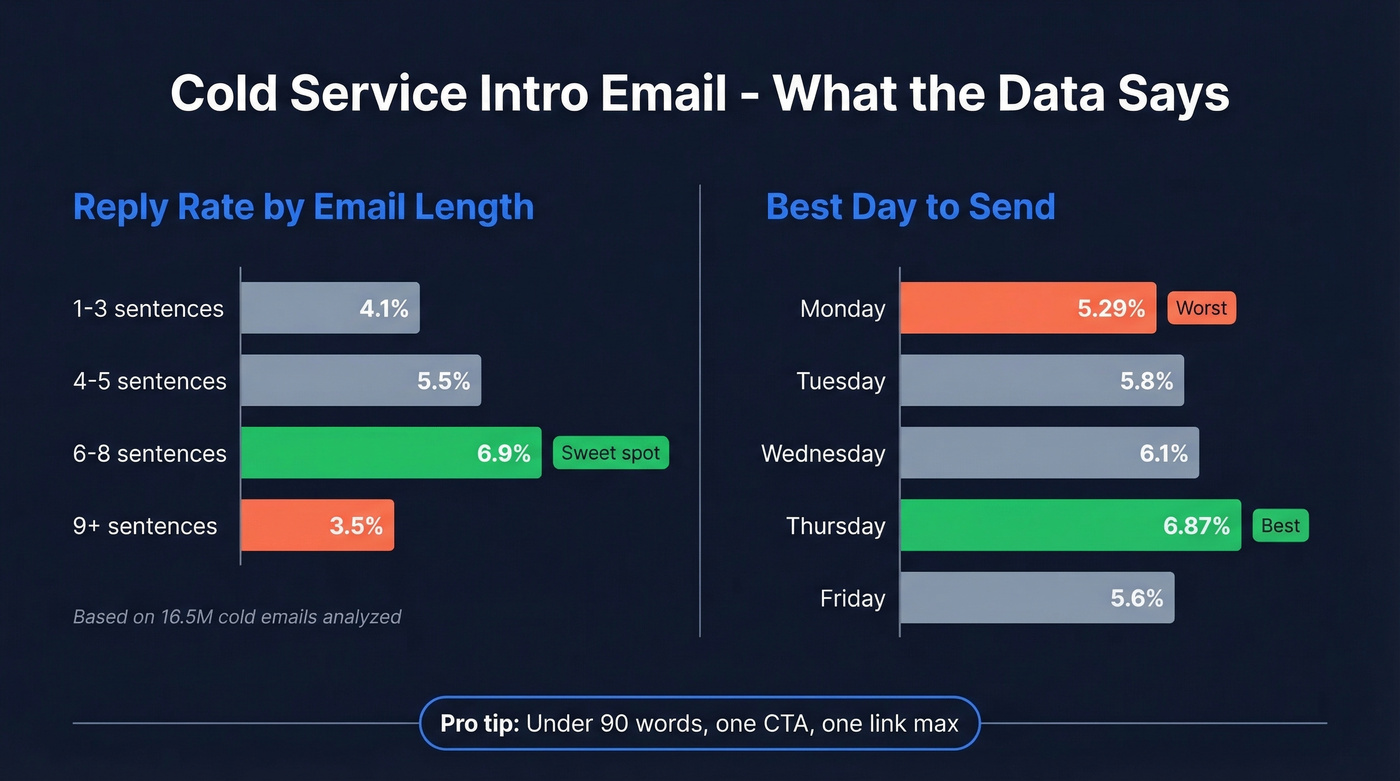
That said, the words still matter. A study of 16.5 million cold emails found that 6-8 sentences hit a 6.9% reply rate - the sweet spot. Anything under 200 words outperformed longer messages. Practitioners on r/sales push even harder: under 90 words, two-sentence paragraphs, one question, done.
Write like you talk. Compare these two openers:
- ❌ "I wanted to reach out regarding an opportunity to optimize your digital presence."
- ✅ "I noticed your blog ranks for 12 keywords but none crack the top 3. We fixed that for a similar company in 90 days."
Aim for a third-grade reading level. One CTA only - two questions usually kills replies. And send on Thursday if you can: it pulls a 6.87% reply rate versus Monday's 5.29%.
Subject Lines That Get Opened
47% of recipients decide to open based on the subject line alone. That's it. Personalized subject lines get 50% higher open rates, and dropping the recipient's name lifts opens from 15.7% to 18.3%. Best-performing subject lines run 61-70 characters.
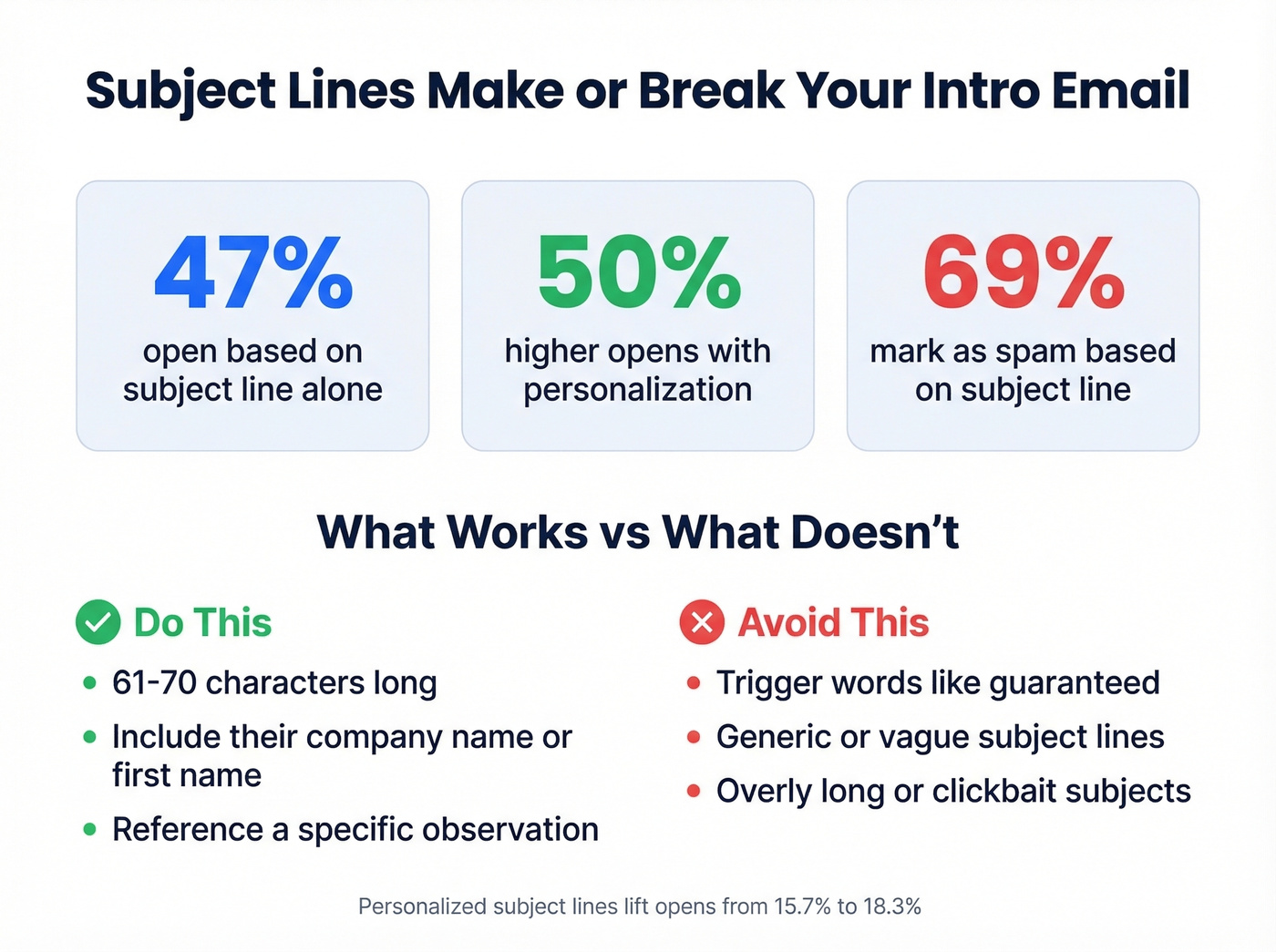
The flip side: 69% mark emails as spam based on the subject line alone. Don't use "guaranteed" - it has the highest bounce rates of any trigger word. Don't write a novel.
Five subject lines that work:
- Quick idea for [Company Name]
- [Mutual connection] suggested I reach out
- [Specific result] for [their industry]
- [First name], one question
- Noticed [specific observation about their business]

You just read it: 80% of your intro email's success comes from emailing the right person at a verified address. Prospeo gives you 300M+ profiles with 98% email accuracy and a 7-day refresh cycle - so your perfectly crafted service intro actually reaches a real inbox, not a dead end.
Stop perfecting templates that bounce. Fix the data first.
5 Service Introduction Email Templates
Template 1: Cold Intro - Agency or Services
This is the workhorse. One feature, one result, one question. That's the entire formula, and we've seen it outperform everything else in our own outbound campaigns.
Subject: Quick idea for [Company Name]
Hi [First Name],
I noticed [specific observation - e.g., "your blog ranks for 12 keywords but none in the top 3"]. We helped [similar company] go from [starting point] to [specific result, e.g., "40% more qualified leads in 90 days"] by [one-sentence method].
Worth a 10-minute call this week to see if that applies to you?
[Your Name] [One link - your site or a relevant case study]
Template 2: Cold Intro - Consultant or Freelancer
Freelancers have an advantage here: you can get specific fast. Lead with two observations that prove you've done your homework, and link one portfolio piece. That's more persuasive than any credential list.
Subject: [First name], one question
Hi [First Name],
I'm a [your specialty] who works with [type of client]. Two quick things I'd change about [specific element of their business you can observe publicly]:
- [Observation one]
- [Observation two]
Here's a recent example of similar work: [one portfolio link]
Can I send over a quick breakdown of how I'd approach this for [Company Name]?
[Your Name]
Template 3: Warm Intro - Referral-Based
Referrals do the heavy lifting - your job is just to not screw it up. Name the connection immediately and make the ask low-friction. Referred leads convert four times more often than leads from other channels, so the bar for your email is actually lower here.
Subject: [Mutual connection] suggested I reach out
Hi [First Name],
[Mutual connection's name] mentioned you're [working on / dealing with specific challenge]. We helped them [specific result], and they thought it'd be relevant for your team.
Happy to share what worked in a quick call - no pitch, just context. Does [day] work?
[Your Name]
Template 4: Account Handoff - New Point of Contact
This is the only template where you can stretch a bit longer. The recipient already knows your company - they need to know you're competent and paying attention.
Subject: Your new point of contact
Hi [First Name],
I'm [Your Name], your new [role] at [Company]. I'll be your primary contact going forward.
I'd love a 15-minute intro call to cover what success looks like for you this quarter, any open items, and goals for the next 90 days.
[Calendar link] - grab any slot that works.
PS - Congrats on [specific recent win or news]. Would love to hear more about it.
Template 5: Post-Meeting - Onboarding Kickoff
Subject: Let's get started - next steps
Hi [First Name],
Excited to kick things off. Here's what I need to get moving:
- Access: [specific logins, accounts, or tools]
- Assets: [brand guidelines, past reports, creative files]
- Timeline: I'll have [first deliverable] ready by [date]
I'll send weekly updates every [day]. Best way to reach me for anything urgent: [email/Slack/phone].
Any questions before we start?
[Your Name]
The 3-Email Follow-Up Sequence
The first follow-up can lift replies up to 49%. But by the fourth email, spam complaints triple from 0.5% to 1.6%. In our experience, three follow-ups is the ceiling. After that, you're burning reputation for diminishing returns.
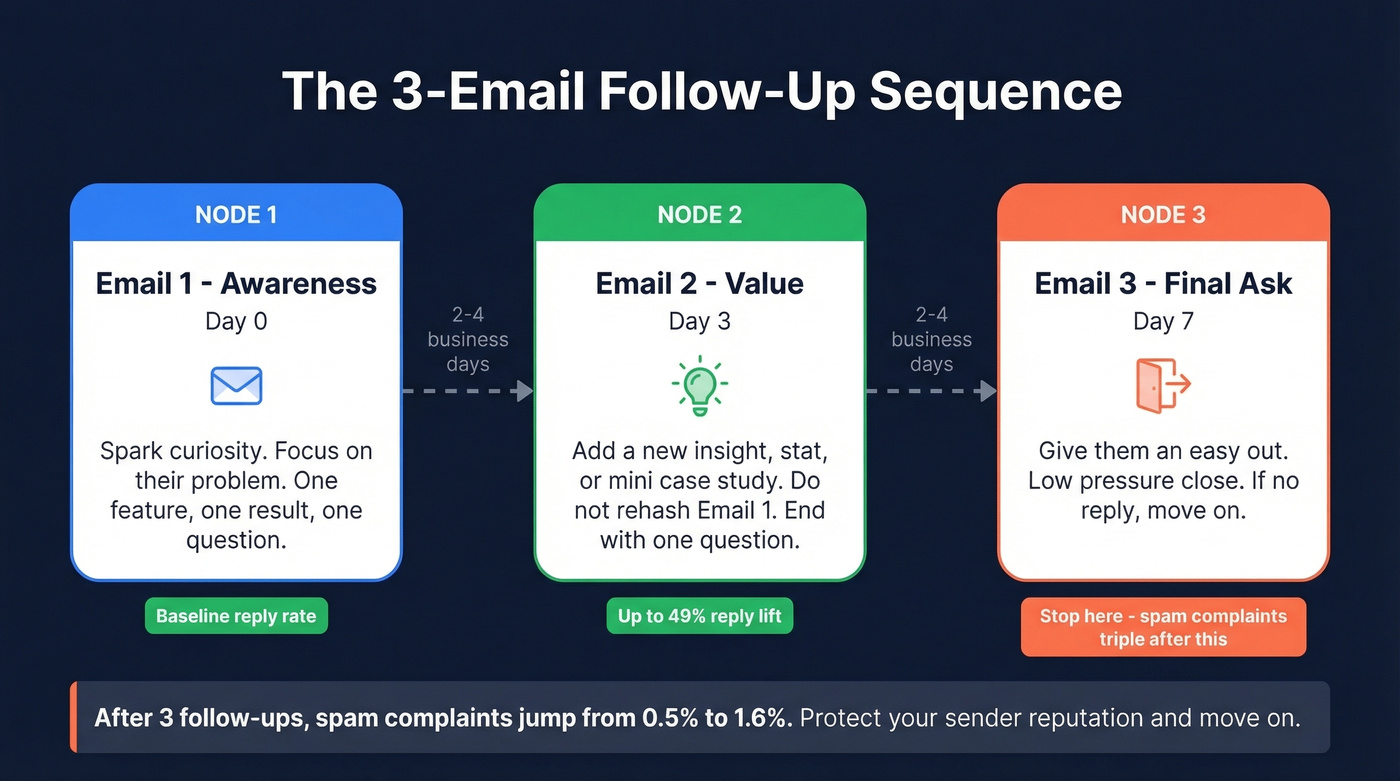
Space each email 2-4 business days apart:
Email 1 - Awareness (Day 0): Your intro template above. Spark curiosity, focus on their problem.
Email 2 - Value (Day 3): Follow up with one useful insight, stat, or mini case study relevant to their business. End with a single question. Don't rehash your first email - add something new.
Email 3 - Final Ask (Day 7): Give them an easy out. "If [specific problem] becomes a priority, I'm here. Should I check back in a few months?" People respond to low-pressure closes more than hard asks. If they don't reply to this one, move on.
Mistakes That Kill Reply Rates
The biggest killer is the feature-dump email. Your intro isn't a resume. One feature, one result, one question. As one r/CustomerSuccess poster put it, lengthy personal intros feel like "tacky peacocking." Nobody cares about your 15-year journey. State your purpose and the value you bring in two sentences.
Multiple CTAs are the second killer. Ask one question. Two questions confuse people into answering neither. Same goes for links - multiple links or attachments increase filtering risk. One link max, or none.
Here's the thing: if you haven't configured SPF, DKIM, and DMARC authentication records, nothing else in this article matters. Your emails are landing in spam. Buy a secondary domain for cold outreach, protect your main domain's reputation, and always include an unsubscribe link - CAN-SPAM requires it.
Deliverability Checklist
Before you hit send on any introduction email to a client for services, run through this:
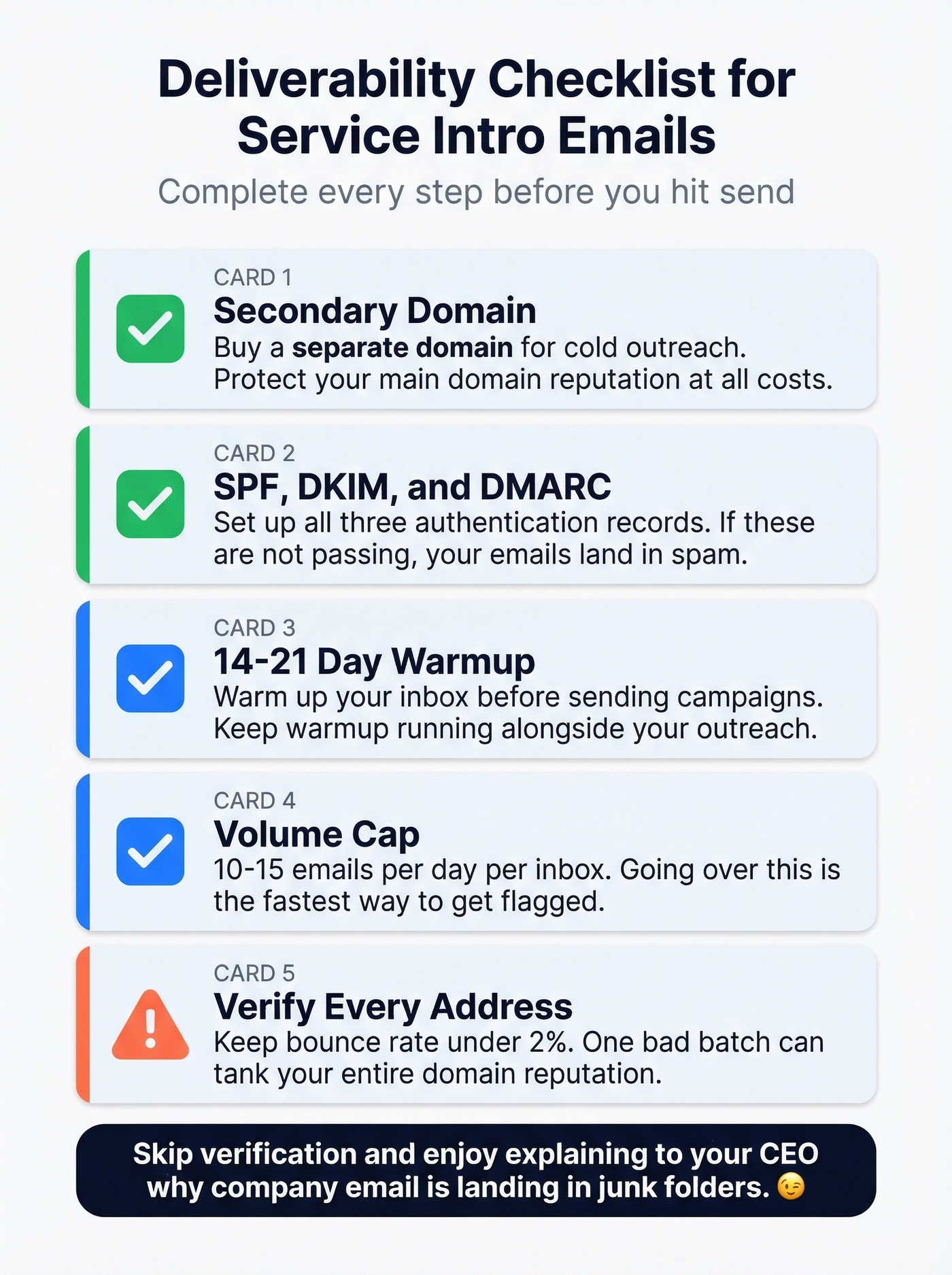
- ☐ Secondary domain purchased and configured for cold outreach
- ☐ SPF, DKIM, and DMARC records set up and passing (Google's guide walks through setup)
- ☐ 14-21 day warmup completed - keep warmup running alongside campaigns
- ☐ Volume cap: 10-15 emails per day per inbox (see Email Velocity)
- ☐ Every address verified before it enters your sequence (use an AI Email Checker)
Skip verification if you enjoy explaining to your CEO why your entire company's email is landing in junk folders. Otherwise, don't send a single cold email without it.

Bounces tank sender reputation and kill follow-up sequences before they start. Prospeo's 5-step verification keeps bounce rates under 2% - exactly where they need to be for cold service intros. At $0.01 per email, verifying your entire prospect list costs less than one bad bounce.
Protect your domain reputation before you hit send.
FAQ
How long should a client introduction email be?
Under 90 words for cold intros. A 16.5M-email study found 6-8 sentences hit a 6.9% reply rate - the highest of any length bracket. Account handoffs and onboarding emails can run slightly longer since the recipient already knows your company.
What's the best day to send a service introduction email?
Thursday pulls a 6.87% reply rate - the highest of any weekday. Monday is the worst at 5.29%. If you're sending one batch per week, schedule it for Thursday morning in the recipient's local time zone.
How many follow-ups should I send after an intro email?
Three max. The first follow-up lifts replies up to 49%, but by the fourth, spam complaints triple from 0.5% to 1.6%. Space them 2-4 business days apart, then move on.
How do I verify emails before sending service intros?
Use a dedicated verification tool before any address enters your sequence. Prospeo's free tier covers 75 emails per month with 98% accuracy, including catch-all domain handling - enough to validate a small campaign. Keeping bounce rates under 2% isn't optional if you care about deliverability.