


Koalendar Pricing, Reviews, Pros & Cons (2026)
Every review site for Koalendar shows the same thing: "Get Price" or "Talk to Advisor." The actual number is sitting right on their website. Koalendar Pro costs $6.99/seat/month on annual billing, or $9.99/seat/month if you go monthly. The free plan is genuinely unlimited - no trial, no expiration. Capterra has 146 reviews, Trustpilot has 67, and G2 has two. Here's what all of them actually say, plus how the pricing stacks up against Calendly, TidyCal, and Cal.com.
30-Second Verdict
Koalendar's free plan is the most generous in scheduling - unlimited bookings, unlimited pages, no time limit. Most solopreneurs never need Pro. If you do, $6.99/seat/month on annual billing undercuts Calendly Standard by 30%. The biggest weakness is native integrations: CRM connections typically require Zapier, Make, or webhooks rather than direct links. If you need deep CRM automation, Calendly is the safer bet. For sales outreach, the emails feeding your booking links matter as much as the scheduling tool itself - Prospeo verifies emails at 98% accuracy so prospects actually receive your link.
Koalendar Pricing Breakdown
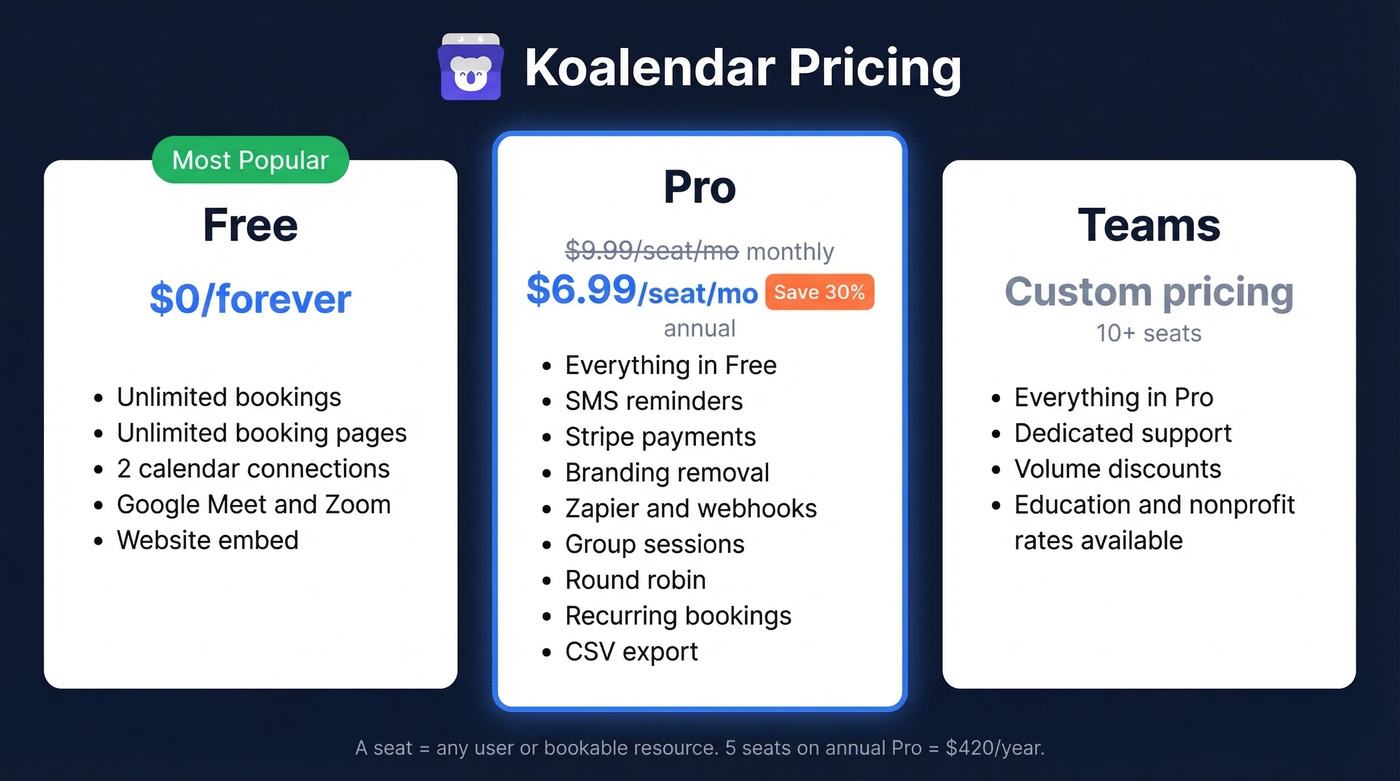
Koalendar keeps it simple. Two real tiers plus a Teams plan with custom pricing for 10+ seats.
| Plan | Price | Key Inclusions |
|---|---|---|
| Free | $0 | Unlimited bookings, unlimited pages, up to 2 calendar connections |
| Pro (monthly) | $9.99/seat/mo | Reminders, Stripe payments, branding removal, Zapier |
| Pro (annual) | $6.99/seat/mo | Same as monthly, 30% savings |
| Teams (10+ seats) | Custom | Dedicated support |
A "seat" is a user or a resource that can be booked. If you're a salon with 3 stylists, that's 3 seats even if only one person manages the account. On annual billing, that works out to roughly $84/seat/year. For a 5-person team, you're looking at $420/year total. Compare that to Calendly Teams on annual billing at $16/user/month - $960/year for the same headcount. The math is straightforward.
The free plan doesn't gate bookings or booking pages behind a paywall. That's unusual. Calendly's free tier limits you to a single event type and one calendar connection. Koalendar gives you unlimited bookings and unlimited booking pages, capped only at 2 calendar connections for conflict checks.
Koalendar also offers education and non-profit discounts. You'll need to contact their team for custom rates, but it's worth asking if you qualify.
5-Year Total Cost of Ownership
| Tool | Year 1 | Year 5 | Notes |
|---|---|---|---|
| Koalendar Pro | $420 | $2,100 | Annual billing, 5-person team |
| Calendly Teams | $960 | $4,800 | Annual billing at $16/user/mo |
| TidyCal | $145 | $145 | One-time, 5 Individual licenses |
| Cal.com Team | ~$900 | ~$4,500 | ~$15/seat/mo estimate |
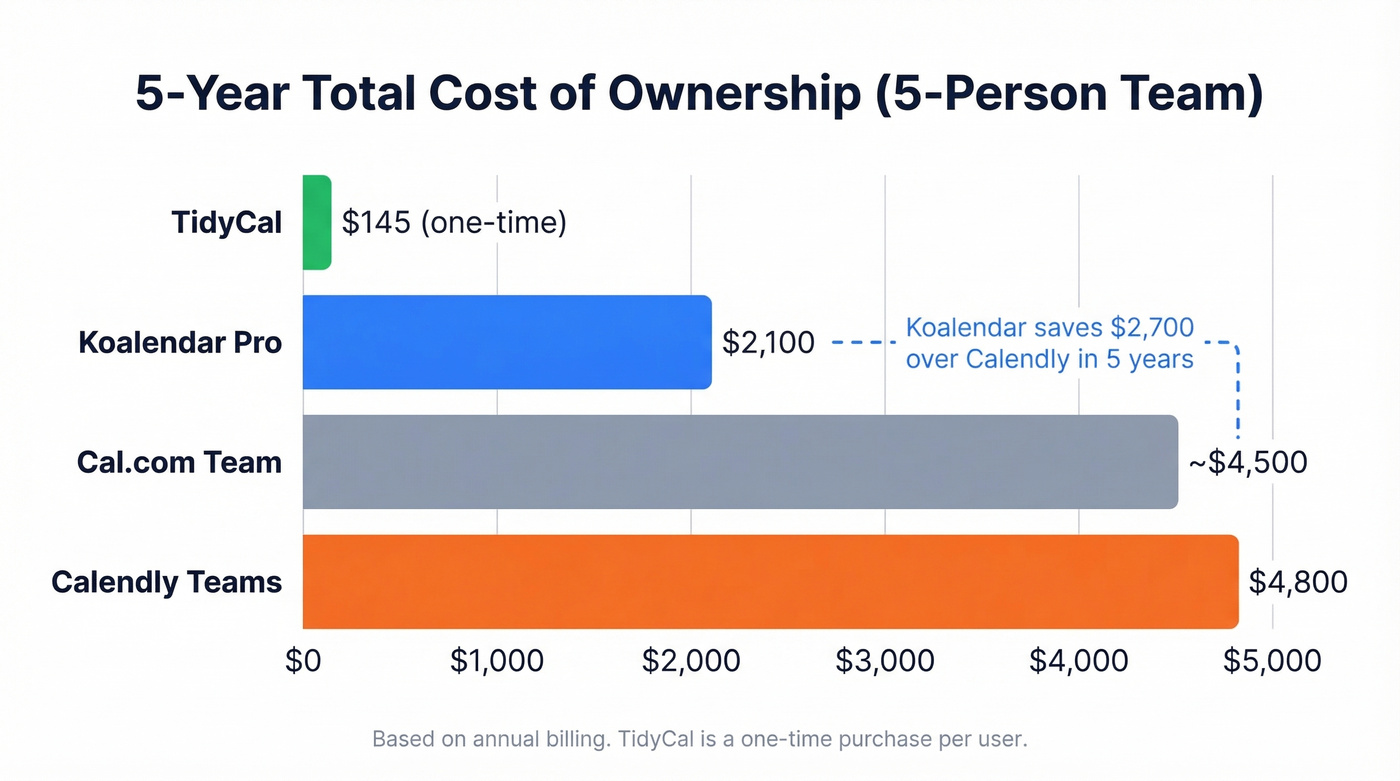
TidyCal wins on raw cost, but it's basic on the lower tiers. Koalendar saves you $2,700 over Calendly across five years while covering most of the same ground for small teams.
Free vs. Pro: Worth the Upgrade?
Use Pro if you're collecting payments via Stripe, need SMS reminders to cut no-shows, run group sessions or classes, want round-robin scheduling across a team, or need CSV export and Zapier automations.
Skip Pro if you're a solo consultant or freelancer booking 1-on-1 meetings. The free plan handles that without limitations.
Here's the thing - most Koalendar users probably don't need Pro. The free tier covers the core scheduling workflow end-to-end. Pro unlocks operational features: group sessions, collective scheduling, tentative bookings with manual approval, booking caps, and follow-up emails. These matter for service businesses and teams, not for someone who just needs a booking link in their email signature.
If you're on the fence, the 30% annual discount and 100% money-back guarantee make it low-risk to try.

Koalendar handles the booking - but prospects need to actually receive your link first. Prospeo finds and verifies professional emails at 98% accuracy so your scheduling links land in real inboxes, not bounce logs. At $0.01/email, it costs less than a single Koalendar Pro seat to verify hundreds of contacts.
Stop sending booking links to dead emails. Verify before you send.
What Users Actually Say
| Platform | Rating | Reviews | Reliability |
|---|---|---|---|
| Capterra | 4.7/5 | 146 | High |
| Trustpilot | 4.9/5 | 67 | Medium-High |
| G2 | 4.5/5 | 2 | Low - too few reviews |
Ignore the G2 score. Two reviews don't tell you anything meaningful.
The 146 reviews on Capterra are the most reliable dataset, and Trustpilot's 67 reviews skew heavily positive with a recurring theme: support is fast. Multiple reviewers mention response times measured in hours, including weekends - one user reported a rescheduling-link bug that got fixed the same day. In our testing, the free plan handled everything a solo consultant needs without friction, and the setup flow is genuinely quick. Non-technical users won't struggle with booking page customization.
On Software Advice, the price perception is consistently positive. One reviewer put it plainly: "Pro is even better - <$7 a month? $84 a year." Koalendar markets itself as rated 4.9 stars by 790+ users and trusted by 10,000+ organizations, and the third-party ratings largely align with that.
Pros and Cons
Pros:
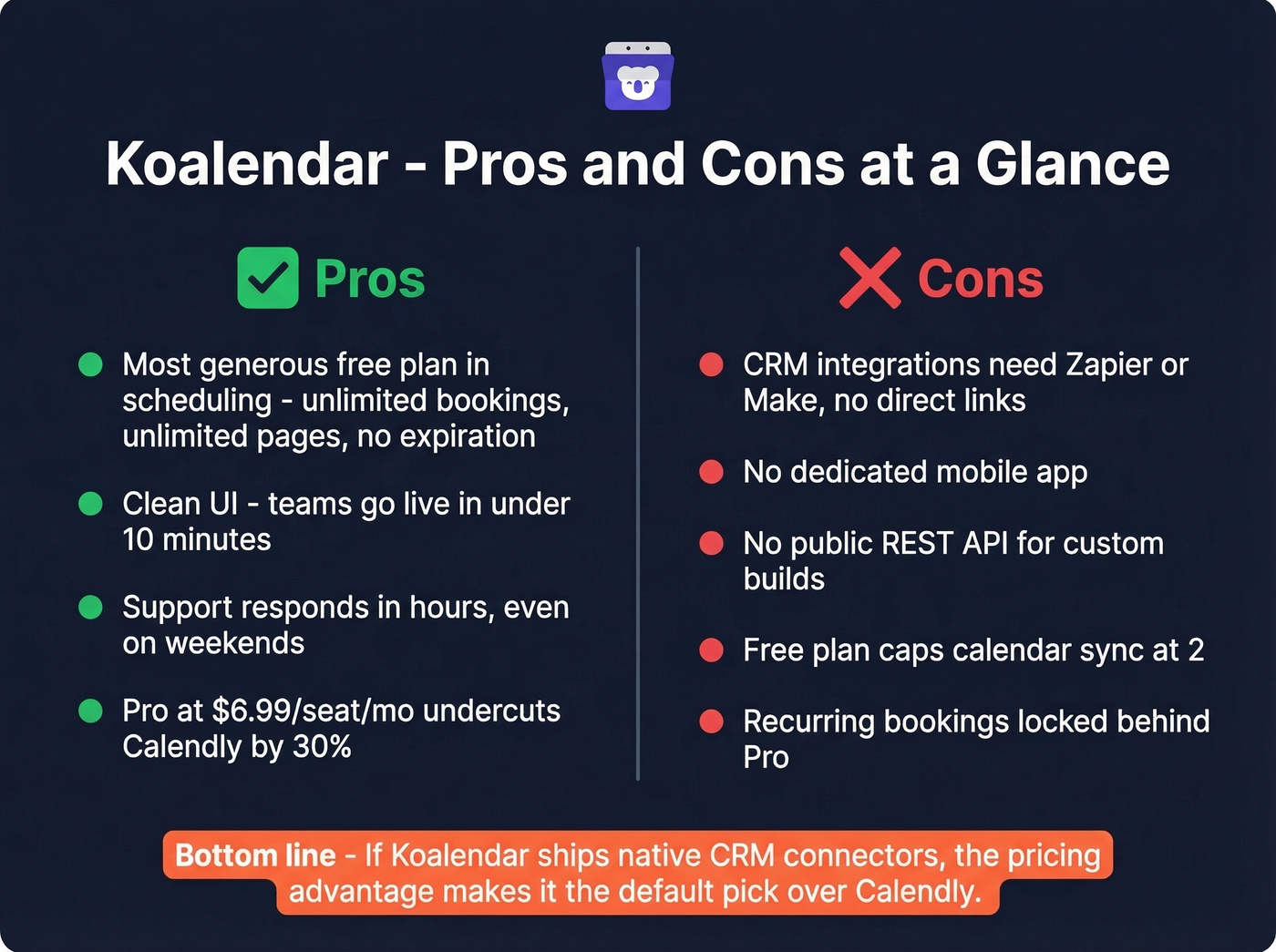
- Most generous free plan in scheduling. Unlimited bookings and unlimited booking pages vs. Calendly's single event type. This isn't a trial - it's a permanent free tier with no expiration date.
- Clean, intuitive UI. Every review platform agrees on this. We've seen teams get booking pages live in under 10 minutes.
- Excellent customer support. Reviews consistently highlight weekend bug fixes and response times under a few hours. For a self-funded, independent company, that's impressive.
- Fair Pro pricing. $6.99/seat/month on annual billing undercuts Calendly Standard at $10/user/month by 30%.
Cons:
- Limited native integrations. Koalendar connects to CRMs like HubSpot and Salesforce via Zapier, Make, or webhooks - not direct links. One Capterra reviewer flagged it directly: "Integration with other tools is difficult." If your workflow depends on native CRM sync, this is a real friction point.
- No dedicated mobile app. You're using the mobile browser.
- No public REST API. Developers wanting custom integrations generally rely on webhooks and automation platforms.
- Free plan caps calendar sync at 2. If you manage multiple calendars across personal and work accounts, you'll need Pro for unlimited sync.
- Recurring bookings aren't on Free. A Reddit user on r/TutorsHelpingTutors flagged this gap. Koalendar includes recurring bookings in Pro, but Free doesn't cover it - a problem for tutors and therapists who rely on weekly repeats.
- Occasional performance hiccups. Some reviewers note the platform is "slow at times" with intermittent network issues. Not dealbreaking, but worth knowing for high-volume booking.
Let's be honest: Koalendar's integration gap is the only thing keeping it from being the default recommendation over Calendly. If they ship deeper native CRM connectors, the pricing advantage makes the decision obvious. Until then, Calendly's 100+ integrations justify the premium for teams with complex stacks.
How Koalendar Stacks Up on Price
| Tool | Free Plan | Paid (per seat/mo) | Best For |
|---|---|---|---|
| Koalendar | $0 (unlimited) | $6.99-$9.99 | Free scheduling, small teams |
| Calendly | $0 (1 event type) | $10-$20 | Integration-heavy teams |
| TidyCal | $0 | $29 one-time | One-time budget buy |
| Cal.com | $0 (self-hosted) | ~$15-$37 | Self-hosting developers |
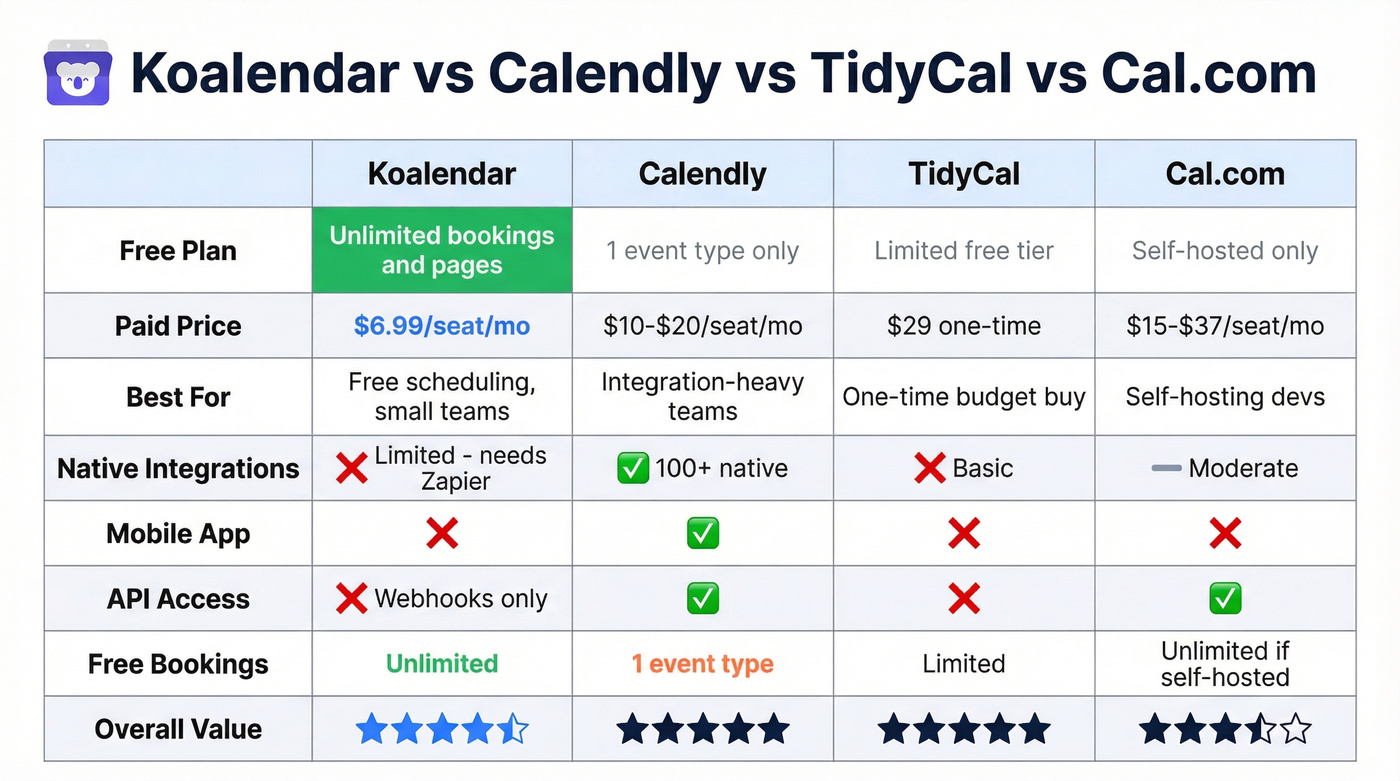
Best free plan: Koalendar, and it's not close. Best lifetime value: TidyCal at $29 once, though it's basic on the Individual tier. Best integrations ecosystem: Calendly with 100+ native connections. Best for developers who want to self-host: Cal.com, though a Reddit user who tested roughly 20 scheduling tools flagged Cal.com bugs as a recurring concern.
Look, if your CRM workflow is the priority, Calendly is the answer. But for a small team that doesn't need direct Salesforce sync and would rather save $500+ per year, Koalendar Pro does the job.
On the Calendly comparison specifically: Koalendar Pro at $6.99/seat/month on annual billing undercuts Calendly Standard at $10/user/month by 30%. On monthly rates, the gap is $9.99 vs. $12 - a 17% savings. Either way, Koalendar is cheaper.
Who Should Use Koalendar
Solopreneurs and freelancers should stay on the free plan. It does everything you need. We'd recommend starting on Free and only upgrading when you hit a specific wall - like needing Stripe payments or SMS reminders.
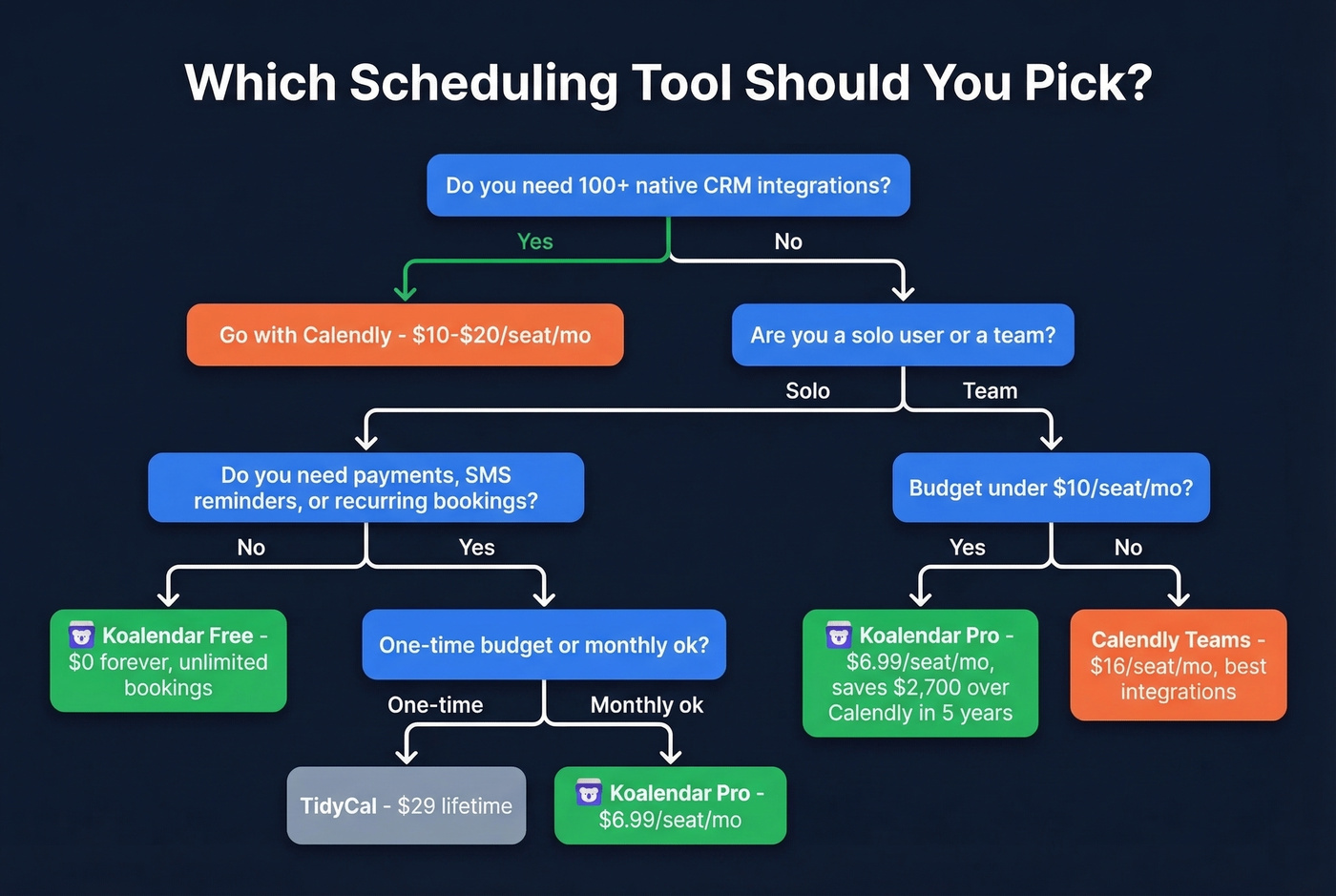
Small teams needing payments and reminders hit the sweet spot with Pro at $6.99/seat/month. You get Stripe payments, SMS reminders, round robin, and group sessions without Calendly's price tag.
For teams needing 100+ native integrations, Calendly wins. If your stack requires direct HubSpot or Salesforce sync without middleware, Koalendar isn't there yet.
Budget-conscious one-time buyers should look at TidyCal at $29 lifetime if they don't need team features.
Skip Koalendar entirely if you're an enterprise team needing deep CRM automation, a developer wanting full API access, or anyone who requires a dedicated mobile app.
Scheduling is step 2. Step 1 is finding the right people to book. If you're using Koalendar for sales demos or outreach meetings, the emails feeding those booking links need to actually land - and that's where verified contact data makes the difference. If you're building lists at scale, start with sales prospecting techniques and a clean lead generation workflow.
Koalendar's biggest gap is native CRM integrations. Prospeo fills the other gap - the contacts in your CRM. Enrich your pipeline with 50+ data points per lead at a 92% match rate, then push verified emails and direct dials straight to HubSpot or Salesforce. No Zapier workaround needed.
Enrich your CRM with contacts who actually pick up the phone.
FAQ
Is Koalendar really free?
Yes. The free plan includes unlimited bookings and unlimited booking pages with up to 2 calendar connections. No credit card required, no time limit, no trial expiration - it's a permanent free tier.
How does Koalendar compare to Calendly?
Koalendar's free plan is far more generous - unlimited bookings vs. Calendly's single event type. Calendly wins on native integrations (100+) and enterprise features. On price, Koalendar Pro at $6.99/seat/month undercuts Calendly Standard at $10/user/month by 30%.
Can I use Koalendar for sales demo scheduling?
Yes. Koalendar Pro supports round robin, collective meetings, and Zoom/Google Meet/Microsoft Teams integration. For sales teams, pairing it with verified email data ensures your scheduling links reach the right prospects - fewer bounces, more booked demos.
What's the best free scheduling tool in 2026?
Koalendar offers the most generous free plan: unlimited bookings, unlimited pages, and no expiration. TidyCal's free tier and Cal.com's self-hosted option are alternatives, but neither matches Koalendar's feature breadth at zero cost.