

How to Build a Lead Follow Up System That Actually Converts
The average business takes 42 hours to respond to a new inbound lead. That's almost two full days - two days where your prospect talks to three competitors, forgets they filled out your form, and moves on with their life. Research from InsideSales/MIT shows leads contacted within 5 minutes are 21x more likely to qualify than those contacted after 30 minutes.
Most teams aren't even close to that window.
The fix isn't another CRM. It's a lead follow up system - the process, cadence, data quality, and tooling that work together to turn interest into revenue. Whether you're building this for your own team or deploying it for clients, the framework is the same.
What Separates Teams That Convert
Three things separate teams that close from teams that chase:
- Fix your speed. Respond to inbound leads in under 5 minutes. Responding within 1 minute can increase conversions by 391%.
- Follow a cadence. 7-10 touches over 10-14 days across email, phone, and SMS. Not "whenever the rep remembers."
- Verify your data. Your system fails silently when emails bounce and phone numbers are dead. Start with clean contact data before anything else.
What This System Actually Looks Like
Let's be honest: a CRM isn't a system. A CRM is a database with a nice UI. A real follow-up system is the process, cadence, data quality, and tooling working in concert to turn interest into revenue.
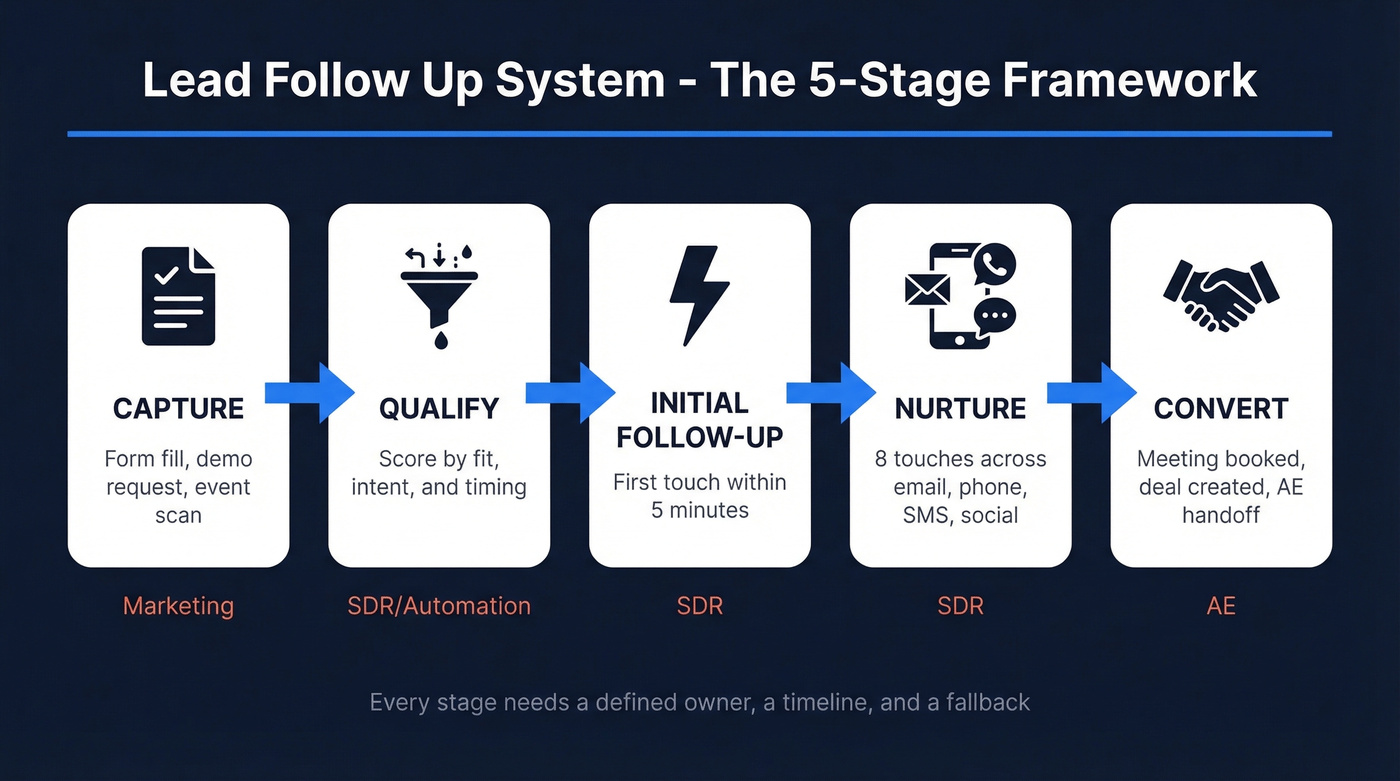
Here's the framework that works:
- Capture - lead enters your pipeline (form fill, demo request, event scan)
- Qualify - score and route based on fit, intent, and timing
- Initial Follow-Up - first touch within minutes, not hours
- Nurture - multi-channel cadence with escalating value
- Convert - meeting booked, deal created, handoff to AE
Every stage needs a defined owner, a timeline, and a fallback. If any stage runs on "the rep will figure it out," you don't have a system.
Five Mistakes Killing Your Follow-Up
1. You never follow up at all. 48% of salespeople never make a second contact after initial outreach. Nearly half your team is one-and-done with leads you paid to generate. That's not a process problem. That's money in the trash.
2. You quit too early. 44% of reps give up after a single attempt. Meanwhile, 80% of sales require five or more follow-ups, and only 2% of deals close on the first contact. Missed follow ups in sales are the single biggest source of leaked revenue - and the easiest to fix with a structured cadence.
3. You're single-channel. Email-only cadences leave money on the table. B2B buyers engage across an average of 10 channels. If you're not mixing email, phone, SMS, and social touches, you're missing the channels where your prospect actually responds.
4. Your timing is random. Following up "when I get around to it" means you're calling at 1:30 PM on a Monday - statistically the worst window. Best-in-class teams time their touches to specific windows and days.

Your follow-up cadence means nothing if 35% of your emails bounce. Bad data kills speed-to-lead and torches your domain reputation. Prospeo delivers 98% email accuracy with a 7-day refresh cycle - so every touch in your cadence actually reaches a real person.
Stop following up with dead inboxes. Start with verified contacts.
Build Your Follow-Up Cadence
The 8-Touch, 12-Day Framework
Each follow-up should be shorter than the last, more specific, and anchored to something the prospect actually said or did. Cold outbound needs 7-10 touches over 10-14 days. Warm leads need 4-7 touches within a week.
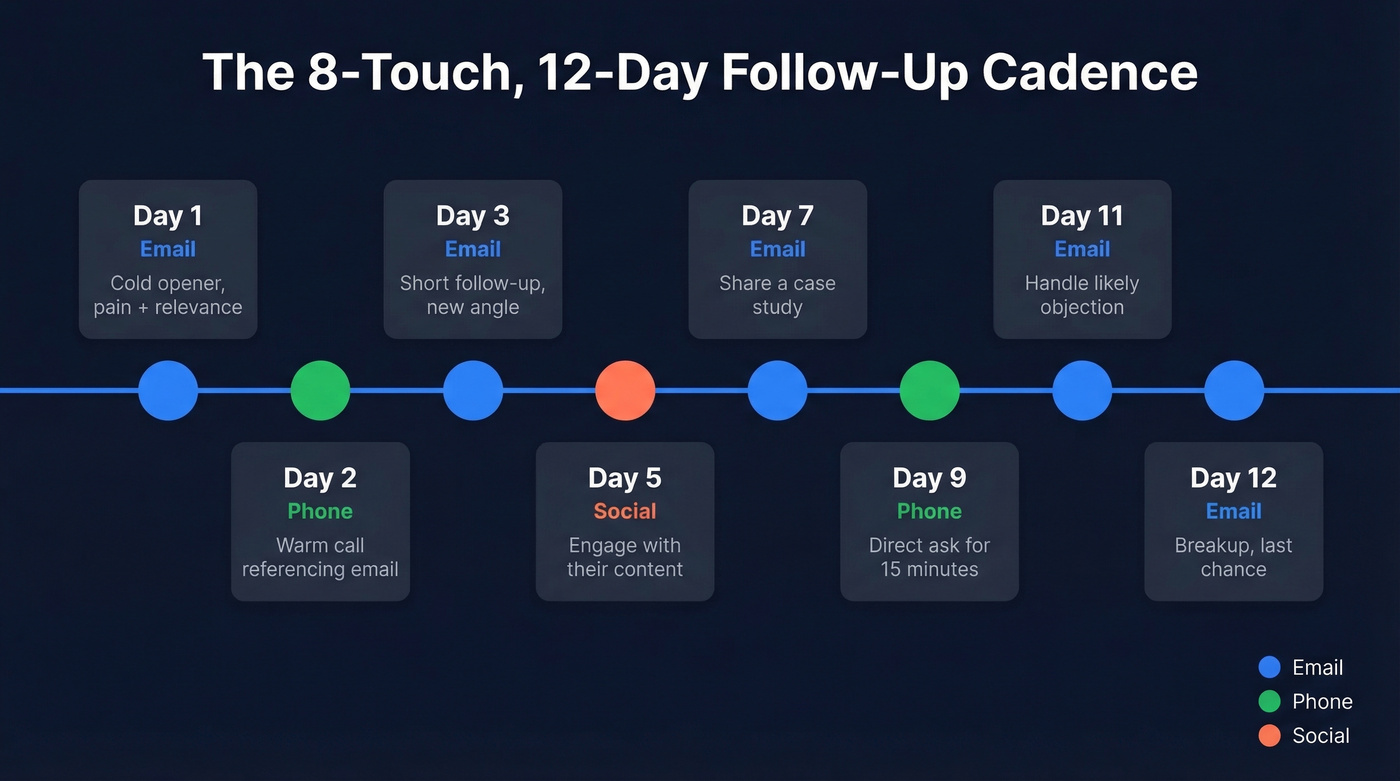
| Day | Channel | Purpose |
|---|---|---|
| 1 | Cold opener - pain + relevance | |
| 2 | Phone | Warm call referencing email |
| 3 | Short follow-up, new angle | |
| 5 | Social | Engage with their content |
| 7 | Share an asset (case study) | |
| 9 | Phone | Direct ask for 15 minutes |
| 11 | Handle likely objection | |
| 12 | Breakup - last chance |
For warm leads, compress this to days 0-5 and cut the social touch. Speed matters more than variety when someone's already raised their hand.
Don't just follow the calendar - layer in behavioral triggers. A pricing page visit, an email open with no click, a job change, or a funding announcement is always a better reason to reach out than "it's been 3 days." The best cadences branch based on prospect behavior, not just elapsed time. One of our team members ran an experiment where job-change triggers outperformed time-based follow-ups by nearly 3x in reply rate, which tracks with what we've seen across multiple campaigns.
Timing That Matters
- Best windows: 8-10 AM and 4-5 PM in the prospect's local time zone
- Best days: Tuesday and Thursday consistently outperform
- Worst slot: 1-2 PM - people are in post-lunch mode and ignore everything
- Start at 2-3 day intervals, then extend to 5-7 days as the cadence progresses
Templates You Can Steal
Post-Meeting Follow-Up (send within 24 hours) Subject: Next steps from our call
Hi {{first_name}}, thanks for the time today. Quick recap: you mentioned {{specific pain point}} is costing your team roughly {{impact}}. I've attached the case study we discussed - the results section on page 2 maps directly to your situation. Want to loop in {{stakeholder}} for a 20-minute deep dive this week?
Value-Add Follow-Up (2-3 days after initial contact) Subject: Thought of you when I saw this
{{first_name}}, came across this {{resource type}} on {{relevant topic}} and immediately thought of your team's challenge with {{pain point}}. Worth a 5-minute skim: {{link}}. Happy to walk through how we've helped similar teams if it resonates.
Breakup Email (final touch) Subject: Should I close your file?
{{first_name}}, I've reached out a few times and haven't heard back - totally understand if the timing's off. I'll close out your file for now. If {{pain point}} becomes a priority again, just reply to this thread and we'll pick up where we left off.
For SMS, keep it to one sentence after an unanswered call: "Hi {{first_name}}, just tried calling about {{topic}} - is there a better time this week?"
Choosing the Right Tech Stack
What You Actually Need
You need three tools, not six. A CRM to track deals and contacts. A sequencer to automate multi-channel cadences. And a data quality layer to make sure the contacts you're reaching out to actually exist.
Look - automating chaos creates bigger, faster chaos. Before you buy anything, make sure you have a defined process. Automation makes sense when manual follow-up tasks eat 5+ hours per week, you've got 3+ reps who need coordination, or lead volume exceeds what your team can handle with timely, personal touches. To put that in perspective, manually following up with just 10 leads per fortnight can consume 10+ hours of rep time - time that compounds fast as volume grows.
Tool Comparison
| Tool | Category | Starting Price | Best For |
|---|---|---|---|
| Prospeo | Data Quality | Free tier; ~$0.01/email | Verified data foundation |
| HubSpot | CRM + Sequences | ~$880/mo (Professional) | SMBs consolidating |
| Pipedrive | CRM | $49/user/mo (Professional, annual) | Pipeline-focused teams |
| Apollo | Outbound + Sequences | Free; $59-99/user/mo | Outbound on a budget |
| Outreach | Sequencing | Custom | Enterprise outbound |
| Salesloft | Sequencing | Custom | Enterprise outbound |
| Default | Routing + SLA | $750/mo | RevOps speed-to-lead |

Your data quality layer sits underneath everything else. Every record in Prospeo refreshes every 7 days - the industry average is 6 weeks, which means most databases are already stale by the time you load them. The platform integrates natively with HubSpot, Salesforce, Outreach, Salesloft, and Zapier.
Recommended Stacks by Team Size
| Team Size | Stack | ~Cost/Rep/Mo |
|---|---|---|
| Solo / SMB | HubSpot Free + Prospeo | Under $50 |
| Mid-Market (5-20 reps) | Pipedrive + Apollo | ~$150-200 |
| Enterprise (20+) | Salesforce + Outreach + Default | ~$300-400 |
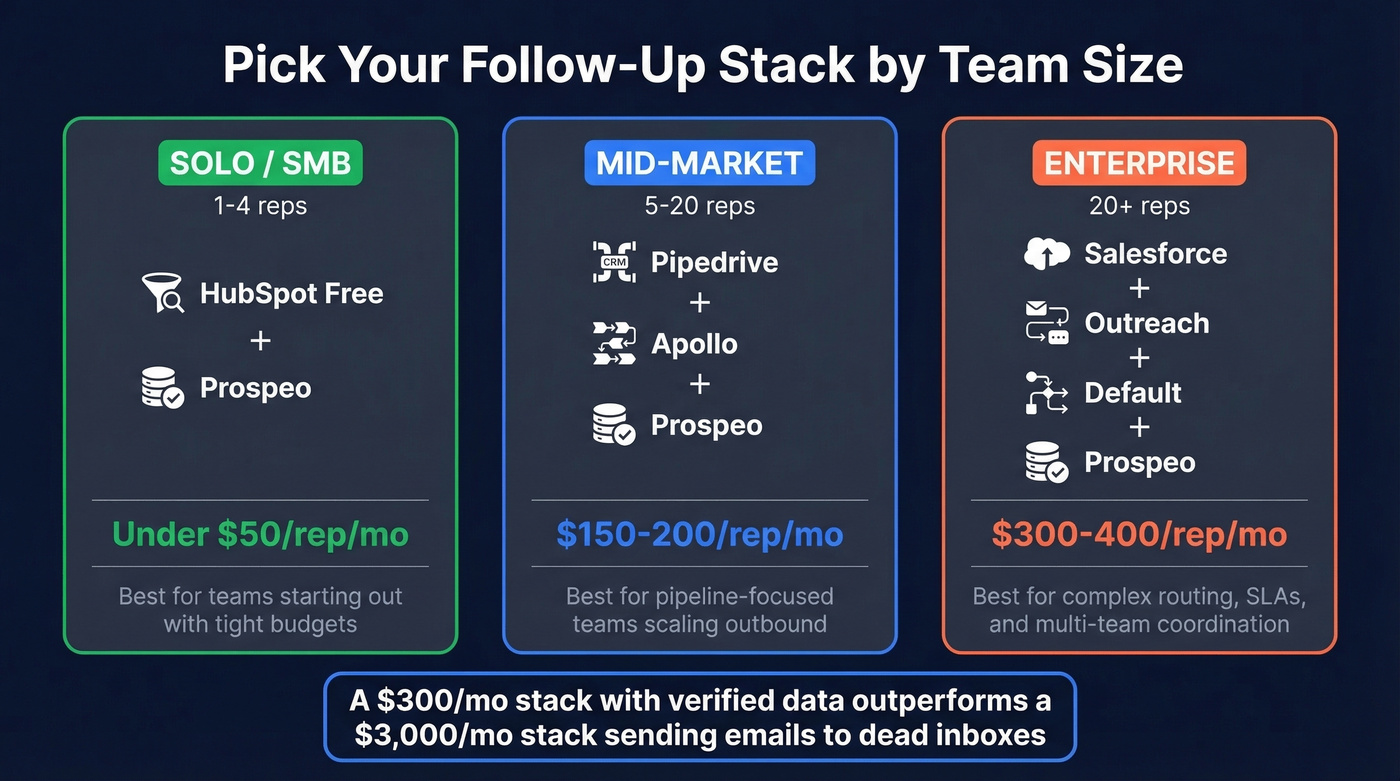
A $300/mo stack with verified data outperforms a $3,000/mo stack sending emails to dead inboxes. Most teams overspend on sequencing tools and underspend on data quality. If your average deal size is under $10k, you almost certainly don't need an enterprise sequencer - you need accurate contact data and a disciplined cadence. Skip Outreach and Salesloft entirely if you're running fewer than 10 reps; Apollo or HubSpot sequences will cover you.
Speed-to-Lead Benchmarks for 2026
The benchmarks below show just how wide the gap is between average and best-in-class.
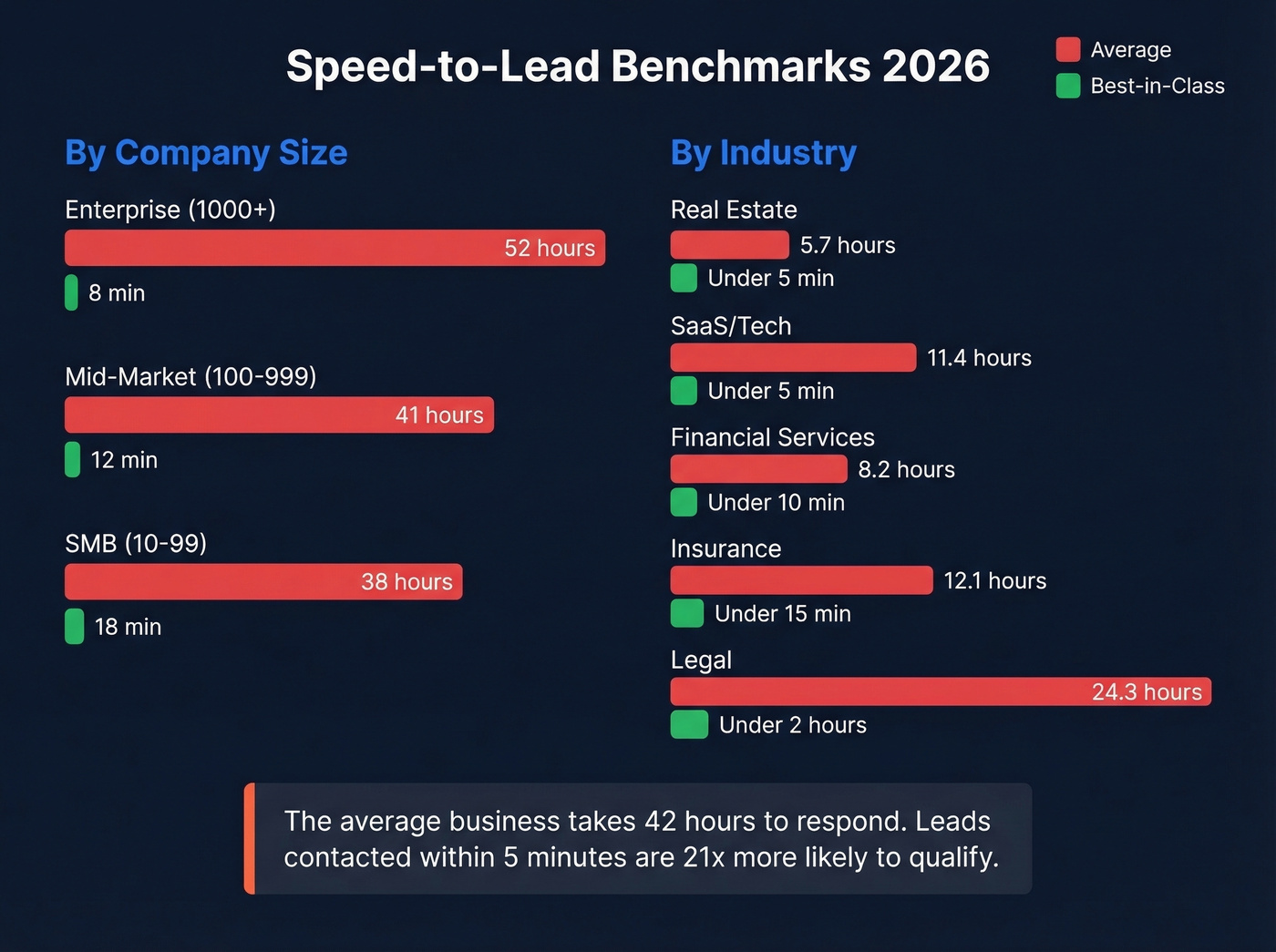
By Company Size
| Size | Avg Response | Best-in-Class |
|---|---|---|
| Enterprise (1000+) | 52 hours | 8 minutes |
| Mid-Market (100-999) | 41 hours | 12 minutes |
| SMB (10-99) | 38 hours | 18 minutes |
By Industry
| Vertical | Avg Response | Best Practice |
|---|---|---|
| Real Estate | 5.7 hours | Under 5 min |
| SaaS / Tech | 11.4 hours | Under 5 min |
| Financial Services | 8.2 hours | Under 10 min |
| Insurance | 12.1 hours | Under 15 min |
| Legal | 24.3 hours | Under 2 hours |
The gap is enormous. Even getting from 42 hours to same-day puts you ahead of most competitors. We've seen mid-market teams cut response time from 24 hours to under 15 minutes just by adding routing automation, SLA alerts, and verified contact data. Snyk's team of 50 AEs made exactly this shift - AE-sourced pipeline jumped 180% and bounce rates dropped from 35-40% to under 5%.
Setting Up CRM Automation
Every CRM automation follows a simple structure: Trigger -> Condition -> Action. A new deal is created (trigger), the deal value exceeds $10k (condition), so the system routes it to a senior AE and fires a 5-minute SLA alert (action). Pipedrive, HubSpot, and Salesforce all support this pattern with if/else branching and wait conditions between steps.
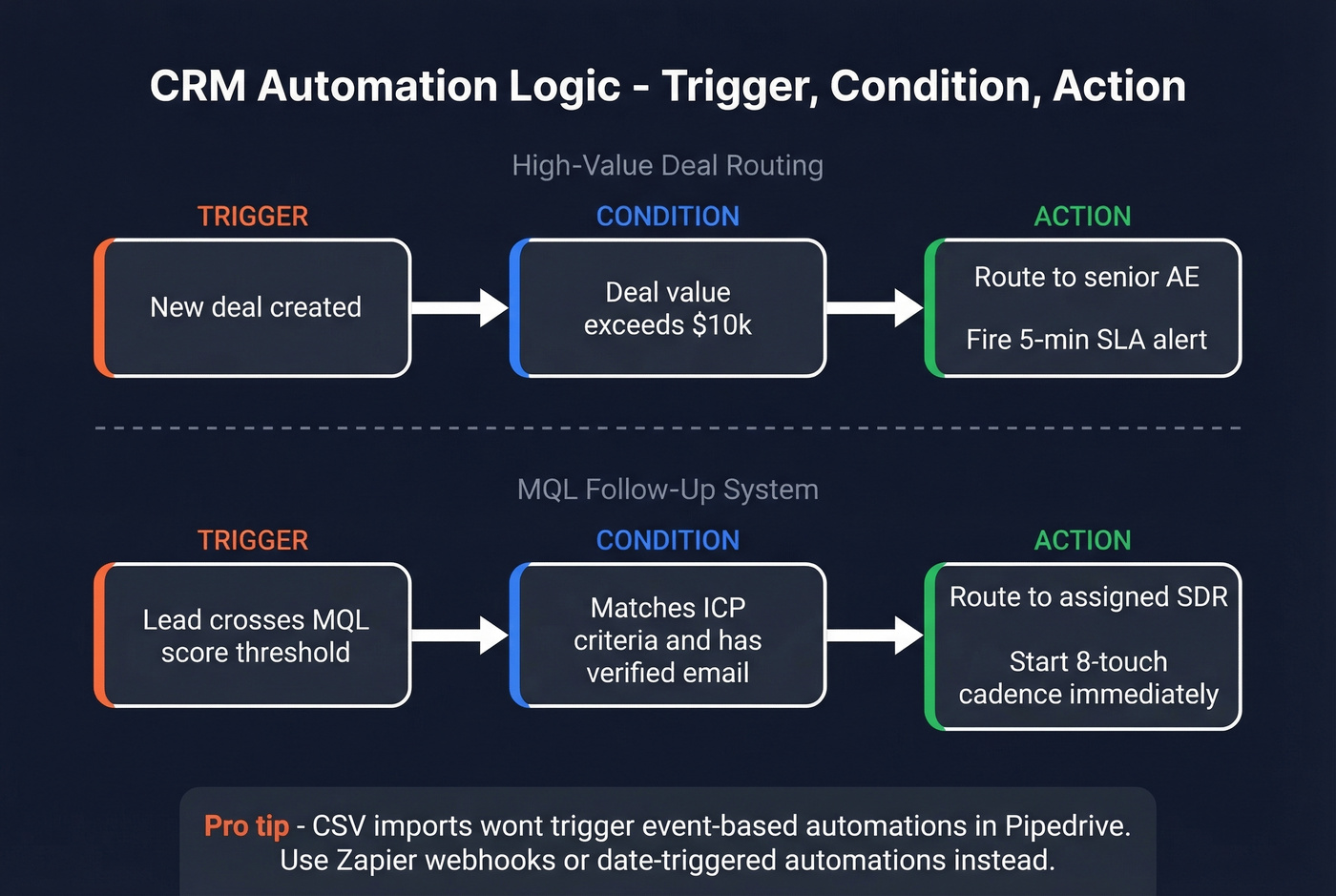
This same logic powers an MQL follow-up system: when a lead crosses your lead scoring threshold and becomes marketing-qualified, the automation should instantly route it to the right rep and kick off a time-bound cadence. No manual handoff, no lag between marketing and sales. The consensus on r/sales is that the marketing-to-sales handoff is where most MQLs go to die, and in our experience, that's accurate - the fix is always automation with tight SLAs, not more meetings between the two teams.
One thing no competitor guide mentions: importing contacts via CSV won't trigger event-based automations in Pipedrive. Date-triggered automations work with imports, but event triggers don't. If you're bulk-loading leads, you'll need a Zapier webhook or manual trigger as a workaround.
Job changes, funding rounds, intent signals - the behavioral triggers that outperform time-based follow-ups by 3x all depend on fresh data. Prospeo refreshes 300M+ profiles every 7 days and tracks 15,000 intent topics so your reps reach the right buyer at the right moment.
Trigger-based follow-ups need real-time data. Prospeo delivers it.
FAQ
How many follow-ups should I send?
For cold outbound, plan 7-10 touches over 10-14 days. Warm leads need 4-7 touches within a week. 80% of sales require five or more follow-ups, and only 2% close on the first contact. Enterprise deals with multiple stakeholders can require 20-70 interactions before closing.
Should I call or email first?
54% of tech buyers prefer phone contact, while only 40% of professional services buyers do. Multi-channel always outperforms single-channel. Lead with whichever channel your ICP prefers, then layer in the others within 24-48 hours.
How do I keep my follow-up system from reaching dead contacts?
Verify contact data before loading it into any sequencer. Job changes, company moves, and email migrations turn good lists into bad lists fast. A 7-day data refresh cycle catches these changes before they wreck your sender reputation - most providers refresh every 6 weeks, which means stale data by launch day.
What's the difference between a general and an MQL follow-up system?
A general system covers every lead from first touch to close. An MQL follow-up system focuses specifically on marketing-qualified leads who've hit a scoring threshold through content downloads, webinar attendance, or repeated site visits. Because MQLs have already shown intent, the cadence is compressed, messaging references their specific engagement, and the SLA for first touch is tighter - ideally under 10 minutes.