

How to Build Lead Scoring in Salesforce: Einstein, Flow & Formula Methods
You enabled Einstein Lead Scoring, waited 48 hours, and half your leads came back with a score of zero. Turns out you didn't have enough conversion history - and nobody told you that before you paid for the add-on.
Lead scoring in Salesforce should be straightforward, but most teams pick the wrong method for their situation and end up with scores nobody trusts. Companies using lead scoring see 138% ROI compared to 78% without it, yet only 44% of organizations actually score their leads. Salesforce's own State of Sales data shows reps spend 9% of their week researching prospects, 8% prospecting, and 8% prioritizing leads and opportunities - a full quarter of their time on activities that a working scoring model should handle. The gap isn't motivation. It's implementation.
Choosing the Right Method
Before you touch a single field, here's the 30-second decision:
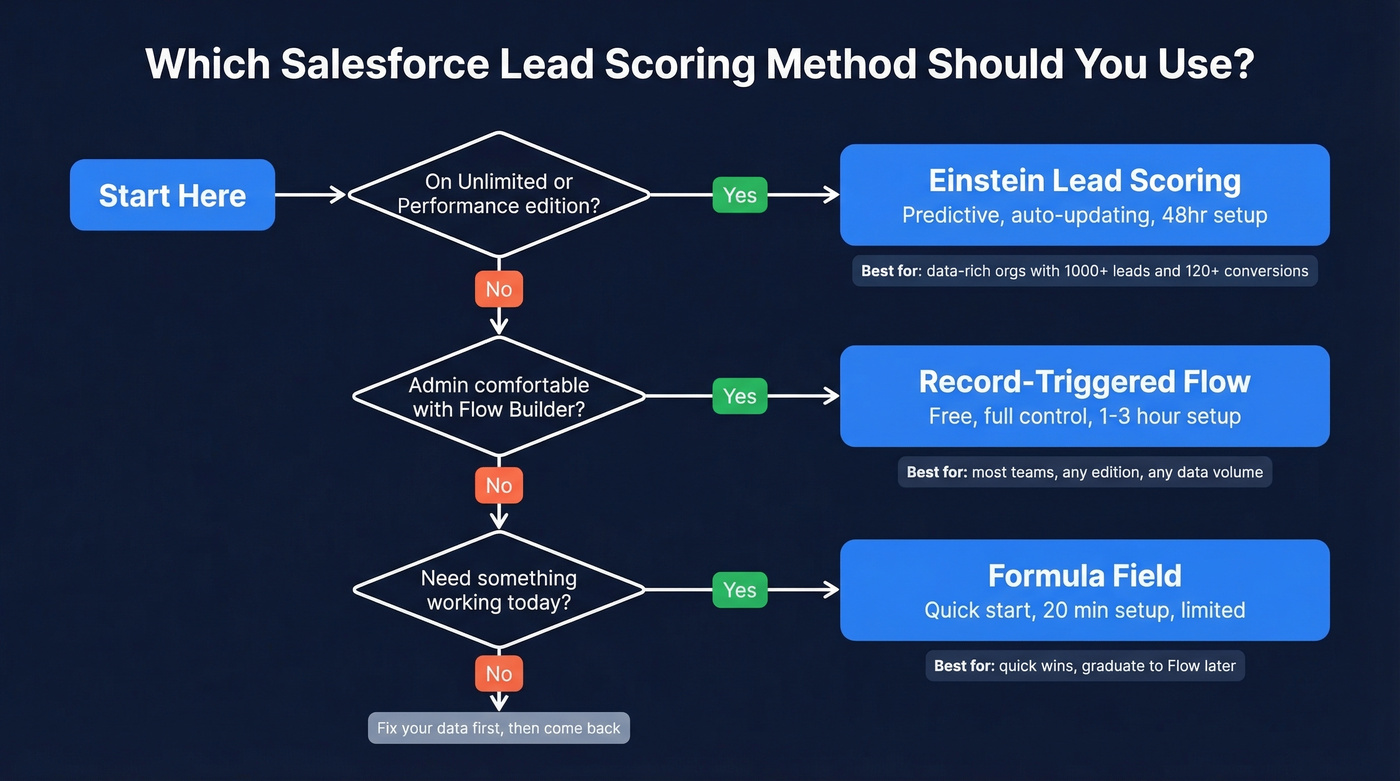
- Unlimited or Performance edition? Einstein Lead Scoring is usually the fastest path to predictive scoring with minimal admin maintenance.
- Admin comfortable with Flow, any edition? Build a Record-Triggered Flow. This is the right move for most teams.
- Need something working in 20 minutes? Start with a formula field, then graduate to Flow when you hit its limits.
| Einstein | Flow | Formula | |
|---|---|---|---|
| Edition | Enterprise / Performance / Unlimited | Any | Any |
| Cost | $50/user add-on on Enterprise; typically included on Unlimited | $0 | $0 |
| Complexity | Low (config, not code) | Medium (admin-level) | Low |
| Data needed | ~1,000 leads + ~120 conversions minimum | Your own criteria | Your own criteria |
| Deploy time | 48 hours (initial analysis) | 1-3 hours | 20 minutes |
| Triggers automation? | Yes | Yes | No |
The cost difference matters. On Enterprise edition at $165/user/month, adding Einstein at $50/user means a 10-person team pays an extra $6,000/year just for scoring. On Unlimited at $330/user, it's typically included - but you're already paying double the base rate.
One prerequisite applies to all three methods: clean data. If your lead records are missing job titles, company sizes, and verified contact info, your scoring model will confidently rank garbage. Enrichment comes first. Scoring comes second.
Einstein Lead Scoring
Use this if you're on Unlimited or Performance, have enough lead and conversion history to train a model, and want scoring that updates itself without admin maintenance.
Skip this if you're on Enterprise (the $50/user add-on adds up fast), you have thin conversion history, or you need to explain why a lead scored high to your sales team. Einstein's biggest limitation is the black box - it'll tell you a lead scores 87, but the reasoning behind that number is vague at best.
When you flip it on, Einstein runs an initial analysis that takes up to 48 hours. It examines every field on your lead records by default, with custom settings allowing you to exclude fields and specify up to 100 field filters. If you don't have enough historical data, Einstein can fall back to a global model built from anonymous data across thousands of Salesforce customers. That global model is adequate but generic - it won't reflect your ICP.
Once active, Einstein scores leads at least every six hours and rescores within the hour when an attribute changes. The underlying model refreshes every 10 days, so your scoring adapts as your lead mix evolves. Machine learning lead scoring yields roughly 75% higher conversion rates - but only if you have the data to feed it. We've seen teams with fewer than 80 conversions in their history get essentially random scores from Einstein, which is worse than no scoring at all because it creates false confidence.
Here's the thing: teams enable Einstein, get excited about the scores, and then realize they can't act on them because they never built routing logic downstream. Einstein scores leads. It doesn't route them.
Record-Triggered Flow
This is the method we recommend for most teams. It costs nothing, works on every Salesforce edition, and gives you full control over the scoring logic.
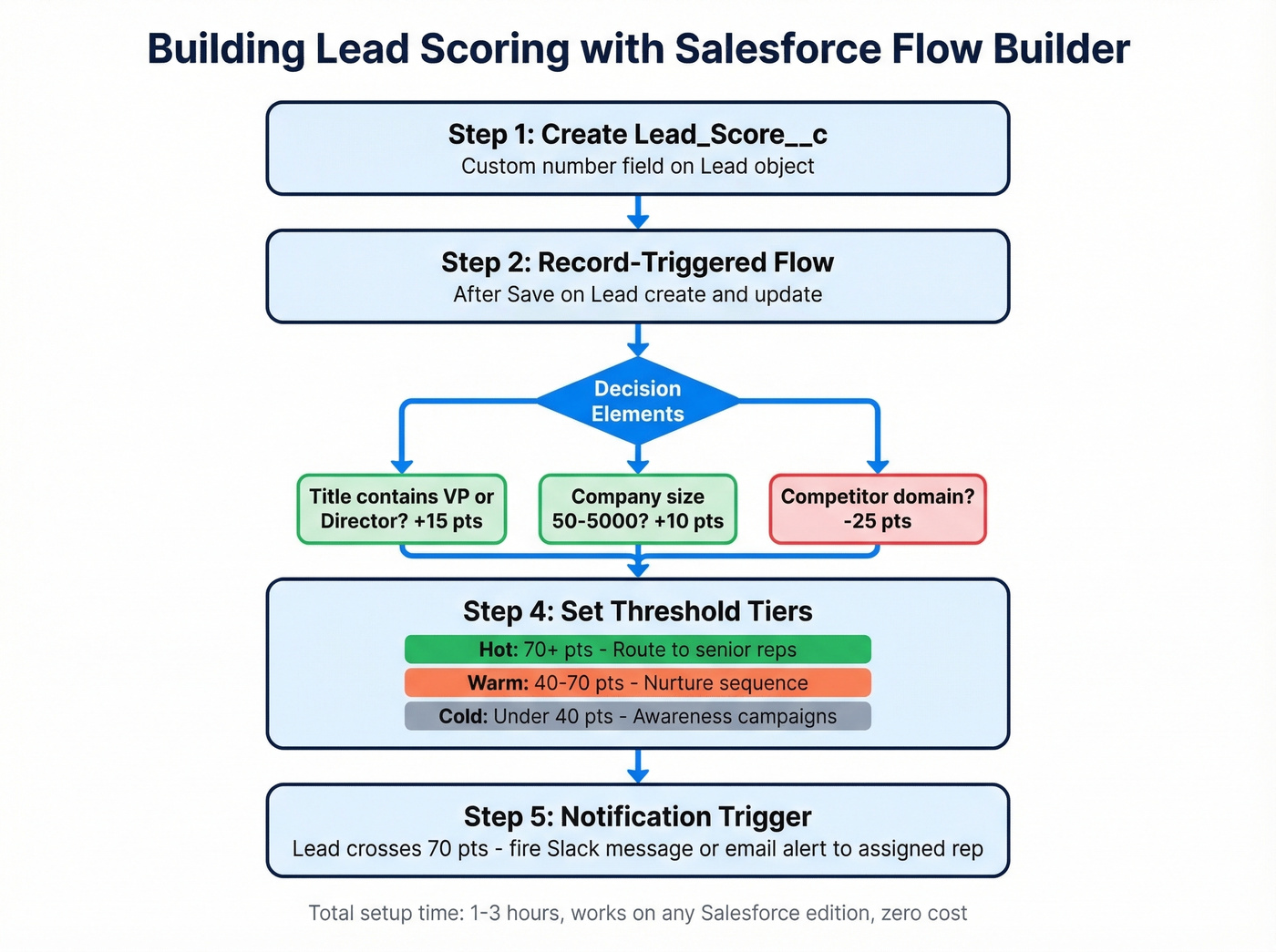
Step 1: Create a custom number field on the Lead object - call it Lead_Score__c. This is your scoring ledger.
Step 2: Build a Record-Triggered Flow set to run After Save on Lead create and update. This fires every time a lead record changes.
Step 3: Add Decision elements that evaluate your scoring criteria. Each branch checks a condition - job title contains "VP," company size > 500, industry matches your ICP - and routes to an Assignment element that adds points to Lead_Score__c.
Step 4: Set threshold tiers. A common starting framework:
- >70 points: Hot - route to senior reps immediately
- 40-70 points: Warm - enter nurture sequence
- <40 points: Cold - park in awareness campaigns
Step 5: Add a notification trigger at the hot threshold. When a lead crosses 70, fire a Slack message or email alert to the assigned rep. A lead that scores hot at 2 PM shouldn't wait until the next morning's report.
On r/salesforce, admins building scoring for enterprise orgs with 6+ month sales cycles run into the same challenge: leadership wants a simple healthy/unhealthy signal, but the underlying data is a mess. Flow handles this well because you can roll component scores for sales activity, intent signals, and marketing engagement into a single master score, then surface just the tier label to leadership.
The beauty of Flow is transparency. When a rep asks "why is this lead hot?", you can point to the exact criteria. Try doing that with Einstein.
Formula Fields - Quick Start
If you need something live in 20 minutes, a formula field gets you there:
(IF(AnnualRevenue = 0, 0, 10)) +
(IF(ISPICKVAL(Industry, ""), 0, 10)) +
(IF(MobilePhone = "", 0, 10))
This awards 10 points each for having annual revenue, an industry value, and a mobile phone number. Simple, readable, immediately useful for basic prioritization.
But formula fields hit three walls fast. The score is calculated, not stored - you can't manually override it per record. Every existing lead gets a score the moment you save the formula, which sounds great until 10,000 stale leads get scored as if they're new. And the dealbreaker: a formula field change won't fire a Flow, send an alert, or update an assignment rule. Your reps have to manually check scores.
When you find yourself wanting the formula to do something when a lead hits a threshold, that's your signal to graduate to Flow.

Your Salesforce lead scoring model is only as good as the data underneath it. Prospeo enriches every lead with 50+ data points - verified emails, mobile numbers, company size, industry, and job titles - at 98% accuracy. That means your scoring rubric actually has fields to score.
Stop scoring empty fields. Enrich first, score second.
Sample Scoring Rubric
Most guides tell you to score everything. Don't. Score 5-7 high-signal attributes. Every additional criterion dilutes the model and makes recalibration a nightmare.
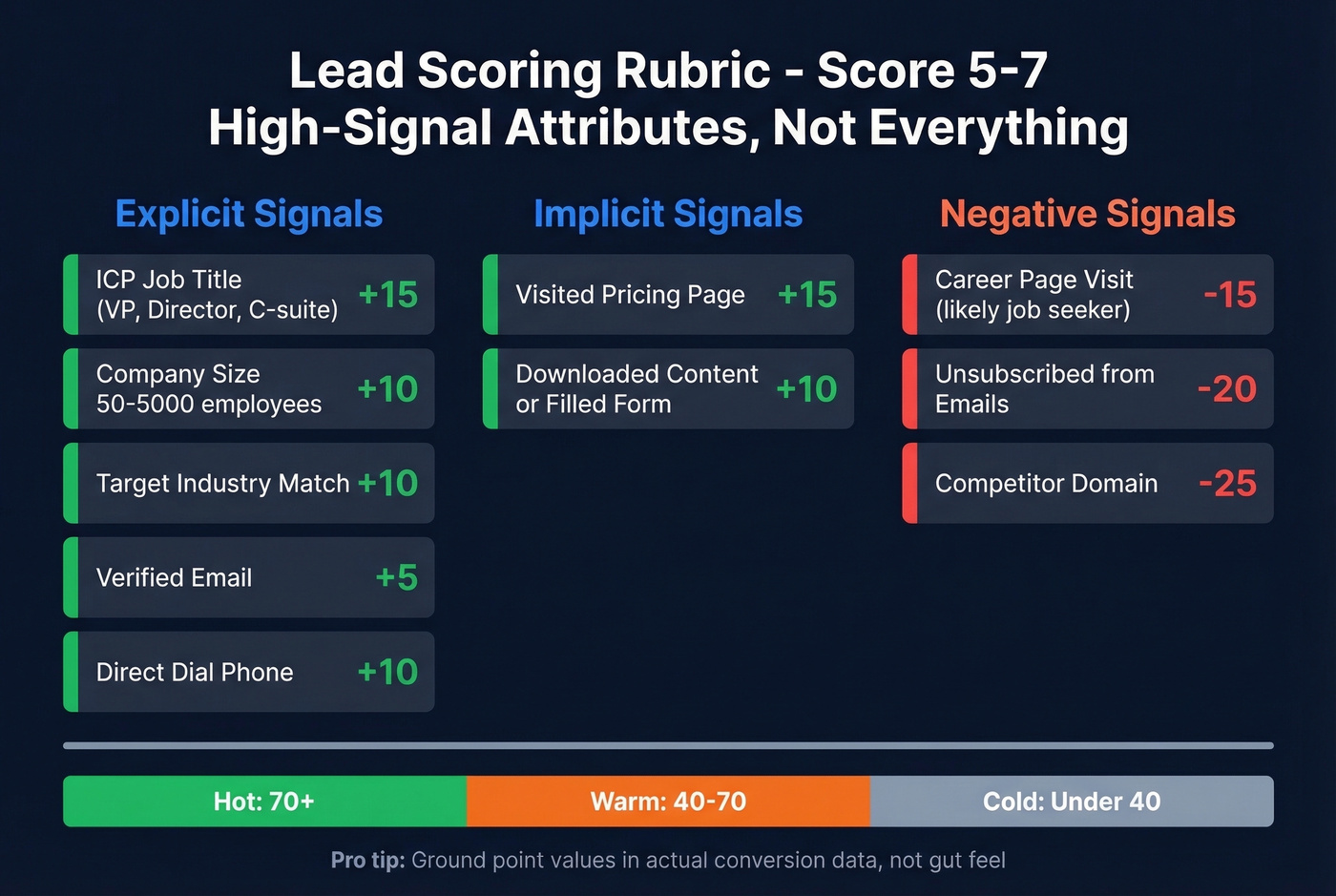
| Criteria | Points | Category |
|---|---|---|
| Job title matches ICP (VP, Director, C-suite) | +15 | Explicit |
| Company size 50-5,000 employees | +10 | Explicit |
| Target industry match | +10 | Explicit |
| Has verified email | +5 | Enrichment |
| Has direct dial phone | +10 | Enrichment |
| Visited pricing page | +15 | Implicit |
| Downloaded content / filled form | +10 | Implicit |
| Career page visit | -15 | Negative |
| Unsubscribed from emails | -20 | Negative |
| Competitor domain | -25 | Negative |
If your deals typically close under $15k, you probably don't need Einstein-level scoring at all. A 5-criteria Flow with clean data will outperform a black-box ML model running on sparse conversion history every single time.
Deriving Point Values from Conversion Data
Don't just assign arbitrary weights. Pull your baseline lead-to-opportunity conversion rate, then check conversion rates for each attribute segment. If leads with VP titles convert at 3x your baseline, weight that criterion at 3x your base score increment. If pricing page visitors convert at 5x baseline, that's your highest-value implicit signal. Ground your rubric in actual numbers, not gut feel.
Score Decay and Negative Scoring
Left unchecked, lead scores only go up. A lead who downloaded a whitepaper 11 months ago still carries those points, even though they've gone completely dark. That's how you end up with an MQL list full of ghosts.
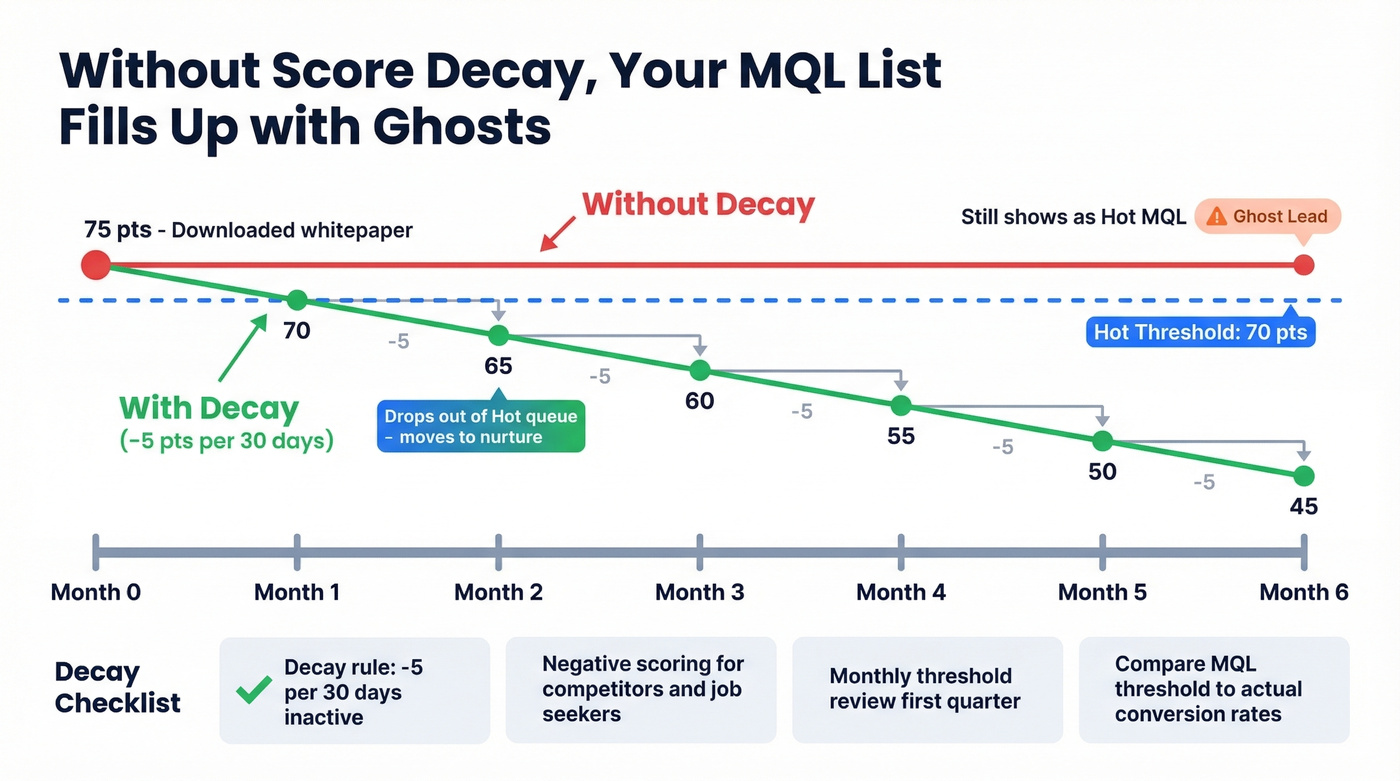
Implement score decay by subtracting points for inactivity. A straightforward model: -5 points per 30 days with no engagement. Build this as a Scheduled Flow that runs nightly or weekly against leads with no recent activity timestamps. Career page visits often indicate job seekers rather than buyers. Competitor domains are rarely buyers. Score them down hard.
Decay and negative scoring checklist:
- Score decay rule configured (-5 per 30 days inactive)
- Negative scoring for competitor domains, career page visits, unsubscribes
- Monthly threshold review for the first quarter, then quarterly
- MQL threshold compared against actual conversion rates each review cycle
Fix Your Data Before You Score
Data quality is the number-one reason scoring projects fail. On Reddit, admins consistently report that messy data - not scoring logic - is what kills their implementations. You can build the most elegant Flow in the world, and it'll still produce meaningless scores if half your leads are missing job titles, company sizes are blank, and email addresses bounce.
Prospeo's native Salesforce integration enriches lead records with 50+ data points per contact - verified emails, direct dials, job titles, company size, industry, technographics - at an 83% match rate. The cost runs roughly $0.01 per lead with a 7-day data refresh cycle, so your scoring inputs don't go stale. Connect it to your Salesforce org, and the fields your scoring model depends on actually have data in them.
Missing job titles, blank company sizes, and unverified emails turn your scoring model into a random number generator. Prospeo's CRM enrichment fills those gaps across your entire Salesforce database - 83% match rate, 7-day refresh cycle, starting at $0.01 per email.
Clean Salesforce data makes every scoring method work. Dirty data breaks all three.
Routing and Automation After Scoring
A lead hits 75 points. Now what? If nobody gets notified and the lead sits in a queue, you've wasted the entire scoring exercise.
Salesforce's built-in assignment rules work but have a 3,000-rule cap and don't support round-robin or workload balancing. For most teams, a Flow-based routing solution is the free, flexible alternative - trigger on Lead_Score__c crossing your hot threshold, then assign based on territory, segment, or round-robin logic you define.
Speed-to-lead research consistently shows response time within 5 minutes dramatically increases conversion - your routing logic should match that urgency. For teams that need more sophistication, third-party routing tools fill the gap: Kubaru runs about $20/month, Distribution Engine ranges from $20-55/user/month, and Chili Piper is around $15/user for ChiliCal with other modules commonly ~$30/user plus platform fees. LeanData is the enterprise option with custom pricing. Scoring without routing is a dashboard exercise. Build both.
FAQ
What's a good MQL threshold for Salesforce lead scoring?
Start at 60-70 on a 0-100 scale, then review against your actual conversion data monthly for the first quarter. A threshold that works for a PLG SaaS company won't work for enterprise services. Calibrate to your pipeline's historical patterns, then shift to quarterly adjustments once the model stabilizes.
Can I score leads without Pardot or Marketing Cloud?
Yes. Salesforce Flow and formula fields work in Sales Cloud on any edition at zero extra cost. Einstein is also Sales Cloud-native, though it typically requires the $50/user add-on on Enterprise. You don't need a marketing automation platform - just clear criteria and clean data.
How do I keep lead scores from inflating over time?
Implement score decay - subtract points for inactivity, such as -5 per 30 days with no engagement. Combine this with negative scoring for disqualifying behaviors like competitor domain visits or email unsubscribes. Recalibrate your thresholds quarterly by comparing MQL scores against actual downstream conversion rates.
What's the cheapest way to enrich Salesforce leads for scoring?
Prospeo enriches leads at ~$0.01 per record with 98% email accuracy and an 83% match rate, plus a free tier of 75 credits/month. Most enterprise enrichment tools charge $1+ per lead and lock you into annual contracts, making it the practical choice for teams that need clean scoring inputs without a six-figure data budget.
Start with Flow, keep your criteria to 5-7 signals, and don't score anything until your data is clean. That's the whole playbook.