

Lead Verification: Everything You Need to Know in 2026
You verified your list three weeks ago. Clean file, green checkmarks, ready to send. Then the first sequence drops and your bounce rate comes back at 8%. Your ESP threatens to throttle your account, and you're staring at 400 hard bounces from a list that was supposedly "verified."
This is the most common failure mode in outbound. It's entirely preventable.
What You Need (Quick Version)
Lead verification means confirming that contact data - email, phone, company - is real and reachable before you hit send. Three things matter more than anything else:
Re-verify close to send time. A list verified three weeks ago isn't verified. B2B contact data decays fast: people change jobs, mailboxes get deactivated, domains expire. Re-verify within 24-48 hours of sending.
Catch-all domains are your blind spot. In a 10,000-email B2B benchmark dataset, 28% of addresses were catch-all - domains that accept all mail regardless of whether the mailbox exists. If your tool can't resolve catch-alls, a huge chunk of your list becomes guesswork.
Keep bounce rates under 2%. Hard bounces should stay under 1%. Above 5% total, you're in serious trouble. The credits you save by skipping verification cost a fraction of the domain you'll burn.
What Is Lead Verification?
Lead verification is the process of confirming that a lead's contact data - primarily email address, but also phone number and company information - is real, active, and deliverable. It's not just checking that an email looks right (that's validation). Verification goes deeper: it queries MX records to confirm the domain accepts mail, then pings the SMTP server to check whether the specific mailbox exists and can receive messages.
The distinction matters. An email like jsmith@acmecorp.com passes format validation instantly - it's structured correctly, the domain looks real. But contact verification asks the harder question: does that mailbox actually exist on Acme Corp's mail server right now? That SMTP-level check is what separates a clean list from a bounce-rate disaster.
Verification vs. Validation vs. Email Checking
These terms get used interchangeably, and that causes real confusion when you're evaluating tools.
| Term | What It Checks | When to Use |
|---|---|---|
| Validation | Format, syntax, rules | First filter - instant |
| Verification | Mailbox exists (MX/SMTP) | Before every send |
| Email checking | Both combined | Full workflow |
Hunter's documentation frames it well: validation asks "could this email exist?" while verification asks "does this email exist?" Most modern tools combine both steps, but when a vendor says "we validate emails," push them on whether they're actually doing SMTP-level mailbox confirmation. Validation alone doesn't prevent hard bounces.
Why Verifying Leads Matters
Domain Reputation and the 2% Rule
Your sending domain's reputation is the single most valuable asset in your outbound stack. ESPs and inbox providers track your bounce rate, and the threshold is unforgiving: total bounces under 2%, hard bounces under 1%. Top-performing outbound teams treat these as hard limits, not guidelines.
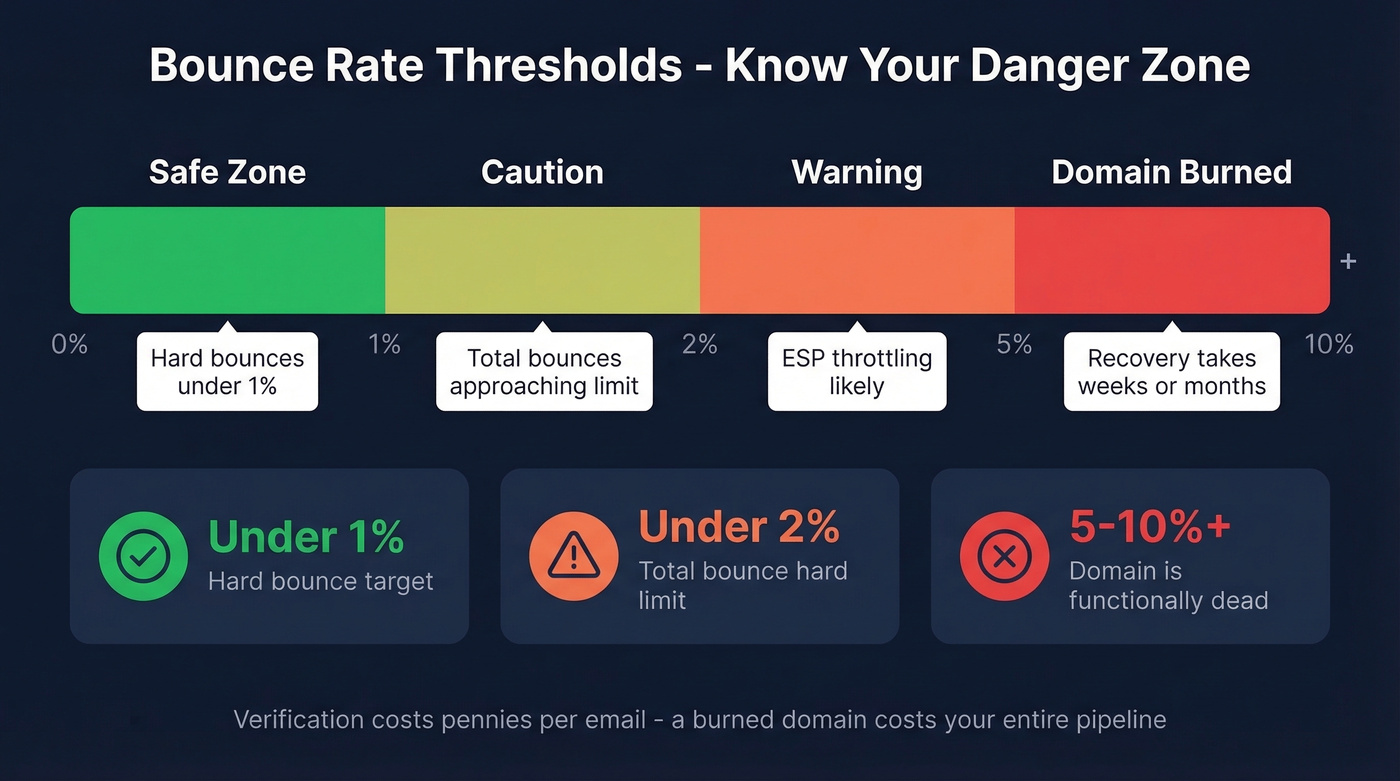
Once you cross 5-10% bounce rates, your domain is functionally burned. Open rates crater, emails land in spam, and recovery takes weeks - sometimes months of warming. We've seen teams abandon domains entirely after a single bad send to an unverified list, because the sender score damage was too deep to recover from in any reasonable timeframe. Your SPF/DKIM/DMARC authentication and IP reputation all compound the problem when bounces spike. The math is simple: verification costs pennies per email. A burned domain costs you your entire pipeline.
The Cost of Bad Data
Say you buy 10,000 leads at $0.05 per lead - that's $500. If 30% are invalid (standard for purchased lists), you've wasted $150 before sending a single email. Verification for that same 10,000 contacts costs $40-$100. That's insurance, not an expense.
A ZeroBounce case study showed a client reducing their bounce rate to 0.85% after implementing verification, with email ROI climbing accordingly. But the $150 in wasted lead cost is the small number. The real damage is downstream: bounced emails degrading your domain, sequences that underperform because half the list never received the message, and SDR time wasted on follow-ups to addresses that don't exist. Bad data compounds.
Compliance Risk (TCPA/FCC)
Phone-based verification carries regulatory weight that email doesn't. TCPA violations run $500-$1,500 per call, and DNC fines can hit $53,088 per violation. TCPA class action filings have surged 95% year-over-year, with recent verdicts exceeding $925M.
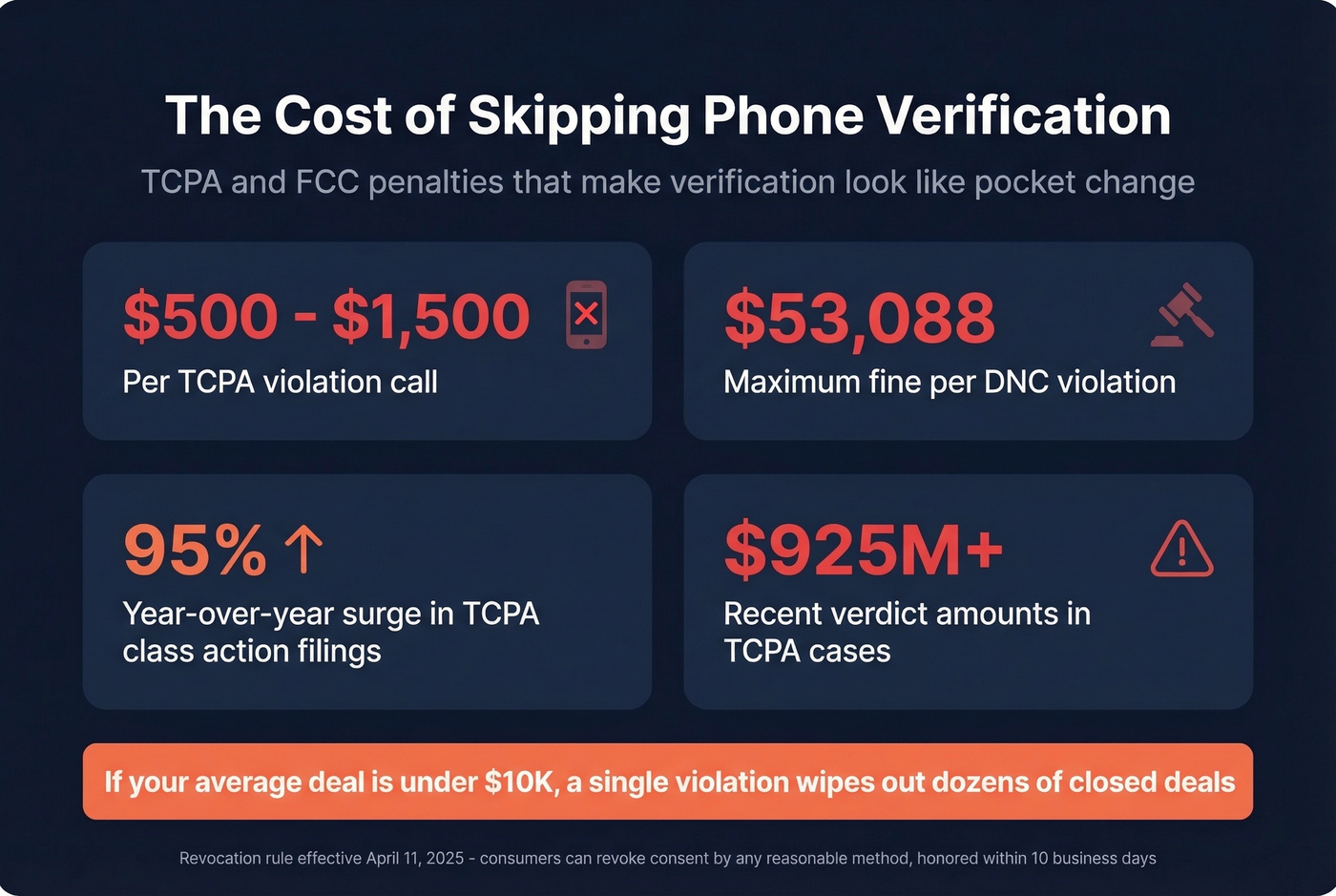
The revocation rule effective April 11, 2025 tightened things further: consumers can now revoke consent by any reasonable method (text, email, voicemail, verbal), and you must honor it within 10 business days. Consent records should be retained at least five years.
Here's the thing: if your average deal size is under $10K, you can't afford not to verify. A single TCPA violation wipes out the revenue from dozens of closed deals. Verification is the cheapest compliance insurance you'll ever buy.
The Five-Stage Process
A proper verification workflow has five stages. Skip any one and you'll see it in your bounces, spam complaints, or wasted spend.
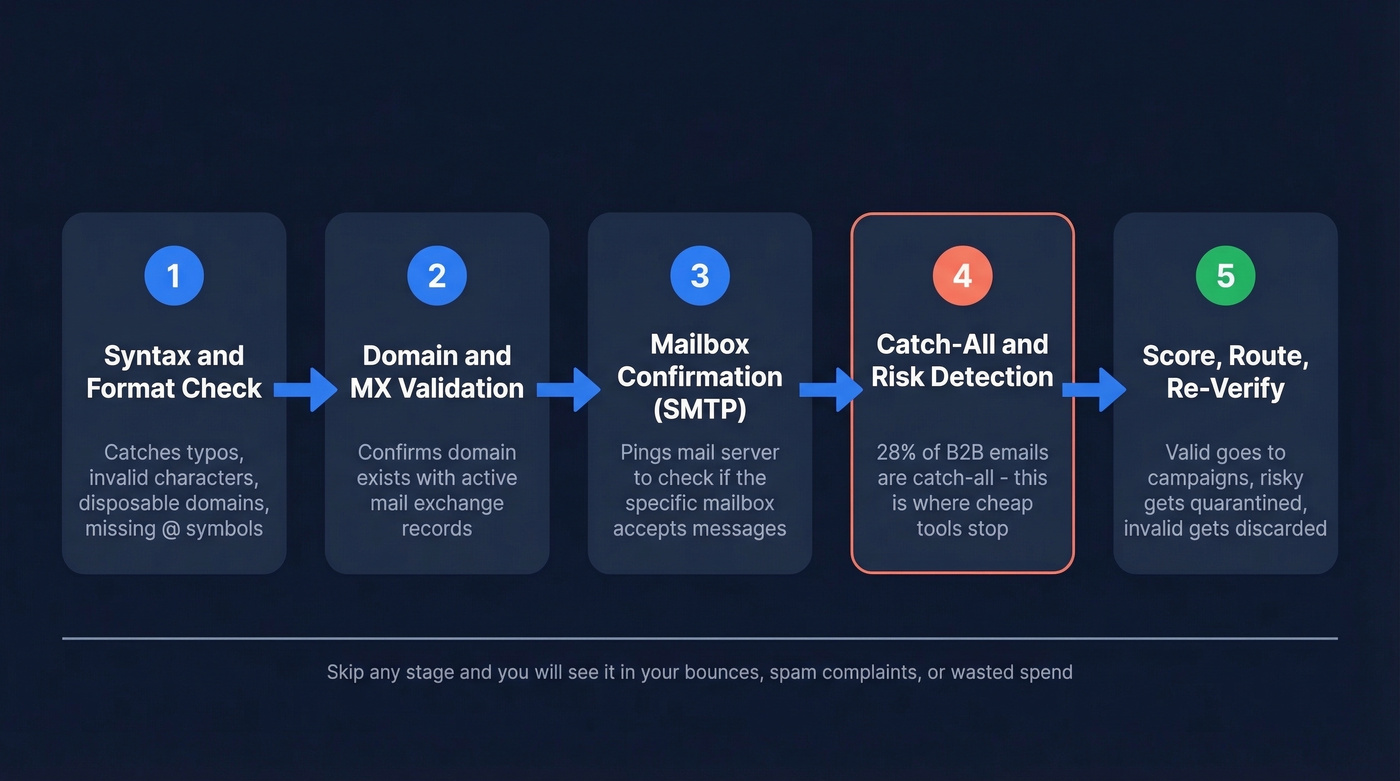
1. Syntax and Format Check
The first filter catches obvious errors: typos, invalid characters, disposable email domains, double dots, missing @ symbols. Instant and cheap. It won't catch a well-formatted email pointing to a dead mailbox, but it eliminates the low-hanging fruit before you burn API calls on deeper checks.
2. Domain and MX Validation
Confirm the domain exists and has active mail exchange records. If acmecorp.com doesn't have MX records configured, no email to that domain will ever deliver. This step also catches expired domains and parked pages masquerading as active companies.
3. Mailbox Confirmation (SMTP)
The core verification step. The tool pings the mail server and asks whether the specific mailbox accepts messages. A valid SMTP response means the mailbox exists and is active. This is where most hard bounces get caught - and where cheap tools stop.
4. Catch-All and Risk Detection
Here's where tools diverge dramatically. Catch-all domains accept all mail regardless of whether the specific mailbox exists, which means basic SMTP checks can't definitively confirm mailbox activity. In that same 10,000-email benchmark, 28% of addresses were catch-all. Role-based addresses (info@, sales@), spam traps, and honeypots also get flagged at this stage.
Enterprise-grade verification goes further with multi-signal checks - combining email verification with phone validation, firmographic confirmation, and name-to-company matching. This layered approach catches mismatches that single-signal tools miss entirely.
5. Score, Route, and Re-Verify
Assign each contact a verification status: valid, invalid, or risky. Route valid leads directly to campaigns, quarantine risky ones for further resolution, and discard invalids. The consensus on r/coldemail echoes this workflow: pull leads closer to send time, re-verify before every campaign, and push straight into sequences. Fewer silent bounces, less list rot.

Prospeo's 5-step verification catches what other tools miss - catch-all domains, spam traps, and honeypots - delivering 98% email accuracy. Data refreshes every 7 days, not 6 weeks, so your list is already verified close to send time.
Stop paying twice - once for leads, again to verify them.
Real-Time vs. Batch Verification
| Approach | Best For | How It Works |
|---|---|---|
| Real-time | Form captures, signups | Verifies at entry point |
| Batch | Existing lists, imports | Bulk upload and process |
Real-time verification catches bad data before it enters your CRM. A prospect types their email into a form, the tool checks it instantly, and invalid addresses get rejected or flagged before they pollute your database. For inbound teams, this is table stakes.
Batch verification is what most outbound teams need: upload a CSV of purchased or scraped leads, run verification, and segment the results. Standard tools often mark 30-40% of emails as risky or unknown - mostly catch-all domains. According to Listmint's testing, advanced catch-all resolution can recover up to 84% of those, which is the difference between a usable list and one where a third of your contacts are question marks.
The "Verified Database" Myth
No database - Apollo, ZoomInfo, or anyone else - provides 100% verified emails. "Verified" means "verified at some point." The complaints on r/coldemail are consistent: users report getting invalid emails from Apollo and ask for "verified-only" alternatives. But the problem isn't any single provider. It's the assumption that verification is a one-time event.
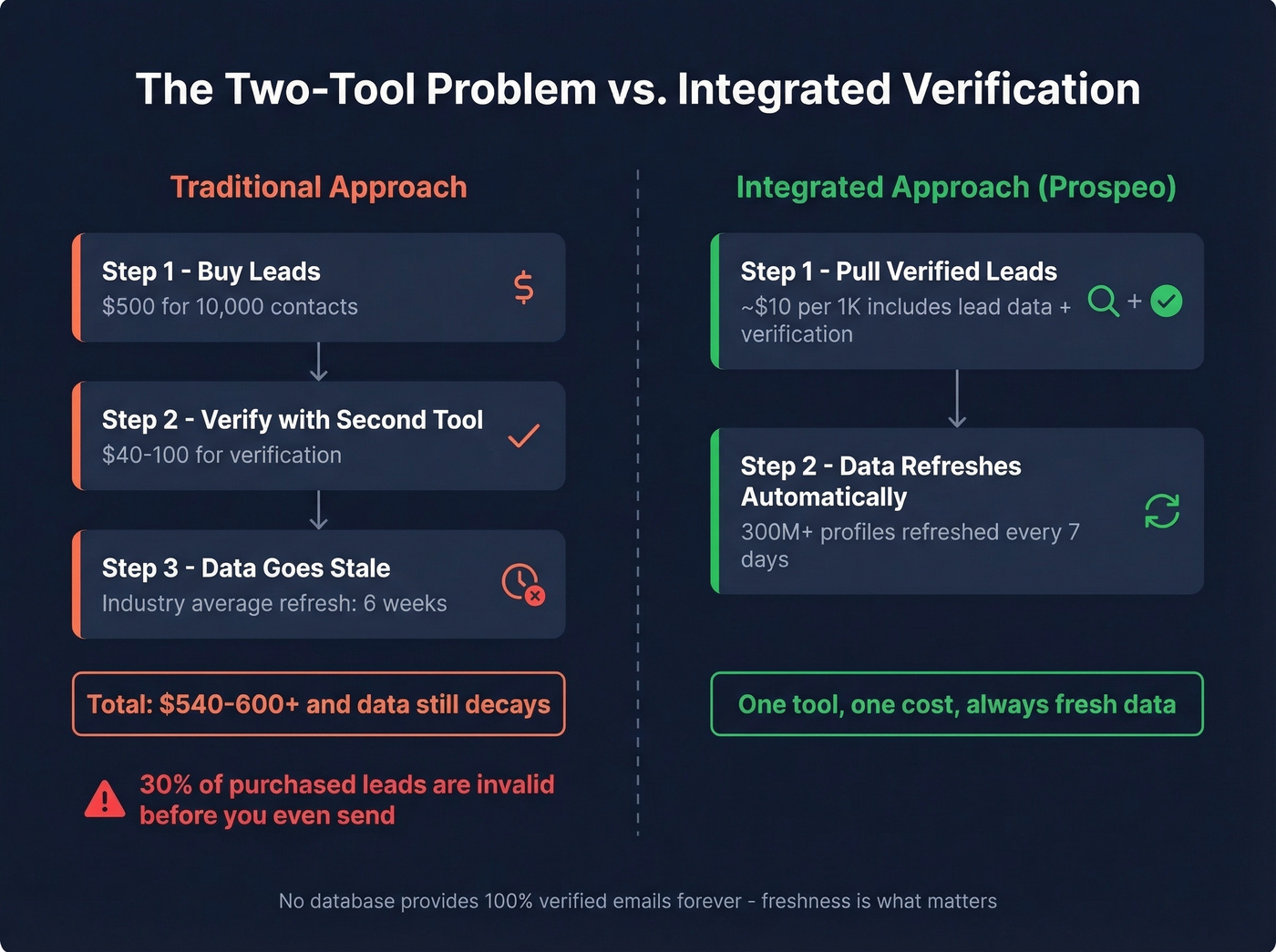
People change jobs, companies restructure, mailboxes get deactivated. A list that was accurate last quarter can be meaningfully worse by the time you send. This creates the two-tool problem: you buy leads from one provider, then pay a second tool to verify them. You're paying twice for data that still goes stale.
Prospeo closes this gap by refreshing its B2B company data 300M+ profiles every 7 days - the industry average is 6 weeks - so the data you pull is verified this week, not verified at some indeterminate point in the past. That 90-day re-verification cycle many teams rely on is far too slow for fast-decaying B2B contact data.
Verification Tool Costs
Verification pricing varies wildly, and the cheapest option isn't always the best value.
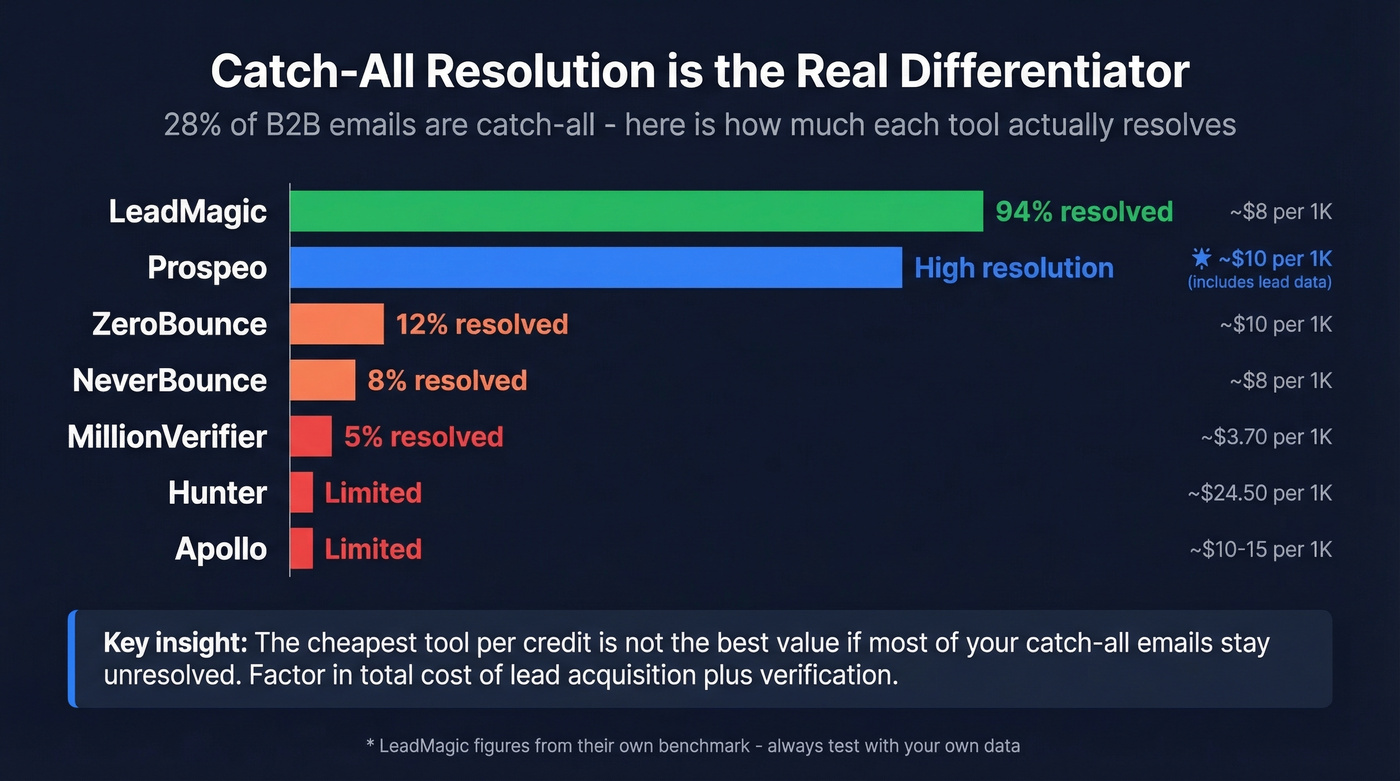
| Tool | Cost per 1K | Accuracy | Catch-All Handling | Free Tier | Best For |
|---|---|---|---|---|---|
| LeadMagic | ~$8 | 99.5%* | 94% resolved* | Limited | Catch-all specialists |
| ZeroBounce | ~$10 | 97.8% | 12% resolved | 100/mo | Standalone verification |
| NeverBounce | ~$8 | 96.9% | 8% resolved | 10 credits | Mid-market teams |
| MillionVerifier | ~$3.70 | 95.8% | 5% resolved | None | Budget bulk verification |
| Hunter | ~$24.50 | ~97% | Limited | 50/mo | Email finder + verify combo |
| Instantly | ~$8-16 | ~97% | Limited | 100 trial | Outbound platform users |
| Apollo | ~$10-15 | ~91% | Limited | - | CRM + prospecting combo |
*LeadMagic's accuracy and catch-all figures come from their own benchmark.
The critical difference with Prospeo: that ~$10 per 1K includes the lead data itself - name, company, title, verified email - not just the verification step. Standalone verifiers charge for verification only, meaning you've already paid separately for the leads. When you factor in total cost of acquisition plus verification, the combined approach is significantly cheaper than the two-tool stack.
MillionVerifier wins on raw price, but its 5% catch-all resolution means most catch-all emails stay unresolved. ZeroBounce and NeverBounce sit in the middle - solid accuracy, but catch-all handling is where they fall short. LeadMagic claims the strongest catch-all resolution, though you'll still need a separate data source for your leads.
Human vs. AI Verification
Fully manual review - where a person checks each contact against company directories and public records - delivers high accuracy but doesn't scale beyond a few hundred leads. AI-driven verification uses machine learning models trained on billions of email patterns to predict deliverability, resolve catch-all domains, and flag risky addresses in seconds.
Most modern tools lean heavily on AI with human oversight for edge cases. For teams doing high-volume outbound, automated verification is the only practical option. But for your top 50 target accounts? Let's be honest - it's worth having someone manually confirm the contact before you send that personalized, high-effort sequence. The best workflows combine both approaches.
How to Evaluate a Tool
Don't trust vendor accuracy claims at face value. Run your own test.
Build a test set of 1,000+ emails with known valid and known invalid addresses behind catch-all domains. A solid benchmark composition looks like this: 42% corporate emails, 28% catch-all, 15% known invalid, 5% disposable, 4% role-based, 4% free providers, and 2% typo domains. Include a mix of email providers - Google, Microsoft, Mimecast - not just one. Make sure "known valid" emails come from recent conversations (past ~14 days), not stale aliases.
Then measure false positives (invalid emails marked valid) and false negatives (valid emails marked invalid). The biggest testing mistake: treating "no bounce" as proof of validity on catch-all domains. A catch-all server accepts everything - the absence of a bounce tells you nothing. Ask every vendor one question: "What's your catch-all resolution rate?" If they can't give you a number, move on.
If you're also evaluating your broader outbound stack, compare how verification fits into your sales engagement platform and sending workflow.
Common Mistakes
Verifying once and assuming it holds. Data decays. Re-verify within 24-48 hours of sending, every time. A list verified three weeks ago is already degraded.
Ignoring catch-all domains. With 28% of B2B addresses sitting behind catch-all servers, marking them all as "unknown" and skipping them means you're leaving a huge chunk of your addressable market on the table.
I once watched a team skip catch-all resolution to save $200 on credits. They sent 15,000 emails, bounced at 7%, and spent the next six weeks warming a replacement domain while their pipeline dried up. The "savings" cost them roughly $40K in delayed revenue.
Sending to "risky/unknown" results without resolution. Risky doesn't mean invalid, but it doesn't mean safe either. Resolve them with a tool that handles catch-alls, or quarantine them entirely.
Rationing verification credits. At $0.004-$0.01 per email, verification is the cheapest insurance in your entire outbound stack. Don't be the team that saved $50 on credits and spent three weeks warming a replacement domain.
If you're seeing repeated deliverability issues, it may be a broader email deliverability problem, not just list quality.
FAQ
How often should I re-verify my lead list?
Re-verify within 24-48 hours of every send. B2B contact data decays quickly - a three-week-old list can already carry enough invalid addresses to spike your bounce rate above 2%. Teams relying on 90-day cycles are leaving themselves exposed.
What's a safe bounce rate for cold email?
Keep total bounces under 2% and hard bounces under 1%. Above 5% total, your domain reputation faces serious damage and recovery typically takes weeks of dedicated warming.
Can catch-all emails be verified?
Basic SMTP checks can't definitively verify catch-all mailboxes because catch-all servers accept everything. Advanced tools resolve 12-84% of catch-alls depending on methodology. Budget tools like MillionVerifier resolve only about 5%, while Prospeo's 5-step pipeline includes full catch-all resolution.
Is verification required for TCPA compliance?
TCPA requires prior express written consent and DNC list compliance, with violations costing $500-$1,500 per call. Verifying that you're contacting real, consented individuals is practical compliance insurance - one violation can exceed the cost of verifying your entire database.
What tool handles verification and lead sourcing together?
Prospeo combines a 300M+ profile database with 5-step email verification and a 7-day data refresh cycle, eliminating the two-tool stack. At ~$0.01 per email with 98% accuracy and full catch-all resolution, it's the most cost-effective combined approach we've found.
At $0.01 per email, Prospeo makes the verification math effortless. 143M+ pre-verified emails, proprietary SMTP infrastructure, and catch-all handling mean you skip the bounce-rate roulette entirely. No third-party email providers. No stale data.
Keep bounces under 1% without a separate verification tool.