


Mailshake Pros and Cons: The Only Review Not Written by a Competitor
Why Every Other Mailshake Review Is Biased
Most Mailshake reviews are written by direct competitors - Lemlist, SalesRobot, GMass, Salesforge. They all sell outreach tools. Every "honest review" ends with "switch to our platform instead."
We're a B2B data company. Mailshake isn't our competitor - it's a tool our customers plug their data into. So here's a genuine look at Mailshake pros and cons with no angle.
30-Second Verdict
Mailshake averages 4.7/5 on G2 (361 reviews), 4.6/5 on Capterra (154 reviews), and 4.8/5 on Trustpilot (91 reviews). That's 606 total reviews across three platforms - strong numbers for a mid-market outreach tool.
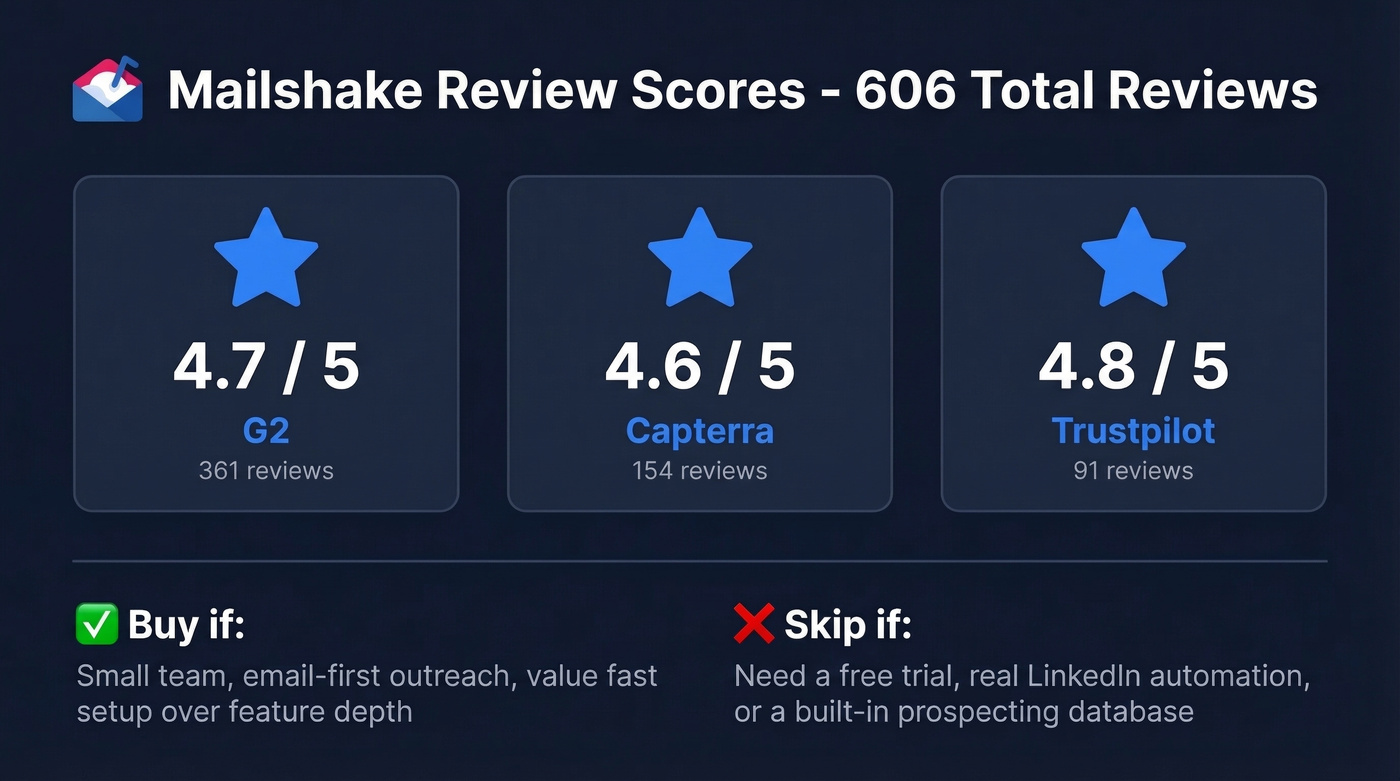
Buy Mailshake if you're a small team running email-first outreach and you value fast setup over feature depth. Skip it if you need a free trial, real LinkedIn automation, or a built-in prospecting database. The pay-upfront buying experience is the single biggest friction point - you're handing over your credit card before you've sent a single email.
What Mailshake Does Well
Easy Setup and Clean UI
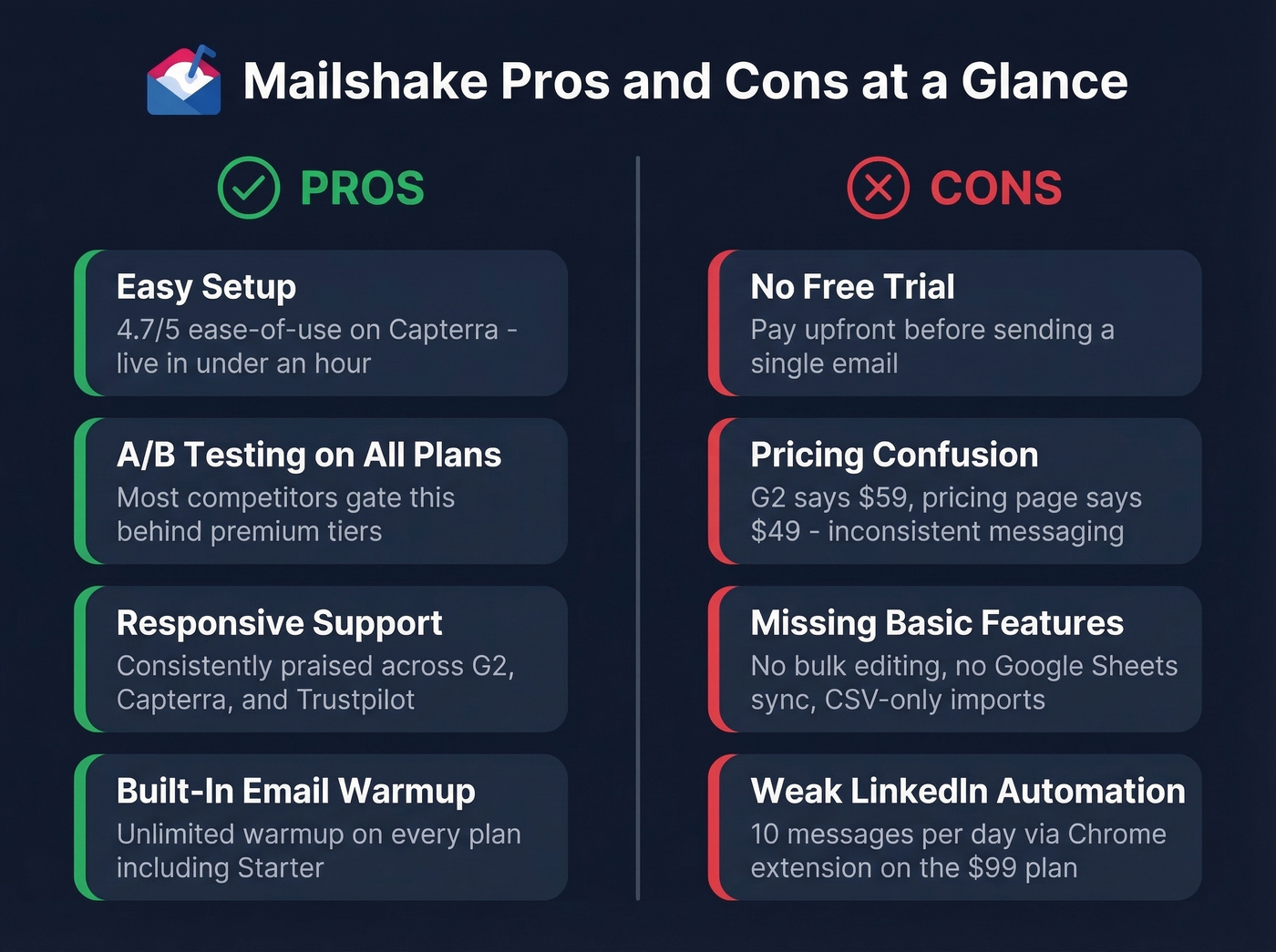
Capterra's ease-of-use subscore sits at 4.7/5. Mailshake doesn't try to be Salesforce. You connect your inbox, upload a CSV, write your sequence, and you're sending. Most teams are live within an hour, which is genuinely impressive compared to tools that require a week of onboarding calls and configuration before you can do anything useful.
Automated Follow-Ups with A/B Testing
Sequences pause automatically once a reply comes in, and A/B testing ships standard even on the $29/user/month Starter plan. Most competitors gate that behind higher tiers. G2 reviewers consistently cite time savings as a top benefit - set it up once, let it run, check results.
Responsive Customer Support
Support is one of the most praised elements across all three review platforms. Trustpilot reviewers call out fast, helpful responses. For a tool with no free trial, strong support matters more than usual. It's your safety net.
Built-In Email Warmup
Unlimited email warmup ships on every plan, including Starter. Most competitors either charge extra or cap warmup volume on lower tiers, so this is a genuine differentiator at the entry price point.

Mailshake's A/B testing and automated follow-ups are great - until you're A/B testing emails that bounce. 98% accuracy from Prospeo's 5-step verification means your sequences actually reach real inboxes. Data refreshes every 7 days, not every 6 weeks.
Fix your data before you optimize your sequences.
Where Mailshake Falls Short
No Free Trial, Plus Refund Friction
Here's the thing: Mailshake collects payment upfront with no trial period. EmailToolTester excluded Mailshake entirely from their best outreach tools list because of this policy.
On Capterra, a January 2026 reviewer described being denied a refund after attempting to cancel. Other reviews flag the cancellation UX too - no email confirmation for cancellations, and invoices are only accessible through the portal. If you do cancel, Mailshake deletes your data after 30 days.
Pricing Confusion
Mailshake's pricing page lists Email Outreach at $49/user/month. G2 lists the same plan at $59. Some pages on Mailshake's own site also reference $59/month starting pricing. We're going with the pricing page as the source of truth, but the inconsistency doesn't inspire confidence.
Add-ons stack fast. Data Finder runs $19/month, and Ready-to-Use Mailboxes cost $12/month each. A 5-person team on Email Outreach with Data Finder hits $264/month before adding a single mailbox. That's a long way from the "$49/month" you saw on the landing page.
Missing Basic Features
A December 2025 Capterra review flagged the lack of bulk editing or deletion for prospects - a frustrating gap when you're managing lists of thousands. And if you want a live spreadsheet workflow, Mailshake's list import is still very CSV-centric. There's no direct Google Sheets connection, so you're exporting, reformatting, and uploading every time your list changes.
LinkedIn Automation Is Barely Automation
LinkedIn outreach only exists on the $99/user/month Sales Engagement plan, and it runs through a Chrome extension capped at 10 messages per day. Let's be honest - that's not automation. That's a browser macro with a price tag. If multichannel matters, look elsewhere.
Pricing Breakdown
| Plan | Price | Email sends/mo | Email addresses | Key features |
|---|---|---|---|---|
| Starter | $29/user/mo | 1,500 | 1 | Warmup, A/B test |
| Email Outreach | $49/user/mo | Unlimited | 2 | CRM, Zapier |
| Sales Engagement | $99/user/mo | Unlimited | 10 | LinkedIn, dialer |
| Agency | Custom | Unlimited | Unlimited | Custom setup |
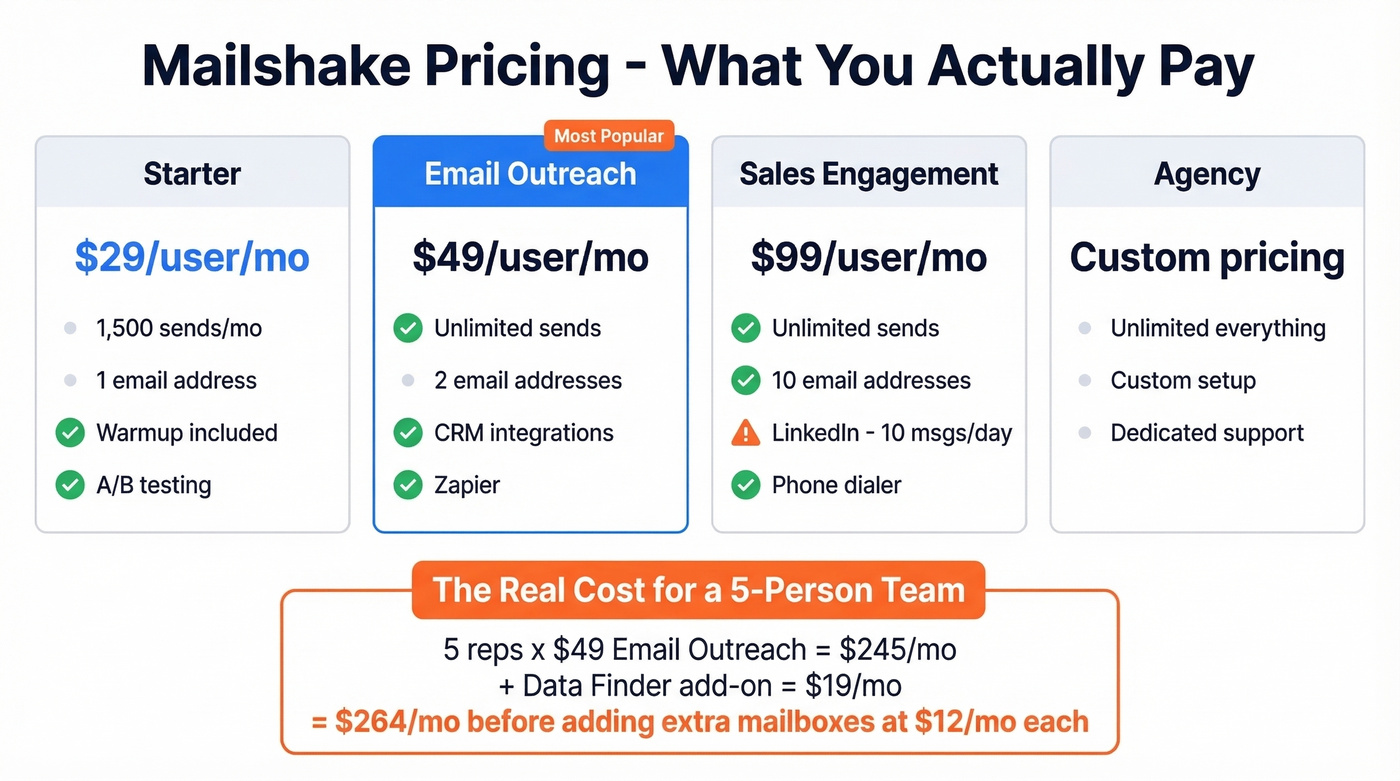
With cold email response rates typically landing between 1-5%, every dollar spent on tooling needs to earn its keep. Five reps on Email Outreach plus Data Finder hits $264/month - not the "$49/month" you saw on the pricing page.
The Problem Nobody Mentions
A lot of deliverability "tool problems" are actually upstream problems: unverified emails, stale data, and catch-all domains that silently bounce. We've seen this pattern hundreds of times across our customer base.
In 2026, inbox providers like Outlook and Gmail continue tightening cold email policies aggressively. Deliverability depends on factors far beyond your sending tool - and the biggest one is whether you're sending to real, active inboxes in the first place. (If you want the full breakdown, start with an email deliverability guide and then work backward to list quality.)
Prospeo runs a 98% email accuracy rate with a 7-day refresh cycle, so your bounce rate drops before you send the first email. The free tier gives you 75 verified emails per month to test.

Mailshake's Data Finder add-on costs $19/month extra. Prospeo gives you 300M+ profiles with 30+ filters - buyer intent, technographics, job changes - at roughly $0.01 per email. No add-on fees, no annual contracts.
Skip the add-on tax - get better data for less.
Who Should Buy Mailshake
Mailshake is built for small teams of 2-5 reps doing email-first outbound who want fast setup without a steep learning curve. If you've done your research and you're ready to commit without a trial, and you value responsive support over feature breadth, it's a solid pick.
If you're building a broader outbound stack, it also helps to compare Mailshake against other SDR tools and map your workflow to a repeatable sales prospecting techniques playbook.
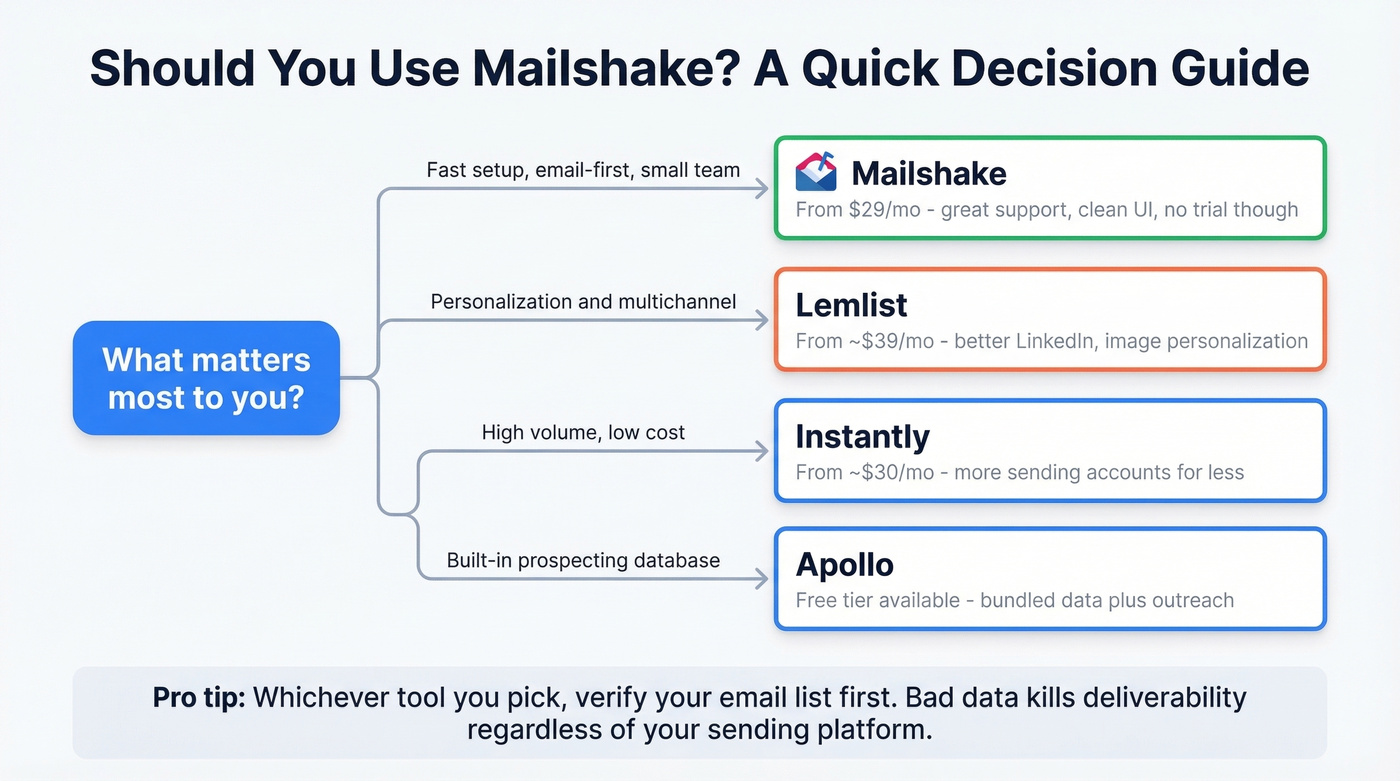
Skip it if you need real LinkedIn automation (10 messages/day on the $99 plan isn't worth it), a free trial before paying, or a built-in prospecting database. Alternatives worth considering: Lemlist (~$39/mo) for personalization, Instantly (~$30/mo) for volume at lower cost, or Apollo (free tier available) for bundled prospecting and outreach.
Our take: Weighing the full list of Mailshake pros and cons, it's a perfectly good tool held back by a terrible buying experience. The no-trial policy costs them more customers than any missing feature ever will.
FAQ
Does Mailshake offer a free trial?
No. Payment is collected upfront with no trial or free plan. EmailToolTester excluded Mailshake from their best outreach tools list specifically because of this policy. If you're hesitant to commit, at least test your data quality first with a free tool like Prospeo's email finder (75 verified emails/month) so you're not wasting paid sends on bad addresses.
What's the cheapest Mailshake plan?
Starter costs $29/user/month but caps you at 1,500 sends and one email address per account. Most teams outgrow it quickly and need the $49 Email Outreach plan for unlimited sends and CRM integrations.
Can Mailshake automate LinkedIn outreach?
Only on the $99/user/month Sales Engagement plan - via a Chrome extension capped at 10 messages per day. It's task-assisted, not truly automated. Teams serious about multichannel should evaluate Lemlist or Instantly instead.