

How to Reply to a Meeting Confirmation Email (With 10 Templates)
You just got the interview confirmation from the hiring manager. Or maybe a client sent a calendar invite and a follow-up email - and now you're wondering if accepting the invite was enough, or if you also need to email back.
A meeting confirmation email reply doesn't need to be complicated. Two sentences is plenty, and the fact that you're overthinking it means you care more than most people. That's a good sign, not a problem.
Here's our contrarian take upfront: the best confirmation reply is boring. Confirm the details, add nothing unnecessary, get out of the way. Everything in this article serves that principle.
Should You Even Reply?
Here's the simple rule. If it's an interview, a client meeting, or any external meeting, reply. Always. Even if you already confirmed by phone. The other person wants written confirmation they can reference.
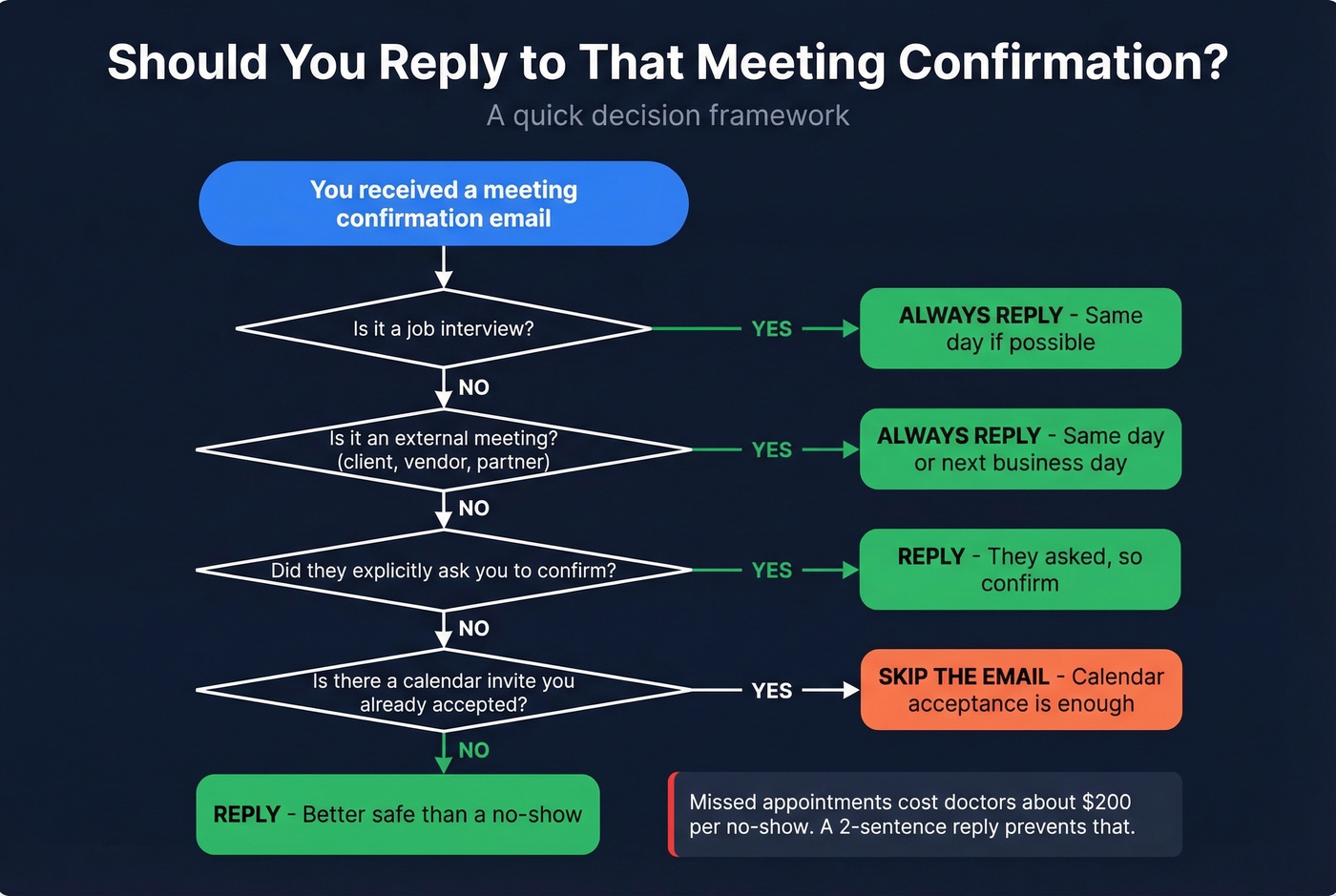
The exception? Internal meetings where a calendar invite exists. If you've accepted the invite and nobody explicitly asked for an email reply, silence is fine. The event is confirmed when the calendar invite is accepted and a confirmation email has been sent - no need to pile on.
Missed appointments for a private doctor can cost about [$200 per no-show](https://www.beckershospitalreview.com/quality/hospital-physician-relationships/no-show-fees-in-healthcare-are-they-effective/). A two-sentence reply reduces that risk. The anxiety about "cluttering someone's inbox" is real - Reddit threads show plenty of people agonizing over this - but a short reply never annoyed anyone. A no-show because you didn't confirm? That annoys people.
Quick decision framework:
- Interview or job-related - always reply
- External meeting (client, vendor, partner) - always reply
- Internal meeting + calendar invite accepted - skip the email
- Anyone explicitly asks you to confirm - reply, obviously
What to Include in Your Reply
Every confirmation response follows three parts: subject line (usually just "Re:" the original), body (two to three sentences), and sign-off. That's the entire structure. We've seen people agonize over a two-line email for 20 minutes. Don't be that person.
Your body text should hit these details:
- Date & time, including timezone if you're in different ones
- Location or meeting link confirmed
- Attendees or agenda - ask now if unclear, not five minutes before the meeting
Michael Page's interview confirmation guide adds providing your contact info, which is smart for interviews but optional for routine business meetings. Remember: boring is best. Thank, confirm details, ask questions if needed, sign off.
Choosing the Right Tone
Match the sender's formality level. It matters more than the words you choose. Getting the register right in professional emails can improve response rates by up to 20% - that stat comes from cold email research, but the principle applies broadly to any professional communication.
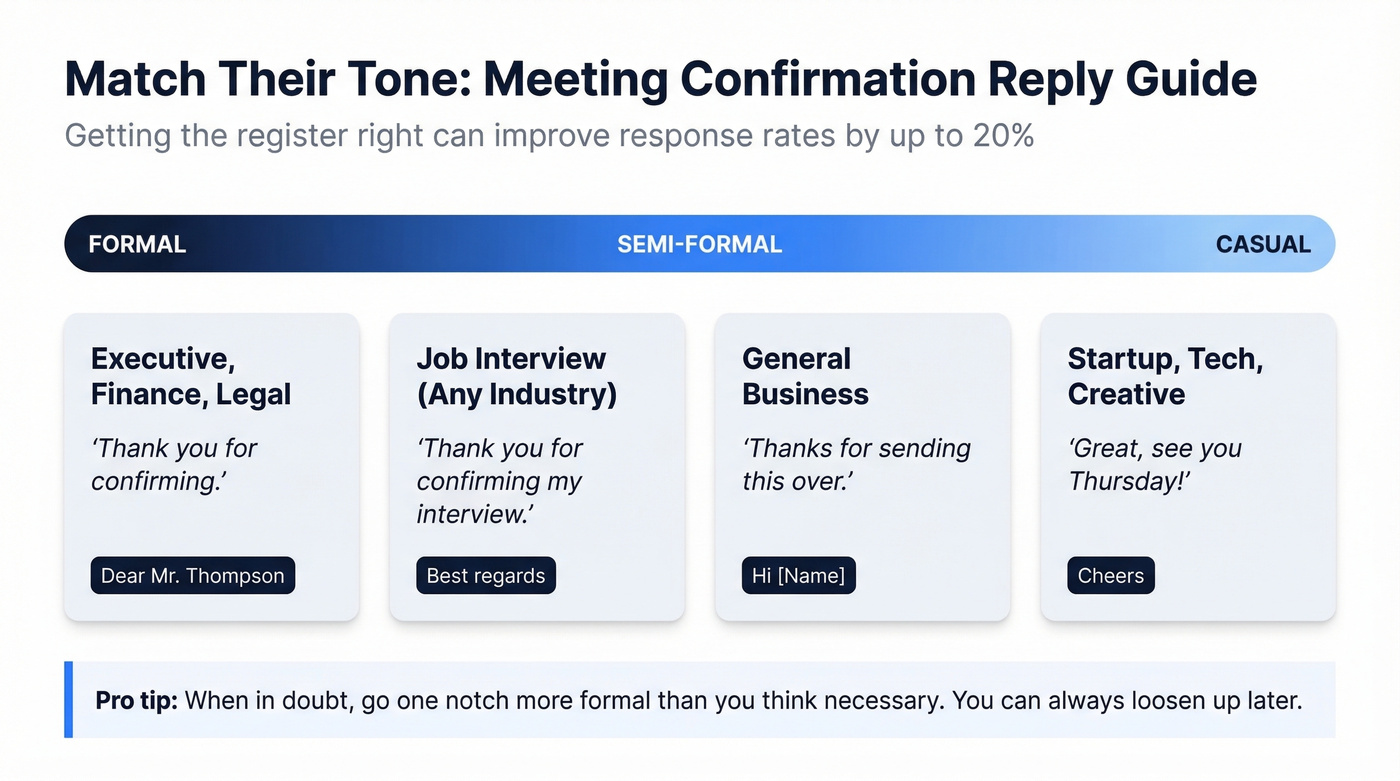
If they wrote "Dear Mr. Thompson," don't reply with "Hey!" If they wrote "Hi Sarah - here's the Zoom link," you don't need "Dear Sir/Madam." When in doubt, go one notch more formal than you think necessary. You can always loosen up; recovering from too-casual is harder.
| Scenario | Tone Level | Example Opening |
|---|---|---|
| Executive / Finance / Legal | Formal | "Thank you for confirming." |
| General business | Semi-formal | "Thanks for sending this over." |
| Startup / Tech / Creative | Casual | "Great, see you Thursday!" |
| Interview (any industry) | Semi-formal+ | "Thank you for confirming." |

A perfect confirmation reply means nothing if you're emailing the wrong address. Prospeo's 98% email accuracy and 5-step verification ensure your meeting requests land in real inboxes - not bounce folders.
Get verified emails for $0.01 each. No bounces, no guessing.
10 Templates for Every Scenario
Every template below is copy-paste ready. Swap the bracketed placeholders and send. The best ones are boring on purpose - they confirm details and get out of the way.
Business Meeting (Formal)
When to use: Senior stakeholders, new clients, regulated industries. If you're confirming on behalf of someone else, swap "I" for "[Executive Name]."
Subject: Re: Meeting Confirmation - [Date]
Dear [Name],
Thank you for confirming our meeting on [Date] at [Time] [Timezone] at [Location/Link]. I look forward to our discussion.
Best regards, [Your Name]
Business Meeting (Casual)
When to use: Colleagues you've met before, startup environments, recurring check-ins.
Thanks [Name] - [Date] at [Time] works perfectly. See you at [Location/Link].
[Your Name]
Interview Confirmation
When to use: Any job interview, even if you already confirmed by phone.
Subject: Re: Interview Confirmation - [Your Name], [Job Title]
Thank you for confirming my interview on [Date] at [Time]. I'll be at [Location] / joining via [Platform Link]. Please let me know if there's anything I should prepare in advance.
Best regards, [Your Name]
Virtual Meeting (Zoom/Teams/Meet)
When to use: Any video call where someone sent you the link.
Thanks for the meeting link. I've confirmed [Date] at [Time] [Timezone] on my calendar. See you on [Zoom/Teams/Meet].
[Your Name]
After a Phone Conversation
When to use: You already agreed on details verbally, and they sent a follow-up email.
Hi [Name],
Thanks for putting this in writing. Confirming our meeting on [Date] at [Time] at [Location/Link], as discussed. Looking forward to it.
[Your Name]
Replying to "Please Confirm Attendance"
When to use: Someone explicitly asked you to reply and confirm. Don't overthink repeating details - the organizer asked you to confirm, so confirm.
Hi [Name],
Confirming my attendance for [Meeting Name] on [Date] at [Time] via [Location/Link]. Thank you for organizing - see you then.
[Your Name]
Rescheduling Reply
When to use: You can't make the original time. Offer two specific alternatives rather than a vague "let me know what works" - it cuts the back-and-forth.
Hi [Name],
Unfortunately, I'm no longer available on [Original Date/Time]. Would [Alternative Date] at [Alternative Time] work for you? Apologies for the change - happy to work around your schedule.
[Your Name]
Declining a Meeting
When to use: You need to decline professionally without burning the relationship.
Hi [Name],
Thank you for the invitation. Unfortunately, I won't be able to attend on [Date]. I'd welcome the chance to connect at another time if that works for you.
Best regards, [Your Name]
Ultra-Short Acknowledgment
When to use: A recruiter or colleague says "I'm sending you a calendar invite" and you just need to acknowledge.
Got it - accepted. See you on [Date].
That's the whole email. Don't overthink it.
Confirming With Questions
When to use: Details are missing or unclear - parking, agenda, attendees, dress code.
Hi [Name],
Thanks for confirming [Date] at [Time]. I'll be there. Quick question - could you let me know [who else will be attending / the agenda / where to park / the dress code]?
[Your Name]
Common Mistakes to Avoid
Over-explaining why you're confirming. "I just wanted to make sure we're still on because I know schedules change and I want to be respectful of your time" - nobody needs that. Just confirm.
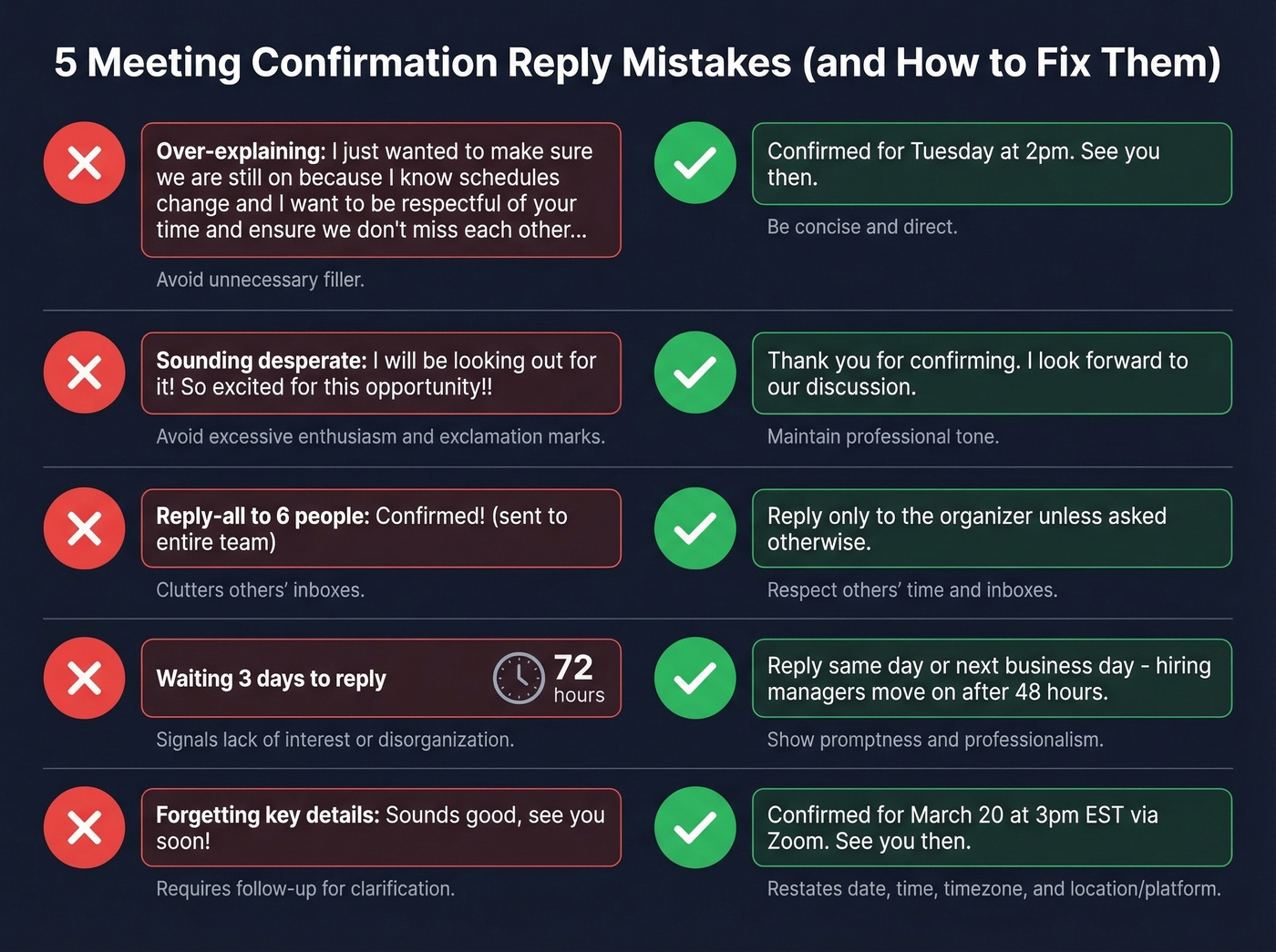
Sounding desperate. A recruiter-thread on Reddit called out "I'll be looking out for it" as sounding too eager. They're right. Neutral and professional beats enthusiastic and anxious every time.
Replying-all when only the organizer needs your confirmation. This is the fastest way to annoy six people simultaneously.
Waiting three days. Same-day or next-business-day is the standard. For interviews, reply the same day if you can. In our experience, a late confirmation creates real doubt about whether you're actually coming - and we've heard from hiring managers who simply moved on to the next candidate after 48 hours of silence.
Forgetting to restate the key details. The whole point of a confirmation response is to prove you have the right date, time, and location. Skip those, and you haven't actually confirmed anything.
Book More Meetings Worth Confirming
Let's be honest - replying to meeting confirmations is the easy part. The hard part is booking them in the first place. If you're in sales, recruiting, or business development, the bottleneck is almost always reaching the right person with a verified email address. Tools like Prospeo cover 300M+ professional profiles with 98% email accuracy, so your outreach actually lands instead of bouncing. Pair that with a solid cold email and you'll have more meetings worth confirming.
If you want more ways to keep conversations moving after the meeting, use these follow-up templates and a dedicated sales meeting follow-up email structure.
FAQ
How quickly should I reply to a meeting confirmation?
Reply the same day or next business day. For interviews, same-day responses signal professionalism - hiring managers notice speed. There's no strategic benefit to waiting; it only creates doubt about whether you'll show up.
Is accepting a calendar invite enough?
For internal meetings with a calendar invite, accepting is sufficient if nobody asked for an email reply. For interviews and external client meetings, always send a short email reply restating the date, time, and location - it shows professionalism regardless of the calendar status.
Should I reply-all to a meeting confirmation?
Reply only to the organizer unless they specifically asked everyone to confirm. A simple "confirmed" sent to all attendees is inbox clutter. If you have a question relevant to the whole group, that's different - but routine confirmations go to the organizer alone.