

How to Merge SPF Records Without Breaking Email Delivery
You added SendGrid to your stack, pasted in the SPF record they gave you, and now Google Workspace emails are landing in spam. Sound familiar?
The fix is straightforward: merge your SPF records into a single entry. RFC 7208 is unambiguous - multiple SPF records on the same hostname cause receivers to throw a PermError, and your authentication breaks completely. A Cornell University study cited by WP Mail SMTP found that only 56.5% of domains even publish SPF records, and 2.9% of those contain validation errors including duplicate records. You don't want to be in that 2.9%.
The Quick Version
Check whether you actually have duplicate SPF records on the same hostname - most people don't. If you do, combine all include:, ip4:, and other mechanisms into a single v=spf1 ... ~all TXT record. Then validate with MXToolbox and confirm you're under 10 DNS lookups. Full merge steps below.
Do You Actually Have Duplicates?
Before you touch DNS, diagnose the actual problem. Three scenarios get mistaken for "duplicate SPF records" constantly, and we've seen teams waste hours fixing something that wasn't broken.
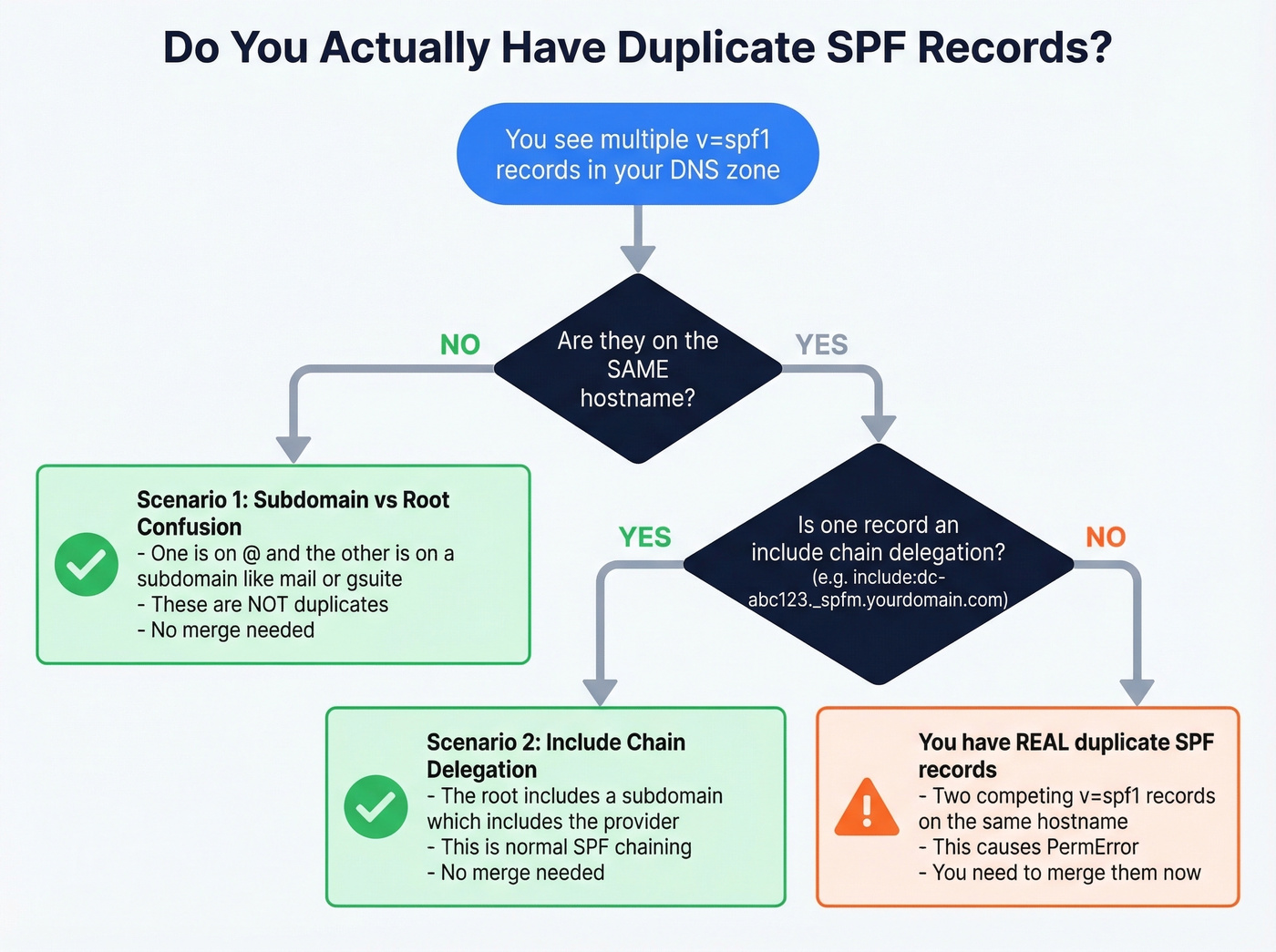
Subdomain vs. root confusion. You see two SPF records in your zone file, but one is on @ (your root domain) and the other is on a hostname like gsuite or mail. SPF is evaluated per hostname - these aren't duplicates. A thread on r/DMARC shows exactly this pattern: someone inherited v=spf1 include:_spf.google.com -all on both @ and gsuite. No merge needed.
Include-chain delegation mistaken for duplicates. Your root record says v=spf1 include:dc-abc123._spfm.yourdomain.com ~all, and there's a separate TXT record on dc-abc123._spfm containing v=spf1 include:_spf.google.com ~all. That's normal delegation - the root includes a subdomain, which includes Google. It's a single evaluated policy chain, not two competing records.
Stale records on non-sending subdomains. An r/sysadmin user found 6 SPF records across hostnames including test subdomains. If those subdomains don't send mail, the records are harmless clutter. Clean them up for hygiene, but they aren't causing your deliverability problem.
If after checking you find two v=spf1 TXT records on the same hostname, keep reading.
SPF Syntax Quick Reference
| Mechanism | What It Does | Counts Toward 10-Lookup Limit? |
|---|---|---|
include |
Checks another domain's SPF | Yes |
a |
Matches domain's A record | Yes |
mx |
Matches domain's MX hosts | Yes |
ip4 |
Matches an IPv4 address/range | No |
ip6 |
Matches an IPv6 address/range | No |
exists |
DNS existence check | Yes |
ptr |
Reverse DNS (deprecated) | Yes |
redirect= |
Replaces policy with target | Yes |
exp= |
Explanation string for fails | Yes |
all |
Catch-all at end of record | No |
Qualifiers modify any mechanism: + (pass, default), - (fail), ~ (softfail), ? (neutral). You'll almost always see them on all - as in ~all or -all.
Always publish SPF as a TXT record. The SPF-specific DNS record type was deprecated years ago and most providers ignore it entirely.
One merge-specific note on redirect=: if one of your records uses it, you can't just paste mechanisms together. Resolve the redirect target first, pull its mechanisms, then combine those into your consolidated record. And skip ptr entirely - it's deprecated per RFC 7208 and unreliable in practice.
How to Merge SPF Records Step by Step
Step 1: List all SPF TXT records at the same hostname. Run a DNS lookup on your root domain and look for any record starting with v=spf1. In Cloudflare, check DNS > Records > filter by TXT. In cPanel, look under Zone Editor.
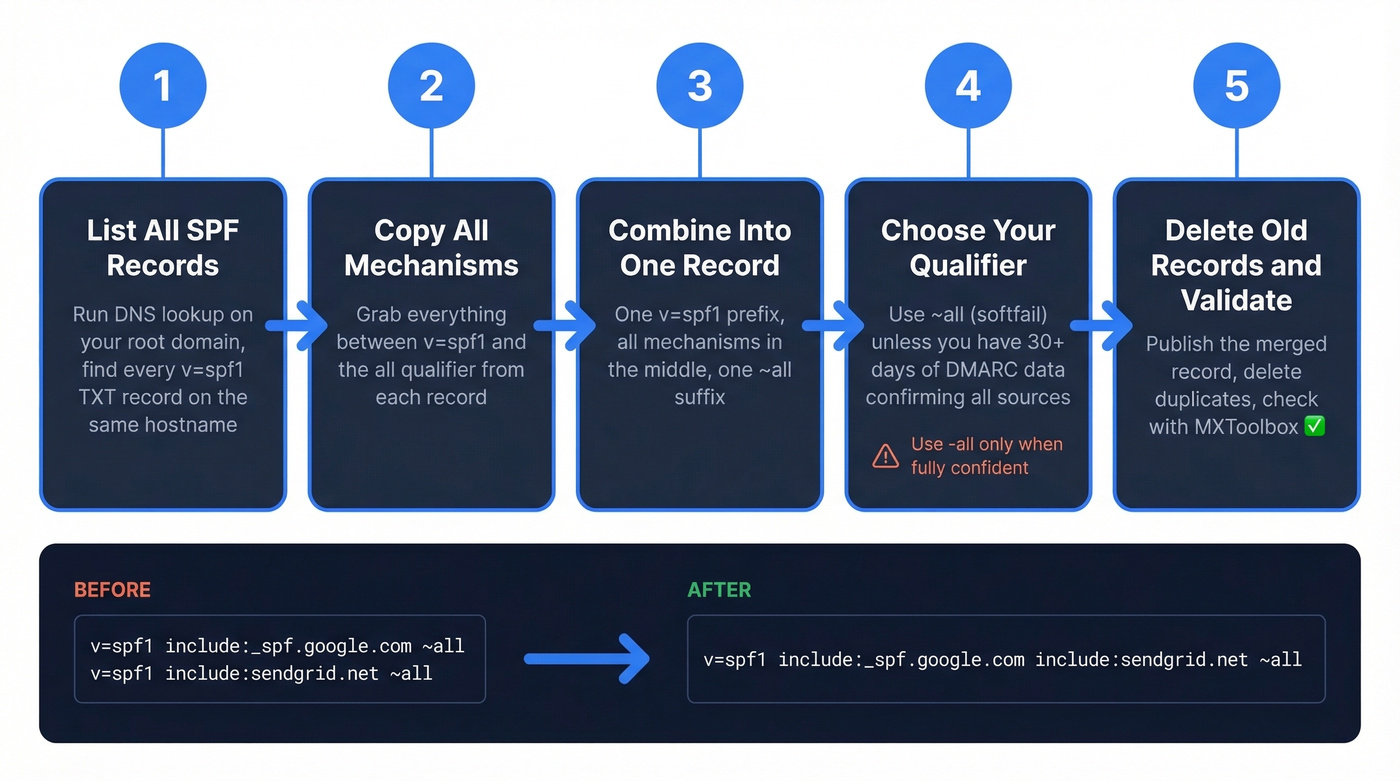
Step 2: Copy every mechanism between v=spf1 and the all qualifier from each record.
Step 3: Combine them into a single record with one v=spf1 prefix and one ~all suffix.
Step 4: Choose your qualifier. Use ~all (softfail) unless you've monitored DMARC reports for 30+ days and confirmed every legitimate source is included. -all is stricter and will hard-fail unauthorized mail - great in theory, but it breaks legitimate email fast during misconfiguration.
Step 5: Delete the old records, publish the new one, and validate.
Worked Examples
Let's walk through the three most common merge scenarios we see.
Two-provider merge (Google Workspace + SendGrid):
Before:
v=spf1 include:_spf.google.com ~all
v=spf1 include:sendgrid.net ~all
After:
v=spf1 include:_spf.google.com include:sendgrid.net ~all
Three-provider merge (Google + Mailgun + Brevo):
Before:
v=spf1 include:_spf.google.com ~all
v=spf1 include:mailgun.org include:spf.brevo.com ~all
After:
v=spf1 include:_spf.google.com include:mailgun.org include:spf.brevo.com ~all
Merge with IP mechanisms alongside includes:
Before:
v=spf1 include:_spf.google.com ~all
v=spf1 ip4:192.168.1.0/24 ip6:2001:db8::/32 include:sendgrid.net ~all
After:
v=spf1 include:_spf.google.com include:sendgrid.net ip4:192.168.1.0/24 ip6:2001:db8::/32 ~all
Mechanism order doesn't affect results as long as you preserve all mechanisms and keep a single all at the end, but convention places include: entries before ip4:/ip6: ranges for readability. One prefix, one suffix, everything else in between. For additional edge cases, SPF record examples can help you sanity-check provider-specific syntax. For additional edge cases, PowerDMARC's merge guide is a solid reference.

You're merging SPF records because bad deliverability is killing your outreach. But even a perfect SPF setup can't save you from sending to invalid addresses. Prospeo's 5-step email verification delivers 98% accuracy - bounce rates under 4% across 15,000+ companies.
Stop fixing symptoms. Start with emails that actually land.
The 10-DNS-Lookup Limit
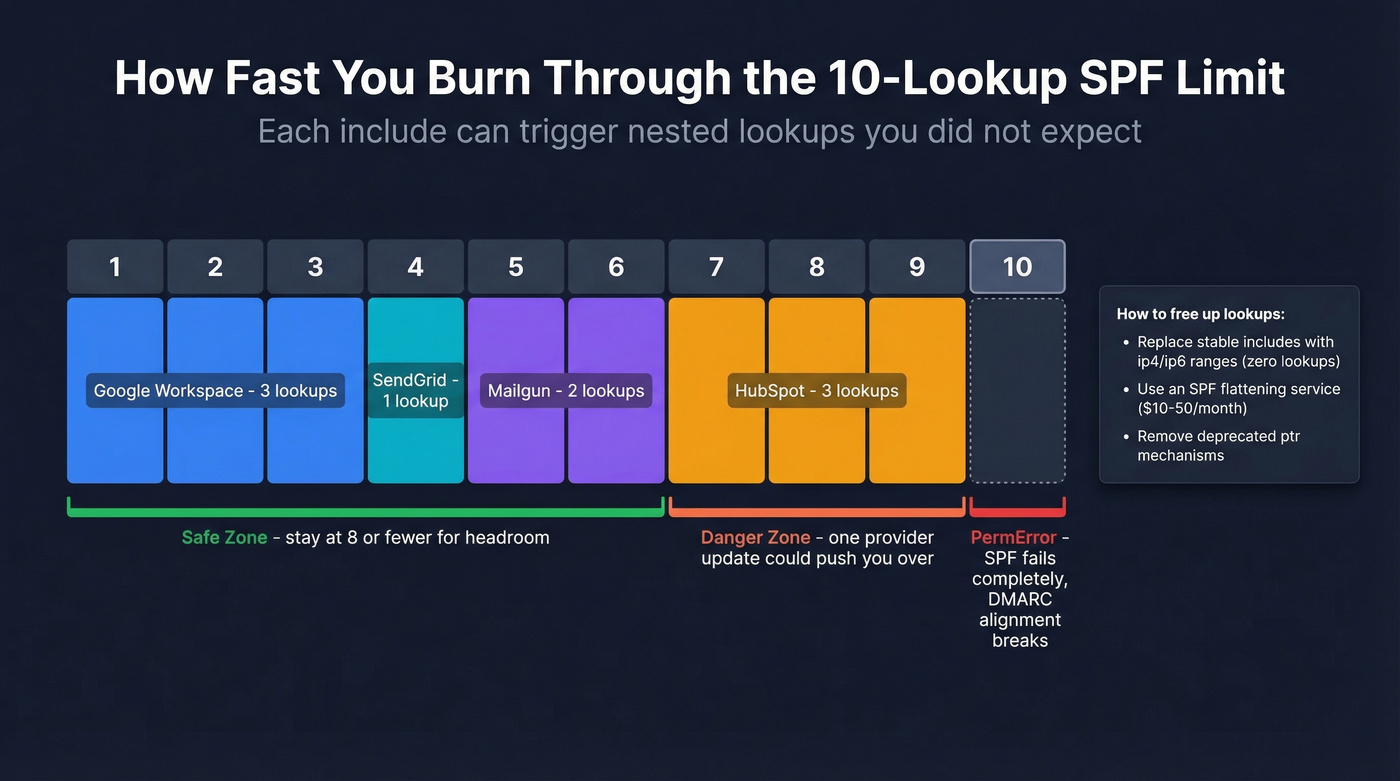
RFC 7208 caps SPF evaluation at 10 mechanisms or modifiers that trigger DNS lookups. Go over, and receivers return a PermError - and if SPF was your only passing identifier, DMARC alignment fails, which means spam placement or outright rejection.
| Counts (DNS lookup) | Doesn't Count |
|---|---|
include, a, mx |
ip4, ip6 |
redirect, exists, ptr |
all |
The tricky part is that nested includes count too. Some providers' include: mechanisms expand into multiple nested lookups. Add Mailgun, SendGrid, and HubSpot, and you're at 9 or 10 before you've added your own ip4 ranges. When your record grows this large, you can also hit an SPF-record-too-long error - the 255-character single-string limit and the 512-byte UDP packet size both constrain what you can publish.
To count your current lookups, run your domain through MXToolbox's SPF checker. It shows the total lookup count and flags if you're over.
Here's the thing: you can be at 9 lookups today and at 11 tomorrow without changing anything on your end. Providers update their include chains without warning - a concern raised on r/DMARC - and suddenly you're over the limit. Our recommendation: stay at 8 or fewer lookups to leave headroom.
If you're already at 10, you've got two options. Replace stable include: entries with ip4:/ip6: ranges (these don't count toward the limit), or use an SPF flattening service like AutoSPF or EasyDMARC's flattening tool, which typically run $10-50/month for SMB plans. Flattening services automatically resolve includes into IP addresses and keep your record updated.
Common Merge Mistakes
Duplicate v=spf1 prefix. The merged record must start with exactly one v=spf1. Pasting two records together without removing the second prefix is the single most common error we see - and it silently breaks everything.
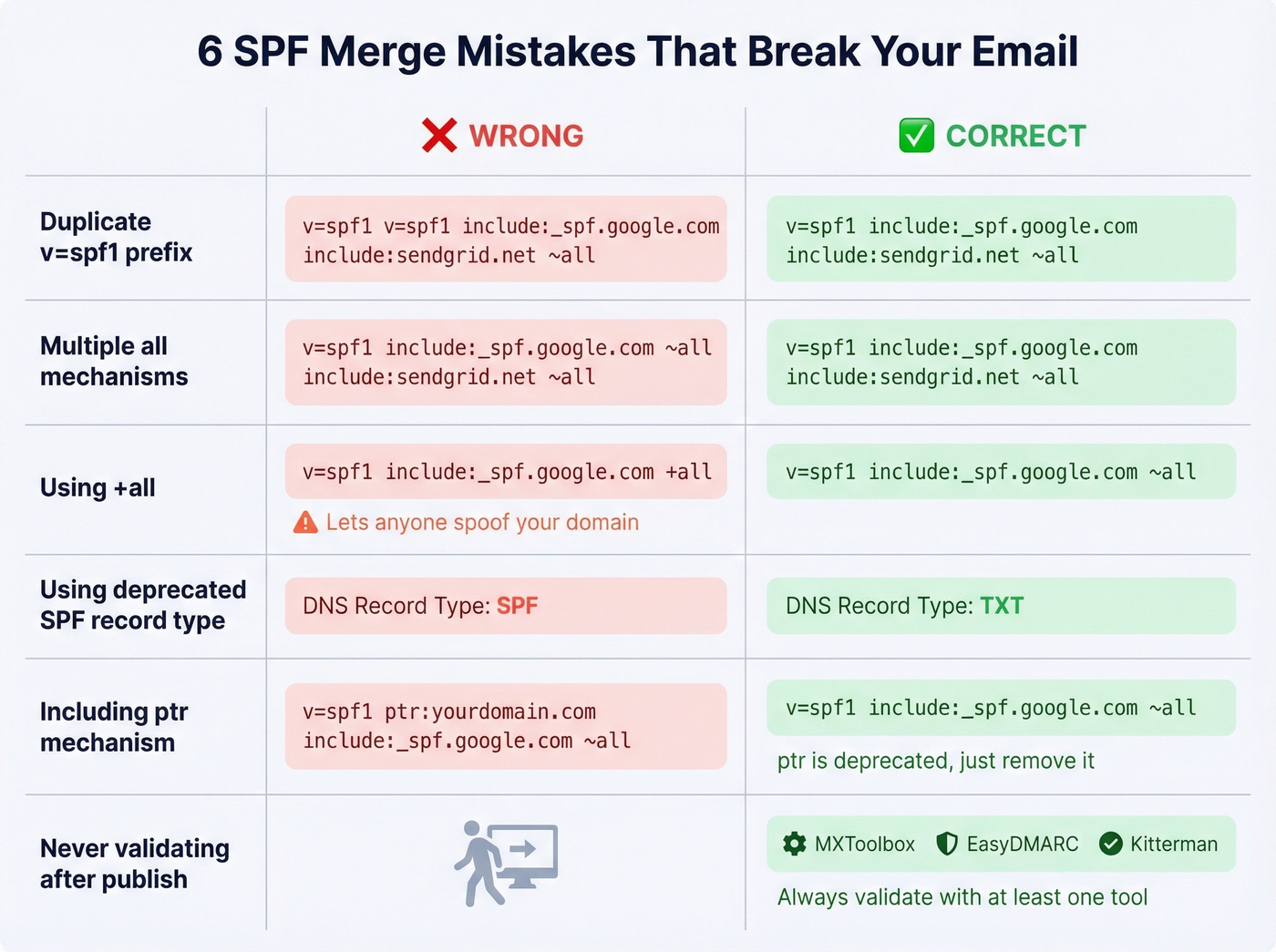
Multiple all mechanisms. Only one, at the very end. Multiple all mechanisms make the record invalid and can trigger PermError.
Using +all. This tells receivers that anyone can send as your domain. Never acceptable. It's an open invitation for spoofing.
Publishing as the deprecated SPF record type. Always use TXT. The SPF-specific DNS record type was deprecated years ago.
Using ptr. Deprecated, unreliable, and wastes a DNS lookup. Remove it during your merge.
Exceeding the 255-character single-string limit. Long SPF records need to be split into multiple quoted strings within the same TXT record. Stay under the 512-byte UDP packet size where possible - while modern resolvers handle TCP fallback, some older infrastructure truncates.
Not validating after publishing. You'd be surprised how many teams merge, publish, and never check. An undetected syntax error means SPF check failures for every message you send.
Validate and Monitor Your Merge
After publishing your merged record, check it with at least one of these:
- MXToolbox SPF Lookup - quick syntax check plus lookup count
- EasyDMARC - visual SPF tree showing your full include chain
- Kitterman SPF Validator - raw RFC-compliant test, completely free
Verify that syntax is valid, lookup count is 8 or fewer, no PermError is thrown, and the all qualifier matches your intent.
Don't treat this as a one-time fix. Providers change their include chains without notice. Set a monthly calendar reminder to re-check your lookup count, or use a DMARC monitoring tool that alerts you when something shifts. Five minutes a month prevents a deliverability crisis.
SPF Is Half the Equation
Look, most teams obsess over SPF and DKIM while ignoring the thing that actually tanks their sender reputation - bounces from bad data. Authentication is table stakes. Data quality is the real differentiator.
Google and Yahoo's bulk-sender requirements (rolled out in 2024 and enforced since) require DMARC, which in turn requires SPF or DKIM alignment with the From domain, plus keeping spam rates under 0.3% in Postmaster Tools. Getting your SPF record right tells mailbox providers your domain is legitimate. But sending to invalid addresses undoes that work just as fast.
We've seen this play out with our own customers. One agency came to Prospeo after burning two domains - their SPF, DKIM, and DMARC were all perfect, but they were pulling contacts from a provider with a 35% bounce rate. Once they switched to verified data with a 98% email accuracy rate and 7-day refresh cycle, bounce rates dropped under 3% and their domains stayed clean. Authentication gets you in the door. Clean data keeps you there. If you want a broader playbook beyond DNS, follow an email deliverability guide and keep an eye on your email bounce rate as a leading indicator.
Staying under the 10-lookup limit gets harder every time you add a sending tool. The real fix? Send fewer emails to better contacts. Prospeo's 143M+ verified emails at $0.01 each mean you protect your domain reputation at the source - not just in DNS.
Clean data protects deliverability better than any DNS record.
FAQ
How do I merge SPF records for multiple email providers?
Combine all include: mechanisms from each provider into one v=spf1 ... ~all record. For example, Google Workspace + SendGrid becomes v=spf1 include:_spf.google.com include:sendgrid.net ~all. Delete the old records, publish the merged one, and validate with MXToolbox.
Can I have separate SPF records on subdomains?
Yes. SPF is evaluated per hostname. Your root domain and mail.yourdomain.com each get their own record - they're independent, not duplicates. Only two v=spf1 records on the same hostname cause a PermError.
Should I use ~all or -all?
Use ~all (softfail) unless you've monitored DMARC reports for 30+ days and confirmed every legitimate sending source is included. -all hard-fails unauthorized mail, which breaks legitimate email fast during misconfiguration.
What if I exceed 10 DNS lookups after merging?
Replace stable include: entries with ip4:/ip6: ranges (which don't count toward the limit), or use an SPF flattening service like AutoSPF that resolves includes into IPs automatically. Aim for 8 or fewer lookups to leave headroom.
How does bad email data affect deliverability after fixing SPF?
Even with perfect SPF authentication, high bounce rates from invalid addresses damage sender reputation and trigger spam filters. Keeping bounce rates under 3-4% through verified contact data protects the domain reputation your SPF fix just restored.