

How to Turn a Name Into a Verified Email Address
You're staring at a conference attendee list. Two hundred names, company affiliations, maybe a job title if you're lucky. No emails. Your SDR team needs to start sequences by Monday, and someone just suggested "guessing the email format." That's how you end up with a 30% bounce rate and a torched sending domain.
Converting a name to email is daily work for B2B sales teams - and most people do it wrong. Here's what actually works, what doesn't, and which tools are worth your money in 2026.
What You Need (Quick Version)
If you've got a name and a company and need a verified email, three paths ranked by reliability:
- Use Hunter as a verification layer on emails you've sourced elsewhere. Its database is smaller, but accuracy is solid.
- Use free manual methods (search operators, company team pages) for one-off lookups when you only need a handful of addresses.
Skip email permutators entirely. They generate guesses, not answers.
Why Guessing Email Formats Fails
A permutator takes a name like "Sarah Chen" and a domain like "acme.com" and spits out 8-12 variations: sarah.chen@, schen@, s.chen@, sarah@, chen.sarah@, and so on. No verification. Just guesses.

We've seen this play out repeatedly. An SDR tries the permutator approach with a list of 200 prospects, and the tool generates roughly 2,000 candidate addresses - but only 200 could possibly be correct (one per person). Verifying all 2,000 at $0.005/check costs about $10, while a proper email finder returns 200 verified results for $1-2. The math alone should kill the permutator workflow, but there's a bigger problem.
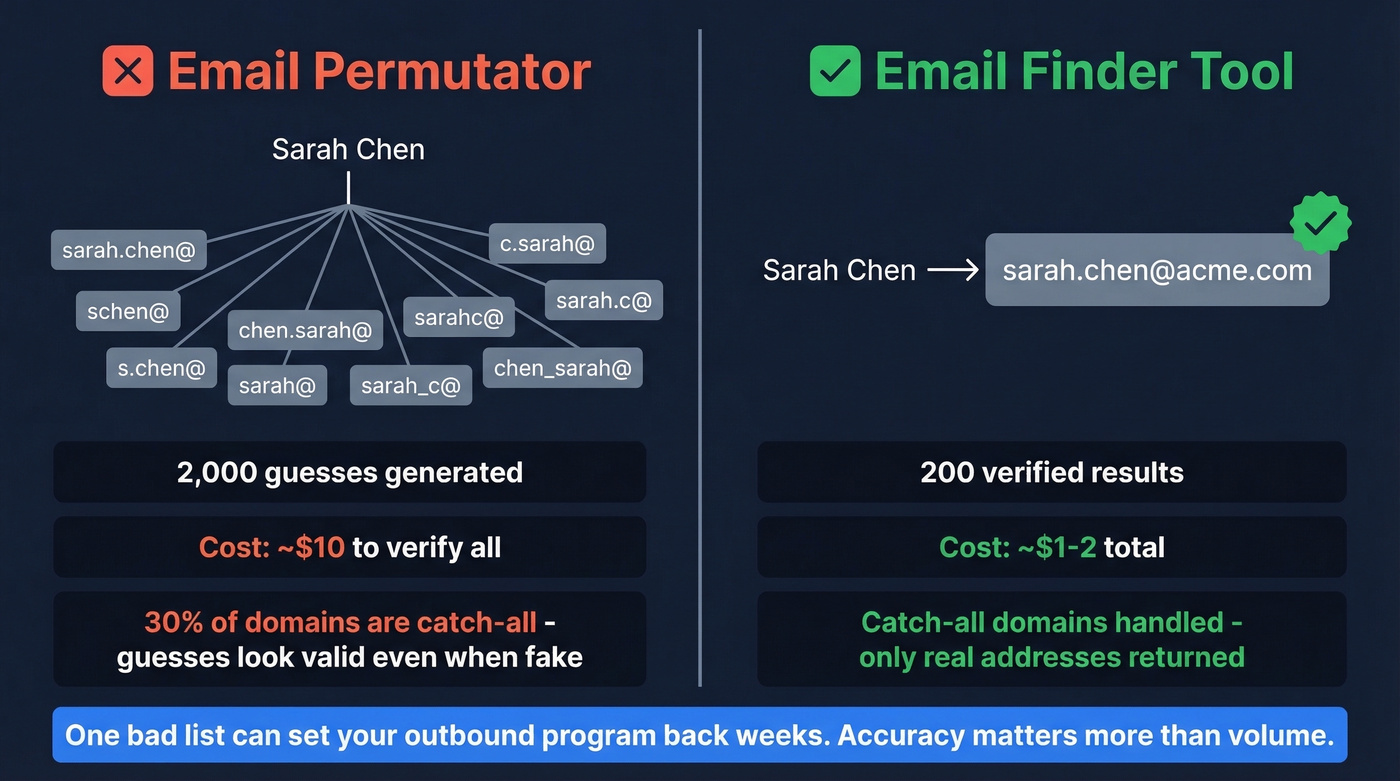
About 30% of B2B domains are catch-all, meaning they accept email sent to any address - even fake ones. Run permutator output through a basic verification tool, and catch-all domains return "valid" for every single variation. You still don't know which one is real. You just wasted credits confirming that the domain accepts garbage.
The cost of getting this wrong isn't just bounced emails. Hard bounces above 3-5% often lead to throttling, blocks, and long-term deliverability problems. One bad list can set your outbound program back weeks.
How Email Finder Tools Work
Understanding the pipeline behind these tools helps you evaluate which ones deserve your trust. The process breaks down into seven steps:
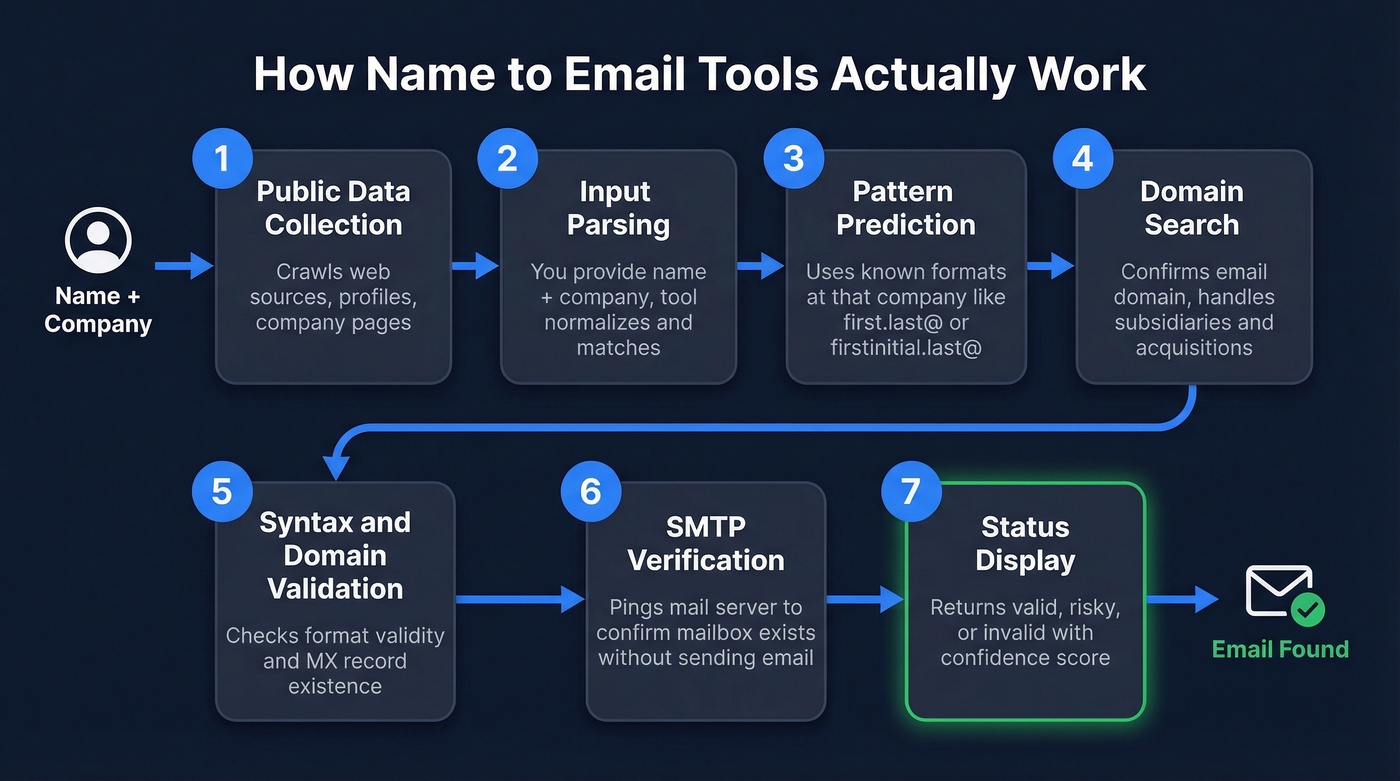
- Public data collection - the tool crawls web sources, professional profiles, company pages, and publicly available datasets to build its contact database.
- Input parsing - you provide a name and company (or domain). The tool normalizes the input and matches it against its records.
- Pattern prediction - using known email formats at that company (first.last@, firstinitial.last@), the tool predicts the most likely address.
- Domain search - the tool confirms the company's email domain, handling edge cases like subsidiaries or acquisitions where the domain doesn't match the company name.
- Syntax and domain validation - basic checks: is the format valid? Does the domain's MX record exist?
- SMTP verification - the tool pings the mail server to check whether the specific mailbox exists, without actually sending an email.
- Status display - you get a result: valid, risky, or invalid, often with a confidence score.

You just read why permutators waste credits on catch-all domains. Prospeo's 5-step verification handles catch-alls, spam traps, and honeypots - delivering 98% email accuracy across 300M+ profiles. At $0.01 per email, one verified result costs less than checking 10 guesses.
Turn names into verified emails, not expensive bounces.
Free Methods (No Tool Required)
Sometimes you just need one email and don't want to sign up for anything. Fair enough.
Search engine operators work best on DuckDuckGo. Try site:companydomain.com "email" "contact" "Full Name" to surface contact pages and team directories, or "Full Name" "@companydomain.com" to catch emails published in press releases, conference speaker bios, and PDF documents. A name-based email search using these operators is surprisingly effective for high-profile contacts who appear frequently in public content.
Company team pages are underrated. Many startups and mid-market companies list team members with direct emails on their About or Team pages. Check the footer too - you'd be surprised how often a founder's email is sitting right there.
WHOIS lookup occasionally surfaces a founder or executive email for smaller companies, though larger orgs use privacy services that make this useless.
These methods don't scale, but they cost nothing and work well for targeted outreach to a handful of prospects.
Best Name to Email Tools Compared
| Tool | Accuracy | Pricing | Best For |
|---|---|---|---|
| Prospeo | 98% | Free 75/mo; from ~$39/mo | Accuracy + verification |
| Hunter | 90% | Free 50/mo; $49-$299/mo | Verification layer |
| Name2Email | Unverified | Free only | Quick Gmail guesses |
| Apollo | 91% | Free 100/mo; from ~$49/mo | All-in-one prospecting |
| Wiza | Not benchmarked | $0.15/email or $30-$50/mo | Occasional lookups |
| Snov.io | 79% | Free 50/mo; from ~$39/mo | Budget outreach |
| RocketReach | 83% | ~$50/mo | Broad coverage |
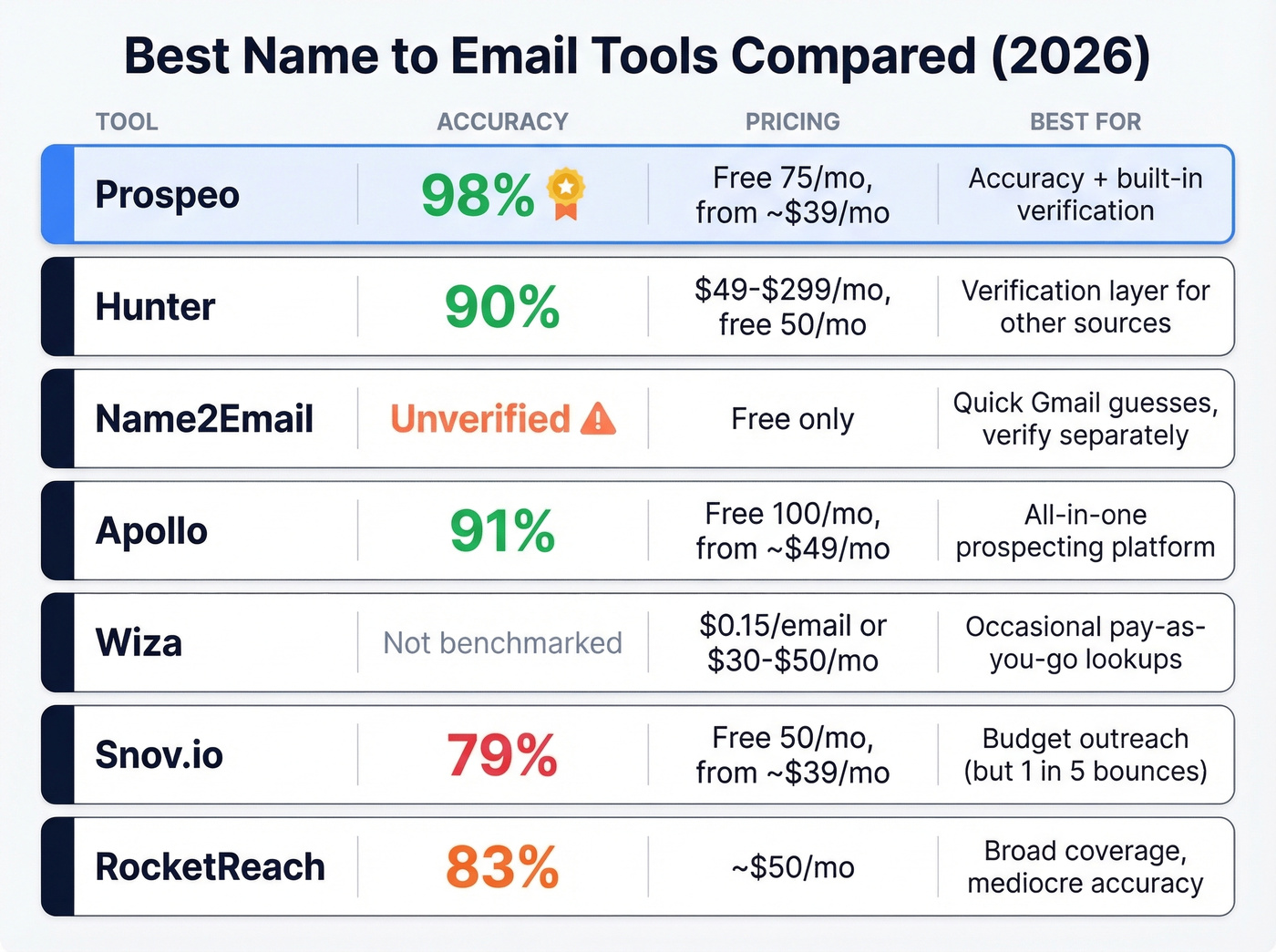
Which one should you pick? For accuracy that doesn't require a separate verification step, start with Prospeo. For verifying emails you've already sourced elsewhere, Hunter. For a single zero-commitment lookup, Name2Email - but verify separately before sending. And for a full prospecting platform rather than just an email finder, Apollo.
Prospeo
Use this if you need emails you can actually send to without a separate verification step. Prospeo's 300M+ profiles and 143M+ verified emails run through a proprietary 5-step verification pipeline - catch-all handling, spam-trap removal, honeypot filtering - that delivers 98% email accuracy. The 7-day data refresh cycle means you aren't pulling contacts that changed jobs six weeks ago.
The Chrome extension (40K+ users) pulls verified emails from any website or professional profile in one click. Bulk lookups work via CSV upload or API. At roughly $0.01 per email, it's a fraction of what enterprise data platforms charge. The free tier gives you 75 emails and 100 Chrome extension credits per month - enough to test whether the accuracy claims hold up. No contracts, no sales calls required.
Hunter
The consensus on r/agency is that Hunter works "better as a verification layer than a primary source." That tracks with our experience. Hunter's 100M+ email database is solid but smaller than competitors, and where it shines is accuracy - 90% in the Saleshandy benchmark - plus a pricing model that only charges you when an email is found.

Free tier gives you 50 searches/month. Paid plans run $49/mo (Starter), $149/mo (Growth), and $299/mo (Scale), with annual billing dropping those by about 30%. Skip Hunter if you need a large-scale prospecting database. Its strength is precision, not breadth.
Name2Email
Name2Email is a free Chrome extension (developed by Reply) with ~80,000 users. Type a name and domain into Gmail's "To" field, and it suggests possible email addresses with a hover-to-identify mechanic.
Here's the thing: it doesn't verify anything. The 3.53/5 rating across 251 Chrome Web Store reviews tells the story - users consistently report the extension breaking after Chrome updates, auto-suggestions failing intermittently, and confirmed addresses being "only sometimes correct." There's no SMTP verification, no catch-all handling, no confidence score. The extension also requests broad permissions, something to flag with your IT team before installing.
For a single quick lookup where you plan to verify separately? Fine. For anything at volume, skip it. Unverified emails will destroy your sender reputation.
Apollo
Reddit practitioners flag that Apollo's data "feels bad sometimes," particularly on older contacts where job changes haven't been updated. That's the tradeoff with Apollo's 250M+ contact database: for fresh contacts at growing companies, it's strong (91% accuracy in the Saleshandy test). For established executives who've been in-role for years, verify before sending.
The free tier (100 credits/mo) is generous, and paid plans start around $49/mo per user. Apollo's real value isn't the email finder alone - it's the full prospecting workflow with sequences, filters, and CRM sync. If you only need emails, you're paying for a lot of features you won't use.
Wiza
Wiza's pay-as-you-go model makes it genuinely useful for founders or freelancers with unpredictable volume. Need 20 emails one month and zero the next? Pay $0.15 per email with no monthly commitment. Steadier users can grab the Pro tier ($30/mo for 100 credits) or Growth ($50/mo for 300 credits). Per-email costs add up fast at high volume, though - for teams running consistent outbound, flat-rate tools save real money.
Snov.io
Snov.io scored 79% accuracy in the Saleshandy benchmark - the lowest of any tool tested. Free tier offers 50 credits/mo, paid plans from ~$39/mo. It bundles a full outreach suite at a budget price, but when one in five emails bounces, the savings evaporate in deliverability damage. We'd pass on this one for email finding specifically.
RocketReach
RocketReach hit 83% accuracy in the same benchmark. Pricing runs around $50/mo on entry plans. One Reddit user described it as "not the most payworthy" after a year on the paid plan with low reply rates. At this price point, you can get meaningfully better accuracy elsewhere.
Accuracy Benchmarks
Vendor accuracy claims are notoriously inflated. Let's look at what independent tests actually show.
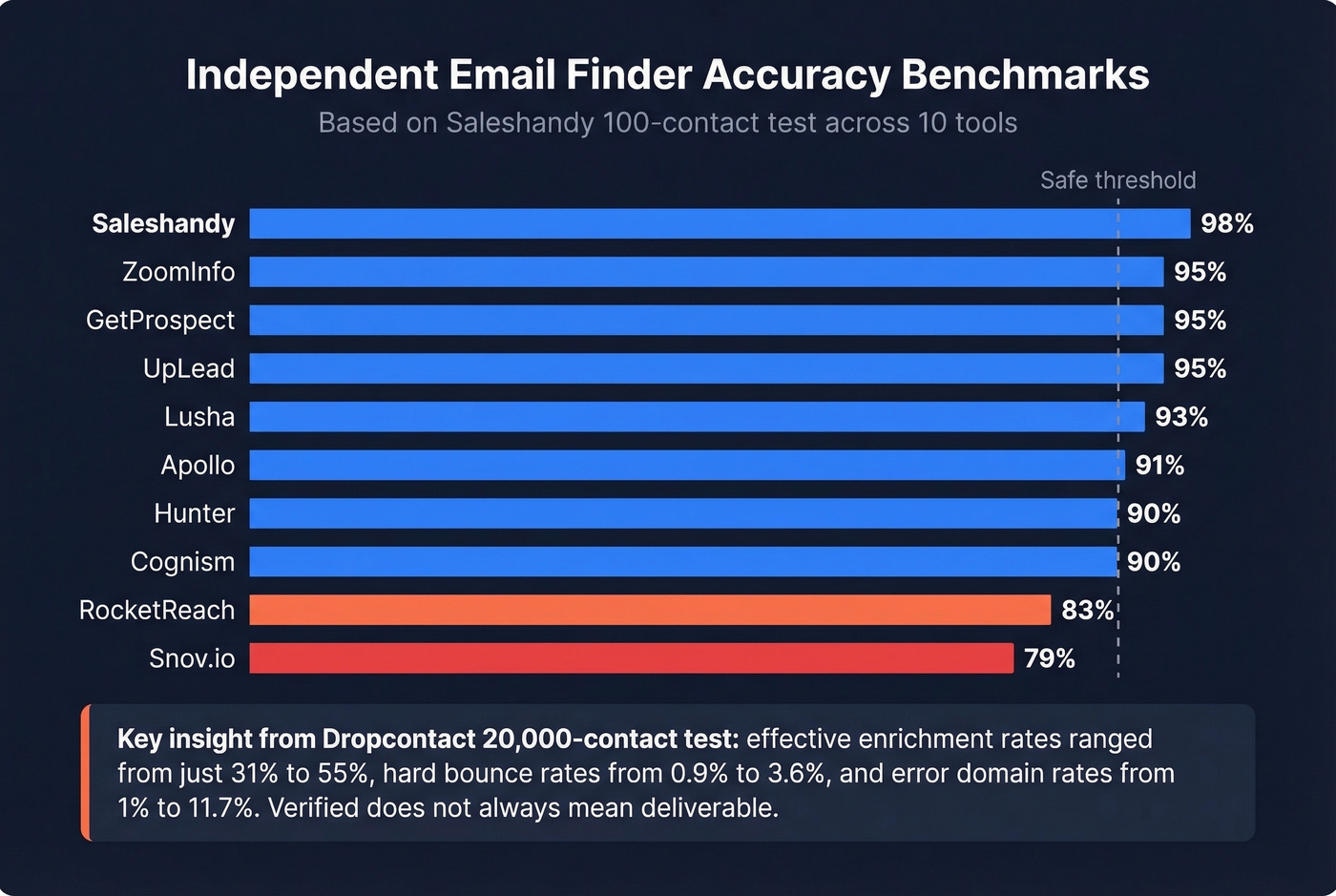
Saleshandy's 100-contact test benchmarked 12 tools against a shared list of verified business contacts:
| Tool | Accuracy |
|---|---|
| Saleshandy | 98% |
| ZoomInfo | 95% |
| GetProspect | 95% |
| UpLead | 95% |
| Lusha | 93% |
| Apollo | 91% |
| Hunter | 90% |
| Cognism | 90% |
| RocketReach | 83% |
| Snov.io | 79% |
A larger-scale benchmark by Dropcontact tested 15 tools across 20,000 real contacts and actually sent emails to every address found. Effective enrichment rates ranged from just 31% to 55%, hard bounce rates from 0.9% to 3.6%, and error domain rates (wrong company matched to the email) from 1% to 11.7%.
The takeaway is blunt: "verified" doesn't mean "deliverable." An email can pass SMTP verification and still bounce because the tool matched the wrong domain, the contact left the company last week, or the mailbox is full. Data freshness matters as much as initial accuracy.
Our take: If your average deal size is under $15k, you probably don't need a $15k/year ZoomInfo seat. A two-tool stack at $50-80/mo total covers 90%+ of lookup needs with comparable accuracy.
The Waterfall Approach
No single email finder covers every contact. The smartest teams chain two or three tools in sequence - a waterfall enrichment approach that yields ~30% more emails than a single tool.
The practical setup: use your most accurate tool as the primary finder, then run unfound contacts through a second source. A high-accuracy primary layer paired with Hunter as a verification pass on anything sourced from a secondary database covers the vast majority of findable contacts without overcomplicating the workflow.
Most teams don't need more than two tools. Adding a third increases coverage by diminishing margins while tripling the complexity of deduplication and data hygiene. Start with two, measure your coverage gap, and only add a third if you're consistently missing more than 15-20% of your target list.
Your conference list has 200 names and zero emails. Prospeo's bulk CSV upload and Chrome extension turn names + companies into verified addresses in minutes - with a 7-day data refresh so you're not emailing someone who left that company last month.
Go from name to inbox-ready email in one click.
FAQ
Is it legal to find someone's email from their name?
Yes, provided you use publicly available business data and comply with GDPR and CAN-SPAM. Most established email finder tools support GDPR workflows with opt-outs and DPAs available on request. Use the data for legitimate business purposes and honor unsubscribe requests immediately.
What's a catch-all domain and why does it matter?
A catch-all domain accepts email sent to any address at that domain - even fabricated ones. About 30% of B2B domains are catch-all, so standard SMTP verification can't confirm a specific mailbox exists. Tools without catch-all handling mark these as "valid" when they may not be, which is why that extra verification layer matters so much.
How many free email lookups can I get per month?
Prospeo offers 75 free verified emails monthly, Hunter gives 50 credits, Apollo provides 100 credits, and Snov.io offers 50. Name2Email is technically unlimited but provides unverified guesses - not confirmed addresses you can safely send to.
What bounce rate is acceptable for cold email?
Keep hard bounces under 3%. Above 5%, expect throttling, blocks, and long-term deliverability damage from ESPs. Always verify emails before loading them into sequences - verification costs roughly $0.005-0.01 per address, trivial compared to rebuilding a burned domain.
Should I use multiple email finder tools?
Yes - a waterfall approach chaining two tools yields ~30% more verified contacts than a single source. Start with your most accurate finder, then fill gaps with a second. Two tools is the sweet spot; three adds complexity with diminishing returns.