

Professional Voicemail Greeting: Scripts, Recording Tips & Setup Guide
A potential client calls you at 5:15 PM. Your phone's off. They hear the default robot voice - "The person you're trying to reach is not available" - and Google your competitor instead. 80% of mobile calls go to voicemail, and only 20% of those callers leave a message. Your professional voicemail greeting is doing real work whether you're there or not, and the default carrier recording is actively losing you opportunities.
You don't need 35 templates. You need one good one, recorded well, and updated regularly. Here's how to get there.
What You Need (Quick Version)
- Pick one template from the scenario that matches you - scripts for nine roles below.
- Keep it 15-25 seconds. Shorter for high-volume lines.
- Never start with "Hello." Callers think you answered and start talking to a recording.
- Record in a quiet, small room. Smile while you speak - listeners can hear it.
Why Your Voicemail Greeting Matters
That 80% stat isn't just trivia. It means your voicemail greeting plays more often than your actual voice does for most inbound callers. And with 75% of people ignoring calls from unknown numbers, your greeting is often the only shot you get to sound competent, trustworthy, and worth calling back.
The default carrier message - "Please leave a message after the tone" - tells callers nothing. It doesn't confirm they reached the right person. It doesn't set callback expectations. It signals you either don't care or haven't spent two minutes on setup.
How to Write a Greeting That Gets Callbacks
There are five elements every professional greeting needs. Boring is professional. Boring gets callbacks.
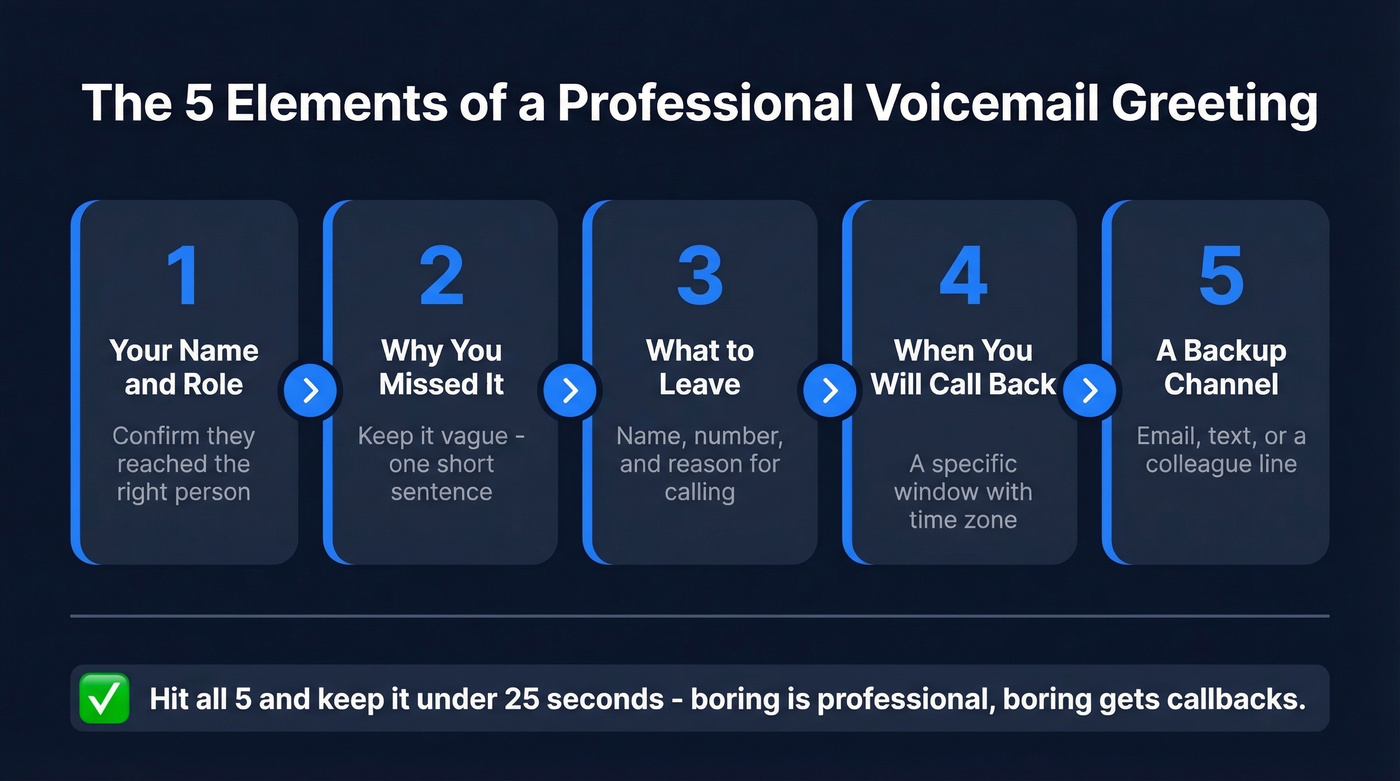
- Your name and title or company. Confirm the caller reached the right person. "Hi, this is [Name], [Title] at [Company]."
- Why you can't answer. Keep it vague and brief. "I'm away from my phone" or "I'm currently unavailable" - nobody needs your calendar.
- What to leave. Ask for their name, number, and a brief reason for calling. Don't make them guess.
- When you'll call back. A specific window beats "as soon as possible." Include your time zone if you work across regions. "I'll return your call within 4 business hours, Pacific time."
- An alternative contact method. Email, a colleague's line, or a "text me" option. Give callers a backup path.
Update your greeting regularly - especially after vacations, job changes, or seasonal hours. A greeting that references last year's holiday schedule makes you look checked out.
How Long Should It Be?
The internet can't agree on this. You'll find claims that 8-13 seconds is ideal, but that figure is based on calculated estimates from assumptions, not primary telecom research. Zoom's guidance says 20-30 seconds. Snap Recordings recommends 10-20 seconds for personal lines.
Here's the thing: the right length depends on context.
| Scenario | Target Length |
|---|---|
| Personal / direct line | 15-25 seconds |
| High-volume business line | 10-15 seconds |
| Auto-attendant with routing | Up to 40 seconds |
For a personal greeting, 15-25 seconds covers all five elements without dragging. High-volume lines where callers already know who you are should stay at 10-15 seconds. Auto-attendants with department routing get more time because they're doing more work.

80% of calls hit voicemail. Skip the phone tag entirely. Prospeo gives you 125M+ verified mobile numbers with a 30% pickup rate - so you connect with decision-makers live instead of hoping they call back.
Stop perfecting your voicemail. Start reaching people who answer.
5 Mistakes That Kill Voicemail Credibility
1. Starting with "Hello." Callers hear it, think you answered, and start talking. Then they realize it's a recording and have to repeat themselves - a small thing that creates real frustration. Start with "Hi, you've reached..." instead.
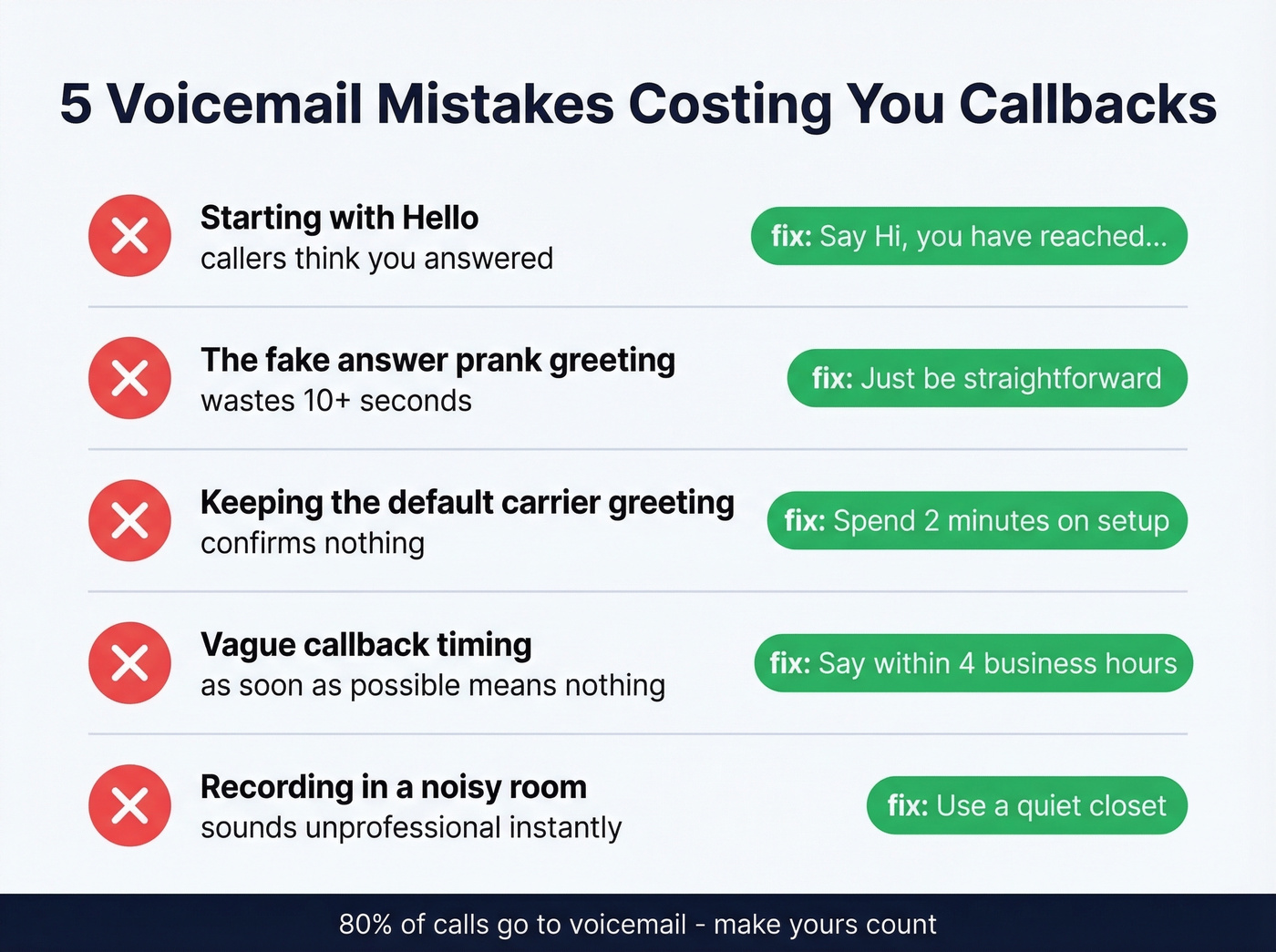
2. The "fake answer" prank greeting. "Hey! ... Just kidding, leave a message!" wastes 10+ seconds and signals immaturity. If you're job hunting or client-facing, this is a dealbreaker for recruiters and prospects.
3. Keeping the default carrier greeting. It tells callers nothing and confirms nothing. Two minutes of setup fixes this permanently.
4. Being vague about callback timing. "I'll get back to you as soon as possible" means nothing. "Within 4 business hours" or "by end of day" gives callers a reason to wait instead of calling your competitor.
5. Recording in a noisy or echoey room. Background chatter, hallway echo, or wind noise makes you sound unprofessional before you've said a word.
How to Record a Great Greeting
Most voicemail guides give you 25 templates and zero recording advice. That's like giving someone a recipe without telling them how to turn on the oven.
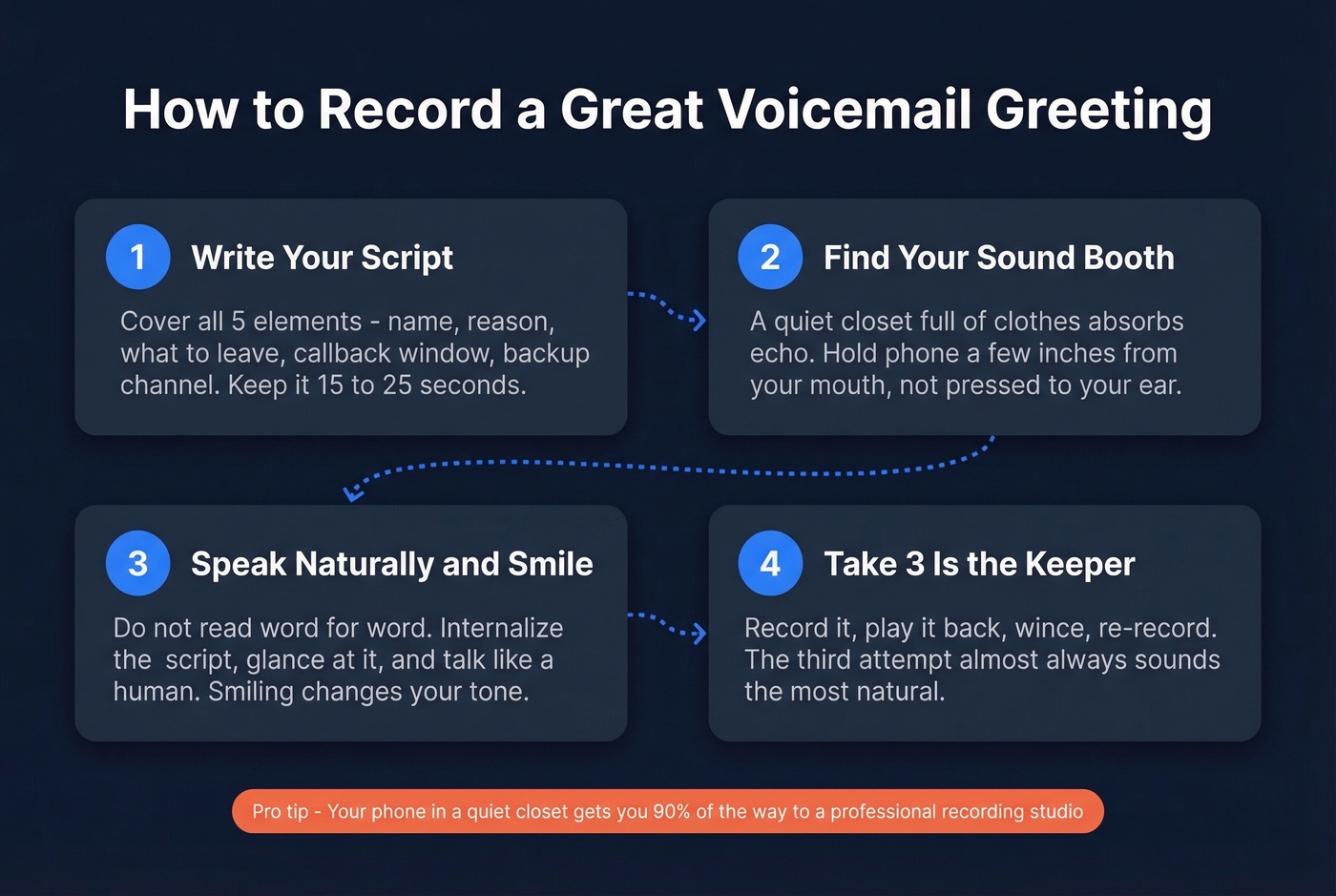
Write your script first, but don't read it word-for-word. Reading verbatim sounds robotic. Instead, internalize the five elements, glance at your script, and speak naturally. Smile while you record - it changes your intonation in ways listeners genuinely notice.
Hold your phone a few inches from your mouth, not pressed against your ear. Pressing it tight creates muffled audio. Record in a small, quiet room - a closet full of clothes works surprisingly well as a DIY sound booth because the fabric absorbs echo and ambient noise.
We've listened to a lot of voicemail greetings over the years, and the pattern is clear: the third take is usually the keeper. Record it, play it back, wince, re-record. Professional recording services like Snap Recordings start at $80+, but your phone in a quiet closet gets you 90% of the way there.
Voicemail Greeting Scripts for Every Role
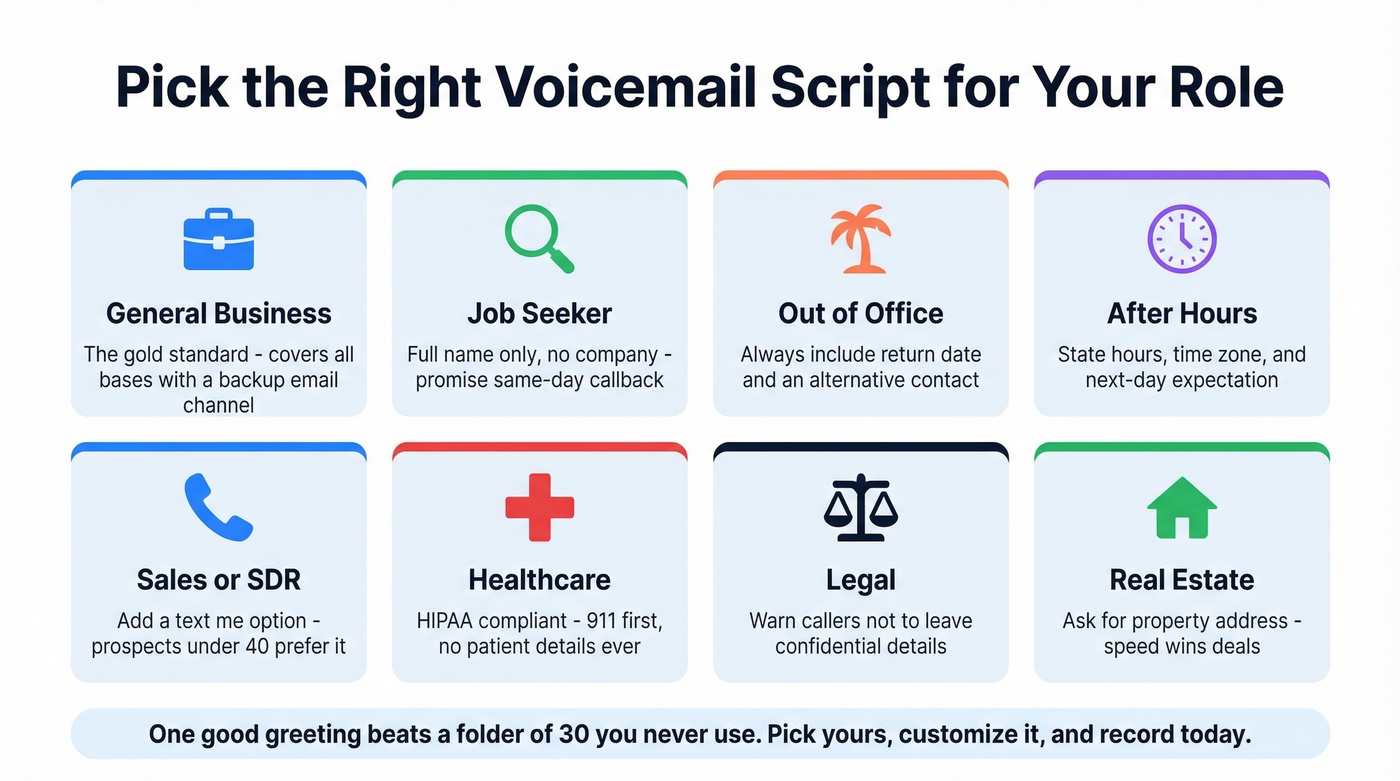
Pick the scenario that matches your role, customize the bracketed fields, and record. One good greeting beats a folder of 30 you never use.
General Business
"Hi, you've reached [Name], [Title] at [Company]. I'm unable to take your call right now. Please leave your name, number, and a brief message, and I'll return your call within [timeframe]. For immediate assistance, email me at [email]. Thanks."
This is the gold standard. It confirms identity, sets expectations, and gives a backup channel. Customize the timeframe honestly - don't promise same-day if you won't deliver.
For more options, see our Business Voicemail Script Examples.
Job Seeker
You applied to 15 jobs last week. A recruiter calls back and hears "YOOO WHAT'S UP." They hang up and call the next candidate.
"Hi, you've reached [Full Name]. I'm not available right now, but your call is important to me. Please leave your name, number, and a brief message, and I'll return your call today. Thank you."
No company affiliation needed - you might be between roles. Lead with your full name, keep it warm and professional, and promise a same-day callback. Recruiters move fast; so should you.
Out-of-Office / Vacation
"Hi, you've reached [Name] at [Company]. I'm out of the office until [return date] with limited access to messages. For urgent matters, please contact [Colleague Name] at [number/email]. Otherwise, leave a message and I'll return your call when I'm back on [date]. Thank you."
Always include a return date, an alternative contact, and an escalation path. "I'm out of the office" with no return date is useless.
Business After-Hours
"Thanks for calling [Company]. Our office hours are Monday through Friday, [hours] [time zone]. Please leave your name, number, and a brief message, and we'll return your call the next business day. You can also reach us anytime at [email] or [website]."
State hours, set a next-day expectation, and offer a digital alternative. A solid business after-hours voicemail script prevents callers from feeling stranded - they know exactly when to expect a response and where to go in the meantime.
Sales / SDR
"Hi, you've reached [Name] with [Company]. I'm on another call right now, but I'd love to connect. Leave your name, number, and what you're working on, and I'll call you back within [timeframe]. For a faster response, text me at this number. Talk soon."
The "text me" option is critical for sales. Many prospects under 40 prefer texting, and it keeps the conversation moving even when you can't pick up. Set a specific callback window - "within 2 hours" beats "soon."
That script works, but only if you're calling numbers that actually ring. If you're building outbound lists, tools like Prospeo give you verified direct dials so more of your calls reach real people instead of hitting disconnected lines. If you want to go deeper on voicemail strategy, use our Sales Voicemail Scripts and Cold Call Voicemail Scripts.
Healthcare / Medical Office
"Thank you for calling [Practice Name]. If this is a medical emergency, please hang up and dial 911. Our office hours are [hours]. To schedule or change an appointment, press 1 or leave your name, number, and the best time to reach you. For prescription refills, press 2."
HIPAA compliance isn't optional here. Your greeting must never include diagnoses, test results, medication names, insurance IDs, or procedure details. Follow the Minimum Necessary Standard: confirm the practice name, give emergency instructions first, and keep everything else scheduling-oriented.
Standard voicemail services like Apple Voicemail, Google Voice, and many carrier systems typically don't provide what HIPAA requires - things like a Business Associate Agreement plus the right security controls. If your voicemail system stores recordings electronically, it needs encryption at rest and in transit, role-based access with MFA, audit logs, and retention policies.
Legal / Law Office
"You've reached the office of [Attorney Name] at [Firm Name]. I'm currently unavailable. Please leave your name, number, and a brief message, and I'll return your call within [timeframe]. Please do not leave confidential details in your message - we'll discuss everything when we connect."
Keep it brief and scheduling-focused. In criminal defense contexts especially, voicemail can invite incriminating disclosures from callers who don't realize the recording isn't privileged. Redirect to a live conversation.
Real Estate
Speed wins deals in real estate - InsideSales/XANT's lead-response research is commonly cited as: 78% of business goes to the first responder. Your greeting needs to move fast.
"Hi, you've reached [Name] with [Brokerage]. I'm sorry I missed your call. Please leave your name, number, and the property address you're calling about, and I'll get back to you by [specific time]. For a faster response, text me at this number."
Name and brokerage in the first two seconds. Asking for the property address lets you prep before the callback - you'll sound sharper and more attentive. If you're prospecting, these Real Estate Cold Calling Scripts pair well with a fast-response voicemail.
Customer Support
"Thanks for calling [Company] support. We're unable to take your call right now. Please leave your name, number, and ticket number if you have one, and we'll respond within [timeframe]. For self-service help, visit [website/FAQ URL]."
The ticket number prompt saves your team from starting from scratch. Always offer a self-service alternative for common issues.
How to Set Up Your Voicemail
iPhone
- Open the Phone app.
- Tap the Voicemail tab at the bottom right.
- Tap Greeting.
- Select Custom.
- Tap Record, speak your greeting, then tap Stop.
- Tap Save.
Android
- Open the Phone app.
- Open Settings (often via the three-dot menu).
- Tap Voicemail.
- Find Greeting (wording varies by device and carrier).
- Record, review, and save.
Carrier apps like T-Mobile Visual Voicemail or Verizon My Verizon sometimes override these steps. If the default path doesn't work, check your carrier's voicemail app.
When to Update Your Greeting
Before and after PTO or vacation - include return dates, remove them when you're back. Job title or company change - outdated info erodes trust instantly. Seasonal hours - holiday schedules, summer Fridays, anything that changes your availability.
Let's be honest: your voicemail greeting matters more than your email signature. An email signature is decoration. A voicemail greeting is the difference between a callback and a lost lead. Yet most people record one once and forget it exists for three years. Set a quarterly calendar reminder. It takes two minutes, and you'll catch outdated references, awkward phrasing, or audio quality issues you missed the first time around.
If you're leaving messages as part of a sales cadence, pair this with a Follow-Up Email After Leaving a Voicemail and a tight Call Follow Up process.
A great voicemail greeting helps when people call you. But the best reps don't wait for callbacks. Prospeo's database has 300M+ profiles with 98% accurate emails and direct dials - so you reach prospects on the first attempt, not the third.
Reach buyers directly for $0.01 per verified contact.
FAQ
What should a professional voicemail greeting include?
Your name, company or role, a brief reason you can't answer, what the caller should leave (name, number, brief message), and a specific callback window like "within 4 business hours." Add an alternative contact method such as email to reduce repeat calls and missed connections.
How long should a voicemail greeting be?
15-25 seconds on a personal or direct business line. High-volume lines should stay at 10-15 seconds. Auto-attendants with department routing can run up to 40 seconds since they handle menu options and call direction.
Is the default carrier voicemail greeting unprofessional?
Yes. It doesn't confirm the caller reached the right person and signals zero effort. A custom greeting takes under two minutes to record and immediately sets you apart from the majority of professionals still using the generic "leave a message after the tone" default.
Should I add a "text me" option to my greeting?
If you're in sales, real estate, or any response-speed role, absolutely. Over 50% of prospects under 40 prefer texting to voicemail. It keeps conversations moving when you can't pick up and reduces the chance callers move on to a competitor while waiting for a callback.