

Sales Battlecard Templates Built for Live Calls, Not Shared Drives
33% of deals are lost directly to a competitor - and nearly half of those were winnable. The gap isn't product. It's preparation.
Most sales battlecard templates sit in a shared drive collecting dust, opened once during onboarding and never touched again. The problem isn't the concept. It's the execution. Reps need something they can scan in 15 seconds mid-call, not a six-page PDF that reads like a product marketing thesis. We've watched this cycle play out across dozens of teams, and the fix is simpler than most people think.
What You Need (Quick Version)
- One-screen template, six sections, zero scrolling. If a rep can't find the answer during a live call, the battlecard failed. Jump to the template.
- Talk tracks and proof points are non-negotiable. Only 43% of battlecards include talk tracks. Yours must - along with customer-facing evidence. The payoff: 93% of teams using battlecards report win-rate improvements exceeding 20%.
- A maintenance owner and monthly cadence. Templates without a system go stale fast, and once reps get burned by outdated intel, they stop trusting the card entirely.
Why Most Battlecards Fail
The lifecycle is painfully predictable: create, neglect, distrust, ignore. A PMM spends two weeks building a beautiful competitive document. It gets shared in Slack. Reps bookmark it. Then the competitor changes pricing, launches a new feature, or shifts messaging - and the battlecard says nothing about it. One rep gets burned citing outdated info on a call. Word spreads. The card is dead.
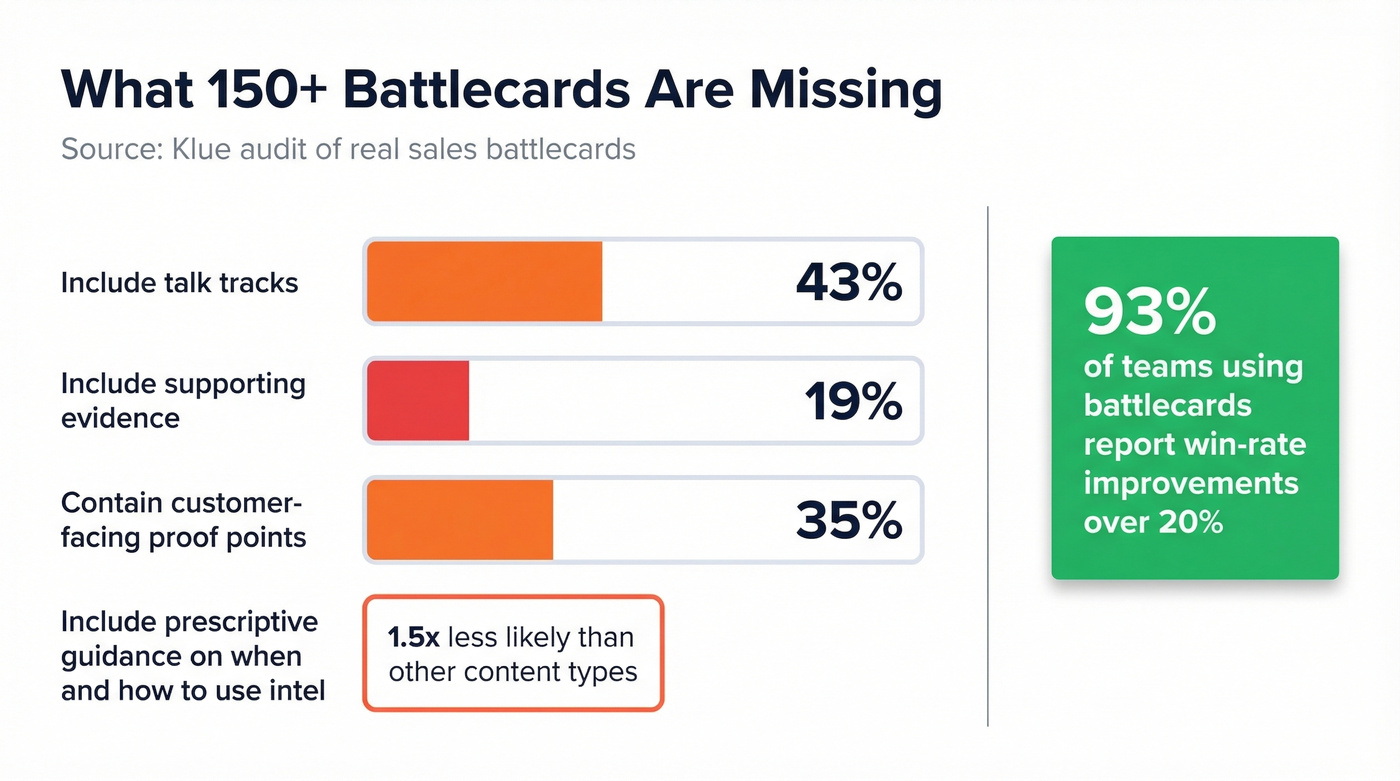
Klue's audit of 150+ battlecards found that only 43% include talk tracks, only 19% provide supporting evidence, and just 35% contain customer-facing proof points. Battlecards were also 1.5x less likely to include prescriptive guidance on when and how to use the intel. The majority give reps context about a competitor but zero guidance on what to actually say or show.
Here's the thing: the adoption problem isn't distribution. You can embed a battlecard in Salesforce, pin it in Slack, and tattoo it on the break room wall. If the content reads like a Wikipedia article instead of a conversation guide, reps won't use it. Every PMM who's watched Gong calls knows this - reps scan, they don't read. Build for scanning or build for nobody.
The One-Screen Battlecard Template
Some frameworks split battlecards into "Know / Say / Show." That creates three vague buckets when reps need six specific answers. Here's the structure we've seen drive the highest adoption - six sections, one screen, designed for a rep who has 15 seconds to find an answer while a prospect is talking.
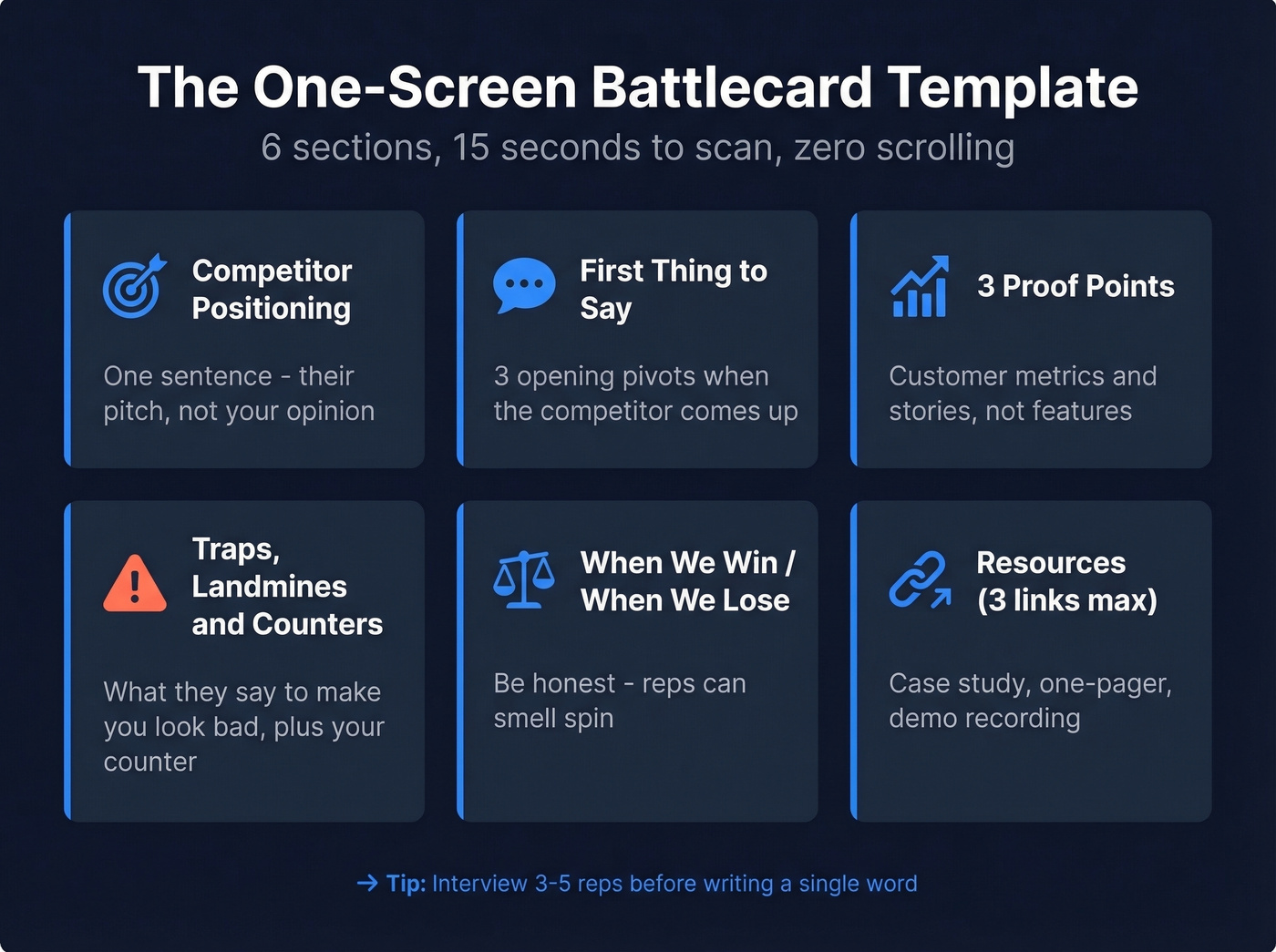
Section 1 - Competitor Positioning (one sentence) A single sentence capturing how the competitor positions themselves. Not your opinion - their pitch. Example: "[Competitor] positions as the enterprise-grade platform for teams that need compliance-first workflows."
Section 2 - First Thing to Say (3 bullets) Opening pivots a rep uses when the competitor comes up. Not features - conversation starters. Think: "When they mention [Competitor], say: 'Great product for [use case]. The teams that come to us usually need [differentiator] - is that on your radar?'"
Section 3 - 3 Proof Points (not features) Customer stories, specific metrics, or third-party validation. "We reduced [Company X]'s bounce rate from 35% to under 4%" beats "We have advanced verification technology" every single time.
Section 4 - Traps, Landmines & Counters What does the competitor say to make you look bad? What demo tricks do they use? List 2-3 traps with a one-sentence counter for each. In our experience, this is the section reps open first.
Section 5 - When We Win / When We Lose Be honest. "We win when the buyer cares about data accuracy and self-serve speed. We lose when they need a full-suite platform with built-in dialer and marketing automation." Honesty builds internal credibility - reps can smell spin, and they'll stop trusting a card that pretends you win every scenario.
Section 6 - Resources (3 links max) A case study, a one-pager, and a demo recording. More than three links and nobody clicks any of them.
Before you write a single word: Interview 3-5 reps for 30 minutes each. Ask: (1) What do prospects say, in their exact words? (2) What's the hardest thing to counter? (3) What worked in your last win? (4) What mistakes do reps make against this competitor? The answers write the battlecard for you.
Talk Track Templates
Only 43% of battlecards include talk tracks. That's a massive miss. Here are three fill-in-the-blank scripts for the scenarios that matter most.
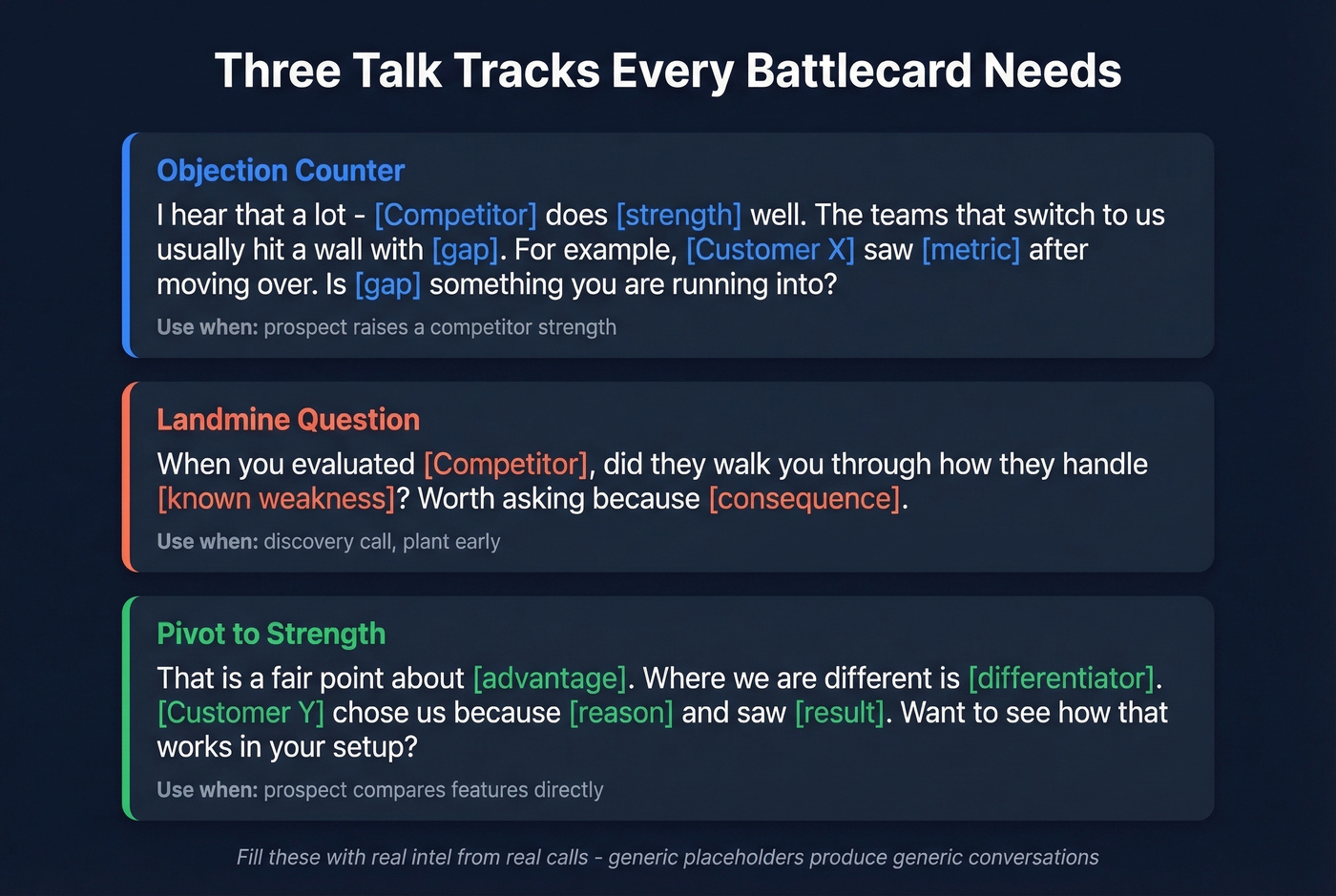
Objection Counter: "I hear that a lot - [Competitor] does [specific strength] well. The teams that switch to us usually hit a wall with [specific gap]. For example, [Customer X] saw [metric improvement] after moving over. Is [specific gap] something you're running into?"
Landmine Question (plant during discovery): "When you evaluated [Competitor], did they walk you through how they handle [known weakness area]? Worth asking because [specific consequence]."
Pivot to Strength: "That's a fair point about [Competitor advantage]. Where we're different is [core differentiator]. [Customer Y] chose us specifically because [reason], and they've seen [result]. Would it help to see how that works in your setup?"
Let's be honest - these templates only work if you fill them with real intel from real calls. Generic placeholders produce generic conversations. Spend the time on the research and the scripts practically write themselves.

Section 3 says proof points beat features. Here's one: teams using Prospeo cut bounce rates from 35% to under 4% and tripled pipeline. That's the kind of metric that wins a live call.
Fill your battlecards with proof points that close deals, not features that bore prospects.
Patterns from Real Battlecard Examples
Dock curated 24 real battlecard examples - rare because most companies treat these as internal secrets. Four patterns worth stealing:
Persona anchoring (Cisco Webex). Instead of leading with features, Cisco frames competitive contrasts around a specific persona and real remote-work moments. Steal this: anchor every battlecard to a buyer persona, not a product category.
Ultra-scannable tables (Parallels vs. Citrix). Two pages, table-driven, checkmarks everywhere. Designed to be consumed in 30 seconds during a replacement deal. When the deal is a direct rip-and-replace, a comparison table beats narrative every time.
Lead with buyer fear (Salesforce). One Salesforce battlecard opens with the prospect's own words: "I don't know when I can text a prospect." Steal this: open with the buyer's problem, not your product's solution.
Micro case studies as proof (Netskope). Short win stories against named competitors, embedded directly in the card - not a link to a PDF. Proof points that live inside the battlecard get used. Proof points that require a click don't.
What Changed in 2026
Feature comparison grids are becoming obsolete. Buyers aren't just evaluating "your product vs. their product" anymore - they're running a five-way decision: buy, build, hire, use AI tools, or wait-and-see.
The question "What headcount does this replace?" came up in 60% of enterprise deals tracked by one CI team. "What roles change when we implement this?" appeared in 40%. Your battlecard template needs answers to these questions, not just a feature checklist.
If your battlecard doesn't address the "build it internally with AI" objection, it's already outdated. That objection is now more common than any named competitor in at least a third of the deals we've tracked. The consensus on r/sales backs this up - reps are reporting that "we'll just build it in-house" kills more deals than any specific vendor.
The Maintenance System
A battlecard without a maintenance system has a shelf life of about four weeks. After that, one stale data point poisons the whole thing. Four practices keep cards alive:
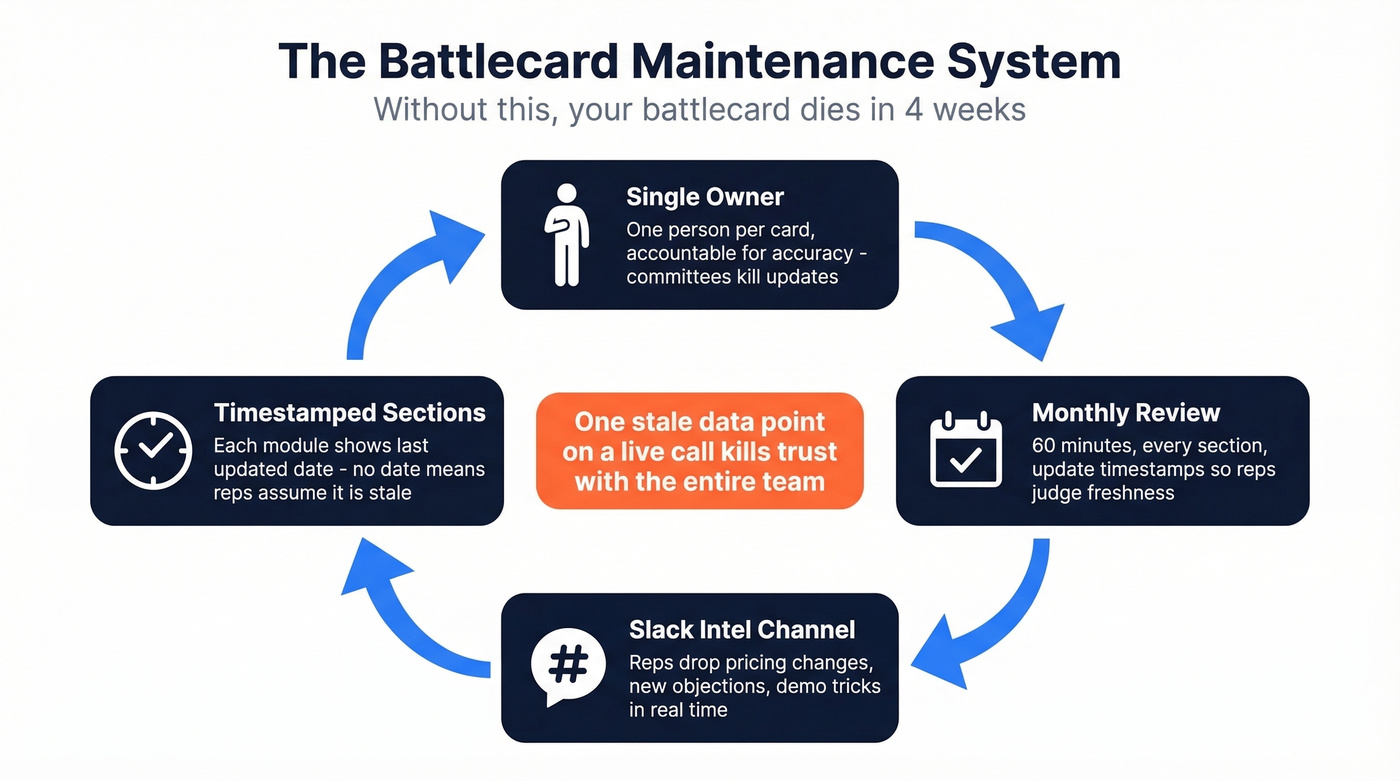
Single owner, not a committee. One person per battlecard, accountable for accuracy. Committees diffuse responsibility and nothing gets updated.
Monthly review cadence. Block 60 minutes. Review every section. Update timestamps on each module so reps can judge freshness at a glance.
Slack channel for field intel. Create a #competitor-intel channel where reps drop what they hear in real time - pricing changes, new objections, demo tricks. The battlecard owner pulls from this during monthly reviews.
Modular sections with timestamps. Each section shows a "last updated" date. If a rep sees "Traps & Counters - updated 3 days ago," they trust it. No date? They assume it's stale.
Stale data doesn't just reduce effectiveness - it destroys trust permanently. One rep cites an outdated competitor price on a call, gets corrected by the prospect, and that battlecard is dead to the entire team. For the contact data feeding your cards - verified emails, mobile numbers, company intel - tools like Prospeo with a 7-day data refresh cycle keep the "reach out to [Competitor's customer]" section accurate between reviews.
Competitive Intelligence Tools Compared
Enterprise CI platforms typically run $15K-$47K/year. Smaller teams don't need that. Here's what each tool actually does and costs:
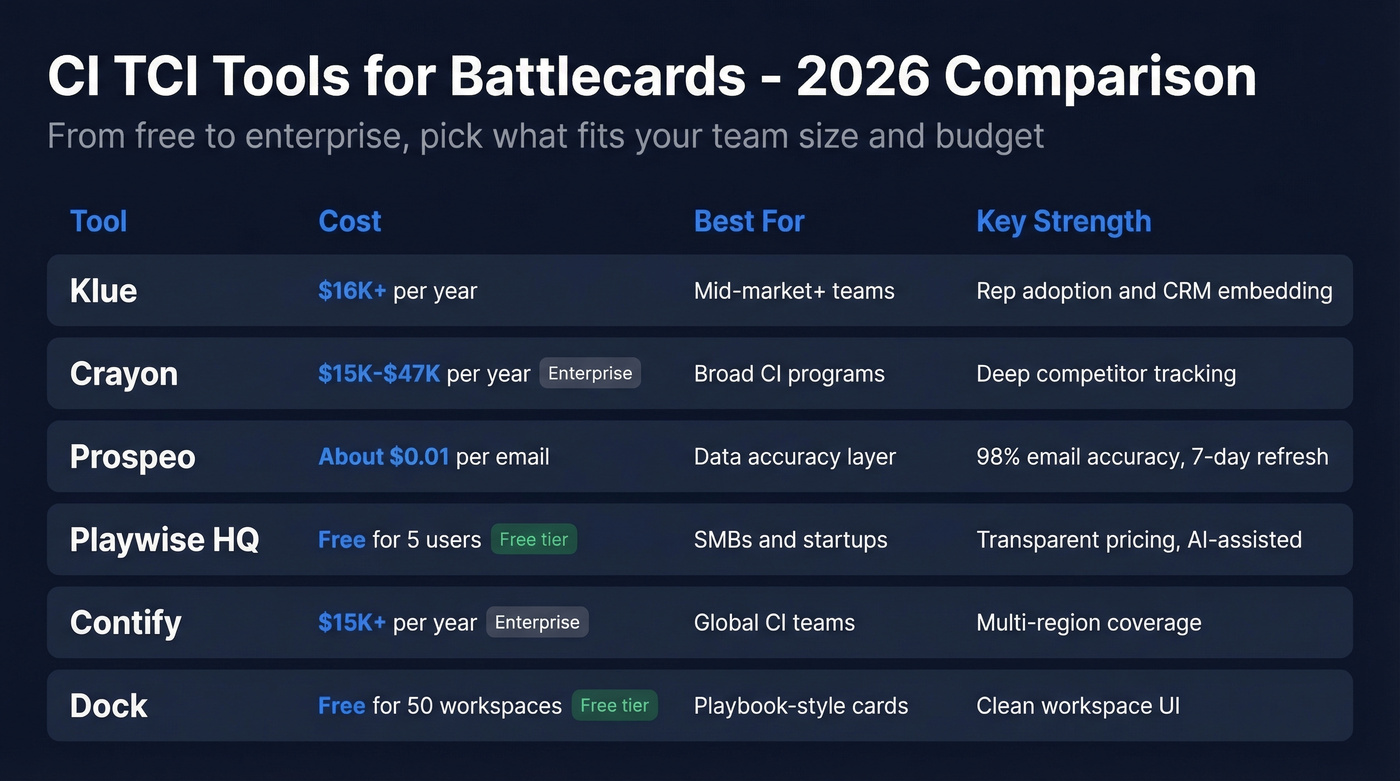
| Tool | Typical Cost | Best For | Key Strength |
|---|---|---|---|
| Klue | ~$16K+/yr | Mid-market+ teams | Rep adoption + CRM embed |
| Crayon | ~$15K-$47K/yr | Broad CI programs | Deep competitor tracking |
| Prospeo | ~$0.01/email | Data accuracy layer | 98% email, 7-day refresh |
| Playwise HQ | Free (5 users) | SMBs & startups | Transparent pricing |
| Contify | ~$15K/yr | Global CI teams | Multi-region coverage |
| Dock | Free (50 workspaces) | Playbook-style cards | Clean workspace UI |
Klue is the strongest option if your priority is getting reps to actually open the battlecard. Workflow integrations and CRM embedding surface cards where reps already work. At ~$16K+/year, it's a real investment - but in markets where competitive deals are the norm, the win-rate lift justifies it. If your CI program extends beyond battlecards into market monitoring, messaging changes, and pricing shifts, competitive intelligence is the play, though implementation is heavier and pricing ranges from ~$15K to $47K/year depending on scope.
Free for 5 users - that's the hook with Playwise HQ. Pro at $250/mo, Enterprise at $450/mo. AI-assisted card generation included. If you're testing whether battlecards move the needle before committing budget, start here.
Contify targets enterprise CI with global coverage and offers a 7-day free trial - expect enterprise-tier pricing starting around $15K+/year. Dock works well as a lightweight playbook tool, free for your first 50 workspaces. Skip Dock if you need analytics on card usage; it's built for content delivery, not adoption tracking.
Every battlecard needs a "When We Win" section backed by real data. Prospeo's 98% email accuracy, 30% mobile pickup rate, and 7-day data refresh give your reps ammo competitors can't match - at $0.01 per lead.
Arm your reps with data accurate enough to put on a battlecard.
Free Template Downloads
You don't need to start from scratch. The best free templates by format:
HubSpot Battlecard Template - Google Sheets format. Clean, sortable, easy to duplicate per competitor. Best for teams already living in the Google ecosystem.
Gong Battlecard Template - PDF with built-in landmine questions and social proof blocks. Closest to the talk-track-first approach we recommend above.
SmartBug SaaS Battlecard - Google Slides format. Visual, presentation-ready, works for team training sessions where you're walking through a new competitor.
Figma Community Battlecard - Figma board for design-forward teams who want full layout control.
Match the tool to the workflow your reps already use, not the other way around. The best sales communication battlecard templates are the ones reps actually open mid-call - format matters more than polish.
FAQ
How long should a battlecard be?
One screen maximum. Reps have roughly 15 seconds during a live call to find what they need. Stick to six sections: competitor positioning, first thing to say, proof points, traps and counters, when we win/lose, and resources. Anything longer gets ignored.
How often should you update battlecards?
Monthly at minimum, with a single designated owner per card. Add timestamps to every section so reps can judge freshness at a glance. In fast-moving categories like AI or cybersecurity, biweekly reviews are worth the extra effort.
What tools do you need to create a battlecard?
Most teams start with Google Slides or a shared doc - and that's fine. Dedicated platforms like Klue or Crayon add CRM embedding and adoption analytics at $15K-$47K/year. For budget-conscious teams, Playwise HQ starts free. Layer in a data accuracy tool for verified contact data so your "reach the buyer" sections stay current.
Do battlecards actually improve win rates?
Yes - 93% of teams using battlecards report win-rate improvements exceeding 20%. The key is format and freshness: one-screen cards with talk tracks and monthly updates outperform multi-page PDFs that go stale after a single quarter.