

Best Sales Dashboard Software in 2026 (12 Tools Compared)
Your VP just asked for a pipeline dashboard by Friday. You've got data scattered across three tools, a CRM that hasn't been cleaned since Q2, and a spreadsheet someone named "FINAL_v3_REAL." That's the moment every sales leader starts searching for sales dashboard software - and immediately drowns in options that all look the same.
Here's what we've learned after testing most of these tools across different team sizes: a data-driven approach to B2B sales can boost growth by up to 25%, but only if the data is trustworthy and the dashboard actually gets used. Most teams fail on both counts. This guide gives you real pricing, honest opinions, and a decision framework so you can pick the right tool without wasting a month on trials.
Our Picks (TL;DR)
| Tool | Best For | Starting Price |
|---|---|---|
| Databox | Easiest setup + free tier | Free / $159/mo |
| Geckoboard | TV wallboards | $60/mo |
| Pipedrive | Small teams | $14/user/mo |
| Power BI | Microsoft shops | ~$10/user/mo |
| Salesforce | Enterprise reporting | $25/user/mo+ |
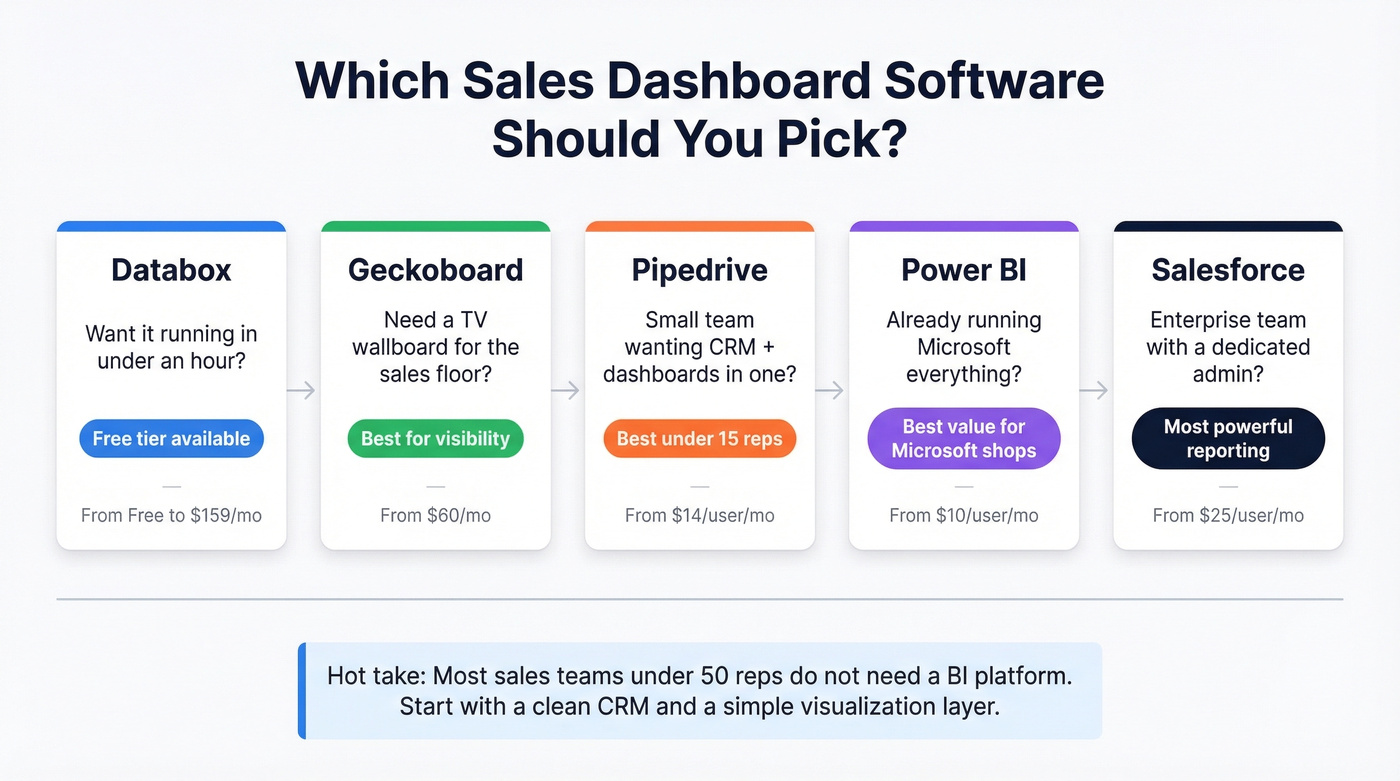
Databox wins on ease. Geckoboard owns the "big screen in the office" use case. Pipedrive bundles CRM and dashboards for lean teams. Power BI is unbeatable if you're already in the Microsoft ecosystem. And Salesforce remains the enterprise default - if you have an admin who knows what they're doing.
Let's be honest: most sales teams under 50 reps don't need a BI platform. They need a clean CRM and a simple visualization layer. The industry oversells complexity because complex tools have higher price tags.
Three Types of Dashboard Tools
Before you compare pricing, understand the three lanes. Not every tool on this list does the same thing.
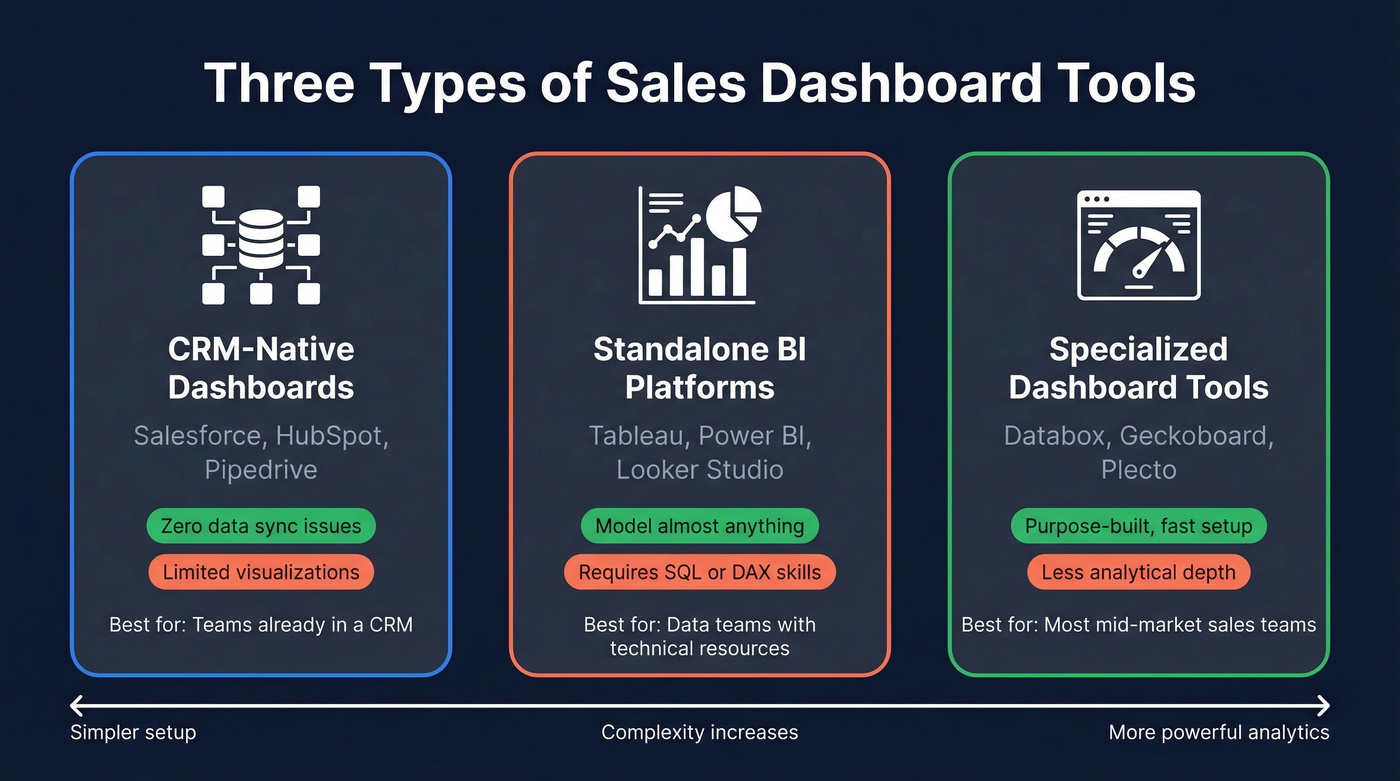
CRM-native dashboards come built into your existing CRM. Salesforce, HubSpot, and Pipedrive all include reporting and dashboard features. The upside is zero data syncing issues, since the dashboard reads directly from your pipeline. The downside is that visualization options are often limited, and you're locked into whatever your CRM vendor decides to build.
Standalone BI platforms like Tableau and Power BI are general-purpose analytics tools that happen to work for sales. They're powerful - you can model almost anything - but they often require a data warehouse, someone who knows DAX or SQL, and patience. Overkill for most sales teams.
Specialized dashboard tools like Databox, Geckoboard, and Plecto sit in the middle. They connect to your CRM and other data sources, then present clean, purpose-built dashboards without the complexity of a full BI stack. In practice, sales managers ask for pipeline visibility and easy setup - not advanced analytics. That's exactly the gap these tools fill, and it's where most mid-market sales teams should start looking.
It's also worth understanding the analytics maturity curve: descriptive (what happened), diagnostic (why), predictive (what will happen), and prescriptive (what to do about it). Most sales teams are still stuck at descriptive. The tools below range from basic reporting to AI-powered forecasting - pick the level that matches where your team actually is, not where you wish it were.
12 Best Sales Dashboards Compared
| Tool | Best For | Price | Free Tier | AI |
|---|---|---|---|---|
| Databox | Easy setup | Free / $159/mo | Yes | Yes |
| Geckoboard | TV wallboards | $60/mo | - | - |
| Salesforce | Enterprise | $25/user/mo+ | - | Yes |
| HubSpot | Mid-market | $9/seat/mo+ | - | Yes |
| Pipedrive | Small teams | $14/user/mo | - | Yes |
| Tableau | Advanced viz | $15/user/mo* | - | Yes |
| Power BI | Microsoft stack | ~$10/user/mo | - | Yes |
| Zoho Analytics | Budget teams | $24/mo | - | Yes |
| Plecto | Gamification | ~$200/mo | - | - |
| Klipfolio | Custom builds | $120-190/mo | - | - |
| Looker Studio | Free + technical | Free | Yes | - |
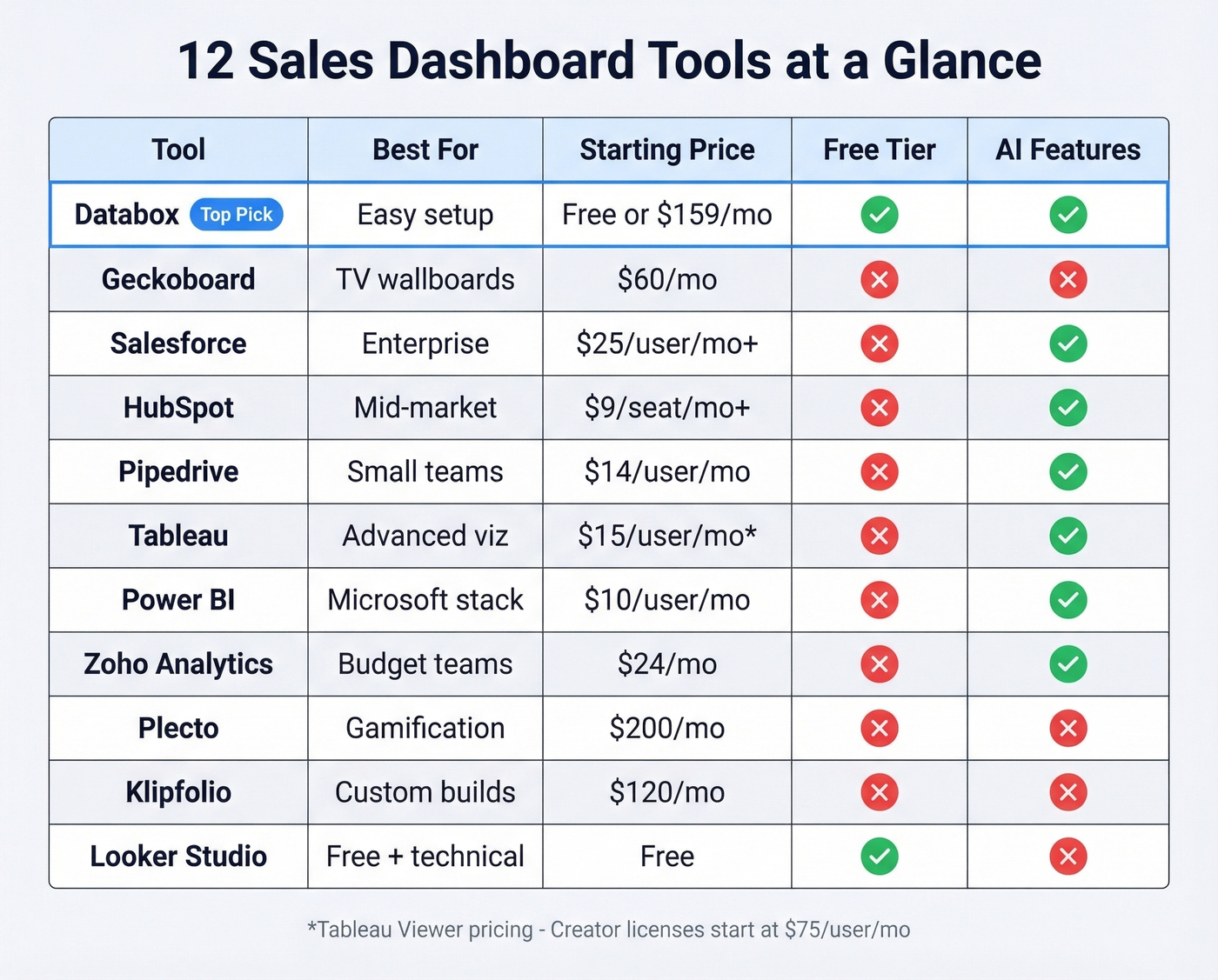
*Viewer pricing starts at $15/user/mo, but every deployment requires at least one Creator license.
Databox
Use it if you want a sales dashboard running in under an hour. The free plan gives you 3 data sources, daily refresh, one dashboard, and 3 users - enough for a small team tracking pipeline basics. The AI Analyst feature on paid plans surfaces anomalies and trends without you having to dig through reports manually. Hourly data refresh on Pro means your numbers aren't stale during the workday.
We've seen teams go from zero to a functional pipeline dashboard in about 40 minutes with Databox, which is genuinely impressive compared to the multi-week implementations some BI tools require.
Skip it if you need to connect more than a handful of sources on a budget. Databox's Pro plan starts at $159/mo (billed annually) with 3 data sources included, and every additional source costs $5.60/mo. If you want 9 sources - CRM, email, ads, calls, web, plus a few extras - that's about $190/mo.
Geckoboard
Best-in-class for office TV dashboards. Nothing else.
If your sales floor needs a wallboard showing real-time numbers, Geckoboard is the answer. Essential starts at $60/mo (billed annually) for 1 dashboard and 1 TV connection. Core ($175/mo) unlocks 20 dashboards, Slack/Teams sharing, and branding. Pro ($319/mo) adds advanced features for multi-location teams. Capterra reviewers give it 4.7/5 across 123 reviews, and the sentiment is overwhelmingly positive.
Don't buy it for AI forecasting, built-in CRM functionality, or deep drill-down analytics. Geckoboard is a visibility tool, not an analysis tool. It shows you what's happening right now - it won't tell you why or what to do next.
Salesforce Sales Cloud
Use it if you're already a Salesforce shop with an admin who knows what they're doing. The reporting engine is genuinely powerful - custom report types, cross-object formulas, and AI forecasting on higher tiers. G2 gives it 4.4/5 across 25,480 reviews, which is impressive at that scale. Pricing starts at $25/user/mo, and enterprise deployments commonly run into the hundreds per user per month once you factor in higher tiers and add-ons. (If you want the full cost breakdown, see our Salesforce pricing guide.)
Skip it if your team avoids Salesforce because it's too complex. Here's the thing: a dashboard that nobody opens is worse than no dashboard at all. If reps find Salesforce intimidating, a standalone tool like Databox pulling from Salesforce data will actually get used. The most common complaints on G2 are learning curve and cost - and both are real.
HubSpot Sales Hub
HubSpot's dashboards are solid for mid-market teams already on the platform. Starter at $9/seat/mo (annual billing) gives you basic reporting. But the jump to Pro - $90/user/mo (annual billing) plus $1,500 in onboarding - is steep for what amounts to better dashboards and sequences. Enterprise runs $150/user/mo with another $3,500 onboarding fee.
That $1,500 onboarding charge is genuinely frustrating. If you're already paying for HubSpot CRM, use the built-in dashboards. If you're not, don't buy HubSpot just for reporting.
Pipedrive
| Pros | Cons |
|---|---|
| CRM + dashboards in one tool | Analytics depth is limited |
| Plans start at $14/user/mo with a 14-day trial | No multi-touch attribution |
| Visual pipeline doubles as dashboard | You'll outgrow it past ~15 reps |
| Dead simple onboarding | Custom cohort analysis not supported |
Pipedrive is the best option for small teams that want CRM and dashboards without enterprise complexity. The visual pipeline view doubles as a deal-flow dashboard, and for straightforward sales tracking with 3-15 reps, it's hard to beat at this price. Our team has recommended it to dozens of early-stage companies, and the feedback is consistently positive until teams scale past that 15-rep threshold. (If you're comparing CRMs, see Copper vs Pipedrive.)
Tableau
Tableau is the most powerful visualization tool on this list and the most overbuilt for typical sales teams. The pricing is deceptive: Viewer licenses start at $15/user/mo, but every deployment requires at least one Creator license - $75/user/mo on Tableau Cloud Standard, and up to $150/user/mo on higher tiers. Enterprise teams can negotiate 25-35% discounts on multi-year deals, but you're still looking at significant spend.
Overkill for 90% of sales teams. You need a data warehouse, someone who knows the platform, and a reason to go beyond what Databox or your CRM already provides.
Power BI
If your company runs on Microsoft - Outlook, Teams, Dynamics 365, Azure - Power BI is the obvious choice. Pro runs around $10/user/mo, Premium around $20/user/mo. The template ecosystem is massive (2,400+ templates in one widely used gallery), so you're rarely building from scratch. Excel integration is seamless.
The tradeoff is that non-technical users hit a wall fast. DAX formulas, data modeling, and the Power Query editor aren't intuitive. In our experience, teams that don't budget for training end up with one person building every report while everyone else waits. Budget for training or hire someone who already knows the platform.
Honorable Mentions
Zoho Analytics is best for budget-conscious teams already in the Zoho ecosystem. Starts at $24/mo and includes AI-powered insights. Solid if you're running Zoho CRM; less compelling as a standalone pick.
Plecto is built for gamification and sales leaderboards. If your team responds to competition and public rankings, Plecto delivers. Expect to pay around $200/mo, which is steep for what's essentially a motivational layer on top of your existing data.
Klipfolio is a custom dashboard builder for teams that want pixel-level control. Plans start around $120-190/mo. Good for agencies or ops teams managing multiple client dashboards.
Looker Studio is Google's free dashboard tool. It connects natively to Google products but often needs paid third-party connectors for Salesforce or HubSpot. Technical users love it. Everyone else finds it frustrating.

A sales dashboard showing stale, unverified data is just a pretty screenshot of your problems. Prospeo refreshes 300M+ profiles every 7 days - not 6 weeks - so your pipeline metrics reflect reality. 98% email accuracy means your activity numbers actually mean something.
Fix the data first. The dashboard will follow.
KPIs Worth Tracking
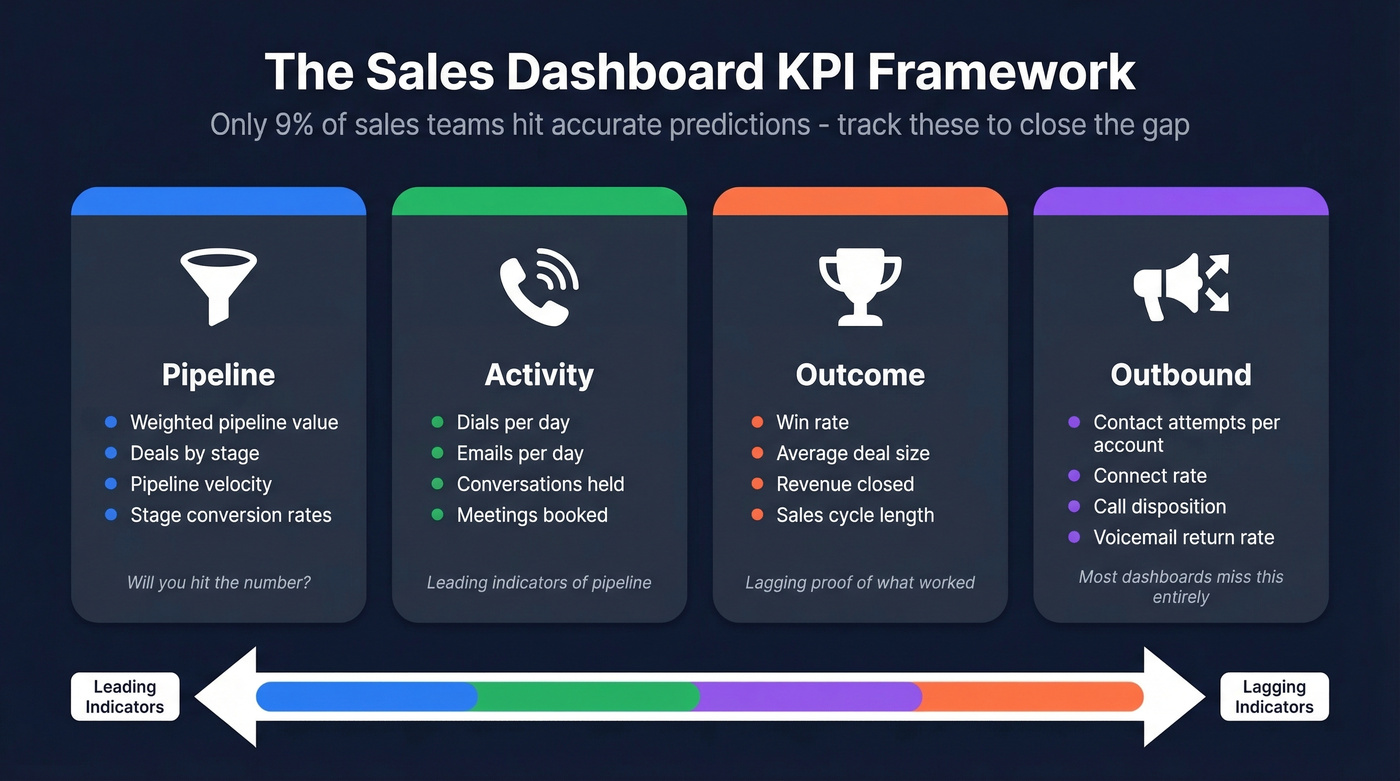
Only 9% of sales teams hit accurate predictions, and most miss by 10% or more. A dashboard won't fix that on its own, but tracking the right KPIs makes the gap visible before it's too late.
| Category | KPIs | Why It Matters |
|---|---|---|
| Pipeline | Weighted pipeline, deals by stage, velocity | Shows if you'll hit the number |
| Activity | Dials/day, emails/day, conversations | Leading indicators of pipeline |
| Outcome | Win rate, avg deal size, revenue | Lagging proof of what worked |
| Outbound | Contact attempts per account, connect rate, call disposition | Most dashboards ignore this entirely |
Most CRM-native dashboards don't surface granular outbound metrics like voicemail return rate or outbound calls by time of day - you'll need a specialized tool or a BI platform pulling from your dialer data. Outbound activity dashboards are the most underserved category in this space, and it's the area where we see the biggest gap between what teams want and what their tools provide. For teams running heavy outbound sequences, a dedicated sales engagement dashboard that tracks rep activity alongside pipeline metrics will surface problems weeks before they show up in revenue. (If you're building an outbound stack, start with our list of SDR tools.)
Five Dashboard Mistakes to Avoid
1. Too many charts. Cap it at 8 per dashboard. More than that and nobody reads any of them. If you need more metrics, build a second dashboard for a different audience.
2. No clear audience. A manager dashboard and a rep dashboard shouldn't look the same. Managers need pipeline and forecast views. Reps need activity tracking and quota attainment. Build for one persona per dashboard.
3. Ignoring data quality. This is the mistake that silently undermines everything else. If 20% of your contact data bounces, your activity metrics are fiction. Tools like Prospeo can enrich and verify CRM data on a 7-day cycle - with a 98% email accuracy rate and 83% enrichment match rate - so your pipeline numbers reflect reality, not wishful thinking. (If you're evaluating vendors, compare options in our data enrichment services roundup.)
4. Wrong chart types. A pie chart for 15 pipeline stages is unreadable. Use bar charts for comparisons, line charts for trends, and tables for detailed breakdowns. A good test for every chart: Is this good or bad? How much? What should I do about it?
5. No action trigger. A dashboard that shows numbers without prompting action is just a screensaver. Every chart should answer "what do I do next?" If it doesn't, cut it.
How to Choose the Right Tool
Match your team size and budget to a starting point.
Under 10 reps: Start with Pipedrive ($14/user/mo) for CRM + dashboards in one, or Databox Free if you already have a CRM and just need visibility. Don't overcomplicate it.
10-50 reps: Geckoboard or Databox Pro. You need real-time visibility across the team, and CRM-native dashboards probably aren't cutting it anymore. Budget $150-350/mo.
50+ reps: Salesforce native reporting if you have an admin, or Tableau/Power BI if you have a data team. At this scale, the investment in a BI platform pays off through custom modeling and cross-department reporting.
All teams, regardless of size: Clean your data first. Organizations that adopt data-driven transformation typically see a 5-10% revenue lift, but that assumes the data is trustworthy. No sales dashboard software compensates for a CRM full of stale contacts and bounced emails. The consensus on r/sales is that most dashboard projects fail not because of the tool, but because the underlying data is garbage. (If you're tightening your pipeline process, see our guide to sales pipeline challenges.)
You mentioned your CRM hasn't been cleaned since Q2. Prospeo's CRM enrichment fills in missing contacts with 50+ data points at a 92% match rate - for about $0.01 per email. Plug verified data into Salesforce or HubSpot, and your dashboards stop lying to you.
Enrich your CRM today and watch your dashboard actually work.
FAQ
What is sales dashboard software?
Sales dashboard software visualizes your pipeline, revenue, activities, and forecasts in real-time charts and reports. It pulls data from your CRM and other tools to give sales leaders a single view of performance without digging through spreadsheets or running manual reports.
What's the best free option?
Databox offers the strongest free plan - 3 data sources, daily refresh, one dashboard, and 3 users. Looker Studio is completely free but requires technical setup and paid connectors for most CRMs.
CRM dashboards vs. standalone tools?
CRM-native dashboards like Salesforce and HubSpot avoid data syncing headaches but offer limited visualization. Standalone tools like Databox and Geckoboard deliver better design and TV display options but add another subscription and potential sync lag. Most mid-market teams benefit from both: a CRM for the source of truth and a specialized tool for the visual layer.
How do I keep dashboard data accurate?
Start with your CRM. If contact records are outdated or emails bounce, every metric downstream is unreliable. A weekly verification cycle - catching bounced emails and outdated job titles before they corrupt your metrics - is the single highest-ROI investment you can make in your reporting stack.
How many KPIs per dashboard?
Cap it at 6-8 metrics per dashboard. Build separate views for managers (pipeline, forecast, win rate) and reps (activities, quota attainment, deal velocity). One focused dashboard beats three cluttered ones every time.