

How to Build a Sales Deck That Actually Closes Deals
It's Tuesday morning. Three reps have three different versions of your "final" deck saved locally. Marketing's master template is two quarters stale. And the AE presenting to your biggest prospect in four hours just asked, "Which version is current?"
Meanwhile, sales reps spend 60% of their time on non-selling tasks - including hunting for the right sales deck. The deck itself isn't the hard part. The process around it is what kills deals.
What You Need (Quick Version)
Three things separate sales decks that close from decks that get forwarded to the trash folder. First, narrative structure - Andy Raskin's five-part framework that starts with a shift in the world, not your product. Second, slide discipline - 10 slides max, because Storydoc analytics show 32% completion under that ceiling versus 22% on average. Third, sending it to verified decision-makers, not dead inboxes. A beautiful deck that bounces is worth exactly nothing.
Jump to: the framework, the template, or the tools.
What a Sales Deck Is (and Isn't)
A sales deck isn't a pitch deck. A pitch deck is about belief - sparking interest, painting a vision, getting someone to lean in. A sales deck is about commitment. The buyer is evaluating options, anticipating risk, and looking for proof. Mix them up and you'll feel either too vague or too transactional depending on where you are in the deal.
It's also not a marketing deck. Marketing decks talk about your brand story and market position. A sales deck talks about the buyer's problem and your specific path to solving it. If your deck starts with your founding year and a timeline of company milestones, you've built a marketing deck. Rip that slide out.
Why Your Deck Matters
The numbers are stark. Organizations with structured sales enablement strategies hit a 49% win rate versus 42.5% without one. That 6.5-point gap compounds across hundreds of deals per year. Yet 65% of sales content goes completely unused, and 50% of prospect engagement comes from just 10% of content - meaning most teams are building decks nobody opens while a handful of great ones do all the heavy lifting.
Here's the thing: 73% of B2B buyers actively avoid sellers who send irrelevant outreach. Your deck is part of that outreach. If it's generic, feature-heavy, or clearly not built for the person reading it, you're training the buyer to ignore you. And with 57% of sales professionals reporting longer sales cycles, every touchpoint carries more weight than it did two years ago.
Even the best presentation is worthless if it never reaches the right person. That's a problem most teams don't solve until it's too late.

The Narrative Framework That Wins
Andy Raskin's five-part framework remains the gold standard for sales deck structure. He reverse-engineered it from Zuora's deck - still one of the most studied B2B presentations ever made - and it's been the most-cited narrative approach in B2B sales for nearly a decade.
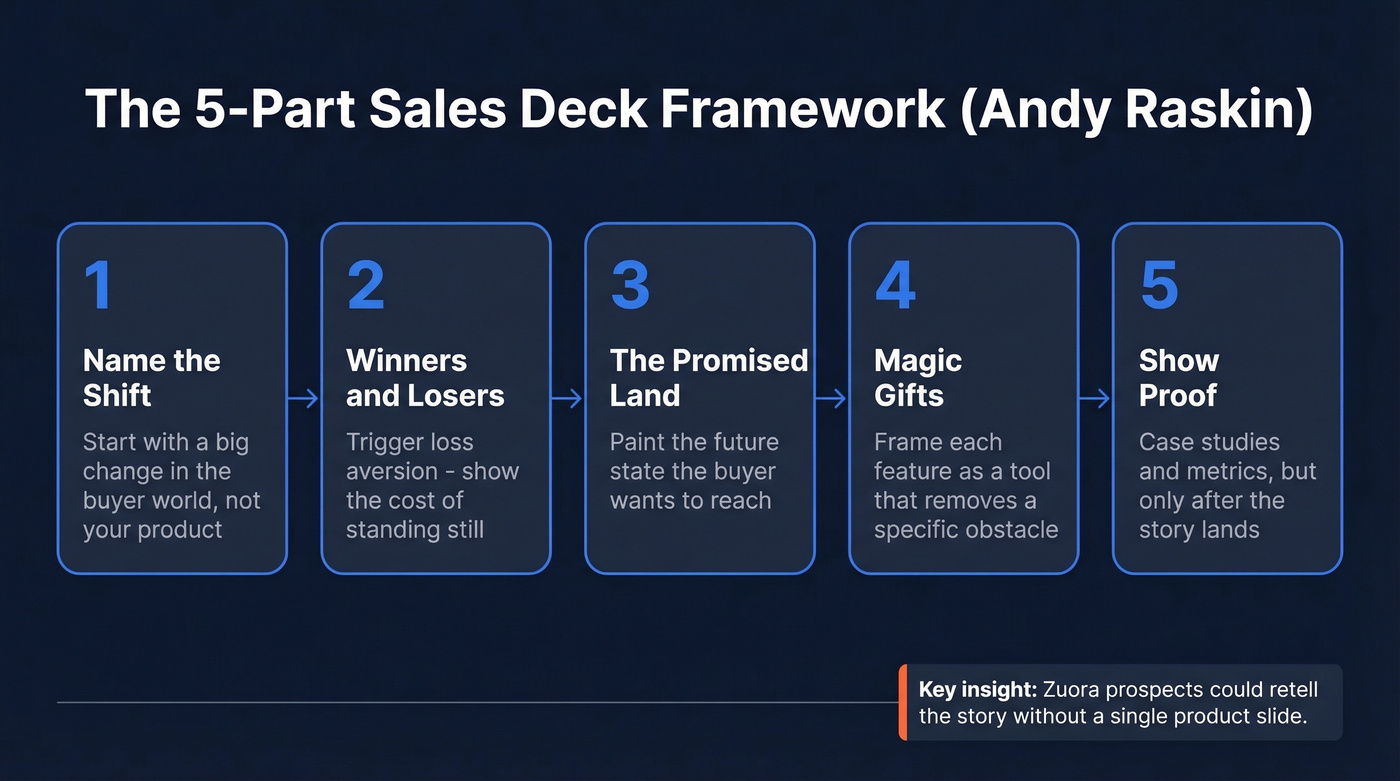
1. Name a big, relevant change in the world. Don't start with your product. Don't start with "the problem." Starting with a problem puts the prospect on the defensive. Starting with a shift - in regulation, buyer behavior, technology, market dynamics - invites discussion.
2. Show there'll be winners and losers. This triggers loss aversion. The prospect doesn't just see an opportunity; they see the cost of inaction.
3. Tease the Promised Land. Describe a future state the buyer wants to reach. This isn't your product - it's the outcome your product enables. The Promised Land is what your champion will repeat internally when someone asks, "What do those guys do again?"
4. Introduce features as "magic gifts." Each feature is framed as a tool that overcomes a specific obstacle on the path to the Promised Land. Product details earn their place only after the narrative has created context.
5. Show proof. Case studies, metrics, logos. But only after the story has landed. Proof without narrative is just a list of numbers nobody connects to their own situation.
We've seen teams restructure a mediocre deck around this framework and get 20-30% better second-meeting rates. The narrative does the heavy lifting that no amount of design polish can replace. Zuora's deck nailed steps 1-3 so well that prospects could retell the story without a single product slide - and Snapchat's early ad sales deck used the same winners-and-losers framing to land major brand deals before they had meaningful ad revenue data.

A killer sales deck sent to a dead inbox closes exactly zero deals. Prospeo gives you 98% verified emails and 125M+ direct dials so your deck reaches the decision-maker who can actually sign off.
Stop perfecting slides that bounce. Fix the list first.
Slide-by-Slide Template
Ten slides. That's the ceiling. Storydoc puts decks under 10 slides at a 32% completion rate versus 22% on average, and 82% of viewers who make it past slide 3 finish the entire deck. Here's the blueprint.
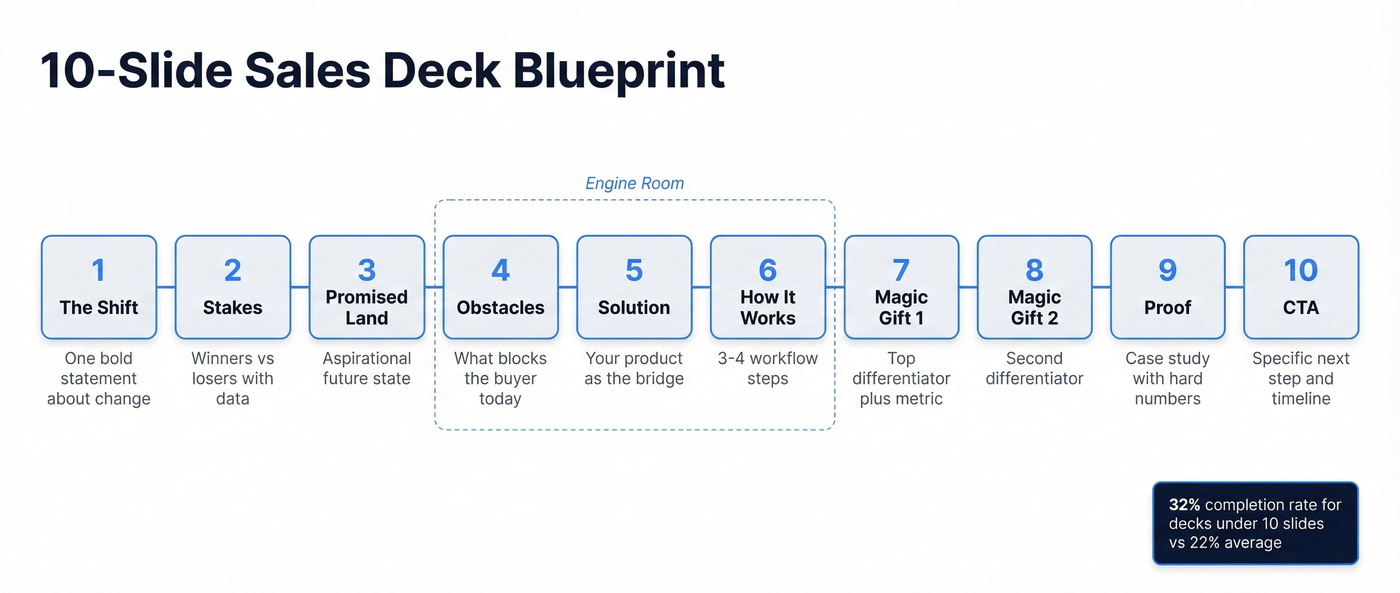
Slide 1 - The Shift. One sentence naming the big change in the buyer's world. No logo wall. No "Founded in 2014." A bold statement that makes them nod.
Slide 2 - Winners and Losers. Show the stakes. Companies adapting to this shift are pulling ahead; those who aren't are falling behind. Two or three data points.
Slide 3 - The Promised Land. Paint the future state. What does the buyer's world look like when this shift is handled well? Keep it aspirational but specific.
Slides 4-6 - Obstacles, Solution, How It Works. Name the barriers keeping the buyer from the Promised Land: legacy systems, manual processes, data gaps. Introduce your product as the bridge - one visual, one sentence, no feature dump. Then show three to four workflow steps so the buyer can picture themselves using it. These three slides are the engine room. Move fast through them.
If you're sending the deck as a leave-behind or pre-read, slides 4-6 need to stand alone without your voiceover. Add a one-sentence annotation beneath each visual. Tools like Storydoc let you embed short video walkthroughs directly into scroll-based decks - worth considering for complex products.
Slide 7 - Magic Gift #1. Your strongest differentiator, framed as the capability that removes the biggest obstacle. Pair it with a specific metric or outcome. Tailor this slide to your audience: a CFO wants ROI and payback period, a VP of Engineering wants integration complexity and time-to-value, and a procurement lead wants vendor risk and contract flexibility.
Slide 8 - Magic Gift #2. Second differentiator. Same structure. Keep it tight.
Slide 9 - Proof. One or two case studies with hard numbers. Revenue impact, time saved, conversion lift. One B2B SaaS company using a structured slide-by-slide template closed $45K in new deals within 30 days.
Slide 10 - The CTA. What happens next? A clear next step - demo, pilot, pricing call. Not "let us know if you're interested." A specific action with a specific timeline.
Mistakes That Kill Deals
These seven mistakes show up in nearly every deck audit we've run.
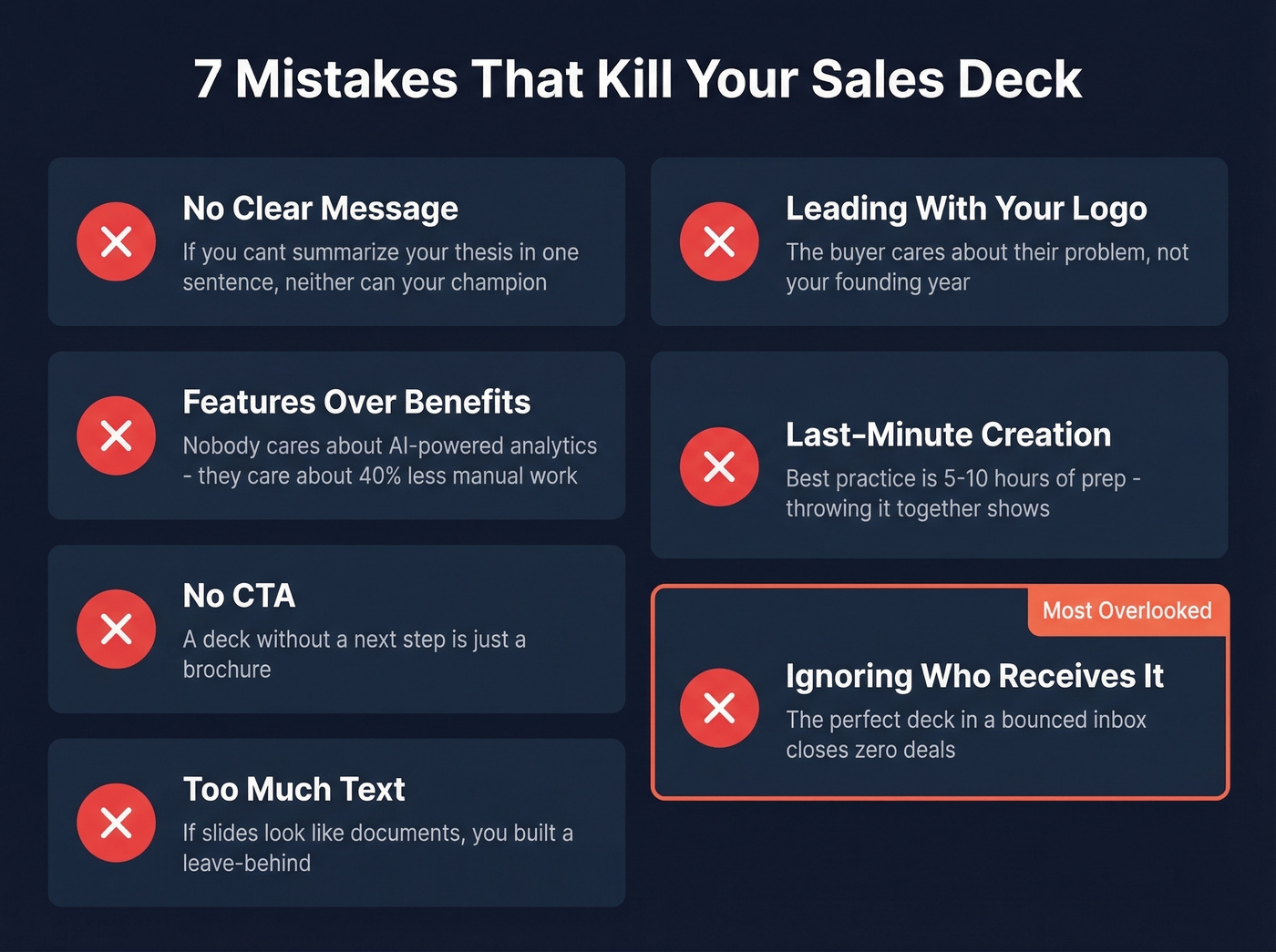
No clear message. If you can't summarize your deck's thesis in one sentence, neither can your champion. They need to sell it internally without you in the room.
Features over benefits. Nobody cares that you have "AI-powered analytics." They care that their team will spend 40% less time on manual reporting. Translate every feature into an outcome.
No CTA. A deck without a clear next step is a brochure. Tell the buyer exactly what to do and when.
Too much text. If your slides look like documents, you've built a leave-behind, not a presentation. Three to five bullet points max per slide. Better yet, use visuals.
Starting with your logo and founding year. The buyer doesn't care about your company timeline. They care about their problem. Lead with the shift.
Last-minute creation. Best-practice benchmarks suggest 5-10 hours of preparation per pitch. Companies like Salesforce and Airbnb invest heavily in deck prep. Throwing slides together the night before shows, and buyers notice.
Ignoring who receives it. You can build the perfect 10-slide narrative and still lose the deal if it lands in a bounced inbox, a generic info@ address, or the inbox of someone who left the company three months ago. The upstream data problem - who actually sees your deck - is the mistake nobody talks about.
Best Tools in 2026
AI has compressed deck creation from four hours down to roughly 30 minutes for a first draft. The narrative is still your job, but formatting, layout, and visual hierarchy are now handled by tools that are genuinely good.
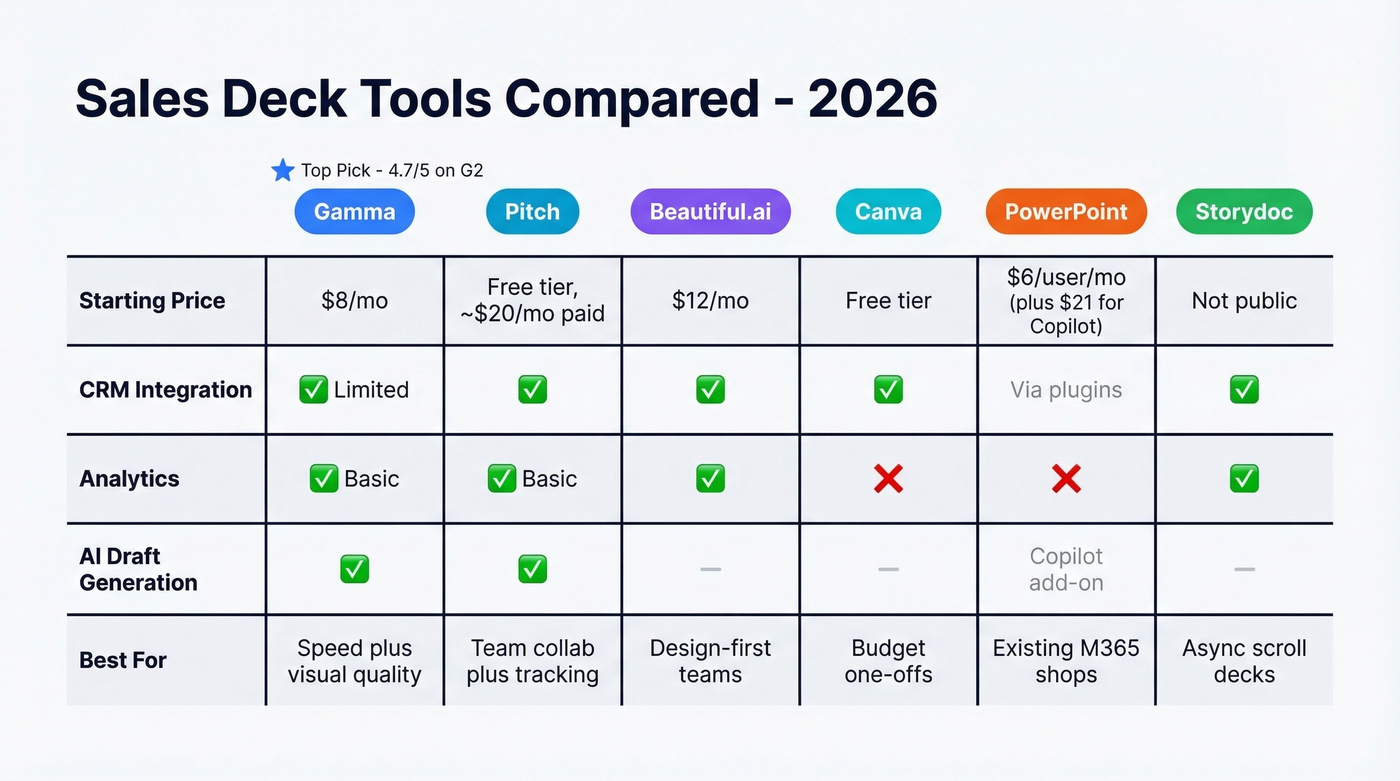
| Tool | Starting Price | CRM Integration | Analytics | Best For |
|---|---|---|---|---|
| Gamma | $8/mo | Limited | Basic | Speed + visual quality |
| Pitch | Free tier; ~$20/mo paid | Yes | Yes | Team collab + tracking |
| Beautiful.ai | $12/mo | Yes | Yes | Design-first teams |
| Canva | Free tier | Yes | No | Budget one-offs |
| PowerPoint | $6/user/mo | Via plugins | No | Existing M365 shops |
| Storydoc | Not public | Yes | Yes | Async/scroll decks |
Gamma is the standout. It's widely listed at 4.7/5 on G2 with 1,000+ reviews, and practitioners on r/SaaS praise it for turning existing docs into presentations with strong visual hierarchy - letting AEs customize in minutes instead of hours. At $8/mo, it's the best value for speed-to-quality.
Pitch is the pick for teams that need collaboration and engagement analytics. The free tier is generous, and the paid plan adds deeper tracking so you can see which slides prospects actually spend time on. Pitch also supports AI draft generation, brand voice rewriting, and variable-based personalization that pulls fields from your CRM.
Beautiful.ai is ideal if design consistency matters more than anything else. It auto-formats slides as you add content, which solves the "brand multiple personality disorder" problem that plagues scaling teams. Skip it if you need deep CRM analytics - Pitch does that better.
Canva works for one-off decks but doesn't scale. No version control, no analytics, no governance. PowerPoint without Copilot is a liability in 2026, and at $21/user/mo for the AI add-on, you're paying more than Gamma and Pitch combined for a worse experience. Storydoc is worth a look if you're sending decks async and want scroll-based, interactive formats with built-in tracking.
Let's be honest: most teams don't need a dedicated deck tool. If you're running sub-$10K deals and fewer than 20 per month, Gamma's $8/mo plan plus a tight 10-slide template will outperform any enterprise deck platform. Save the budget for data quality - that's where deals actually die.
Fix Your Prospect List First
Stop obsessing over slide design. Start obsessing over who sees your deck.
Picture this. You build a killer 10-slide deck using the Raskin framework. You send it to 500 "decision-makers" from your database. Forty-seven emails bounce. Two hundred land in generic info@ addresses. A hundred and eighty go to people who've already left the company. Your beautiful deck reaches maybe 73 actual decision-makers. That's a 15% effective delivery rate - and no amount of slide design fixes that.

This is where the upstream work matters. Before you send a single deck, build your prospect list from verified sources using intent signals, technographics, job changes, and headcount growth filters. Prospeo's database runs every email through a 5-step verification process with 98% accuracy on a 7-day refresh cycle - the industry average is 6 weeks, which means most teams are emailing stale data for over a month. Snyk's team of 50 AEs saw their bounce rate drop from 35-40% to under 5% after switching, generating 200+ new opportunities per month. Your deck can't close a deal if it never reaches the right person.
If you're building outbound around this deck, pair it with sales prospecting fundamentals, a clean Ideal Customer Profile, and a repeatable lead generation workflow so the right accounts see the right story.
You just built a 10-slide deck tailored to a CFO. Now make sure it reaches the right CFO. Prospeo's 30+ filters - including buyer intent, job changes, and department headcount - let you target the exact person your deck was built for, with contacts refreshed every 7 days.
Match every custom deck to a verified buyer - starting at $0.01 per email.
Sales Deck FAQ
How many slides should a sales deck have?
Ten slides max. Decks under 10 slides achieve a 32% completion rate versus 22% on average, and engagement drops sharply after 18 slides. If you can't tell your story in 10, the problem is your narrative, not your slide count.
What's the difference between a sales deck and a pitch deck?
A pitch deck sparks belief and earns a second meeting. A sales deck drives commitment - the buyer is evaluating options and needs proof, specifics, and a clear next step. Use pitch decks early in the funnel, sales decks mid-to-late.
Should I use AI to build my deck?
Yes, for formatting and first drafts. Tools like Gamma compress a four-hour process into 30 minutes. But the narrative arc and buyer-specific customization are still your job - AI can't interview your champion.
How do I make sure my deck reaches decision-makers?
Verify every email before sending. Run a verification process with 98%+ accuracy and refresh your data weekly, not monthly. Pair that with intent filters to target buyers actively researching your category.
How do I know if my deck is working?
Track time-on-slide, completion rate, and follow-up actions. Pitch and Storydoc offer built-in analytics showing exactly where prospects drop off. If 80% bail after slide 4, that's your problem slide - rewrite it before touching anything else.