

Sales Funnel Salesforce: Build, Automate & Track It Right
A VP of Sales once described his CRM to me as "detective work instead of visibility." Reps guessing timelines, close dates pushed out quarter after quarter, opportunities sitting in "Negotiation" for six months with no next steps logged. His forecast was fiction. The sales funnel wasn't broken because Salesforce is bad - it was broken because nobody architected it to be trustworthy.
That's fixable. Here's how.
What You Need (Quick Version)
Three priorities, in order:
- Standardize your Lead Status and Lead Stage fields. Stop conflating lifecycle position with outreach progress - they're different things.
- Build five core Flow automations that enforce hygiene without adding rep burden.
- Clean your contact data before you build a single dashboard. Garbage in, garbage out. Verify emails and phone numbers at the source so your conversion metrics reflect real engagement, not bounced messages.
Get these three right and your funnel starts telling the truth.
Funnel Stages in Salesforce
The biggest architectural mistake teams make is treating Salesforce like it has one "stage" field. It doesn't. You've got Lead Status, a custom Lead Stage field you add, and Opportunity Stage - each maps to a different part of the funnel.
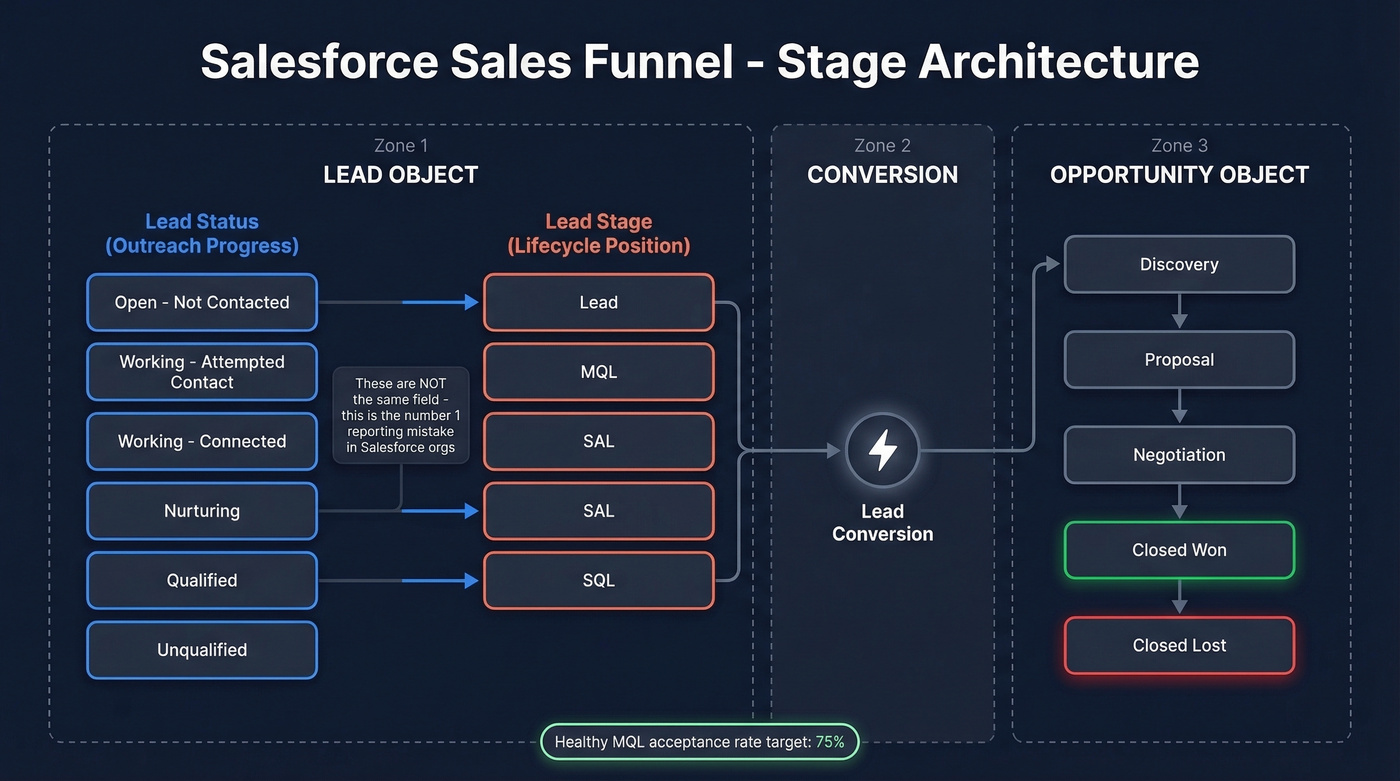
Here's an example mapping (your exact labels will vary by org):
| Funnel Phase | SF Object | Field | Example Values |
|---|---|---|---|
| Awareness | Lead | Lead Status | Open - Not Contacted |
| Interest | Lead | Lead Status | Working - Connected |
| MQL | Lead | Lead Stage (custom) | MQL |
| SAL | Lead | Lead Stage (custom) | SAL |
| SQL | Lead | Lead Stage (custom) | SQL |
| Opportunity | Opportunity | Opp Stage | Discovery, Proposal |
| Closed Won | Opportunity | Opp Stage | Closed Won |
The lifecycle model underneath this is Prospect, MQL, SAL, SQL, Customer. SAL (Sales Accepted Lead) is the handoff checkpoint most teams skip - and it's the one that matters most. A healthy MQL acceptance rate target is 75%. If yours is below that, your MQL definition is too loose. In our experience, teams that skip SAL end up with a 40% rejection rate they can't explain.
Lead Stage vs Lead Status
These aren't the same field, and conflating them is the #1 reporting mistake we see in Salesforce orgs.
Lead Status tracks outreach progress. You manage it via a Salesforce Lead Process - navigate to Setup, then Lead Processes, then create or edit. Think action-oriented values: "Open - Not Contacted," "Working - Attempted Contact," "Working - Connected," "Nurturing," "Qualified," "Unqualified."
Lead Stage is a custom picklist field you create on the Lead object through Object Manager, Lead, new picklist. It tracks lifecycle position: Lead, MQL, SAL, SQL. This is what your funnel reports actually care about.
The automation mapping works in four steps:
- On lead creation, set Status = Open and Stage = Lead.
- When marketing qualifies, update Stage = MQL.
- When a rep accepts the MQL, update Stage = SAL. When sales qualifies it, update Stage = SQL.
- Add an Unqualified Reason picklist with a validation rule requiring it when Status = Unqualified - this is how you improve MQL criteria over time instead of guessing.
Opportunity Stages for Deal Tracking
Exit criteria matter more than stage count. Four to seven stages covers most B2B sales motions. The default Salesforce stages (Prospecting, Qualification, Needs Analysis, Proposal, Negotiation, Closed Won/Lost) work fine as a starting point.
Where teams get into trouble is enterprise and consulting cycles. If your deals involve RFPs, procurement reviews, or operational verifications, those need explicit stages. In Salesforce admin circles, you'll see the same pattern over and over: deals sit in "Negotiation" because they're actually in procurement review, invisible to the forecast. Name the stage, define the exit criteria, move on.
Funnel Conversion Benchmarks
"Your MQL-to-SQL rate is 8% - is that terrible?" Depends entirely on how you define MQL.
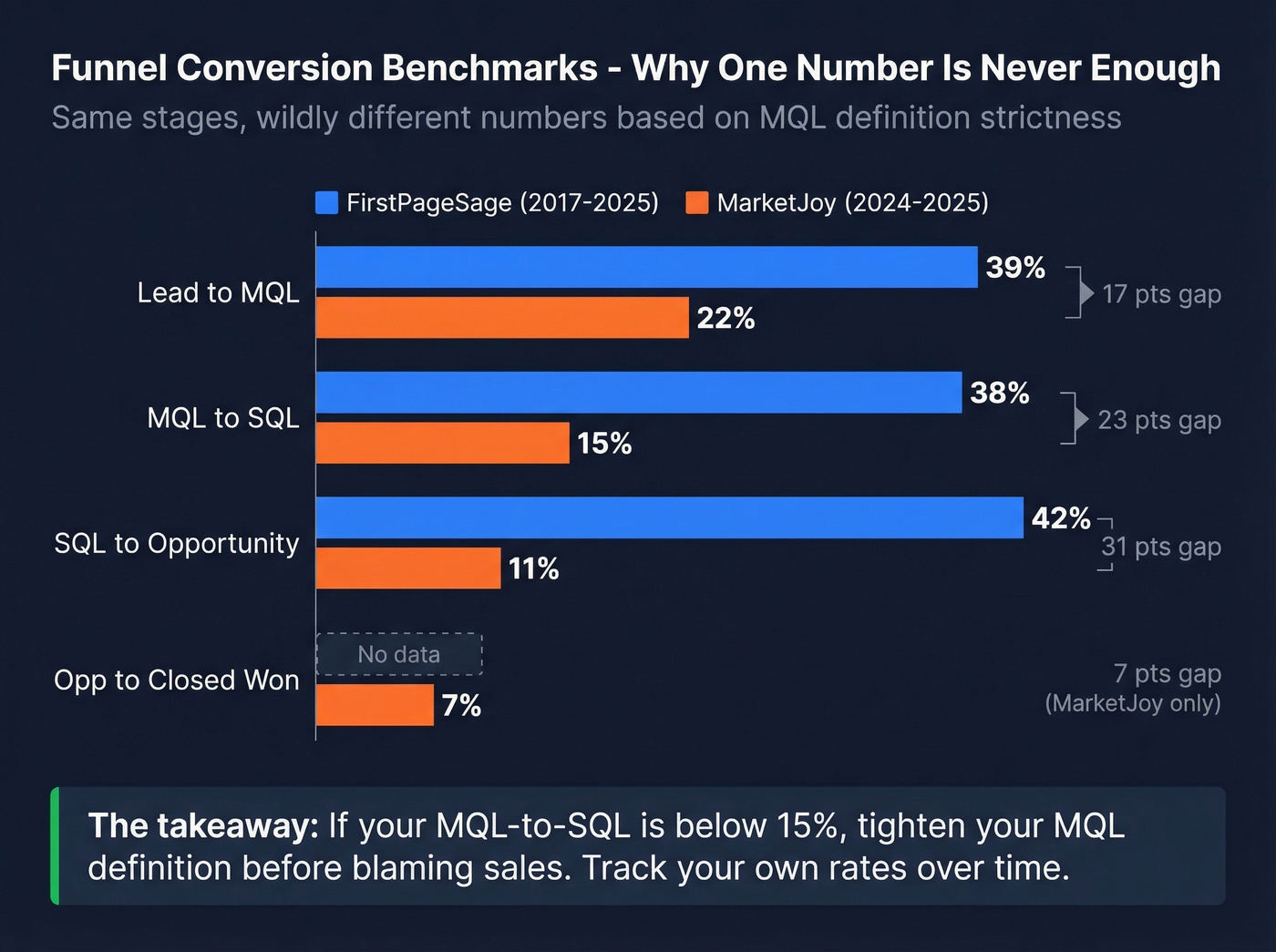
Two widely-cited benchmark sets illustrate the gap:
| Stage | FirstPageSage (2017-2025 dataset) | MarketJoy (2024-2025 aggregated) |
|---|---|---|
| Lead to MQL | 39% | 22% |
| MQL to SQL | 38% | 15% |
| SQL to Opportunity | 42% | 11% |
| Opp to Closed Won | - | 7% |
That's not a rounding error - it's a qualification criteria difference. FirstPageSage's dataset is roughly 65% B2B, and their numbers skew toward tighter definitions. MarketJoy's reflect broader, looser top-of-funnel criteria where more leads enter but fewer convert.
The takeaway: don't benchmark against a single number. Track your own rates over time and use these ranges to sanity-check. If your MQL-to-SQL is below 15%, tighten your MQL definition before blaming sales.
Here's the thing: most teams obsess over top-of-funnel volume when their real problem is a leaky middle. A 15% MQL-to-SQL rate with clean data will outperform a 38% rate built on inflated MQL definitions every single quarter.

Your Salesforce conversion benchmarks are meaningless if half your leads have bad contact data. Prospeo's 98% email accuracy and 5-step verification process means every MQL, SAL, and SQL in your funnel represents a real, reachable buyer - not a bounced message inflating your pipeline.
Stop debugging your funnel when the real problem is dirty data.
Five Flow Automations for Funnel Health
Most guides stop at stage definitions. Here are five Flow automations that enforce those stages automatically, no rep intervention required. On r/salesforce, "must-have validation rules and flows" is one of the most common pipeline hygiene requests, which tells you how widespread the problem is.
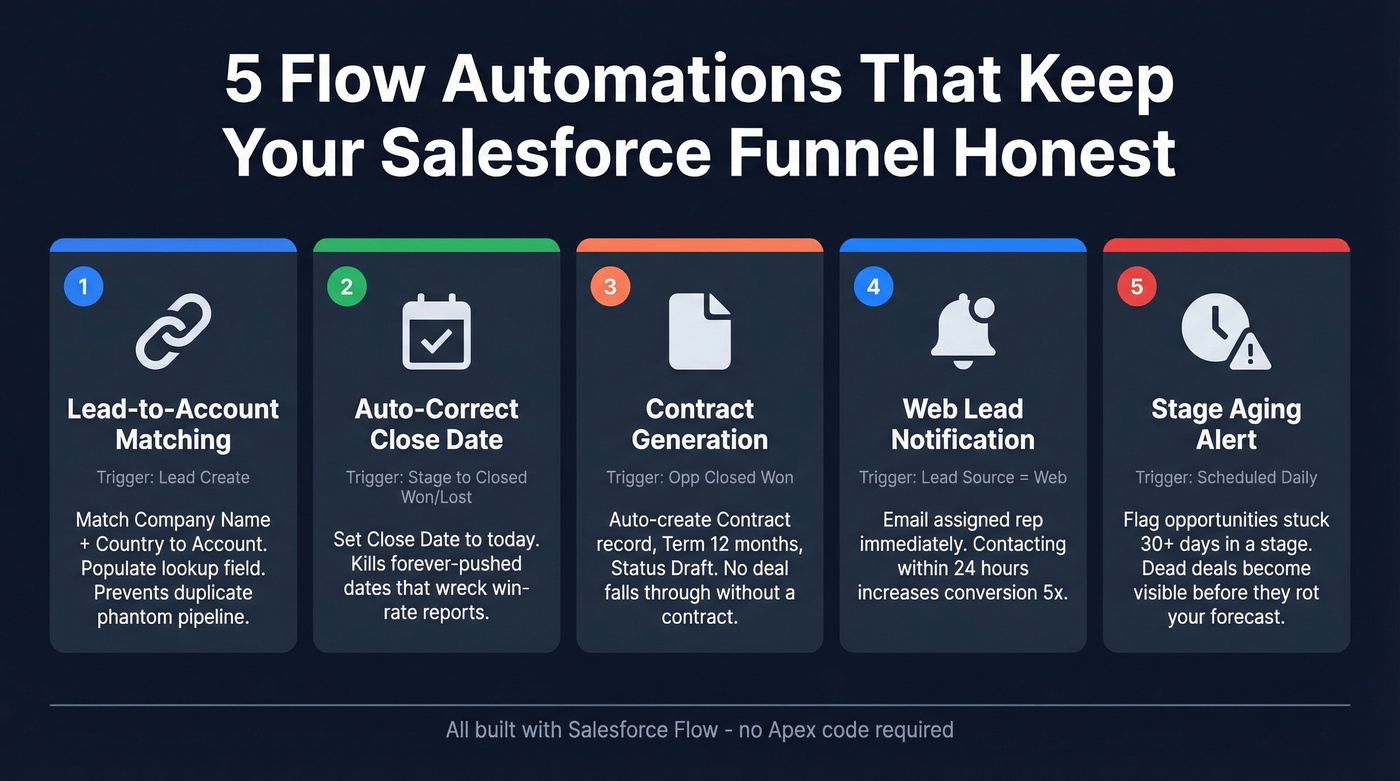
Lead-to-Account Matching
Trigger: Record-triggered Flow on Lead create. Match Company Name to Account Name plus Country to Billing Country. Populate a lookup field on the Lead pointing to the matched Account. For higher precision, match email domain against a custom Account_Domain__c field. This prevents duplicate leads from creating phantom pipeline.
Auto-Correct Close Date
Trigger: Before-save Flow on Opportunity when Stage changes to Closed Won or Closed Lost. Set Close Date to today's date. Simple. This kills the "forever pushed" close date problem that makes win-rate and cycle-time reports useless.
Contract Generation
Trigger: Record-triggered Flow when Opportunity Stage = Closed Won AND IsClosed = true. Auto-create a Contract record with Term = 12 months, Status = Draft, linked to the Account. No closed deal falls through without a contract.
Web Lead Notification
Trigger: Record-triggered Flow on Lead create where Lead Source = Web. Send an email to the assigned rep using an Email Template. Contacting leads within 24 hours increases conversion by 5x - this Flow makes sure form submissions don't sit in a queue for three days.
Stage Aging Alert
Trigger: Scheduled Flow running daily. Check days-in-stage against a threshold - 30 days works for mid-funnel stages. Flag the Opportunity with a task or Chatter post to the owner. Deals sitting in "Proposal Sent" for 60 days without activity are dead; make them visible before they rot your forecast.
Einstein Lead Scoring
Use this if: You've got at least 1,000 leads and 120 conversions in the past six months, you're on Salesforce Enterprise or above, and your data is reasonably clean. Setup is straightforward: Setup, Einstein Lead Scoring, toggle on, choose Default or Custom settings.
Skip this if: You don't meet the data threshold, or you aren't ready to pay for it. Enterprise runs $165/user/month plus a $50/user/month Einstein add-on. Unlimited at $330/user/month includes Einstein. For teams that don't hit the minimums, build a manual lead scoring model with weighted fields first - it's more transparent and doesn't require a black box.
Einstein's scoring explanations are opaque, and the model is only as good as your underlying data quality. If your Lead Status values are inconsistent and half your records are duplicates, Einstein will learn from garbage.
Data Hygiene - Fix This Before You Dashboard
Every funnel problem traces back to data quality. Duplicate records inflate lead volume and break attribution. Inconsistent statuses make reports incomparable - we've seen orgs with six synonym statuses ("Working," "In Progress," "Active," "Contacted," "Engaged," "Open") all meaning the same thing. Missing fields make forecasts fiction.
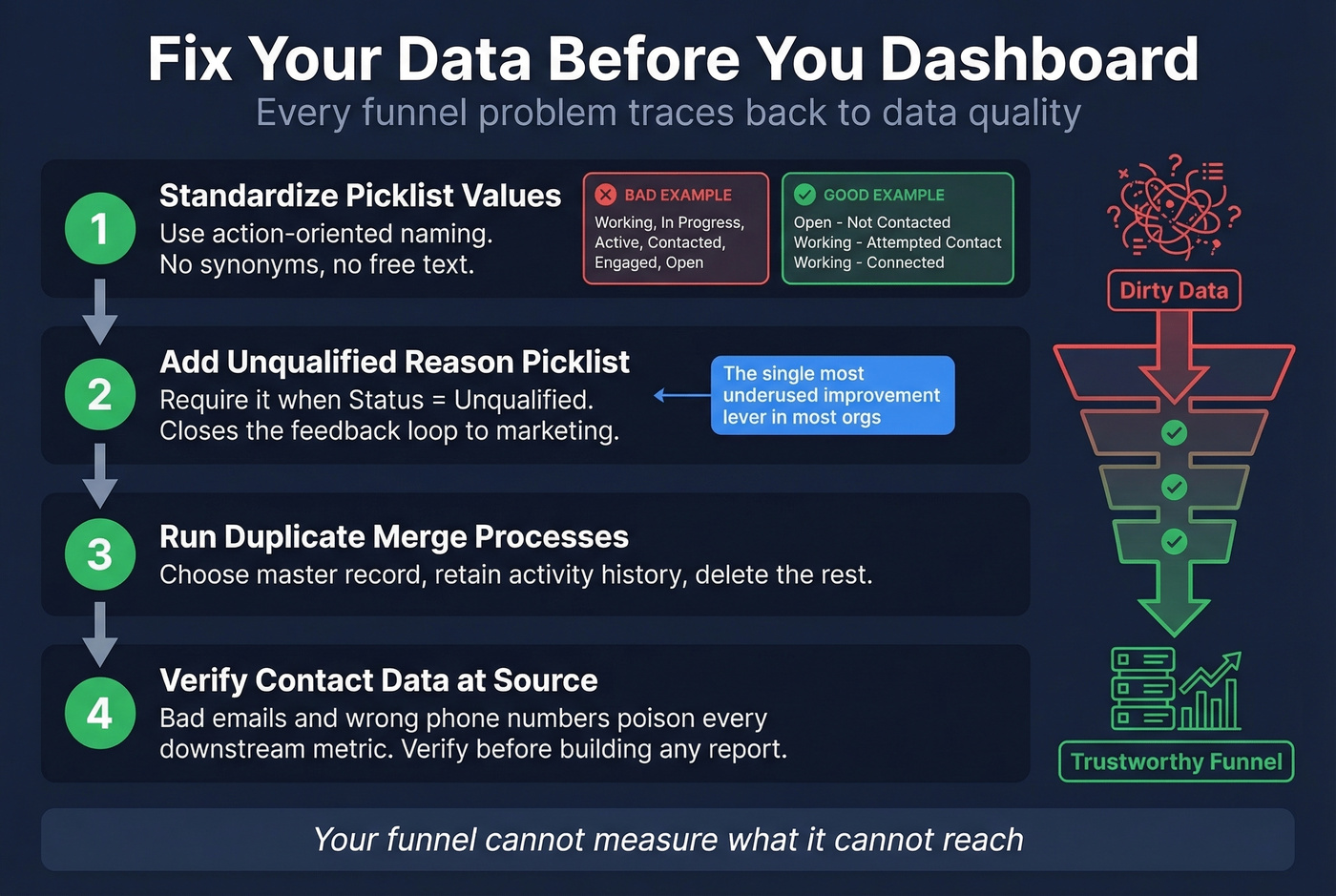
Here's the hygiene checklist before you build a single dashboard:
Standardize picklist values. Use action-oriented naming: "Open - Not Contacted," "Working - Attempted Contact," "Working - Connected." No synonyms, no free text.
Add an Unqualified Reason picklist with a validation rule requiring it when Lead Status = Unqualified. This closes the feedback loop to marketing and is the single most underused improvement lever in most orgs.
Run duplicate merge processes. Use Salesforce's native duplicate management or a third-party app. Choose a master record, retain activity and campaign history, delete the rest.
Verify contact data at the source. Bad emails, wrong phone numbers, and outdated titles poison every downstream metric. Before you build a single funnel dashboard, run your lead list through Prospeo's Salesforce enrichment - 98% email accuracy, an 83% enrichment match rate, and a 7-day refresh cycle so your conversion rates reflect real engagement, not bounced messages and dead numbers. Your funnel can't measure what it can't reach.
Those five Flow automations won't save your forecast if reps are calling dead numbers and emailing invalid addresses. Prospeo enriches your Salesforce CRM with 50+ data points per contact at a 92% match rate - verified emails, direct dials, and intent signals refreshed every 7 days, not every 6 weeks.
Feed your Salesforce funnel data that actually converts at $0.01 per email.
Measuring Funnel Performance
Two practical paths for funnel visualization, and which one you pick depends on the audience.
Native Salesforce is the right call for operational reviews. Open a dashboard component, View Report, Edit, select the Funnel chart type. It's fast, it's live, and it's perfect for weekly pipeline standups. Build separate report types for Lead-stage conversions and Opportunity-stage conversions - combining them into a single report muddies the metrics. The limitation is flexibility; you're locked into one data source with limited formatting.
Google Sheets wins for board decks where you need to combine Salesforce data with marketing or finance numbers. The trick is a stacked bar chart with a helper column: insert a column between your stage labels and values, use =(max($C$2:$C$7)-C2)/2 to compute transparent bar widths, then set the helper series color to None. You get a centered, funnel-shaped visual that looks polished in any exec presentation.
If you need a cleaner KPI layer on top, start with funnel metrics and then map them to Salesforce reports.
FAQ
Does Salesforce have a built-in sales funnel?
Yes - Salesforce dashboards support funnel charts you can add to reports and dashboards. But it's basic. Most teams still need two custom lifecycle fields (Lead Stage + Unqualified Reason), four to seven Opportunity stages with exit criteria, and three to five Flows to keep data consistent week to week.
How many Opportunity stages should I use?
Four to seven covers most B2B sales motions. If you run longer cycles with RFPs or procurement, add one or two explicit stages for those steps so deals don't hide in "Negotiation" for 60+ days and wreck your forecast accuracy.
What's a good MQL-to-SQL conversion rate?
For many B2B teams, 15%-38% is a realistic range depending on how strict your MQL definition is. If you're under 15%, tighten qualification criteria and require an Unqualified Reason picklist so you can fix the upstream targeting instead of arguing about lead quality.
Do I need Einstein for lead scoring?
Not necessarily. Einstein needs at least 1,000 leads and 120 conversions in the last six months to be worth turning on. If you're below that, start with a manual model using five to seven fields with weights and only graduate to Einstein once your Lead Status and lifecycle fields are consistently maintained.
How do I keep funnel data clean in Salesforce?
Three controls: validation rules for required fields, duplicate management and merges, and verified contact enrichment before leads hit reps. Let's be honest - most data quality problems start at ingestion, not downstream. Verify emails and phones before they enter the system, enforce picklist standards with validation rules, and run deduplication on a regular cadence.
Summary
If you want a sales funnel Salesforce setup that's actually usable - not "detective work" - don't start with dashboards. Start with field architecture (Status vs lifecycle), enforce it with a handful of Flows, and fix data quality at the source with verified enrichment. When the inputs are clean, your funnel stops being a debate and starts being a decision tool.