

Stop Planning Headcount. Start Planning Capacity.
It's October. The CFO just sent next year's revenue target - up 35%. Your CRO wants to know how many AEs to hire. Finance wants a headcount number by Friday. And everyone's treating sales headcount planning like a math problem with one variable: bodies.
Here's the thing nobody talks about: even if headcount stays flat, replacing an $80K rep with a $100K hire inflates costs 25%. One out of every three companies doesn't have a capacity plan at all. Headcount is an input, not a plan. The real question is how much productive selling capacity you need - and how to build it without blowing the budget on reps who won't be ramped until Q3.
What a Real Headcount Plan Requires
- The formula: Ending Reps = Beginning Reps + New Hires - Attrition
- The catch: Headcount doesn't equal capacity. A rep in month two of a six-month ramp isn't producing at full quota.
- What matters: Ramp-weighted productive capacity - actual output, not names on the org chart
Below: benchmarks, a six-step model, a worked example, and the three mistakes that break every plan.
The Core Formula
The headcount roll-forward gives you a starting point:
Ending Reps = Beginning Reps + New Hires - Churn
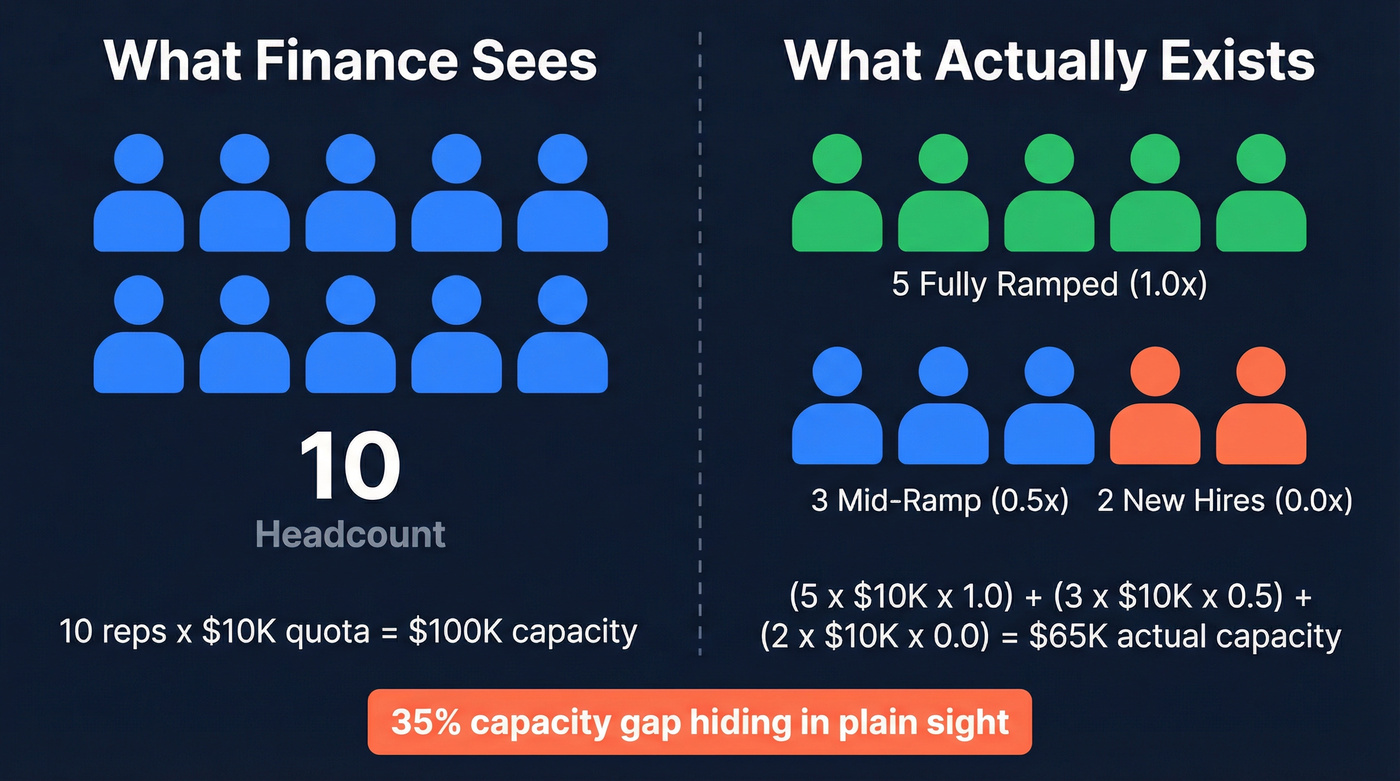
Run this monthly or quarterly. But the number that actually matters for revenue planning is productive capacity. A team of 10 AEs where three are in ramp and two are in their notice period doesn't have 10 units of capacity - it has six or seven.
Ramp-weighting fixes this. Assign each rep a productivity factor based on where they sit in the ramp curve: 0.0 for month one, 0.5 for mid-ramp, 1.0 for fully ramped. Sum those factors across the team, and you've got your real capacity number.
Key Benchmarks for 2026
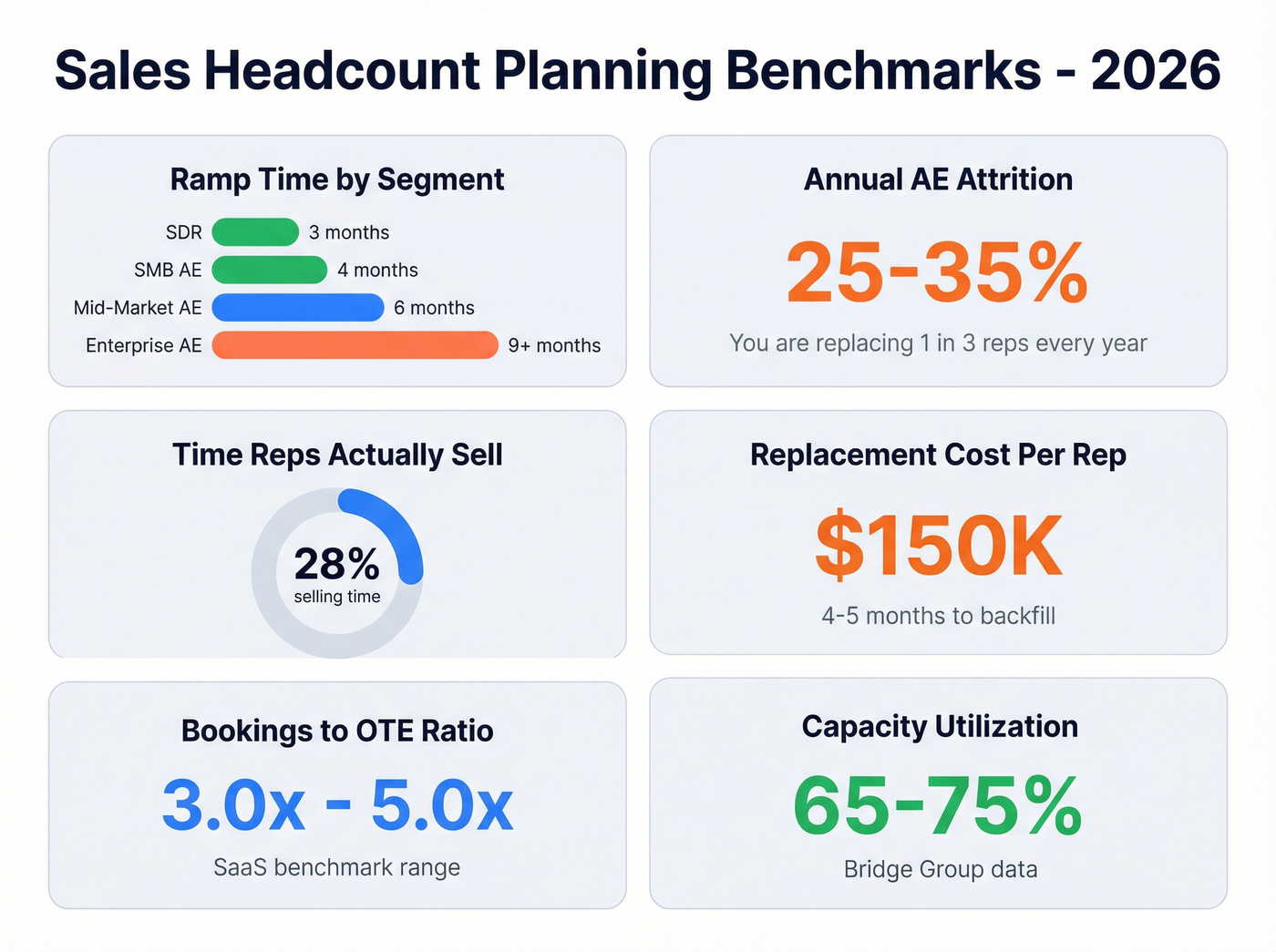
Bookmark this table. You'll reference it every planning cycle.
| Metric | Benchmark | Context |
|---|---|---|
| SDR ramp | 3 months | Fastest to productivity |
| SMB AE ramp | 4 months | High-velocity motion |
| Mid-market AE ramp | 6 months | Most common segment |
| Enterprise AE ramp | 9+ months | Back-loaded deals |
| Avg B2B ramp | ~7 months | Cross-segment average |
| Annual AE attrition | 25-35% | Plan for the range, not the midpoint |
| Bookings-to-OTE ratio | 3.0x-5.0x | SaaS benchmark |
| Capacity utilization | 65-75% | Bridge Group data |
| Time actually selling | ~28% | Salesforce benchmark |
| Replacement cost per rep | ~$150K / 4-5 months | Direct + opportunity cost |
If your reps only sell 28% of the time, your "capacity" is already a fraction of its theoretical max. And at 25-35% annual attrition, you're replacing a quarter to a third of your AE team every year. That's not a hiring plan. It's a treadmill.

Your capacity model assumes reps are selling - but they only sell 28% of the time. Bad data makes it worse. Prospeo's 98% accurate emails and 125M+ verified mobiles mean new hires book meetings in week one, not month three.
Stop losing ramp weeks to bounced emails and wrong numbers.
How to Build the Model: Six Steps
Step 1: Set the revenue target. The board hands you the number. Your job isn't to argue with it - it's to show what it takes to get there. Some RevOps leaders argue you should start from opportunity flow rather than a top-down target. They're right in theory, but most boards hand you the number, so we'll work from there.
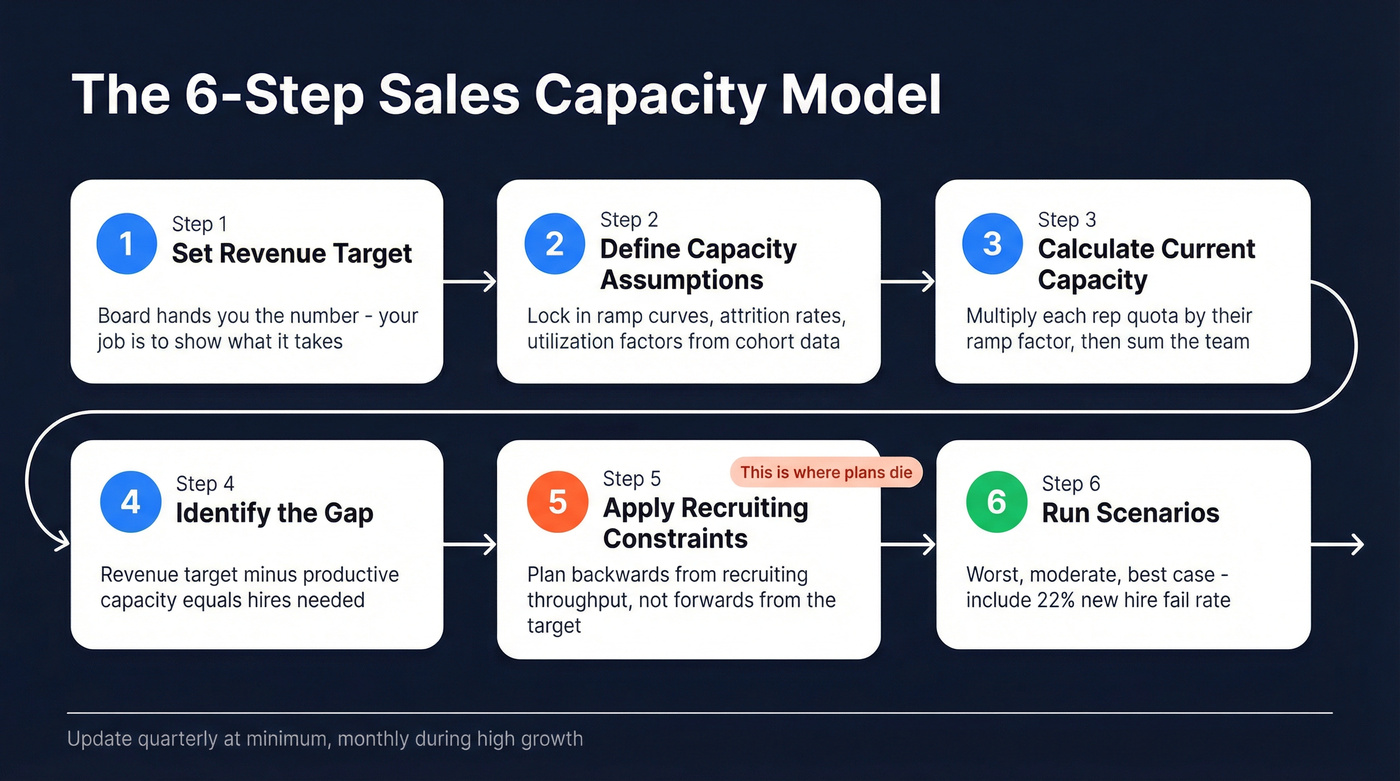
Step 2: Define capacity assumptions. Lock in your ramp curve using the benchmarks above, then calibrate with your own cohort data. Set your expected attrition rate - use sales-specific, not company-wide. Add a realistic utilization factor. Cohort your last 4-8 quarters of hires and report median time-to-productivity, not averages. There are multiple sizing approaches here (workload-based, revenue-based, ratio-based), but ramp-weighted capacity is the one that holds up under scrutiny.
Step 3: Calculate current productive capacity. Multiply each rep's quota by their ramp factor. Sum across the team. This is the number Finance needs next to the revenue target.
Step 4: Identify the gap. Revenue target minus current productive capacity equals the gap. Divide by expected per-rep output, ramp-adjusted, to get the number of new hires needed.
Step 5: Apply recruiting constraints. This is where plans die. Your model says hire 20 AEs in Q2, but recruiters have a limited capacity to produce hires per month. Factor in interview hours, offer-to-accept ratios, and hiring manager bandwidth. Plan backwards from recruiting capacity, not forwards from the revenue target.
Step 6: Run scenarios. Build worst-case, moderate, and best-case versions. The RevOps Co-op model uses a 22% historical fail rate for new hires - roughly one in five won't work out within five months. Your scenarios should also account for enterprise linearity: 60%+ of enterprise bookings land in H2, with 60% of that in Q4 alone. AI-assisted scenario modeling tools are emerging here, but a well-built spreadsheet still beats a poorly configured platform. If you're starting from scratch, a headcount planning template in Excel - even a free one - is better than no model at all. Just make sure it includes ramp-weighting columns, not just raw headcount rows.
Worked Example
Two AEs, each with a $10K/month quota. Rep A is fully ramped (factor: 1.0). Rep B is two months into a five-month ramp (factor: 0.4).
Actual monthly capacity: ($10K x 1.0) + ($10K x 0.4) = $14,000 - not $20,000.
That's a 30% gap from what a headcount-only plan would assume. In our experience, teams that don't ramp-weight individual reps overestimate capacity by 20-30% consistently. Scale this across 15 reps with staggered start dates, and you see why flat-headcount spreadsheets produce fantasy numbers.
Three Mistakes That Break the Plan
The quota-first trap. Raising quotas 10-15% doesn't create capacity - it lowers attainment. Inflated quotas lead to missed targets, demoralized reps, attrition, and more hiring. We've seen this doom loop play out at company after company that treats quota as a lever instead of a reflection of actual productive capacity.
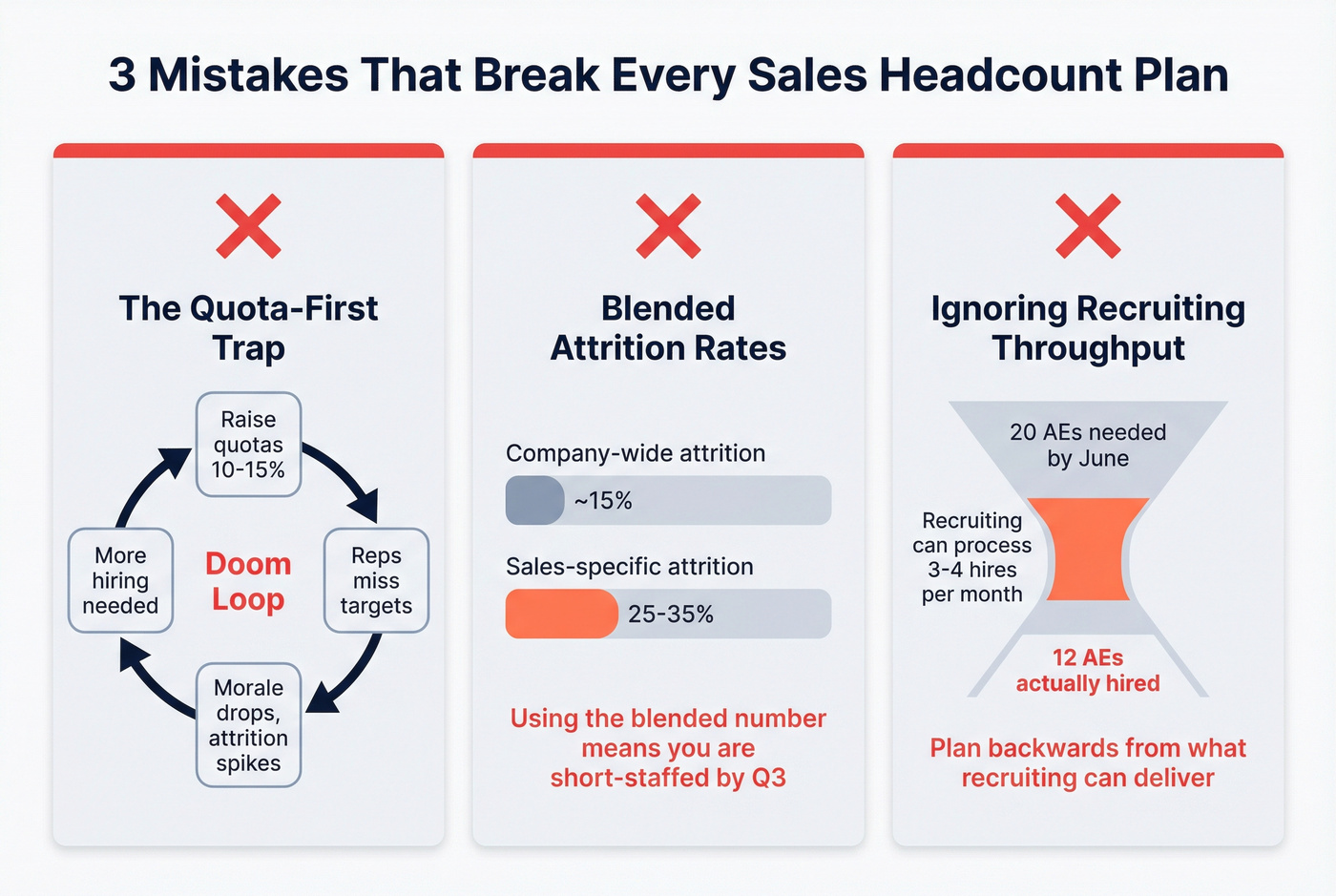
Blended attrition rates. Your company-wide attrition might be in the teens. Sales attrition runs 25-35%. Using the blended number guarantees you're short-staffed by Q3. The consensus on r/sales is blunt: role-specific attrition is non-negotiable, and blended rates are "too simplistic" for a serious plan.
Ignoring recruiting throughput. Your model can say whatever it wants. If you need 20 AEs by June and your recruiting team can't physically process that many hires, the math doesn't work. Period. Plan backwards from what recruiting can actually deliver.
Let's be honest: most plans fail not because the math is wrong, but because they treat hiring as an on/off switch. The companies that hit their numbers treat recruiting as a continuous pipeline - always-on, always sourcing - not a quarterly scramble triggered by a revenue gap. The best RevOps teams treat their headcount model as one piece of a broader sales workforce planning discipline that also covers ramp programs, territory design, and retention strategy.
Data Quality Protects Your Assumptions
Every assumption in your capacity model - ramp time, time-to-first-meeting, quota attainment by month three - depends on new reps having accurate prospect data from Day 1. Bad emails and wrong phone numbers don't just waste time; they extend ramp by weeks.
GreyScout, a sales agency, cut rep ramp from 8-10 weeks to 4 weeks after switching to verified contact data through Prospeo. That's the difference between a rep contributing in Q1 versus Q2. With 98% email accuracy and a 7-day data refresh cycle, new hires aren't spending their first month cleaning lists. They're selling. When your capacity plan assumes reps hit quota by month four, the quality of their prospect data is the variable most teams forget to control.

GreyScout cut rep ramp from 8-10 weeks to 4 weeks with Prospeo's verified contact data. At $150K replacement cost per rep, every week of faster ramp pays for itself. Give your headcount plan a fighting chance with data refreshed every 7 days.
Turn your headcount investment into productive capacity faster - starting at $0.01 per email.
Sales Headcount Planning FAQ
How often should you update a headcount plan?
Quarterly at minimum, monthly during high-growth periods. Track planned hires versus actual hires - if you're consistently missing your planned hire targets, your ramp and attrition assumptions need recalibration before the next cycle.
Who owns the sales headcount plan?
RevOps builds the model, Finance approves the budget, the CRO owns the assumptions. When those three aren't aligned, the plan breaks in execution - usually by Q2 when attrition outpaces backfill.
How do you handle mid-year attrition spikes?
Build an attrition buffer into the original plan and pre-approve backfill triggers so recruiting starts immediately without a new approval cycle. Verified contact data from Day 1 compresses the ramp gap that attrition creates, which is why we recommend pairing your headcount model with a data provider like Prospeo's B2B database that refreshes weekly rather than monthly.
What's the difference between headcount planning and capacity planning?
Headcount planning counts bodies. Capacity planning weights each body by ramp stage, utilization, and expected attrition. A team of 10 with three in ramp has 10 headcount but roughly 7 units of productive capacity. The gap is where revenue plans quietly fall apart.