

Salesforce Data Cleaning: Formulas, Workflows, and Tools That Actually Work
A RevOps lead we know ran a duplicate report last quarter and found an embarrassing number of duplicate Accounts in an org that wasn't even that big. That's not an outlier. Most Salesforce orgs carry 5-20% duplicate records, and the number climbs every time someone imports a list or a web-to-lead form fires without proper matching rules. With 53% of organizations citing poor data quality as the top barrier to agentic AI adoption per IBM's 2025-26 State of Salesforce report, Salesforce data cleaning isn't a nice-to-have - it's actively blocking your AI roadmap.
The cost is real. AI trained on low-quality data costs large businesses roughly 6% of revenue, averaging $406M annually at Fortune 500 scale. You're probably not a Fortune 500, but scale that down proportionally and the math still hurts.
The Short Version
Clean Accounts first, then Contacts, then Opportunities - ignore everything else until those three are solid. Salesforce's native tools prevent new duplicates but won't remediate existing ones at scale. Email decay is the cleaning step everyone skips; verify contacts every 90 days if you don't want dead emails quietly wrecking your outbound performance.
What Counts as "Dirty" Data
Not all data problems look the same in Salesforce. These six types actually matter:
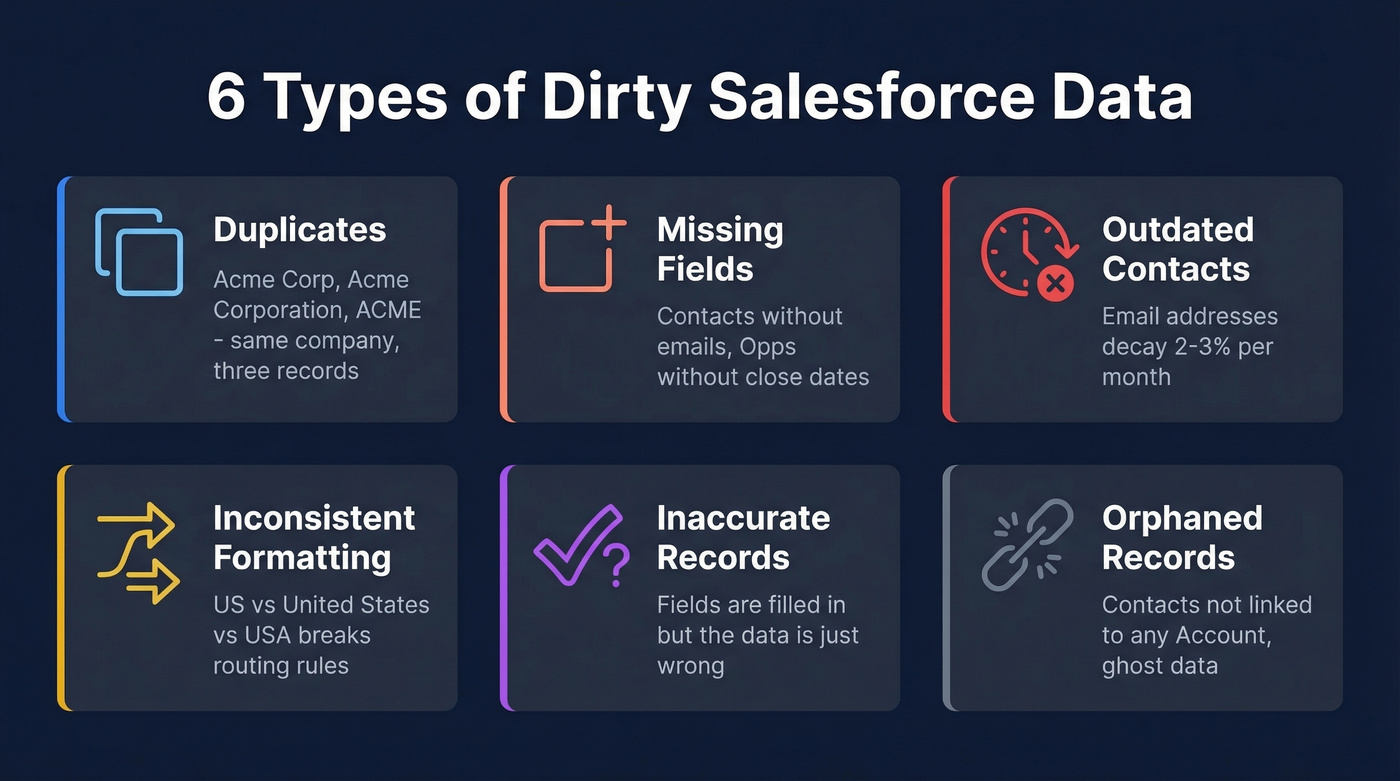
Duplicates are the most visible offender. The same company entered as "Acme Corp," "Acme Corporation," and "ACME" across three records. Web-to-lead forms, Data Loader imports, and marketing automation are the usual culprits. Even with Duplicate Rules set to block, duplicates still accumulate through bulk imports and migrations.
Missing fields break everything downstream. Contacts without emails, Opportunities without close dates, Leads without company names - reports break, routing fails, forecasts lie.
Outdated contacts rot silently. Email addresses decay at 2-3% per month. If you aren't verifying regularly, a meaningful chunk of your contact emails will be invalid within a single quarter.
Inconsistent formatting sounds boring until your territory assignment rules break because someone typed "US" instead of "United States" in the Country field, or "VP Sales" instead of "Vice President of Sales" in the title.
Inaccurate records are harder to catch because the field isn't blank - it's just wrong. Wrong phone numbers, outdated revenue figures, incorrect industry classifications. These pass every validation rule you write.
Orphaned records clutter reports and confuse reps. Contacts not linked to any Account. Activities attached to deleted Leads. And don't overlook hidden data - records obscured by page layouts or permission sets that admins forget exist. These ghost records inflate counts and skew reports without anyone realizing they're there.
Here's the thing: if your average deal size is under $15k, you probably don't need a six-figure data quality platform. A disciplined admin with native tools, a good verification service, and a quarterly cadence will get you 80% of the way there.
What to Clean First
Stop trying to clean everything at once. We've seen teams spend three months on a "full data audit" and end up with a spreadsheet nobody acts on.
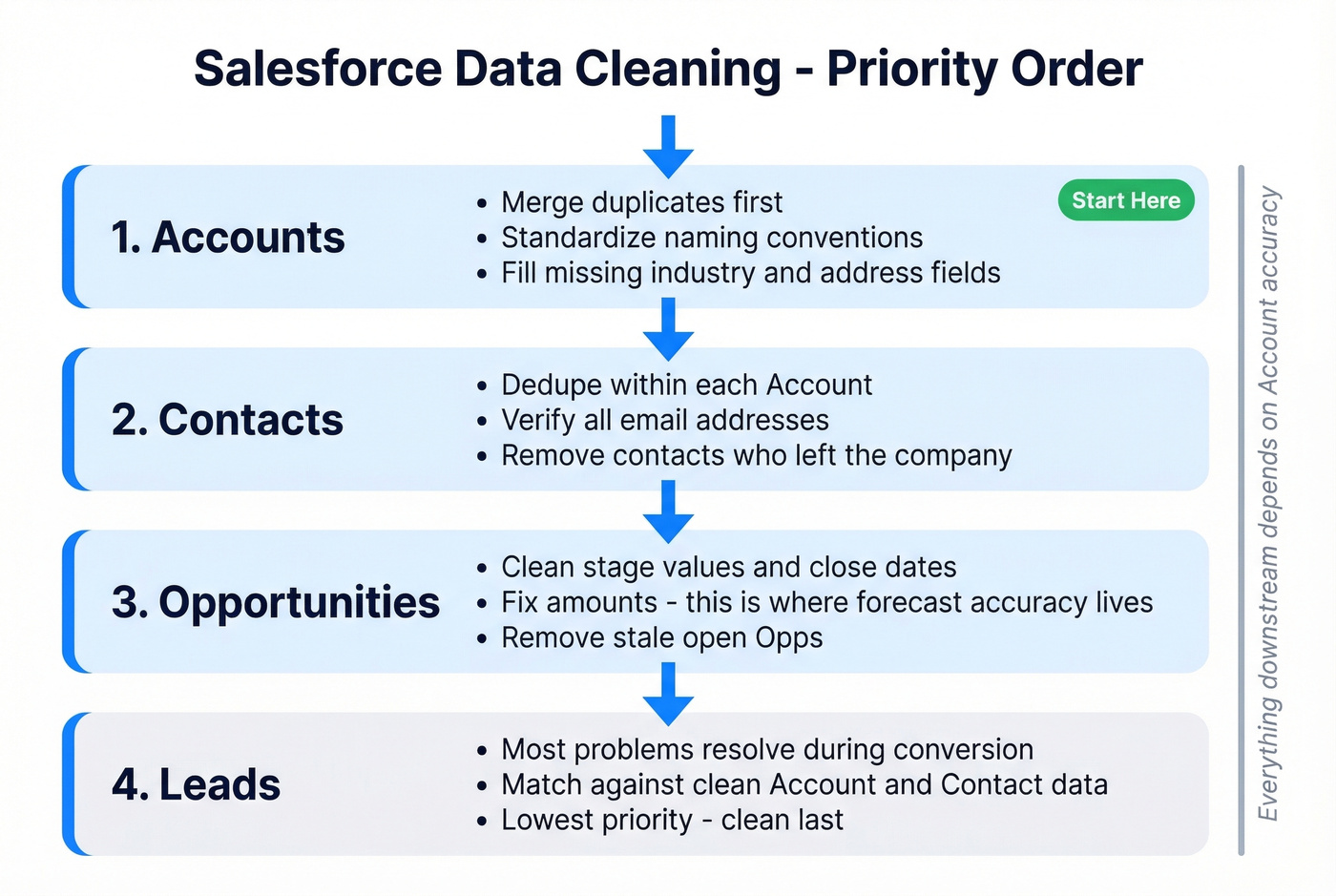
This order works:
- Accounts - Everything downstream depends on Account accuracy. Merge duplicates here first, standardize naming conventions, fill in missing industry and address fields.
- Contacts - Once Accounts are clean, dedupe Contacts within each Account. Verify emails. Remove contacts who left the company two years ago.
- Opportunities - Clean stage values, close dates, and amounts. This is where forecast accuracy lives.
- Leads - Last, because most Lead problems resolve themselves when you have clean Account/Contact data to match against during conversion.
If you're prepping for Agentforce in 2026, narrow even further: define the agent's "topics" first, then clean only the data corpus those topics consume.
How to Find Duplicates
Salesforce has a built-in Duplicate Report capability, but most admins don't know it exists:
- Go to Setup > Report Types and create a new report type.
- Set the primary object to the one you're deduping (Account, Contact, or Lead).
- Add a relationship to Duplicate Record Items - this connects your records to the duplicate sets Salesforce has already identified.
- Build a new report using this report type. Group rows by Duplicate Record Set Name.
- Run the report. Click any set name to see the individual records Salesforce flagged as potential matches.
One critical limitation: Duplicate Jobs - the batch process that identifies existing duplicates - are only available on Performance and Unlimited editions. If you're on Professional or Enterprise, you won't have this option natively.
For smaller orgs or quick spot-checks, spreadsheet techniques work fine. Export your data via Data Loader, then use Excel's Conditional Formatting (Highlight Cells Rules > Duplicate Values) or Google Sheets with =COUNTIF(A:A, A1)>1. These won't catch fuzzy matches like "Acme Corp" vs "Acme Corporation," but they'll surface exact duplicates fast.
Native Capabilities and Hard Limits
Salesforce's built-in duplicate management is solid for prevention. It's terrible for remediation. Understanding the difference saves you from building a cleaning plan that the platform can't execute.
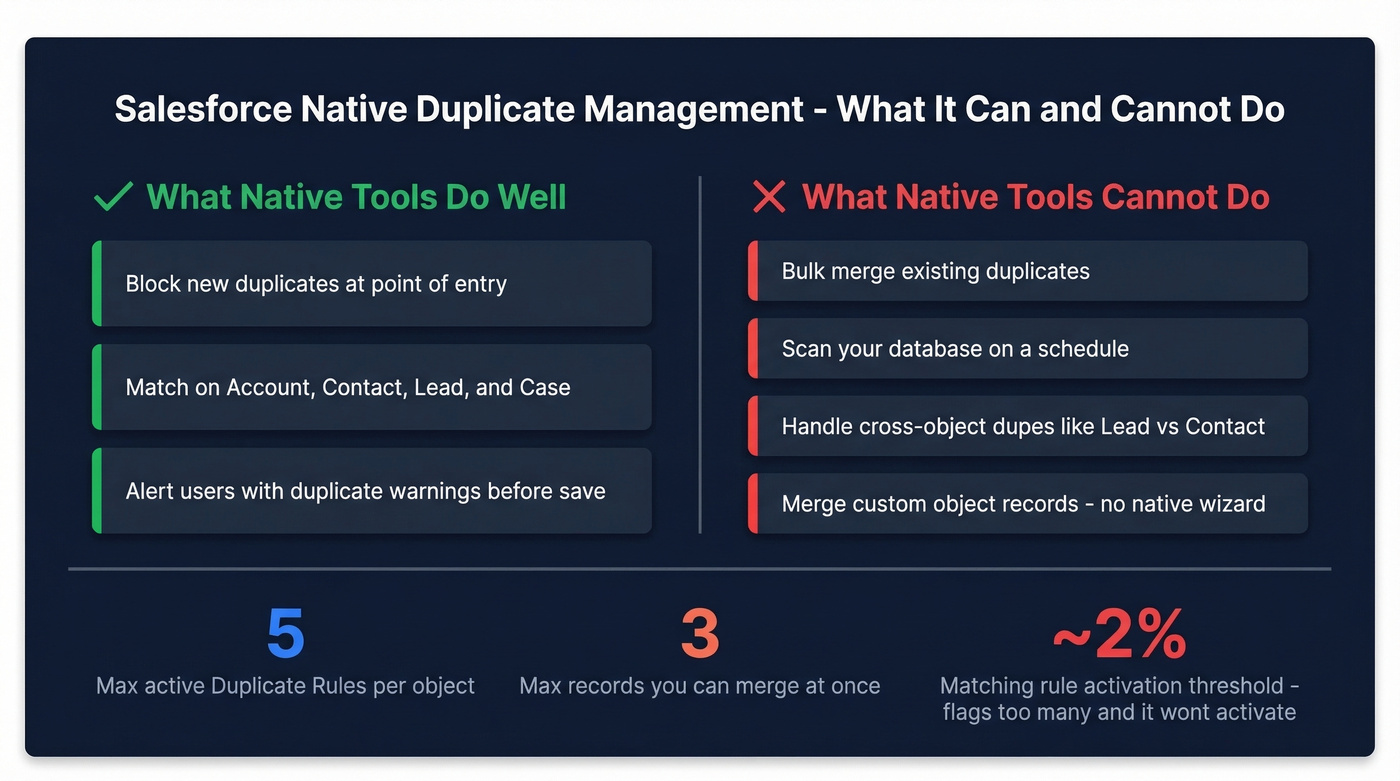
| Constraint | Limit |
|---|---|
| Active Duplicate Rules | 5 per object |
| Matching rule activation threshold | ~2% of records flagged |
| Max records per merge | 3 |
| Objects with merge UI | Account, Contact, Lead, Case |
| Batch dedupe (Duplicate Jobs) | Performance/Unlimited only |
| Custom object merge | No native wizard |
The activation threshold catches people off guard. If your matching rule flags roughly 2% of total records as potential duplicates, Salesforce can block activation entirely. Support can raise this to ~5%, but it can't be removed. For an org with 200,000 Contacts, that means if more than 4,000 are potential dupes, your new rule won't activate.
Native tools are designed to stop new duplicates from entering the system. They don't scan your existing database on a schedule, don't merge in bulk, and don't handle cross-object duplicates like a Lead and Contact for the same person. For anything beyond basic prevention, you need third-party tools or custom automation.

Email addresses decay 2-3% per month - that's exactly the rot clogging your Salesforce org. Prospeo's 143M+ verified emails refresh every 7 days (not every 6 weeks like most providers), so your CRM enrichment starts with data that's already clean. 98% email accuracy means fewer bounces, fewer duplicates from re-entry, and reports you can actually trust.
Replace decayed contacts with verified data at $0.01 per email.
Validation Rules That Work
Validation rules are your first line of defense against dirty data entering Salesforce. They differ from required fields - required fields are always mandatory, while validation rules enforce conditions only when specific criteria are met.
Five copy-paste formulas that cover the most common data quality gaps:
Require email on every Contact:
ISBLANK(Email)
Error message: "Email is required for all Contacts."
Require phone when Lead Source is Business Partner:
AND(
  ISPICKVAL(LeadSource, "Business Partner"),
  ISBLANK(Phone)
)
Prevent closing an Opportunity without a Next Step:
AND(
  ISPICKVAL(StageName, "Closed Won"),
  ISBLANK(NextStep)
)
Validate US ZIP code format:
NOT(REGEX(ShippingPostalCode, "^[0-9]{5}(?:-[0-9]{4})?$"))
Permission-based bypass so admins can override:
AND(
  NOT($Permission.Bypass_Validation__c),
  ISBLANK(Custom_Field__c)
)
The bypass pattern is critical for imports and integrations. Without it, your Data Loader jobs will fail on records that don't meet validation criteria. Create a custom permission called Bypass_Validation, assign it to integration users and admins, and reference it in every validation rule.
Automating Cleanup with Flows
Flow Builder is where data cleaning moves from reactive to proactive. Instead of running reports and manually fixing records, you build automation that cleans data as it enters or changes. A Forrester report found data quality tools improve resolution time by 90% and save 5,184 data engineer hours annually - automation isn't optional if you're serious about scale.
The Summer '25 release made Flow Builder significantly more usable, with single-click element editing and an expanded resource picker that searches up to 10 levels deep. Three use cases worth building first:
When a Lead is created without an Industry, a record-triggered Flow can pull it from the matched Account or fire an API call to an enrichment provider. For standardization, a before-save Flow can convert free-text entries like "United States," "US," and "USA" into a single standard value on every record save - no user action required. For enrichment on Lead creation, a Flow can fire an API call to fill in title, company size, and verified email before a rep ever sees the record.
Email Verification: The Step Everyone Skips
You can merge every duplicate, standardize every picklist, and validate every field - and your outbound sequences will still fail if a big chunk of your email addresses are dead.
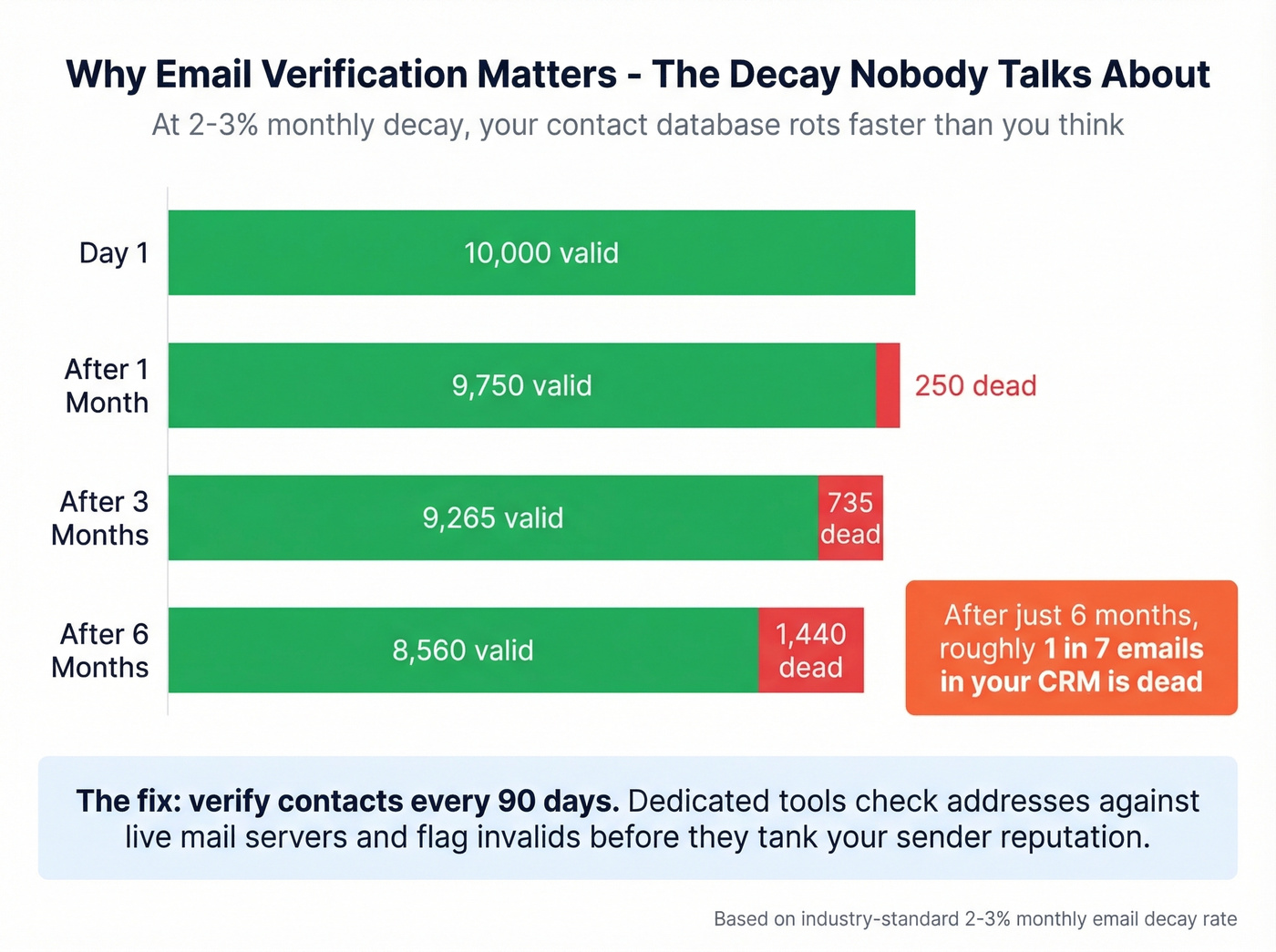
That tanks your sender reputation and drags down deliverability for every email you send, including the ones going to valid addresses. This is the gap between "clean CRM" and "usable CRM." Most guides on Salesforce data quality stop at deduplication and formatting. They don't address the fact that a perfectly structured record with a dead email is functionally useless for outbound. Dedicated verification tools solve this by checking every address against live mail servers, flagging invalids, and enriching records with fresh data so reps stop wasting sequences on dead addresses. The consensus on r/salesforce is that email verification is the single most impactful thing you can do after deduplication - and we agree.
Best Third-Party Tools
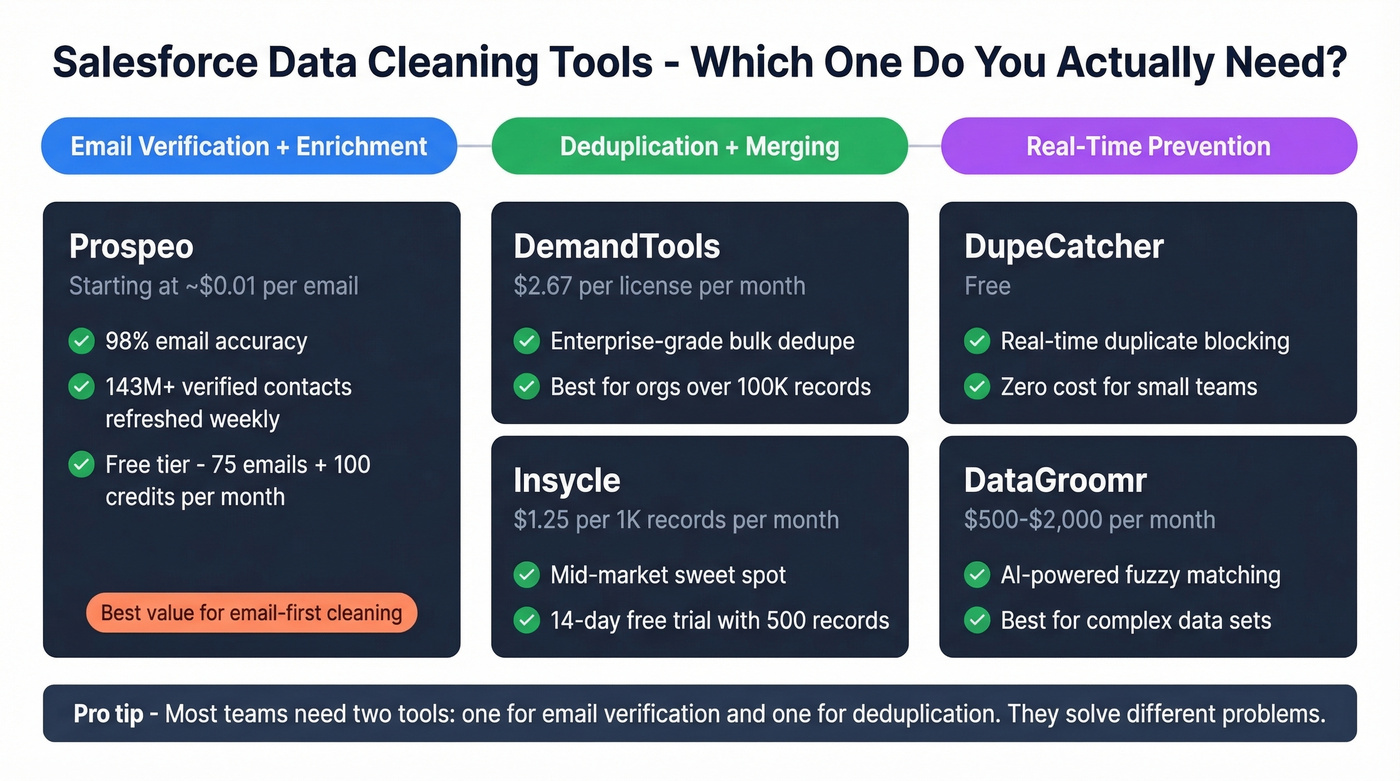
| Tool | Pricing Model | Starting Price | Free Tier/Trial | Best For |
|---|---|---|---|---|
| Prospeo | Per credit | ~$0.01/email | 75 emails + 100 credits/mo free | Email verify + enrichment |
| DemandTools | Per license/mo | $2.67/license/mo | No free tier | Enterprise dedupe |
| Insycle | Per 1K records/mo | $1.25/1K records | 14-day trial (500 records) | Mid-market orgs <100K records |
| DataGroomr | Custom | ~$500-$2,000/mo | Demo required | AI-powered fuzzy matching |
| DupeCatcher | Free | $0 | Free | Real-time dupe prevention |
| Cloudingo | Subscription | ~$625-$1,250/mo | Demo required | Merge automation |
Prospeo
Deduplication tools fix record structure, but they can't tell you whether the email on a contact actually works. Prospeo fills that gap with 98% email accuracy across 143M+ verified addresses and a native Salesforce integration that runs directly inside your org. Connect it, select the contacts you want verified, and it flags invalid emails, enriches records with 50+ data points including title, phone, company size, and technographics, and refreshes everything on a 7-day cycle - far faster than the 6-week industry average. At ~$0.01 per email with a free tier of 75 emails and 100 credits per month, it's the most cost-effective way to keep contact records accurate between quarterly deep cleans. Teams using Prospeo for CRM enrichment see an 83% match rate on contact data and bounce rates dropping below 4%.
Use this if email decay and incomplete contact records are your biggest data quality problem. Skip this if your only issue is Account-level deduplication.
DemandTools
DemandTools is the tool enterprise Salesforce admins reach for when deduplication gets complex. It handles dedupe across both standard and custom objects - something Salesforce's native merge wizard can't do - with fuzzy matching, custom winning-record rules, and rollback options when something goes wrong.
The pricing model is refreshingly simple: flat per-license fees with no record limits. The Elements edition starts at $2.67/license/month; the full V Release runs $11/license/month. For a 20-seat org, that's $53.40-$220/month regardless of whether you have 50,000 or 5 million records. G2 reviewers (4.6/5 across 284 reviews) consistently praise the scenario flexibility - you can build dozens of dedupe scenarios for obscure match criteria and run them on schedule.
Use this if you're an enterprise org with complex dedupe needs across custom objects and you want flat, predictable pricing. Skip this if your primary problem is email accuracy rather than record deduplication.
Insycle
Insycle takes the opposite approach: you pay per 1,000 records in your connected database. Starter plans run $1.25/1K records monthly, Growth at $1.88, and Professional at $2.50 - or 20% less on annual plans. All plans include unlimited users and unlimited operations, with a 14-day free trial covering up to 500 records.
For an org with 50,000 records, that's $62.50-$125/month - significantly cheaper than DemandTools for smaller databases. The tradeoff is that costs scale linearly with record count. Once you're past 100K records, DemandTools' flat pricing often wins. Insycle covers deduplication, standardization, and bulk updates with a clean UI that doesn't require admin-level Salesforce knowledge.
DataGroomr
DataGroomr uses machine learning for duplicate detection, catching fuzzy matches that rule-based tools miss - "Jon Smith" vs "Jonathan Smith" or "123 Main St" vs "123 Main Street." Custom pricing typically lands in the $500-$2,000/month range depending on org size. It's the right pick for ML-powered matching without writing complex rules, but overkill for orgs with straightforward duplicate patterns.
DupeCatcher
Free, real-time duplicate detection. It catches duplicates as they're being created but doesn't help with bulk remediation of existing records. A solid zero-cost starting point.
Cloudingo
Strong merge automation at ~$625-$1,250/month for mid-market orgs. Less flexible than DemandTools for complex multi-object scenarios, but the merge workflows are clean and well-designed. Worth evaluating if DemandTools feels like more than you need.
Building a Data Hygiene Routine
Tools clean your data once. Governance keeps it clean.
Weekly: Spot-check 20-30 new records for formatting consistency. Review any records flagged by Duplicate Rules that reps dismissed.
Monthly: Run your Duplicate Report. Review and merge the top 50 duplicate sets. Check field completeness rates on Accounts and Contacts.
Quarterly: Bulk email verification - flag or archive contacts with invalid addresses. Run a field completeness audit across all four priority objects. This is where a verification tool pays for itself: connect it to your Salesforce instance, select the contacts you want checked, and let it run. Invalid emails get flagged, enriched fields get populated, and the refresh cycle means records don't go stale between audits.
Semi-annually: Full data audit covering duplicate rates, orphaned records, and stale Opportunities.
Your merge policy needs to answer one question: when two records conflict, which value wins? Pick from most populated fields, most recent activity, or owner hierarchy. Document it, enforce it, and make sure everyone who merges records knows the rule.
Real talk: the hardest part of governance isn't the process - it's ownership. Assign a Data Steward role, even if it's 10% of an admin's time. Without clear ownership, every governance routine dies within two quarters. We've watched it happen more times than we can count.
You just spent hours deduping Accounts and Contacts - don't refill Salesforce with the same bad data. Prospeo's CRM enrichment returns 50+ data points per contact at a 92% match rate, with standardized fields that won't break your validation rules or territory assignments. Native Salesforce and HubSpot integrations mean clean data flows in without CSV gymnastics.
Stop cleaning data that was dirty on arrival. Start with verified records.
FAQ
How often should I clean Salesforce data?
Run weekly spot-checks on new records, monthly duplicate reports, and quarterly deep cleans that include email verification and field completeness audits. One-time projects guarantee you'll be back in the same mess within six months - build cadence into your operating rhythm.
What's the best free tool for Salesforce data cleaning?
DupeCatcher handles real-time duplicate prevention at zero cost. For email verification, Prospeo's free tier gives you 75 verified emails plus 100 credits monthly - enough for small teams to validate their highest-priority contacts alongside native Duplicate Reports.
Can I automate deduplication in Salesforce?
Duplicate Rules prevent new duplicates automatically, but native merge doesn't support batch processing. For existing duplicates at scale, DemandTools offers flat pricing with custom object support, while Insycle charges per record with a cleaner UI. Both support scheduled dedupe runs.
How do I handle Lead vs. Contact duplicates?
Native merge doesn't support cross-object deduplication. Define a merge policy for which object wins, map fields between Lead and Contact, then use DemandTools or manual Data Loader workflows to consolidate. Document your winning-record rules before you start.
Should I clean data before deploying Agentforce?
Yes - but scope it tightly. Define your agent's topics first, then clean only the objects and fields that agent will consume. Verify contact records your agents will reference so they work with accurate emails and phone numbers from day one.