

Salesforce vs Zoho CRM: Which One Is Worth Your Money in 2026?
The Salesforce vs Zoho CRM debate usually starts the same way. Your CFO asks why the CRM line item went from $18K to $47K in two years. You're staring at a Salesforce renewal quote that includes modules nobody remembers buying, and meanwhile a VP just forwarded you a Zoho demo link with the subject line "can we just use this instead?"
Most comparisons recycle outdated pricing - half the internet still lists Salesforce Enterprise at $165/user/month when it's actually $175. Let's fix that with current numbers, real total-cost-of-ownership math, and a verdict that doesn't dodge the hard question.
30-Second Verdict
Under 20 people, budget-conscious: Zoho CRM Enterprise ($40/user/month). It does 80% of what Salesforce does at roughly a quarter of the cost.
50+ people, complex sales process, integration-heavy: Salesforce Enterprise ($175/user/month). But budget 2-3x the license cost for implementation and admin.
The 20-50 person toss-up zone: This is where the decision actually gets hard. Integration needs push you toward Salesforce. Budget constraints push you toward Zoho. Read the TCO section before committing.
Skip both if your real problem is data quality, not CRM features. Your CRM is only as good as what you feed it - and tools like Prospeo verify emails at 98% accuracy with a 7-day refresh cycle to keep records clean.
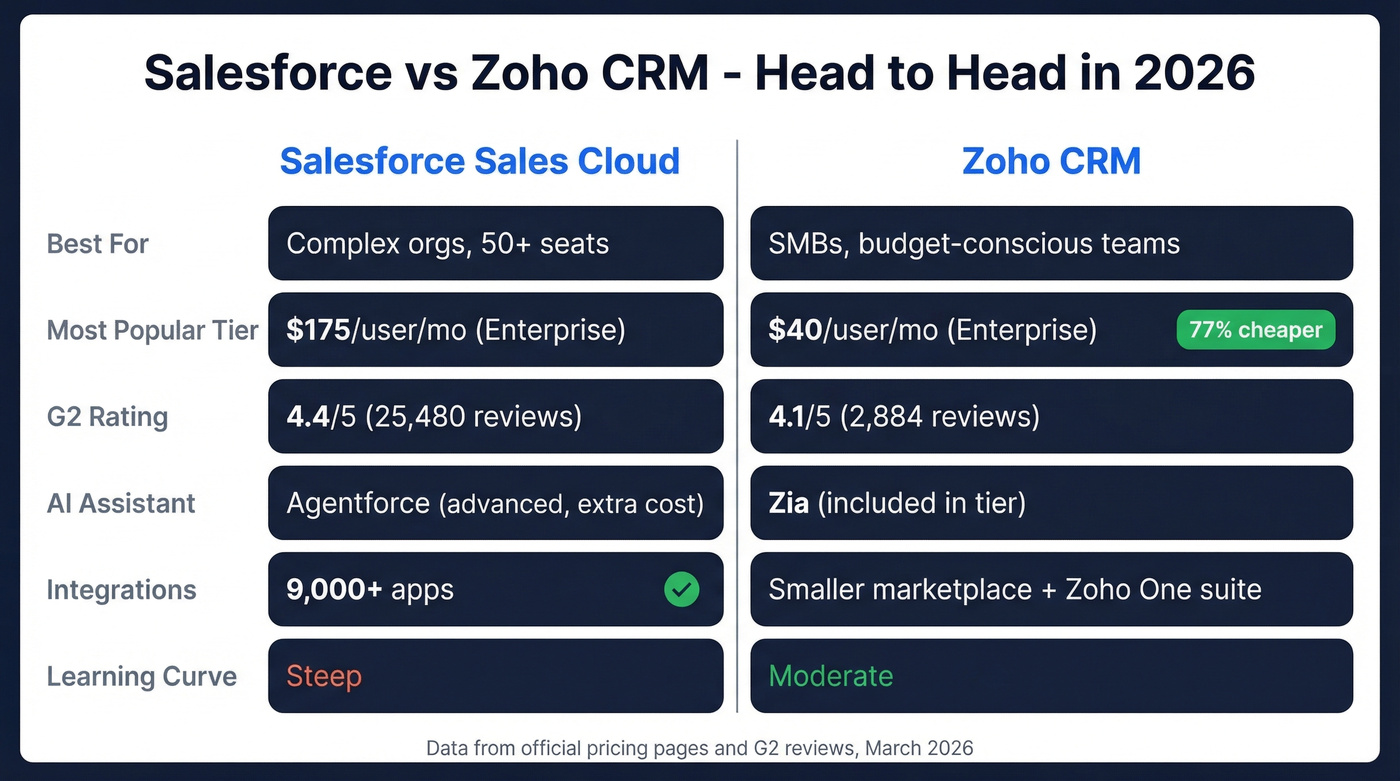
Side-by-Side Overview
| Salesforce Sales Cloud | Zoho CRM | |
|---|---|---|
| Starting price | $0 (Free Suite, 2 users) | $0 (Free, 3 users) |
| Best for | Complex orgs, 50+ seats | SMBs, budget-conscious teams |
| G2 rating | 4.4/5 (25,480 reviews) | 4.1/5 (2,884 reviews) |
| AI assistant | Einstein / Agentforce | Zia |
| Integrations | 9,000+ apps (AppExchange) | Smaller marketplace + Zoho One |
| Social features | Often requires add-ons | Built-in CRM social features |
| Learning curve | Steep | Moderate |
| Mobile app | Polished, full-featured | Functional, improving |
The review count gap tells a story on its own. Salesforce has about 8.8x more G2 reviews, which reflects market share more than quality. Zoho's smaller footprint doesn't mean it's worse - it means fewer enterprise buyers have reviewed it.
2026 Pricing Breakdown
These numbers come directly from Salesforce's and Zoho's official pricing pages.
Salesforce Sales Cloud Tiers
| Tier | Price | Billing |
|---|---|---|
| Free Suite | $0 (2 users) | No contract |
| Starter Suite | $25/user/mo | Monthly or annual |
| Pro Suite | $100/user/mo | Annual only |
| Enterprise | $175/user/mo | Annual only |
| Unlimited | $350/user/mo | Annual only |
| Agentforce 1 Sales | $550/user/mo | Annual only |
The Free Suite is new and almost nobody mentions it in comparison articles. It's limited to 2 users, but it exists. Most teams land on Enterprise or Unlimited once they need conversation intelligence and more advanced automation.
Zoho CRM Tiers
| Tier | Annual billing | Monthly billing |
|---|---|---|
| Free | $0 (3 users) | $0 (3 users) |
| Standard | $14/user/mo | ~$20/user/mo |
| Professional | $23/user/mo | ~$35/user/mo |
| Enterprise | $40/user/mo | ~$50/user/mo |
| Ultimate | $52/user/mo | ~$65/user/mo |
Monthly billing on Zoho runs 25-40% more than annual. That's a significant premium if you aren't ready to commit for a year.
Zoho's Team-User Advantage
Here's something Salesforce doesn't offer. Zoho distinguishes between org users with full CRM access and team users with limited access. Team users can't own records, run reports, manage automation, or access Zia - but they can view and collaborate within team modules.
This matters if you've got marketing, CS, or finance people who need CRM visibility without full licenses. On Salesforce, every seat costs the same. On Zoho, you can give cross-functional teams lighter access at a lower cost. It's a genuine architectural advantage for companies where 30% of CRM users are viewers, not doers.
Total Cost of Ownership
License pricing is the tip of the iceberg.
What Salesforce Actually Costs
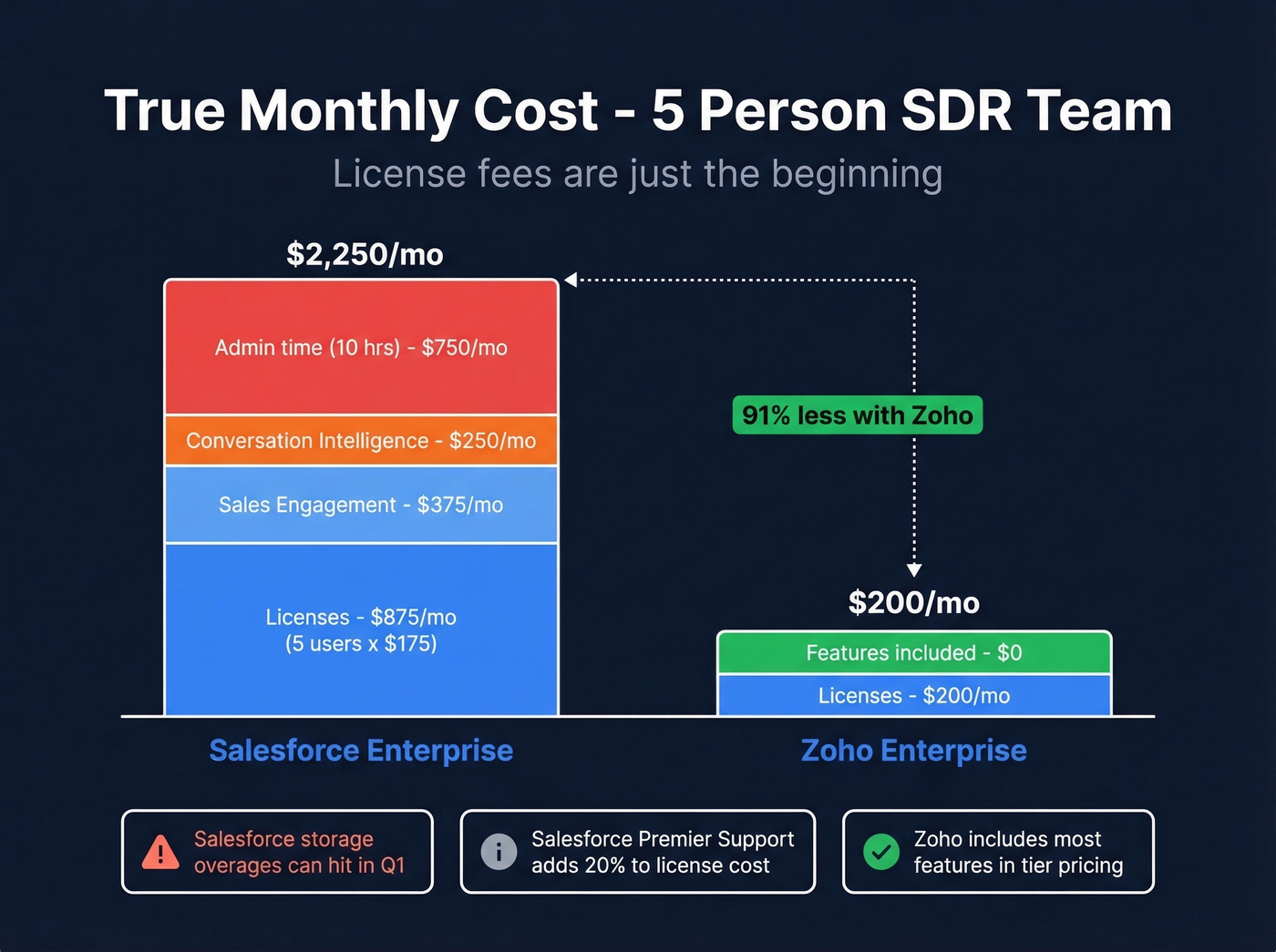
Here's the thing: a 5-person SDR team on Salesforce can cost anywhere from $1,250 to $8,000+/month depending on tier and add-ons. Three SDRs on Enterprise at $175/user/month looks like $525/month in licenses. Add Sales Engagement at roughly $75/user/month, Conversation Intelligence at around $50/user/month, and 10 hours of admin time at $75/hour - suddenly you're at ~$2,040/month. Scale that to 5 SDRs on Unlimited with 20 hours of admin time, and you're looking at ~$4,050/month.
The most dramatic scenario we've modeled: 10 SDRs on Agentforce 1 with a full-time admin runs approximately $13,500/month. That's $162K/year before a single add-on.
Premier Support alone runs ~20% of your license cost on lower tiers. And if you need Pardot (rebranded as MCAE) for marketing automation, that starts at $1,250/month as a separate product.
Implementation and Storage Surprises
Licensing is often only 30-40% of the total implementation budget. Implementation services eat 35-45%, data migration takes 15-20%, training and change management run 10-15%, and ongoing support adds 5-10% annually.
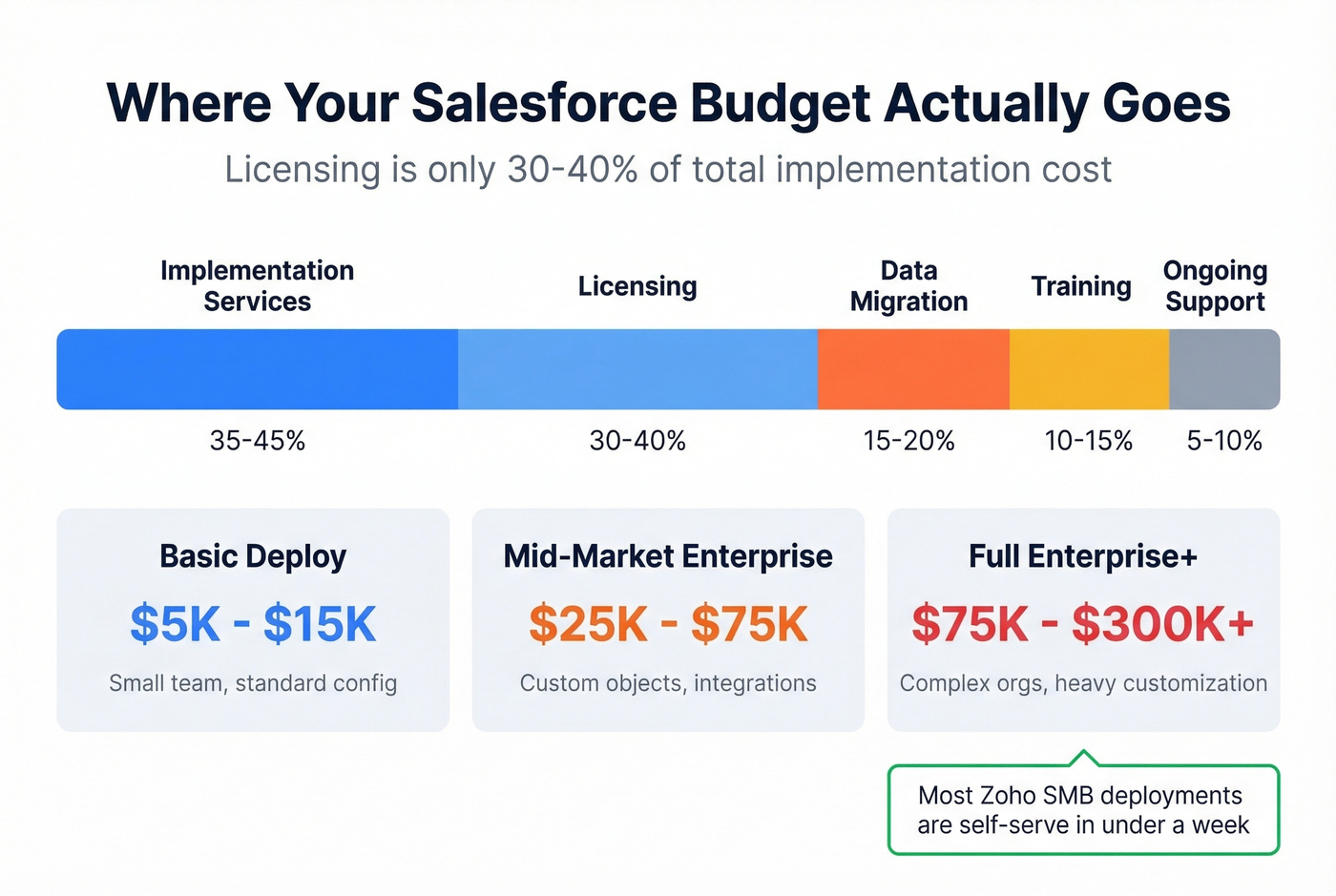
The cost ranges are wide:
- Basic deployments: $5K-$15K
- Mid-market Enterprise: $25K-$75K
- Full Enterprise+ with custom objects and integrations: $75K-$300K+
- Training alone: $500-$5,000 per user depending on role complexity
Then there's storage. Salesforce provides 1GB of data storage and 10GB of file storage per org. Need more? That's $125/month per 500MB of data or $5/month per GB of files. We've seen teams hit storage overages within the first quarter of a new implementation - the kind of cost that never shows up in the sales demo.
What Zoho Actually Costs
The same 5-person team on Zoho Enterprise with annual billing pays ~$200/month. That's it. No separate conversation intelligence module, no storage surcharges for most use cases.
Zoho's implementation costs are real at scale - the range runs from $60K to $1.4M for complex enterprise projects. But most SMB deployments are genuinely self-serve. A team of 10-20 can be up and running in a week without a consultant. That's a fundamentally different cost structure than Salesforce, where even a basic deployment usually involves professional services.
On Reddit, Salesforce-to-Zoho migration threads consistently cite complexity and cost as the primary drivers for switching. A Nucleus Research study found businesses that switch from Salesforce to Zoho cut costs by 68% on average. The math backs them up.
Feature Comparison
Lead Management and Automation
Both platforms handle the fundamentals well - contact management, deal pipelines, workflow automation. The difference is where features sit in the pricing tiers.
Zoho's Standard tier at $14/user/month includes key automation features that Salesforce gates behind higher tiers or paid add-ons. If you're comparing entry-level tiers, Zoho gives you dramatically more per dollar. Salesforce Starter at $25/user/month doesn't include forecasting or lead scoring. That gap alone frustrates teams who assumed basic sales features would be, well, basic.

Reporting and Analytics
Salesforce pulls ahead at Enterprise+ with deeper analytics, custom report types, and Tableau. If your RevOps team lives in dashboards and needs cross-object reporting with calculated fields, Salesforce is the stronger platform.
Zoho's analytics are adequate for most teams under 50 people. Zoho Canvas lets you design custom dashboard layouts, which is a nice touch for teams that want visual flexibility without Tableau-level complexity. For most sales managers who need pipeline visibility, win-rate tracking, and activity metrics, Zoho delivers.
Integrations Ecosystem
This is where Salesforce's moat is widest. AppExchange hosts 9,000+ apps (AppExchange), and 91% of Salesforce customers use at least one. If your tech stack includes niche industry tools, Salesforce almost certainly has a native integration.
Zoho's marketplace is smaller, but the Zoho One suite covers many gaps natively - project management, helpdesk, marketing automation, and accounting all live under one roof. For teams willing to go all-in on the Zoho ecosystem, fewer third-party integrations are needed in the first place.

You just read how Salesforce storage overages and Zoho implementation costs add up fast. But the biggest hidden cost in any CRM? Bad data. Prospeo enriches your CRM records with 50+ data points at a 92% match rate - for roughly $0.01 per email. That's less than one month of Salesforce storage overages.
Stop paying enterprise CRM prices to store outdated contacts.
AI Capabilities: Zia vs Agentforce
Zoho's Zia is included in higher tiers and handles predictive lead scoring, anomaly detection, and basic conversational AI. It isn't flashy, but it works. For most sales teams, "good enough" AI that's included in your license beats "best-in-class" AI that costs extra.
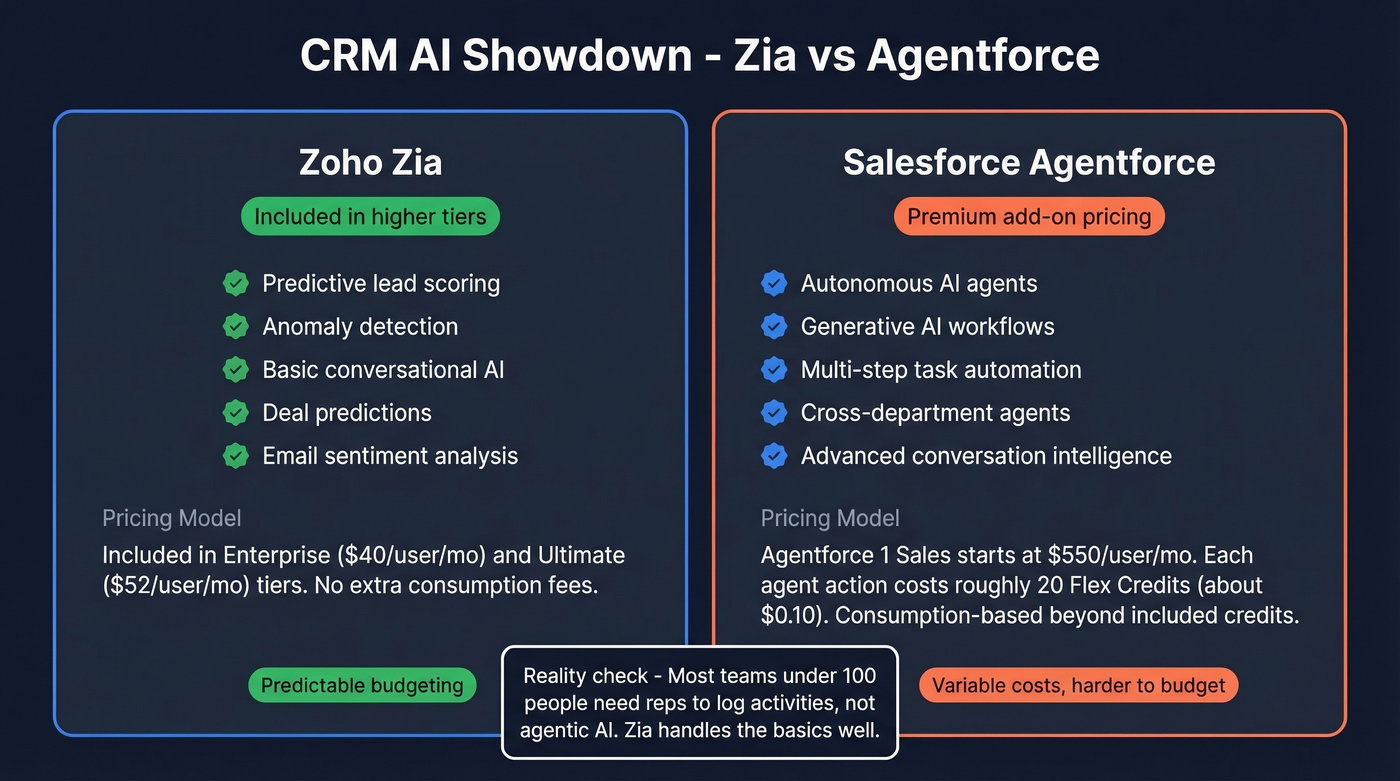
Salesforce has rebranded its AI stack around Agentforce - autonomous AI agents that can handle tasks across sales, service, and marketing. The capabilities are genuinely more advanced than Zia, particularly for generative use cases and complex multi-step workflows. But the pricing model is a red flag for budget-conscious teams. Agentforce budgeting is harder because it mixes per-user licensing with consumption credits: each agent action costs roughly 20 Flex Credits (about $0.10), and the Agentforce 1 Sales tier starts at $550/user/month. Beyond the included credits, you're buying more.
If predictable budgeting matters to your team - and it should - Zoho's "AI included in your tier" approach is far easier to plan around.
Let's be honest: most teams under 100 people don't need agentic AI in their CRM. They need their reps to actually log activities and update deal stages. Zia handles the AI basics. Agentforce is impressive technology solving a problem most mid-market teams don't have yet.
Ease of Use and Setup
The G2 sub-scores tell a nuanced story.
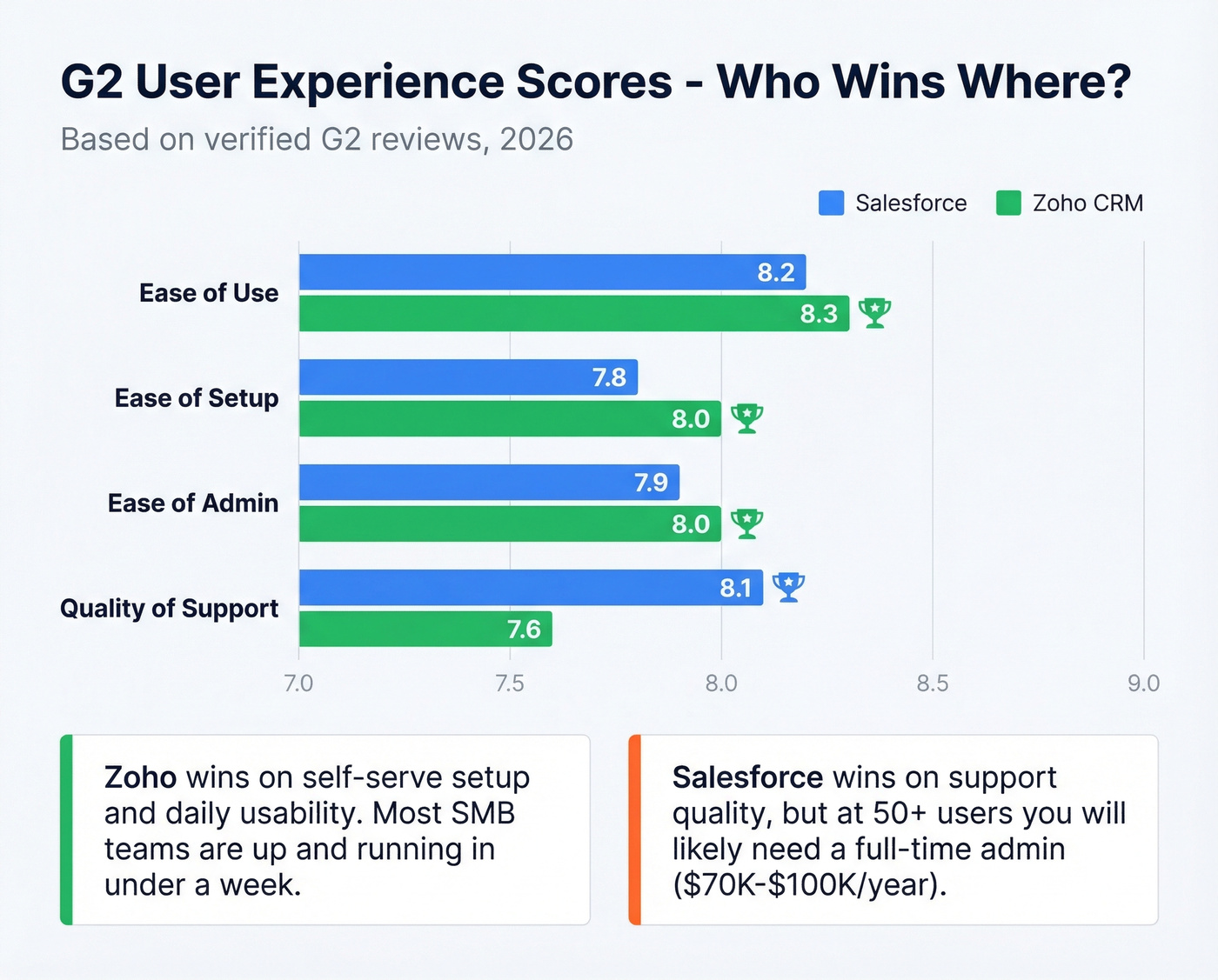
| Metric | Salesforce | Zoho CRM | Edge |
|---|---|---|---|
| Ease of Use | 8.2 | 8.3 | Zoho |
| Ease of Setup | 7.8 | 8.0 | Zoho |
| Ease of Admin | 7.9 | 8.0 | Zoho |
| Quality of Support | 8.1 | 7.6 | Salesforce |
Zoho wins on self-serve setup, ease of use, and admin simplicity. Salesforce wins on support quality.
Zoho's UI has improved dramatically since 2020, but it still feels like it was designed by engineers, not designers. Zoho users on Reddit frequently note the interface feels less polished than Salesforce, though the gap has narrowed. Salesforce's Lightning Experience handles visual design better.
That said, Salesforce requires dedicated admin time at any meaningful scale. At 50+ users, you're looking at a full-time Salesforce admin role at $70K-$100K/year. That's a hidden headcount cost Zoho rarely demands.
Scalability and Limits
Zoho works well for teams under 50 people with straightforward sales processes. The platform handles custom objects, workflow automation, and reporting well enough for most mid-market needs.
Zoho hits ceilings when you push past its architectural limits: 300 custom fields per module and only 5 lookup fields per module. Advanced automation beyond no-code workflows requires Deluge scripting - Zoho's proprietary language that's less mature than Salesforce's Apex/Lightning Flow ecosystem.
Salesforce shines when you need virtually unlimited customization, complex multi-object relationships, and an integration ecosystem that can connect to anything.
Skip Salesforce if you're a team of under 50 seriously considering Enterprise tier. You're probably over-buying. The complexity and admin overhead will eat more budget than the features save.
Migrating from Salesforce to Zoho
If you're switching platforms, here's the playbook we've seen work:
- Document your Salesforce ER diagram - every object, field, relationship, and automation. This takes 25-75 hours depending on complexity.
- Map custom objects to Zoho custom modules. Remember the 300 fields/module ceiling when planning.
- Export in this order: Accounts, Contacts, Deals, Activities, Attachments. Use Data Export Wizard or Data Loader.
- Rebuild automations using Zoho Blueprints, Workflow Rules, and Deluge functions. Consolidate into Zoho One apps where possible to reduce vendor costs.
- Handle attachments separately - they often require API calls or a Zoho Marketplace migration tool.
- Verify your data before importing. This is where most migrations quietly fail. Bad emails and outdated phone numbers carry over from Salesforce and poison your new CRM from day one. Run your contact list through Prospeo's bulk verification before import - at ~$0.01 per verified email, it costs less than a single Salesforce user license and catches the garbage data that would otherwise follow you to your new platform.

Budget $60K-$1.4M for complex enterprise migrations. Most SMB moves are far cheaper - a 15-person team can often self-serve the migration in 2-4 weeks with a part-time consultant.
CRM Data Quality: The Part Nobody Talks About
Regardless of which CRM you pick, pipeline quality depends on the data feeding it. Bad emails mean bounced sequences. Wrong numbers mean wasted call blocks. Neither Salesforce nor Zoho solves this - they're containers, not data sources.
In our experience, the teams that get the most out of either platform are the ones running quarterly data audits and using a verification tool with a short refresh cycle. One of our customers, Snyk, cut their bounce rate from 35-40% to under 5% after layering in proper email verification across their CRM - and AE-sourced pipeline jumped 180% as a result.
Whether you pick Salesforce or Zoho, neither CRM verifies the emails and phone numbers sitting in your pipeline. Prospeo's 7-day refresh cycle and 98% email accuracy ensure every record your reps touch is current - not 6 weeks stale like most data providers.
Your CRM choice matters less than the data inside it.
The Verdict
Under 20 people: Zoho CRM Enterprise at $40/user/month, nine times out of ten. The cost savings are too significant to ignore, and the feature gap at this scale is minimal.
50+ with complex processes: Salesforce Enterprise at $175/user/month. But go in with eyes open - budget 2-3x the license cost for implementation, admin, and add-ons. A 50-seat Salesforce deployment with proper implementation easily runs $150K-$250K in year one.
20-50 people: Genuine toss-up. If your tech stack demands deep integrations with ERP, CPQ, or custom billing systems, Salesforce's AppExchange ecosystem is hard to replicate. If budget constraints are real and your sales process is relatively standard, Zoho Enterprise gives you 80% of the capability at 23% of the price.
When to choose neither: For pure pipeline simplicity, look at HubSpot with its free CRM and paid Sales Hub from $20/user/month, or Pipedrive starting at $14/user/month. Teams in the Microsoft ecosystem should give Dynamics 365 Sales a look from $65/user/month.
Most comparison articles tell you Salesforce is for enterprises and Zoho is for small businesses. That's lazy. The real question when weighing Salesforce vs Zoho CRM is: do you have the budget and admin capacity to extract value from Salesforce's complexity? If the answer is "not really," Zoho isn't a compromise. It's the smarter choice.
FAQ
Is Zoho CRM really free?
Yes - Zoho CRM offers a free plan for up to 3 users with core contact management, lead tracking, and deal pipelines. No credit card required. Salesforce now has a Free Suite too, but it's limited to 2 users with fewer capabilities.
How much does Salesforce really cost per year?
A 10-person team on Enterprise at $175/user/month pays $21,000/year in licenses alone. Add implementation, add-ons, admin time, and storage overages, and the real cost is typically 2-3x that - $42K-$63K for a modest deployment. Budget accordingly.
Can Zoho CRM handle enterprise-scale deployments?
Zoho supports enterprise use but has architectural ceilings: 300 custom fields per module and 5 lookup fields. Complex automation requires Deluge scripting. For teams over 200 with deeply customized workflows, Salesforce's Apex/Lightning Flow ecosystem is more flexible.
Can I migrate from Salesforce to Zoho?
Yes. Export in order: Accounts, Contacts, Deals, Activities, Attachments. Budget 25-75 hours for planning and field mapping. The biggest risk is carrying over bad data - verify contacts before importing to catch outdated records.
How do I keep CRM data clean long-term?
Schedule quarterly data audits and use a verification tool with a short refresh cycle. A 7-day refresh cadence prevents bounce-rate creep regardless of whether you're on Salesforce or Zoho - and it's far cheaper than dealing with the downstream damage of stale records.