


Best Sangoma Alternatives in 2026 (Honest Guide)
You open your Sangoma invoice expecting $17.99 per user. The actual charge is $21.59. That "Administrative and Regulatory Recovery Fee" buried in the fine print just added 18.5% to your bill - and you didn't notice for three months. 45% of B2B tech buyers say transparent pricing is the single most important factor when evaluating vendors. Sangoma doesn't make that easy.
What Sangoma Actually Costs
The advertised $17.99/user/month Business Voice cloud price looks competitive until you read the footnotes. That rate requires a five-year commitment. Sangoma advertises volume discounts up to 33%, but only if you combine that lock-in with significant seat count. Then the surcharges hit.
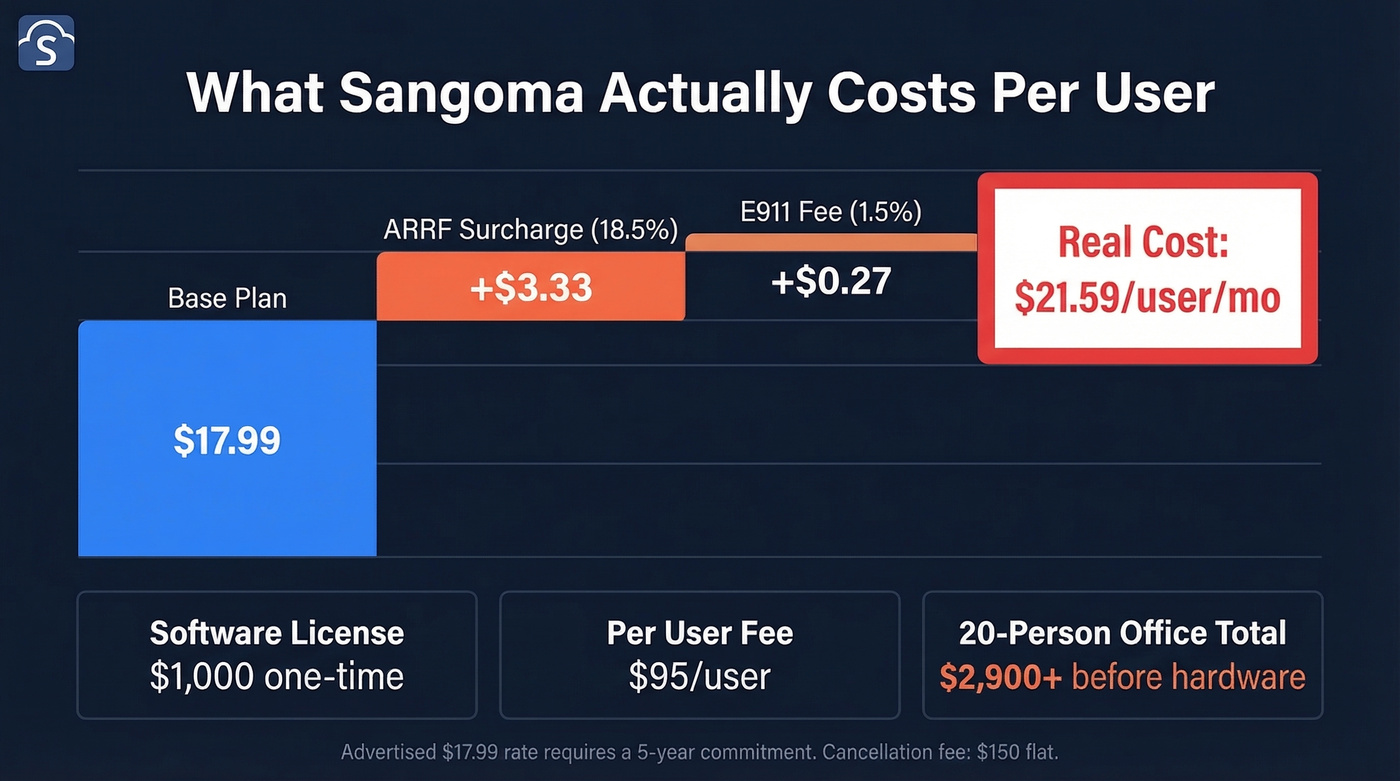
| Fee | Amount |
|---|---|
| Base plan | $17.99/user/mo |
| ARRF surcharge | 18.5% (~$3.33) |
| E911 fee | 1.5% (~$0.27) |
| Local inbound DID | $0.75/DID |
| Cancellation | $150 flat |
Your real cost per user lands around $21.59/month before DIDs. On-prem Switchvox is steeper: a $1,000 one-time software license plus $95 per user, plus the appliance itself. For a 20-person office, that's $2,900 upfront in software and user licensing before the appliance and your first call.
Why Businesses Leave Sangoma
Support quality has dropped. The consensus on r/VOIP is blunt - practitioners describe being "bumped around from person to person" in what feels like classic cost-cutting. Sangoma scores a 4.2/5 on G2 across 254 reviews, and the cons pattern is consistent: complex setup, costs that add up fast, and settings management that isn't beginner-friendly. To be fair, those same reviews praise Sangoma's all-in-one UC integration and call quality - the complaints are about everything around the core product.
The FreePBX community is fracturing. Forums are being dismantled, prominent contributors were banned, and the savefreepbx.com movement signals a real governance crisis. If you're a FreePBX admin, the ecosystem you built on feels less stable than it did two years ago.
FreePBX 17 was painful. No more ISO releases - just an install script on Debian. Users reported broken UI layouts, TLS needing manual downgrade to 1.2, and PHP memory limits requiring manual fixes. One admin called it "not even beta quality." That's rough for software running your phone system.
Top Sangoma Alternatives at a Glance
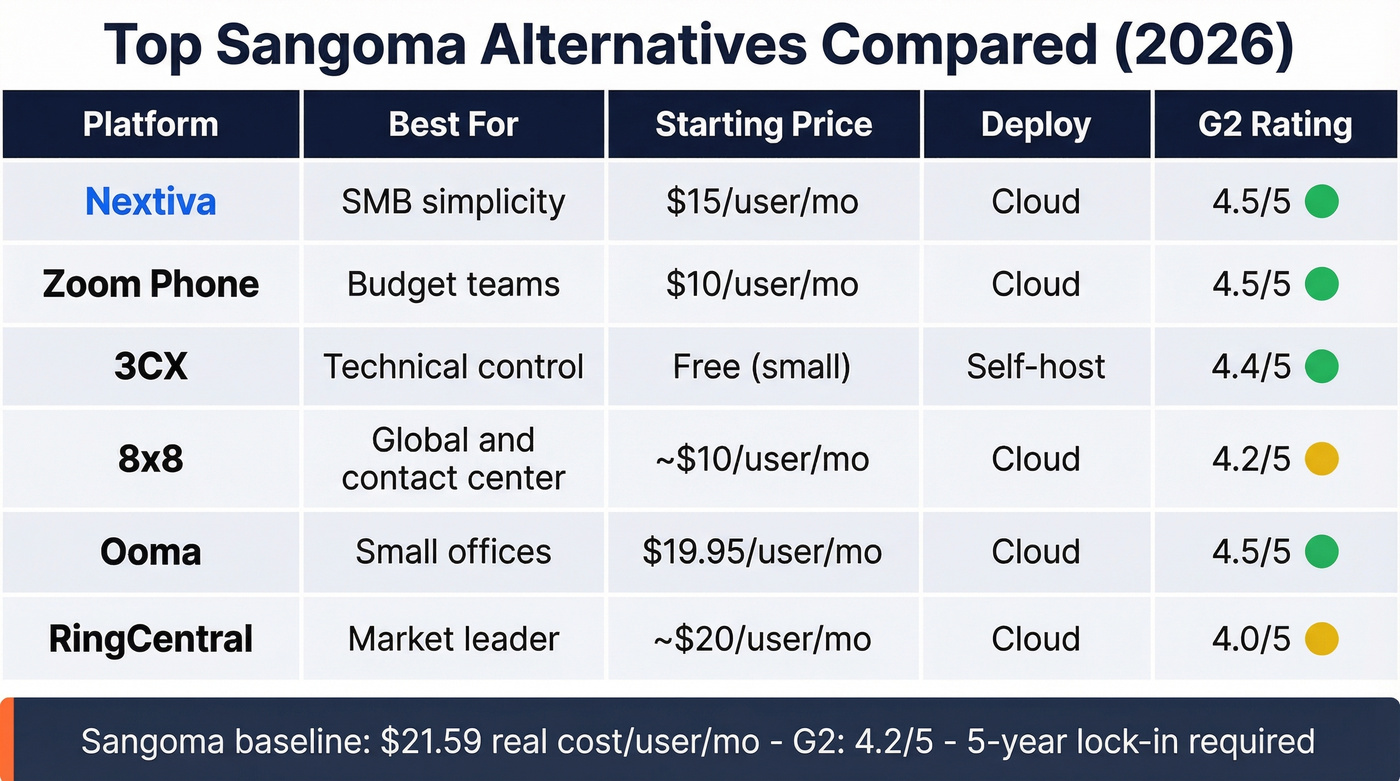
| Tool | Best For | Starting Price | Deploy | G2 |
|---|---|---|---|---|
| Nextiva | SMB simplicity | $15/user/mo | Cloud | 4.5/5 |
| Zoom Phone | Budget teams | $10/user/mo | Cloud | 4.5/5 |
| 3CX | Technical control | Free (small) | Self-host | 4.4/5 |
| 8x8 | Global/CC | ~$10/user/mo | Cloud | 4.2/5 |
| Ooma | Small offices | $19.95/user/mo | Cloud | 4.5/5 |
| RingCentral | Market leader | ~$20/user/mo | Cloud | 4.0/5 |
The Best Sangoma Alternatives
Nextiva
If you're under 50 employees and want a phone system that just works, Nextiva is the answer. The Core plan starts at $15/user/month, Engage runs $25, and Power Suite CX hits $75 for full contact center features. No hidden surcharges - what you see is what you pay. After Sangoma's fee schedule, that alone is worth the switch.
We've recommended Nextiva to several teams migrating off Sangoma, and the feedback is consistently the same: setup takes hours instead of days, and the first invoice matches the quote. That sounds like a low bar, but after Sangoma's ARRF surprises, it matters.
Skip Nextiva if you need on-prem deployment or deep customization. It's cloud-only and opinionated about how things work. For most SMBs, that's a feature, not a bug.
Zoom Phone
Zoom Phone is the cheapest credible option in this comparison. Metered calling starts at $10/user/month, unlimited US/Canada runs $15, and Global Select is $20. If your team already lives in Zoom Meetings, adding Phone is nearly effortless - same admin console, same interface, no learning curve.
The catch: Zoom Phone works best inside the Zoom ecosystem. As a standalone UCaaS platform, it's thin. And the Power Pack add-on at $25/user/month is practically required if you want real call queue analytics. For Zoom-native teams on a budget, it's a no-brainer. For everyone else, Nextiva gives you more for $5 more.
3CX
Here's the thing: if your deal sizes are modest and you have even one person who can manage a Linux box, 3CX is the best value in business telephony right now. It's free for small deployments and starts around $350/year for Pro licensing. On G2, it scores a 4.4/5 versus Sangoma's 4.2/5, with ease of use at 9.0 vs 8.5.
The tradeoff is real, though. 3CX charges $75 per support interaction, so you're largely on your own when things break. We've seen teams thrive with 3CX when they have an IT person who enjoys tinkering, and struggle badly when they don't. Know which camp you're in before committing. If your IT resource is already stretched thin managing other systems, the $75-per-ticket model will bleed you dry faster than Sangoma's surcharges ever did.
8x8
8x8 is the strongest play for global calling with bundled contact center capabilities. Plans range from X1 at roughly $10-$14/user/month through X8 at $130-$150/user/month based on broker pricing data, though 8x8 no longer publishes rates publicly.
Unmatched international coverage across 40+ countries and unified UCaaS + CCaaS in a single platform make it the obvious pick for distributed global teams. Strong compliance certifications round out the package.
On the downside, it's overkill for domestic-only teams. Pricing opacity rivals Sangoma's, and the admin console has a learning curve that'll frustrate non-technical users. If you're making international calls daily, 8x8 earns its price. If you're a 15-person team in Ohio, you're paying for infrastructure you'll never touch.
Ooma
Ooma is the "set it and forget it" option for small offices. Essentials at $19.95/user/month, Pro at $24.95, Pro Plus at $29.95. Non-technical teams can be up and running in an afternoon with Ooma's plug-and-play hardware.
Best for offices under 20 people who want reliable calling without an IT department. Skip it if you need advanced integrations or contact center features - Ooma keeps things deliberately simple, and that simplicity is the whole point.
RingCentral
The market leader and G2's top-rated Sangoma competitor is RingEX. Expect $20-$35/user/month depending on tier. RingCentral does everything - phone, video, messaging, fax, contact center - but you'll pay more than Zoom Phone or Nextiva for the privilege.
In our experience, RingCentral earns its premium only when you need deep integrations with hundreds of business apps or enterprise-grade compliance. For most SMBs, Nextiva delivers 90% of the value at a lower price.
We excluded Dialpad, Vonage, and GoTo Connect from this list. They're solid platforms but don't offer a meaningful advantage over the picks above for most teams switching from Sangoma.

Upgrading your phone system only matters if your reps can reach the right people. Prospeo gives you 125M+ verified mobile numbers with a 30% pickup rate - so every call your new UCaaS platform routes actually connects to a real buyer.
Stop paying for better phones and still calling dead numbers.
Clean Your Prospect Data During the Switch
Let's be honest about something most migration guides ignore: switching phone systems breaks your outbound workflows in ways nobody anticipates. Stale emails bounce, disconnected numbers waste SDR time, and your new platform inherits every data quality problem from the old one. I watched a 30-person sales team launch on a shiny new phone system only to spend their first month chasing dead numbers because nobody thought to clean the CRM first.
Prospeo fills this gap. With 300M+ professional profiles and 98% email accuracy, your SDRs aren't launching on a new system with bouncing emails and disconnected dials. The 125M+ verified mobile numbers refresh every 7 days - not the 6-week industry average - so the data stays current through your entire migration window. The free tier gives you 75 verified emails per month to start cleaning lists immediately, no contracts required.
If you’re also tightening your outbound process, pair the migration with a cleaner B2B sales process and basic CRM automation so reps don’t lose time to manual busywork.

Open-Source Paths for FreePBX Admins
If you're a FreePBX admin who wants to stay self-hosted, three realistic options exist.
If you’re rebuilding your stack anyway, it’s a good moment to standardize your fields and dedupe records with a simple data standardization pass before you port numbers and re-sync tools.
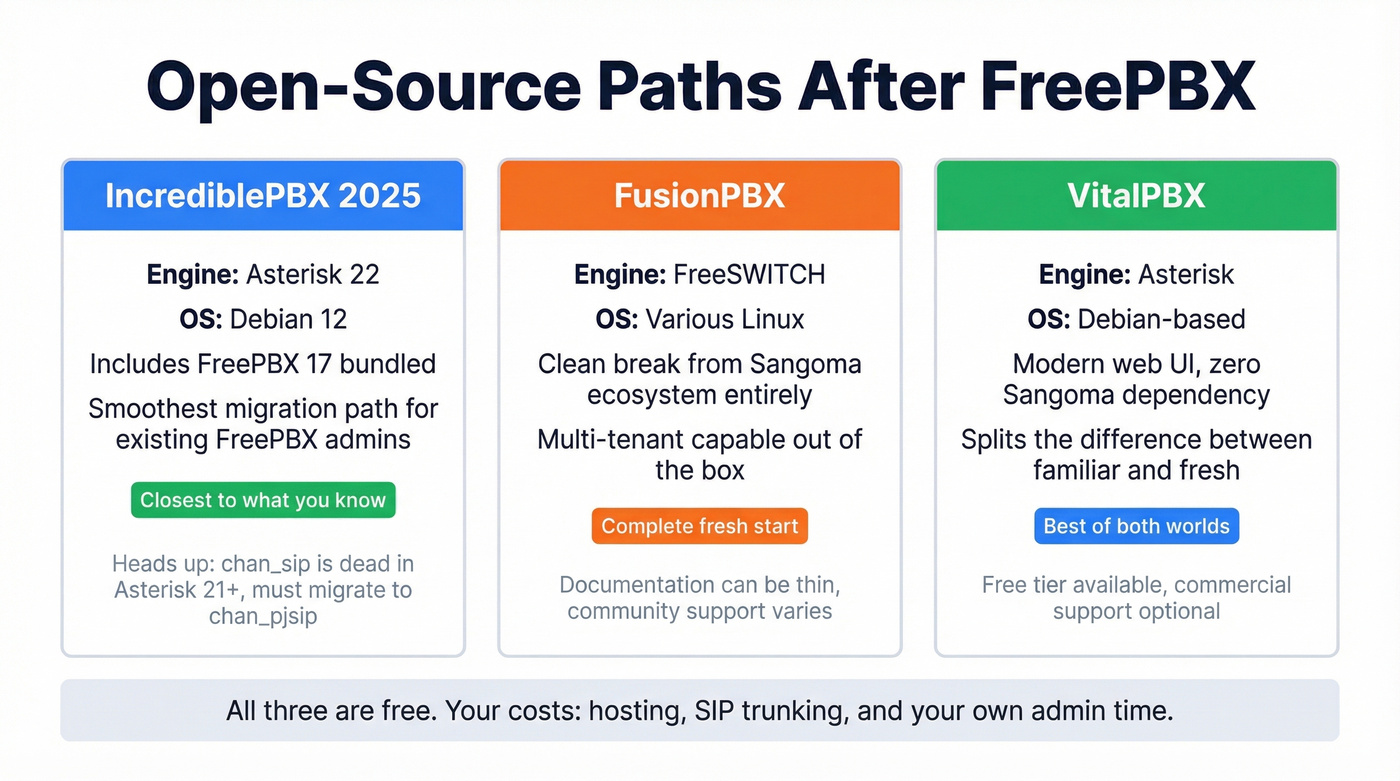
IncrediblePBX-2025 bundles Debian 12, Asterisk 22, and FreePBX 17 into a maintained package - the smoothest path if you want to stay in the Asterisk ecosystem. Note that chan_sip is dead in Asterisk 21+; everything needs to migrate to chan_pjsip.
FusionPBX runs on FreeSWITCH instead of Asterisk, a clean break from Sangoma's orbit entirely. Some admins on voip-info.org swear by it, though documentation can be thin. VitalPBX splits the difference - an Asterisk-based distro with a modern web UI and zero Sangoma dependency. All three are free; your costs are hosting, SIP trunking, and your own admin time.
Hidden fees aren't just a Sangoma problem - bad contact data silently drains your outbound budget too. Prospeo's 98% email accuracy and 7-day data refresh mean your reps spend time selling, not bouncing off stale records at $0.01 per verified email.
Your new phone system deserves data that actually picks up.
How to Choose the Right Replacement
Under 50 employees, want simplicity - go with Nextiva or Zoom Phone. Need global calling or contact center - 8x8. Technical team wanting self-hosted control - 3CX. FreePBX admin staying self-hosted - FusionPBX or VitalPBX.
If you’re comparing the two most common “simple” picks, our deeper breakdown of 8x8 vs Nextiva can help you sanity-check features vs price.
If I had to pick one recommendation for the average Sangoma refugee: Nextiva. Transparent pricing, fast setup, and a support team that actually picks up the phone. Start there unless you have a specific reason not to.
Sangoma Alternatives FAQ
Is Sangoma going out of business?
No. Sangoma continues operating its full product line across cloud, hybrid, and on-prem UC deployments. That said, the FreePBX community governance crisis and declining support quality have shaken confidence among technical users, driving more migration conversations than we've seen in years.
What's Sangoma's 18.5% ARRF fee?
The Administrative and Regulatory Recovery Fee is a monthly surcharge added on top of your base plan price. On a $17.99/user plan, it adds roughly $3.33/user/month - turning your "$18 plan" into a $21+ reality before DIDs or other line items.
What's the cheapest alternative to Sangoma?
Zoom Phone at $10/user/month (metered) or 3CX's free tier for small self-hosted deployments. Both are significantly cheaper than Sangoma's real cost after surcharges, and neither hides fees in the fine print.
Can I migrate my numbers away from Sangoma?
Yes. Number porting is standard across all major VoIP providers. Expect the process to take 7-14 business days. Sangoma charges a $150 cancellation fee per their published fee schedule, so factor that into your migration budget.
How do I keep prospect data accurate during a platform switch?
Use a B2B data platform to verify emails and phone numbers before launching outreach on the new system. Stale data on a fresh platform wastes your first month. Prospeo's free tier lets you verify 75 emails monthly - enough to start cleaning your most critical lists immediately, with no contracts required.