

Scrubby vs Wiza: Different Tools, Different Jobs - Here's What You Need
Scrubby verifies emails you already have. Wiza finds emails you don't.
So "Scrubby vs Wiza" isn't a normal head-to-head. It's closer to comparing a catch-all specialist to a prospecting workflow. The reason people mix them up is simple (and a little annoying): review sites sometimes lump them into the same bucket, even though the overlap is thin.
Let's break it down in plain terms: if you're cleaning lists, you're shopping for Scrubby. If you're building lists, you're shopping for Wiza.
30-Second Verdict
Pick Scrubby if catch-all domains are wrecking your deliverability and you need a second opinion on "risky" addresses.
Pick Wiza if you want a fast way to build prospect lists from professional profiles, export them, and get verification at the point of export.
Skip the two-tool stack if you're under ~5,000 outbound emails/month or you just don't want to babysit two subscriptions and two credit systems. One platform that finds and verifies (including catch-all handling) is usually the cleaner move.
Why This Comparison Gets Weird
Catch-all domains accept mail for any address at the domain level, which means a basic SMTP check can't confirm whether "jane@company.com" is real. That's why catch-all results pile up in "risky" buckets and why teams end up arguing about whether to send anyway.
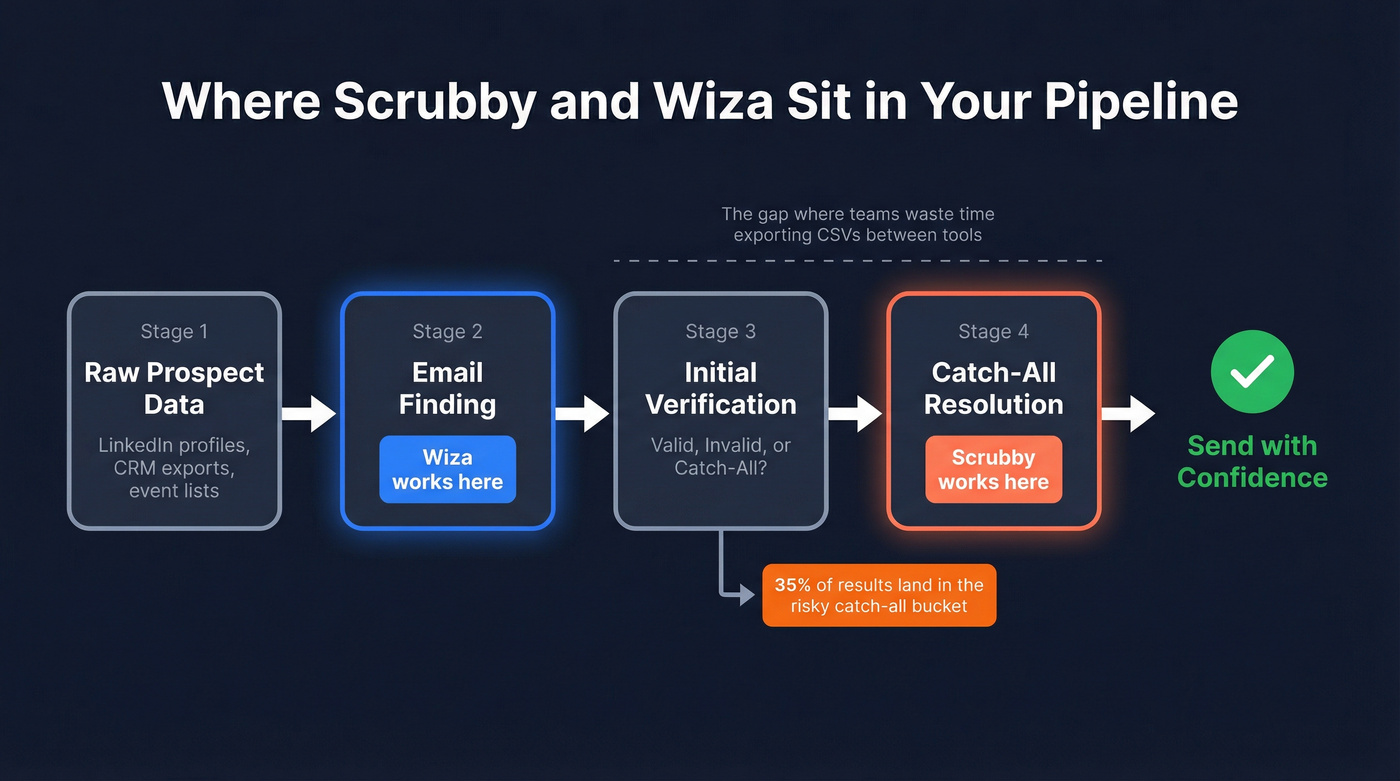
Scrubby exists to resolve that ambiguity. It's built to take the "catch-all / risky" pile and turn it into a clearer send/no-send decision.
Wiza, on the other hand, is built to create the list in the first place. It will detect catch-all domains and flag them, but it isn't trying to be a dedicated catch-all verdict engine.
Look, this is where teams waste time: they buy a finder, notice a lot of "risky" results, then panic-buy a specialist verifier, then spend the next month duct-taping the workflow together.
Feature Comparison (Quick)
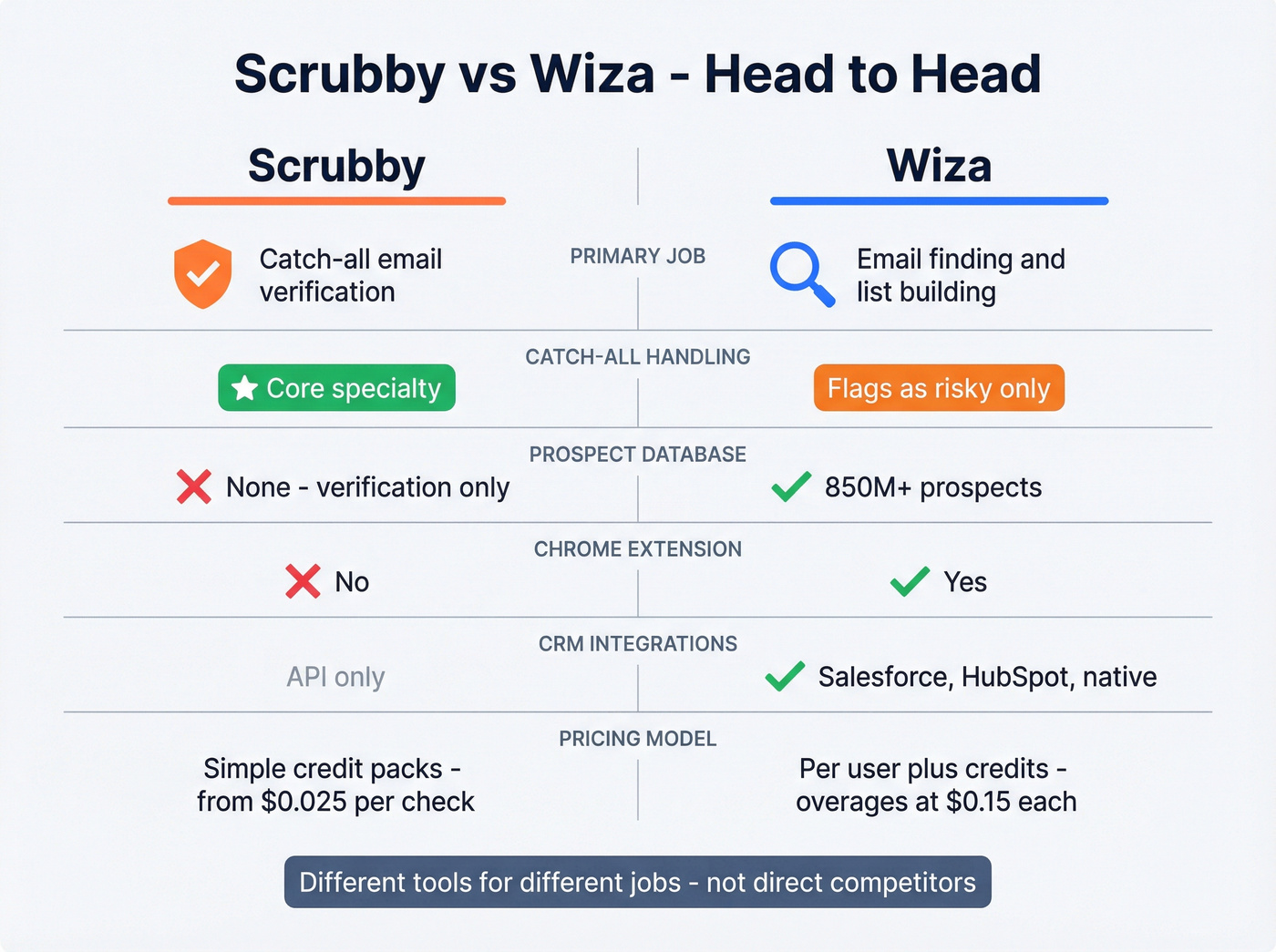
| Feature | Scrubby | Wiza | Who wins |
|---|---|---|---|
| Primary job | Catch-all verification | Email finding + export verification | Depends on your stage |
| Catch-all handling | Core specialty | Detects catch-all and flags as "risky" | Scrubby |
| Prospect database | Not applicable | 850M+ prospects | Wiza |
| Chrome extension | No | Yes | Wiza |
| CRM integrations | Via API | Salesforce, HubSpot | Wiza |
| Pricing style | Credit-based | Per-user + credits/overages | Scrubby (simpler) |
| Best fit | Cleaning risky lists | Building new lists | Depends |
Scrubby: What It's Actually Good At
Scrubby is a second-layer validator. You don't run it on every list by default; you run it when your normal verifier spits out a big chunk of catch-all or risky results and you need a more confident answer.
A scenario we've seen: an agency pulls a 20,000-contact list from a client CRM, runs a standard verifier, and gets 35% marked as catch-all. The client wants volume, the agency wants deliverability, and nobody wants to be the person who torched the sending domain. Scrubby is the "settle the argument" tool in that moment.
It doesn't find emails. It doesn't enrich contacts. It's there to reduce uncertainty on the hardest category.
One more thing: Reddit threads in r/Emailmarketing tend to land on the same vibe - "it works, but it gets pricey fast." That's not a dunk; it's just the tradeoff with specialist tools that charge for deeper checks.
Skip Scrubby if you aren't seeing a meaningful catch-all problem. If your lists are mostly clean and your bounce rate's already under control, you won't feel the value.

Scrubby can't find emails. Wiza can't properly resolve catch-alls. Prospeo does both in one step - 300M+ profiles, 98% email accuracy, and built-in catch-all handling with 5-step verification. No CSV exports between tools. No second subscription.
Kill the two-tool stack and start prospecting for $0.01/email.
Wiza: What It's Actually Good At
Wiza is a prospecting tool first. The workflow is built around pulling contacts from professional profiles, exporting lists, and verifying as you export so you don't pay for junk.
Per Wiza's G2 profile, it's used by nearly 500,000 individuals and over 50,000 companies globally, and it searches across 850M+ prospects. That's the pitch: big pool, fast extraction, and verification baked into the export step.
Wiza also leans into monitoring and job-change tracking, which is another tell that it's not trying to be a catch-all specialist. It's trying to keep your prospect list fresh and usable for outreach.
Where teams get surprised is the credit math. In our experience, people underestimate how quickly exports and overages add up once a couple of reps start pulling lists daily, especially if you're doing any kind of iterative targeting where you export, tweak filters, export again, and repeat.
Pricing Breakdown (Real-World Math)
Wiza pricing
| Plan | Monthly | Annual | Credits |
|---|---|---|---|
| Free | $0 | Monthly only | 20 emails/mo (+ 5 phones/mo) |
| Starter | $49/user/mo | Not listed | 100 emails/mo (+ 100 phones/mo) |
| $99/user/mo | $83/mo ($990/yr) | 500/mo (monthly) or "unlimited" (annual, capped at 30,000 exports/yr) | |
| Email + Phone | $199/user/mo | $166/mo ($1,990/yr) | 500/mo (monthly) or "unlimited" (annual, capped at 30,000 exports/yr) |
| Team (3+) | Not listed | From $449/mo (billed annually) | Unlimited (includes API access and more) |
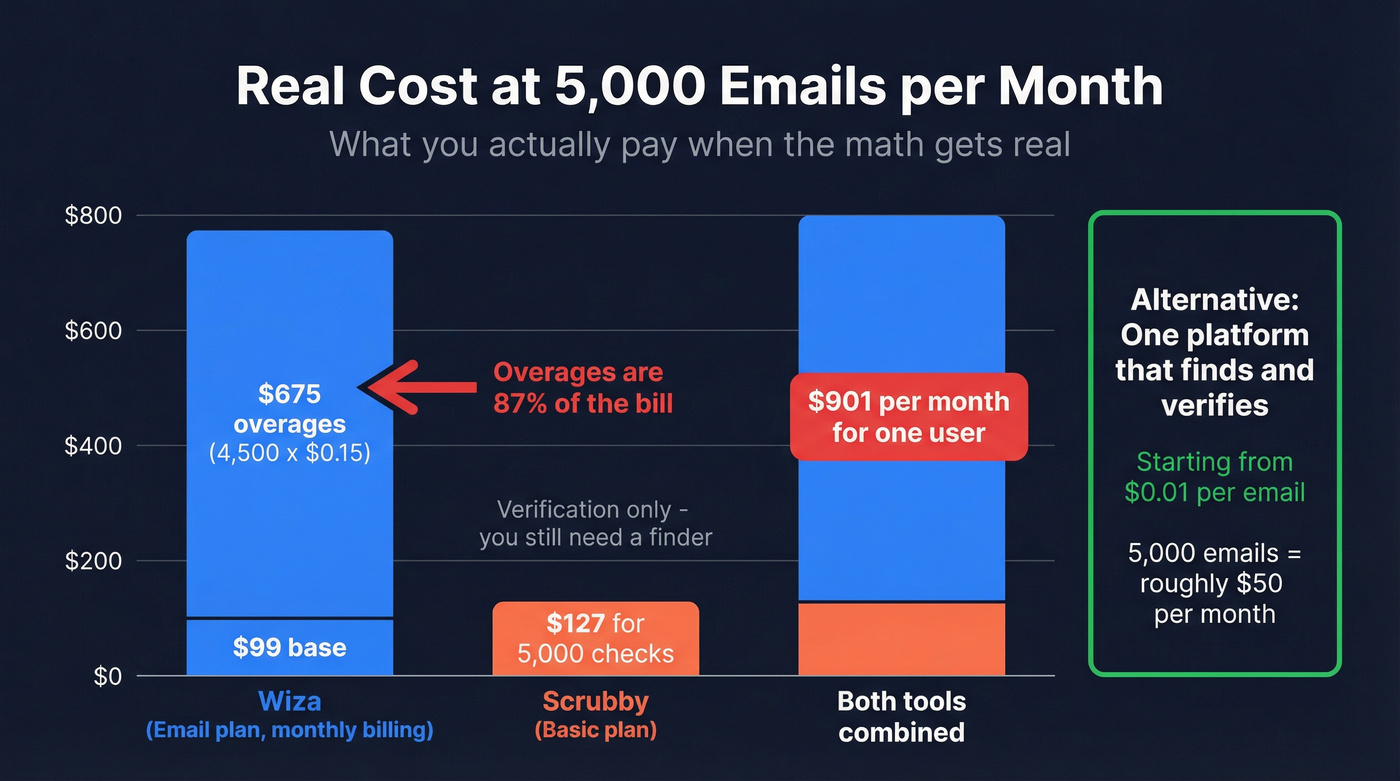
Overages are listed at $0.15 per extra email and $0.35 per extra phone number.
If you're doing 5,000 emails/month on the Email plan with monthly billing, the math is ugly: $99 base + (4,500 * $0.15) = ~$774/month for one user. Add seats and it climbs fast.
Scrubby pricing
| Plan | Price | Credits | Approx. per credit |
|---|---|---|---|
| Starter | $27/mo | 1,000 | ~$0.027 |
| Basic | $127/mo | 5,000 | ~$0.025 |
| Growth | $247/mo | 10,000 | ~$0.025 |
| Enterprise | Custom | Custom | From ~$0.01 |
Scrubby's pricing is easier to reason about because it's basically "pay for checks." The catch is obvious: it's verification only. If you don't already have emails, you're still buying (or building) a sourcing workflow upstream.
We've watched teams buy Wiza for sourcing, then add Scrubby for catch-all cleanup, then realize they're paying two bills and still spending time exporting/importing CSVs like it's 2014. That's the part that drives people nuts.
When to Use Which (And When Not To)
Use Scrubby when you already have lists (CRM exports, event lists, scraped lists, partner lists) and catch-all results are a real deliverability threat. It's a specialist, and specialists are worth it when the pain is specific.
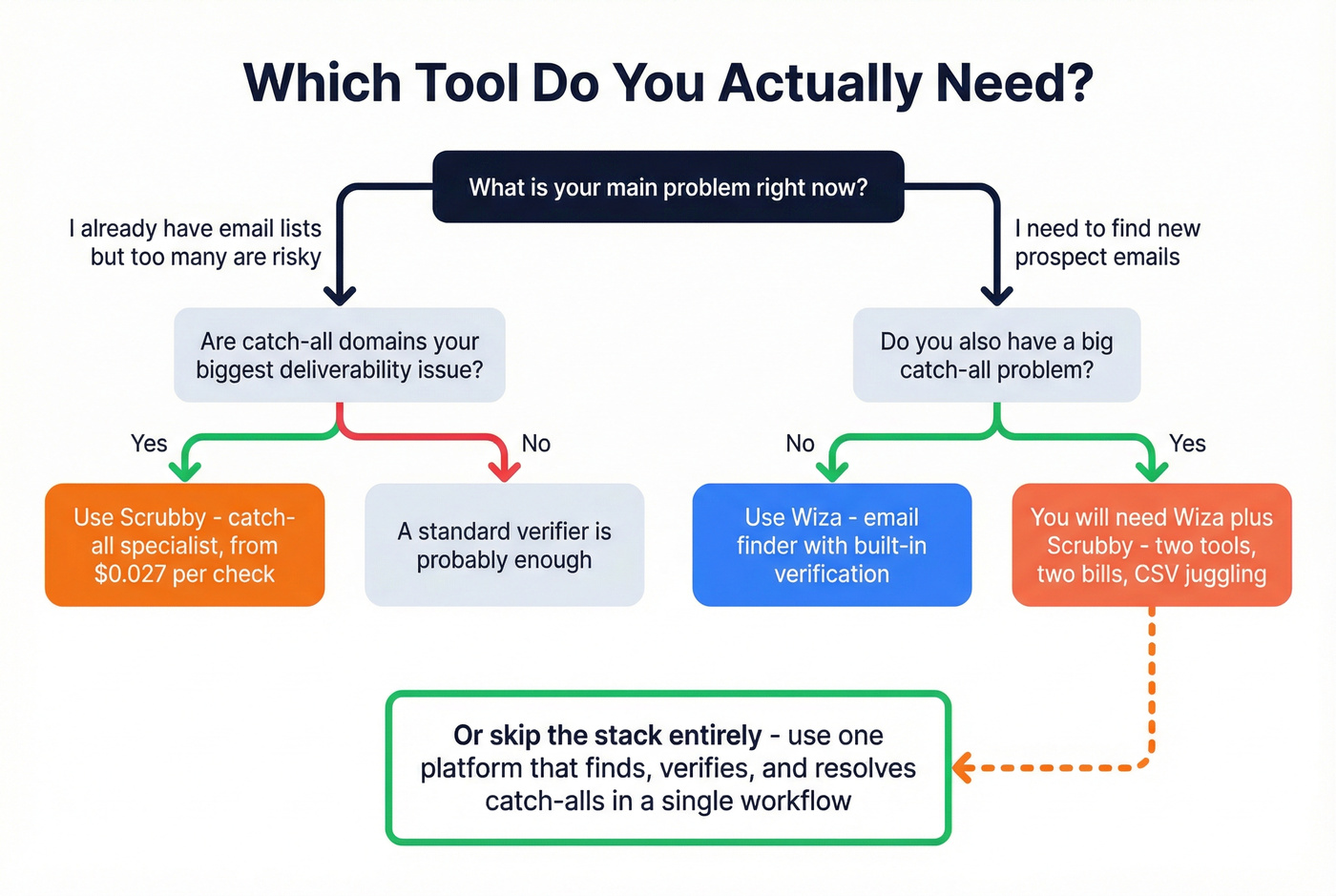
Use Wiza when your main problem is list creation and you want a browser-based workflow that turns professional profiles into exportable contacts with verification included.
Use both only if you have a steady stream of new prospects and catch-all domains are a recurring issue you can't ignore. The workflow is straightforward but not fun: Wiza finds emails, flags a chunk as risky, you export those, then you run them through Scrubby to decide what to send.
In our tests, that two-step process adds about 15 minutes per batch once you include exports, formatting, re-uploads, and the inevitable "wait, which file is the latest one?" moment. It works. It's just friction.
Skip the Two-Tool Stack (A Cleaner Option)
If you want one system that finds and verifies in the same flow - including catch-all handling - tools like Prospeo are the simpler answer.
Prospeo gives you 300M+ professional profiles, 143M+ verified emails, and 125M+ verified mobile numbers, with 98% email accuracy and a 7-day refresh cycle. That freshness matters more than most people think: when your data updates weekly instead of every month or two, you waste less time chasing people who left the company three job changes ago.
It's also built for the day-to-day reality of outbound teams: you can search with 30+ filters, verify in real time, enrich via CSV/CRM, and plug into common outbound tools through native integrations. For teams that care about deliverability, the built-in 5-step verification (including catch-all handling, spam-trap removal, and honeypot filtering) is the difference between "we sent a campaign" and "we kept our domain healthy."

That two-step Wiza-to-Scrubby workflow adds 15 minutes per batch and two invoices per month. Prospeo's database finds verified emails and resolves catch-all domains in a single search - with a 7-day data refresh cycle, not the 6-week industry average.
Stop babysitting two credit systems when one does the job better.
FAQ
Can Wiza verify catch-all emails?
Wiza detects catch-all domains and flags those addresses as "risky," exporting them free. It doesn't give you a definitive send/no-send verdict for catch-all mailboxes, which is why teams pair it with a catch-all specialist or use a platform that resolves catch-all results as part of verification.
Does Scrubby find email addresses?
No. Scrubby only verifies emails you already have. You need a finder upstream before Scrubby can help.
What's cheaper for 5,000 contacts per month?
If you're paying overages, Wiza can get expensive quickly at 5,000 exports/month on monthly billing. Scrubby is far cheaper for verification, but it doesn't source contacts, so you still need a finder.
If your goal is "5,000 usable contacts/month without juggling tools," a single platform that finds and verifies tends to be the lowest-friction (and often lowest-cost) setup.
What's the actual difference between Scrubby and Wiza?
Scrubby is a verification-only tool that specializes in resolving catch-all and risky emails. Wiza is an email finder that builds prospect lists and verifies at export. They sit at different stages of the pipeline: Wiza generates contacts; Scrubby cleans up the hardest verification cases.