

SPF Record DNS: Setup, Syntax, and Troubleshooting Guide
Business email compromise is a $55 billion problem, and the first line of defense is a single SPF record in DNS that most admins get wrong. This TXT record tells receiving mail servers which IP addresses can send email on behalf of your domain - and when it's misconfigured, legitimate mail bounces while spoofed mail sails through.
Here's the short version. You need one SPF record per domain, ending with -all once you've confirmed every sending source. Multiple records cause a PermError and break everything. The 10 DNS lookup limit is real and will bite you the moment your third SaaS vendor asks you to "just add this include." And SPF alone isn't enough - without DKIM and DMARC, you're half-protected at best.
What Is an SPF TXT Record?
An SPF record is a DNS TXT record published on your domain that lists every server authorized to send email as you. When someone receives a message claiming to be from yourcompany.com, their mail server pulls your SPF TXT record and checks whether the sending IP appears in that list. Pass or fail depends on your qualifier - hard fail, soft fail, or neutral.
SPF once had a dedicated DNS RR type (type 99), but it's no longer supported by major email providers and DNS services. Publish SPF as a TXT record. Always.
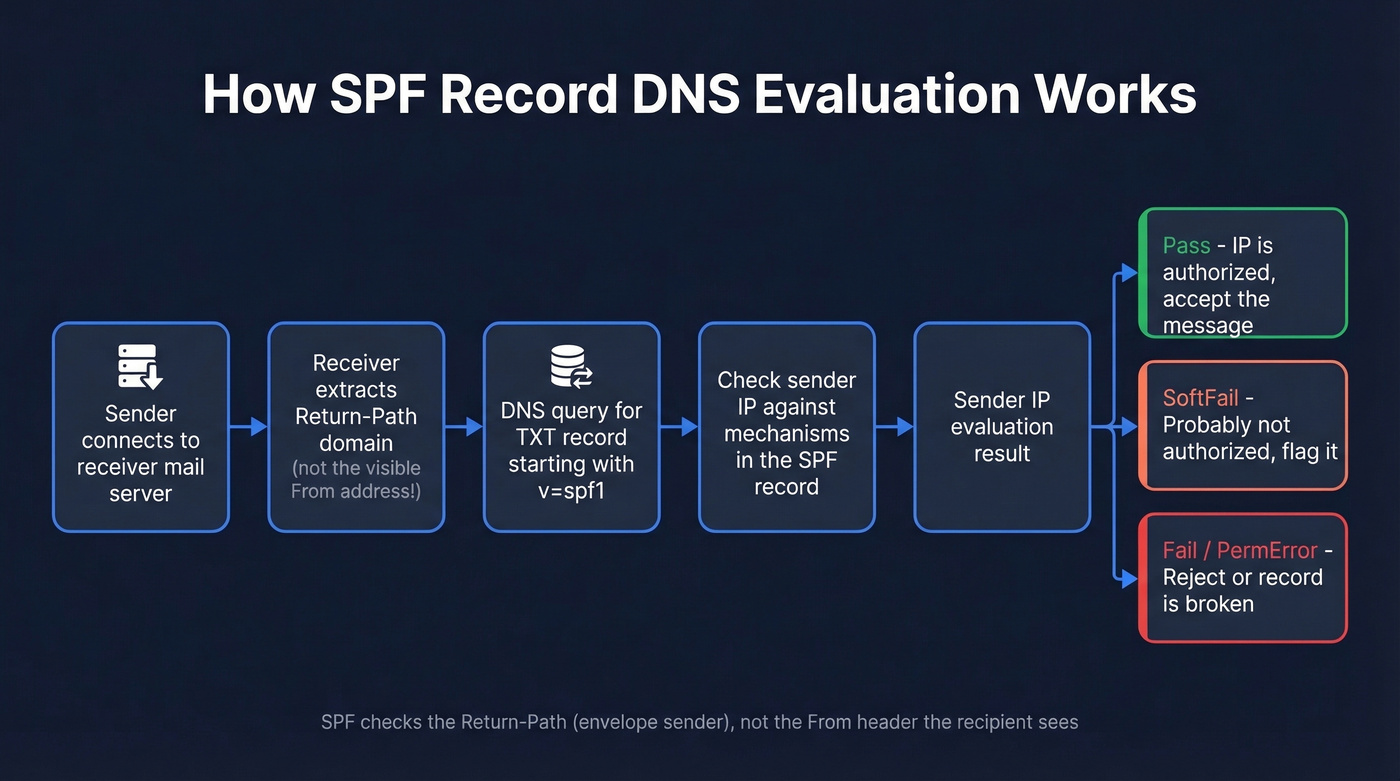
The standard governing all of this is RFC 7208, published in 2014 and still the canonical spec. One detail that catches people off guard: SPF checks the Return-Path domain (the RFC5321.MailFrom), not the visible "From" address the recipient sees. This distinction matters when you get to DMARC alignment, and it's the root cause of most "SPF passes but DMARC fails" confusion we see in support threads.
Here's the evaluation flow in plain terms:
Sender's server connects → Receiver extracts Return-Path domain
→ Receiver queries DNS for TXT record with "v=spf1"
→ Receiver checks sender IP against mechanisms in the record
→ Result: Pass / Fail / SoftFail / Neutral / PermError / TempError
Think of it as a guest list for your domain's email. If the IP isn't on the list, the bouncer decides what to do based on your instructions.
Complete SPF Syntax Reference
Every SPF TXT record starts with v=spf1 and contains a combination of mechanisms, modifiers, and qualifiers.
Mechanisms and Modifiers
| Element | Type | What It Does | Example |
|---|---|---|---|
all |
Mechanism | Matches everything | ~all (softfail all others) |
ip4 |
Mechanism | Matches an IPv4 address/range | ip4:203.0.113.0/24 |
ip6 |
Mechanism | Matches an IPv6 address/range | ip6:2001:db8::/32 |
a |
Mechanism | Matches A/AAAA of a domain | a:mail.example.com |
mx |
Mechanism | Matches MX hosts of a domain | mx |
include |
Mechanism | Pulls in another domain's SPF | include:_spf.google.com |
exists |
Mechanism | Passes if domain resolves | exists:%{l}._spf.example.com |
ptr |
Mechanism | Reverse DNS check (deprecated) | Avoid - expensive lookups |
redirect |
Modifier | Replaces entire SPF with another | redirect=_spf.example.com |
exp |
Modifier | Custom rejection explanation | exp=explain._spf.example.com |
The ptr mechanism is deprecated per RFC 7208. It triggers expensive reverse DNS lookups and dmarcian explicitly recommends avoiding it. If you see it in your record, replace it with ip4/ip6 entries.
Qualifiers
| Qualifier | Prefix | Result | What Receivers Do |
|---|---|---|---|
| Pass | + (default) |
Authorized | Accept |
| Fail | - |
Not authorized | Reject/quarantine |
| SoftFail | ~ |
Probably not authorized | Accept but flag |
| Neutral | ? |
No assertion | Treat as if no SPF |
Beyond these four, SPF evaluation can also return None (no record found), PermError (record is broken), or TempError (DNS timeout). PermError is the one that causes the most damage - it means your record is unparseable and receivers can't evaluate it at all.
SPF Examples for Common Providers
Here are the include strings for the services you're most likely using. Copy these exactly - typos in include domains are one of the most common SPF failures.
| Provider | Include String |
|---|---|
| Google Workspace | include:_spf.google.com |
| Microsoft 365 | include:spf.protection.outlook.com |
| SendGrid | include:sendgrid.net |
| Mailchimp | include:servers.mcsv.net |
| Zoho | include:zoho.com |
| Amazon SES | include:amazonses.com |
Microsoft 365 users in GCC High or DoD environments use different include strings - check Microsoft's documentation for sovereign cloud values.
A combined record for a company using Google Workspace, SendGrid, and Mailchimp:
v=spf1 include:_spf.google.com include:sendgrid.net include:servers.mcsv.net -all
That's three includes - three DNS lookups consumed. You've got seven left.
For domains that don't send email at all - parked domains, redirect domains - publish this:
v=spf1 -all
One line. It tells receivers that no server is authorized to send mail from this domain, and it's a simple defense against spoofing on domains you aren't actively using.
How to Create Your SPF Record
Four steps. Don't skip step one - it's where most problems start.
1. Audit every sending source. List every service that sends email as your domain: your email provider, marketing platform, transactional email service, CRM, support desk, appointment tools. Check with each vendor whether they use your domain as the Return-Path or their own. If they use their own, you don't need to include them in your SPF.
2. Build the record string. Start with v=spf1, add an include: for each service that uses your domain as Return-Path, add any ip4:/ip6: entries for on-premise servers, and end with -all or ~all during initial testing.
3. Add the TXT record in DNS. Log into your DNS provider - Cloudflare, Route 53, GoDaddy, Namecheap, whatever you use. Create a new TXT record with host @ (or leave blank for root domain), paste your SPF string as the value, and set TTL to 3600 (1 hour). One record per domain, no exceptions.
4. Verify with a lookup tool. Run your domain through MxToolbox or dmarcian's SPF Surveyor to confirm the record resolves correctly, counts your lookups, and flags syntax issues. A record that looks right in your DNS panel can still fail evaluation.

You're configuring SPF to protect your domain reputation. Don't waste that effort sending to bad emails. Prospeo's 5-step verification and spam-trap removal deliver 98% email accuracy - keeping your bounce rate under control.
Protect your sender reputation from both sides of the equation.
The 10 DNS Lookup Limit
Here's the scenario we see constantly: an admin has a working SPF record with 8 includes. Marketing adds Mailchimp. IT adds a ticketing system. Suddenly you're at 11 lookups, SPF returns PermError on every message, and nobody notices until Gmail starts bouncing customer-facing emails.
This is one of the most common operational failures, and the consensus on r/sysadmin is that it catches everyone at least once.
RFC 7208 Section 4.6.4 caps DNS-querying mechanisms at 10 per evaluation. It also limits "void" DNS lookups to 2. Exceed either, and you get a PermError.
Which Mechanisms Count
| Counts Toward Limit | Doesn't Count |
|---|---|
include |
all |
a |
ip4 |
mx |
ip6 |
ptr |
|
exists |
|
redirect |
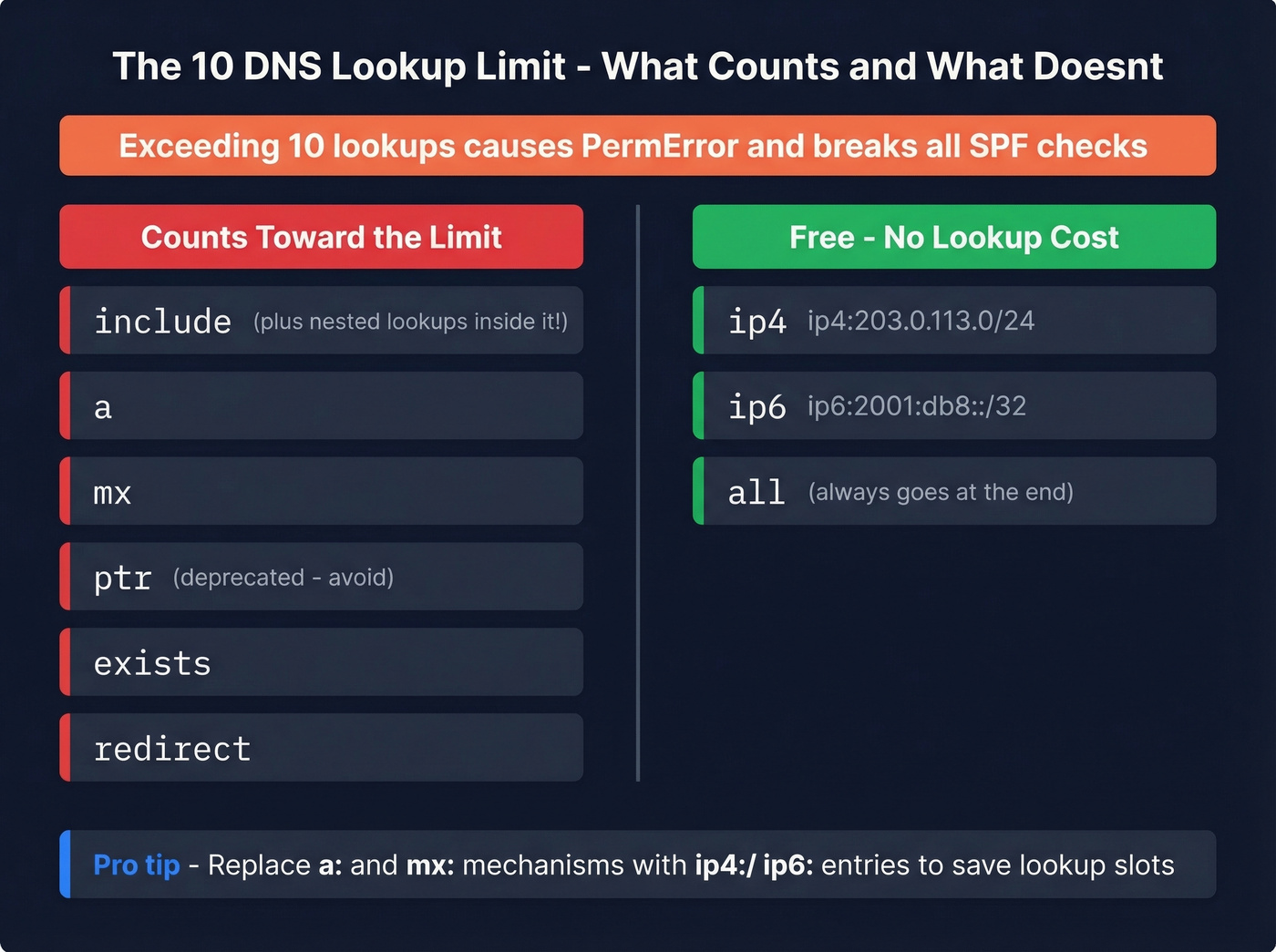
Here's the part people miss: each include also triggers the lookups inside the included record. So include:_spf.google.com doesn't just cost you one lookup - it costs you one plus whatever DNS-querying mechanisms exist inside Google's policy. Use EasyDMARC's SPF lookup tool to see the full tree.
Three Ways to Fix It
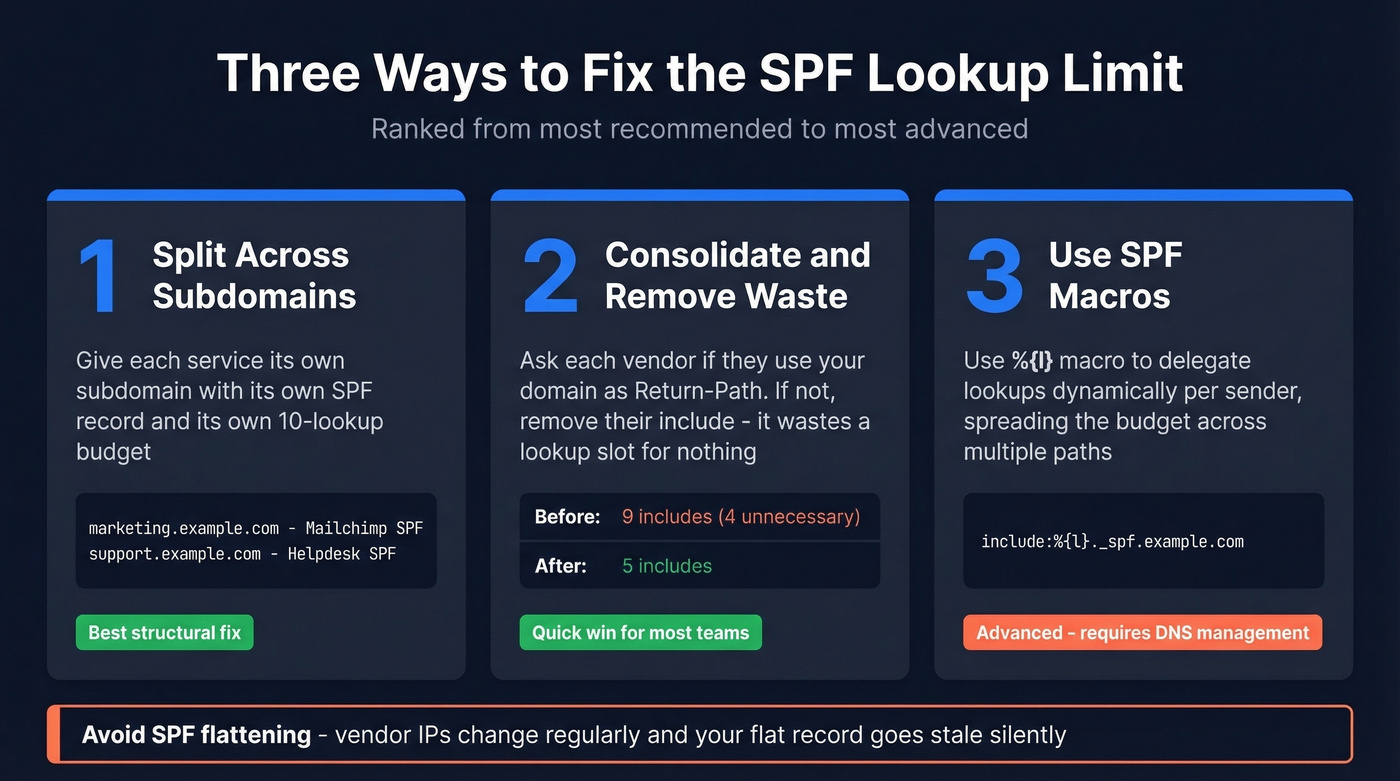
1. Split sending across subdomains. This is the best structural fix. Give each high-volume service its own subdomain - marketing.example.com for Mailchimp, support.example.com for your helpdesk. Each subdomain gets its own SPF record and its own 10-lookup budget. The visible From can stay on your apex domain as long as your DMARC policy uses relaxed SPF alignment, which is the default.
One caveat: if you've set aspf=s (strict alignment) in your DMARC record, this approach breaks. Check before you commit.
2. Consolidate and remove unnecessary includes. This is the low-hanging fruit most teams skip. Ask every vendor: "Do you use our domain as the Return-Path, or yours?" Many ESPs and transactional senders use their own bounce domain, which means adding their include to your SPF is wasted - it consumes a lookup slot for nothing. We've seen records with 4-5 includes that served zero purpose. Replace a: and mx: mechanisms with ip4:/ip6: where possible, since those don't count toward the limit.
3. Use SPF macros for per-sender delegation. This is the advanced play. Instead of listing every vendor in your root SPF, use the %{l} macro to delegate lookups dynamically:
v=spf1 include:_spf.google.com include:%{l}._spf.example.com ~all
Then create DNS records like support._spf.example.com and billing._spf.example.com, each pointing to the relevant vendor's SPF. This spreads your lookup budget across multiple evaluation paths instead of loading them all into one record.
A note on SPF flattening: tools that resolve all your includes down to raw IP addresses and publish a flat record sound appealing. The problem is that vendors change their IPs regularly, so your flattened record goes stale and mail breaks. Dmarcian calls flattening a last resort, and we agree. Use subdomain splitting or macros instead.
Common SPF Mistakes
Most of these are avoidable with five minutes of checking. Six problems we see over and over.
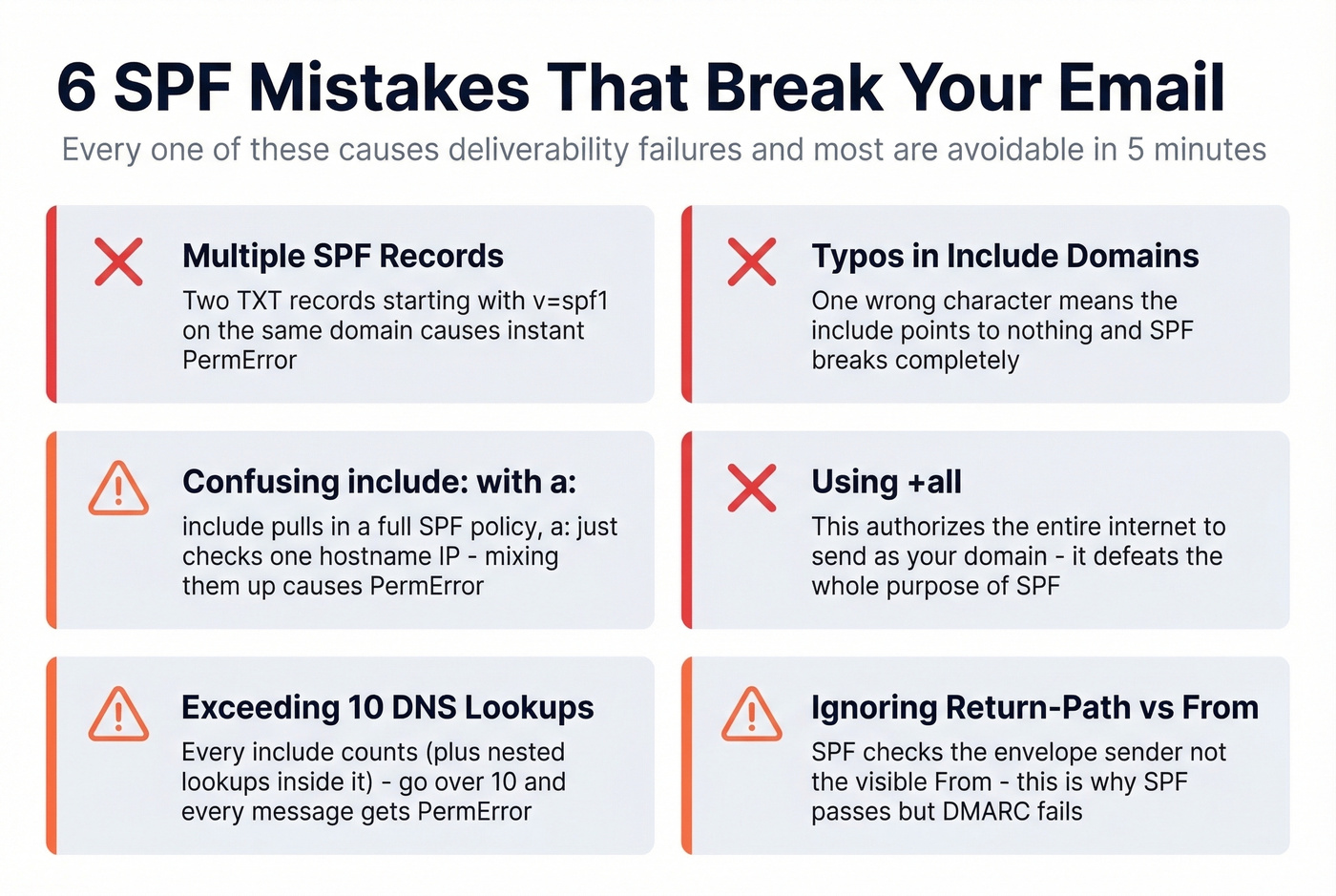
Multiple SPF records on one domain. Two TXT records both starting with v=spf1 cause an immediate PermError. Receivers can't evaluate either one. Merge them into a single record. This happens most often when a new vendor tells you to "add an SPF record" and the admin creates a new TXT entry instead of editing the existing one.
Typos in include domains. A real case from r/DMARC: an admin typed edgedatacetner.com instead of edgedatacenter.com. The include pointed to a nonexistent domain, SPF returned PermError, and Gmail bounced every message from their appointment system. Always copy include strings directly from the vendor's documentation.
Confusing include: with a:. These do different things. include:example.com pulls in that domain's entire SPF policy. a:mail.example.com authorizes the A/AAAA record of a specific hostname. When a vendor says "add a:mail.vendor.com" and you write include:mail.vendor.com instead, you're pulling in a policy that probably doesn't exist - another PermError.
Using +all. This literally authorizes every IP address on the internet to send as your domain. It's the SPF equivalent of leaving your front door open with a "come on in" sign. Always use -all or ~all during testing. Never +all.
Hitting the 255-character string limit. A single DNS TXT string can't exceed 255 characters. For long records, your DNS provider needs to split the value into multiple quoted strings within the same TXT record. Most modern providers handle this automatically, but some older interfaces don't. Keep the overall DNS response small - ideally under 512 bytes - to avoid UDP fragmentation issues.
Forgetting that subdomains need their own records. SPF records don't inherit from the parent domain. If you send email from support.example.com, it needs its own SPF TXT record. The record on example.com won't cover it. Skip this and your subdomain mail fails SPF silently.
Why Forwarding Breaks SPF
When someone forwards your email, the forwarding server opens a new SMTP connection to the final recipient. The receiving server sees the forwarder's IP address, checks it against your domain's SPF record, and - predictably - it's not there. SPF fails.
This isn't a misconfiguration. It's a fundamental limitation of how SPF works with forwarded mail.
SRS and ARC
Two protocols patch this gap. SRS (Sender Rewriting Scheme) has the forwarding server rewrite the Return-Path to its own domain, so SPF evaluation happens against the forwarder's SPF record instead of yours. The original sender information is preserved in the rewritten address for bounce handling.
ARC (Authenticated Received Chain) takes a different approach. The forwarding server records what it verified on the inbound hop - SPF result, DKIM result, DMARC result - and signs that chain. Downstream receivers can then look at the ARC headers and trust the original authentication results even if DKIM breaks during forwarding, which happens when forwarders add footers or modify subject lines.
The Microsoft SRS Caveat
A Reddit thread attributes a scenario dubbed "LaunDroMARC" to security researcher Aaron Hart: spoofed email that fails DMARC at the first hop can pass SPF and DMARC after being forwarded through Exchange Online, thanks to SRS rewriting. Microsoft doesn't consider it a vulnerability. The practical takeaway: monitor your DMARC aggregate reports for unexpected forwarding patterns, especially through Microsoft 365 tenants.
How SPF, DKIM, and DMARC Work Together
SPF authorizes servers. DKIM signs messages. DMARC ties them together with policy and reporting. You need all three.
SPF checks whether the sending IP is authorized for the Return-Path domain. DKIM uses a cryptographic key pair - the sending server signs the message with a private key, and the receiver verifies it against a public key published in DNS. DMARC then checks whether at least one of those passes and aligns with the visible From domain.
That alignment piece is where things break. A scenario we've seen from Zoho users more than once: SPF passes because the Return-Path domain has a valid SPF record, but DMARC fails because the Return-Path domain doesn't match the From domain. The admin rewrites the record six times, getting more frustrated each round, when the actual problem is alignment - not syntax. To verify authentication is working end-to-end, check the Authentication-Results header in a received message. You'll see spf=pass, dkim=pass, and dmarc=pass when everything lines up.
DMARC policies escalate in three stages: p=none (monitor only), p=quarantine (send failures to spam), and p=reject (block failures outright). The recommended path is to start at none, analyze your aggregate reports for legitimate senders you missed, fix those, then move to quarantine and eventually reject.
The reality? 75-80% of domains with a DMARC record never make it past none. Don't be one of them. Teams that push to enforcement typically see a 5-10% deliverability lift.
Let's be honest: if you're running cold outbound, getting SPF + DKIM + DMARC to enforcement matters more than any fancy deliverability tool you could buy. Fix authentication first. Optimize everything else second.
Protecting Sender Reputation Beyond SPF
SPF, DKIM, and DMARC protect your domain from external spoofing. But there's another threat to your sender reputation that comes from inside the house: bad data.
Sending to invalid addresses, spam traps, and dead mailboxes generates bounces that ISPs interpret as a signal you don't maintain your lists. Authentication is half the equation - clean data is the other half. We've worked with outbound teams who had perfect DNS records but still landed in spam because 15% of their list was bouncing. Before you launch a cold outreach campaign or import a purchased list, running every address through a verification tool like Prospeo keeps your bounce rate under control and preserves the domain reputation you just spent time protecting with your SPF record.
If you're actively monitoring bounces and deliverability, it also helps to track your email bounce rate and use dedicated email reputation tools to spot issues early. And if you suspect list hygiene problems, prioritize spam trap removal before scaling volume.
SPF misconfigurations tank deliverability. So does bad contact data. Prospeo refreshes 300M+ profiles every 7 days - not every 6 weeks - so you're never emailing stale addresses that trigger bounces and hurt your domain.
Clean DNS records deserve clean data at $0.01 per verified email.
FAQ
Can I have two SPF records on one domain?
No. Publishing two TXT records that both start with v=spf1 causes a PermError, meaning receivers can't evaluate your SPF at all. Merge all authorized sources into a single record. If a vendor tells you to "add an SPF record," edit your existing one - don't create a second.
What happens when SPF fails?
The outcome depends on your qualifier. -all produces a hard fail, telling receivers to reject or quarantine the message. ~all produces a soft fail - the message is usually delivered but flagged. The receiving server's own policy and your DMARC record determine the final action.
Does SPF work with email forwarding?
Not reliably. Forwarding creates a new SMTP connection from the forwarder's IP, which won't appear in the original domain's SPF record. SRS rewrites the Return-Path to fix this, and ARC preserves the original authentication chain for downstream receivers.
What's the difference between -all and ~all?
-all instructs receivers to reject mail from unauthorized senders outright. ~all says "flag it but deliver." Use ~all during initial rollout while you're confirming all legitimate sending sources, then switch to -all once you've verified everything and DKIM plus DMARC are in place.
How do I keep my bounce rate low after setting up SPF?
Authentication stops spoofing, but it doesn't stop you from sending to bad addresses. Use a real-time email verification service to catch invalid addresses, spam traps, and catch-all domains before they inflate your bounce rate. Clean lists protect the sender reputation your authentication records work to establish.