

How to Test an Email Address: Free Tools, Manual Methods, and What Results Mean
Your last campaign bounced 8% and your ESP sent you a warning. Most teams treat 2% total bounces as the line in the sand - yours just quadrupled that. Now you're staring at a list of 12,000 contacts wondering which ones are real and which ones are ticking time bombs for your sender reputation.
You need to test an email address - every single one - before your next send. The fix isn't complicated, but picking the wrong method or the wrong tool will cost you time and deliverability you can't get back.
Here's every way to do it in 2026, from free single-check tools to manual SMTP commands you can run in your terminal.
Verification vs. Spam Testing
Let's clear up a common mix-up. Testing an email address means checking whether a recipient's mailbox exists and can receive mail. That's verification. Tools like mail-tester.com do something completely different - they test whether your outgoing message looks spammy by scoring your content, authentication records, and sending infrastructure.
Bouncing? You need verification. Landing in spam? You need a deliverability audit. Different problems, different tools.
What You Need (Quick Version)
Three paths depending on your situation:
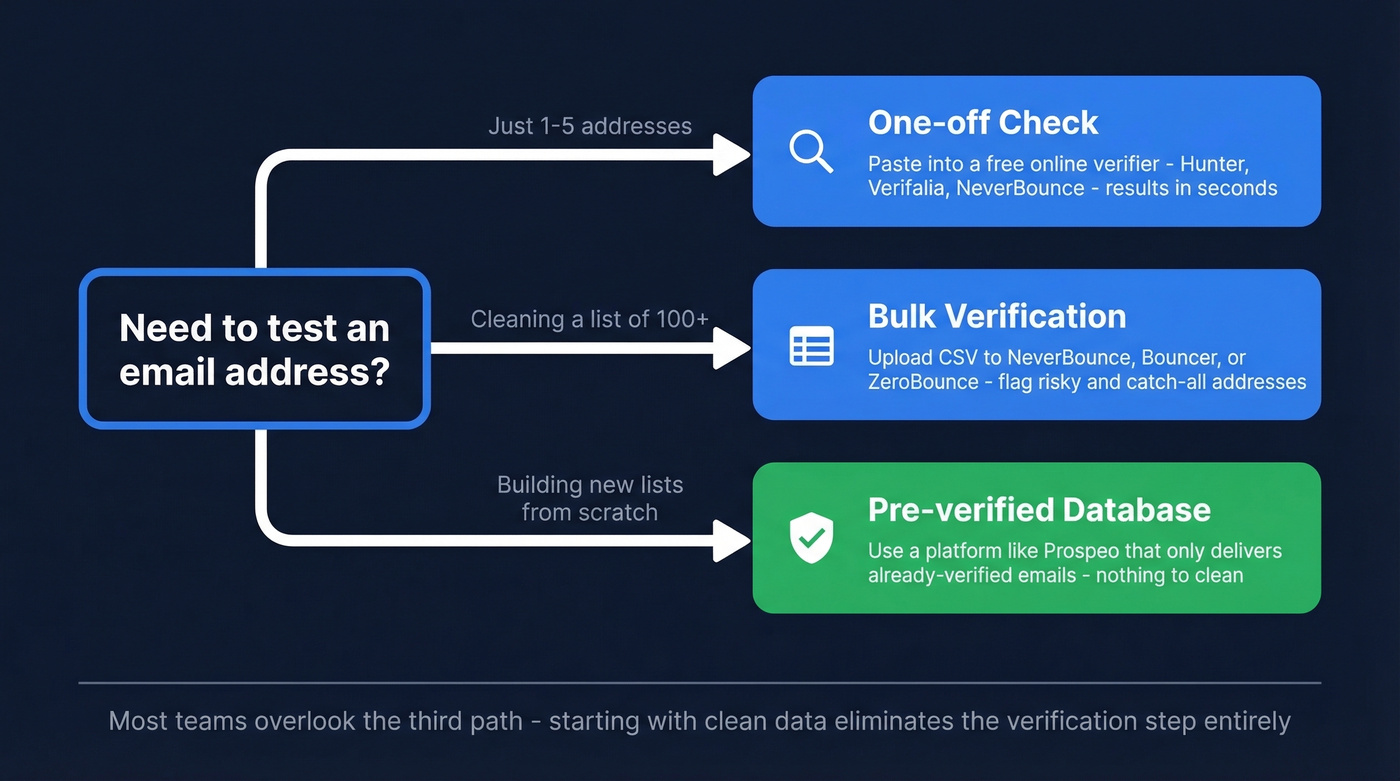
- One-off check - Paste a single address into a free online verifier. Hunter, Verifalia, or NeverBounce all handle this in seconds.
- Cleaning a list before a campaign - You need bulk verification with catch-all handling. NeverBounce, Bouncer, or ZeroBounce will process thousands of addresses and flag the risky ones.
- Skip verification entirely - Use a platform that only delivers pre-verified emails from a regularly refreshed B2B database. Nothing to clean because the data arrives clean.
Most teams overlook that third path. We'll come back to it.
Free Email Verification Tools Compared
Most tools advertise high-90s accuracy on their marketing pages. In practice, accuracy drops hard on catch-all domains, which make up 30-40% of B2B email domains. Keep that in mind as you compare.
| Tool | Free Tier | Cost/1K | Cost/10K | Differentiator |
|---|---|---|---|---|
| Prospeo | 75 verifications/mo | ~$10 | ~$100 | Find + verify in one step |
| Hunter | 100 verifications/mo | ~$14.90 | ~$149 | Combined finder + verifier |
| ZeroBounce | 100 verifications/mo | ~$6.40 | ~$64 | SOC 2, 40+ integrations |
| NeverBounce | 1,000 credits | ~$8 | ~$50 | 80+ integrations, API |
| Bouncer | 1,000 credits | ~$7 | ~$45 | Budget-friendly, accurate |
| Emailable | 250 credits | ~$5 | ~$50 | Simple UI, fast |
| EmailListVerify | Up to 3 free checks | ~$2.40 | ~$24 | Cheapest bulk option |
| Verifalia | Free single checks | - | - | 30+ verification steps |
Now let's look at the ones worth talking about in detail.
Prospeo
Use this if you're tired of the two-step dance of finding emails in one tool and verifying them in another. Prospeo combines both into a single workflow - search its 300M+ professional profile database, and every email that comes back has already passed a 5-step verification pipeline including catch-all handling and spam-trap removal and honeypot filtering included.

We've tested this against other tools extensively, and the 98% email accuracy rate is the highest in production we've seen. The 7-day data refresh cycle means you're not verifying against stale records the way you would with tools that refresh every 4-6 weeks. The free tier gives you 75 email verifications plus 100 Chrome extension credits per month, and paid plans run about $0.01 per email with no annual contracts.
Skip this if you only need a one-time check on a handful of addresses and don't want to create an account.
Hunter
Hunter's Email Verifier is free to use with no signup needed for single checks, and the free plan gives you 100 verifications per month - plenty for spot-checking individual addresses. Bulk verification runs about $149 per 10K, which isn't the cheapest, but the combined finder-verifier interface is convenient.
Where Hunter falls short is catch-all-heavy enterprise lists. You'll see a lot of "accept-all" results without much guidance on what to do with them.
ZeroBounce
ZeroBounce is the compliance-first option. SOC 2 certified, with a verification engine that includes AI-based scoring for catch-all addresses. At $64 per 10K, it's mid-range on pricing.

If you're in regulated industries - financial services, healthcare, government - the audit trail and compliance documentation justify the premium. If you're in SaaS sales and just need clean emails, you're overpaying for certifications you don't need.
NeverBounce
NeverBounce gives you 1,000 free credits, and bulk pricing starts around $8 per 1K. The real selling point is the integration library - 80+ native connections let you plug verification directly into your CRM, ESP, or marketing automation platform without touching an API. For teams that need verification baked into existing workflows rather than as a standalone step, NeverBounce is the safest pick.
Budget Picks
Bouncer offers 1,000 free credits and charges $7 per 1K after that. Accuracy is competitive with the bigger names, and the interface is clean. Strong choice if you're cost-conscious and don't need 40 integrations.
Emailable keeps things simple - 250 free credits, pricing that works out to about $50 per 10K. Good for marketers who just want to upload a CSV and get results. Check their best practices guide for workflow tips.
EmailListVerify is the cheapest bulk option at $24 per 10K. If you're verifying massive lists on a tight budget, it's hard to beat on pure cost-per-verification.
Verifalia offers free single-address checks and runs over 30 verification steps. Useful for quick one-offs when you just need to test an email address right now.
How to Manually Verify via SMTP
Sometimes you want to check an address yourself - maybe you're debugging a bounce, or you want to understand what verification tools actually do under the hood. Here's the manual method, confirmed by Microsoft's own SMTP testing documentation.
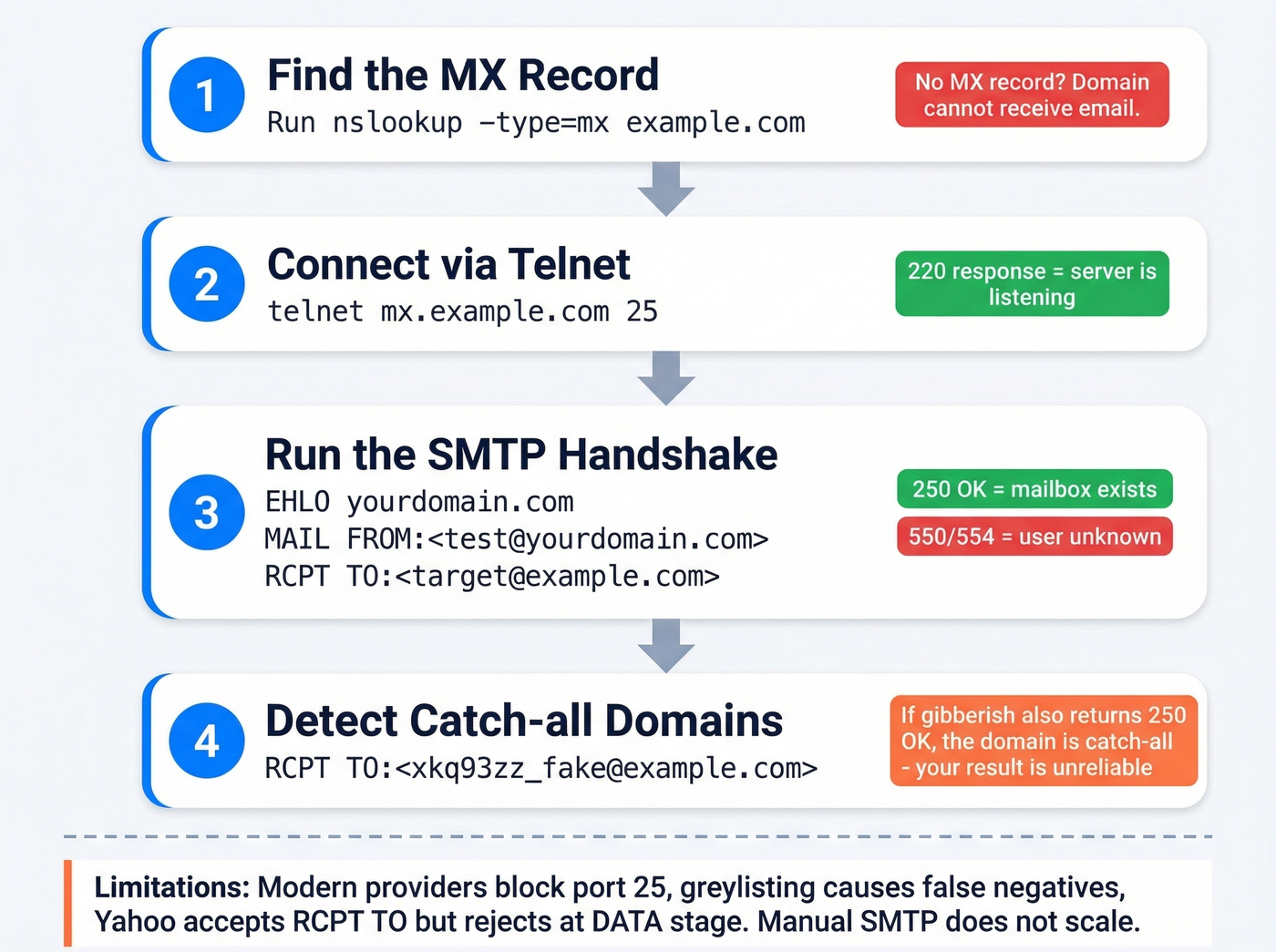
Step 1: Find the MX record.
nslookup -type=mx example.com
This returns the mail server(s) responsible for that domain. No MX record? The domain can't receive email. Full stop.
Step 2: Connect via Telnet.
telnet mx.example.com 25
A successful connection returns a 220 response code - the server is listening.
Step 3: Run the SMTP handshake.
EHLO yourdomain.com
MAIL FROM:<test@yourdomain.com>
RCPT TO:<target@example.com>
If RCPT TO returns 250 OK, the server says it'll accept mail for that address. A 554 or 550 with "user unknown" means the mailbox doesn't exist.
Step 4: Detect catch-all domains.
Run RCPT TO with a gibberish address:
RCPT TO:<xkq93zz_fake@example.com>
If this also returns 250 OK, the domain is catch-all - it accepts everything, and your original 250 OK doesn't actually confirm the mailbox exists.
Here's the thing: the limitations are real. Modern email providers aggressively block port 25 connections from unknown IPs. Greylisting will temporarily reject your probe and ask you to retry later. Many major mailbox providers and enterprise gateways limit or outright block SMTP probing. Some providers like Yahoo accept the RCPT TO command but reject at the DATA stage - meaning you'd need to attempt actual delivery to get a definitive answer, which defeats the purpose. This method works for understanding the mechanics, but it doesn't scale, which is exactly why verification tools exist.

Every email from Prospeo's 300M+ database passes a 5-step verification pipeline - catch-all handling, spam-trap removal, and honeypot filtering included. No separate verification step. No bounced-email surprises. Just 98% accurate contacts refreshed every 7 days, starting at $0.01 per email.
Skip the verification tools entirely - start with clean data.
How Verification Works Under the Hood
Every professional verification tool runs a pipeline that mirrors the manual process but adds layers you can't replicate by hand:
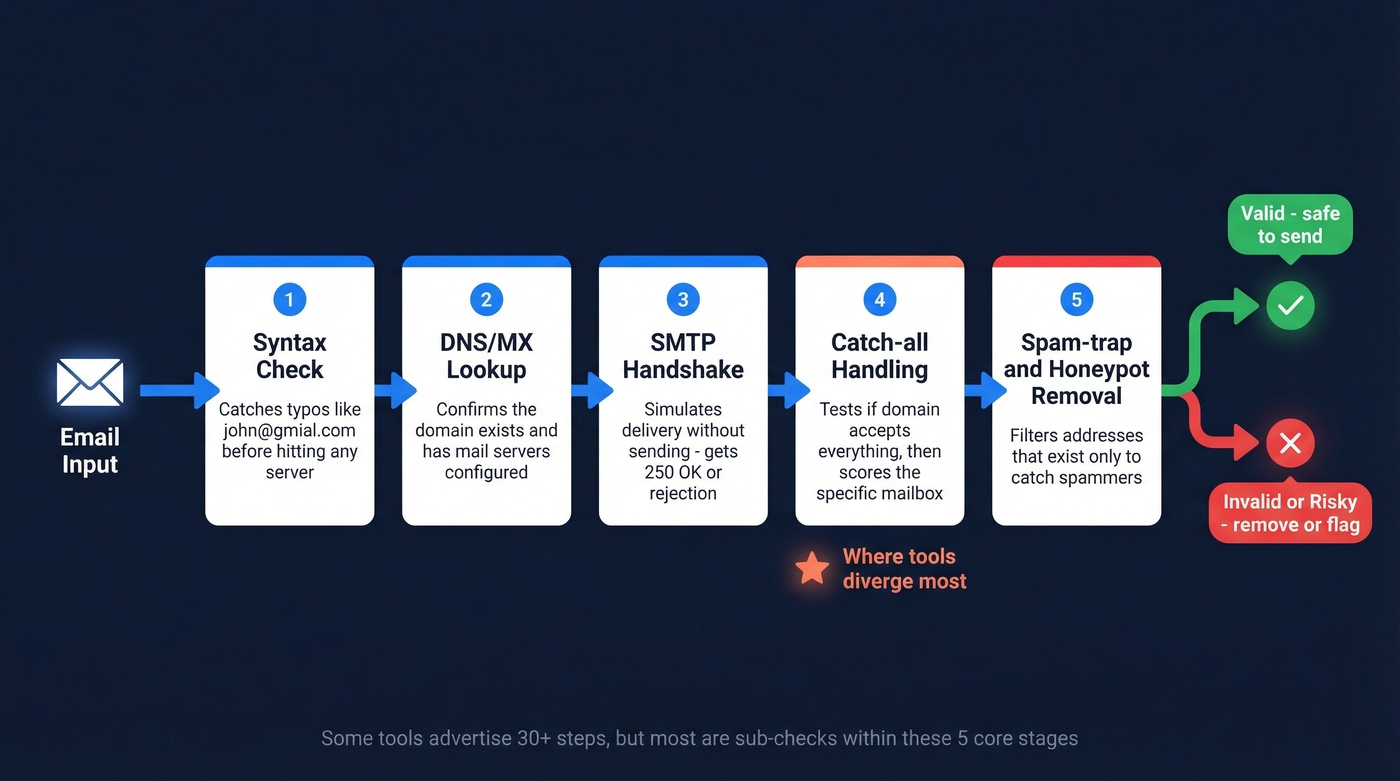
- Syntax check - Is the address formatted correctly? Catches typos like
john@gmial.combefore anything touches a server. - DNS/MX lookup - Does the domain exist and have mail servers configured? Eliminates dead domains instantly.
- SMTP handshake - Connects to the mail server and simulates delivery without actually sending a message. This is where you get the
250 OKor rejection. - Catch-all handling - Tests whether the domain accepts all addresses indiscriminately. If it does, the tool applies proprietary scoring to estimate whether the specific mailbox is real.
- Spam-trap and honeypot removal - Filters out addresses that exist solely to catch spammers. Sending to these destroys your reputation faster than bounces do.
Some tools advertise 30+ verification steps, but most of those are sub-checks within these five core stages. The number of steps matters less than how the tool handles catch-all domains and greylisting.
The catch-all step is where tools diverge most. Basic verifiers just label catch-all addresses as "unknown" and leave you to decide. Better tools use behavioral signals and historical data to score catch-all addresses rather than punting the decision to you. Greylisting is the other wildcard - some servers temporarily reject the first connection attempt and expect a retry. Cheap verifiers treat this as "unknown." Professional tools retry with appropriate delays, which is why verification sometimes takes minutes instead of milliseconds.
Understanding Your Results
Verification tools return more than just "valid" or "invalid." Here's what each result category means and what to do with it:
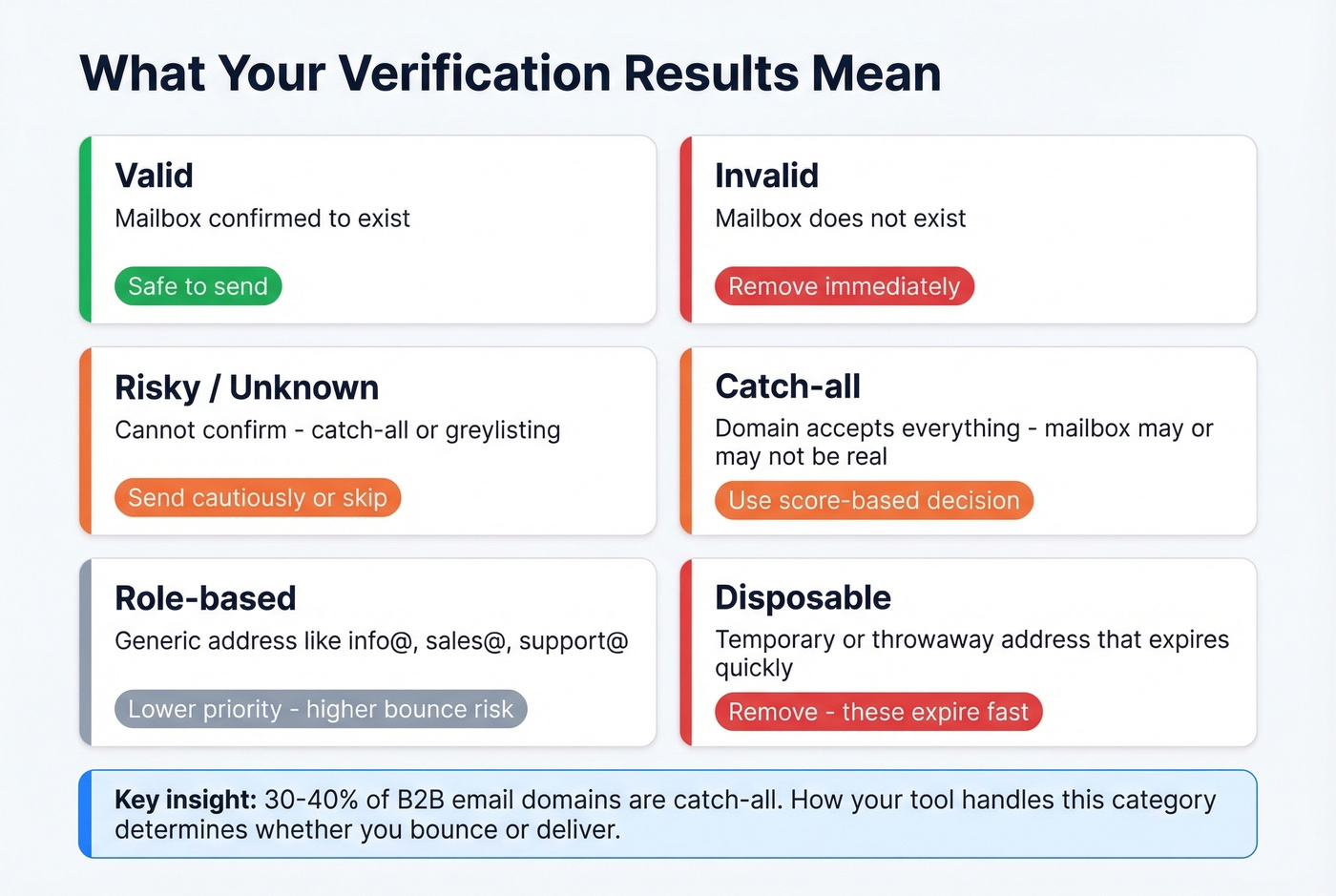
| Result | What It Means | Action |
|---|---|---|
| Valid | Mailbox confirmed | Safe to send |
| Invalid | Mailbox doesn't exist | Remove immediately |
| Risky/Unknown | Can't confirm (catch-all, greylisting) | Send cautiously or skip |
| Catch-all | Domain accepts everything | Score-based decision |
| Role-based | Generic address (info@, sales@) | Lower priority, higher bounce risk |
| Disposable | Temporary/throwaway address | Remove - these expire fast |
Invalid results cause hard bounces - permanent failures that ESPs track aggressively. Soft bounces from a full mailbox or a temporarily down server are less damaging but still worth monitoring. The distinction matters because most ESPs weigh hard bounces far more heavily when deciding whether to throttle your account.
The catch-all category is where most teams get stuck. Roughly 30-40% of B2B email domains are configured as catch-all, especially enterprise environments running Microsoft 365 or Google Workspace behind gateways like Proofpoint or Mimecast. That means a huge chunk of your prospect list will come back as "risky" even though many of those addresses are perfectly real.
Role-based addresses like info@, support@, and sales@ are a different kind of risk. They technically exist, but they're often monitored by multiple people, have higher complaint rates, and some ESPs flag them automatically. Send to them sparingly and never in cold outbound sequences.
Bounce Rate Benchmarks
How do you know if your list is clean enough? Here are industry averages compiled from multiple reports:
| Industry | Avg Bounce Rate |
|---|---|
| Ecommerce | 0.19% |
| Beauty & Personal Care | 0.26% |
| Food & Beverage | 0.30% |
| Business & Finance | 0.55% |
| Consulting | 0.79% |
| IT/Tech/Software | 0.90% |
| Financial Services | 1.20% |
| Government | 1.30% |
| Real Estate | 1.40% |
| Construction/Manufacturing | 2.20% |
Below 2% is acceptable. Below 1% is ideal. Above 5% is a red flag that your list needs serious cleaning. If you're in tech or consulting and bouncing above 1%, you're underperforming your peers and risking ESP throttling.
These benchmarks assume you're verifying before you send. If you're seeing bounce rates above 3%, you're either skipping verification or your data source is stale. Both are fixable.
Look, if your deals average under $15K, you probably don't need a $64/10K verification tool. EmailListVerify at $24/10K or Bouncer at $45/10K will get you under the 2% threshold just fine. Save the premium tools for regulated industries and enterprise-scale lists where the compliance paperwork actually matters.
Common Mistakes
Not re-verifying. Email addresses decay. After four weeks, roughly 2% of a verified list goes bad - people change jobs, domains expire, mailboxes get deactivated. Re-verify before every major campaign, not just once when you buy the list.
Treating accept-all as valid. A catch-all 250 OK doesn't mean the mailbox is real. It means the server accepts everything. Sending blindly to catch-all addresses is how you end up with a 6% bounce rate on what you thought was a "verified" list.
Verifying after bounces instead of before. By the time your ESP flags you, the reputation damage is already done. Verification is preventive medicine, not emergency surgery.
Skipping warm-up after verification. A clean list doesn't mean you can blast 10,000 emails on day one from a new domain. Verification and warm-up are separate steps - both are required. (If you need a playbook, start with email warmup tools.)
Verifying everything instead of filtering first. Don't burn credits verifying contacts who haven't opened an email in 18 months. Filter inactive contacts first, then verify the ones worth keeping. In our experience, this alone cuts verification costs by 20-30% on most lists.
The biggest mistake of all? Verifying emails you found somewhere else when you could start with verified data from the beginning. Prospeo's database delivers contacts that have already passed verification on a 7-day refresh cycle - you're not cleaning a list, you're starting with clean data.
You're reading this because bad emails are wrecking your sender reputation. SMTP checks and bulk verifiers fix the symptom - stale data is the disease. Prospeo refreshes every record on a 7-day cycle (industry average: 6 weeks), so the emails you pull today are still valid when you hit send tomorrow.
Test fewer emails by starting with ones that actually work.
FAQ
How can I test an email address without sending a message?
Verification tools use an SMTP handshake that simulates delivery without completing it - no message is sent, no content is transmitted. The mail server confirms whether the mailbox exists, and the connection closes. Every major verification platform uses this method, and it's completely safe for your sender reputation.
Why does my verifier return "unknown" or "risky"?
Usually because the domain is catch-all - the server accepts mail for any address, so the tool can't confirm the specific mailbox exists. About 30-40% of B2B domains behave this way, especially those behind enterprise email gateways like Proofpoint or Mimecast. Greylisting can also trigger "unknown" results.
How often should I re-verify my list?
Before every major send, or at minimum every four weeks. About 2% of verified emails go bad each month as people change roles, companies restructure, and domains lapse. Waiting longer than a month means you're gambling with your sender reputation.
What free tool is best for email validation?
NeverBounce and Bouncer each offer 1,000 free credits - the most generous free tiers for bulk checks. Hunter gives 100 free verifications monthly with no signup for single checks. Prospeo's free plan includes 75 verifications plus 100 Chrome extension credits, with the added benefit of finding and verifying emails in one step.
What's the difference between verification and spam testing?
Verification checks whether a recipient's address exists and can receive mail. Spam testing checks whether your outgoing message will land in the inbox or get filtered. Tools like mail-tester.com score your content and authentication setup. They solve completely different problems - if you need to test an email address for deliverability, you need verification first.