

The 3 Types of Email Bounces (and What to Do About Each)
You ran a 10,000-email campaign and 400 bounced. Some are "soft," some are "hard," and you've got no idea which ones to suppress and which to retry.
Here's the thing: most guides only cover two types of email bounces and call it a day. In real deliverability work, there's a third category that demands completely different handling. Nearly 9% of emails entered on webforms are invalid, and 64.6% of businesses say deliverability issues have directly hit revenue. Bounces aren't a nuisance metric - they're a leading indicator of whether your sending infrastructure is healthy or slowly dying.
Three Categories, Not Two
- Hard bounces - permanent failures. Suppress immediately.
- Soft bounces - temporary issues. Retry up to 3 times over 72 hours, then suppress.
- Block bounces - policy, authentication, or reputation failures. Investigate the root cause.
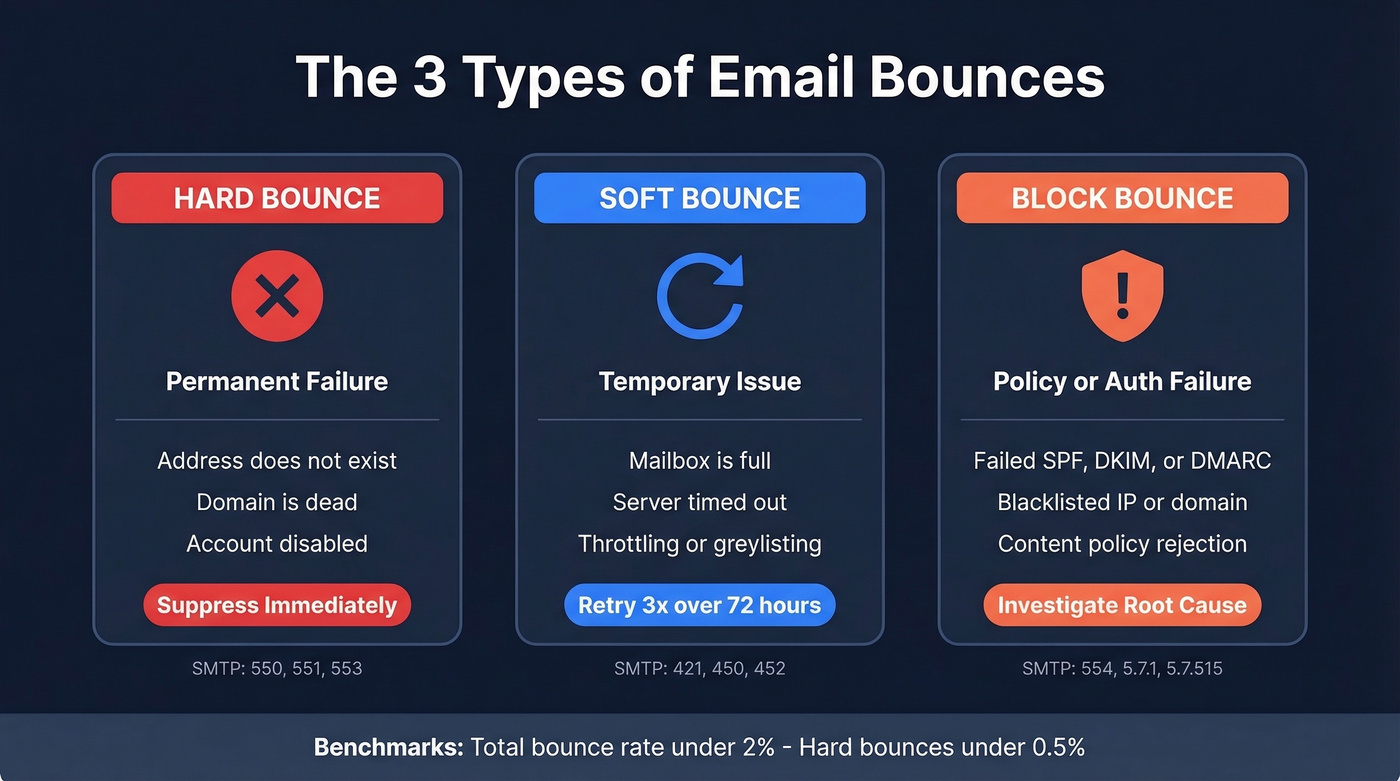
Your benchmarks: keep total bounce rate under 2%, hard bounces under 0.5%. The SMTP code table further down tells you exactly what each code means and what action to take.
Hard Bounces
A hard bounce means the address is permanently undeliverable. The mailbox doesn't exist, the domain is dead, or the recipient's account has been disabled. Common SMTP codes: 550 (mailbox unavailable), 551 (user not local), 553 (mailbox name not allowed).
The action is simple and non-negotiable: suppress the address immediately. Don't retry. Don't "check back in a month." Every hard bounce you re-send to chips away at your sender reputation with that mailbox provider, and once that reputation drops below a threshold, you start getting blocked on messages to valid addresses too - which is far worse than losing one contact.
Soft Bounces
A soft bounce is temporary. The recipient's mailbox is full, the server timed out, or you're being throttled. Codes you'll see: 421 (service temporarily unavailable), 450 (mailbox busy/unavailable), 452 (insufficient storage).
Retry with backoff - up to 3 times over 72 hours. If the address keeps soft-bouncing after that, treat it like a hard bounce and suppress.
One important distinction: if the bounce message contains the word "spam," quarantine that contact separately. That's a reputation signal, not a capacity issue.
Block Bounces
Block bounces are the ones that cause the most damage because they signal systemic problems, not individual address failures. The receiving server looked at your authentication, your sender reputation, or your content and rejected the entire transaction. Codes: 554 (transaction failed), 5.7.1 (permission denied/policy), 5.7.515 (Microsoft authentication rejection).
A bad SPF record, missing DKIM, or a failed DMARC check can generate block bounces across your entire list. The fix isn't suppression - it's investigating your authentication setup and checking whether you've landed on a blacklist like Spamhaus or Barracuda. We've seen teams panic-suppress thousands of valid addresses after a block bounce wave, when the real problem was a misconfigured DNS record that took ten minutes to fix.

Block bounces from misconfigured auth are fixable. But bounces from bad data? Those are preventable. Prospeo's 5-step verification catches invalid addresses, spam traps, and catch-all domains before they ever hit your SMTP server - delivering 98% email accuracy on 143M+ verified addresses.
Drop your bounce rate below 2% before your next campaign.
SMTP Bounce Code Reference
Every bounce comes with an SMTP code. The first digit tells you the class: 4xx is temporary, 5xx is permanent. The enhanced status code (the X.Y.Z format) adds specifics - the second number tells you the category (1 = addressing, 2 = mailbox, 7 = security/policy).
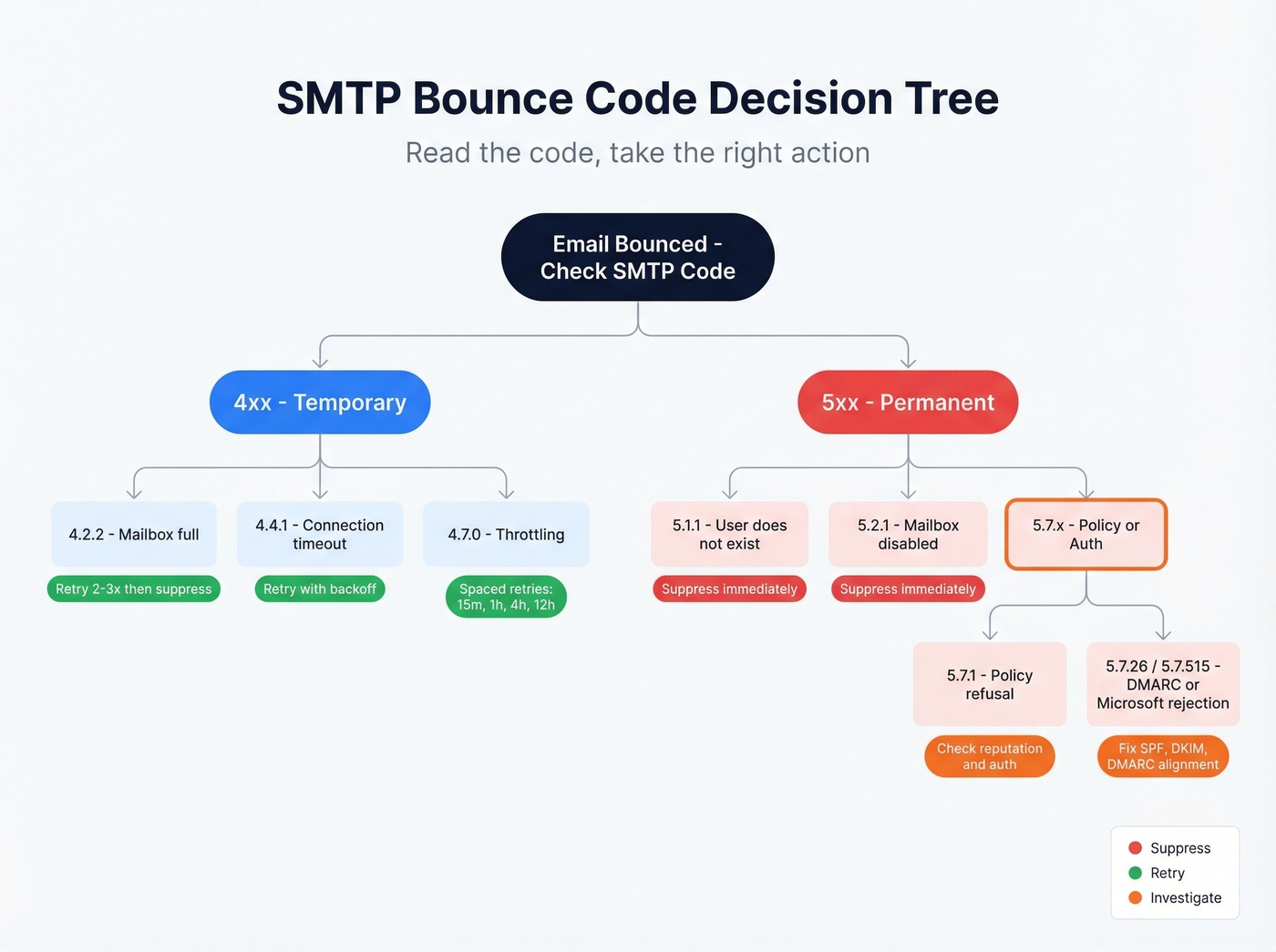
A 550 returned during the live SMTP handshake is near-definitive. The same code in a delayed bounce notification can be less reliable, because some servers misclassify.
| Code | Type | Meaning | Action |
|---|---|---|---|
| 5.1.1 | Hard | Recipient doesn't exist | Suppress immediately |
| 5.2.1 | Hard | Mailbox disabled | Suppress immediately |
| 4.2.2 | Soft | Mailbox full | Retry 2-3x, then suppress |
| 4.4.1 | Soft | Connection timed out | Retry with backoff |
| 4.7.0 | Soft | Throttling/greylisting | Spaced retries (15m, 1h, 4h, 12h) |
| 5.7.1 | Block | Policy/security refusal | Check reputation + auth |
| 5.7.26 | Block | DMARC failure | Fix SPF/DKIM/DMARC |
| 550; 5.7.515 | Block | Microsoft auth rejection | Fix SPF/DKIM/DMARC alignment |
For throttling, don't hammer the server. Space retries at 15 minutes, then 1 hour, then 4 hours, then 12 hours. Most ESPs handle this automatically, but if you're running your own SMTP infrastructure, build this backoff logic explicitly.
Bounces vs. Blocks vs. Deferrals
Your ESP's bounce label often doesn't match what actually happened at the SMTP level. Twilio SendGrid, for example, separates events into delivered, bounced, blocked, and deferred - four categories, not two. A "blocked" email in SendGrid won't suppress the address, while a "bounced" one will. If you're not aware of this distinction, you'll either over-suppress valid contacts or under-suppress bad ones.
Then there's the silent drop: a server accepts your message, then deletes it. No bounce notification, no spam folder placement - just gone. You'll never see this in your dashboard, which is why bounce rate alone isn't a complete picture of deliverability.
In our experience, deferrals cause the most unnecessary panic. Verizon and Comcast servers routinely generate thousands of deferrals during high-volume sends. That's normal delivery behavior, not a crisis - an email can defer multiple times and still land in the inbox just fine.
Provider Enforcement in 2026
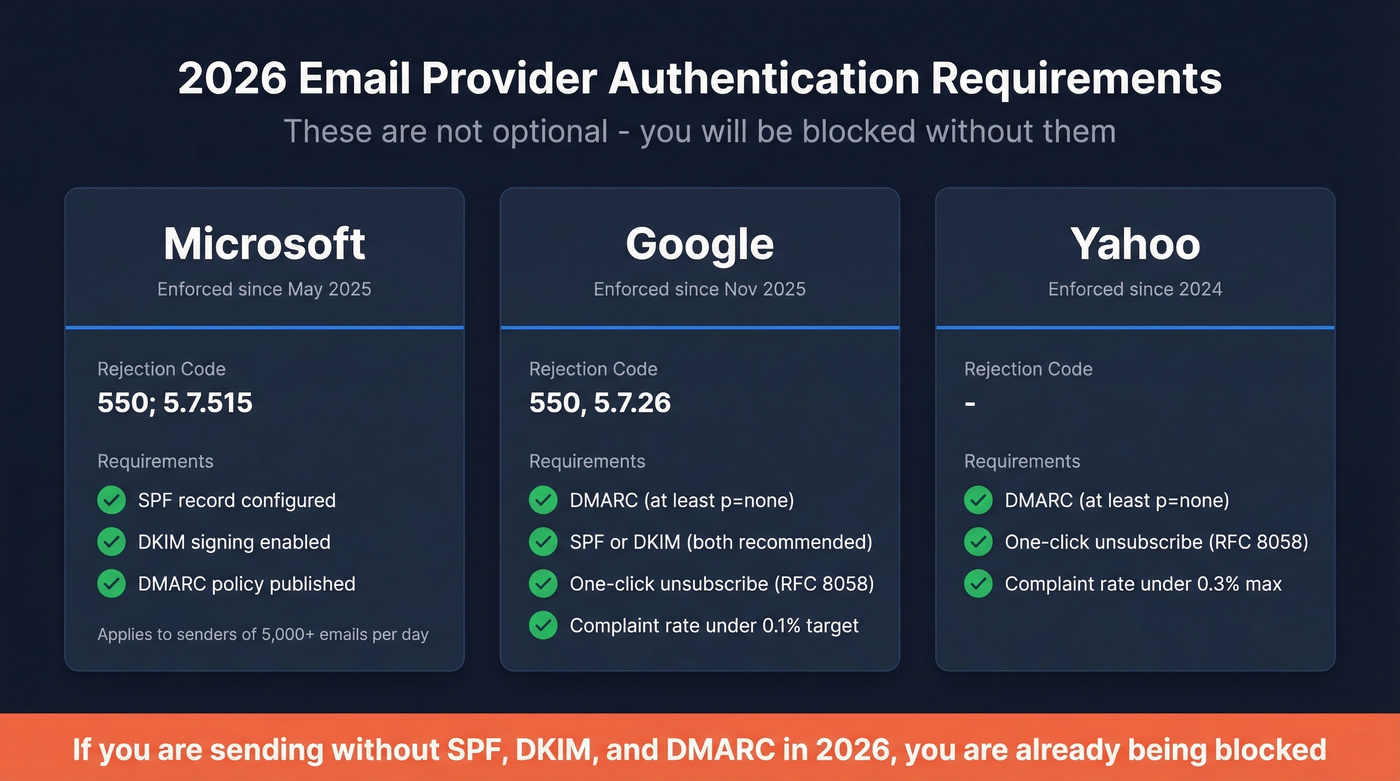
All three major mailbox providers now actively enforce strict authentication requirements. These rules aren't optional.
| Provider | In Effect Since | Key Code | Requirements |
|---|---|---|---|
| Microsoft | May 2025 | 550; 5.7.515 | SPF/DKIM/DMARC for 5,000+/day senders |
| Nov 2025 | 550, 5.7.26 | DMARC (at least p=none) + one-click unsub | |
| Yahoo | 2024 | - | DMARC (at least p=none) + one-click unsub |
Google and Yahoo require RFC 8058 one-click unsubscribe for bulk senders. Complaint thresholds sit at 0.3% maximum, with Google's Postmaster Tools recommending 0.1% as the real target. If you're sending at any volume without SPF/DKIM/DMARC in 2026, you're already getting blocked - not warned, blocked.
How to Prevent Email Bounces
Only 23.6% of businesses verify their list before every campaign. The other 76% keep wondering why their bounce rates climb.
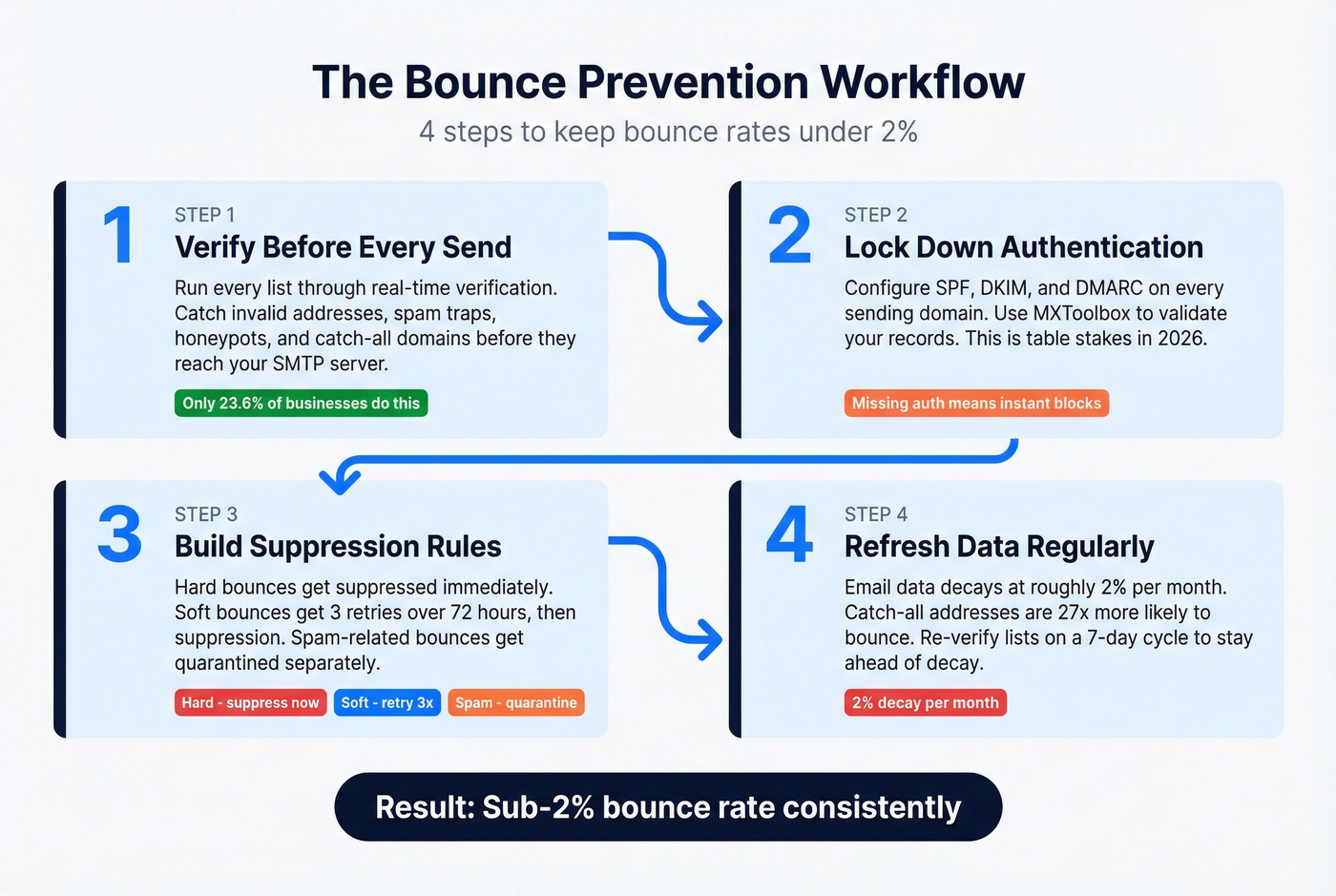
Clean your data before it decays. Email data goes stale at roughly 2% per month - a sample list was 2.3% outdated after just 8 weeks. Catch-all domains make this worse: accept-all addresses are 27x more likely to bounce, because the server accepts everything during verification but rejects or drops messages later.
Verify before every send. We've seen teams cut bounce rates from 35% to under 4% just by adding pre-send verification. Prospeo's 5-step verification handles catch-all domains, removes spam traps, and filters honeypots - solving the "verified but still bounced" problem that's common in cold outreach. With 98% email accuracy and a 7-day data refresh cycle, verified addresses stay current instead of decaying between campaigns.

Lock down authentication. Set up SPF, DKIM, and DMARC before you send a single email. MXToolbox is a good free resource for checking your records. In 2026, this isn't best practice - it's table stakes.
Build suppression rules. Hard bounces get suppressed immediately. Soft bounces get 3 retries over 72 hours, then suppression. Spam-related soft bounces get quarantined separately so you can monitor whether your reputation is recovering.
Let's be honest about something: most teams obsess over bounce rates when the real problem is upstream. If you're buying lists or scraping without verification, no amount of suppression logic will save your sender reputation. Fix the data pipeline first. Everything else follows.
Email data decays at 2% per month. Most providers refresh every 6 weeks - by then, thousands of addresses have gone stale. Prospeo refreshes every 7 days and runs catch-all handling, honeypot filtering, and spam-trap removal on every record. That's how teams like Snyk went from 35-40% bounce rates to under 5%.
Get emails that are verified this week, not last quarter.
FAQ
What's a good bounce rate?
Under 2% total and under 0.5% hard bounces. Industry averages range from 0.3% to 1.5% depending on list hygiene and verification practices. Anything above 2% signals a data quality problem that needs immediate attention - don't wait for your ESP to flag it.
Should I remove soft bounces?
Not immediately. Retry up to 3 times over 72 hours first. If the address keeps failing after the third attempt, suppress it permanently. Addresses that soft-bounce with a "spam" message should be quarantined separately for reputation monitoring, because that pattern usually means the receiving server has flagged your domain or IP.
What's a block bounce?
A rejection caused by policy enforcement, blacklisting, or authentication failure - not an invalid address. Fix your SPF/DKIM/DMARC records first, then check major blacklists like Spamhaus and Barracuda. Understanding the different bounce categories helps you diagnose whether the issue is with the address or your sending infrastructure.
How do I reduce bounces in cold outreach?
Run every list through real-time email verification before sending. Prospeo's 5-step verification catches catch-all traps and honeypots that basic validators miss - teams like Meritt dropped bounce rates from 35% to under 4% after switching. Combine verification with proper authentication and suppression rules for sub-2% bounce rates consistently.