

UCEPROTECT Level 3: What It Is, Whether It Matters, and What to Do
You ran a blacklist check on MxToolbox, saw UCEPROTECT Level 3 glowing red, and now you're convinced your email infrastructure is broken. Take a breath. We've seen this panic play out dozens of times, and that red flag almost certainly isn't the reason your emails aren't landing.
The short version:
- UCEPROTECT Level 3 lists your hosting provider's ASN, not you specifically. No major mailbox provider uses it as a primary filter.
- Don't pay for express delisting (commonly quoted at ~250 EUR per ASN for L3). The listing typically clears about a week after the ASN drops below the threshold.
- If you're seeing actual delivery failures to Outlook or Hotmail, check the Microsoft edge case below. Otherwise, ignore L3 and focus on SPF/DKIM/DMARC and your data quality.
What Is UCEPROTECT Level 3?
UCEPROTECT is a DNS-based blacklist (DNSBL) that operates three escalating levels. Level 1 flags a single IP address for sending spam. Level 2 escalates to an entire /24 subnet - 256 IPs - when multiple L1 listings cluster in the same block. Level 3 is what UCEPROTECT themselves call "Draconic": it lists every IP address assigned to an entire Autonomous System Number (ASN), which can mean thousands or millions of IPs blacklisted because of spam originating from a fraction of them.
Their own documentation warns that L3 "can, and probably will cause collateral damage to innocent users when used to block email." They're not hiding the bluntness - they're advertising it. They also claim these L3-listed providers are responsible for 50-75% of global spam. Even if true, the collateral damage ratio makes L3 unusable as a precision filter.
Out of roughly 105,000 providers worldwide, only several hundred end up on Level 3 at any given time. But those several hundred include some of the largest cloud providers on the planet, sweeping millions of legitimate senders into the listing.
L1 vs. L2 vs. L3 at a Glance
| Level | Scope | Trigger | Who Can Fix It |
|---|---|---|---|
| L1 | Single IP | Direct spam from that IP | You / your admin |
| L2 | /24 subnet (256 IPs) | Multiple L1 listings in subnet | Your hosting provider |
| L3 | Entire ASN (thousands-millions of IPs) | SPAMSCORE >= 50 + >= 50 Level 1 impacts in the last 7 days | Only your provider |
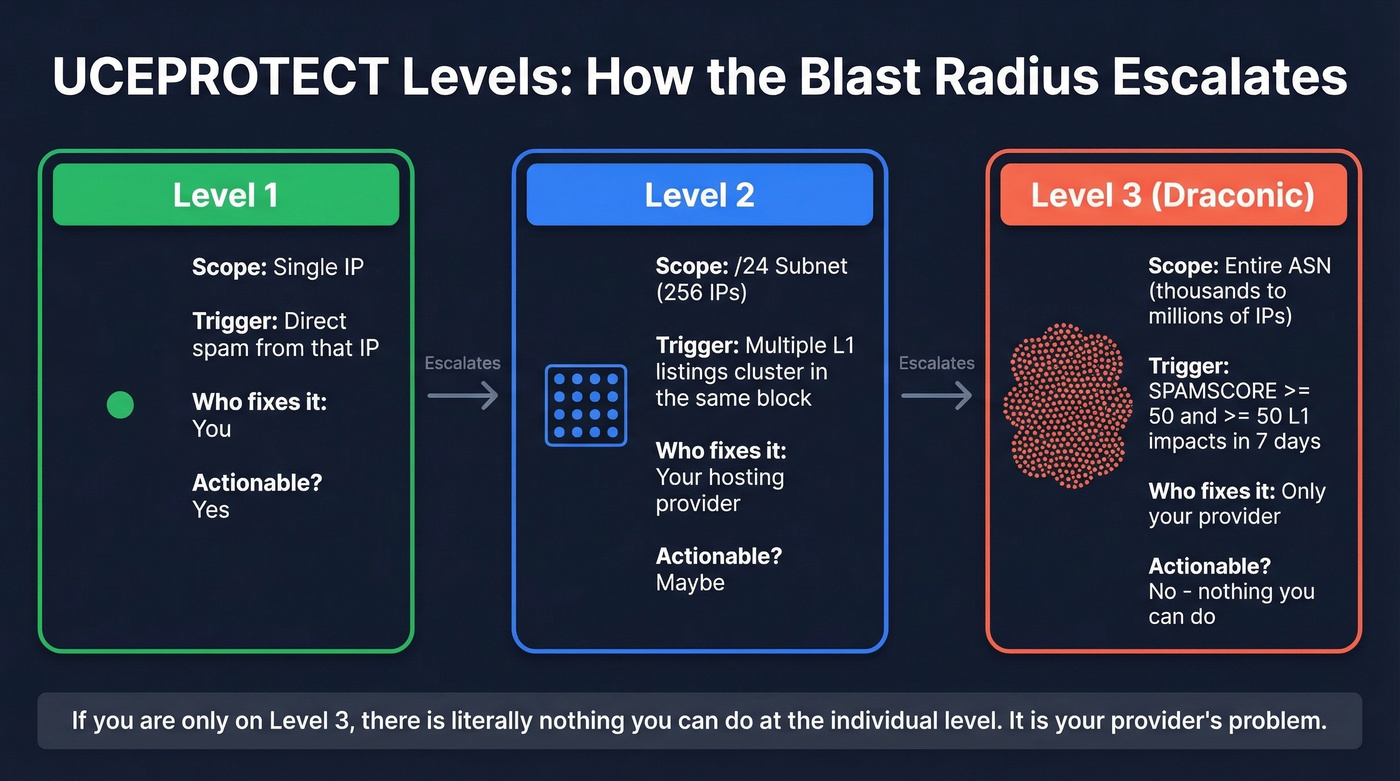
If you're listed on L1, that's actionable. L3? There's literally nothing you can do at the individual level. It's your provider's problem.
How L3 Listings Actually Work
The math behind L3 is straightforward. UCEPROTECT calculates a SPAMSCORE for each ASN:
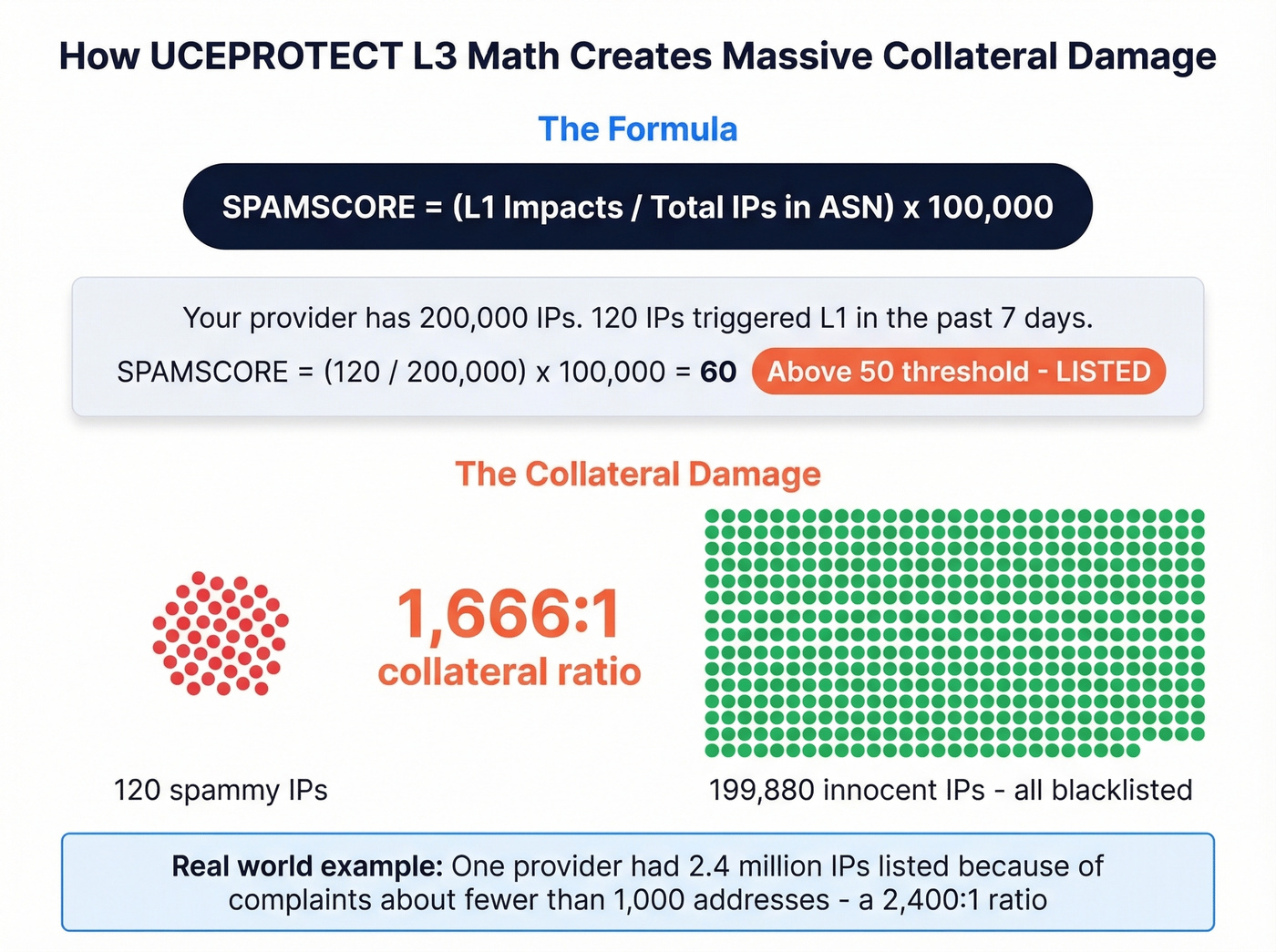
SPAMSCORE = (L1 impacts from the ASN / total IPs in the ASN) x 100,000
Say your hosting provider controls an ASN with 200,000 IP addresses, and 120 of those IPs triggered Level 1 listings in the past 7 days. The SPAMSCORE would be (120 / 200,000) x 100,000 = 60. That's above 50 with more than 50 L1 impacts, so the entire ASN gets listed.
Your clean, properly authenticated mail server gets blacklisted because 120 other customers on the same network were sending spam. The collateral damage ratio is absurd.
UCEPROTECT also builds in "provider protection" throttling for new listings: impact counting is limited during the first 4 hours, reduced to 1-hour windows after 24 hours, and removed entirely after 48 hours. After that, every new impact counts indefinitely until the ASN no longer matches the listing criteria.
Does This Listing Affect Your Email?
For the vast majority of senders, an L3 listing is a non-issue.
InMotion Hosting, citing Sucuri's research, documented that UCEPROTECT blocked over 2.4 million IP addresses from a single provider based on complaints about fewer than 1,000 addresses. That's a 2,400:1 collateral damage ratio. No serious mailbox provider would use that as a primary filtering signal.
Gmail doesn't use UCEPROTECT for filtering decisions. Google relies on its own internal reputation systems, authentication checks, and engagement signals. An L3 listing won't tank your Gmail deliverability.
Yahoo runs a proprietary filtering stack that's heavily authentication- and reputation-driven. UCEPROTECT isn't a meaningful signal there either.
Microsoft/Hotmail is the one edge case worth understanding - details below.
Enterprise gateways would only be affected if the receiving admin manually added UCEPROTECT L3 to their DNSBL configuration. This is rare, and any admin who understands L3's scope wouldn't do it.
The consensus on r/sysadmin is blunt: L3 is a scam. The top complaint isn't that it exists - it's that it lists entire ASNs and then charges money to delist.
The Microsoft 365 Edge Case
Here's the thing most guides skip over. Multiple practitioners report that Microsoft 365 sometimes quarantines emails when the sender's email signature contains a URL hosted on an IP within an L3-listed ASN. One sysadmin on Reddit documented this exact scenario - their company's website link in the email signature triggered quarantine because the site's hosting IP fell within an L3-listed range.
Separately, admins have reported receiving alerts from Microsoft stating their IP is blacklisted by UCEPROTECT Level 3, with corresponding deliverability issues to Hotmail and Outlook addresses. One practitioner stated flatly that "Hotmail.com still uses it."
Microsoft hasn't publicly confirmed using UCEPROTECT as a filtering criterion. But the pattern across multiple independent reports is consistent enough to take seriously if you send heavily to @hotmail.com or @outlook.com addresses.
The workaround: Remove hyperlinked URLs from your email signatures temporarily. If you're relaying outbound mail through an L3-listed IP, consider routing through a smarthost on a different network. Both are stopgaps - the listing typically clears within about a week once the ASN drops below the criteria.

Most deliverability issues aren't caused by blacklists like UCEPROTECT L3 - they're caused by sending to bad email addresses. Prospeo's 5-step verification delivers 98% email accuracy, keeping your bounce rate under control and your domain off the blacklists that actually matter.
Fix the root cause. Start with data that doesn't bounce.
L3 vs. Blacklists That Actually Matter
Not all blacklists carry the same weight. Here's UCEPROTECT in context against the DNSBLs that genuinely influence deliverability.
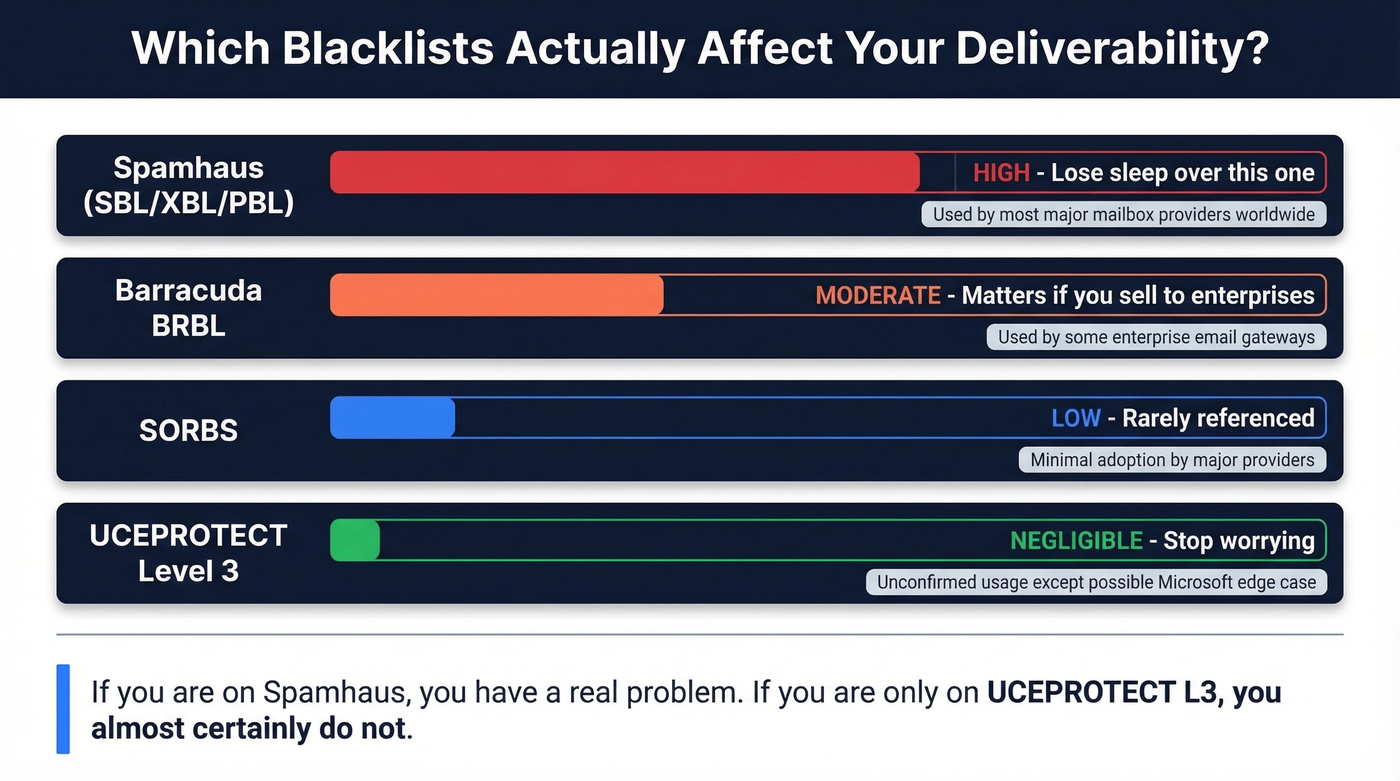
| Blacklist | Used by Major Providers? | Impact |
|---|---|---|
| Spamhaus (PBL/SBL/XBL) | Commonly referenced across major ecosystems | High - the main one worth losing sleep over |
| Barracuda BRBL | Some enterprise gateways | Moderate - check if you sell to enterprises |
| SORBS | Rarely | Low |
| UCEPROTECT L3 | Unconfirmed (Microsoft edge case) | Negligible for most senders |
If you're on Spamhaus, you have a real problem. If you're only on UCEPROTECT L3, you almost certainly don't.
What to Do If You're Listed
Here's your action plan, in priority order:
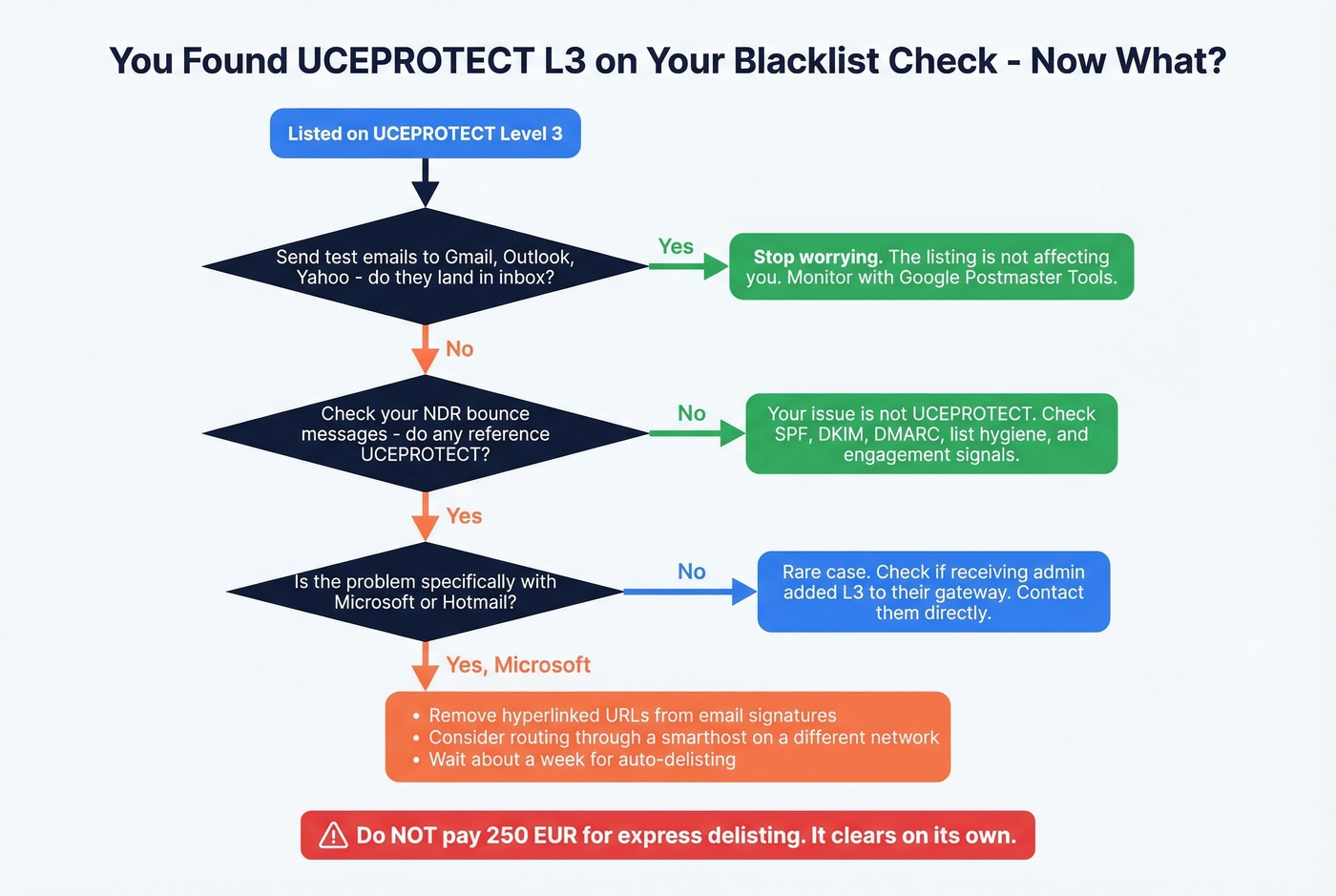
Test actual deliverability. Send test emails to Gmail, Outlook, and Yahoo accounts. If they land in the inbox, stop worrying.
Check your bounce messages. If none of your NDRs reference UCEPROTECT, the listing isn't the bottleneck. Your issue is elsewhere.
If Microsoft/Hotmail is affected: Remove hyperlinked URLs from your email signatures. Consider routing outbound mail through a smarthost relay on a different network.
Register clean IPs on the whitelist. You can carve out individual IPs at ips.whitelisted.org (commonly cited at 42 EUR/year per IP). Cheap insurance if you need it.
Wait about a week. L3 listings clear once the ASN drops below the threshold. No action required from you.
Contact your hosting provider. L3 is their problem to address at the network level. Let them know - they're likely already aware.
Use Google Postmaster Tools to monitor your actual domain reputation. It's free and far more useful than blacklist checkers.
Don't pay for express delisting. More on this below.
Should You Pay for Delisting?
No. Full stop.
For Level 3, express removal runs around 250 EUR per ASN. The whitelist carve-out is about 42 EUR per year per IP. And the listing clears on its own once the ASN drops below the criteria.
The business model is straightforward: list entire ASNs containing millions of innocent IPs, then charge per-ASN removal fees for a listing that disappears on its own. The sysadmin community's word for this is "extortion," and UCEPROTECT's own policy page warns providers they can lose the "right to expressdelist" if they call it "blackmail, extortion, scam..." Skip the payment. Wait it out.
Why Cloud Users See This Constantly
If you host on AWS, Azure, GCP, or DigitalOcean, you'll encounter L3 listings. It's a feature of scale, not a sign of a problem with your setup.
AWS has been cited in community discussions as having 34+ million IPs listed on UCEPROTECT L3. Linode's ASN 63949 has been listed repeatedly. Azure and GCP show up frequently too. When your provider controls millions of IPs, even a tiny percentage of abuse triggers the SPAMSCORE threshold. One AWS customer found their mail to Office 365 and Hotmail blocked, waited four months for resolution, and ultimately solved it by relaying through a smarthost on a different network. That's the nuclear option - and for most senders, it's completely unnecessary.
The Real Fix for Deliverability
Let's be honest: the problem isn't an ASN-level blacklist. It's that you're checking blacklists instead of checking your actual inbox placement. In our experience, the senders most worried about blacklists are the ones who should be worried about their list hygiene.
Authentication comes first. SPF, DKIM, and DMARC properly configured. If these aren't right, no blacklist status matters.
Engagement signals come second. Opens, clicks, and replies tell mailbox providers your emails are wanted. No blacklist removal fixes low engagement.
Data quality is the foundation underneath both. High bounce rates from invalid email addresses are a primary driver of IP reputation damage - which is exactly what feeds blacklist listings in the first place. We've watched teams go from 35% bounce rates to under 3% just by verifying their lists before sending, and the deliverability improvements follow within weeks. Prospeo's 5-step verification with catch-all handling and spam-trap removal across 143M+ verified addresses is built for exactly this problem.

Redirect your energy from blacklist anxiety to these fundamentals. A clean list, proper authentication, and engaged recipients will do more for your deliverability than any amount of DNSBL monitoring.
You just spent time diagnosing a blacklist that doesn't matter. The real deliverability killer? Outdated contact data. Prospeo refreshes 300M+ profiles every 7 days - not every 6 weeks - so you're never sending to dead addresses that spike your bounce rate and trigger real blacklists like Spamhaus.
Stop chasing false alarms. Send to contacts verified this week.
FAQ
How long does a UCEPROTECT Level 3 listing last?
L3 listings clear once the ASN's SPAMSCORE drops below 50 or fewer than 50 Level 1 impacts remain in the last 7 days - typically about one week after the spam activity stops. Express removal costs around 250 EUR per ASN but isn't worth paying since the listing expires automatically.
Does Gmail block emails listed on UCEPROTECT L3?
No. Gmail doesn't use UCEPROTECT for filtering decisions. Google relies on its own reputation systems, authentication checks, and engagement signals. An L3 listing won't cause Gmail deliverability drops.
Can I remove my IP from UCEPROTECT Level 3?
You can't remove an individual IP because L3 targets your provider's entire ASN. Your options are waiting roughly a week for automatic expiry, whitelisting specific IPs at ips.whitelisted.org (42 EUR/year), or routing mail through a smarthost on a different network.
How do I prevent blacklist listings from bad email data?
High bounce rates from invalid addresses damage IP reputation, which feeds blacklist listings. Verify emails before sending - tools like Prospeo run 5-step verification with catch-all handling and spam-trap removal, keeping bounce rates under 3% so your sender reputation stays clean.