

W3Techs Review: Pricing, Pros, Cons & Alternatives for 2026
Think of W3Techs as the Census Bureau of web technologies - it counts what's out there, but it won't help you knock on any doors. Here's the short version: it's the single best free source for web technology market share data, updated daily, with no vendor bias. But it's a statistics platform, not a prospecting tool. If you need lead lists or contact data for companies running specific tech stacks, you need something else entirely.
What Is W3Techs?
W3Techs runs daily surveys across 24 technology categories - CMS, programming languages, web servers, hosting providers, analytics, advertising networks, and more. It fetches pages like a search engine and detects technologies using regular expressions and DOM traversal across several thousand indicators, pulling signals from HTML elements, JavaScript, CSS, URL structure, HTTP headers, DNS records, and Whois info. It also uses technology dependencies, so if WordPress is detected, W3Techs infers PHP usage automatically.
Reports update daily. More extensive market reports drop monthly. For its surveys, W3Techs examines the top 10 million websites, revisiting each site roughly once a month. No affiliation with any vendor it covers.
W3Techs Pricing Breakdown
The core product - daily surveys, individual site lookups, trend charts - is completely free. Free registration also includes Website Quality Alerts.
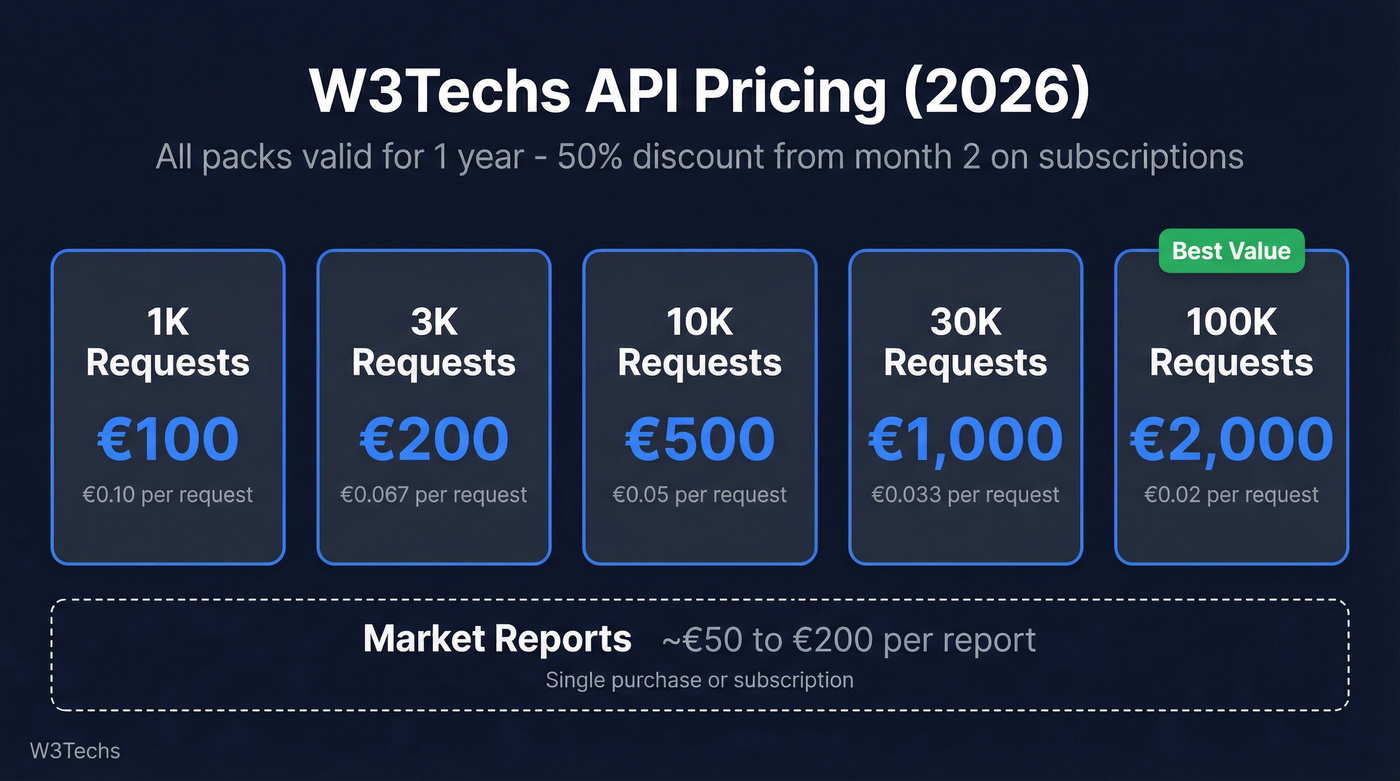
Paid options break into two tiers:
| Product | Pricing | Notes |
|---|---|---|
| API (1K requests) | €100 | Valid for 1 year |
| API (3K requests) | €200 | Valid for 1 year |
| API (10K requests) | €500 | Valid for 1 year |
| API (30K requests) | €1,000 | Valid for 1 year |
| API (100K requests) | €2,000 | Valid for 1 year |
| Market reports | ~€50-€200/report | Single or subscription |
Monthly API subscriptions get a 50% discount starting in the second month, and unused subscription credits carry over.
One thing worth knowing: W3Techs isn't widely reviewed on mainstream SaaS review sites the way Wappalyzer or SimilarTech are. The closest thing to a review ecosystem lives on Hacker News and developer forums, which makes it harder to gauge user sentiment at scale.
Pros and Cons
Pros:
Best free market share data available. Nothing else comes close for public, daily-updated web technology statistics across 24 categories.
Massive report depth. The Content Management Systems Market Report is a nearly 9,000-page PDF covering historical trends and cross-technology breakdowns.
Independent and neutral. No vendor affiliations means the data isn't tilted toward whoever's paying.
Website Quality Alerts. Free registered users get flagged on potential site issues - a genuinely useful feature that flies under the radar. Cons:
Detection bias is real. Technologies that leak visible signals (like PHP via WordPress footprints) get overcounted, while stacks hidden behind CDNs or JAMstack patterns get undercounted.
Zombie install inflation. A dormant WordPress site untouched for three years counts the same as a freshly launched one.
Not a prospecting tool. You can't export lead lists, filter by company size, or find contact data. Full stop.
Opaque paid documentation. API and market report details aren't well-documented publicly - you often learn the most after purchase.

W3Techs tells you 42% of sites run WordPress. But you can't email a statistic. Prospeo pairs technographic filters with 98% verified email accuracy and a 7-day data refresh - so you go from market share insight to booked meeting without bouncing.
Turn tech stack data into pipeline for $0.01 per verified email.
How to Read W3Techs Data (Without Misquoting It)
Let's be honest about what the numbers actually mean. When W3Techs says WordPress powers 42.4% of websites, that's 42.4% of the top 10 million sites with detectable WordPress installs. It doesn't mean 42.4% of the web is actively maintained on WordPress. Hosts auto-install WordPress on new accounts, abandoned sites stay detectable for years, and staging environments count too.
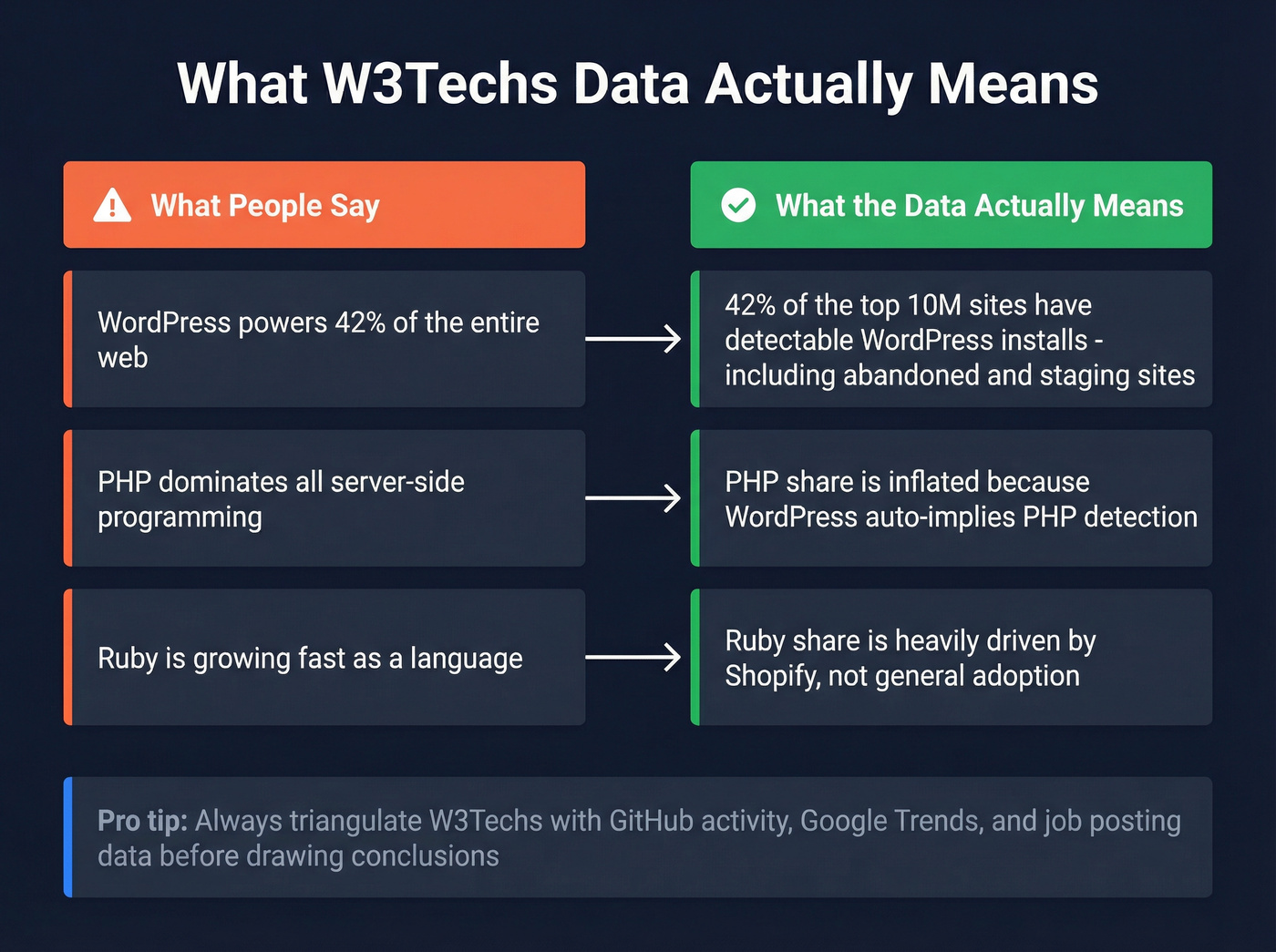
PHP's dominance is largely a WordPress artifact. Ruby's share is heavily influenced by Shopify's footprint. Across developer forums like Hacker News, the consensus is clear: W3Techs measures web footprint, not developer mindshare. We've used W3Techs data in dozens of market reports and always triangulate with GitHub activity, Google Trends, and job posting data before drawing conclusions.
Here's the thing: W3Techs is the most-cited and least-understood data source in tech. Half the "WordPress powers X% of the web" headlines you've read are misinterpreting what W3Techs actually measures. Use it for trends, not absolutes.
W3Techs vs. Alternatives
W3Techs doesn't actually compete with most "alternatives" people compare it to - they solve different problems.
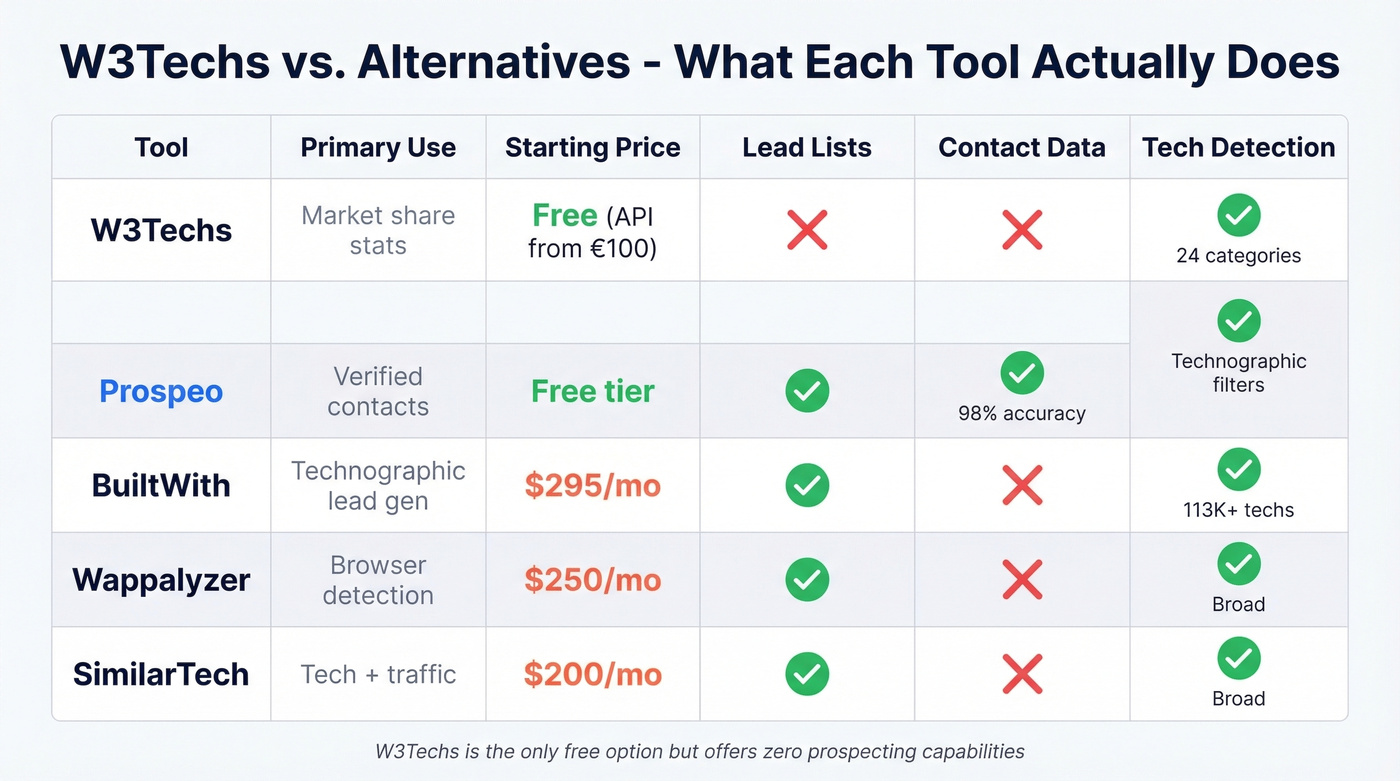
| Tool | Best For | Pricing | Tech Tracked | Updates |
|---|---|---|---|---|
| W3Techs | Market share stats | Free + API from €100 | 24 categories | Daily |
| Prospeo | Verified contact data | Free tier, ~$0.01/email | Technographic filters | 7-day refresh |
| BuiltWith | Technographic lead gen | $295-$995/mo | 113K+ | Weekly |
| Wappalyzer | Browser-based detection | $250-$850+/mo | Broad | Continuous |
| SimilarTech | Tech + traffic overlay | $200-$490/mo | Broad | Varies |
BuiltWith is purpose-built for technographic prospecting, indexing 414 million domains and tracking 113K+ technologies weekly. But here's what catches people off guard: the Basic plan at $295/mo limits you to just 2 technologies and 2 keywords, so most teams need Pro at $495/mo for unlimited filters. If you only need individual site lookups, the Advanced plan at $144/year covers that without the full lead gen suite.
Wappalyzer takes a different approach - install the browser extension and get automatic tech detection as you browse. There's a free tier with 50 monthly lookups, and paid plans start at $250/mo for 5,000 lookups. G2 reviewers rate it 4.7/5. The tradeoff: very large dataset processing can take time.
Skip SimilarTech if your budget is tight and you don't need traffic estimates layered on tech detection. At $200-$490/mo it's the cheapest paid option, but the G2 review count is thin - just 12 reviews at 4.2/5 stars - and users flag data gaps.
W3Techs tells you WordPress has ~42% market share. Prospeo gives you verified emails for the people who run those WordPress sites, with 98% email accuracy and a 7-day data refresh cycle.
Who Should Use W3Techs?
It's a great fit if you're:
- Researching technology market trends for reports or presentations
- Building investor decks that need credible usage statistics
- Tracking macro shifts across CMS, hosting, or language ecosystems
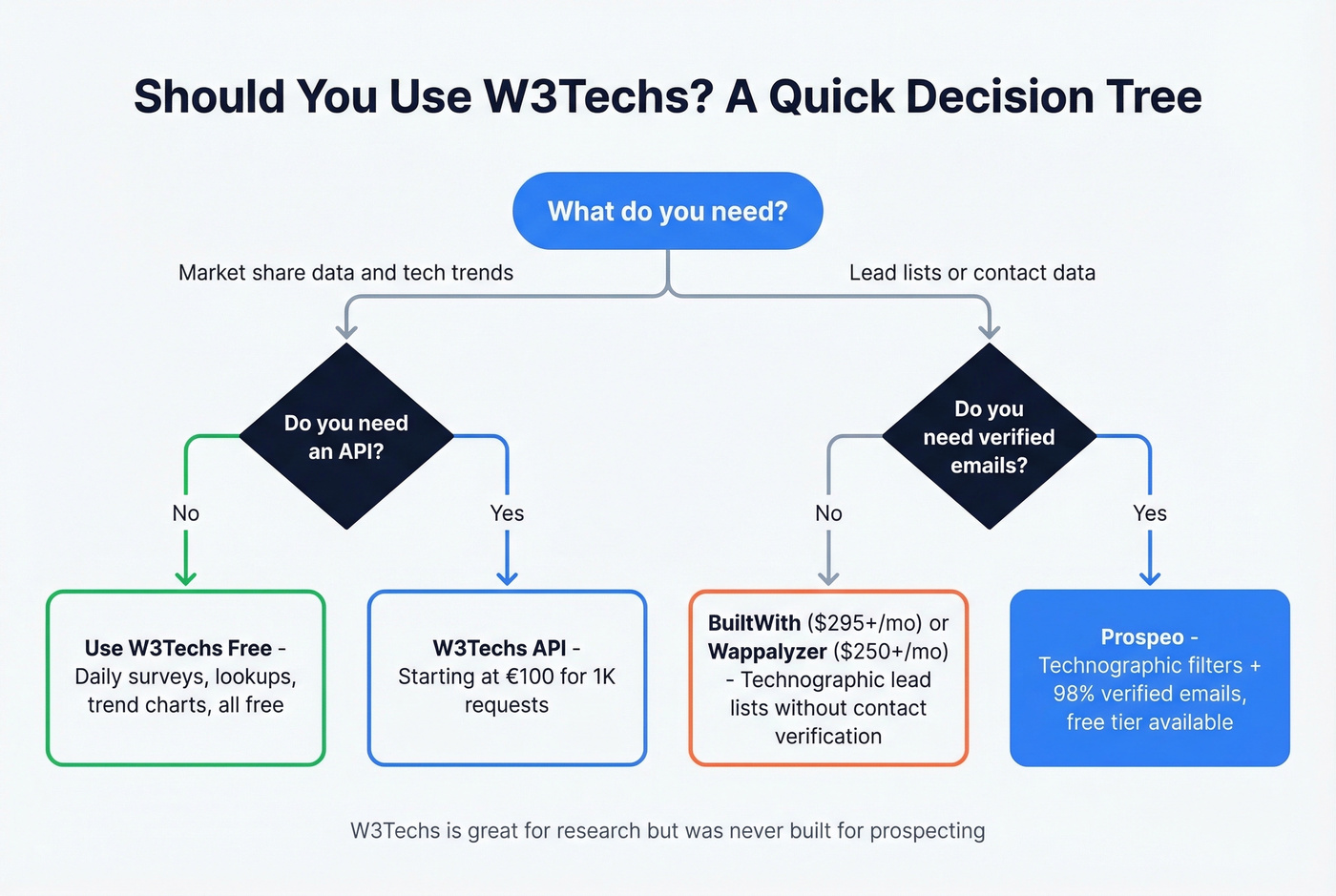
Look elsewhere if you need:
- Exportable lead lists filtered by technology stack
- Contact data attached to those technology signals
- CRM integration or enrichment workflows
For that second group, we've found the fastest path is pairing a technographic tool like BuiltWith or Wappalyzer with a contact data platform that can actually verify the emails before you hit send. Burning through credits on bounced emails gets expensive fast - I've watched teams waste entire quarters on bad data before fixing the pipeline.
Tired of knowing which companies use a technology but having no way to reach them? Prospeo's 300M+ profiles with 30+ filters - including technographics - let you find decision-makers and get verified contact data in one workflow. No stitching tools together.
Stop researching stacks and start reaching the people who run them.
FAQ
Is W3Techs data accurate?
Directionally accurate for macro trends, not absolute truth. Detection overcounts technologies that leak visible signals like PHP via WordPress and undercounts stacks hidden behind CDNs or static delivery. Use it for trend analysis and relative comparisons, not precise market sizing.
Is W3Techs free?
Daily surveys, technology lookups, and trend charts are completely free. Paid options include API request packs starting at €100 for 1,000 requests and monthly market reports at roughly €50-€200 per report.
What's the best W3Techs alternative for lead generation?
W3Techs doesn't do lead generation at all. For technographic lead lists, BuiltWith at $295+/mo and Wappalyzer at $250+/mo are the standard options. For verified contact data with technographic filters, Prospeo covers 300M+ profiles with 98% email accuracy starting free - 75 emails per month, no contract required.