


Web Scraper Review: Pricing, Pros, Cons, and Whether It's Worth It
Web Scraper's pricing starts free, but the gap between the Chrome extension and what you actually need in production is wider than most people expect. The $50/mo Project Cloud plan only includes 5,000 URL credits, and one credit equals one page load - so those credits vanish fast once you add pagination, sub-pages, and daily schedules.
We've spent time testing this tool against real scraping workflows, and this review covers the pricing, honest pros and cons, and where it falls short so you can decide before committing.
30-Second Verdict
Web Scraper scores 4.4/5 on G2, 4.7/5 on Capterra, and 4.7/5 on Trustpilot. The free Chrome extension is genuinely useful for learning and small jobs. Cloud plans run $50-$200+/mo and scale reasonably for mid-volume scraping. Best fit: non-developers pulling a few hundred pages per week. Not the right tool for enterprise-scale extraction or B2B contact data.
What Is Web Scraper?
Web Scraper is a point-and-click browser extension for Chrome and Firefox that extracts structured data from websites without code. You build a "sitemap" by clicking on page elements, and the extension follows your instructions to scrape content, pagination, and sub-pages.
The Cloud version adds scheduling, API access, proxy rotation, and exports to CSV, XLSX, or JSON - with push integrations for Dropbox, Google Sheets, Amazon S3, and Microsoft Azure. Cloud offers two drivers: Full JS (executes JavaScript, uses more bandwidth) and Fast (skips JavaScript execution). The extension is free for unlimited local use; Cloud requires a paid plan or free trial.
Pricing Breakdown for 2026

| Plan | Price | URL Credits | Parallel Tasks | Data Retention |
|---|---|---|---|---|
| Extension | Free | Unlimited (local) | - | - |
| Project | $50/mo | 5,000 | 2 | 30 days |
| Professional | $100/mo | 20,000 | 3 | 30 days |
| Scale | From $200/mo | Unlimited* | 2+ | 60 days |
| Enterprise | Custom | Custom | Custom | Custom |
*Scale's "unlimited" credits depend on job count, request interval, and driver used. All Cloud plans include a 7-day free trial with no credit card required.
What URL Credits Actually Get You
One URL credit equals one page load, regardless of how many records sit on that page.
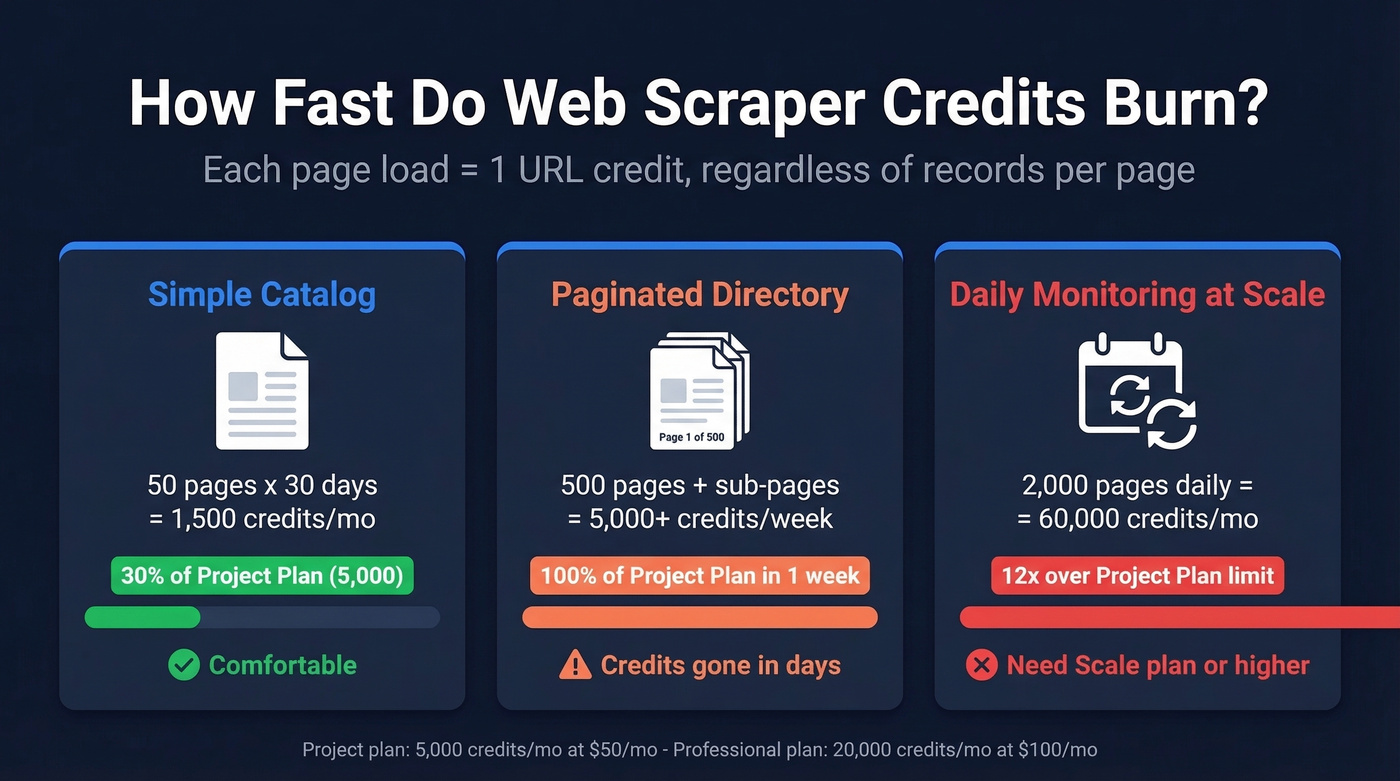
Scraping a 50-page product catalog daily burns about 1,500 credits/month (50 page loads x ~30 days), which is comfortable on the Project plan's 5,000 credits. But if you're monitoring 500 pages with sub-pages, you'll blow through those 5,000 credits in under a week. We've seen teams hit this wall within days when scraping paginated directories - it's the most common surprise on the Project tier.
Hidden Costs to Watch
The Scale plan has an optional residential proxy add-on priced at $2.5/GB (the plan also includes a US datacenter proxy). That sounds cheap until you factor in page sizes.
A lightweight page without rendering runs 50-150 KB. Full JS rendering pushes that to 100-300 KB. A JavaScript-heavy site at 250 KB/page across 10,000 pages eats about 2.5 GB - that's $6.25 on top of your subscription. For high-volume scraping with full rendering, proxy bandwidth costs can quietly double your monthly bill.
Here's the thing most people miss: beyond subscription costs, DIY scraping typically eats 10-20 hours/week in maintenance. At $50/hr, that's $2,000-$4,000/mo in opportunity cost that never shows up on the invoice.

You're spending $50-$200/mo on scraping tools plus 10-20 hours/week maintaining sitemaps - all to get contact data that still needs verification. Prospeo delivers 143M+ verified emails and 125M+ mobile numbers at 98% accuracy for ~$0.01/email. No proxies, no CAPTCHAs, no broken exports.
Skip the scraping. Get the contacts directly.
Pros and Cons
Pros:
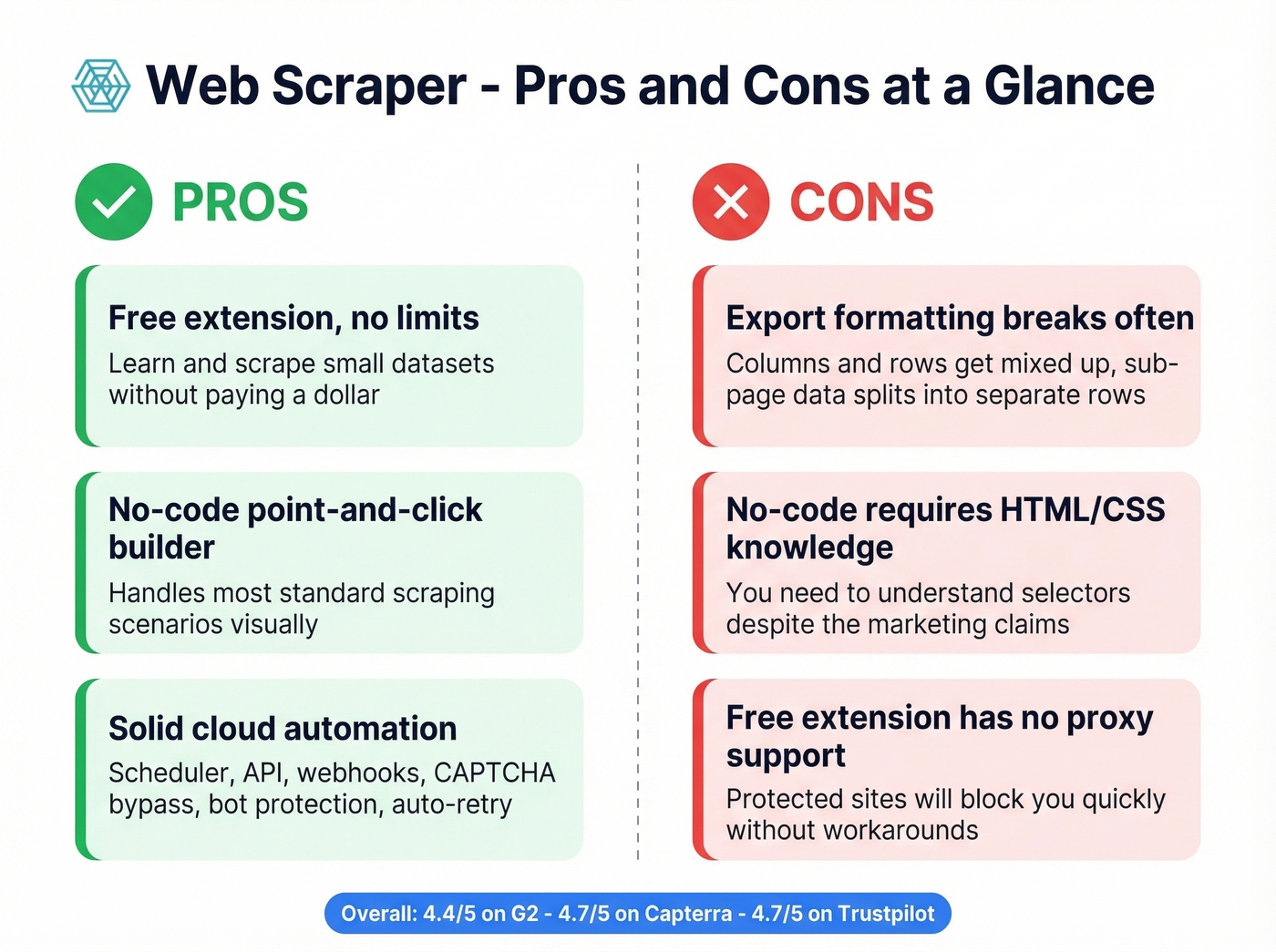
- Free extension with no limits on local use. You can learn the tool and scrape small datasets without spending a dollar - a genuine advantage over most competitors.
- No-code interface works for standard jobs. Point-and-click sitemap building handles most scraping scenarios without writing a line of code.
- Cloud automation is solid. Scheduler, API, webhooks, and integrations cover most workflow needs. Cloud includes CAPTCHA bypass, bot protection bypass for Cloudflare, Datadome, and PerimeterX, plus auto-retry with IP and fingerprint rotation. Data quality monitoring with alerts for failed or empty pages rounds it out.
Cons:
- Export formatting breaks. A recurring complaint on G2: "columns and rows get mixed up." Sub-page data can export into separate rows from main-page data, requiring manual cleanup every time.
- "No-code" is generous. You'll need basic HTML/CSS selector knowledge to build anything beyond the simplest scrapers. The learning curve is real despite the marketing.
- Free extension has no proxy support. You'll get blocked on protected sites quickly. Reddit threads in r/webscraping mention getting "locked out" without a VPN/proxy and not knowing where to configure proxy settings.
What Real Users Say
The review sample is small - 4 reviews on G2, 7 on Capterra, 28 on Trustpilot. That's not a lot to go on.
In our testing, the free extension handled basic catalog scraping fine but hit walls on anything with Cloudflare protection. Consistent complaints revolve around data structure issues on export and confusion around pagination. The tool works well within its lane, but that lane is narrower than the marketing suggests. If you're scraping anything more complex than a simple product listing page, expect to spend time debugging your sitemaps.
How Web Scraper Compares

| Tool | Starting Price | Proxy / Add-on Cost | Best For |
|---|---|---|---|
| Web Scraper | Free / $50/mo | $2.5/GB residential | No-code, small-mid jobs |
| Octoparse | ~$69/mo | $3/GB + CAPTCHA $1-1.5/K | Visual scraping, templates |
| ScrapingBee | ~$49/mo | Built into API pricing | API-first developers |
| Bright Data | ~$499/mo | Built into API pricing | Enterprise scale |
| Oxylabs | Starts at $49/mo | Built into API pricing | API scraping at volume |
DIY no-code tools generally run $0-$249/mo, scraping APIs $29-$999/mo, and managed services $199-$10,000+/mo. Web Scraper sits at the affordable end of the no-code category.
Octoparse charges extra for CAPTCHA solving ($1-$1.5 per thousand) and Crawler Setup starts at $399, so its true cost often exceeds the sticker price. For enterprise-grade infrastructure, Bright Data and Oxylabs play in a different league entirely.
Our take: Most teams scraping under 5,000 pages/month should start with Web Scraper's free extension and only upgrade when they actually hit the ceiling. The $50/mo jump is worth it for scheduling alone. But if you're spending more than $100/mo on scraping infrastructure, seriously question whether a purpose-built API or data provider would be cheaper than the DIY approach once you factor in maintenance time.
If you're evaluating other stacks, it can also help to compare scraping APIs vs no-code scrapers before you commit.
Who Should (and Shouldn't) Use It
Use it if you're a non-developer scraping a few hundred pages weekly, your budget is under $100/mo, and you're comfortable learning basic CSS selectors. The free extension is a great starting point, and the Project plan handles moderate workloads.
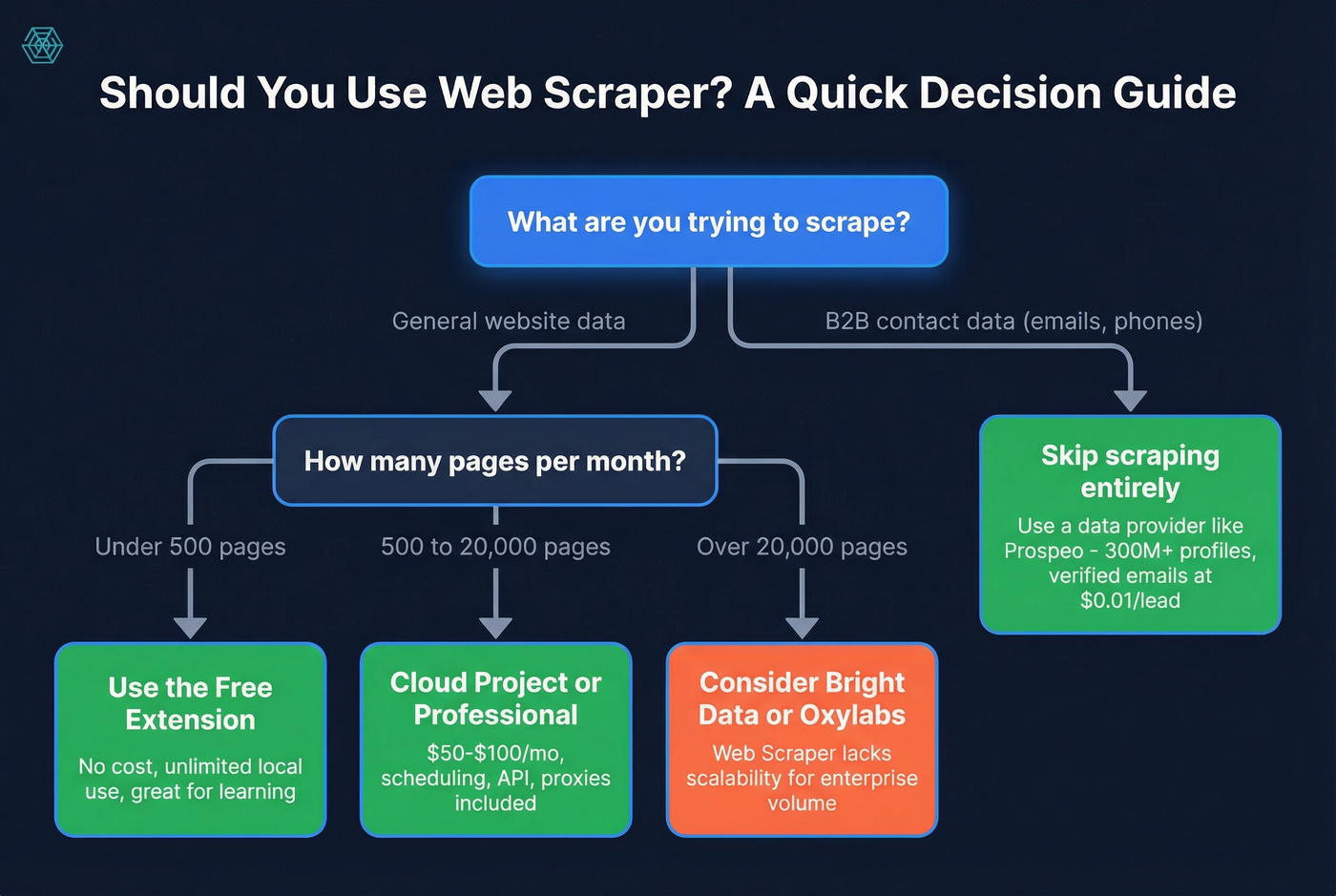
Skip it if you need enterprise-scale extraction. Third-party reviewers flag limited scalability and restricted customization for large operations. Look at Bright Data or Oxylabs instead.
If your end goal is pipeline, not pages, you'll usually get more leverage from a lead generation workflow and sales prospecting techniques than from maintaining scrapers.
If you're scraping websites to build B2B prospect lists, you're solving the wrong problem. Prospeo's database has 300M+ profiles with 30+ filters - buyer intent, technographics, funding, headcount growth - refreshed every 7 days. One search replaces thousands of page loads.
Replace your scraping workflow with one search.
FAQ
Is Web Scraper's Chrome extension really free?
Yes - completely free for unlimited local use. You only pay for Cloud features like scheduling, API, and proxies, which start at $50/mo with a 7-day free trial and no credit card required.
Can Web Scraper handle JavaScript-heavy websites?
The Cloud version can, using its Full JS driver with proxy rotation, CAPTCHA bypass, and bot protection bypass. The free extension struggles with protected sites since it doesn't have built-in proxy support.
What's the best alternative for B2B contact data?
If your goal is business contact data - emails, phone numbers, job titles - a dedicated data provider beats DIY scraping every time. Prospeo delivers verified data from 300M+ professional profiles with 98% email accuracy at roughly $0.01/lead, with no proxy costs or maintenance overhead.