

WebAutomation.io Pricing, Reviews, Pros and Cons for 2026
You're looking at WebAutomation.io because you want structured data from websites without writing Python scripts or babysitting scrapers that break every time a site updates its DOM. Fair enough. But before you commit, understanding the credit system, real-world costs, and trade-offs matters more than the headline pricing suggests. We've dug into the actual numbers, user reviews, and alternatives so you can decide whether it fits your workflow or whether you're better off elsewhere.
The 30-second verdict: WebAutomation.io scores a 4.9/5 on G2 (17 reviews) and 4.8/5 on Capterra (24 reviews). It's best for non-technical teams that need data from popular websites without maintaining scrapers. Skip it if you have developers on staff, need a free tier to evaluate without time pressure, or if what you actually need is B2B emails and phone numbers - that's a different tool category entirely.
Pricing Breakdown for 2026
| Plan | Monthly Price | Row Credits/mo | Concurrent Requests |
|---|---|---|---|
| Project | $99 | 400K | 1 |
| Start-Up | $249 | 1.5M | 3 |
| Business | $449 | 3M | 5 |
| Corporate | $999 | 12M | 7 |
Annual billing knocks 25% off - you're effectively paying for 10 months and getting 12. Pay-as-you-go credits run $1 per 1,000 if you exceed your plan or want to test without committing. There's also a Concierge Extractor Builder service starting at $299 where their team builds a custom extractor for your target site.

Data retention scales from 30 days on the lowest tier up to 120 days on Corporate, and parallel extractor sessions range from 3 to 25 by plan. API access is limited on lower tiers, with Business and Corporate including priority support. All plans support CSV, XLSX, XML, and JSON exports, and premium proxies are bundled in - you're not paying extra for residential proxy bandwidth like you would with Octoparse add-ons or Apify's residential proxy pricing.
One thing worth flagging: the free trial messaging is contradictory. The page header says "14 days free trial (unlimited credits)" while the FAQ on the same page says 10M credits. Functionally, 10M credits is more than enough to evaluate the platform, but the inconsistency isn't a great look.
You'll also see conflicting plan info on third-party review sites - some list a Free plan, a Starter tier, or different entitlements. The official pricing page currently shows four paid tiers starting at $99/mo.
For context, no-code scraping tools typically run $0-$249/mo, managed scraping services cost $199-$10,000+/mo, and building an in-house scraping team runs $80K-$150K/year. WebAutomation sits squarely in the middle of the no-code range.
How Credits Actually Work
This is where WebAutomation gets confusing, and it's the part most review articles skip entirely.
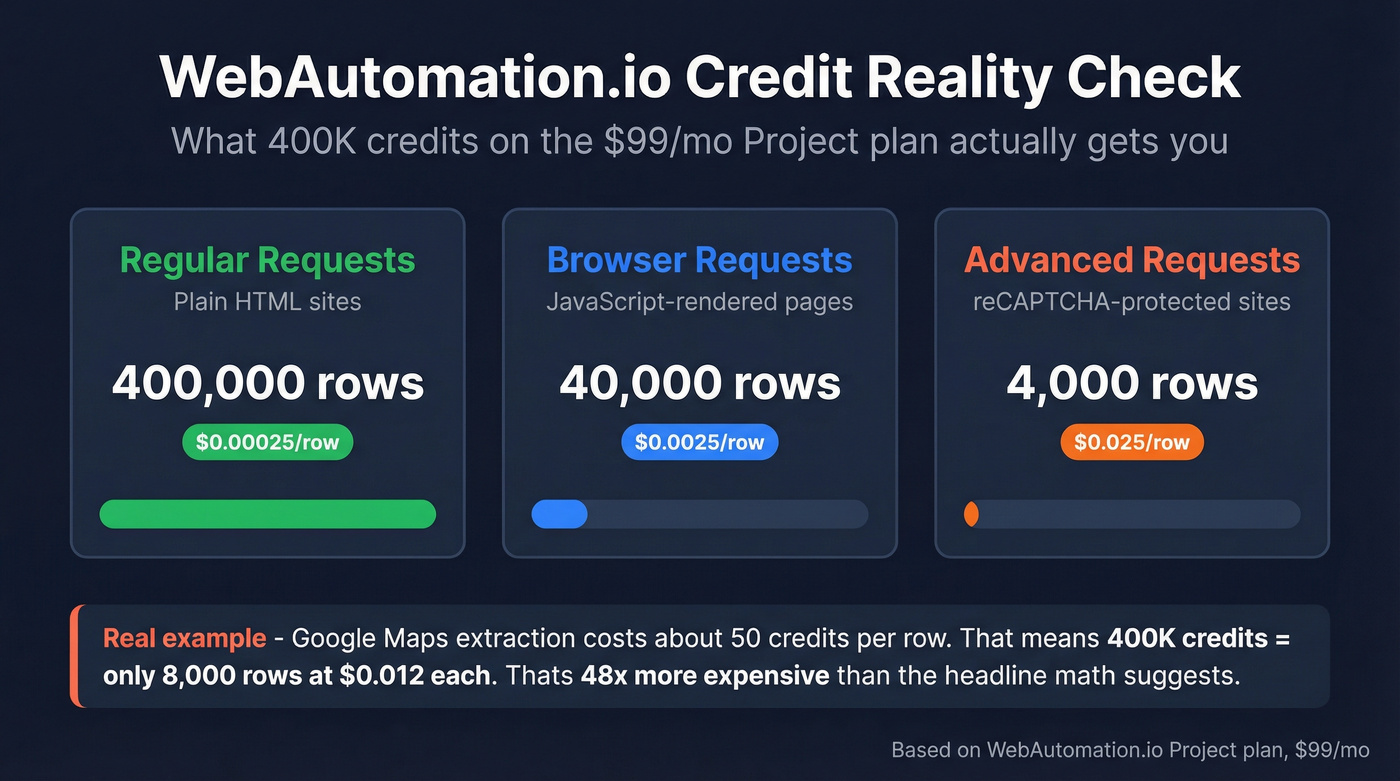
Plans are sold in row credits, but the underlying mechanics run on compute credits - how much processing power it takes to fetch and render pages. The key point: the cost per row depends entirely on how complex the target site is.
There are three request tiers:
- Regular Requests for plain HTML scraping cost 1 compute credit
- Browser Requests for JavaScript-rendered pages cost 10 compute credits
- Advanced Requests for reCAPTCHA-protected sites cost 100 compute credits
On the Project plan at $99/mo with 400K credits, that translates to 400,000 rows from simple HTML sites, 40,000 rows from JS-rendered sites, or just 4,000 rows from reCAPTCHA-protected sites. That's a 100x difference in effective cost depending on your target.
Let's make this concrete. Google Maps extraction runs about 50 credits per row. At that burn rate, 400K credits yields roughly 8,000 rows - about $0.012 per row, not the $0.00025 you'd calculate from the headline number. That's a 48x gap between marketing math and real-world math.
Credits don't roll over month to month, but you're only charged for successful requests with 2xx HTTP responses. Failed scrapes don't eat your allocation.
Here's the thing: if most of your targets are JS-heavy or CAPTCHA-protected, the Project plan's 400K credits evaporate fast. Run the 14-day trial and track your actual credit burn rate before committing. The difference between the advertised per-row cost and your real per-row cost can be staggering.
Pros and Cons from Real Users
What works well:
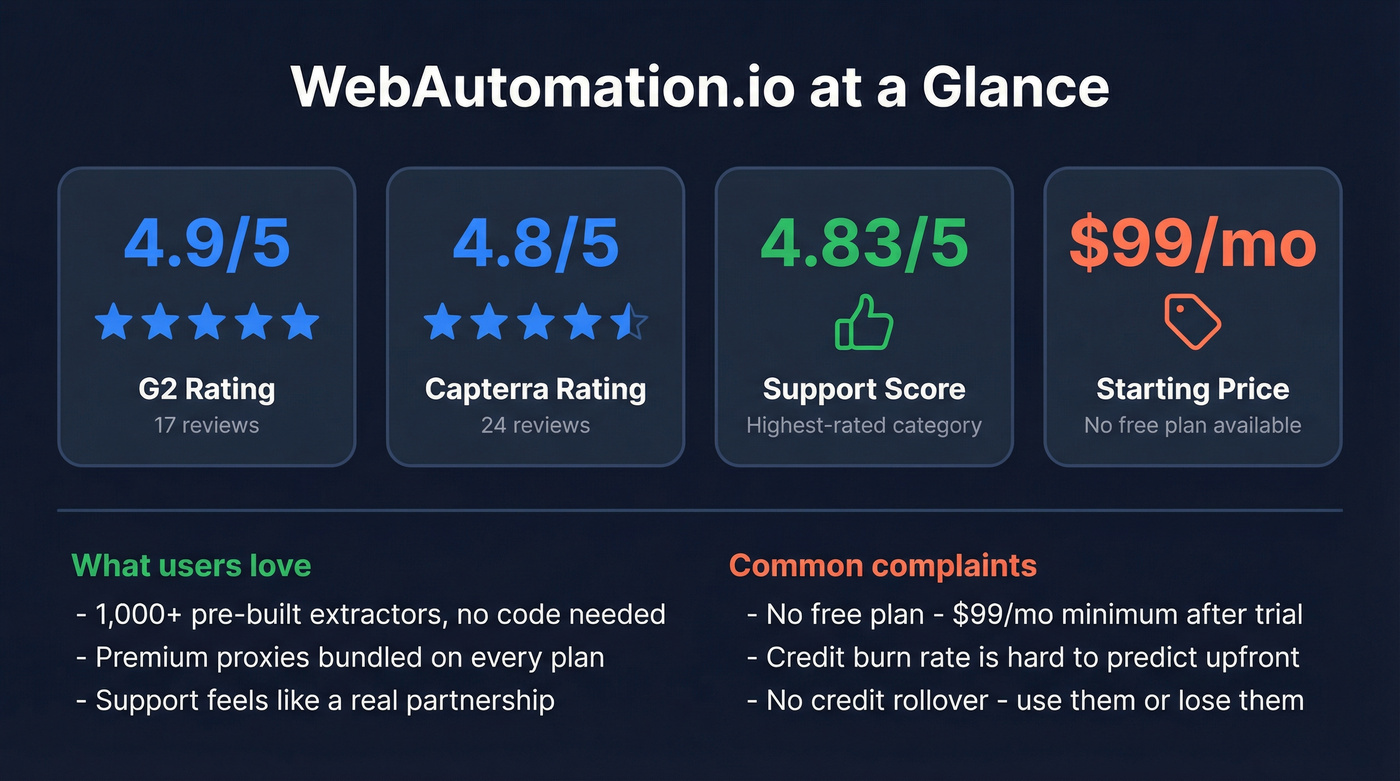
- Pre-built extractor marketplace covers 1,000+ websites - you're scraping in clicks, not code
- Zero maintenance: WebAutomation maintains the extractors when target sites change their structure
- Customer support is genuinely strong, with a 4.83/5 support rating and G2 reviewers consistently highlighting the "partnership" feel
- Accessible for non-technical users who'd otherwise be hiring freelance developers
- Premium proxies included on every plan with no add-on fees
What doesn't:
- No free plan - the number-one complaint on G2 is the lack of a freemium model, meaning you're committing to at least $99/mo after the trial
- Credit consumption is opaque until you actually run an extractor, with no per-extractor rate card published
- No credit rollover, so unused credits vanish every month
- Occasional loading glitches reported by users on Software Advice
We've seen similar frustration echoed on Reddit, where users in r/webscraping often mention that credit-based pricing models feel unpredictable until you've run enough jobs to understand your actual burn rate. That learning curve is real.

If you're scraping websites to build prospect lists, you're solving the wrong problem. Prospeo gives you 300M+ professional profiles with 98% verified emails and 125M+ mobile numbers - no scrapers to maintain, no credits that burn 100x faster on protected sites. At $0.01 per email, you skip the scraping entirely.
Stop scraping for contact data. Search 300M+ verified profiles instead.
How WebAutomation Compares
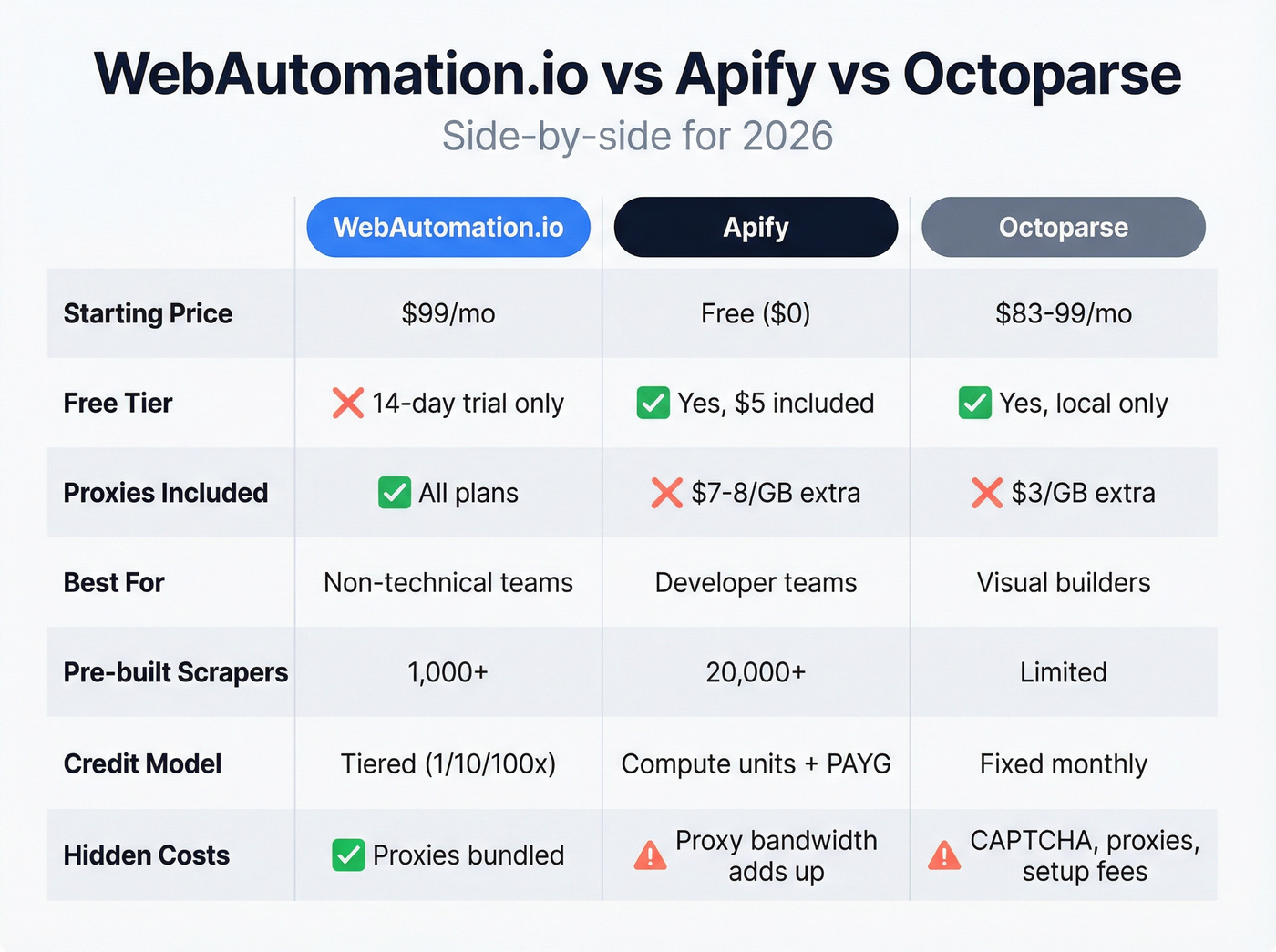
| Tool | Starting Price | Free Tier | Credit Model | Best For |
|---|---|---|---|---|
| WebAutomation | $99/mo | 14-day trial | Credit cost tiers (1/10/100) | Non-technical teams |
| Apify | $0 (Free) | Yes, $5 included | Compute units + PAYG | Developer teams |
| Octoparse | ~$83-$99/mo | Yes, local only | Fixed monthly | Visual builders |
WebAutomation vs. Apify
Apify is the developer's choice. Plans start free with $5 of included usage, then $29/mo for Starter, $199/mo for Scale, and $999/mo for Business - all with pay-as-you-go on top. Compute units run $0.20-$0.30 each, and residential proxies cost $7-$8/GB extra.
The 20,000+ prebuilt Actors in Apify's marketplace dwarf WebAutomation's library, and the API-first workflow fits engineering teams perfectly. The tradeoff: Apify's usage-based billing can be unpredictable, and it's heavier than most non-technical users need. If you don't have someone comfortable reading documentation and wiring up API calls, you'll spend more time configuring than scraping.
If you're deciding between these two specifically, see our deeper breakdown of Apify vs Octoparse.
WebAutomation vs. Octoparse
Octoparse offers what WebAutomation doesn't: a permanent free tier. It's local-only extraction, but it lets you evaluate the visual point-and-click builder without a credit card. Paid plans run roughly $83-$99/mo for Standard and $249-$299/mo for Professional.
Here's the catch - Octoparse's add-ons stack fast. Residential proxies are $3/GB, CAPTCHA solving runs $1-$1.50 per thousand, and custom crawler setup starts at $399. By the time you're running cloud scraping at scale with anti-blocking, the total cost can match or exceed WebAutomation, which bundles proxies into every plan. In our experience, the "cheaper starting price" argument falls apart once you factor in the extras most production workflows require.
Need B2B Contact Data Instead?
WebAutomation charges $99/mo for 400K credits that shrink to 4,000 rows on protected sites. Prospeo's free tier gives you 75 verified emails and 100 Chrome extension lookups monthly - no credit card, no opaque credit burn rates. Just accurate B2B data refreshed every 7 days.
Get a real free tier with contacts you can actually use today.
Final Verdict
WebAutomation.io is a strong pick for non-technical teams scraping popular websites at moderate scale. The credit system is the single most important thing to understand before you buy - the variance between simple and complex targets directly determines your real cost per row, and it can catch you off guard if you don't test first.
If you're evaluating other credit-based tools, you may also want to compare pricing mechanics in ScrapingBee alternatives or see how other vendors structure credits in ListKit Pricing.
FAQ
Does WebAutomation have a free plan?
No permanent free plan exists. There's a 14-day trial with 10M credits - more than enough to evaluate the platform thoroughly. After the trial, the cheapest plan is $99/mo, or roughly $75/mo billed annually with the 25% discount.
How much does one row of data actually cost?
Simple HTML sites cost 1 credit per row (~$0.00025 on the Project plan), but JS-rendered pages cost 10 credits and reCAPTCHA-protected sites cost 100. Google Maps extraction runs about 50 credits per row, making the real cost ~$0.012/row - 48x the headline figure.
What's the best alternative for finding B2B emails?
WebAutomation is a general web scraper, not a contact data tool. For verified business emails and direct dials, Prospeo offers 143M+ verified emails at 98% accuracy with a free tier of 75 emails/month and no scraping setup required. Hunter and Snov.io are other options in this space, though neither matches the same accuracy or mobile number coverage.