Apify vs Octoparse (2026): Which Web Scraping Tool Fits Your Workflow?
If your scraper breaks every time a site changes a button label, or your "simple export" turns into a queueing, proxy-burning mess, you don't have a scraping problem. You've got a workflow-fit problem.
Apify vs Octoparse is really a choice between cloud infrastructure you automate (Apify) and a desktop power tool your operators run (Octoparse). Pick the one that matches who owns the work, and everything gets easier.
Here's the thing: most teams buy the wrong one because they shop for features instead of ownership.
30-second verdict (and "skip both if...")
Octoparse is a no-code desktop GUI. Cloud Extraction is available on Standard/Professional/Enterprise plans. Apify is an API-first cloud platform built around reusable Actors.

Use Octoparse if:
- You want a visual point-and-click builder your ops team can own end-to-end.
- Your jobs are "business scraping": directories, listings, straightforward pagination, "load more," exports.
- You're OK living inside a node-based Cloud Extraction model (and managing queues when nodes are busy).
Use Apify if:
- You want pipeline-as-code: repeatable runs, versioned logic, programmatic triggers, webhooks.
- You need to scale via concurrent runs and treat scraping like a product component.
- You want to start from the Apify Store (prebuilt Actors) and customize when needed.
If you truly need raw web data for analytics, research, or a product feature, keep reading.
Micro decision tree
- Need a GUI your non-devs can run? -> Octoparse
- Need API-first automation + scalable runs? -> Apify
- Need verified B2B contacts for outbound? -> Prospeo (or start with free prospecting tools)

Apify vs Octoparse: what they're really built for
Apify: scraping as infrastructure
Apify is a cloud automation platform that happens to be excellent at scraping. The core unit is an Actor: a containerized job you can run on-demand, schedule, or trigger via API. You can pull Actors from the Apify Store, or build your own with Crawlee (their open-source crawling library) and deploy it the same way.
That "everything is an Actor" model is why Apify fits engineering-led teams: you don't just scrape a site, you ship a repeatable job with inputs/outputs, retries, storage, and monitoring.
In our experience, teams stop arguing about "which scraper" once they treat Actors like services with owners, alerts, and versioned changes.
Real workflow vignette (Apify): A product team needs "top 20 results for 500 keywords" every morning. They run one Actor per keyword set, push results to a dataset, trigger a webhook, and load into a warehouse. When the site changes, they update one Actor version and roll it forward like any other service.
Octoparse: scraping as an operator tool
Octoparse is built for operators. It's a desktop app where you click elements, define pagination, handle infinite scroll, and use templates when available. When you need it to run continuously, you push it to Cloud Extraction, and Octoparse runs it on their infrastructure with node-based concurrency.
Real workflow vignette (Octoparse): A RevOps analyst needs weekly pulls from 30 directories. They build 30 crawlers in the desktop app, schedule them in Cloud Extraction, and export to CSV or a downstream system. When one directory changes its layout, they fix selectors in the GUI in minutes - no repo, no deploy pipeline.
One operating model matters more than any checkbox list:
Apify scales by concurrent runs + compute units (cloud-first). Octoparse scales by cloud nodes + scheduled task slots (desktop-first, cloud optional).
My blunt take: Apify's the better long-term foundation if scraping is business-critical. Octoparse is the faster win when you need results this week and you don't want engineering in the loop.
Apify vs Octoparse at a glance (features, limits, best fit)
| Category | Apify | Octoparse | Best fit |
|---|---|---|---|
| Primary UX | Cloud + API | Desktop GUI | Octoparse |
| Build model | Actors + Store | Click flows | Apify |
| Scale unit | Concurrent runs | Cloud nodes | Apify |
| Scheduling | Native schedules | App + cloud | Apify |
| API control | Full control | Run + export | Apify |

A few specifics that change day-to-day operations:
- Octoparse scheduled-task concurrency is capped by plan: Standard 1, Professional 3, Enterprise 5 concurrent scheduled tasks. That's "how many can run on a schedule at once," not "how many crawlers you own."
- Apify max concurrent runs scales hard by plan: 25 (Free) / 32 (Starter) / 128 (Scale) / 256 (Business). That's why Apify feels unfair once you're running lots of small jobs.
If you're running a handful of scrapes and exporting CSVs, Octoparse is usually the quickest setup. If you're building a daily pipeline with programmatic control, Apify's the cleaner base.

Scraping directories for B2B contact data? You're solving the wrong problem. Prospeo gives you 300M+ professional profiles with 98% email accuracy and 125M+ verified mobile numbers - no crawlers, no broken selectors, no proxy costs. Data refreshes every 7 days, not whenever your scraper doesn't break.
Skip the scraping pipeline. Get verified contacts in seconds.
How scaling actually works (Octoparse cloud nodes vs Apify concurrency)
Octoparse: node-based cloud extraction (predictable, but rigid)
Octoparse scaling (in Cloud Extraction) is node-based. Your plan gives you a fixed pool of cloud nodes, and tasks queue when nodes are busy.

Octoparse's own materials and third-party listings don't always line up on the exact "concurrent cloud" number for every tier, but the operational reality stays the same: you get a finite pool, and once it's full, you're waiting.
- Professional supports up to 20 concurrent cloud extractions.
- When nodes are full, tasks queue until a node frees up.
- A "splittable" task can consume multiple nodes, which collapses parallelism for everything else.
This is the failure pattern I've seen most: one splittable job grabs most of the node pool, and throughput falls off a cliff even though "concurrent tasks" looks fine on paper.
Octoparse also dedupes across runs: if you scrape 105 rows and 100 are duplicates, only 5 new rows are saved. That's great for storage hygiene, but it doesn't refund the compute you spent discovering duplicates.
Apify: concurrent runs + compute units (flexible, but you must watch spend)
Apify scales by concurrent runs and you pay by compute units (CUs). If you have 50 small jobs, Apify can run them in parallel (up to your plan limit). You feel the cost in CUs and proxy bandwidth, not in "why's my queue stuck?"
Look, usage-based billing isn't "bad." It's just unforgiving if you don't measure.
What breaks first (the real-world stuff):
Octoparse breaks first when...
- A splittable task starves the node pool.
- Complex pages slow cloud extraction.
- Protected sites trigger proxy/CAPTCHA iteration (and Cloudflare blocks show up fast).
- You run out of scheduled slots and start playing calendar Tetris.
Apify breaks first when...
- Headless browser usage spikes CU burn.
- Proxy bandwidth becomes a top-3 line item.
- An Actor leaks memory/state and hits run limits.
- Teams ship Actors without alerts, then discover failures days later.
If your scraping workload is "a few exports a week," Apify's overkill. If your workload is "this data powers revenue or product," Octoparse is the wrong ceiling to bet on.
Workflow fit: dev team vs ops team vs hybrid (with concrete examples)
This is where most buying decisions go wrong. People compare features; they should compare ownership.
Choose Octoparse when ops owns the whole loop
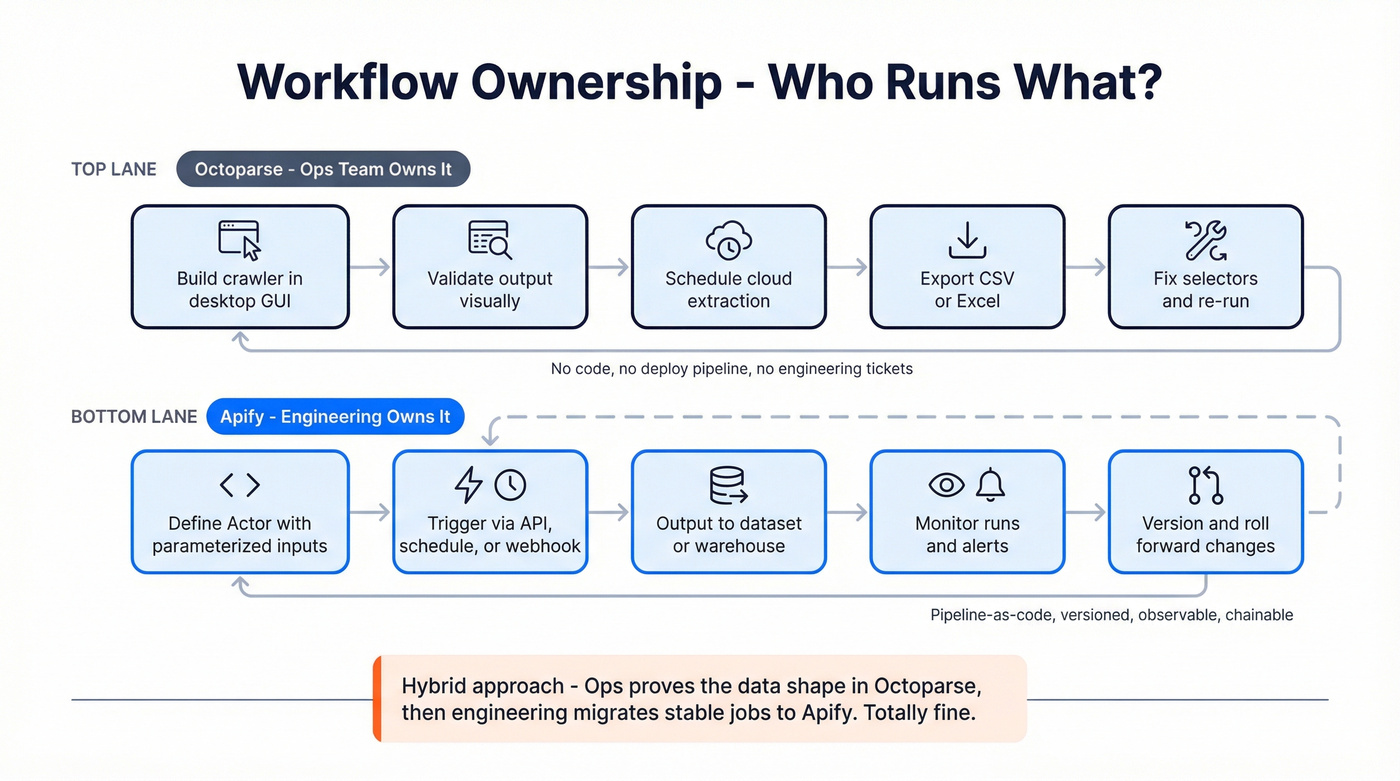
Octoparse wins when the workflow looks like this:
- An analyst builds crawlers in a GUI.
- They validate output visually.
- They schedule cloud runs.
- They export CSV/Excel or push to a lightweight destination.
- Fixes are "update selectors and re-run."
Octoparse is perfect for:
- Directory scraping for market maps.
- Price monitoring on a small set of sites.
- Lead research where the output is a spreadsheet, not a service.
- Teams that need a tool today and don't want a backlog ticket.
Skip Octoparse if:
- You need strict change control (who changed what, when).
- You want to generate crawlers programmatically.
- You need high parallelism across many jobs without node politics.
Choose Apify when engineering owns reliability and automation
Apify wins when the workflow looks like this:
- Inputs are parameterized (JSON in, dataset out).
- Runs are triggered by schedules, webhooks, or orchestration.
- Output goes to storage, a queue, or a warehouse.
- Failures page someone; retries/backoff are deliberate.
- Changes are versioned and rolled out intentionally.
Apify is perfect for:
- "Scrape -> normalize -> load" pipelines.
- Product features that depend on fresh web data.
- Multi-step workflows (scrape, then enrich, then notify).
- Teams that want reusable components (Actors) across projects.
Skip Apify if:
- Nobody on the team wants to own code.
- You can't tolerate usage-based variability (CUs + proxies).
- Your "pipeline" is really just a monthly export.
Hybrid reality (common and totally fine)
A lot of teams land here:
Ops uses Octoparse to prove the data shape and business value. Engineering migrates the stable, high-value jobs to Apify once the requirements stop moving.
That's not indecision. It's a sane rollout plan.
API & automation surface area (pipeline-as-code vs run-and-export)
This is the most important hidden difference.

Apify: control plane by design
Apify is built to be controlled by API. You start runs, pass inputs, read datasets, trigger webhooks, chain jobs, and integrate with your orchestration. If scraping is part of a product or data platform, Apify has the right shape.
I've watched teams go from "one-off scrape" to "daily data product" in a month simply because the integration surface was already there.
Octoparse: API for running and retrieving, not for building
Octoparse's API is useful, but it's not pipeline-as-code. It's primarily "run control + data retrieval," with constraints that matter:
- Rate limit: 20 req/s, with a hard bucket of 100 requests per 5 seconds (then 429s).
- Pagination: 1,000 rows per request max (large exports require offset loops).
- Token expiry: 86399 seconds (about one day).
- You can't create or modify crawlers via API. Crawler setup and changes happen in the desktop app.
- Local extraction data isn't exportable via API unless you back it up to cloud first.
If you need crawler definitions to live like code (reviewed, versioned, reproducible), Octoparse will frustrate you. If you just need scheduled runs and reliable exports, it does the job.
Data outputs & downstream: what you actually get and how it plugs in
Scraping tools don't just "collect data." They produce outputs with different ergonomics, and that affects everything downstream.
Apify outputs (best for pipelines)
- Datasets & key-value stores: clean separation between "run metadata," "structured rows," and "artifacts."
- Webhooks: push completion/failure events into your systems immediately.
- API-first retrieval: pull results as part of a larger workflow without touching a UI.
- Reusable interfaces: Actors behave like services - inputs in, outputs out.
This is why Apify feels like infrastructure: it's built for chaining.
Octoparse outputs (best for operator workflows)
- Desktop-first validation: you can see what's being extracted while building.
- Cloud Extraction results: easy to schedule and retrieve, but you'll work within the API export limits.
- Export mindset: CSV/Excel and "deliverables" are the default mental model.
If your downstream is "a spreadsheet someone checks," Octoparse is comfortable. If your downstream is "a job that triggers three other jobs," Apify's cleaner.
If you're scraping specifically to build lead lists, you're usually better off starting with a business contact database or dedicated lead generation tools instead of maintaining crawlers.
Pricing in 2026 (unit economics that actually matter)
Both tools have a "starting price" that stops mattering the moment you hit real volume. The real bill comes from throughput + anti-bot costs.
Pricing snapshot (compressed for mobile)
| Cost area | Apify | Octoparse | Winner |
|---|---|---|---|
| Entry plan | $0-$999/mo | Free + paid plans (Standard/Professional) | Octoparse |
| Meter | Compute Units | Nodes + add-ons | Apify |
| Resi proxies | $7-$8/GB | $3/GB | Octoparse |
| CAPTCHA | Your stack | $1-$1.5/1k | Octoparse |
| Add-on scale | $5 per extra concurrent run | More nodes / higher tier | Apify |
Apify plan pricing (public): $0 / $29 / $199 / $999. CU pricing drops by tier: $0.30/CU (Free/Starter), $0.25/CU (Scale), $0.20/CU (Business). Apify Free includes a $5 monthly usage credit and access to the platform, which is perfect for proving a workflow before committing.
Apify residential proxy bandwidth (tiered):
- $8/GB (Free/Starter)
- $7.5/GB (Scale)
- $7/GB (Business)
Apify add-on clarity: the "$5" line item is extra concurrency capacity--$5 per additional concurrent run slot (capacity), not per job execution.
Octoparse pricing shape: base plan + extras. Standard is commonly listed in the ~$69-$119/month range depending on billing and listing source, and Professional is commonly listed around ~$249/month. Then add what you actually need at scale:
- Residential proxies: $3/GB
- CAPTCHA solving: $1-$1.5 per 1,000
- Pay-per-result templates: $0.001-$3 per 1,000 results
- Done-for-you services: $399+ (crawler setup) and $599+ (data service)
My opinion: Octoparse's add-ons are the hidden bill. Apify's hidden bill is browser-heavy CU burn.
One worked example (back-of-napkin unit economics, with explicit assumptions)
Goal: 200,000 rows/day from a dynamic site with moderate blocking.
To make this concrete, assume:
- Proxy bandwidth: 1 GB/day of residential traffic (dynamic pages + retries).
- CAPTCHA frequency: 5 CAPTCHAs per 1,000 pages (moderate blocking).
- Apify compute: 10 CUs/day (browser-heavy runs with retries; this is the line item teams feel first).
Now map that to monthly costs (30 days):
Octoparse (Professional base + anti-bot extras)
- Base plan: ~$249/mo
- Proxies: 1 GB/day x 30 x $3/GB = $90/mo
- CAPTCHA: if 200k rows ~= 200k pages (simple model), CAPTCHAs/day = 200,000/1,000 x 5 = 1,000/day Monthly CAPTCHA = 30,000 -> $30-$45/mo at $1-$1.5 per 1k
- Estimated total: ~$369-$384/mo (before re-runs, template fees, or higher bandwidth)
Apify (Starter/Scale + usage)
- CUs: 10 CUs/day x 30 x $0.30/CU = $90/mo (Free/Starter CU rate) On Scale at $0.25/CU: $75/mo
- Proxies: 1 GB/day x 30 x $8/GB = $240/mo (Free/Starter proxy rate) On Business at $7/GB: $210/mo
- Platform plan: $29-$199/mo depending on tier and concurrency needs
- Estimated total: ~$359-$529/mo depending on plan tier and proxy rate
What this shows:
- Octoparse can look cheaper when proxy bandwidth is the main driver.
- Apify can match or beat it when you reduce browser usage, cut retries, and move up tiers for cheaper proxy bandwidth and CUs.
Anti-bot reality: when a site fights back (what to do next)
Protected sites are where tool choice stops being theoretical. Here's the mini-playbook that keeps projects from stalling.
When Octoparse hits resistance, do this (in order)
- Start with a template (if available) before building from scratch.
- Move from local runs to Cloud Extraction for stability and scheduling.
- Turn on residential proxies and keep bandwidth visible as a KPI.
- Use CAPTCHA solving when challenges appear (budget it; don't pretend it's free).
- Reduce page complexity: extract fewer fields, avoid unnecessary clicks, minimize scroll depth.
- Split one monster crawler into smaller ones to avoid splittable tasks hogging nodes.
- If the site stays hostile, accept the truth: you'll be iterating selectors and flow logic regularly.
When Apify hits resistance, do this (in order)
- Check the Apify Store for an Actor that already handles the target site's defenses.
- Prefer HTTP-first scraping where possible; reserve headless browsers for pages that truly require them.
- Tune Crawlee behavior: retries, backoff, session rotation, and request concurrency.
- Configure proxies deliberately (residential vs datacenter) and track GB per 1k pages.
- Reduce browser footprint: block images, fonts, and heavy resources; keep navigation minimal.
- Add run-level validation (empty dataset = failure) so you catch blocks immediately.
- If you must run browsers at scale, treat CU burn like cloud spend: budgets, alerts, and optimization sprints.
The practical difference: Octoparse users fight the site inside a GUI. Apify users fight it in code and configuration. Both work. Only one matches your team.
Production readiness checklist (reliability, monitoring, limits, maintenance)
Scraping isn't set-and-forget. Treat it like production software, even if it's "just data."
Apify production checklist
- Know platform limits: 100 schedules, 100 webhooks, 1000 tasks per user.
- Watch memory ceilings: 8,192 MB max run memory on Free, 32,768 MB on Starter.
- Instrument runs: logs, failure alerts, and dataset validation (empty dataset should page someone).
- Budget maintenance: for protected sites at scale, 10-30% of engineering time goes to scraper upkeep. I've watched teams ignore this, then blame the tool when reality shows up.
Octoparse production checklist (limits operators actually hit)
- Crawler limits: Standard: 100 crawlers; Professional: 250 crawlers.
- Local concurrency: Free/Basic: 2 concurrent local runs; Standard+: unlimited local runs.
- Cloud scaling expectations: Enterprise commonly supports 40+ nodes plus collaboration features.
- Document crawler ownership: who updates, who approves, and how rollbacks work.
- Track node utilization and queue time; "concurrent tasks" isn't throughput.
- Plan for anti-bot iteration: proxies and CAPTCHA aren't edge cases. They're the bill.
If your end goal is outbound, don't stop at "scraped rows" - you still need B2B data hygiene and a real email verifier process.
What users say in 2026 (reviews + recurring complaints)
At a high level, both tools score well. The difference is what people complain about, and those complaints predict your future.
Ratings (Capterra + Software Advice):
- Capterra (updated Jan 13, 2026): Apify ~4.8/5 (388 reviews) vs Octoparse ~4.7/5 (106 reviews).
- Software Advice (updated Feb 12, 2026): Apify 4.8 (388) vs Octoparse 4.7 (106).
Operational themes (G2; Apify 393 reviews, Octoparse 52 reviews):
- Apify complaints: "expensive" (69 mentions) and learning curve (39). Translation: it's powerful infrastructure, and you pay for infrastructure.
- Octoparse complaints: slow cloud/complex tasks (5), learning curve (8), proxy issues (2). Translation: it's no-code until the site gets complex, then you're debugging flows and waiting on nodes.
What this means in practice:
- If your team hates usage-based bills, Apify will annoy you unless you actively optimize.
- If your team hates operational ceilings (nodes, slots, complex logic), Octoparse will annoy you, because those ceilings show up exactly when the project becomes important.
FAQ
Is Apify or Octoparse better for non-technical teams?
Octoparse is usually the better fit for non-technical teams because it's a desktop no-code GUI with templates and click-based extraction, so an operator can build and fix crawlers without a repo or deploy process. Apify is strongest when a developer owns automation, monitoring, and versioned changes.
Can Octoparse be fully automated via API (create/edit crawlers)?
No. Octoparse's API is mainly for running tasks and exporting results, while crawler creation and edits happen in the desktop app. In practice, you can automate execution, but you can't treat crawler definitions like code you generate, review, and deploy.
Why do Octoparse cloud jobs queue even with "concurrent tasks"?
Octoparse Cloud Extraction is node-based: your plan gives you a fixed number of nodes, each task consumes at least one node, and "splittable" tasks can consume multiple nodes at once. When nodes are occupied, everything else queues, even if you have plenty of crawlers configured.
What's a good free option if I'm scraping for lead lists instead of raw web data?
Prospeo is the best free starting point for lead lists because its free tier includes 75 email credits plus 100 Chrome extension credits per month, and the data's verified (98% email accuracy) and refreshed every 7 days. For raw web tables, Apify's Free plan is great for testing, but it won't replace verified contact data.
Whether you pick Apify or Octoparse, you still need to verify the contact data you extract. Prospeo's 5-step verification delivers 98% email accuracy at $0.01 per email - no catch-all traps, no honeypots, no bounced campaigns. 15,000+ companies already ditched the scrape-then-verify workflow.
Verified B2B data without a single line of scraping code.