Briteverify vs Kickbox (2026): Which Email Verification Tool Fits Your Workflow?
If you're comparing briteverify vs kickbox, you're probably not stuck on features. You're stuck on outcomes: fewer bounces, fewer spam-folder surprises, and fewer "why did we mail that?" moments.
Here's the thing: both tools verify emails, but they behave differently once you throw real-world lists at them. Kickbox tends to be conservative and hands you more "Unknown" results. BriteVerify tends to return fewer Unknowns, which feels decisive, but it also means your team needs tighter rules around "Accept All" and "Unknown" so they don't quietly turn into "send anyway."
I've watched teams torch a perfectly good sending domain because they treated verification like a binary gate instead of a risk system.
Hot take: if your average deal size is modest and you're mostly doing outbound, you don't need an "enterprise verification platform." You need a workflow that keeps bounces low without turning list cleaning into a weekly fire drill.
30-second verdict (and when to skip both)
- Pick Kickbox if you want transparent pricing, predictable ops, and you're OK treating Unknown as a workflow step (retry/holdout). It's the safer choice when you'd rather suppress than risk bounces.
- Pick BriteVerify if you're already in the Validity ecosystem and you care about enterprise trust artifacts and "verify at point of capture" patterns, especially for Salesforce-heavy teams.
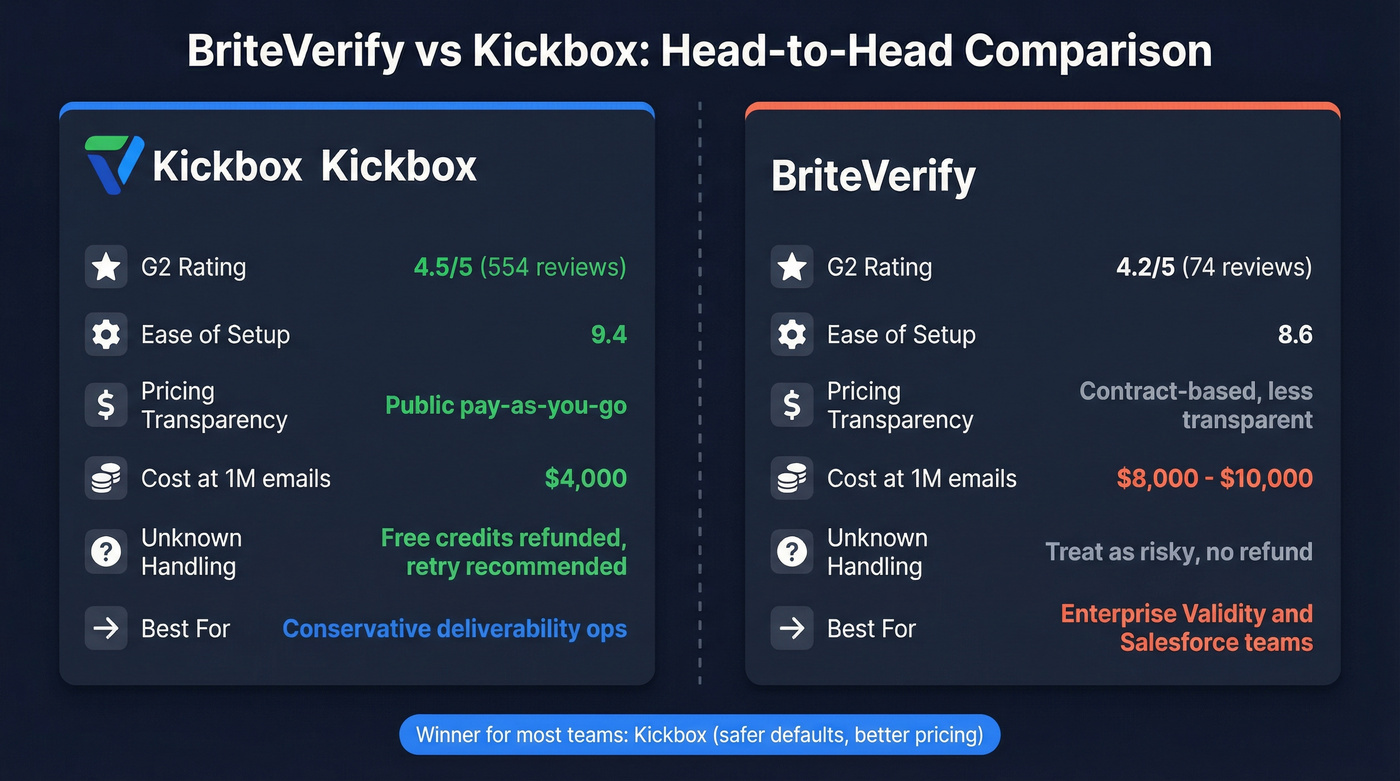
One line that explains most of the debate: "Unknown vs valid risk" is the whole game.
Micro-scenarios:
- Marketing list hygiene (ESP bounce threshold anxiety): Kickbox wins. More Unknowns is annoying, but it's usually safer than "false Deliverable."
- Salesforce admin wants verification inside CRM screens: BriteVerify can win, but the "real-time" behavior has caveats.
G2 snapshot (from the G2 comparison page): Kickbox 4.5/5 (554) vs BriteVerify 4.2/5 (74).
A quick G2 dimension check (same page):
- Ease of Setup: 8.6 (BriteVerify) vs 9.4 (Kickbox)
- Quality of Support: 8.2 (BriteVerify) vs 8.8 (Kickbox)
- Meets Requirements: 8.6 (BriteVerify) vs 9.1 (Kickbox)
Briteverify vs Kickbox: side-by-side comparison (outputs, pricing, security)
Quick comparison (verification vs outbound-ready data)
| Core job | Verify + enrich | Email verification | Email verification |
| Status outputs | Verified + enrichment | Deliverable / Undeliverable / Risky / Unknown | Valid / Invalid / Accept All / Unknown |
| Unknown handling | 7-day refresh reduces rot | Retry; Unknowns free | Treat as risky |
| Pricing model | Credits (self-serve) | Pay-as-you-go credits | Usage-based contract |
| 5k emails | ~$50 (equiv.) | $40 | ~$40-50 |
| 1M emails | ~$10k (equiv.) | $4,000 | ~$8k-10k |
| Security (short) | GDPR | TLS 1.3 + 90-day delete | SOC 2 Type 2 + ISO 27001/27701 |
| Best for | Outbound-ready data | Conservative deliverability ops | Enterprise + Validity stack |
Security highlights summarized from Kickbox docs/trust center and the Validity trust center.
Callouts that matter in real life:
- Kickbox's four statuses are operationally clean, and their docs are unusually explicit about what Unknown means and what to do next.
- BriteVerify's Accept All bucket is the one that bites teams who treat it like Valid.
- Kickbox's pricing is refreshingly public. BriteVerify's pricing opacity makes forecasting harder for RevOps.
- If you need hands-on inbox placement help, Kickbox also sells deliverability consulting. That's a real differentiator when you're trying to recover a bruised sender reputation.

Results taxonomy mapping (what each status really means)
Most teams mess this up by treating verification like a binary "good/bad" gate. It's not. It's a risk classification system you use to control bounce rate, complaints, and wasted sends.
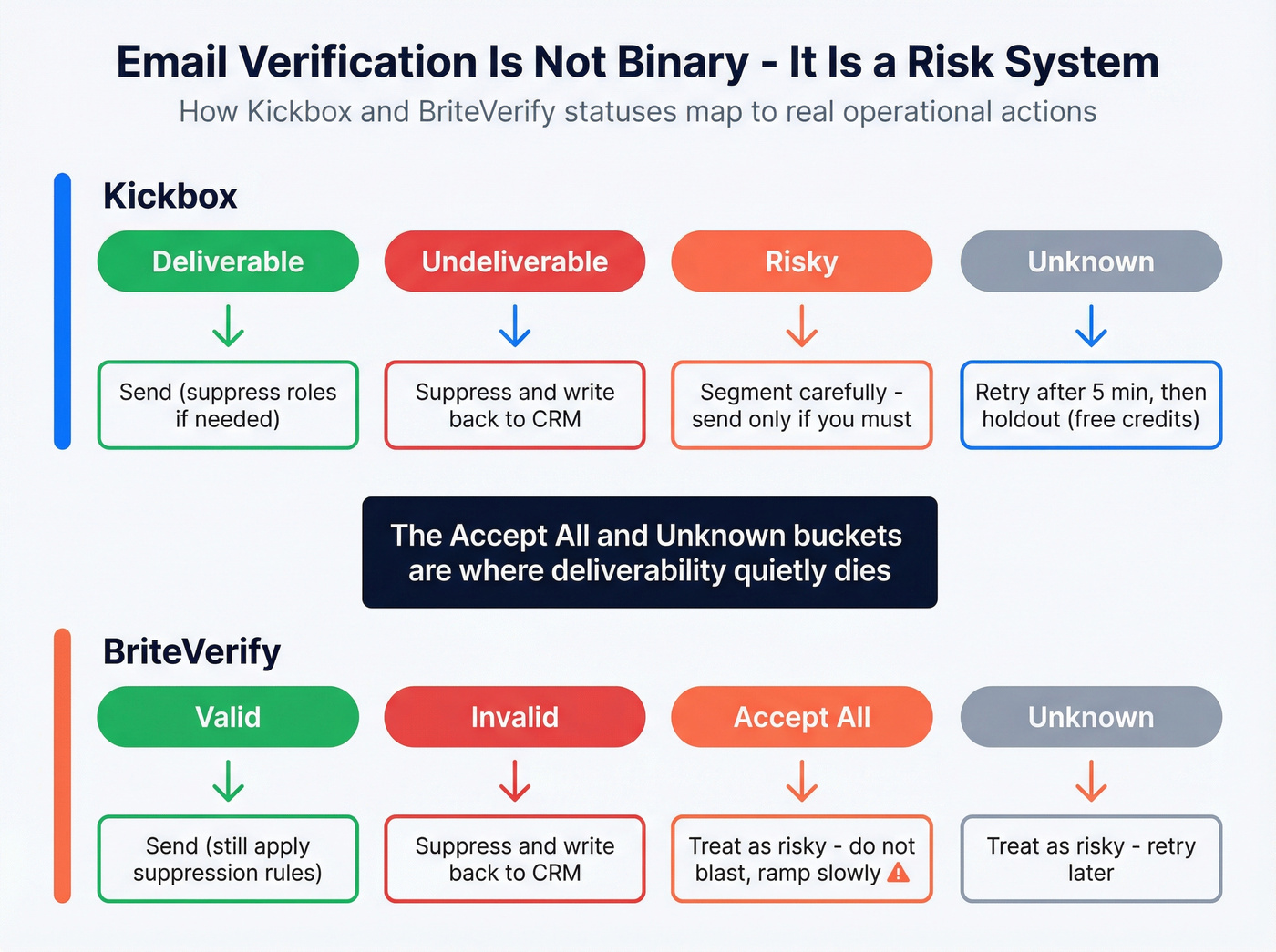
Two rules that keep teams out of trouble:
- Don't let "Valid/Deliverable" bypass suppression logic. Role accounts, disposable domains, and prior bounces still matter.
- Don't let "Unknown" become "send anyway." Unknown is where deliverability dies, quietly.
Real talk: the fastest way to get yelled at by Marketing Ops is to push a "verified" list into a blast, then watch the bounce rate spike while everyone argues about whose tool was "more accurate."
Kickbox statuses -> operational actions (suppress, retry, segment)
Kickbox returns: Deliverable, Undeliverable, Risky, Unknown.
Here's the operational playbook:
| Kickbox status | What it means operationally | What to do |
|---|---|---|
| Deliverable | Safe to send; framed with a 95% delivery guarantee | Send (still suppress roles if needed) |
| Undeliverable | Hard no | Suppress + write back to CRM |
| Risky | Accept-all, disposable, role, etc. | Segment; send only if you must |
| Unknown | Server didn't respond | Retry after ~5 minutes; holdout |
Three details that matter:
- Unknown retry guidance: Kickbox recommends retrying Unknown after about 5 minutes. Build that into automation.
- Unknowns are free: Unknown results don't count against your balance (credits refunded). That changes how aggressive you can be with retries.
- Risky isn't "bad," it's "handle carefully." For outbound, I suppress disposable and role-based. For transactional, role-based can be fine depending on your use case.
If you're running sequences in Outreach, Smartlead.ai, or Instantly and feeding them from CSV imports, the cleanest workflow is:
- Verify -> suppress Undeliverable -> quarantine Risky/Unknown -> retry Unknown -> only then push to sequencer.
This is also where a formal email verification list SOP keeps teams aligned.
BriteVerify statuses -> operational actions
BriteVerify commonly shows: Valid, Invalid, Accept All, Unknown.
Treat it like this:
| BriteVerify status | What it means operationally | What to do |
|---|---|---|
| Valid | Likely OK | Send (still apply suppression rules) |
| Invalid | Hard no | Suppress + write back to CRM |
| Accept All | Domain accepts everything | Treat as risky; don't blast |
| Unknown | Domain didn't respond | Treat as risky; retry later |
The Accept All bucket is the big one. Catch-all domains can look fine in verification and still bounce later (or worse, accept and then silently drop). If your ESP bounce threshold is 5% or less, the safest rule is simple: don't mail Accept All/Unknown unless you're willing to ramp slowly and monitor.
One more operational gotcha: BriteVerify's consumption model can surprise you if your workflow accidentally runs verification when you didn't intend to. That's not a data problem. It's an ops tax. Put a guardrail in place: log every verification run with timestamp, source system, and record count.

You're comparing BriteVerify and Kickbox because bad data is torching your sender reputation. What if your emails arrived already verified? Prospeo's 5-step verification with catch-all handling, spam-trap removal, and honeypot filtering delivers 98% email accuracy - so you never have to argue about "Unknown" vs "Accept All" again.
Stop verifying after the fact. Start with emails that are already clean.
Quality scoring and thresholds (Kickbox Sendex explained)
Kickbox's differentiator isn't just statuses. It's Sendex, a quality score from 0 to 1. Think of it as "how likely is this address to behave like a real, responsive inbox," not "will it bounce."

A practical way to use it:
| Use case | "Good" Sendex range | What I do |
|---|---|---|
| Marketing | 0.70-1.00 | Send normally |
| Transactional | 0.55-1.00 | Send normally |
| Any | Below "Good" | Segment or suppress |
Two warnings:
- Don't use Sendex alone. A Deliverable email with a low Sendex can still be a complaint magnet.
- Use Sendex to sequence your risk. If you're warming a domain or ramping volume, start with your highest Sendex segment first.
If you’re building deliverability guardrails, it also helps to understand what’s changed in email deliverability recently.
Pricing: what you'll pay at 5k-1M (plus real cost math)
Email verification pricing is simple until it isn't. The trap is forecasting: if your verification spend is variable and your list volume spikes, you'll feel it, and you'll feel it at the worst time (right before a launch, right after an event, right when Sales screams for "one more list").
Pricing at common volumes
| Volume | Kickbox | BriteVerify | Notes |
|---|---|---|---|
| 5k | $40 | ~$40-50 | Similar entry point |
| 10k | $80 | ~$80-100 | Depends on tier/contract |
| 100k | $800 | ~$800-1,000 | Often ~$0.008-0.01 |
| 250k | $1,500 | ~$2,000-2,500 | Negotiation starts to matter |
| 1M | $4,000 | ~$8,000-10,000 | BV varies by deal |
Kickbox specifics (from their published credit packs): 500=$5, 1k=$10, 2.5k=$25, 5k=$40, 10k=$80, 25k=$200, 50k=$400, 100k=$800, 250k=$1,500, 500k=$2,500, 1M=$4,000, plus 100 free verifications upfront. Also: Unknown results are always free (credits refunded), which lowers your effective cost on messy lists.
BriteVerify pricing signals (directional, but useful):
- G2's BriteVerify pricing listing shows $0.01 per email up to 250k verifications (so 5,000 ~= $50 on that listing).
- Third-party directories often show a pay-as-you-go entry point around $40 for 5,000 verifications.
- In practice, budgeting $0.008-$0.01 per email is a sane range for many teams, with discounts at scale.
- If you see ultra-low directory numbers floating around, ignore them. They don't match how verification vendors price real usage.
If you’re comparing vendors more broadly, see our rankings of email verifier websites.
The pricing math that actually matters: cost per usable email
This is where Kickbox's "Unknowns are free" changes the spreadsheet.

Example: you upload 100,000 emails.
- Tool A charges for everything you submit.
- Tool B refunds Unknowns.
If 12% of your list comes back Unknown:
- Kickbox effective billed volume ~= 88,000 (because Unknowns are refunded)
- At $800/100k list price, your effective cost per billed verification drops accordingly
Now the operational reality: Unknowns still require a decision (retry, holdout, suppress). So the real KPI isn't "cheapest per check." It's cheapest per address you're willing to mail without blowing bounce thresholds, which is why teams that send at scale end up caring more about routing rules and timestamps than they do about a tenth of a cent.
My recommendation:
- If you're a marketer protecting a primary domain, optimize for lowest bounce risk, not lowest unit cost.
- If you're doing point-of-capture verification, optimize for fast decisions and a clean "risky bucket" routing path.
Integrations and implementation gotchas (HubSpot + Salesforce)
Integrations are where "simple verification" turns into operational complexity. The difference between a clean system and a CRM full of landmines is usually data modeling + timestamps + automation.
We've tested enough of these setups to say it plainly: if you don't store the verification timestamp and provider, you're going to re-verify the same records, argue about which result is "real," and pay for it twice.
If you want a broader blueprint for keeping systems clean, use this CRM data hygiene framework.
Kickbox: implementation checklist (HubSpot + Salesforce)
Kickbox has integrations across major marketing tools and CRMs (including HubSpot, Salesforce, Marketo, Klaviyo, and more) and docs that are straightforward enough to implement without guesswork.
Gotcha #1: HubSpot export limitation Kickbox's HubSpot integration can't export a list of Undeliverable/bad emails back into HubSpot. It's intentional. They don't want you accidentally mailing the bad list.
Workaround that actually works
- Verify the HubSpot list in Kickbox.
- Export the "Guaranteed/Deliverable" list back into HubSpot for sending.
- Download the full results CSV from Kickbox.
- In HubSpot, import bad emails into a suppression list (or set a custom property like
email_verification_status = undeliverableand build active lists off it).
Gotcha #2: Real-time HubSpot is beta If you want point-of-capture verification, plan for a test environment and a rollback.
Gotcha #3: Don't skip reason codes Kickbox provides reason codes (timeouts, invalid_domain, etc.). Pipe them into your data model.
Data model I'd actually ship
email_verification_status(enum)email_verification_provider(Kickbox/BriteVerify)email_verification_reason(string)email_verification_score(Sendex numeric, if Kickbox)email_verified_at(timestamp)email_verification_run_id(string; ties back to logs)
BriteVerify: implementation checklist (Salesforce reality included)
BriteVerify shines when you want verification embedded in enterprise data hygiene, especially if you're already using other Validity products.
Gotcha #1: Salesforce "real-time" can mean "when viewed" The managed Salesforce component verifies when the record is viewed on the Lightning record page. If you're creating/importing records programmatically, verification might not run until someone opens the record.
Here's a scenario I've seen more than once: a team imports 40,000 leads, assumes "real-time verification" handled it, then enrolls the leads into sequences the same day. A week later, the bounce report lands, and suddenly everyone's in a Slack thread arguing about definitions instead of fixing the workflow.
Workarounds
- Run scheduled bulk verification via BriteVerify's Bulk API.
- Stamp verification status + timestamp via a scheduled hygiene job so you're not relying on "someone opened the record."
Gotcha #2: Install path isn't always AppExchange-simple Expect separate production/sandbox packages and guides. Normal for enterprise tooling, but it surprises admins.
Gotcha #3: Consumption surprises
Put a hard guardrail in place: log every verification run with who/what triggered it, and alert when volume spikes.
Automation rule that prevents chaos
- If a record's
email_verified_atis older than 30 days, route it to a nightly bulk verification job. - If a record is created via form/API, verify immediately, but don't auto-enroll Accept All/Unknown into primary campaigns.
Security, compliance, and data retention (procurement view)
If procurement's involved, you're not comparing "does it verify emails." You're comparing risk posture and how fast you can get to "approved vendor."
Kickbox security posture (practical bullets):
- TLS 1.3 for data in transit
- Stored encrypted in AWS S3
- Automatic deletion after 90 days (and you can delete sooner)
- API caching uses an irreversible cryptographic hash
- Supports 2FA, "Sign in with Google," and Okta SSO
One frustration: Kickbox's SOC 2 messaging isn't consistent across pages. Some pages say "SOC II certified," while their security docs point you to a trust center for current progress toward SOC 2.
Validity / BriteVerify security posture:
- SOC 2 Type 2
- ISO 27001 and ISO 27701
- Clear trust center with DPA/subprocessors and security artifacts available
If you need security paperwork fast, Validity's the smoother ride.
"Skip both" or "pair with either": Prospeo as the accuracy + freshness layer
Verification tools answer one question: "Will this bounce today?" Outbound teams usually need two more answers: "Is this the right person?" and "Is this still current?"
That's why teams use Prospeo as the accuracy + freshness layer. Prospeo is "The B2B data platform built for accuracy" with 300M+ professional profiles, 143M+ verified emails, 125M+ verified mobile numbers, and 98% email accuracy, all on a 7-day data refresh cycle (industry average: 6 weeks). It also gives you 30+ search filters, 15,000 intent topics, and enrichment that returns 50+ data points per contact with a 92% API match rate.
Skip this if you only need to clean a one-off newsletter list once a quarter. Prospeo's sweet spot is repeatable outbound and enrichment workflows where freshness is the difference between "pipeline" and "we just annoyed a bunch of people."
If you’re evaluating options, start with the broader list of BriteVerify alternatives and then pressure-test against your workflow.
Verification tools fix the symptom. Bad source data is the disease. Prospeo refreshes 300M+ profiles every 7 days - not 6 weeks - so your lists don't rot between verification runs. Teams using Prospeo see bounce rates under 4% without bolting on a separate verification step.
Kill the bounce problem at the source for $0.01 per email.
If you want a third-party verifier instead: ZeroBounce, Emailable, Bouncer
Sometimes you don't want either Kickbox or BriteVerify. You just want a solid verifier with a different UX, a different pricing curve, or a better fit for how your team works.
If you’re shopping the category, compare against our master list of email lookup tools too.
ZeroBounce (Tier 2)
Best for: teams that want a feature-rich verifier with lots of list hygiene add-ons (scoring, monitoring, and broader deliverability tooling). Pricing signal (2026 budget range): typically ~$0.007-$0.015 per email depending on volume, with monthly plans and credit packs. One differentiator: it's built for marketing ops teams who want verification plus adjacent deliverability utilities in one place, less "pure API," more "deliverability workbench."
Emailable (Tier 2)
Best for: fast, no-drama list cleaning with a straightforward UI and API, great for agencies and growth teams that run lots of CSV batches. Pricing signal (2026 budget range): commonly lands around ~$0.004-$0.012 per email depending on volume/plan, often cheaper at mid-tier volumes than enterprise-leaning tools. One differentiator: it's easy to operationalize: upload -> segment -> export, without needing a heavy CRM-centric implementation.
Bouncer (Tier 3)
Best for: smaller teams that want a clean verifier with a simple workflow and solid accuracy without enterprise overhead. Pricing signal (2026 budget range): often ~$0.003-$0.01 per email depending on volume, typically credit-based. One differentiator: lightweight setup and quick time-to-value, good when you just need verification done and don't want a platform.
FAQ
What should I do with "Unknown" results in Kickbox or BriteVerify?
Treat Unknown as "not safe yet," not "good enough." In Kickbox, retry Unknown after ~5 minutes because it's often a temporary server timeout, and Unknowns are free. In BriteVerify, quarantine Unknown into a holdout segment and only mail it if you're willing to ramp slowly and monitor bounces.
Are "accept-all/catch-all" emails safe to send to?
Accept-all emails are risky because the domain accepts everything, even addresses that don't exist. The safest approach is to suppress accept-all for marketing blasts and only test them in small batches with tight bounce monitoring. For outbound, prioritize verified person-addresses over role or catch-all patterns.
What bounce rate should I target for marketing vs transactional email?
For marketing email, keep bounces under 2% and ideally closer to 1% to protect domain reputation and inbox placement. For transactional email, you can tolerate slightly higher bounces, but you still want to stay under 2% because persistent bounces trigger provider filtering and can degrade deliverability across all mail streams.
Why can't Kickbox export bad emails back into HubSpot, and what's the workaround?
Kickbox blocks exporting Undeliverable lists back into HubSpot to prevent accidental sending to known-bad addresses. The workaround is to export the Deliverable list into HubSpot for campaigns, then download the full results CSV and import the bad addresses into a suppression list or a "do not email" property workflow.
Summary: my take on briteverify vs kickbox
For briteverify vs kickbox, the decision's basically this: Kickbox is the conservative, operationally clean verifier with public pricing and a clear Unknown workflow; BriteVerify is the enterprise-friendly option that fits best when you're already in the Validity stack and want verification embedded in CRM processes.