Automated Champion Tracking: The 2026 Playbook for Turning Job Changes Into Pipeline
I was reviewing outbound metrics for a mid-market SaaS team last quarter when something jumped off the spreadsheet. Their fastest deals - the ones closing in weeks instead of months - all had one thing in common: the buyer had used the product at a previous company. Every single one.
Champions who changed jobs and got re-sold weren't just converting faster. They closed at 114% higher rates, produced 54% larger deal sizes, and responded to outreach at 65% compared to 12% for cold contacts. That's not a marginal improvement. That's a different channel entirely.
And it's why automated champion tracking has become the highest-ROI pipeline source for SaaS teams with established customer bases.
The problem? Most teams track champions manually, if they track them at all. CRMs miss 78% of former champions who switch jobs. The ones that do get flagged often have stale emails and disconnected phone numbers. So you've got this incredibly high-converting warm outbound signal - former buyers who already trust your product - and it's leaking out of your pipeline every single day.
What You Need to Start Tracking Champions (Quick Version)
You need exactly two systems: one that detects job changes, and one that verifies the contact data is correct. Everything else is workflow orchestration your CRM can handle.
$500-$2,000/mo: Clay + a verification layer + your CRM. Build the workflow once, automate it forever. Best ROI per dollar for teams tracking 1,000-10,000 contacts.
$2,000+/mo: Champify or UserGems for detection + verification before sending. The platform handles signal detection and routing; you confirm contact data is live before outreach launches.
The verification layer isn't optional at any budget. A detected job change with a bounced email is worse than no detection at all - it wastes rep time and damages your domain reputation.

Why Champion Tracking Is a $200K+ Pipeline Channel
Here's the math that makes this a no-brainer.

Roughly 20% of your CRM contacts change jobs every year. The Department of Labor puts the broader number at 30% of the American workforce changing jobs annually. That means if you've got 5,000 contacts with deal history in your CRM, about 1,000 of them are moving to new companies every twelve months. Each one is a potential warm introduction to a new account.
Former champions convert 6X-22X more than other outbound signals. Champion-sourced opportunities carry a 39% win rate versus the 19% SaaS industry average. Sales cycles shorten by roughly 12% when a champion is involved in the buying process. And the timing couldn't be better: newly hired executives spend 70% of their budget in their first 100 days. They're actively looking for tools they already trust. Software users are 3X more likely to buy from a previously used vendor when contacted after switching jobs - and with B2B buying committees now involving 6-12 people, having an internal advocate at a new account is the single fastest way to cut through consensus-driven decision-making.
The Cobalt case study makes this concrete. Their enterprise deals typically take 5-6 months to close at a $40K ACV. One churned customer - flagged by their tracking system - closed in 3 weeks at $90K. That's a 10X acceleration in sales cycle and more than double the deal size. UserTesting reported an 18X ROI in closed-won revenue. Dozuki generated $28M in new sales opportunities.
Think of it as champion lifetime value. Every champion who changes jobs extends their LTV beyond the original account. A single champion who moves three times in a decade could generate three separate deals. Organizations running mature tracking systems are projected to boost net revenue retention by 35% and cut churn by 45%.
If your average deal size exceeds $15K and you have 2+ years of customer history, this is almost certainly your highest-ROI pipeline source - higher than paid ads, higher than content, higher than cold outbound. The only question is whether you're capturing it or letting it leak.
Champion vs. Coach vs. Informant - Who's Actually Worth Tracking
Not every friendly contact is a champion. This distinction costs real money when you get it wrong.

| Champion | Coach | Informant | |
|---|---|---|---|
| Influence | Decision-maker or strong internal advocate | Guides you through org processes | Provides basic info |
| Risk tolerance | Risks political capital for you | Avoids personal risk | Takes no risk |
| Intel quality | Insider knowledge, budget visibility | Process knowledge | Surface-level |
| Action | Track aggressively, Tier 1 outreach | Track passively, Tier 2 | Don't track |
The ultimate test of a champion is their willingness to put their reputation on the line. A coach will tell you who to talk to. A champion will walk you into the room and vouch for you.
Confusing these categories is expensive. One team I worked with tracked every high-usage contact in their product as a "champion." They had 3,000 contacts in their tracking system. Response rate? 8%. They were burning outreach credits on informants and coaches who had no buying power.
When they narrowed the list to actual advocates - contacts who'd participated in case studies, given NPS promoter scores, referred other customers, or held decision-making titles - the list shrank to about 800 contacts. Response rate jumped to 31%. That's a $47K mistake in wasted tool spend and rep time, recovered overnight by applying a simple filter.
Don't conflate usage with advocacy.

A detected job change with a bounced email is worse than no detection at all. Prospeo's 98% email accuracy and 7-day data refresh cycle mean your champion outreach hits real inboxes - not spam traps. Verify every job-change signal before it reaches a rep.
Stop leaking warm pipeline to stale data. Verify champions at $0.01 per email.
The Step-by-Step Workflow for Automated Champion Tracking
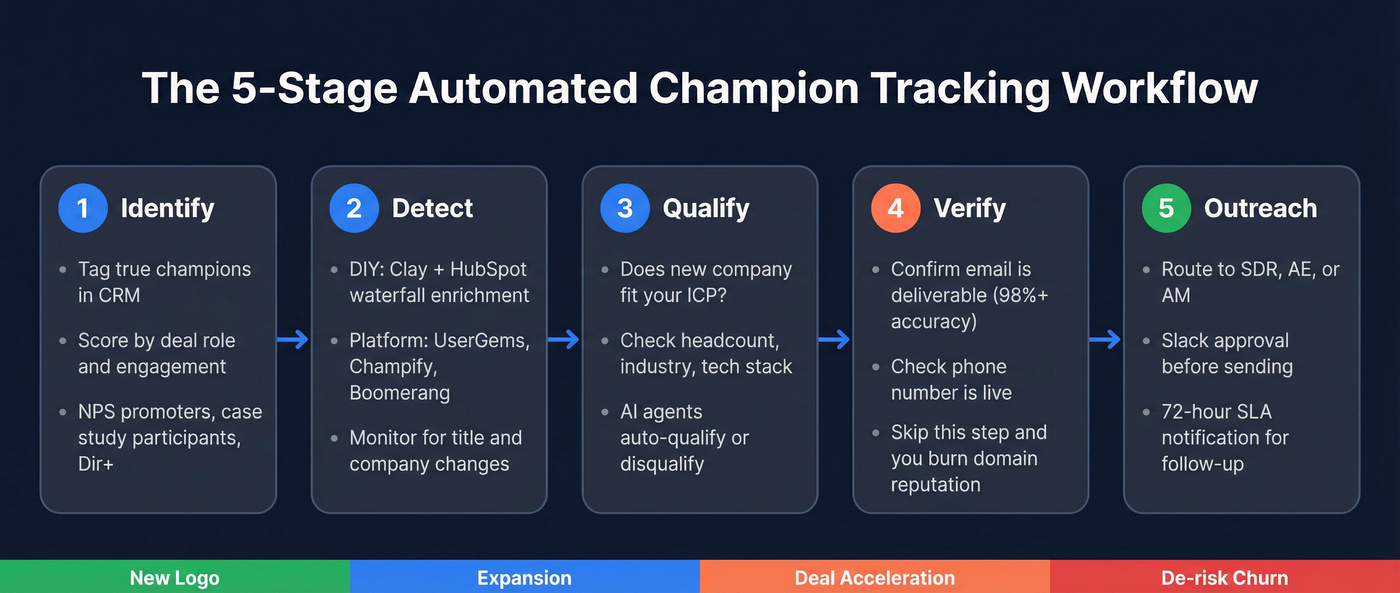
Every system follows the same five stages, whether you're building it yourself or buying a platform. Each stage maps to one of four sales playbooks: new logo acquisition (champion moves to a net-new account), customer expansion (champion moves to a department you haven't sold into), deal acceleration (champion arrives at an account already in your pipeline), and deal de-risking (champion leaves a current customer, threatening churn).
Stage 1: Identify
Tag true champions in your CRM. Categories that matter: closed-won opportunity contacts, active product users with high engagement, CS-defined advocates, NPS promoters, case study participants, and persona-matching customer contacts at Director level and above.
Score them. A job change from an NPS promoter who was the economic buyer matters more than a job change from an admin user. Teams using AI lead scoring at this stage can automatically surface high-value contacts from product usage data, NPS scores, and deal history rather than relying on manual tagging alone.
Stage 2: Detect
This is where the two paths diverge.
DIY with Clay + HubSpot: Build your customer list in HubSpot. Use Clay's waterfall enrichment (GPT-4o mini, GPT-4o, and LinkedIn's own model) to find and verify profile URLs. Set up an AI agent to classify contacts into personas - don't rely on job titles alone. Monitor for title and company changes on a schedule. When a change fires, qualify the new company against your ideal customer (headcount, industry, tech stack).
Dedicated platform (UserGems, Champify, Boomerang): The platform monitors your tagged contacts automatically and pushes buying signals into Salesforce or HubSpot when a job change is detected. Less flexibility, more reliability, zero maintenance.
Stage 3: Qualify
Not every job change is worth pursuing. The new company needs to fit your ICP. Clay handles this with AI agents that check company size, industry, tech stack, and funding. Dedicated platforms bake this into their routing logic.
Stage 4: Verify
This is where most workflows break.
The detection tool says "your champion moved to Acme Corp" - but is the email address correct? Is the phone number live? Before any outreach fires, run the contact through a verification layer with 98%+ email accuracy. If you skip this step, you're burning rep time and domain reputation on bounced emails.
Stage 5: Outreach
The Chili Piper case study shows what good routing looks like. They generated $300K in pipeline from 19 opportunities in 5 months. Their routing logic: if the champion's new account has an existing owner, notify that owner. If not, round-robin to the SDR team. Named target accounts with active opportunities go straight to the AE. Current customers trigger an Account Manager notification plus auto-enrollment in a Salesloft cadence. A 72-hour SLA notification fires if the rep hasn't followed up.
The Slack approval step is non-negotiable. Without it, AI-generated outreach fires unchecked, and one bad email to a VP can burn the relationship permanently.
Three routing paths cover most scenarios: (1) no existing relationship goes to SDR, (2) named target or active opp goes to AE, (3) current customer goes to AM. When a champion leaves a customer account, the AM gets notified to find a new internal champion - because that account just got riskier.
When to Reach Out (The Timing That Kills or Creates Deals)
Timing isn't a nice-to-have. It's the difference between a 65% response rate and a 5% one.

The ideal outreach window is 2-8 weeks after a job change. New hires go through a 60-120 day evaluation period where they're assessing their new tech stack and making purchasing decisions. 70% of budget gets spent in the first 100 days. You want to be in the conversation before that budget is allocated, not after.
Here's how the numbers break down: 10% of champions are ready to buy immediately in their first 30 days. Another 30% start evaluating tools within 90 days. The remaining 60% are longer-term plays - but they're still warm leads compared to cold outbound.
Prioritization matrix:
- Tier 1 champion + strong ICP fit + intent signal = call within 1 hour. This is your highest-value signal. Don't let it sit in a queue.
- Tier 1 champion + strong ICP fit, no intent = multi-channel sequence within 24 hours. Phone Day 1, email Day 1, social touch Day 1, follow-ups on Days 3, 7, 14, and 30.
- Tier 2-3 champion + moderate ICP fit = automated email sequence. Personalized but not hand-crafted.
What good outreach actually looks like:
"Hey [Name], congrats on the move to [New Company] - exciting stuff. When we worked together at [Previous Company], you mentioned that [specific pain point or initiative] was a big priority. Curious if that's still top of mind in your new seat. Either way, happy to share what we've been shipping lately - no pitch, just context."
That empathy-driven approach drives a 200% engagement boost over generic templates. Notice: no product pitch, no demo request, no "I saw you changed jobs." Just a human referencing a real conversation.
Here's the thing: if you're waiting more than 120 days to reach out after a job change, you've already lost. The new hire has either bought a competitor's tool or gotten too settled to make changes. Companies using timing data see 40% more qualified leads than those who treat every signal the same.
The Data Quality Problem Nobody Talks About
Here's the dirty secret of champion tracking: detection is the easy part. Every tool on the market can tell you someone changed jobs. The hard part is having correct contact data when you actually need to reach them.
CRM data decays at 31% per year - and in some cases, that number hits 70%. A staggering 77% of CRMs contain significant errors. Your tracking tool detects a job change, pulls the email from your CRM or its own database, and fires an outreach sequence. If that email bounces, you've wasted the signal, burned a rep's time, and damaged your domain reputation.
If your tracking tool sends you a "job change detected" alert with an email that bounces, what exactly are you paying for?

Champion Tracking Tools Compared (With Real 2026 Pricing)
The market splits into three categories: dedicated champion tracking platforms (UserGems, Champify, Boomerang), flexible workflow builders (Clay, Lantern), and contact enrichment layers (Prospeo). Here's how they stack up for a team tracking 10,000 contacts.

| Tool | Pricing | Rating | CRM Support | Best For |
|---|---|---|---|---|
| UserGems | $2,750/mo ($33K-$69K/yr) | 4.7/5 G2 | SF, HubSpot | Enterprise teams |
| Champify | $2,000/mo ($24K-$36K/yr) | 4.8/5 G2 | Salesforce only | Churned customer re-engagement |
| Boomerang AI | $15K-$24K/yr | - | SF, HubSpot | Mid-market, ROI guarantee |
| Clay | $149-$800/mo ($6K-$12K/yr) | 4.9/5 G2 | Any (via API) | Technical RevOps |
| Prospeo | Free-$0.01/email ($1.2K-$3K/yr) | 4.6/5 G2 | SF, HubSpot, Clay | Data verification |
| Sales Navigator | $80-$135/mo ($960-$1.6K/yr) | - | Limited | Manual, <500 contacts |
| Lantern | ~$3K-$5K+/mo ($36K-$60K+/yr) | - | SF, HubSpot | Signal-heavy enterprise |
| Common Room | ~$500-$5K/mo ($6K-$60K/yr) | 4.5/5 G2 | SF, HubSpot | Community-driven signals |
UserGems
UserGems is the market leader in dedicated champion tracking. Core runs $2,750/mo ($33K/year) for 30,000 records with 3 admin users. Advanced jumps to $5,750/mo ($69K/year). Elite hits $10,000/mo ($120K/year). Add one-time implementation fees of $3,000-$10,000 depending on tier.
UserGems backs its pricing with ROI guarantees - 1X on Core, 2X on Advanced, 3X on Elite, or they refund the subscription. Vendr data shows an average contract value of $25K across 15 deals, with buyers achieving ~22% savings through negotiation. One buyer got 37% off by agreeing to an end-of-year signature plus a case study.
G2 rating sits at 4.7/5 across 141 reviews. The Sendoso case study is impressive: 20% reply rate and 47 new opportunities in 30 days. But the Reddit consensus is blunt - "strong intent signals but pricing is crazy." UserGems requires an established customer base to generate signal volume, so it's not ideal for early-stage companies.
Champify
Use this if: You're a Salesforce shop focused on re-engaging churned customers and you want the tightest match accuracy in the market.
Skip this if: You run HubSpot. Champify is Salesforce-only.
Core starts at $2,000/mo for 15K+ tracked contacts. Pro runs $3,000/mo for 40K+ contacts with InsiderAI. Enterprise hits $6,000/mo for 150K+ contacts. Onboarding fees add $3,000-$4,000. There's also a $500K ROI guarantee - a notable differentiator at this price point.
86% match rate, 80% fewer false positives than Sales Navigator, and ~85% email coverage for new job contacts. G2 rating is 4.8/5 (54 reviews) - the highest G2 satisfaction score among dedicated tools. One TrustRadius reviewer noted: "There were more missing job changes and false positives in UserGems, in my experience."
Boomerang AI
Boomerang is the value play in dedicated champion tracking. Revv Up starts at $15K/year for up to 10,000 contacts with a 1X ROI guarantee - roughly half the cost of UserGems Core. Scale Up runs $24K/year and adds buying committee enrichment and a 3X ROI guarantee. Add-ons like Buying Group Mapping and Relationship Mapping cost $15K/year each.
The free Data Test before purchase is a smart move - you can validate signal volume before committing. One customer reported $800K in additional pipeline within 3 months. Supports both Salesforce and HubSpot natively, which gives it an edge over Champify for HubSpot shops.
Clay
I watched a RevOps lead build a full champion tracking workflow in Clay over a weekend. It monitored 8,000 contacts, qualified new companies against ICP criteria, generated personalized outreach with Claude, and routed approvals through Slack. Total cost: about $400/month in Clay credits plus API keys.
That's the Clay promise - and the Clay problem. It's insanely powerful once you master it, but "quite technical" is an understatement. The credit-based pricing runs $149-$800/mo, and BYOK (bring your own API keys) significantly reduces costs. There's a pre-built champion tracking template that gets you 80% of the way there. But you'll need someone who thinks in workflows, not just someone who can click buttons.
Best for technical RevOps teams who want maximum flexibility and minimum vendor lock-in.
LinkedIn Sales Navigator
| Pros | Cons |
|---|---|
| 94% would buy again (TrustRadius) | Way too manual for tracking at scale |
| $80-$135/mo - cheapest entry point | No automated alerts or routing |
| Rich profile data for manual research | Breaks down above 500 contacts |
If you're monitoring fewer than 500 contacts, it works. Beyond that, you need automation. Think of it as training wheels for champion tracking - useful for proving the channel before investing in a real system.
Lantern
Credit-based with no per-seat charges. 150+ data providers, 200+ signal types, and pre-built champion tracking agents. One customer reported $7.6M in pipeline in 60 days. Pricing isn't public - estimated $3,000-$5,000+/mo based on platform complexity. Heavy for smaller teams, but powerful for enterprise revenue intelligence and signal coordination.
Common Room
~$500-$5,000+/mo depending on scale. 200M+ contacts with person-level account-based marketing and community signal tracking. Good if your champions are active in developer communities or open-source ecosystems. Not focused enough for pure job change tracking - it's a signal aggregation platform that happens to include job changes.
Worth watching: Wiza Monitor is a newer entrant in the job change tracking space. It lacks the track record of the tools above, but it's gaining traction in practitioner communities and worth evaluating if you're comparison shopping.
Build vs. Buy - Which Approach Fits Your Team
The build-vs-buy decision comes down to three variables: team size, technical capacity, and whether you've proven the channel works yet.
DIY stack costs:
| Component | Monthly | Annual |
|---|---|---|
| Clay (Pro) | $300-$800 | $3,600-$9,600 |
| Verification layer | ~$100-$250 | ~$1,200-$3,000 |
| CRM (existing) | $0 | $0 |
| Total | $400-$1,050 | $4,800-$12,600 |
Dedicated platform costs:
| Platform | Annual |
|---|---|
| UserGems (Core) | $33,000 + $3K impl. |
| Champify (Core) | $24,000 + $3K impl. |
| Boomerang (Revv Up) | $15,000 |
The gap is massive. A DIY stack runs $5K-$13K/year. A dedicated platform runs $15K-$69K/year. The trade-off is flexibility vs. maintenance and cost vs. time-to-value.
If you're spending $33K/year on champion tracking before you've proven the channel works, you're doing it backwards. Start with the DIY stack. Prove the signal. Then decide if the volume and complexity justify a platform.
Segmentation by company size:
- Startup (<50 employees): DIY with Clay + verification + your CRM. You don't have enough tracked contacts to justify a platform, and your RevOps person can build this in a weekend.
- Mid-market (50-500 employees): Champify or Boomerang. You've got the contact volume and the deal sizes to justify the spend, but not the engineering resources to maintain a custom build.
- Enterprise (500+ employees): UserGems. The routing complexity, multi-team coordination, and signal volume require a purpose-built platform. The ROI guarantee de-risks the investment.
At every tier, contact verification sits underneath as the data quality layer. At ~$0.01 per email verification, it's the cheapest insurance against burning your domain reputation on bounced champion emails.
Champions convert 6X–22X more than cold outbound - but only if you reach them. Prospeo gives you 143M+ verified emails and 125M+ verified mobiles so every job-change alert turns into a live conversation, not a bounce.
Turn every job change into a booked meeting with data that actually connects.
Common Mistakes That Kill Champion Tracking ROI
1. Tracking the wrong champions. This is the $47K mistake. Tracking every high-usage contact instead of actual advocates with decision-making power. One team saw response rates jump from 8% to 31% just by narrowing their definition to true champions - contacts who'd referred, advocated, or held budget authority.
2. Generic outreach. Leading with a product pitch instead of the relationship. "Hey, I saw you moved to Acme - want a demo?" is lazy and everyone sees through it. Reference a specific conversation, a shared project, or a result you achieved together.
3. Bad timing. Waiting more than 120 days after a job change means the budget window has closed. The 2-8 week window is optimal. After 90 days, you're competing against inertia.
4. Unverified contact data. A detected job change with a bounced email is worse than no detection. It wastes rep time, burns sequence slots, and damages domain reputation. Verify before you send. Every time. (If you need a step-by-step SOP, see how to verify an email address.)
5. No routing logic. Signals going to a shared inbox instead of the right rep with an SLA is how champion tracking dies quietly. The Chili Piper model - owner-based routing with a 72-hour follow-up SLA and Slack notifications - is the standard to aim for. Without routing, signals pile up and expire.
FAQ
How long does it take to see ROI from automated champion tracking?
Most teams generate pipeline within 60-90 days of launching. Chili Piper produced $300K in pipeline in 5 months; a Boomerang customer hit $800K in 3 months. Start with your highest-value churned accounts for the fastest results - these contacts already know your product and carry the strongest conversion signal.
How many CRM contacts do I need for champion tracking to work?
You need at least 1,000-2,000 contacts with associated deal history. Since roughly 20% change jobs annually, 1,000 contacts yields about 200 signals per year. Below that threshold, manual tracking via Sales Navigator is sufficient and more cost-effective than a dedicated platform.
Is automated champion tracking GDPR compliant?
Monitoring publicly available job changes via professional profiles is permissible under legitimate interest, but storing and processing that data requires GDPR-compliant tools with proper DPAs, opt-out mechanisms, and data retention policies. Choose verification providers that enforce global opt-out compliance and offer DPAs - non-negotiable for European champion data.
Can I do champion tracking without Salesforce?
Yes. Boomerang AI supports HubSpot natively, and Clay works with any CRM via webhooks and Zapier. The DIY approach - Clay + Prospeo for verification + HubSpot - is fully CRM-agnostic. Champify is the only major dedicated tool that's Salesforce-only, which limits it for mid-market teams running HubSpot.
What's the difference between champion tracking and job change tracking?
Job change tracking monitors all contacts for career moves - it's a broad net. Champion tracking is a targeted subset focused on contacts who were advocates, power users, or decision-makers. The filtering and prioritization layer is what separates it from generic job change alerts. Without that filter, you're just getting noise.