The Best Sales Tracking Software for Every Team Size in 2026
Every listicle on this SERP is written by a vendor that ranks itself #1. Pipedrive's blog picks Pipedrive. HubSpot's blog picks HubSpot. monday.com's blog - you get it. We sell Prospeo, a data platform, not a CRM. So we've got no horse in the CRM race, just strong opinions about which sales tracking software actually works and which ones waste your budget.
Sales reps spend only 30% of their time actually selling. The rest vanishes into admin, data entry, and toggling between tools that don't talk to each other. Meanwhile, only 43.5% of sales professionals hit quota last year. A good pipeline tool fixes that. A bad one adds to the pile.
And roughly 50% of CRM implementations fail - mostly because teams pick the wrong tool for their size, skip training, or feed the system garbage data. The payoff when you get it right? $8.71 in ROI for every $1 spent, according to Nucleus Research.
That last part matters more than most guides admit. Tracking garbage data in a beautiful pipeline is still garbage. So we're covering the CRM layer and the data quality layer, because your pipeline dashboard is only as honest as the contacts inside it.
Our Picks (TL;DR)
| Pick | Tool | Why | Starting Price |
|---|---|---|---|
| Best for pipeline simplicity | Pipedrive | Visual pipeline, teams <20 | $14/seat/mo |
| Best free starting point | HubSpot Sales Hub | Best free CRM, plan for upgrades | Free |
| Best for enterprise | Salesforce Sales Cloud | 50+ reps with a dedicated admin | $25/user/mo |
| Best budget AI CRM | Freshsales | AI CRM, free for 3 users | Free (3 users) |
| Best for outbound | Close CRM | Built-in calling, SMS, email | $9/mo (Solo) |

Are You Ready for Sales Tracking Software?
Not every team needs a CRM right now. If you're a two-person startup closing deals off a shared Google Sheet, that's fine - for about six months. But spreadsheets rot fast. Over 90% of business spreadsheets contain errors, and those errors compound the moment a second rep starts editing.

Five signs you've outgrown the spreadsheet:

Fragmented data silos. You're checking Slack, email, and a shared doc just to find the last interaction with a prospect. That's three places too many.
Duplicate outreach. Two reps email the same VP on the same day. The prospect notices. You look disorganized because you are.
Manual forecasting. Your pipeline "forecast" is an hour of copy-pasting into a pivot table every Monday morning. That's not forecasting - it's archaeology.
Lead leakage. Follow-ups slip through the cracks. Nobody notices until the deal goes to a competitor who simply responded faster.
Team scaling conflicts. Version control breaks the moment three people edit the same file. Formulas break. Rows disappear. Someone accidentally deletes Q3.
91% of companies with 10+ employees already use a CRM. If you're hitting any two of the signals above, you're past due.
CRM systems save businesses 5-10 hours of employee workload per week - and that's conservative once you factor in automated follow-ups, call logging, and pipeline velocity reporting that spreadsheets simply can't do. The common migration path is spreadsheet, then Airtable or smart sheets, then dedicated CRM. You can skip the middle step. Just pick the right tool for your team size.

You just read that 50% of CRM implementations fail - and garbage data is the #1 reason. Prospeo enriches your CRM contacts with 98% verified emails, direct dials, and 50+ data points per record. Refreshed every 7 days, not 6 weeks.
Stop tracking dead contacts. Feed your CRM data that actually connects.
What to Look for in Sales Tracking Solutions
Pipeline visibility and deal tracking. Table stakes. Every tool on this list does it. The question is how - drag-and-drop Kanban boards (Pipedrive, monday), list views (Close), or customizable multi-pipeline dashboards (Salesforce, HubSpot). Pick the view that matches how your team actually thinks about deals.

Automation and workflow. If your reps are manually logging calls and sending follow-up reminders to themselves, you're burning capacity. McKinsey found that top B2B orgs freed up 20% of sellers' capacity through automation alone. Look for automatic deal stage progression, task creation on triggers, and email sequence integration. For a deeper build, see CRM integration for sales automation.
Reporting and forecasting accuracy. CRM-powered forecasting improves accuracy by 32-42%. That's the difference between a board meeting where you're guessing and one where you're projecting with confidence. Make sure the tool's reporting doesn't require a BI analyst to configure - most mid-market teams need dashboards that work out of the box. If you want a framework, start with what is a sales forecast.
Track win rate and quota attainment at the rep level, not just the team level.
Integration ecosystem. Your CRM has to talk to everything else in your stack - email platform, sequencer, calendar, and data sources. Salesforce has 5,000+ AppExchange integrations. HubSpot has 1,500+. Pipedrive has 500+. The number matters less than whether your specific stack is covered. If you’re mapping tools, use this B2B sales stack blueprint.
Mobile access. If your reps are in the field or traveling, mobile CRM quality matters. HubSpot and Salesforce have dedicated iOS/Android apps with full deal management. Pipedrive's mobile app is solid for pipeline updates on the go. Don't overlook this - a CRM that only works at a desk loses half its value for outside sales teams.
Data quality and contact accuracy. This is the criterion nobody else lists - and it determines whether your sales pipeline is real or fiction. 73% of B2B buyers actively avoid sellers who send irrelevant outreach. If 40% of your contacts have bounced emails or wrong phone numbers, every metric downstream is polluted and your reps are burning through prospect goodwill. If you’re fighting decay, use a how to keep CRM data clean workflow.
AI capabilities. Sellers partnering with AI are 3.7x more likely to meet quota. In 2026, that means AI-assisted lead scoring, conversation intelligence, auto-generated email drafts, and prospecting agents. HubSpot's Breeze, Freshsales' Freddy, and Salesforce's Einstein are all pushing hard here. 81% of sales teams are already investing in AI - if your tool doesn't have it, you're falling behind. For the scoring side specifically, compare AI lead scoring vs traditional lead scoring.
The 12 Best Sales Tracker Tools in 2026
Pipedrive - Best for Visual Pipeline Management
Use this if: You have under 20 reps and want a CRM that works on day one without a consultant.
Skip this if: You need built-in marketing automation or advanced forecasting models.
Pipedrive does one thing better than tools costing 5x more: visual pipeline management. The drag-and-drop deal board is genuinely intuitive - I've watched teams go from spreadsheets to Pipedrive in a single afternoon with zero training. That's rare.

The ecosystem is solid: 500+ integrations cover most stacks, and add-ons like LeadBooster ($32.50/mo) and Web Visitors ($41/mo) extend functionality without bloating the core product. The AI assistant handles deal suggestions and marketplace search, though it's not as deep as HubSpot's Breeze or Freshsales' Freddy.
The most common G2 complaint: no free plan. At $14/seat/mo for Lite, it's not expensive - but when HubSpot and Freshsales offer free tiers, the gap stings for bootstrapped teams.
Pricing: Lite $14 - Growth $39 - Premium $59 - Ultimate $79/seat/mo (annual). 14-day free trial.
HubSpot Sales Hub - Best Free CRM / All-in-One Platform
I watched a 15-person team adopt HubSpot's free CRM, fall in love, and then get the renewal quote for Professional 11 months later. The jump from Starter ($15/user/mo) to Professional ($90/user/mo) is a 6x price increase. That's the HubSpot playbook - and it works because the free tier is genuinely excellent.
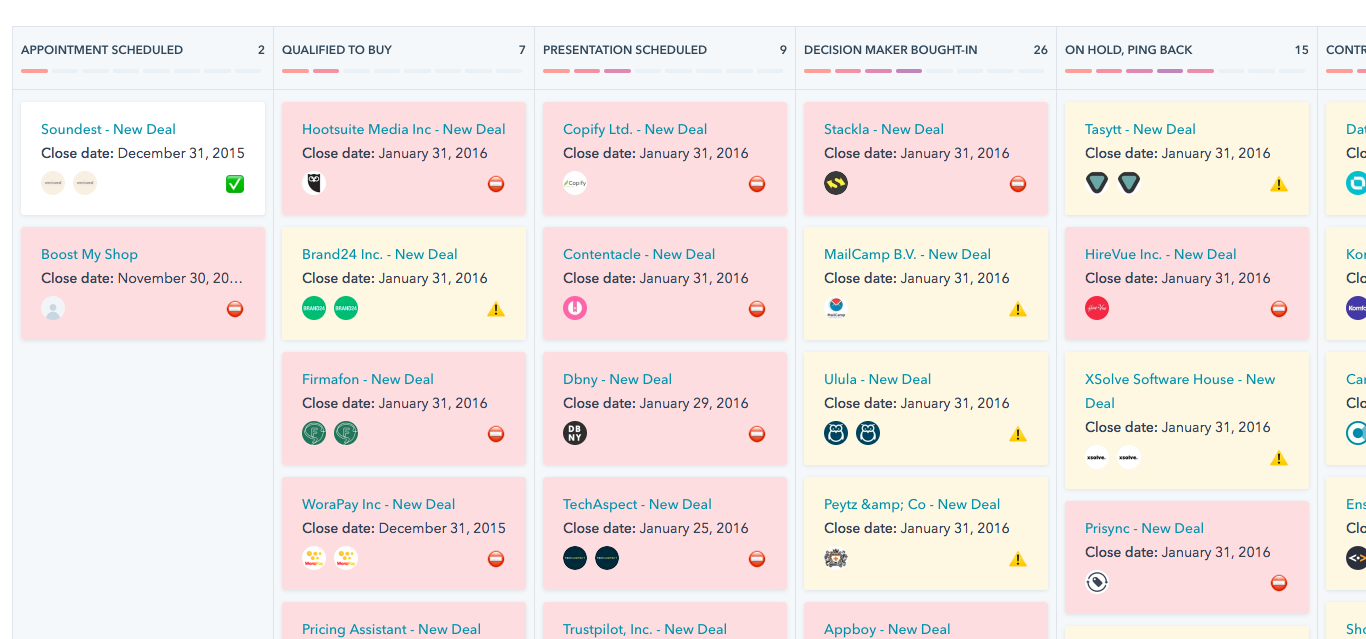
The unified ecosystem is HubSpot's real moat. Marketing Hub, Sales Hub, Service Hub, and Commerce Hub share the same database. No syncing headaches, no duplicate contacts. For teams that need marketing and sales alignment, nothing else comes close at this price point. Breeze AI agents handle prospecting, customer engagement, and content creation.

The tradeoff: reporting isn't as advanced as Salesforce's, and CRM customization hits walls without premium plans. G2 reviewers consistently flag the pricing cliff between tiers as the biggest frustration.
Pricing: Free - Starter $15/user/mo - Professional $90/user/mo - Enterprise $150/user/mo (annual).
Salesforce Sales Cloud - Best for Enterprise
Salesforce holds 23.9% of the global CRM market - more than Microsoft, Oracle, SAP, and Adobe combined. 83% of Fortune 500 companies use it. Those numbers aren't an accident.

But here's my hot take: Salesforce is the right choice for about 10% of the teams that buy it. If you have 50+ reps, a dedicated Salesforce admin, and complex workflows spanning sales, service, and partner channels - it's unmatched. If you have 12 reps and no admin? You'll spend six months configuring it, three months training, and then watch adoption crater because reps find it easier to track deals in a spreadsheet.
Use this if: 50+ reps, dedicated admin, complex multi-team workflows.
Skip this if: You don't have someone whose job title includes "Salesforce" in it.
Pricing: Free (2 users) - Starter $25 - Pro Suite $100 - Enterprise $175 - Unlimited $350 - Agentforce $550/user/mo (annual). 30-day free trial.
Freshsales - Best Budget AI CRM
| Pros | Cons |
|---|---|
| Freddy AI at every tier, including free | Narrower ecosystem than HubSpot or Salesforce |
| Free plan for 3 users | Limited marketing automation |
| $9/user/mo Growth plan | Fewer than 500 integrations |
| 21-day trial (longest on this list) | Reporting less mature than enterprise tools |
Freddy AI at $9/user/mo is genuinely hard to beat. Most competitors gate AI features behind $50+/user plans. Lead scoring, deal insights, and AI-powered forecasting come standard. We've seen teams go live in under a week with no technical resources - that matters when you're a 5-person sales team without a RevOps hire.
Pricing: Free (3 users) - Growth $9 - Pro $39 - Enterprise $59/user/mo (annual). 21-day free trial.
Zoho CRM - Best for Budget Ecosystem
45+ Zoho apps share a single database. If you're already in the Zoho ecosystem (Zoho Books, Zoho Desk, Zoho Campaigns), adding CRM is a no-brainer. The Zia AI assistant handles lead scoring, anomaly detection, and workflow suggestions.
The interface feels dated compared to Pipedrive or HubSpot. It works - it just doesn't feel modern. The 500-record enrichment cap per user license is frustrating for any kind of volume prospecting, and large datasets get clunky. Support on lower tiers is limited.
Pricing: Free (3 users) - Standard $14 - Professional $23 - Enterprise $40 - Ultimate $52/user/mo (annual). 15-day free trial.
Close CRM - Best for Inside Sales
Close is missing from every other SERP result for this category, and that's a mistake. If your team runs high-volume outbound - cold calls, SMS, email sequences - Close has the tightest communication loop of any CRM on this list.
Built-in calling, SMS, and email mean reps never leave the CRM to make a call or send a follow-up. The UI is fast. The workflow is opinionated in the right ways: it assumes you're doing outbound and optimizes for speed over customization. For teams that need to track sales activity alongside communication in a single pane, Close delivers. If outbound is your core motion, pair this with an outbound sales engine approach.
Use this if: You're an inside sales team doing 50+ calls/day and want everything in one window.
Skip this if: You need marketing automation, complex multi-pipeline reporting, or enterprise-grade permissions.
Pricing: Solo $9/mo - Standard ~$35/user/mo - Professional ~$60/user/mo - Custom. No free plan, but the Solo tier is the cheapest entry point on this list for a single rep.
monday CRM - Best for Visual Project-Style Tracking
If your team already uses monday.com for project management, the CRM module feels like home. The board-based interface is familiar, the learning curve is nearly zero, and the visual workflow builder lets non-technical users create automations without code.
The tradeoff: it's a CRM built on top of a project management tool, not the other way around. Deep sales features like conversation intelligence, built-in dialing, or advanced forecasting aren't there yet. Great for teams that think in boards and columns; less great for teams that need a purpose-built sales machine.
Pricing: Free (2 seats) - Basic $9/seat/mo - Standard $12/seat/mo - Pro $19/seat/mo - Enterprise custom. 14-day free trial.
Copper - Google Workspace Niche
Native Gmail and Google Calendar integration makes Copper the obvious pick for teams living in Google Workspace. Starts at $12/seat/mo, with Professional at ~$59/seat/mo and Business at ~$119/seat/mo. Limited functionality outside the Google ecosystem - if you're on Outlook, look elsewhere.
Zendesk Sell - Support-First Teams
If you already run Zendesk Support, adding Sell creates a unified customer view across support tickets and sales deals. 70% of teams deploy in under 8 weeks. The support-to-sales handoff is smooth - that's the whole value proposition. It's not the best standalone CRM, but the unified view is hard to replicate with separate tools.
Pricing: $19-$169/agent/mo. 14-day free trial.
ActiveCampaign - Marketing-First, CRM Second
Here's the thing: ActiveCampaign isn't a standalone CRM. CRM pipelines are an add-on starting from the Plus plan ($59/mo). Only consider it if you're already using AC for email marketing and want basic deal tracking without adding another tool. For dedicated pipeline management, pick something else.
Keap - Small Business All-in-One
$249/month for invoicing, CRM, and marketing automation in one tool. That's steep for what you get - Pipedrive plus a separate invoicing tool would cost less and do both jobs better. Best for solopreneurs who genuinely need everything in a single login and don't want to manage integrations.
Quick Comparison by Need
Stop scrolling. Here's who wins each category:
| Need | Winner | Runner-Up |
|---|---|---|
| Best AI features | Freshsales (Freddy at every tier) | HubSpot (Breeze agents) |
| Best free tier | HubSpot (unlimited users) | Freshsales (3 users) |
| Best for outbound | Close (built-in calling + SMS) | Pipedrive (with LeadBooster) |
| Fastest setup | Pipedrive (live in one afternoon) | Freshsales (under a week) |
| Best value under $20/mo | Freshsales ($9/user) | Close ($9/mo Solo) |
| Best for Google Workspace | Copper (native Gmail integration) | HubSpot (Chrome extension) |
| Best enterprise customization | Salesforce (5,000+ integrations) | HubSpot Enterprise |
Pricing Comparison for Sales Tracking Tools
Base price isn't real cost. A $14/seat Pipedrive plan with LeadBooster ($32.50) and Web Visitors ($41) suddenly costs $87.50/seat. A "free" HubSpot CRM that needs Professional features within a year is really a $90/user/mo tool with a 12-month grace period.
| Tool | Free Tier | Entry Price | Mid-Tier | Top Tier | Trial |
|---|---|---|---|---|---|
| Pipedrive | No | $14/seat/mo | $39/seat/mo | $79/seat/mo | 14 days |
| HubSpot | Yes | $15/user/mo | $90/user/mo | $150/user/mo | Free tier |
| Salesforce | Yes (2 users) | $25/user/mo | $175/user/mo | $550/user/mo | 30 days |
| Freshsales | Yes (3 users) | $9/user/mo | $39/user/mo | $59/user/mo | 21 days |
| Zoho CRM | Yes (3 users) | $14/user/mo | $40/user/mo | $52/user/mo | 15 days |
| Close | No | $9/mo (Solo) | ~$60/user/mo | Custom | 14 days |
| monday CRM | Yes (2 seats) | $9/seat/mo | $19/seat/mo | Custom | 14 days |
| Copper | No | $12/seat/mo | ~$59/seat/mo | ~$119/seat/mo | 14 days |
| Zendesk Sell | No | $19/agent/mo | $115/agent/mo | $169/agent/mo | 14 days |
| ActiveCampaign | No | $59/mo (Plus) | $89/mo (Pro) | $159/mo | 14 days |
| Keap | No | $249/mo | - | - | 14 days |
A note on tools we excluded: Ambition (~$50-80/user/mo) is a sales performance overlay, not a standalone CRM - it adds gamification and coaching dashboards on top of your existing CRM. SPOTIO is purpose-built for field sales with GPS tracking, a different category entirely. Both are solid tools; they just don't belong on a CRM comparison list.
The global CRM market is projected to surpass $112 billion by 2026 and is growing at roughly 12.8% CAGR. Vendors know this - expect annual price increases across the board. Lock in annual pricing where you can.
Which Tool Fits Your Team Size?
Solo and Small Teams (1-10 Reps)
You need something that works on day one without a consultant, an admin, or a three-week implementation. That means Pipedrive, Freshsales, Close, or HubSpot Free.
Pipedrive if you want the cleanest pipeline UX. Freshsales if budget is the primary constraint and you want AI at $9/user/mo. Close if you're doing high-volume outbound calls. HubSpot Free if you want the safety net of upgrading into a full ecosystem later. At this stage, you need a tool that removes friction rather than adding it.
Mid-Market Teams (10-50 Reps)
This is where the wrong choice gets expensive. A 25-seat HubSpot Professional deployment runs $27,000/year. Salesforce Enterprise for the same team is $52,500/year. The gap between "good enough" and "overkill" is five figures.
HubSpot Professional is the sweet spot for most mid-market teams - unified marketing and sales, solid reporting, and Breeze AI. Zoho Enterprise works if you're already in the Zoho ecosystem and want to save 40-50% vs HubSpot. monday CRM fits teams that think in project boards and want a familiar interface.
Enterprise (50+ Reps)
If you have 50+ reps, a dedicated admin, and complex multi-team workflows, the conversation is really Salesforce Enterprise vs HubSpot Enterprise. Salesforce wins on customization depth and AppExchange breadth. HubSpot wins on ease of use and unified marketing-sales-service data.
Mistakes That Kill CRM Implementations
Half of all CRM implementations fail. Poor adoption is the #1 cause. That's not a scare stat - it's a pattern I've watched repeat across dozens of teams. Here are the nine mistakes behind it.
1. No clear objectives before buying. "We need a CRM" isn't an objective. "We need to reduce lead response time from 4 hours to 15 minutes and track deal velocity by rep" is. Without specific KPIs, you can't evaluate whether the tool is working - and you'll blame the software for a strategy problem.
2. Choosing the wrong complexity level. A 10-person team on Salesforce Enterprise is like buying a commercial kitchen to make toast. A 100-person team on Pipedrive Lite is like running a restaurant out of a toaster oven. Match the tool to your actual complexity, not your aspirational complexity.
3. Skipping training. Generic onboarding webinars don't work. Context-specific, point-of-pain training - "here's how to log this specific type of call in your workflow" - dramatically improves adoption. 23% of users cite manual data input as a major obstacle. Train people on the shortcuts, not the theory. (If this is your bottleneck, see manual data entry problems.)
4. Ignoring real-time data. Your CRM generates insights in real time. If leadership only looks at the dashboard during Monday pipeline reviews, you're treating a live instrument like a weekly report. Set up alerts, automate stage-change notifications, and make the data part of daily workflow.
5. Creating a surveillance culture. There's a line between tracking rep activity and monitoring employees. If reps feel the CRM exists to police them rather than help them, adoption craters. Frame it as a tool that makes their job easier - automated logging, fewer admin tasks, better lead routing - not a management panopticon.
6. Manual reporting instead of automation. If anyone on your team is exporting CRM data to Excel to build a report, something's broken. Every tool on this list has built-in reporting. Use it. The 34% productivity boost from CRM adoption comes from eliminating exactly this kind of manual work.
7. No integration with existing tools. A CRM that doesn't talk to your email platform, your sequencer, and your calendar is a data island. Before you buy, map your stack and verify that the integrations exist - and that they're real two-way syncs, not one-way data dumps.
8. Treating it as a one-time setup. CRM is an internal product that requires ongoing management. Workflows change. Team structures evolve. New tools get added to the stack. If nobody owns the CRM after implementation, it'll drift into irrelevance within six months.
9. Feeding your CRM stale data. This is the one that kills quietly. If 40% of your contacts have bounced emails, your pipeline dashboard is fiction. B2B contact data decays at roughly 30% per year. Lead conversion rates increase up to 300% with accurate CRM data - and drop off a cliff with stale records. A 7-day data refresh cycle prevents the slow decay that makes CRMs useless. Most teams don't realize their data has rotted until bounce rates spike and sequences stop converting. If you want the benchmarks and math, read B2B contact data decay.
Every tool above tracks your pipeline. None of them fix the 40% of contacts with wrong emails or dead phone numbers sitting inside it. Prospeo plugs directly into HubSpot and Salesforce to verify and enrich every record - 92% match rate, $0.01 per email.
Your sales tracker is lying to you. Clean the data underneath it.
FAQ
What is sales tracking software?
Sales tracking software helps teams monitor deals through the pipeline, track rep activity, forecast revenue, and automate follow-ups. Most tools in this category are CRMs or integrate with one. The core value is replacing spreadsheets with automated workflows that give real-time visibility into pipeline health and rep performance.
How much does sales tracking software cost?
Free tiers exist from HubSpot, Freshsales, and Zoho. Paid plans range from $9/user/mo (Close, Freshsales) to $550/user/mo (Salesforce Agentforce). Most mid-market teams spend $40-$100/user/mo once you factor in the tier that actually has the features they need. Always calculate total cost including add-ons.
What's the difference between a CRM and sales tracking software?
Sales tracking is a function; CRM is the tool category that delivers it. Most CRMs include pipeline tracking alongside contact management, reporting, and automation. Overlay tools like Ambition focus exclusively on performance tracking on top of your existing CRM rather than replacing it.
How do I keep my CRM data accurate over time?
Automate enrichment instead of relying on reps to manually update records - they won't. Tools like Prospeo integrate directly with Salesforce and HubSpot to keep contacts current without rep effort, refreshing data on a 7-day cycle. Schedule quarterly audits to catch structural issues like duplicates and orphaned accounts.
Can small teams benefit from enterprise CRMs like Salesforce?
Salesforce offers a free plan for up to 2 users, but the complexity and admin overhead make it impractical for teams under 20 reps. Pipedrive or Freshsales deliver 80% of the value at 20% of the cost. Save Salesforce for when you genuinely need enterprise-grade customization and have a dedicated admin to manage it.