

What Is a DMARC Record (and How to Actually Implement One)
You published a DMARC record, checked the box, and moved on. Two months later, your domain's still on p=none - which means it's blocking exactly zero spoofing attempts. That's not DMARC protection. That's a monitoring experiment you forgot to finish.
We've seen this pattern dozens of times across teams we work with: the record exists, the reports pile up unread, and the domain stays wide open. If you're asking what a DMARC record actually is and how to get from "published" to "protected," this guide covers everything from first record to full enforcement.
What You Need (Quick Version)
A DMARC record is a DNS TXT record that tells email receivers what to do when messages fail SPF or DKIM authentication.
If you send 5,000+ emails per day to Gmail or Yahoo, you need one - it's been mandatory since early 2024 (at minimum, a record with p=none). Microsoft followed with similar bulk-sender requirements in early 2025. Start with p=none to monitor, but understand that's not protection - you have to reach p=reject. Most problems come from small DNS mistakes and forgotten third-party senders, not from the protocol itself.
How DMARC Works With SPF and DKIM
DMARC stands for Domain-based Message Authentication, Reporting & Conformance. It's defined in [RFC 7489](https://www.rfc-editor.org/info/rfc7489) as a "scalable mechanism" for domain owners to express policies for email validation, disposition, and reporting.
Here's the plain version: SPF and DKIM are the authentication checks. DMARC is the policy and reporting layer that sits on top of them. SPF verifies the sending server. DKIM verifies the message hasn't been tampered with. DMARC tells the receiving server what to do when those checks fail - and sends you a report about it.
Let's kill a critical misconception early: DMARC "does not produce or encourage elevated delivery privilege of authenticated email." That's straight from the RFC. Having a record doesn't make your emails land in the inbox. It stops other people from pretending to be you. Confusing those two things leads to bad decisions.
DMARC also only stops spoofing of your exact domain. It won't protect against look-alike domains (examp1e.com) or display-name impersonation - those require separate defenses.
Why DMARC Matters in 2026
The rules changed in 2024. Senders pushing over 5,000 daily emails to Gmail and Yahoo accounts were required to have a DMARC record, plus SPF and DKIM aligned with the From domain. Microsoft followed suit in early 2025. Google started by issuing temporary errors, then moved to rejecting a percentage of non-compliant traffic as enforcement ramped up through 2024-2026.
The US federal government had already mandated DMARC for all agencies back in 2017 under BOD 18-01 - the private sector is just catching up.
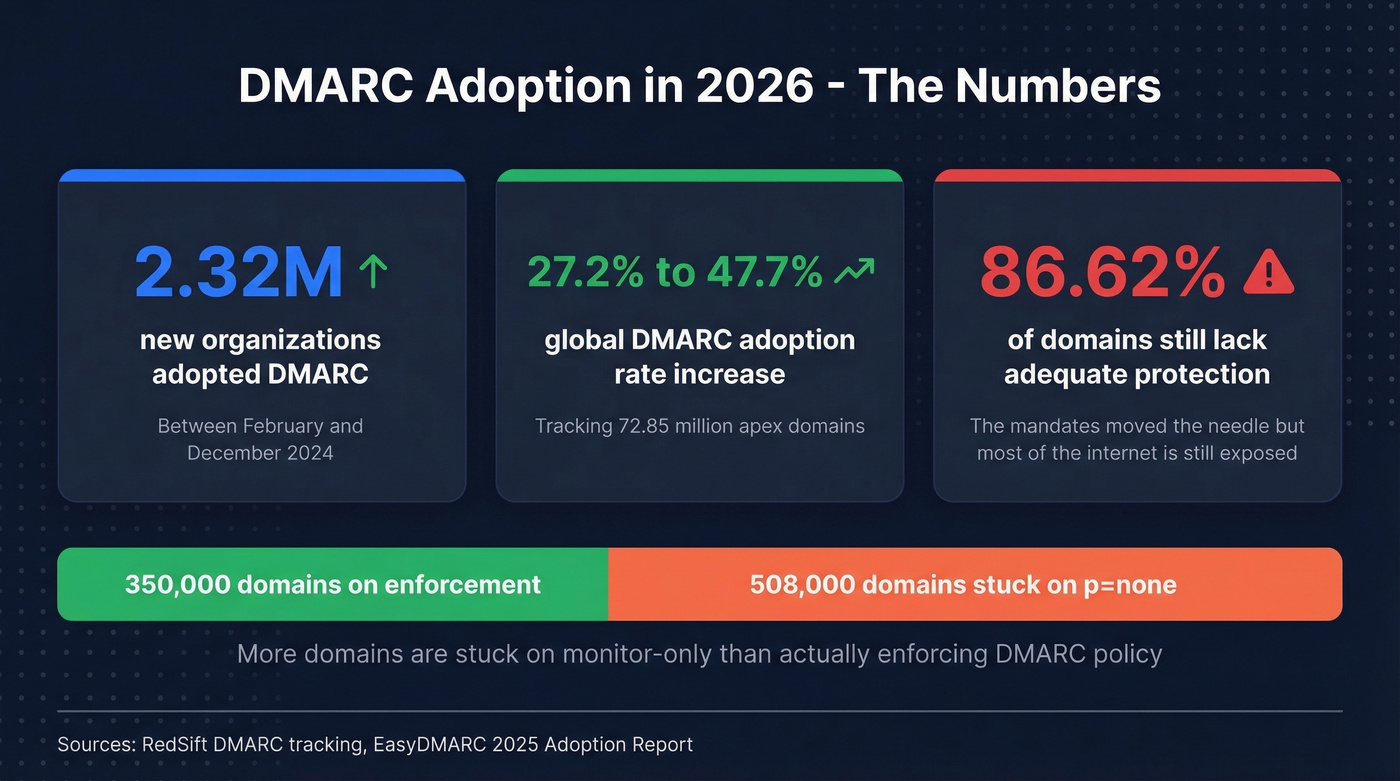
The adoption numbers tell the story. 2.32 million organizations adopted DMARC between February 2024 and December 2024, based on tracking 72.85 million apex domains. Global adoption jumped from 27.2% to 47.7% over roughly the same period.
But here's the uncomfortable number: 86.62% of domains still lack adequate protection. The mandates moved the needle, but most of the internet is still exposed. If your domain doesn't have a record - or it's stuck on p=none - you're in the majority. That's not a good thing.
The Authentication Flow
Four steps, every time, in seconds.
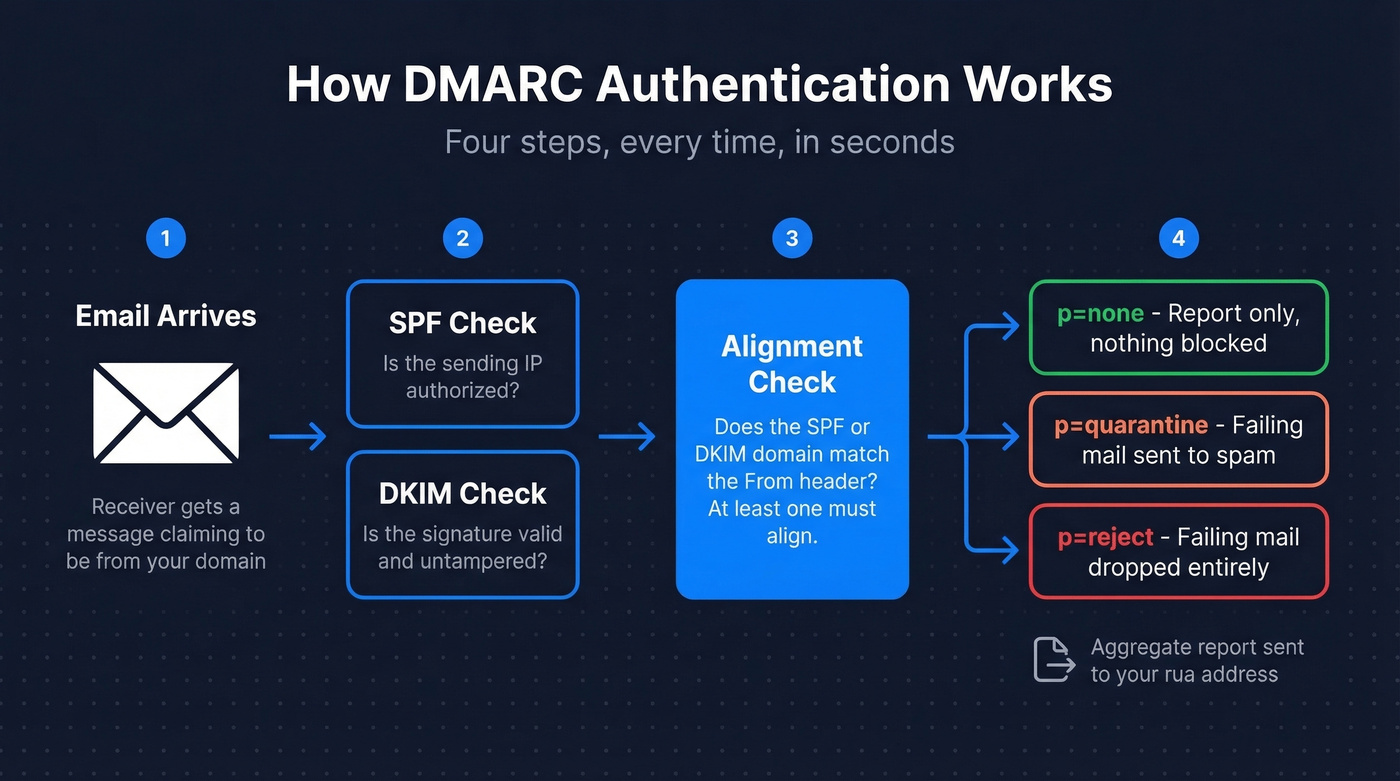
- Receiver gets the email. The receiving mail server sees a message claiming to come from your domain.
- SPF and DKIM checks run. The server verifies the sending IP against your SPF record and checks the DKIM signature against your published key.
- Alignment check. This is where DMARC adds value. It checks whether the domain in the SPF or DKIM result aligns with the From header domain. Authentication passes when at least one of SPF or DKIM aligns.
- Policy applied, report sent. The receiver applies your policy (none, quarantine, or reject) to failing messages and sends you an aggregate report.
Alignment comes in two flavors: relaxed and strict. Relaxed alignment allows subdomains to match the parent domain - so mail.example.com aligns with example.com. Strict requires an exact match. Most organizations start with relaxed (adkim=r, aspf=r), and that's the right call for nearly everyone. (If you want the deeper mechanics, see our alignment check breakdown.)
Record Syntax and Structure
A DMARC record lives at _dmarc.yourdomain.com as a DNS TXT record. Some DNS UIs show the host field as just _dmarc; others want the full subdomain. Here's a typical record:
v=DMARC1; p=quarantine; rua=mailto:dmarc@example.com; pct=100; adkim=r; aspf=r;
v=DMARC1 declares the version - the only valid value. p=quarantine tells receivers to send failing messages to spam. rua=mailto:dmarc@example.com is where aggregate reports go. pct=100 applies the policy to all failing messages. adkim=r and aspf=r set relaxed alignment for both DKIM and SPF.
One TXT record, one line. The complexity isn't in the syntax - it's in understanding what each tag does and rolling out the policy without breaking legitimate email.
All 11 DMARC Tags Explained
| Tag | Required? | Default / Values | What It Does | Common Mistakes |
|---|---|---|---|---|
v |
Yes | DMARC1 only |
Protocol version | Lowercase dmarc1 or DMARC1.0 = invalid |
p |
Yes | none / quarantine / reject |
Policy for failing mail | Leaving none indefinitely |
rua |
No | mailto: URI(s) |
Aggregate report address | Omitting = no reports |
ruf |
No | mailto: URI(s) |
Forensic report address | Many receivers don't send these |
sp |
No | Inherits p value |
Subdomain policy | Not setting it when subdomain policy should differ |
adkim |
No | r (relaxed) / s (strict) |
DKIM alignment mode | Setting s before testing subdomain senders |
aspf |
No | r (relaxed) / s (strict) |
SPF alignment mode | Same as above |
pct |
No | 100 (range: 0-100) |
% of failures getting policy | It's % of failures, not all mail |
fo |
No | 0 / 1 / d / s |
When to generate failure reports | Rarely changed; 1 helps debugging |
rf |
No | afrf |
Report format | Almost never needs changing |
ri |
No | 86400 (seconds) |
Report interval | Shorter intervals aren't widely honored |

Two rules that trip people up: v must be the first tag - if it's not, the entire record is invalid. And publishing multiple records on the same domain causes receivers to treat your domain as having no DMARC at all.
None vs. Quarantine vs. Reject
Use p=none if you just published your record and need to identify all legitimate sending sources. This is monitoring mode - you'll get reports, but nothing gets blocked. Stay here for a short window (commonly 1-4 weeks), not months.
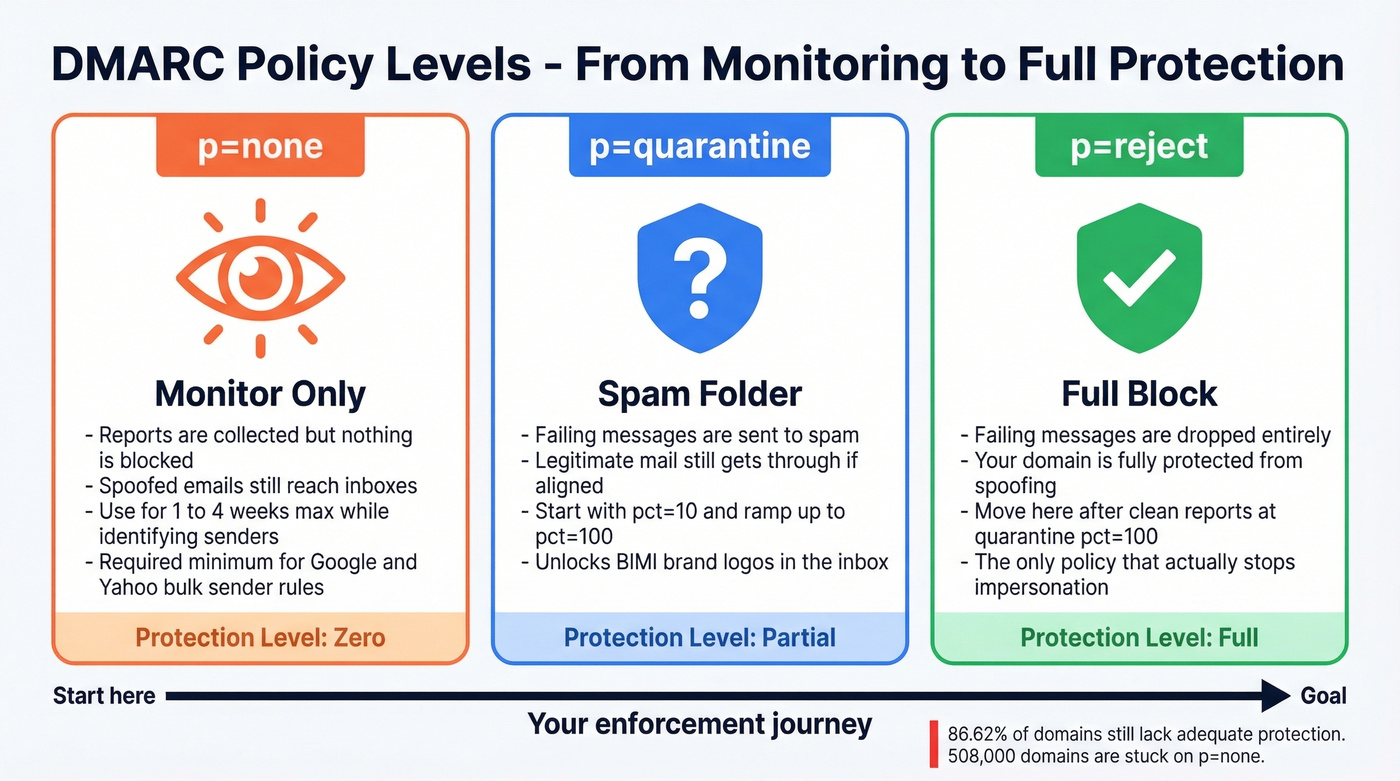
Skip p=none if your policy has been none for more than a month. You're not monitoring anymore; you're procrastinating. The EasyDMARC adoption report shows 508,000 domains stuck on monitor-only versus 350,000 using enforcement. Don't be in the bigger group.
Use p=quarantine if your aggregate reports show legitimate mail consistently passing. Failing messages go to spam. Combine with pct=10 initially to limit blast radius, then ramp up.
Use p=reject if you've been at quarantine with pct=100 for at least two weeks and reports are clean. Failing messages get dropped entirely. Your domain is now protected.
Here's the thing: if your policy is still p=none in 2026, you don't have DMARC protection. You have a participation trophy. Those 508,000 domains stuck on monitor-only are doing the email security equivalent of installing a smoke detector and removing the batteries.

You're setting up DMARC to stop spoofing and protect deliverability. But authentication only works if the emails you send are clean in the first place. Prospeo's 5-step verification and 98% email accuracy mean bounce rates under 4% - so your newly enforced DMARC policy doesn't flag your own outbound.
Don't let bad data undo the DMARC work you just did.
Benefits of Enforcement
Understanding the definition is one thing. Understanding why enforcement matters is another - and the benefits go well beyond blocking spoofed messages.
Domain reputation preservation. Every spoofed email that reaches an inbox damages your domain's reputation with mailbox providers. Enforcement stops that bleed. Visibility into your email ecosystem. Aggregate reports reveal every service sending on your behalf, including ones your team forgot about three vendors ago. Compliance with sender mandates. Google, Yahoo, and Microsoft now require it for bulk senders, and enforcement keeps you ahead of tightening requirements.
There's also BIMI - brand logos in the inbox - which requires p=quarantine or p=reject. No enforcement, no logo. And the most underrated benefit: DMARC protects the people who trust your domain. Your customers and partners are the ones who'd fall for a spoofed email, not you.
How to Set Up a DMARC Record
Before you touch DNS, confirm that SPF and DKIM are configured and passing. DMARC can't do its job without at least one of them aligning with your From domain.
Verify SPF and DKIM are passing. Send a test email and check headers, or use MxToolbox. Look for
spf=passanddkim=passwith the correct domain. (If you need a reference point for SPF syntax, use these SPF record examples.)Create a dedicated report mailbox. Something like
dmarc-reports@yourdomain.com. These reports are XML files - they'll clutter a personal inbox fast. If you're sending reports to an address on a different domain, you'll need an external reporting authorization DNS record on the receiving domain.Build your record string. Start simple:
v=DMARC1; p=none; rua=mailto:dmarc-reports@yourdomain.com;You can specify multipleruaaddresses separated by commas and append size limits (e.g.,rua=mailto:dmarc@example.com!10m).Add the TXT record in DNS. Go to your DNS management console - Cloudflare, GoDaddy, Namecheap, wherever your domain's DNS lives. Create a TXT record with the host
_dmarcand paste your record string as the value.Validate. Use MxToolbox or EasyDMARC's free checker to confirm the record is published correctly and parseable.
Only one DMARC record per domain. Publishing multiple records causes receivers to treat your domain as having no DMARC at all - the single most common "it's not working" mistake we see.
Phased Rollout Strategy
Don't rush this. A botched rollout breaks legitimate email. But don't stall either - every week at p=none is a week your domain is unprotected. (If you're also sending cold outbound, pair this with an email deliverability checklist so enforcement doesn’t expose list issues.)
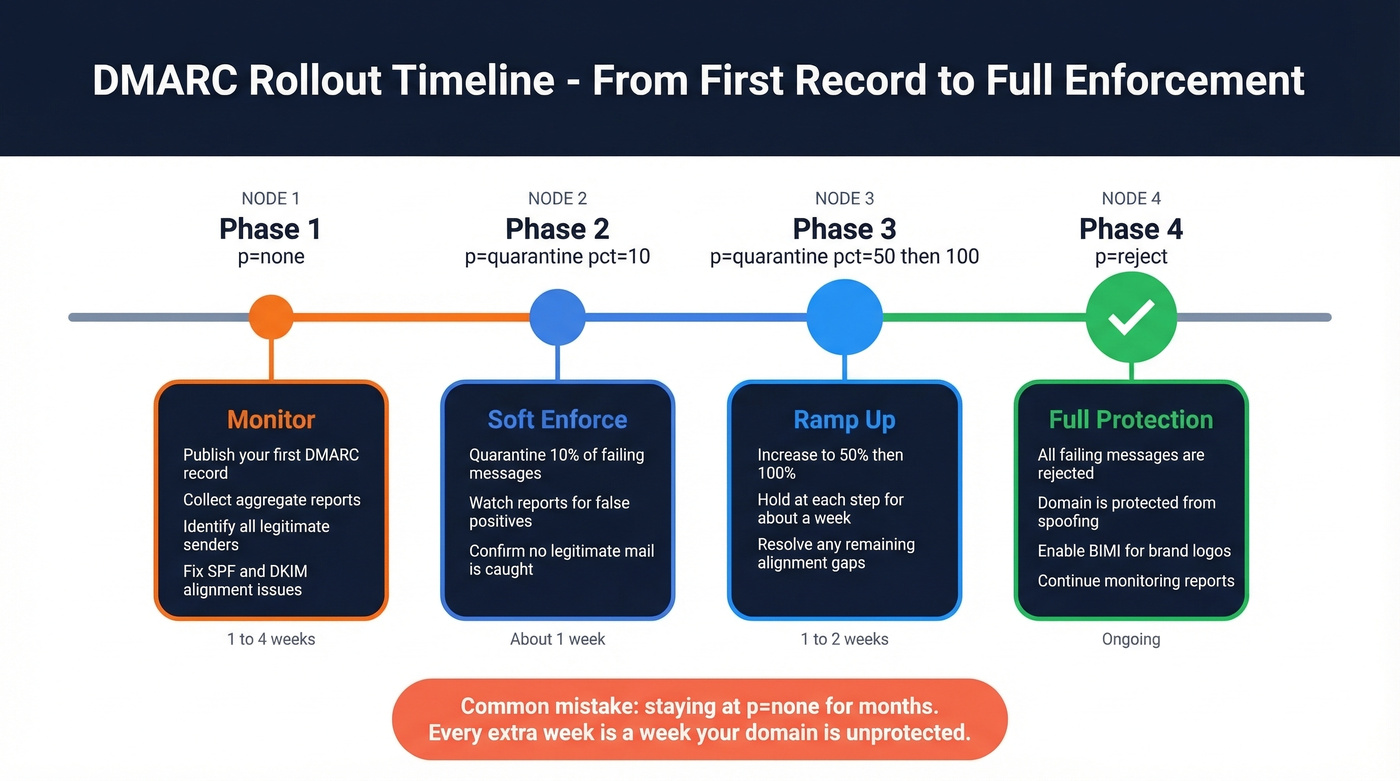
Phase 1: p=none. Publish your record and collect aggregate reports. Identify every legitimate sending source - your marketing platform, transactional email service, CRM, support tools. Fix any SPF/DKIM alignment issues. This phase should last 1-4 weeks, not months.
Phase 2: p=quarantine; pct=10 then pct=50 then pct=100. Start quarantining 10% of failing messages. Watch reports for legitimate mail getting caught. Ramp to 50%, then 100%. Each step should hold for about a week if reports look clean.
Phase 3: p=reject; pct=10 then pct=100. Same ramp. Start rejecting 10% of failures, increase to 100%. Spoofed messages now get dropped entirely.
Phase 4: Monitor. DMARC isn't set-and-forget. New sending services, vendor changes, and infrastructure shifts can break alignment. Review reports monthly at minimum. In our experience, teams that skip this step end up back at square one within six months when someone onboards a new tool without updating DNS.
Reading Your First Aggregate Report
Aggregate reports arrive as XML files (often compressed) from every receiver that processes your email. Here's a simplified snippet:
<!-- unknown MDX component: feedback -->
org_name tells you which receiver sent the report. source_ip identifies the sending server. count shows how many messages came from that IP. disposition shows what the receiver did. The dkim and spf results show pass/fail along with the domains they authenticated against. For a deeper walkthrough, Litmus has a solid primer on interpreting your first reports.
What to Look For First
Your top priority is legitimate sources failing authentication. Your own marketing tools, CRM, and transactional email services will often fail SPF or DKIM alignment initially - fix these before tightening policy. Unfamiliar IPs failing auth are likely spoofing attempts; that's DMARC working as intended. Don't panic, and don't try to "fix" those.
It's normal to see hundreds of failures quickly in the early days - often from your own third-party tools and forgotten senders. Not every failure is a problem to solve. Some are spoofing (good). Some are caused by email forwarding, which breaks SPF and can mangle DKIM signatures. ARC (Authenticated Received Chain) mitigates this where supported, but some forwarding failures are permanent and expected. Focus on legitimate senders you control.
Common DMARC Mistakes
- Leaving
p=noneindefinitely. Monitor briefly, then move to enforcement. - Missing
ruatag. No reporting address means no reports. You're flying blind. - Publishing multiple records. Receivers treat this as having no DMARC at all.
- Misconfigured alignment. Your SPF and DKIM domains need to match your From header domain, not just pass their own checks.
- No subdomain policy. If you don't set
sp=, subdomains inherit your domain policy. That's fine sometimes - and a disaster other times. - TXT record formatting errors. Some DNS UIs introduce line breaks or quoting issues. Always validate after publishing.
- Misunderstanding
pct. It controls what percentage of failing messages get the policy applied - not what percentage of all your email is checked.
What Comes After: BIMI
BIMI is the carrot. Your brand logo appears next to your emails in supported inboxes - but only if you've earned it with enforcement.
BIMI requires p=quarantine or p=reject; p=none doesn't qualify. The DNS record lives at default._bimi.yourdomain.com:
v=BIMI1; l=https://example.com/logo.svg; a=https://example.com/vmc.pem
Your logo must be in SVG Tiny Portable/Secure format - square, non-transparent background, hosted over HTTPS. Gmail requires a Verified Mark Certificate from DigiCert or Entrust. Think of BIMI as the reward for doing DMARC right: a visible trust signal that only authenticated senders can display.
DMARC and Outbound Email Quality
Here's where teams get tripped up. DMARC protects your domain from spoofing - it stops external threats. But it does nothing about internal data quality issues. I've watched teams set up authentication perfectly and still land in spam because a chunk of their contact list bounces on the first sequence.
RFC 7489 is explicit - DMARC doesn't grant delivery privilege. The relationship between authentication and inbox placement is indirect: DMARC preserves your domain reputation by stopping spoofing, but you need both authentication and data hygiene to actually reach the inbox. High bounce rates still damage sender reputation regardless of how clean your DNS records are. (If bounces are a recurring issue, start with these bounce rate benchmarks and fixes.)
Prospeo's email verification - 98% accuracy with catch-all handling and spam-trap removal - closes this gap. The free tier covers 75 emails per month, enough to test the workflow before committing. (For a broader view of tooling, compare email reputation tools alongside verification.)
Teams that move to p=reject see deliverability gains - but only if their contact data holds up under strict authentication. Prospeo refreshes 300M+ profiles every 7 days, so you're never sending to stale addresses that spike bounces and trigger spam filters.
Enforce DMARC with confidence. Start with data that actually delivers.
FAQ
Does a DMARC record improve deliverability?
Not directly. DMARC prevents spoofing and preserves domain reputation, but RFC 7489 explicitly states it "does not produce or encourage elevated delivery privilege." Inbox placement still depends on clean lists, good content, and proper sending infrastructure. Authentication is one piece, not the whole picture.
Can I set up DMARC without SPF or DKIM?
You can publish a record without them, but it won't pass authentication checks. DMARC requires at least one of SPF or DKIM to align with your From domain. Set up both first - then publish your DMARC record.
How long should I stay at p=none?
Commonly 1-4 weeks - long enough to identify all legitimate sending sources in your aggregate reports. Staying longer gives you visibility but blocks zero spoofing. Move to quarantine as soon as reports show legitimate mail consistently passing.
What if my domain doesn't send email?
Publish v=DMARC1; p=reject; immediately. This prevents attackers from spoofing a domain you don't use for mail. No SPF or DKIM needed - just the reject policy. Non-sending domains are prime targets precisely because nobody's watching them.
How do I protect sender reputation beyond DMARC?
DMARC stops spoofing, but high bounce rates still damage reputation independently. Verify contact data before sending - tools like MxToolbox check DNS records, while Prospeo's email verification catches invalid addresses before they trigger bounces.