What Is a DMARC Report - and What Are You Supposed to Do With It?
You set up a DMARC record because Gmail told you to. Now your inbox is filling with .xml.gz files from Comcast, Yahoo, Zoho, and providers you've never heard of. So what is a DMARC report, exactly - a failure alert or routine noise? A sysadmin on r/sysadmin described this exact scenario, unsure whether to panic or ignore them.
Here's the thing: 83.9% of domains don't have a DMARC record at all. If you've got one, you're ahead. Now let's make it useful.
Quick Summary
- DMARC aggregate reports are daily XML summaries of authentication results for email claiming to be from your domain - not per-message failure alerts. Use a free tool like Postmark or Valimail to read them.
- Forensic (RUF) reports are dead. Gmail and Outlook don't send them. Don't configure them.
- Your goal: monitor at
p=nonefor 4-8 weeks, then enforce withp=quarantinethenp=reject.
How DMARC Reports Work
A DMARC report is an XML summary sent by receiving mail servers back to you, the domain owner. Every time someone - or something - sends email claiming to be from your domain, the receiving server logs whether it passed SPF, DKIM, and alignment checks. Those results get bundled and delivered to the address in your DMARC record's rua= tag.
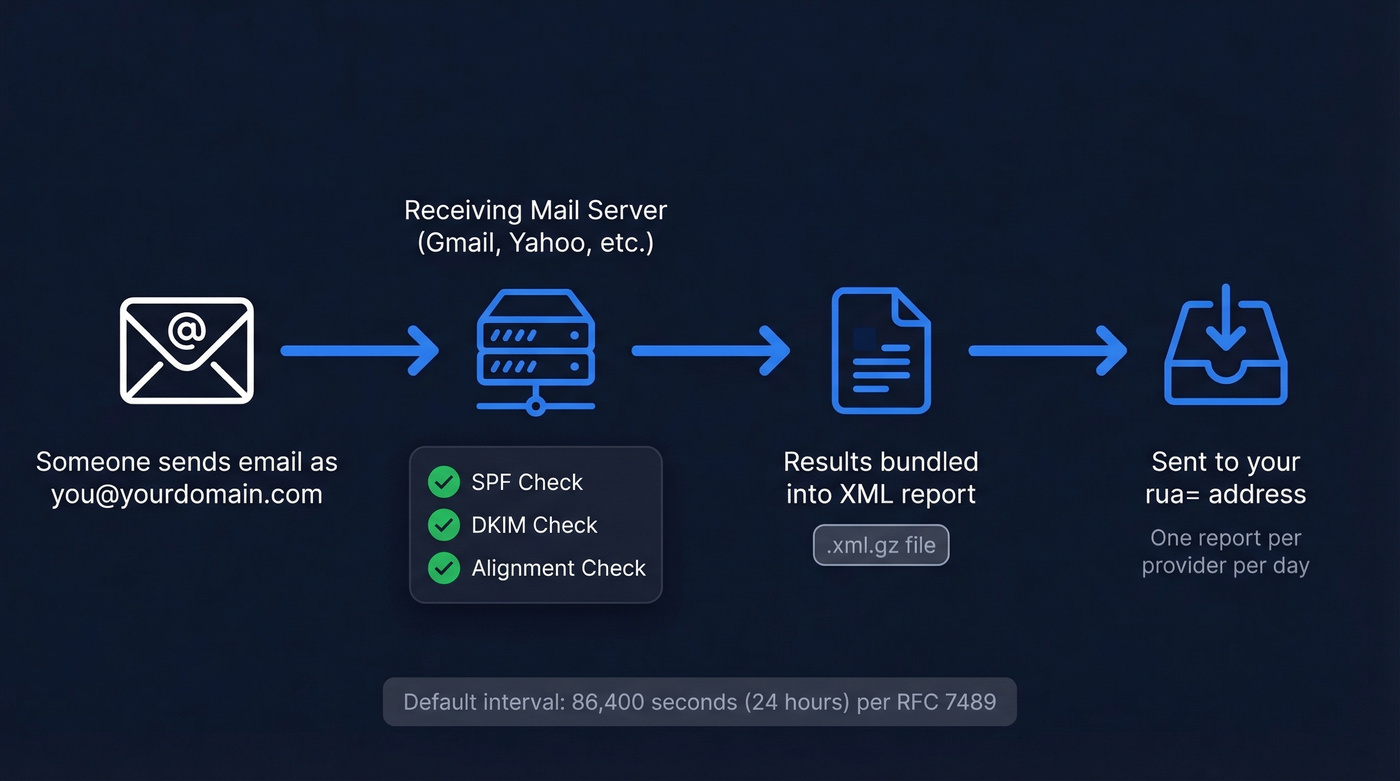
Two types exist. Aggregate reports (RUA) are the ones that matter: daily summaries covering authentication results for all mail streams that claim your domain, not just failures. Forensic reports (RUF) are per-message failure notifications - and they're functionally extinct. The default reporting interval is 86,400 seconds (24 hours) per RFC 7489. In practice, you'll get one report per receiving provider per day, which adds up fast.
Why DMARC Reports Matter in 2026
Only 14.9% of domains have any DMARC policy at all, based on Red Sift's analysis of 73.3 million domains. But adoption among top domains surged 75% between 2023 and 2025, and enforcement is accelerating.
February 2024 brought Google and Yahoo's bulk sender requirements - DMARC mandatory for anyone sending 5,000+ messages per day. In early 2025, Microsoft followed suit. By late 2025, Gmail began rejecting non-compliant messages at the SMTP level - no more flags, just bounces. And in 2026, PCI DSS v4.0 mandates DMARC for any company handling credit card data.
The window for "I'll get to it later" is closed.
Aggregate vs. Forensic: One Matters, One Doesn't
| Aggregate (RUA) | Forensic (RUF) | |
|---|---|---|
| Scope | All email claiming the domain | Failed messages only |
| Format | XML file | Plain text email |
| Delivery | Daily summary | Per-message |
| PII risk | None | High (headers, body) |
| Provider support | Universal | Less than 10% of majors |
| Actionability | High | Low |
Forensic reports are dead. Gmail and Outlook don't send them. Valimail's Todd Herr has outlined five problems with RUF, and the privacy risk alone should kill them for you.
As Al Iverson explained on Spam Resource, the mechanism creates a bizarre PII chain: person A spoofs your domain to person B, and B's mail provider sends you - the domain owner - a report containing B's personal data. You now have PII for someone you've never interacted with. Even at a 0.1% failure rate, domains sending millions of messages a day generate thousands of RUF reports. Spend zero time here.

DMARC enforcement stops spoofed mail - but it won't help if your outbound list is full of invalid addresses. Prospeo's 5-step verification and 98% email accuracy mean sub-4% bounce rates from day one. No catch-all traps, no spam honeypots, no domain reputation damage.
Protect your domain reputation on both sides of the inbox.
How to Read DMARC Report XML
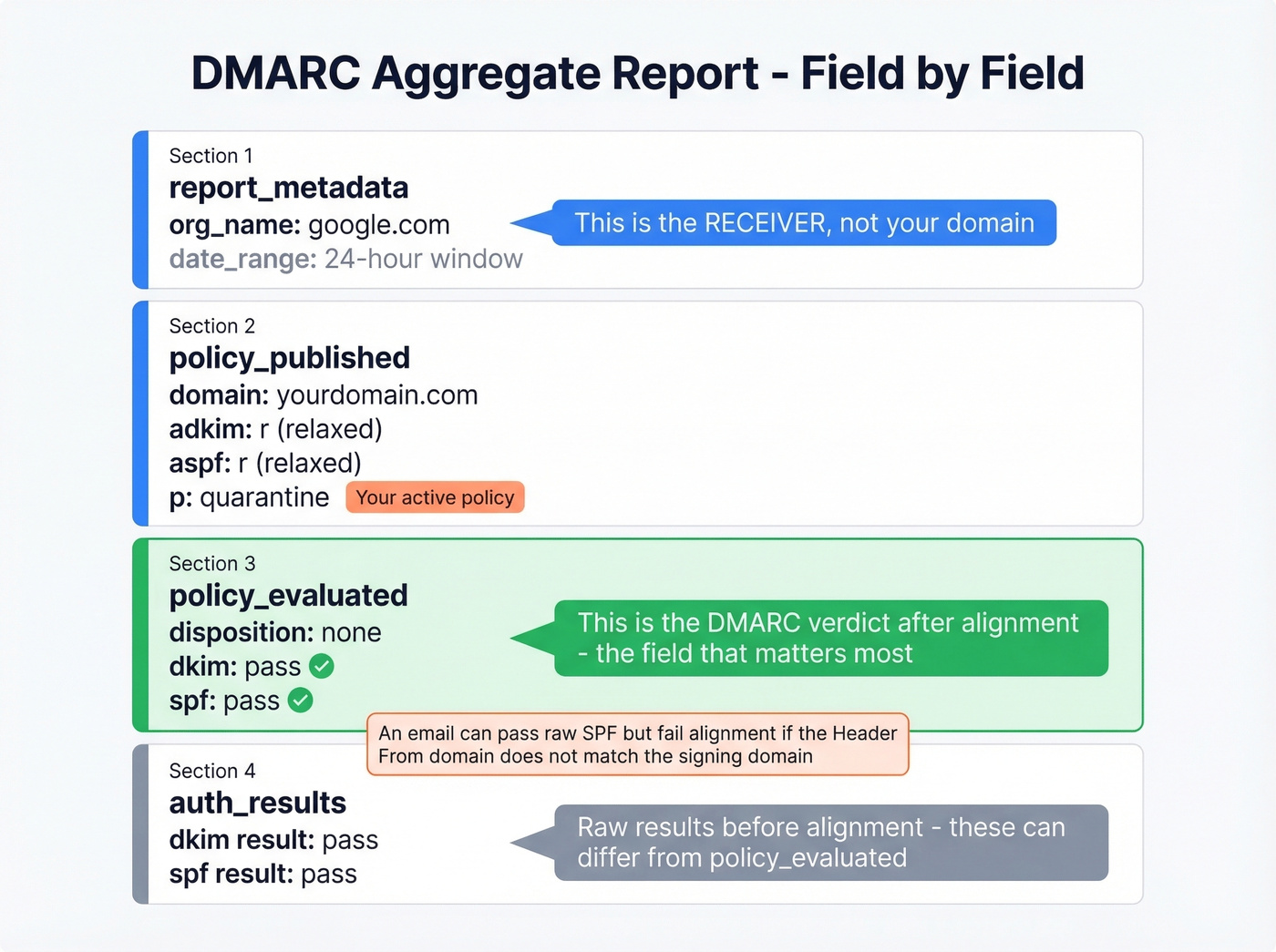
Here's what a typical aggregate report looks like, trimmed to the key blocks:
<!-- unknown MDX component: feedback -->
The <org_name> field is the receiving server (Google, Yahoo, Comcast) - not your domain. The <source_ip> should match a server you've authorized in your SPF record. If it doesn't, someone else is sending as you.
Here's the critical distinction: <policy_evaluated> shows the DMARC-level verdict after alignment checks, while <auth_results> shows raw SPF/DKIM results. These can differ. An email might pass raw SPF but fail alignment - for example, the Header From domain is marketing.company.net while the DKIM signing domain is marketing.company.com. That's an alignment mismatch, and DMARC will flag it even though an individual check passed. When you're deciding what to fix, <policy_evaluated> is the field that matters.
Free Tools to Parse Reports
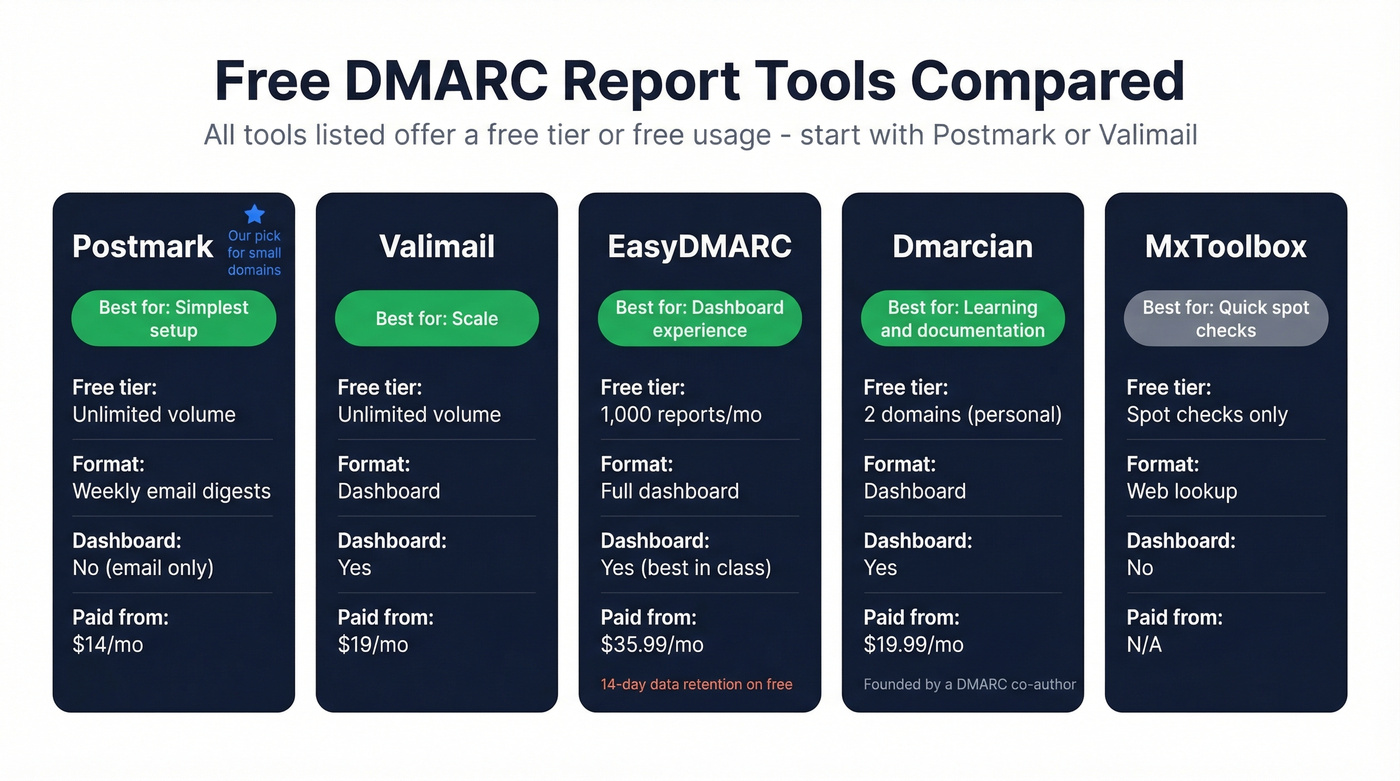
Don't read raw XML. These tools do it for you:
| Tool | Free Tier | Limits | Paid From | Best For |
|---|---|---|---|---|
| Postmark | $0 | Unlimited volume, weekly email digests (no dashboard) | $14/mo | Simplest setup |
| Valimail | $0 | No volume limits | $19/mo | Scale |
| EasyDMARC | $0 | 1,000/mo, 14-day data | $35.99/mo | Best dashboard |
| Dmarcian | $0 | 2 domains, personal | $19.99/mo | Best docs |
| MxToolbox | Free | Spot checks only | N/A | Quick lookups |
Start with Postmark or Valimail - both handle unlimited volume at no cost. In our experience, Postmark's setup takes under two minutes and its weekly email digests are plenty for most small domains. If you need a real-time dashboard, graduate to EasyDMARC. Dmarcian has the best documentation if you want to understand what you're looking at - it was founded by one of DMARC's original authors.
The Enforcement Path: p=none to p=reject
Four steps. Don't skip any.
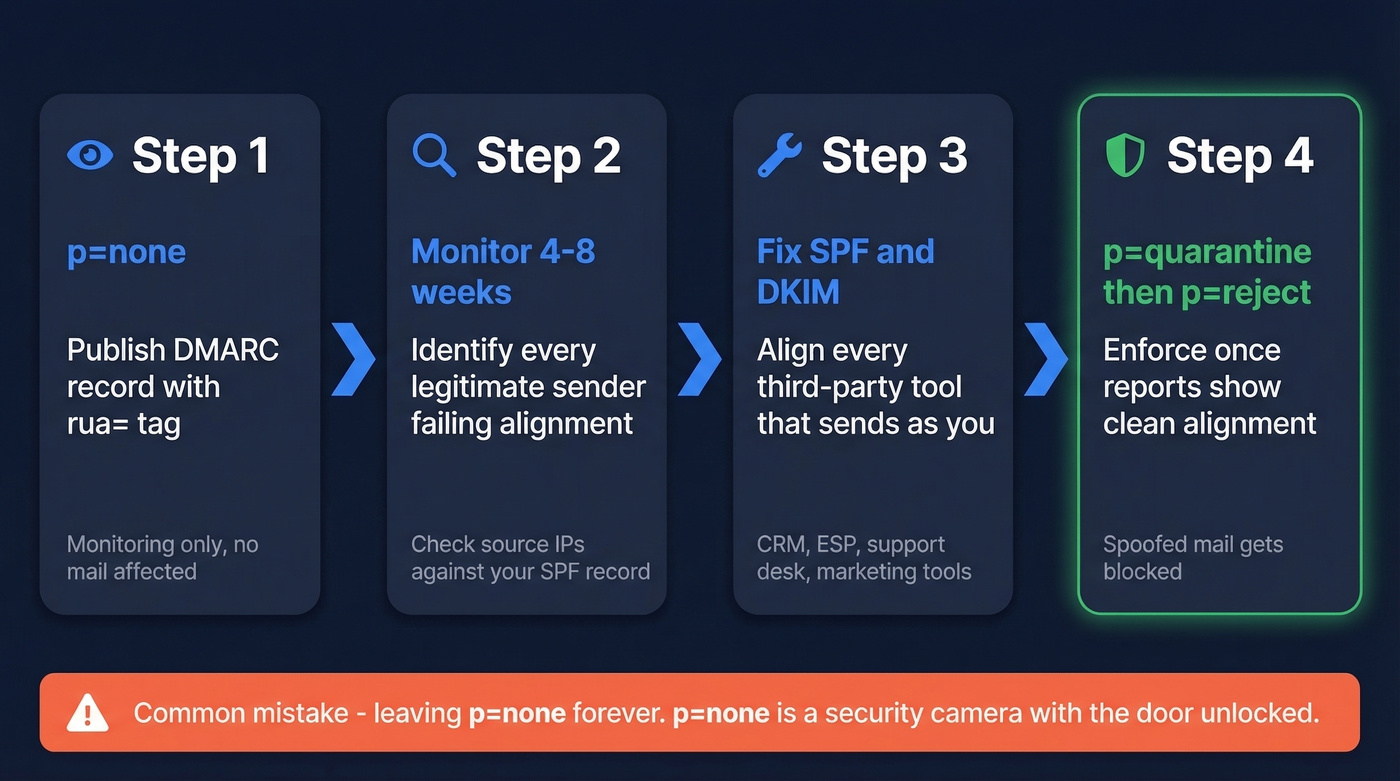
- Publish
p=nonewith arua=tag. This turns on monitoring without affecting mail delivery. - Monitor for 4-8 weeks. Identify every legitimate sender failing alignment - your marketing platform, transactional email provider, CRM, support desk. Look for
<source_ip>values you don't recognize and cross-reference them against your SPF record. - Fix SPF/DKIM for all authorized senders. This is the actual work. Align every third-party tool that sends on your behalf.
- Move to
p=quarantine, thenp=reject. Once your reports show clean alignment across all legitimate sources, enforce.
Common mistakes: publishing multiple DMARC records on one domain (this invalidates both), jumping straight to p=reject before monitoring, and - the most common - leaving p=none forever. We've seen teams sit on p=none for over a year, convinced they're protected. They aren't. p=none is a security camera with the door unlocked.
Hot take: if your domain sends fewer than 1,000 emails per day and you use a single ESP, you can move to p=reject after two weeks of clean reports. The 4-8 week timeline exists for complex multi-sender environments. Don't let it become an excuse to procrastinate.

Authentication Is Half the Equation
DMARC protects your domain from spoofing. But there's another half to the deliverability puzzle: data quality. Sending to invalid addresses tanks your sender reputation just as fast as authentication failures. We've watched teams nail their DMARC enforcement only to see inbox placement crater because 8% of their list was bouncing. Prospeo's email verification catches invalid addresses with 98% accuracy on a 7-day refresh cycle, keeping bounce rates under control while DMARC keeps your domain authenticated.
If you're troubleshooting bounces while tightening authentication, start with bounce rates and then work through a full email deliverability checklist.
You're investing hours configuring SPF, DKIM, and DMARC to keep your sending domain clean. Don't undermine that work with bad contact data. Prospeo refreshes 300M+ profiles every 7 days - not every 6 weeks - so you're never sending to stale addresses that spike your bounce rate.
Your authentication is dialed in. Now dial in your data.
DMARC Report FAQ
Do I need to read every XML file myself?
No. Use Postmark or Valimail to aggregate and visualize reports automatically. Both free tiers handle unlimited volume and surface only failures worth investigating - ignore the raw XML entirely.
How long should I stay on p=none?
Four to eight weeks for multi-sender domains. Monitor reports, fix SPF/DKIM alignment for every legitimate sender, then escalate to p=quarantine and finally p=reject. Simple single-ESP setups can often enforce within two weeks.
What else affects deliverability besides DMARC?
Bounce rate is the biggest factor after authentication. Sending to invalid addresses damages sender reputation as fast as SPF failures. Verify lists before every campaign - Prospeo's free tier includes 75 email verifications per month.
What's the difference between SPF, DKIM, and DMARC?
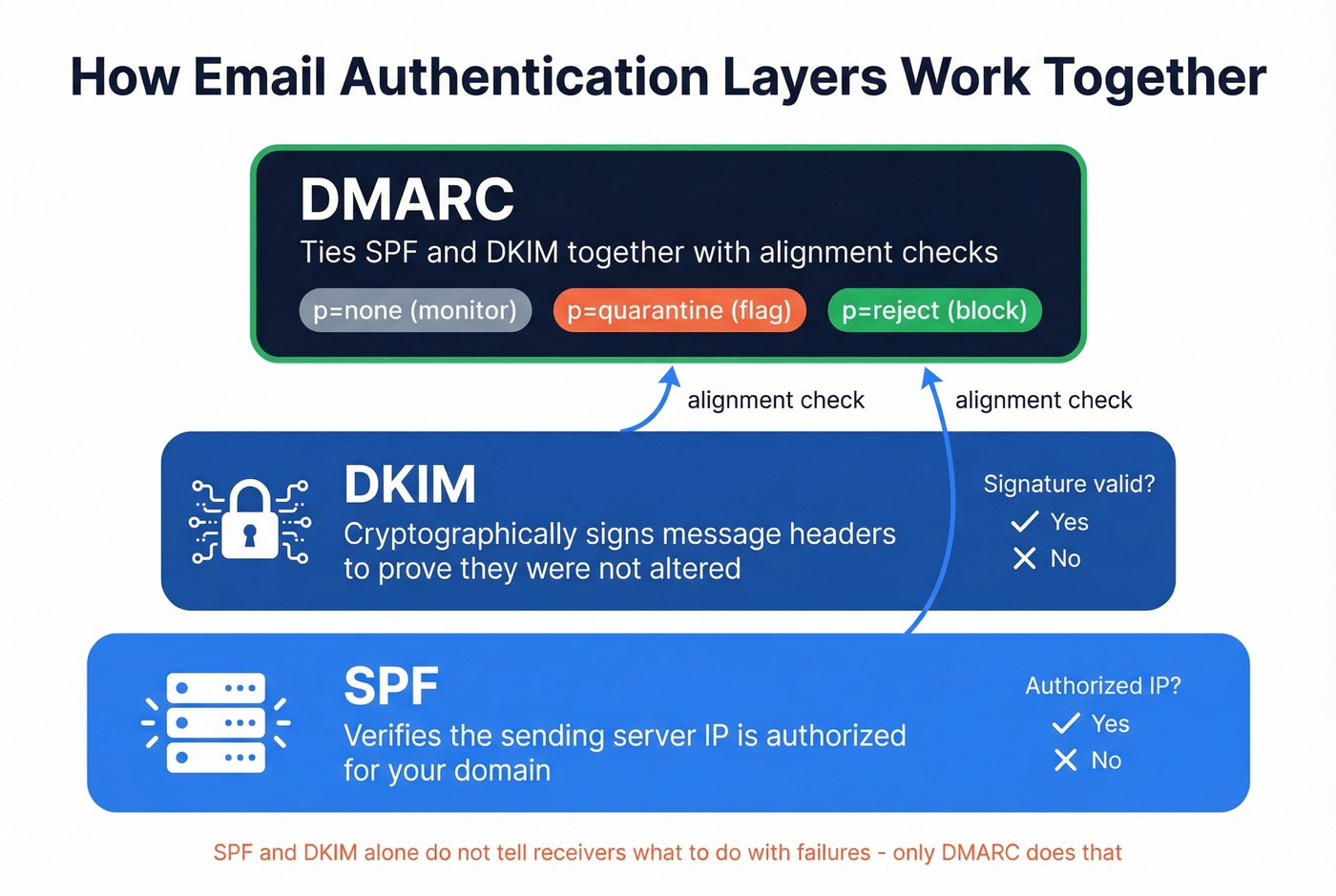
SPF verifies the sending server's IP is authorized for your domain. DKIM cryptographically signs message headers to prove they weren't altered. DMARC ties both together with alignment checks and tells receivers what to do when messages fail - none, quarantine, or reject. Skip DMARC if you want, but don't expect the other two to protect you on their own.