


Woodpecker Review 2026: Pricing, Pros, Cons & What Users Actually Think
Every review you find shows a different number for Woodpecker's pricing. $20, $29, $35 - depends on who's writing and when they last checked. G2 lists $35/mo as the starting price; Woodpecker's own page shows $29. We dug into the actual add-on math, real user feedback across G2, Trustpilot, and Reddit, and tested the platform ourselves to give you a straight answer on what you'll pay, what works, what doesn't, and whether it's worth your time.
30-Second Verdict
Rating: 4.5/5 on G2 (105 reviews) · 2.8/5 on Trustpilot (27 reviews)
Best for: Small B2B teams and agencies that prioritize deliverability over a polished UI
Starting price: $29/mo (Woodpecker site) / $35/mo (G2 listing) for 500 contacted prospects
Key caveat: No built-in sales prospecting databases. You need to bring your own data.
What Is Woodpecker?
Woodpecker is a cold email automation platform built for B2B outreach. It handles personalized sequences, follow-ups, inbox rotation, adaptive sending, and ESP matching - all focused on keeping you out of spam. Pricing is based on contacted prospects (not per-seat), and Woodpecker includes unlimited team members and unlimited email accounts. It's not trying to be an all-in-one GTM suite. It sends emails, and it tries to send them well.
Full Pricing Breakdown
Most reviews list the base tiers and stop there. Here's every add-on with current pricing so you can calculate what you'll actually spend.
Base Plans
Woodpecker's pricing is tied to how many contacted prospects you run per month. The official pricing page shows these plan names, and in some cases displays a higher monthly number alongside the discounted rate:
| Plan | Monthly Price | Contacted Prospects |
|---|---|---|
| Starter | $24/mo (also shows $35/mo) | 500/mo |
| Growth | $126/mo (also shows $188/mo) | Varies by tier |
| SCALE | $903/mo (also shows $1,354/mo) | Varies by tier |
| MAX | $6,666/mo (also shows $9,999/mo) | Unlimited |
G2 lists Woodpecker's starting price as $35/mo for 500 prospects contacted per month, which explains the conflicting numbers you'll see across reviews.
Fine print that matters: A prospect contacted multiple times in the same campaign in a month counts once. Contact them in two separate campaigns? That counts twice against your limit.
Add-On Costs
| Add-On | Price |
|---|---|
| LinkedIn automation | $29/mo per connected account |
| Agency panel | $27/mo per active client |
| API + integrations | $20/mo |
| Extra warm-ups | $5/mo per inbox |
| Email (Google/MSFT) | $6/mo per inbox |
| Email (Maildoso/Infraforge) | $4/mo per inbox |
| White-label reports | $5/mo per active client |
Real Cost Example
Here's where the "$29/month" headline falls apart. A common setup: Starter plan, three purchased email inboxes on Maildoso ($12), one LinkedIn add-on ($29), API access ($20), and a couple extra warm-ups ($10). That's roughly $100/mo - before you've sourced a single contact. Check Woodpecker's pricing page to build your own scenario.
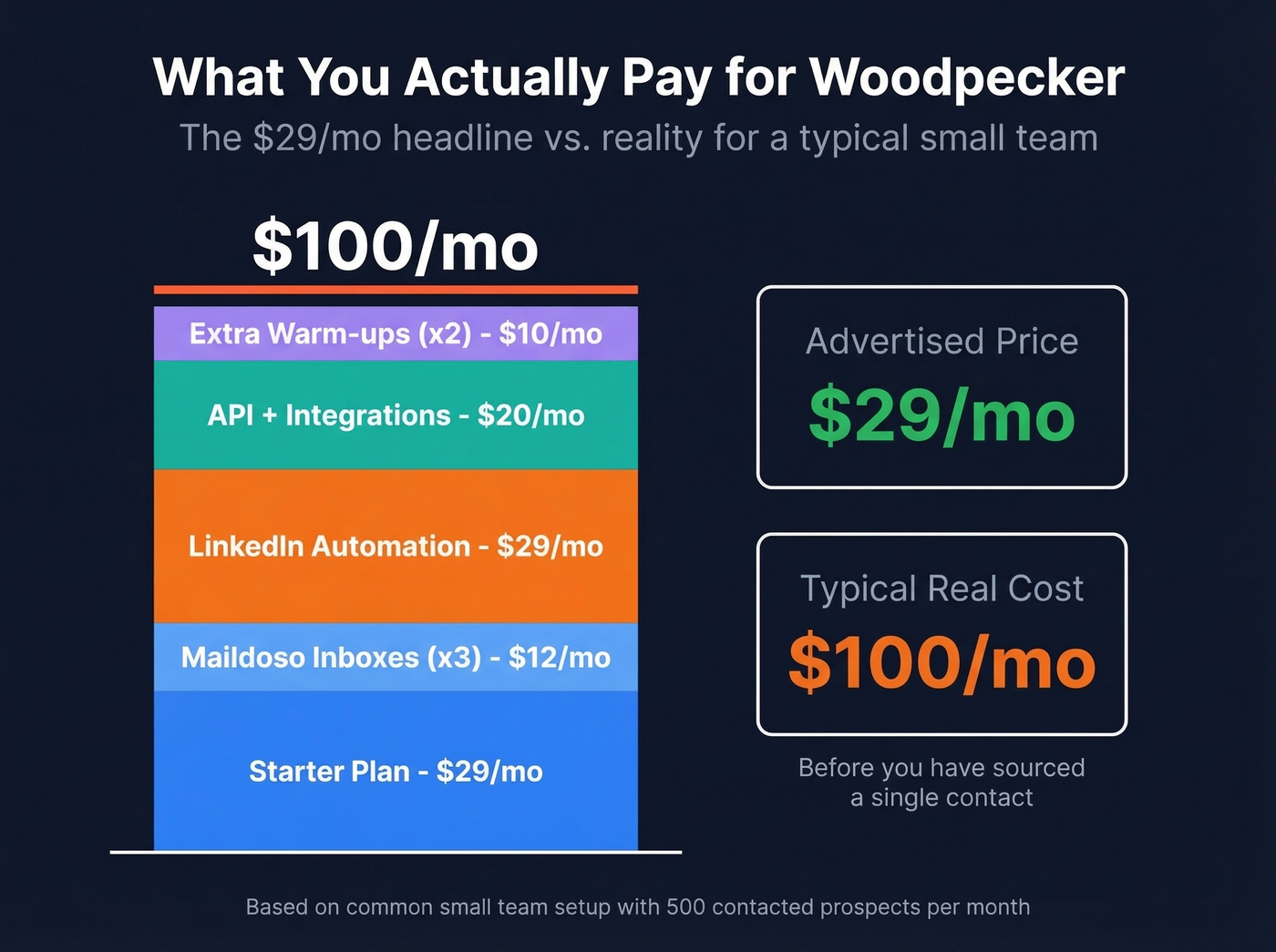

Woodpecker's real cost hits ~$100/mo before you've sourced a single contact. Prospeo fills that gap - 300M+ profiles, 143M+ verified emails at 98% accuracy, starting at $0.01 per email. CSV export straight into Woodpecker in seconds.
Stop paying to send emails that bounce. Start with data that connects.
Pros and Cons
Pros:
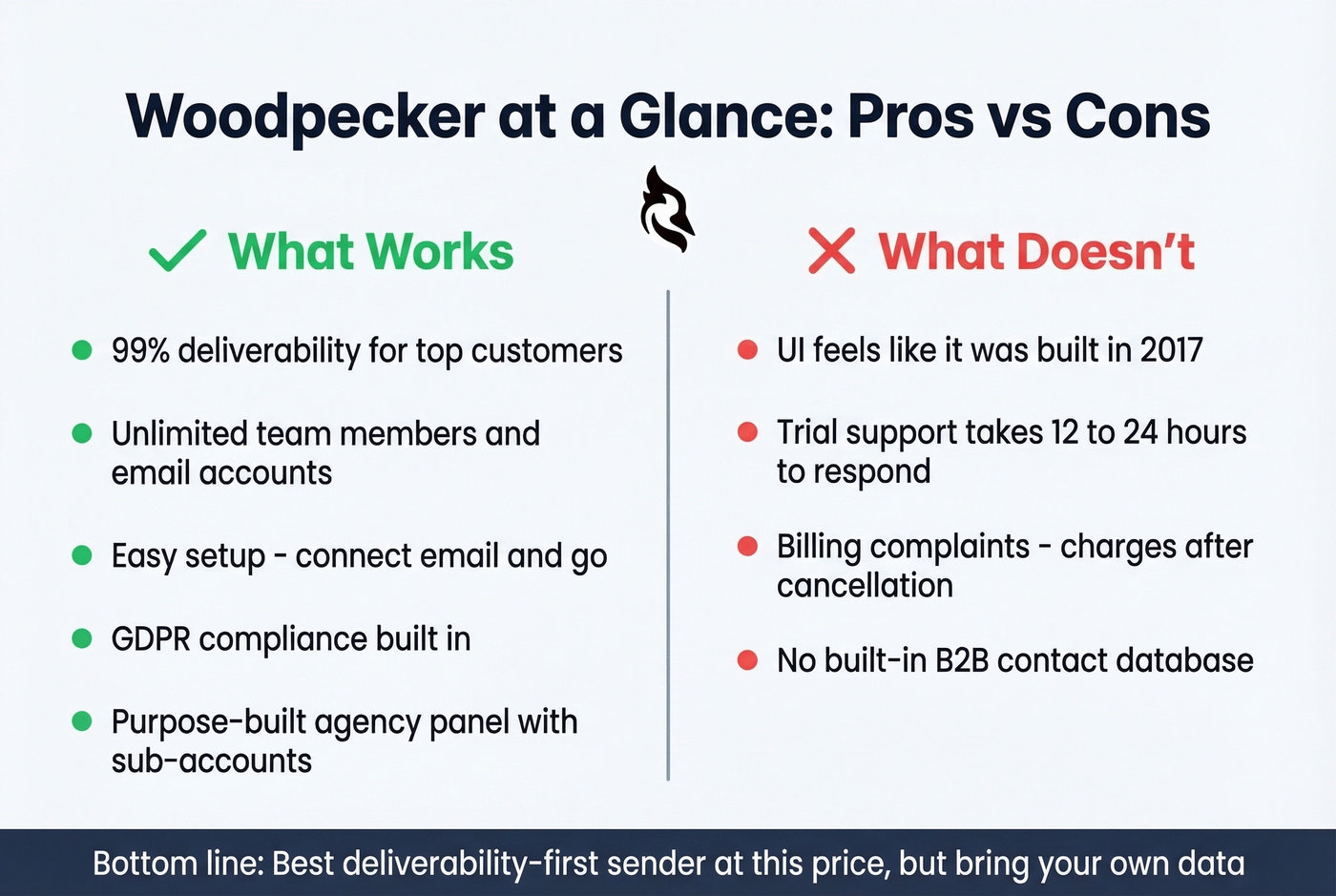
- Deliverability is the core product. Inbox rotation, adaptive sending, free catch-all verification powered by Bouncer, and warm-up are all built in. Woodpecker claims top customers hit 99% deliverability.
- Unlimited team members and email accounts. No per-seat tax, which is rare at this price point.
- Easy setup. G2 reviewers mention ease of use 26 times. Connect your email, build a sequence, go.
- GDPR compliance baked in. Useful if you're sending into the EU.
- Agency panel is purpose-built. Sub-accounts, bulk actions, client-level permissions - not an afterthought.
Cons:
- The UI feels dated. One Reddit user put it bluntly: the interface feels like it was "built in 2017 and never updated."
- Trial support is slow. Multiple users report 12-24 hour response times during the free trial.
- Billing and cancellation friction. Trustpilot reviews flag charges after cancellation and confusing refund policies.
- No built-in B2B database. Woodpecker sends emails. It doesn't find contacts.
What Users Actually Say
The review split is telling. On G2, Woodpecker holds a 4.5/5 - 79% five-star, 14% four-star, and 6% one-star. Zero two- or three-star reviews. That polarization is unusual; people either love it or they're furious. Negative G2 reviewers flag missing features (6 mentions) and limited integrations (2 mentions).
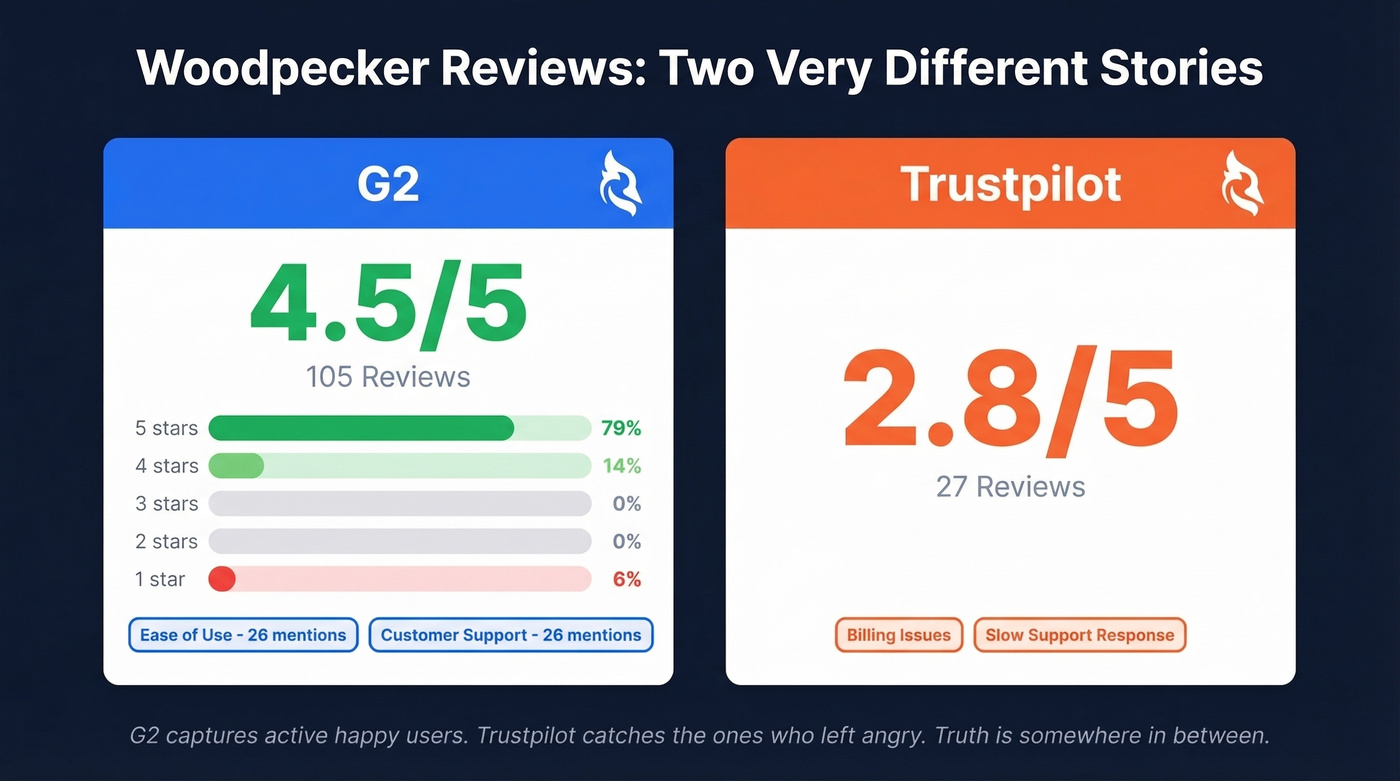
On Trustpilot, it's 2.8/5 from 27 reviews, with complaints clustering around billing issues and support responsiveness. The praise on G2 clusters around customer support and ease of use (26 mentions each).
Let's be honest: G2 reviews skew toward active, happy users, while Trustpilot catches the people who left angry. The truth sits somewhere in between. But the billing complaints are specific enough - charges after cancellation, unclear refund timelines - that they're worth taking seriously before you hand over your card.
Who Should Use Woodpecker
Use it if you're a small team that wants reliable sending with strong deliverability defaults, you run an agency and need a proper client management panel, or you already have a data source and just need a sender.
Skip it if you want a modern, intuitive UI, you need fast support during your trial evaluation, you want built-in prospect data, or you need true multichannel beyond email and LinkedIn.
Here's our take: Woodpecker is the best deliverability-first sender at its price point. But deliverability alone doesn't save a campaign built on bad data. We've seen it dozens of times - a 98% accurate email list will outperform an 80% accurate one in every sender on the market, Woodpecker included.
Alternatives Worth Considering
Prospeo
Different category entirely, and arguably the most important piece of the stack. Woodpecker sends emails but doesn't find or verify contacts, and bad data will tank your campaigns regardless of sender quality. Prospeo covers the upstream problem with 300M+ professional profiles, 143M+ verified emails, and a 7-day data refresh cycle while the industry average sits at six weeks. Email accuracy is 98%, backed by a proprietary 5-step verification process with catch-all handling, spam-trap removal, and honeypot filtering. It integrates natively with Instantly, Smartlead, and Lemlist, or you can CSV export straight into Woodpecker. The free tier gives you 75 verified emails per month, and paid plans run about $0.01 per email. Teams pairing Prospeo with their sending tool consistently report bounce rates dropping below 4%.

Instantly
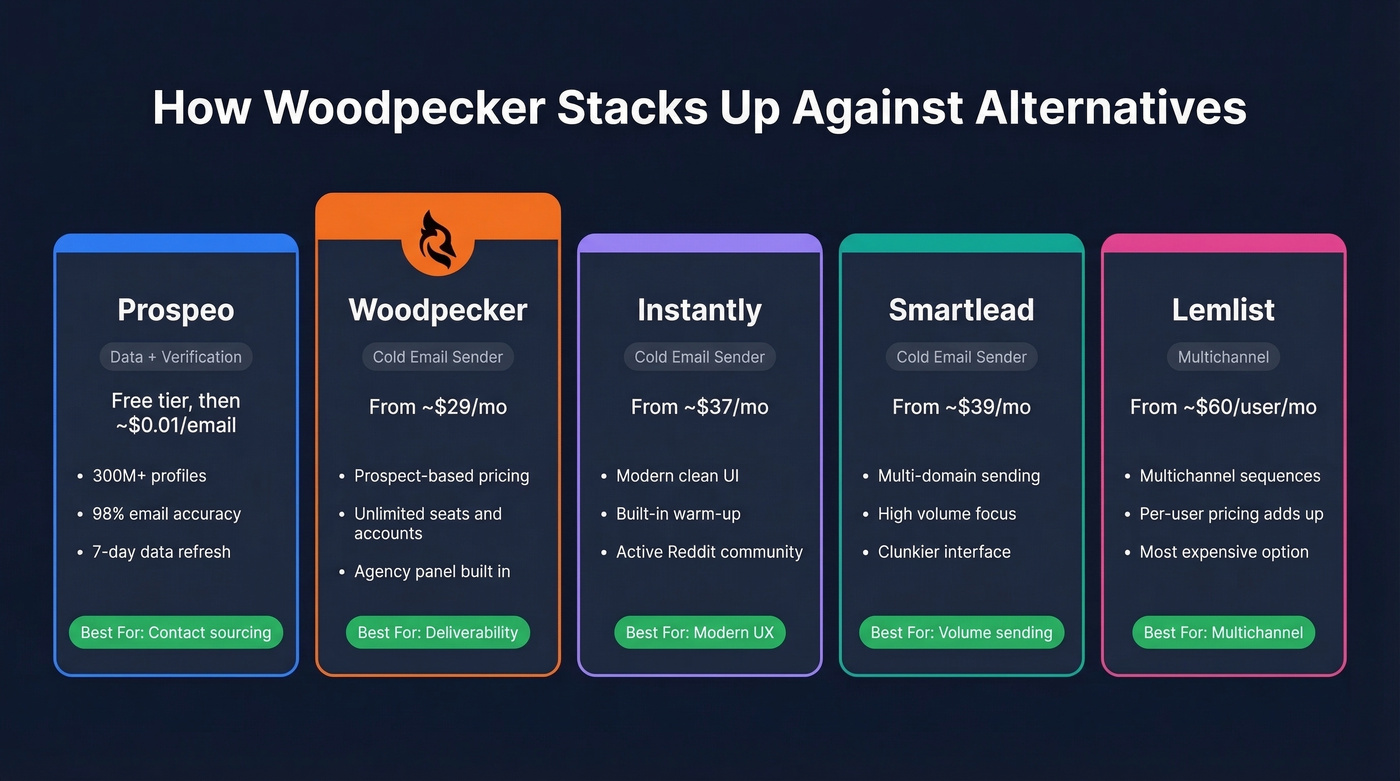
The most recommended cold email tool on r/coldemail right now. Modern UI, built-in warm-up, smoother onboarding. Starts around $37/mo. Support is "mid" (Reddit's word, not ours), and pricing has increased multiple times - lock in your rate if you go this route. If Woodpecker's dated interface is a dealbreaker, this is where most teams land.
Smartlead
Built for multi-domain, high-volume sending. The UI is clunkier than Instantly's, and we've seen reports of emails getting stuck in queue. Starts around $39/mo. Worth testing if you're running 5+ sending domains, but don't expect a polished experience.
Lemlist
Starts around $60+/user/mo on annual billing, making it the most expensive option here by a wide margin. One Reddit user called it a "marketing tool pretending to be a cold email tool." The multichannel features look impressive on paper, but per-seat pricing adds up fast for teams of three or more.
| Tool | Pricing Model | Starts At | Best For |
|---|---|---|---|
| Prospeo | Per credit | Free tier | Contact sourcing + verification |
| Woodpecker | Per contacted prospect | ~$29/mo | Deliverability-first sending |
| Instantly | Per seat | ~$37/mo | Modern UI + warm-up |
| Smartlead | Per seat | ~$39/mo | Multi-domain volume |
| Lemlist | Per user | ~$60/mo | Multichannel sequences |
Frequently Asked Questions
Is Woodpecker worth it for small teams?
Yes. It's one of the best senders for teams under 5 people who care about deliverability. Unlimited seats and email accounts mean no per-user tax. Just budget for add-ons: most small teams spend $70-$100/mo once LinkedIn automation and API access are included.
Does Woodpecker include a prospect database?
No. Woodpecker is a sending tool only - it doesn't find or verify contacts. You'll need a separate data provider to source your lists before importing them.
How does Woodpecker compare to Instantly?
Woodpecker wins on deliverability features and agency tooling. Instantly wins on UI, onboarding speed, and community support. Woodpecker starts at ~$29/mo with prospect-based pricing; Instantly starts at ~$37/mo with seat-based pricing. For agencies managing multiple clients, Woodpecker's dedicated panel is a clear advantage.
Why are Woodpecker's Trustpilot reviews so low?
The 2.8/5 Trustpilot score from 27 reviews is driven primarily by billing complaints - charges after cancellation and unclear refund policies. The G2 score of 4.5/5 from 105 reviews reflects a very different user base. G2 captures active users; Trustpilot captures churned ones. The billing issues are worth watching, but they don't reflect the product's sending quality.
Woodpecker's deliverability features are strong - but they can't fix bad data. Teams using Prospeo's 5-step verified emails consistently drop bounce rates below 4%. With a 7-day refresh cycle, your lists never go stale.
Pair Woodpecker's sending with the most accurate B2B email data on the market.
Bottom Line
Woodpecker is a legitimate cold email sender for teams that prioritize deliverability and don't need a flashy UI. After weighing the pricing, reviews, pros and cons, the verdict is straightforward: calculate the real cost with add-ons before committing, because the "$29/month" headline undersells what you'll actually spend. And invest in your data quality upstream. We've seen it over and over - the tool you use to find contacts matters more than the tool you use to email them.