


Zoom in 2026: Pricing, Pros, Cons, and What You'll Actually Pay
You just got the Zoom renewal quote. $22/user/month for 50 seats, plus a Webinar add-on nobody asked for. The CFO wants to know why you're not just using Teams, which is already bundled with your Microsoft 365 licenses.
Fair question. Here's the honest breakdown - what Zoom really costs, where it still wins, and where it doesn't.
30-Second Verdict
Zoom Workplace holds a 4.5/5 on G2 across 55,863 reviews, and one widely cited industry comparison pegs Zoom at 55.91% of the video conferencing market. Video quality is a standout - it scored 9.5/10 for video/audio in a six-month evaluation - the free tier is genuinely useful, and AI Companion ships included on paid plans. Teams Copilot costs $30/user/mo extra. That's a massive gap for the same category of feature.
But the advertised $13.33/user/mo Pro price is misleading. Most teams pay $18-$25/user/mo once add-ons land.
Best plan for small teams: Pro (annual). Best value with phone: Business Plus. Skip Enterprise unless you actually need enterprise controls and a quote-based plan.
Zoom Pricing Breakdown
Base Plan Pricing
Zoom's tiers on annual billing:
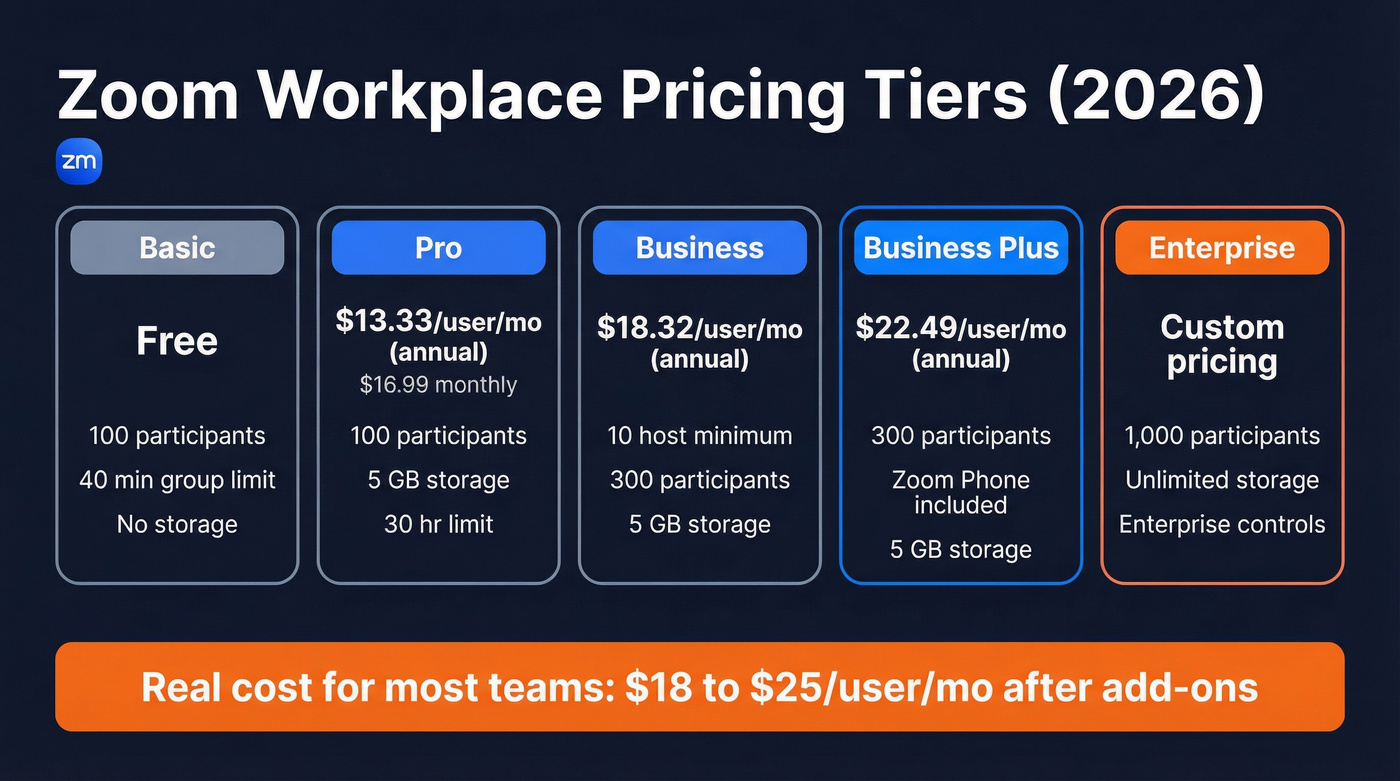
| Plan | Annual Price | Monthly Price | Participants | Storage | Time Limit |
|---|---|---|---|---|---|
| Basic | Free | Free | 100 | - | 40 min (group) |
| Pro | $13.33/user/mo | $16.99/user/mo | 100 | 5 GB/license | 30 hours |
| Business | $18.32/user/mo | $21.99/user/mo | 300 | 5 GB/license | 30 hours |
| Business Plus | $22.49/user/mo | Not public | 300 | 5 GB/license | 30 hours |
| Enterprise | Custom | Custom | 1,000 | Unlimited | 30 hours |
Business requires a 10-host minimum. Business Plus bundles Zoom Phone - that's the play if you want meetings and phone under one vendor without stacking another add-on.
Add-Ons That Change the Math
This is where the sticker price falls apart.
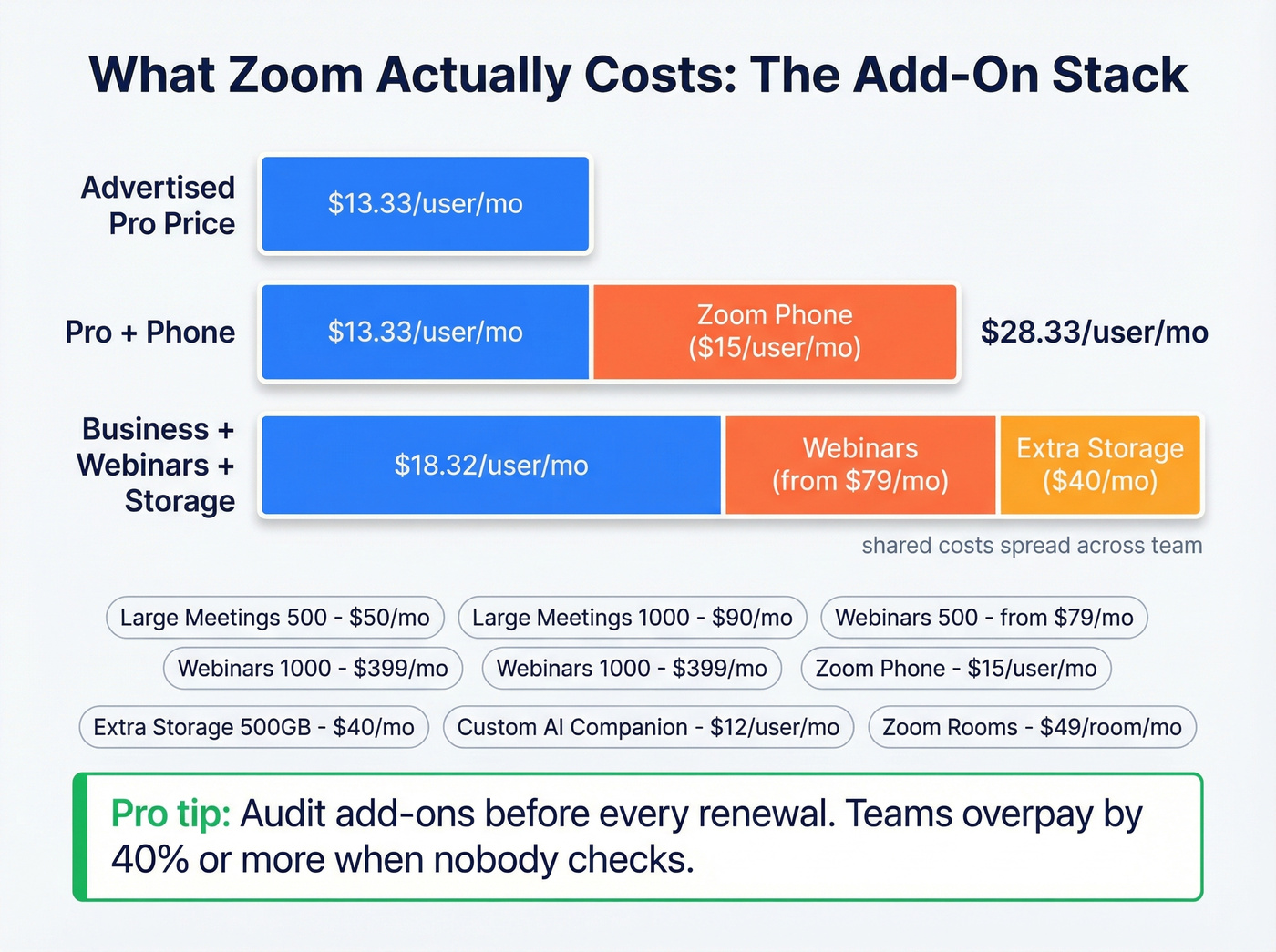
| Add-On | Price |
|---|---|
| Large Meetings (500) | +$50/mo |
| Large Meetings (1,000) | +$90/mo |
| Webinars (500 attendees) | From $79/mo |
| Webinars (1,000 attendees) | $399/mo |
| Zoom Phone Pro | From $15/user/mo |
| Extra Storage (500 GB) | $40/mo |
| Custom AI Companion | $12/user/mo |
| Zoom Rooms | $49/room/mo |
We've seen teams overpay by 40% or more because nobody audited the add-ons at renewal. Budget $18-$25/user/month, not the $13.33 list price.
Two gotchas worth knowing: Pro plans cap AI transcription at 1,200 minutes/month with a 90-minute max per meeting, while Business bumps that to 6,000 minutes/month with a 4-hour max. And auto-renewal is enabled by default - if you don't manage renewal timing, you'll end up paying for another term you didn't plan for.
Pros and Cons
What Zoom gets right:
- Video and audio quality is excellent. A saascrmreview.com evaluation scored it 9.5/10 across devices and network conditions over six months of testing.
- AI Companion is included on paid plans at no extra cost. That alone saves $30/user/mo compared to sales enablement tooling that often gets layered on top of Teams.
- The free plan remains one of the best in the market - 100 participants, unlimited 1:1 calls, and the 40-minute group cap is fine for most meetings. In our experience, the cap rarely becomes the bottleneck people think it'll be.
- 132 integrations on G2, covering CRMs, calendars, project management, and LMS platforms.
Where it falls short:
- Half of Zoom licenses go unused at the enterprise level. That's real budget waste, and it's shockingly common.
- Transcription minute caps are an operational trap. Hit the limit mid-quarter and your AI summaries just stop working.
- Enabling E2EE disables cloud recording, live streaming, polling, and phone dial-in. Security and functionality are directly at odds.
- Zoom Phone support is a genuine pain point. Reddit threads on r/VOIP describe failed go-lives with tickets marked "low priority" and 1-3 day response times. Even satisfied users flag billing confusion and AE turnover.
- Storage costs become an IT burden at scale. Threads on r/sysadmin consistently flag managing per-license storage caps across hundreds of users as a headache nobody budgets for.

You're scrutinizing Zoom add-ons to save $5/user/month. Meanwhile, bad contact data is costing you entire deals. Prospeo delivers 98% verified emails at $0.01 each - 90% cheaper than ZoomInfo - so the meetings you schedule on Zoom actually connect you to real buyers.
Stop overpaying for data the same way you overpay for Zoom add-ons.
AI Companion - Worth It?
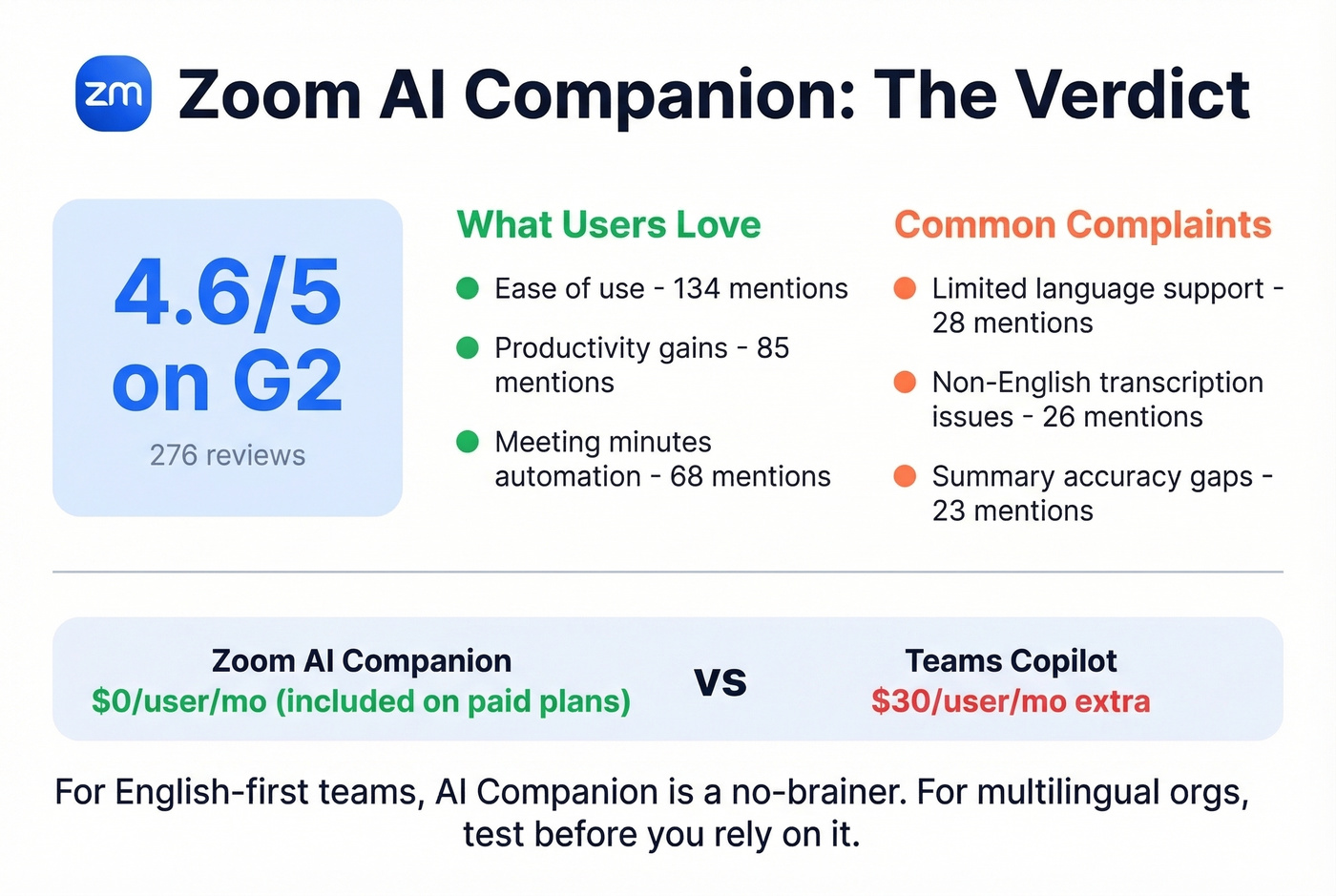
AI Companion carries a 4.6/5 on G2 across 276 reviews. Users praise ease of use (134 mentions), productivity gains (85), and meeting minutes automation (68). The most common complaints: limited language support (28 mentions), transcription inaccuracy in non-English meetings (26), and summary accuracy issues (23).
If you're rolling this out to a revenue org, pair it with a tighter sales process optimization cadence so summaries actually turn into next steps.
AI Companion 3.0 introduces agentic capabilities and pulls context from Google Drive, OneDrive, Gmail, and Outlook. It can also be used for meetings on Google Meet and Microsoft Teams, not just Zoom calls - which is a surprisingly smart move. The Custom AI Companion add-on at $12/user/mo unlocks custom vocabulary and deeper integrations, and real-time voice and video translation is expected later in 2026.
For English-first teams, it's a no-brainer since it's included. For multilingual orgs, test before you rely on it.
Security in 2026
Zoom's security has matured dramatically since the Zoombombing era. AES 256-bit GCM encryption arrived with Zoom 5.0 in 2020, true end-to-end encryption rolled out in 2020-2021 after the Keybase acquisition, and in 2024 Zoom shipped post-quantum E2EE using Kyber 768 to counter "harvest now, decrypt later" attacks.
E2EE is optional, not default - turning it on disables cloud recording, live streaming, polling, and phone dial-in, which is the tradeoff that keeps coming up. For compliance-heavy industries, Zoom supports SOC 2, HIPAA, and FedRAMP requirements.
If you're evaluating vendors for regulated teams, it helps to document requirements the same way you would for enterprise B2B sales procurement.
How Zoom Compares
| Zoom | Microsoft Teams | Google Meet | Webex | |
|---|---|---|---|---|
| Starting price | $13.33/user/mo | Bundled w/ M365 | Bundled w/ Workspace | $14.95/user/mo |
| AI cost | Included | +$30/user/mo | Included w/ Workspace | Included |
| Max participants | 1,000 (Enterprise) | 1,000 (Premium) | 500 (Business Plus) | 1,000 (Enterprise) |
| Bandwidth (1080p group) | 3.8 Mbps | 1.2 Mbps | - | - |
| Best for | Video-first orgs | M365-heavy shops | Budget-conscious Workspace users | Cisco-stack enterprises |
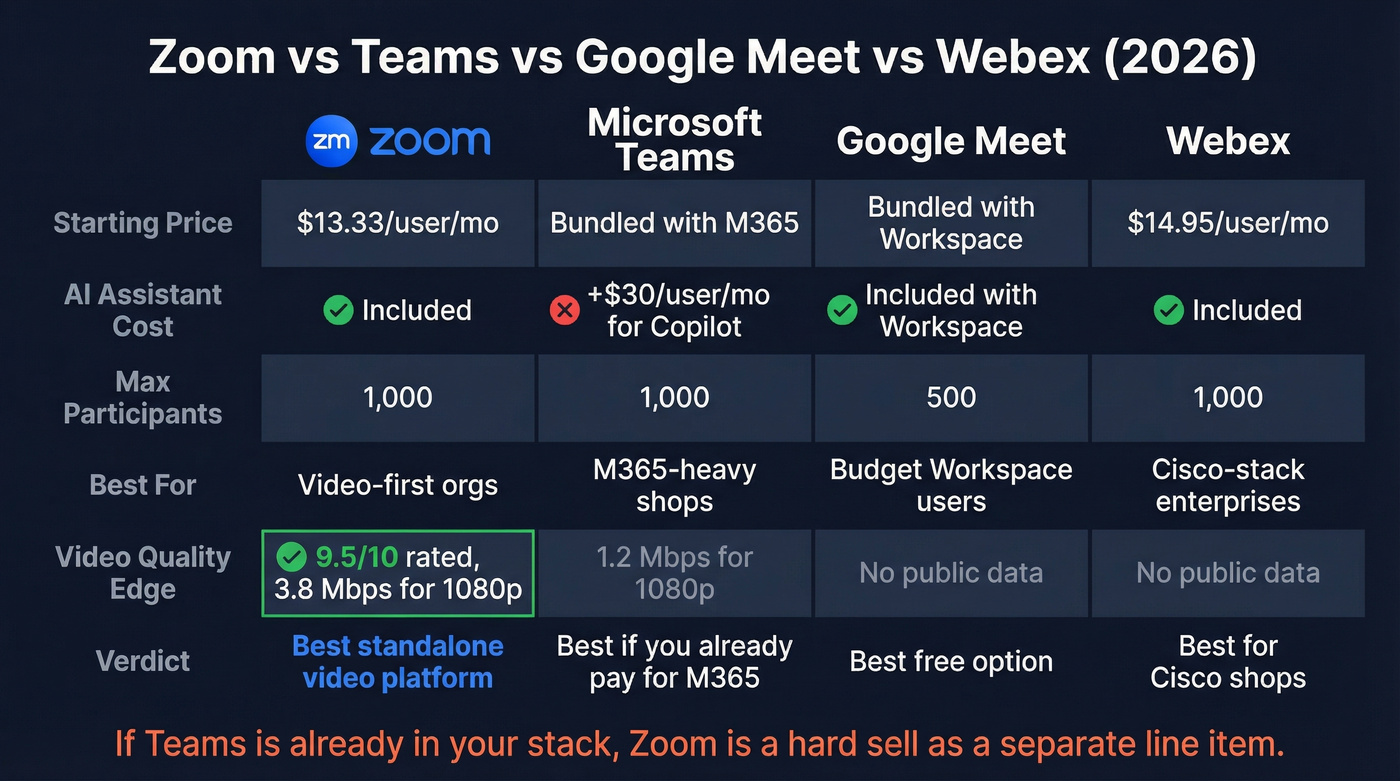
Let's be honest: Zoom is still the best standalone video platform. But most teams don't need standalone video. If your company already pays for Microsoft 365 Business Premium, Teams is effectively free. Zoom only makes sense as a separate line item if you need superior video quality, the AI Companion cost advantage matters, or you're running events and webinars at scale.
Who Should (and Shouldn't) Use Zoom
Pick Pro if you're a small team that needs reliable video and AI summaries without complexity. Pick Business for mid-market teams that need 300-person meetings and higher transcription caps. Pick Business Plus when you want Zoom Phone bundled - it's cleaner than stacking the add-on separately. Pick Enterprise if you need quote-based pricing, higher limits, and enterprise controls.
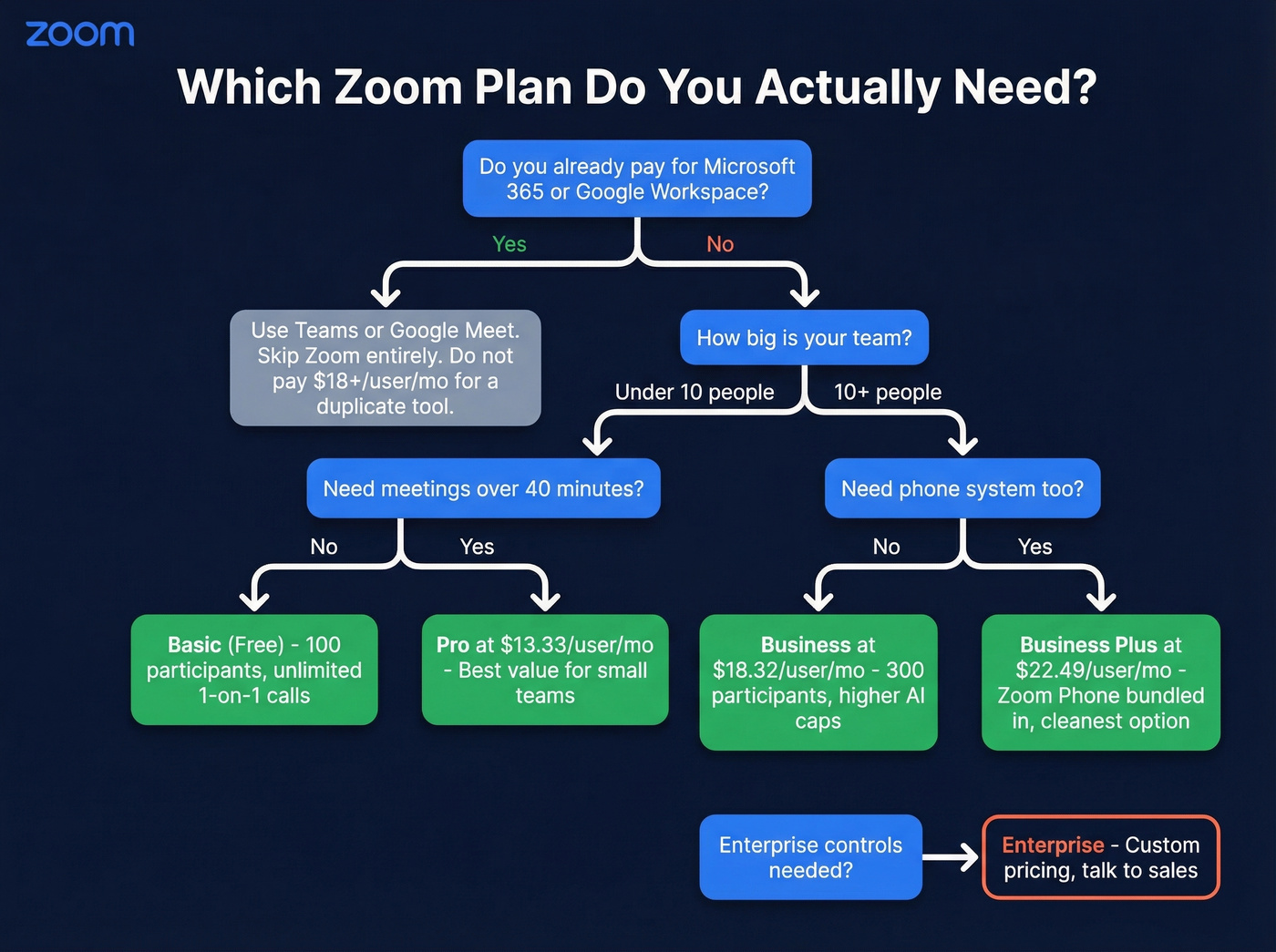
Skip Zoom entirely if Teams is already in your stack, or if Google Meet covers your basic video needs for free. Don't pay $18+/user/month for a tool that duplicates what you already have.
One thing we see constantly with sales teams: they'll obsess over the meeting platform - camera quality, virtual backgrounds, AI notes - while ignoring the fact that half their booked demos are with the wrong people. Bad contact data wastes every slot on your calendar. Tools like Prospeo verify B2B emails at 98% accuracy on a 7-day refresh cycle, so every outbound email actually reaches a real inbox before you ever fire up Zoom.
If you're trying to fix that end-to-end, start with data enrichment and a repeatable lead generation workflow so reps aren't booking meetings off stale records.
Half of enterprise Zoom licenses go unused. Bad sales data has the same problem - you pay for contacts that never convert. Prospeo's 7-day data refresh and 5-step verification mean every email you pull is current and deliverable. Teams using Prospeo book 35% more meetings than Apollo users.
Fill those Zoom meetings with prospects who actually pick up.
FAQ
Is Zoom's free plan good enough for small teams?
Yes. You get 100 participants and unlimited 1:1 calls with no cost. The 40-minute group cap is the only real constraint, and most meetings should be under 40 minutes anyway. Upgrade to Pro at $13.33/mo (annual) if you routinely run longer sessions.
What does Zoom actually cost per user?
List price starts at $13.33/user/mo for Pro on annual billing, but most organizations pay $18-$25/user/mo once Phone, storage, or webinar add-ons are factored in. Budget for the higher number and audit add-ons before every renewal.
Is Zoom AI Companion worth using?
It's included on paid plans at no extra cost, making it a clear win over Teams Copilot at $30/user/mo. Meeting summaries and action items work well in English. Multi-language accuracy is still inconsistent - 26 G2 reviews specifically flag non-English transcription issues.
How can I improve Zoom sales call outcomes?
Great video quality means nothing if you're meeting the wrong people. Pair Zoom with a verified contact data tool to make sure every demo slot is booked with a real decision-maker, not a dead lead.