

AI Email Copywriting: Prompts, Tools, and the Mistakes Nobody Warns You About
It's Wednesday afternoon. You owe the team three email sequences by Friday, and you're staring at a blank draft. Two years ago, that meant panic. Today, 87% of businesses using AI apply it to email marketing workflows, and the production bottleneck has basically evaporated - in 2023, 62% of teams needed two-plus weeks to produce a single email, but by 2025 only 6% did. The tools are here. The question isn't whether to use AI email copywriting. It's how to use it without sounding like a robot or torching your sender reputation.
What You Need (Quick Version)
Three things matter more than which shiny tool you pick:
- The prompt matters more than the tool. Start with ChatGPT (free) and the 5-element prompt framework below. You'll outperform most paid tools with a great prompt.
- For dedicated email AI, Copy.ai ($29/mo billed monthly or $24/mo billed annually) or Hoppy Copy (from $39/mo) are the best value in 2026.
- Verify before you send. AI-drafted copy that bounces destroys your domain. This is the step everyone skips.
Two Types of AI Email Tools
Before you start comparing features, understand the split. Standalone AI writers - ChatGPT, Copy.ai, Rytr - generate copy you paste into your email platform. Email platforms with built-in AI generate copy inside your sending tool, with more context about your audience and sequences.
The decision is simple. Fewer than 10 emails a week? A standalone writer gives you flexibility without another subscription. Running sequences at scale - dozens or hundreds of sends daily? A platform with native AI saves you the copy-paste dance. Many teams fall into the second camp but start with the first to learn what good prompting looks like.
Here's the thing: if you're sending fewer than five emails a week, you don't need any of these tools. Just write them. AI-assisted email drafting earns its keep at volume, not at trickle.
Best Tools for AI Email Copywriting in 2026
We've tested most of these across real campaigns. The table below reflects where each one actually earns its price tag.
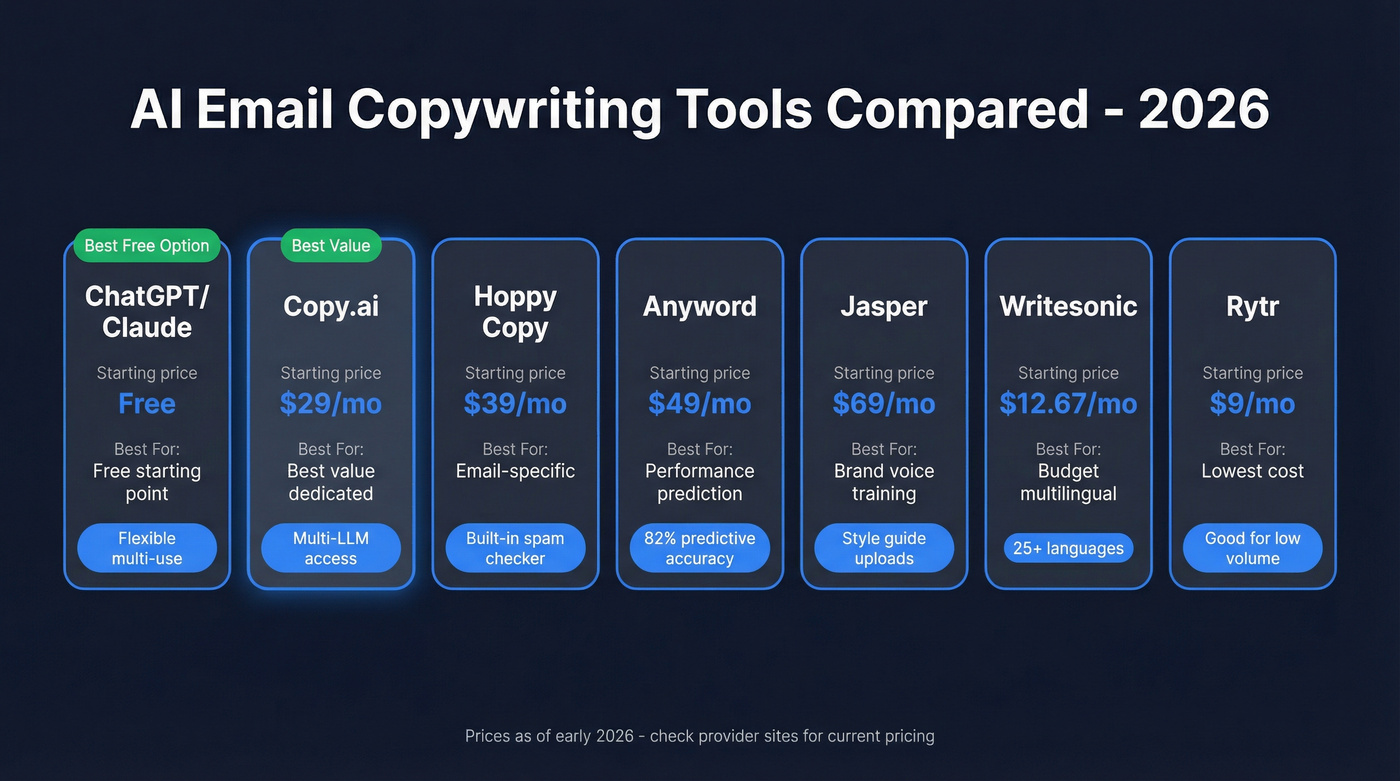
| Tool | Best For | Starting Price | Standout Feature |
|---|---|---|---|
| ChatGPT / Claude | Free starting point | Free (Pro ~$20/mo) | Flexible, multi-use |
| Copy.ai | Best value dedicated | $29/mo monthly or $24/mo annual (includes 5 seats) | Multi-LLM access |
| Hoppy Copy | Email-specific | From $39/mo | Built-in spam checker |
| Anyword | Performance prediction | $49/mo ($39 annual) | 82% predictive accuracy |
| Jasper | Brand voice training | $69/mo ($59 annual) | Style guide uploads |
| Writesonic | Budget multilingual | $12.67/mo | 25+ languages |
| Rytr | Lowest cost | $9/mo | Good for low volume |
ChatGPT and Claude
You already have an account. That's the biggest advantage. ChatGPT and Claude's free tiers handle email drafting surprisingly well when you feed them a structured prompt - and 71% of email marketers using AI use ChatGPT specifically. The ceiling is high too. GPT-4-class models produce copy that's tonally flexible, structurally sound, and easy to edit. Claude tends to write slightly more natural-sounding prose out of the box, which matters for cold outreach where "AI smell" kills replies.
The tradeoff is workflow friction. You're copying and pasting. There's no template library, no A/B variant generation, no integration with your sending tool. For learning what works, these are unbeatable. For production at scale, you'll eventually want something purpose-built.
Copy.ai
Five seats for $29/mo is absurd value. The Chat plan includes unlimited words and access to OpenAI, Anthropic, and Gemini models, so you aren't locked into one LLM's quirks. Many guides still quote $36 or $49/mo for Copy.ai - that's outdated. The current pricing page shows $29/mo billed monthly, $24/mo if you go annual.
The tradeoff: Copy.ai is a general-purpose writing tool, not an email-specific one. You won't find a built-in spam word checker or deliverability scoring. For most teams, that's fine - you're pairing it with a sending platform anyway. Growth plans jump to $1,000/mo with 75 seats and workflow automation credits, which is enterprise territory.
Hoppy Copy
Hoppy Copy was built specifically for email marketing - the templates, the interface, the output structure all assume you're writing campaigns, sequences, and newsletters. The built-in spam words checker flags trigger phrases before you send, and its "Brand Memory" feature lets you train the AI on your brand voice once and reuse it across all campaigns.
Skip this if you need a general writing tool. Hoppy Copy does one thing. If you also need landing pages, ad copy, or blog content, you'll need a second tool.
Pricing starts at $39/mo with a 7-day free trial. Scale and Enterprise tiers are custom.
Anyword: The "Will This Work?" Predictor
Anyword's differentiator is predictive performance scoring. It assigns each variant a score trained on billions of data points from marketing campaigns, with 82% prediction accuracy versus roughly 52% from a generic GPT-4o approach. Whether that number holds in your specific vertical is worth a test run, but the concept is sound - you get a "will this work?" signal before you send.
Starter plans run $49/mo ($39/mo annual) with 50 performance predictions per month. The Data-Driven tier at $99/mo ($79/mo annual) unlocks real-time scoring on manual edits, which is where the tool really earns its keep.
Jasper, Writesonic, and Rytr
Jasper's brand voice training - where you upload style guides and past content to shape output - is its real selling point. But at $69/mo ($59/mo annual), it's overpriced for most email use cases. If you're an enterprise marketing team maintaining strict brand consistency across hundreds of emails, Jasper makes sense. For everyone else, Copy.ai at less than half the price gets you 90% of the way there.
Writesonic is the budget multilingual option at $12.67/mo with 25+ languages - solid if you're running campaigns across EMEA or LATAM. Rytr at $9/mo is the cheapest option that still produces usable output, best for founders or solo operators sending a handful of emails per week.

AI-written emails that bounce destroy your domain faster than bad copy ever will. Prospeo's 98% email accuracy and 7-day data refresh mean every AI-crafted sequence lands in a real inbox - not a spam trap.
Stop perfecting copy that bounces. Verify every address first.
How to Write AI Email Prompts That Work
Let's be honest about something the tool vendors won't tell you: a $9/mo tool with a great prompt will outperform a $69/mo tool with a lazy one. We've seen this pattern across dozens of campaigns. The prompt is where you get your edge, and it's what separates mediocre output from a genuinely useful workflow.
The most common complaint on r/sales and r/emailmarketing isn't AI quality - it's that people use zero-effort prompts and blame the tool for generic results.
The 5-Element Prompt Framework
Every effective email prompt includes five elements, drawn from the Typeface framework:
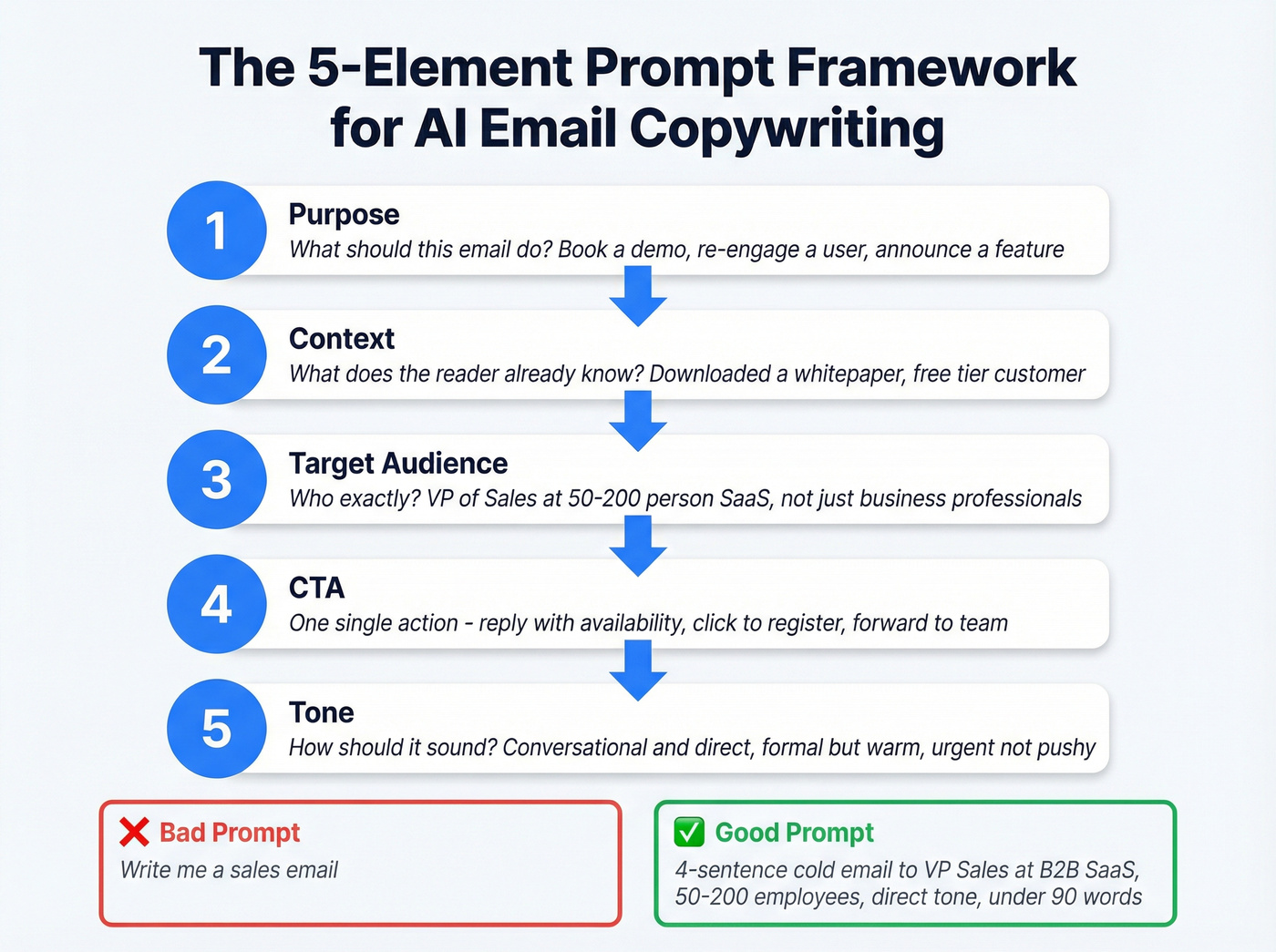
- Purpose - What should this email accomplish? Book a demo, re-engage a churned user, announce a feature.
- Context - What does the reader already know? They downloaded a whitepaper last week, or they're a current customer on the free tier.
- Target audience - Who exactly is reading this? VP of Sales at a 50-200 person SaaS company, not just "business professionals."
- CTA - What's the single action you want? Reply with availability, click to register, forward to their team.
- Tone - How should it sound? Conversational and direct, formal but warm, urgent without being pushy.
A bad prompt: "Write me a sales email."
A good prompt: "Write a 4-sentence cold email to VP-level sales leaders at B2B SaaS companies (50-200 employees) introducing our pipeline analytics tool. They likely use Salesforce and struggle with forecast accuracy. Tone: direct, peer-to-peer, no hype. CTA: ask if they'd be open to seeing a 2-minute demo video. Keep it under 90 words."
The difference in output quality is night and day.
Three Ready-to-Use Templates
Cold outreach:
Write a 5-sentence cold email to [job title] at [company type]. They [context about their pain point]. My product [one-sentence value prop]. Tone: conversational, no buzzwords. CTA: "Mind if I send a quick walkthrough?" Keep it under 100 words.
Newsletter:
Write a newsletter email announcing [topic/feature] to existing customers who [context - e.g., use our free tier]. Include one concrete example of how it helps them. Tone: friendly, informative, not salesy. CTA: [specific action]. Subject line options: give me 3, each under 8 words.
Re-engagement:
Write a re-engagement email to users who haven't logged in for 30+ days. They originally signed up for [reason]. Acknowledge the gap without guilt-tripping. Offer one specific reason to come back. Tone: warm, low-pressure. CTA: "Worth another look?" Keep it under 75 words.
Sales Emails vs. Marketing Emails
These are different animals, and your AI prompts should reflect that.
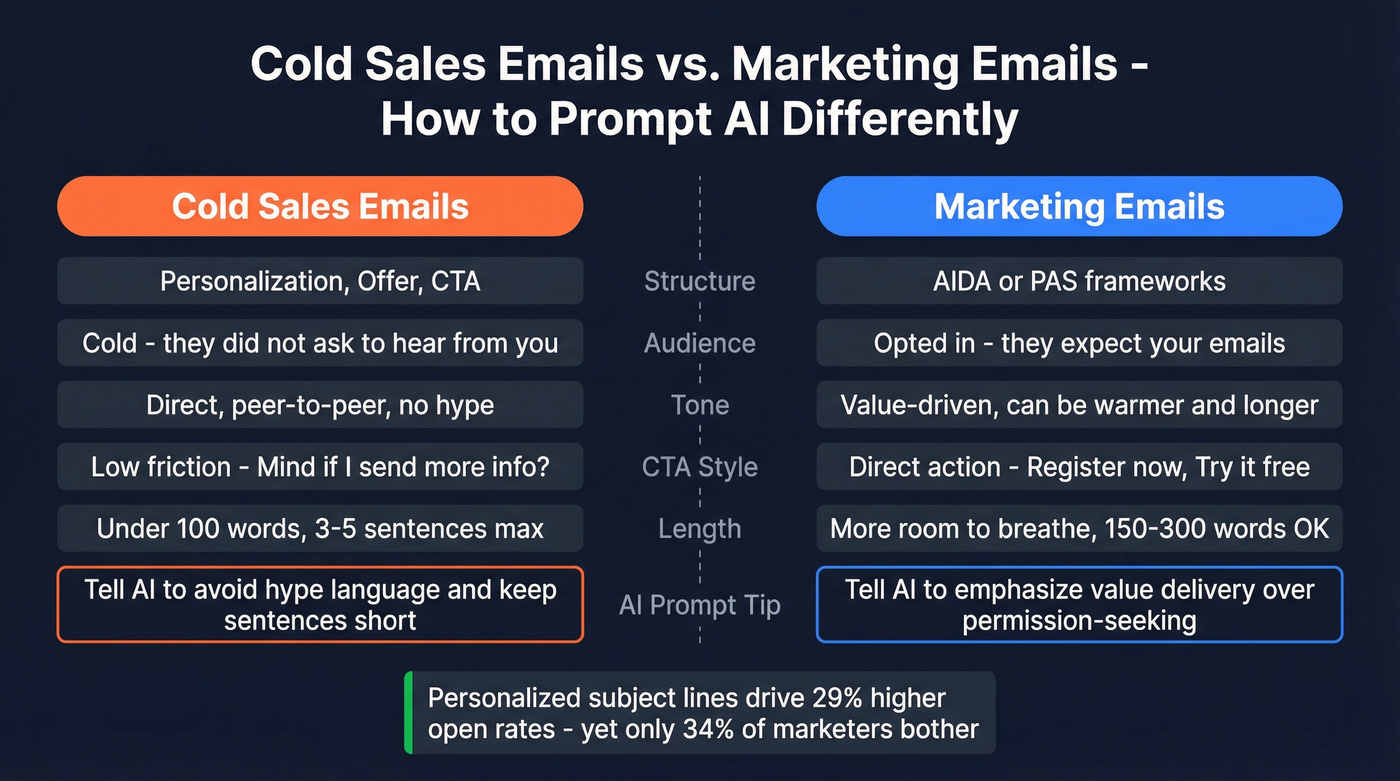
Cold emails follow a tight structure: Personalization, Offer, CTA. The Instantly framework nails this - open with something specific to the recipient, bridge to your offer in one sentence, and close with a low-friction CTA. "Mind if I send more info?" consistently outperforms "Let's book 30 minutes this week" because it asks for less commitment upfront. Personalized subject lines drive 29% higher open rates, yet only 34% of marketers bother - which means personalization is still a genuine competitive edge, not table stakes.
Marketing emails have more room to breathe. You can use AIDA or PAS frameworks adapted for AI prompting. The key difference: your audience opted in. They expect to hear from you. So the prompt should emphasize value delivery over permission-seeking.
When prompting AI for cold outreach, explicitly instruct it to avoid hype language and keep sentences short. AI defaults to marketing-speak, which is exactly what gets cold emails ignored - or flagged as spam.
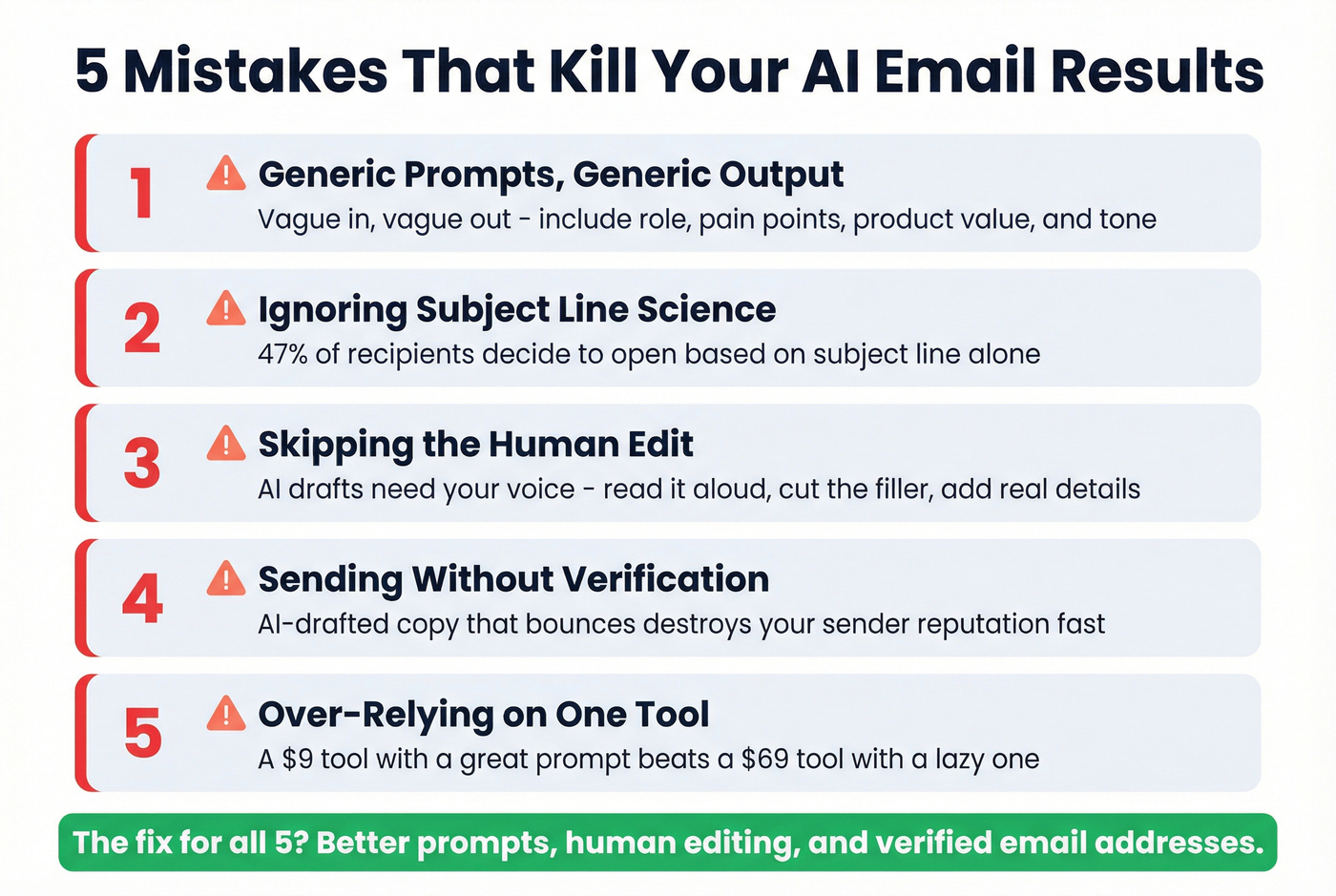
Five Mistakes That Kill Results
Generic Prompts, Generic Output
"Write me a sales email" produces garbage. Every time. The quality of your AI output is directly proportional to the specificity of your input - include the recipient's role, their likely pain points, your product's specific value, and the exact tone you want. Vague in, vague out.
Ignoring Subject Line Science
47% of recipients decide whether to open based on the subject line alone. Even more alarming: 69% mark emails as spam based purely on the subject line. The data on length is clear - 6-10 words hit a 21% open rate, while 11-15 words drop to 14%. When you prompt AI for subject lines, specify a word count. Left unconstrained, AI writes subject lines that are too long and too generic.
Leaving Spam Triggers in AI Copy
AI loves phrases like "100% free," "Act now!" and "Limited time offer." These are spam filter magnets. After every AI draft, scan for all-caps words, excessive exclamation marks, and hype language. Hoppy Copy's built-in spam checker handles this automatically, but even a manual pass catches the worst offenders. Keep punctuation to three marks or fewer per email.
Spotting AI-Written Phrases
Raw AI output reads like raw AI output. Readers can tell. In our experience, the editing pass consistently takes longer than the generation itself, which surprises teams that expected AI to eliminate the work entirely. Watch for telltale phrases: "I hope this email finds you well," "In today's fast-paced world," and "I wanted to reach out because" are dead giveaways that erode trust with savvy recipients.
Plan for 10-15 minutes per email. Strip filler phrases, replace generic claims with specific numbers, and read the whole thing aloud. If any sentence sounds like it could appear in anyone's email to anyone's audience, rewrite it.
Sending to Unverified Addresses
This is the mistake that costs real money. You spend an hour crafting the perfect AI-generated sequence, load 500 contacts, 47 bounce, and your domain reputation tanks. It takes weeks to recover. The copy was never the problem - the list was.
The impact is measurable: Stack Optimize built from $0 to $1M ARR using Prospeo-verified lists, maintaining 94%+ deliverability and under 3% bounce rates across all their clients with zero domain flags. That's what clean data looks like in production.
The AI Email Editing Checklist
Before any AI-drafted email goes out, run through these:
- Strip filler. Delete any sentence that starts with "In today's..." or "As a leader in..." - AI loves these openers and readers hate them.
- Add specifics. Replace "[Company]" placeholders with real details. Swap generic benefits for concrete numbers.
- Read it aloud. If you stumble or cringe, rewrite that sentence. The ear catches what the eye misses.
- Run a spam check. Use Hoppy Copy's built-in checker or a free tool like Mail Tester. Flag and remove trigger phrases.
- Verify your list. Run your recipients through an email verification tool to catch invalid emails, spam traps, and catch-all domains before they damage your sender reputation. Prospeo's free tier handles 75 verifications per month - enough to gut-check your list before you hit send.
That last step isn't optional. It's the difference between a campaign that builds pipeline and one that gets your domain blacklisted.
You just built the perfect AI prompt. Now who are you sending it to? Prospeo gives you 300M+ verified contacts with 30+ filters - buyer intent, tech stack, job changes - so your AI copy reaches decision-makers, not dead ends. At $0.01 per email.
Great AI copy deserves a list that actually converts.
FAQ
Is AI email copy as good as human-written?
AI-generated emails show an 11% higher CTR on average - 9.44% vs 8.46% for human-written. In one test, AI subject line variations lifted open rates by up to 22%. But raw AI output needs editing. The combination of AI draft plus human editing outperforms either approach alone.
Does AI-generated copy hurt deliverability?
Not inherently, but AI defaults to hype language that triggers spam filters. Phrases like "100% free" and "Act now!" land emails in junk folders. Edit out trigger phrases, keep punctuation minimal, and verify your list before sending.
What's the best free AI email writer?
ChatGPT or Claude free tiers handle email drafting well with a structured prompt. QuillBot also offers a completely free writer. For email-specific features on a budget, Rytr starts at $9/mo and Copy.ai offers a limited free plan.
How much editing does AI email copy need?
Plan for 10-15 minutes per email. Focus on removing filler, adding company-specific details, and checking for spam triggers. The better your prompt, the less editing required - which is why the 5-element framework above pays for itself in saved time.
How do I make sure AI-written emails actually get delivered?
Edit out spam trigger words and hype language that AI tends to generate, then verify your contact list before sending. Catching invalid addresses, spam traps, and catch-all domains prevents the bounces that destroy sender reputation.