

AI Email Response Generators: The Tools, the Traps, and What Actually Works
The average professional gets 121 business emails a day. McKinsey pegs email at 28% of the workweek - roughly 13 hours. Every time you context-switch to reply, it takes over 23 minutes to fully refocus. With 4.59 billion email users sending roughly 392 billion messages daily in 2026, the inbox isn't shrinking. That's why the AI email response generator market is projected to hit $4.5 billion by 2029.
The best tools genuinely deliver on the time-savings promise. But most free options are interchangeable - wrappers around the same LLMs producing the same slightly-too-polished output. What actually matters is picking the right category of tool, using it without sounding like a bot, and understanding where your email data goes once you hit "generate."
Quick Picks
- Free and fast: Planable - no signup, 10 styles, unlimited use.
- Best for Gmail power users: Superhuman ($30/mo) or Google's built-in drafting with the Gemini add-on ($19.99/mo).
- Privacy-first: Proton Scribe ($19.99/mo) - drafting inside Proton Mail, no external data processing.
Three Types of AI Email Tools
Most roundups lump every AI email tool into one bucket. That's genuinely unhelpful. Understanding which category you need saves you from installing five tools when you needed one.
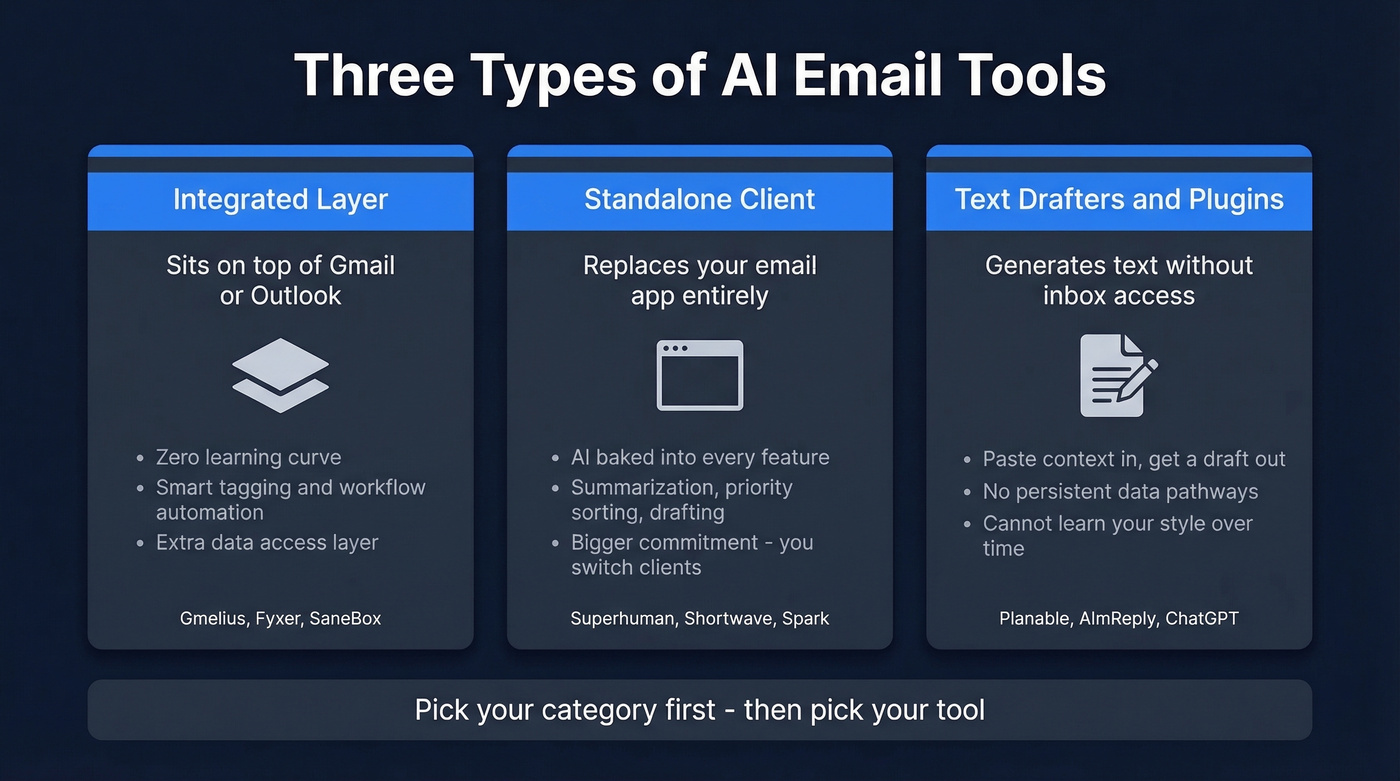
Integrated Layer
These sit on top of your existing inbox - Gmail or Outlook - and inject AI features without replacing the interface. Gmelius and Fyxer are the best-known examples. They add reply suggestions, smart tagging, and workflow automation directly into the UI you already use, so there's zero learning curve. The downside: you're adding another layer of data access on top of your email provider. Under the hood, the more advanced assistants use RAG and sentiment analysis to generate contextual replies and reduce hallucinations.
Standalone Client
These replace your email app entirely. Superhuman, Shortwave, and Spark rebuild the experience from scratch with AI baked in - summarization, priority sorting, and reply generation all live in one interface. The tradeoff is commitment. You're switching email clients, and that's a bigger decision than installing a Chrome extension. If you want a single tool that handles everything from triage to drafting, start here.
Text Drafters and Plugins
These generate email text without touching your inbox at all. Planable, AImReply, and ChatGPT fall into this bucket. You paste in context, get a draft, copy it back. No inbox access, no persistent data pathways. But they can't learn your style, prioritize your inbox, or automate follow-ups.
Best AI Email Response Generators in 2026
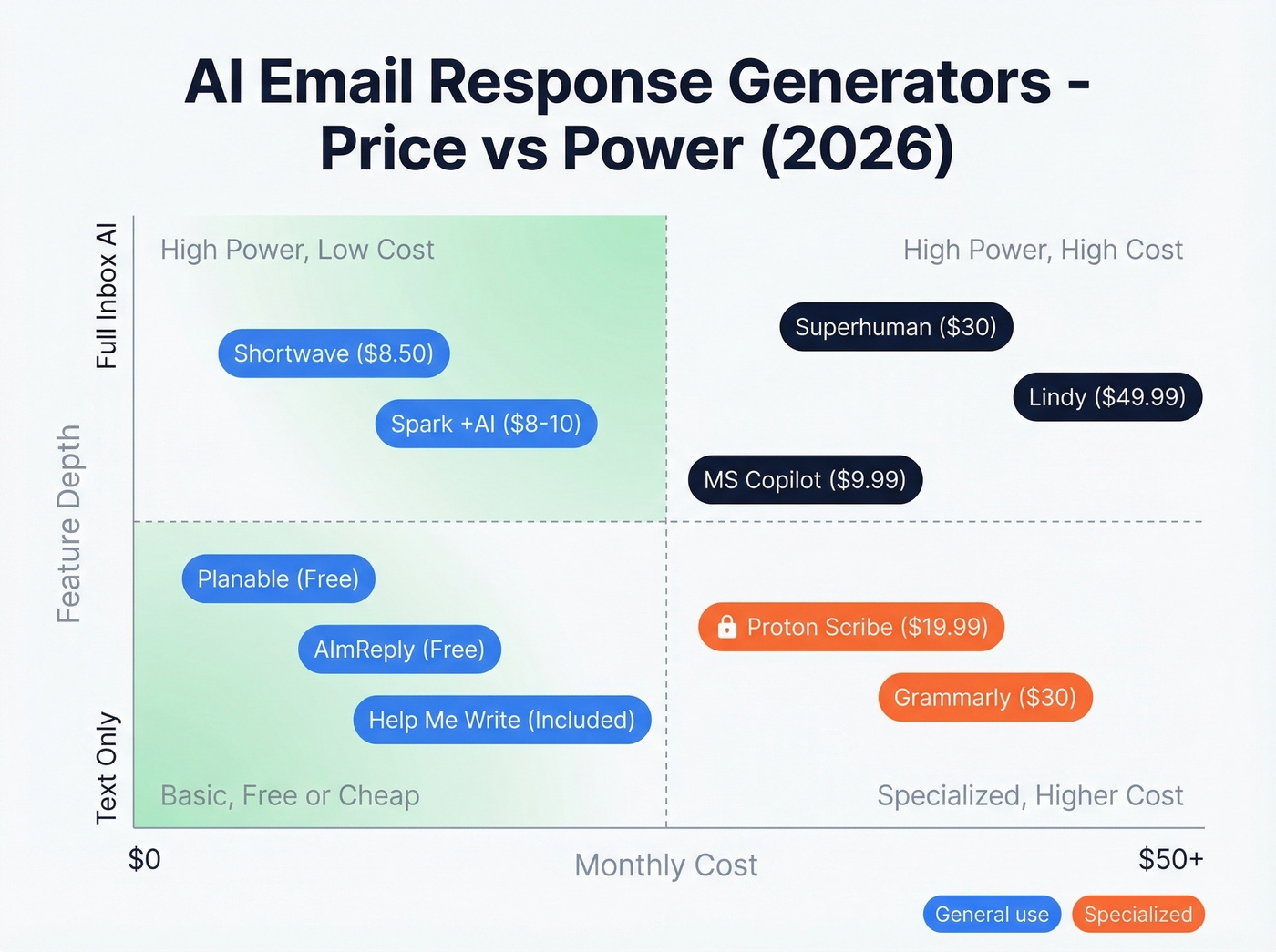
| Tool | Type | Best For | Starting Price | Free Tier? |
|---|---|---|---|---|
| Superhuman | Standalone | Gmail power users | $30/user/mo | No |
| Help Me Write (Gmail) | Integrated | Casual Gmail users | Included with Workspace; Gemini add-on $19.99/mo | Included |
| Planable | Text drafter | Quick free replies | Free | Yes |
| Shortwave | Standalone | AI-native inbox | $8.50/mo | Yes |
| Spark +AI | Standalone | Voice matching | ~$8-10/mo | Free client |
| Proton Scribe | Integrated | Privacy-first | $19.99/mo | No |
| Grammarly | Plugin | Tone + editing | $30/mo | Yes |
| AImReply | Text drafter | Multilingual | Free | Yes |
| SaneBox | Integrated | Inbox triage | $7.99/mo | No |
| MS Copilot | Integrated | Outlook orgs | $9.99/mo | No |
| Lindy | Automation | Workflows | $49.99/mo | No |
Superhuman
Superhuman makes email feel like a product someone actually designed, rather than a legacy system we're all stuck with. AI lives in the command bar - hit a shortcut, get a reply draft, adjust the tone, send. It also summarizes threads, surfaces what needs attention, and gets out of your way for everything else.
At $30/user/mo, it's not cheap. But if email is genuinely your primary work tool - you're a founder, an account exec, a recruiter fielding 150+ messages a day - the time savings compound fast. We've seen reps cut their email processing time nearly in half after switching, which is hard to argue with when you're doing the math on hourly cost. The catch: it's a separate interface, so you're leaving Gmail's native UI behind. For casual email users who send 20 replies a day, it's overkill.
Google Help Me Write
Google's built-in AI drafting is the definition of "good enough for most people." It's a button in Gmail compose that generates context-aware drafts based on the thread. Adding Gemini unlocks more advanced generation at $19.99/mo.
Here's the thing: it doesn't learn your style over time. Every draft comes out in the same slightly generic Google voice. It also can't tag, route, or automate anything - it's purely a text generator that happens to live inside Gmail. For the 80% of people who just need help replying to a vendor email or a meeting request, that's perfectly fine. Don't install another tool if this solves your problem.
Planable
Planable's free generator is the benchmark for the text drafter category. No signup, 10 writing styles (casual, formal, witty, empathetic, and more), and it generates 1, 3, or 5 variations per prompt. The UI is clean, there are no gates hiding behind a "Premium" label, and it works immediately.
Is it meaningfully different from pasting the same prompt into ChatGPT? Honestly, not really. But the pre-built styles and variation engine save you from prompt engineering, and the zero-friction access makes it the fastest path from "I need to reply to this" to "done."
Shortwave
Shortwave gives you 80% of Superhuman's AI features at a fraction of the cost. Search is semantic - ask questions about your inbox in natural language - summaries are automatic, and reply drafts are contextual. At $8.50/mo with a free tier, it's the strongest middle ground for anyone who wants AI-powered email response drafting without the $30/mo commitment.
Spark +AI
The real differentiator is "My Writing Style," which learns from your past emails and adapts output to match your voice. A recurring complaint with AI email tools is that they all sound the same - Spark is the strongest answer to that problem. The free client is solid on its own; AI features live in paid plans at roughly $8-10/mo.
If you're in a client-facing role where tone matters, test Spark first.
Proton Scribe
Use this if you're in legal, healthcare, finance, or any industry where email content is sensitive. Proton Scribe handles drafting inside Proton Mail at $19.99/mo with no external data processing.
Skip this if you're on Gmail or Outlook and don't want to switch email providers. Proton Scribe only works within Proton Mail - it's a package deal.
Grammarly
More editor than generator. GrammarlyGO can draft replies, but the real strength is tone adjustment and polish - taking your rough draft and making it sound professional, confident, or friendly. At $30/mo, it's priced like Superhuman but solves a different problem. Best for people who write their own emails but want a quality check before sending.
AImReply
Seventeen languages, 12 tones, 3 lengths. The "free unlimited" claim is slightly misleading - some features are gated behind Premium upsells. For multilingual teams, though, it's the strongest free option available.
SaneBox
Not a generator - it's inbox triage. SaneBox sorts, prioritizes, and surfaces what matters at $7.99/mo. Pair it with a text drafter like Planable for a complete system: SaneBox decides what deserves a reply, the generator helps you write it.
Microsoft Copilot
Native to Outlook at $9.99/mo. Drafts, summarizes, extracts action items. If your org lives in Microsoft 365, this is the path of least resistance. It won't wow you, but it works without friction and IT won't push back on the procurement.
Lindy
At $49.99/mo, Lindy is in a different weight class - it's a workflow automation platform that includes an automated reply generator, triage rules, and multi-step sequences. SOC 2 and HIPAA compliant. Overkill for individual use, but built for ops teams running email automation at scale.

An AI email response generator saves you time writing replies. But none of that matters if you're sending to invalid addresses. Prospeo verifies 143M+ emails at 98% accuracy - so every AI-crafted reply actually reaches a real person.
Stop perfecting emails that bounce. Verify first at $0.01 each.
How to Sound Human
A Columbia University study found that more than half of spam emails are now AI-written. Your recipients are developing antibodies. They can feel when an email was generated - the vocabulary is too consistent, the structure too clean, the opener too predictable. "Hope this email finds you well" is the new "Dear Sir or Madam."
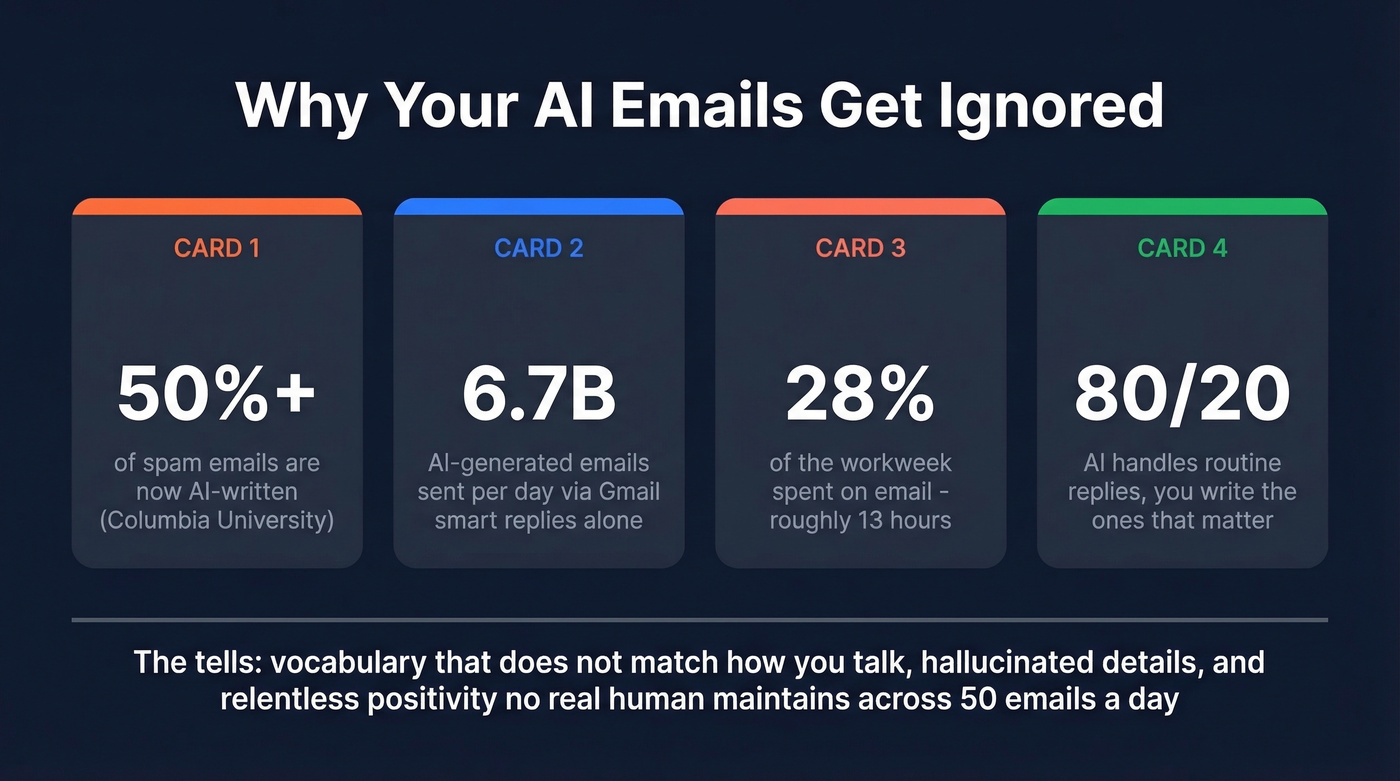
The common tells: vocabulary that doesn't match how you actually talk, hallucinated details the model invented, and a relentless positivity that no real human maintains across 50 emails a day. By 2017, Gmail smart replies already accounted for 12% of daily email - 6.7 billion AI-generated messages per day. That number has only grown, and so has reader fatigue.
Let's be honest: for high-stakes emails - the ones that could close a deal or save a relationship - iterating on prompts and editing AI output often takes longer than just writing the thing yourself. That's automation bias at work. Use AI for volume replies, status updates, and scheduling. Write the important ones with your own hands. In our experience, the 80/20 rule holds: AI handles the routine, you handle the ones that matter. If your deal size is under five figures, you probably don't need to agonize over every word. Six figures? Put down the generator and write it yourself.
Privacy: Where Your Data Goes
When you connect an AI tool to your inbox, you're creating a data pathway that exposes your email to three parties: your email provider, the email client, and the AI provider processing your text. Beyond message text, AI tools can access metadata, relationship graphs, and behavioral patterns - who you email, when, and how often.
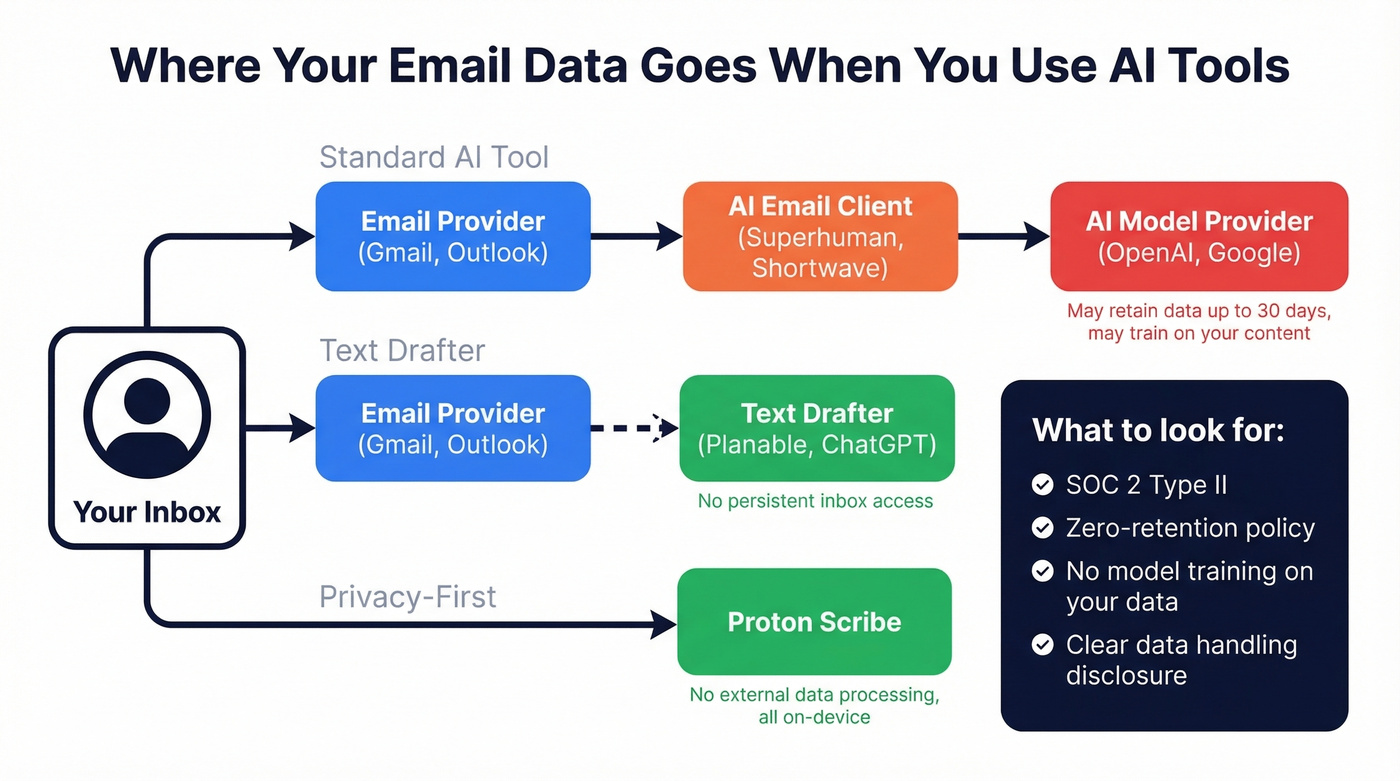
Most tools use token-based authentication that maintains persistent access for the duration of your subscription. OpenAI retains data for up to 30 days for abuse monitoring, and personal accounts may have model training enabled by default. Gartner predicts that by 2028, 40% of large enterprises will use AI to monitor employee moods and behaviors. The line between "AI assistant" and "AI surveillance" is thinner than most people realize.
For business email, look for SOC 2 Type II certification, explicit zero-retention policies, and clarity on whether your data trains models. If a tool doesn't disclose its data handling at all - and most free generators don't - assume the worst. Proton Scribe and Lindy are strong options when privacy is a hard requirement. For teams doing outbound, it also helps to align your tooling with your broader B2B compliance requirements.
Before You Hit Send
You just spent 20 minutes crafting the perfect cold email with your AI reply tool. The tone is right, the CTA is sharp, the personalization is on point. You hit send. Bounce notification.
This is the upstream problem nobody talks about in AI email generator roundups. The writing is the easy part. Whether your email reaches a real inbox depends entirely on data quality. Prospeo verifies email addresses in real time - 143M+ verified emails, 98% accuracy, refreshed every 7 days. The free tier gives you 75 verifications per month, and paid plans run about $0.01 per lead. Before you launch any outbound campaign powered by AI-generated emails, run your list through verification. A brilliant email to a dead address is worth exactly nothing. If you want a broader comparison, start with our guide to the best email verifier tools and then dig into how to confirm an email address is valid.
If you're using AI to scale outreach, pair it with a deliverability-first setup: solid sender authentication, a clean list, and a plan to scale cold email without spam.
You just cut your email drafting time in half. Now cut your bounce rate too. Teams using Prospeo drop bounce rates from 35%+ to under 4% - meaning your AI-generated outreach actually hits inboxes, not spam traps.
Pair your AI drafts with emails that are actually deliverable.
FAQ
Are free AI email generators safe?
For personal email, generally yes. For business email with sensitive data, check the tool's data retention and processing policies first. Prefer tools with SOC 2 compliance or zero-retention guarantees. Don't paste confidential information into any tool that doesn't disclose where your data goes.
Can AI match my writing style?
Most free generators produce generic output regardless of how you normally write. Spark +AI's "My Writing Style" feature learns from your past emails and adapts. Superhuman adjusts tone in its command bar. For free tools, plan to edit every output - treat the draft as a starting point, not a finished message.
What's the best free AI email response generator?
Planable - no signup, 10 writing styles, unlimited use. AImReply is a close second with 17-language support. For Gmail users, Help Me Write is included with Google Workspace and requires zero setup. Pick based on whether you need multilingual support or just speed.
How do I make sure outbound emails actually land?
The AI email response generator handles the writing, but deliverability depends on data quality upstream. Run your list through an email verification tool before sending. Prospeo checks addresses in real time with 98% accuracy across 143M+ records, so your messages reach real inboxes instead of bouncing.